cruise control FIAT 500X 2022 User Guide
[x] Cancel search | Manufacturer: FIAT, Model Year: 2022, Model line: 500X, Model: FIAT 500X 2022Pages: 312, PDF Size: 13.26 MB
Page 96 of 312
94STARTING AND OPERATING
To Vary The Speed Setting
To Increase Or Decrease The Set Speed
When the Cruise Control is set, you can increase
speed by pushing the SET (+) button, or decrease
speed by pushing the SET (-) button.
U.S. Speed (mph)
Pushing the SET (+) , or SET (-) button once will
result in a 1 mph speed adjustment. Each
subsequent tap of the button results in an
adjustment of 1 mph.
If the button is continually pushed, the set
speed will continue to adjust until the button is
released, then the new set speed will be estab -
lished.
Metric Speed (km/h)
Pushing the SET (+), or SET (-) button once will
result in a 1 km/h speed adjustment. Each
subsequent tap of the button results in an
adjustment of 1 km/h.
If the button is continually pushed, the set
speed will continue to adjust until the button is
released, then the new set speed will be estab -
lished.
To Accelerate For Passing
While the Cruise Control is set, press the
accelerator to pass as you would normally. When
the pedal is released, the vehicle will return to the
set speed.
USING CRUISE CONTROL ON HILLS
The transmission may downshift on hills to
maintain the vehicle set speed.
The Cruise Control system maintains speed up and
down hills. A slight speed change on moderate hills
is normal. On steep hills, a greater speed loss or
gain may occur so it may be preferable to drive
without Cruise Control.
To Resume Speed
To resume a previously set speed, push the RES
button and release. Resume can be used at any
speed above 20 mph (32 km/h).
Deactivation
A tap on the brake pedal, pushing the CANC button,
ESC intervention, brake control mitigation,
Electronic Park Brake intervention, or normal
brake pressure while slowing the vehicle will
deactivate the Cruise Control without erasing the
set speed from memory.
Pushing the on/off button or placing the ignition in
the OFF position erases the set speed from
memory.
ADAPTIVE CRUISE CONTROL (ACC)
Adaptive Cruise Control (ACC) increases the driving
convenience provided by Cruise Control while
traveling on highways and major roadways.
However, it is not a safety system and not designed
to prevent collisions. Cruise Control function
performs differently if your vehicle is not equipped
with ACC Ú page 93.
ACC will allow you to keep Cruise Control engaged
in light to moderate traffic conditions without the
constant need to reset your speed. ACC utilizes a
radar sensor and a forward facing camera
designed to detect a vehicle directly ahead of you
to maintain a set speed.
WARNING!
Cruise Control can be dangerous where the
system cannot maintain a constant speed. Your
vehicle could go too fast for the conditions, and
you could lose control and have an accident. Do
not use Cruise Control in heavy traffic or on
roads that are winding, icy, snow-covered or
slippery.
22_FD_OM_EN_USC_t.book Page 94
Page 97 of 312
STARTING AND OPERATING95
(Continued)
NOTE:
If the ACC sensor detects a vehicle ahead, ACC
will apply limited braking or accelerate (not to
exceed the original set speed) automatically to
maintain a preset following distance, while
matching the speed of the vehicle ahead.
Any chassis/suspension or tire size modifica -
tions to the vehicle will affect the performance
of the Adaptive Cruise Control and Forward Colli -
sion Warning system.
Fixed Speed Cruise Control (ACC not enabled)
will not detect vehicles directly ahead of you.
Always be aware of the feature selected
Ú page 297.
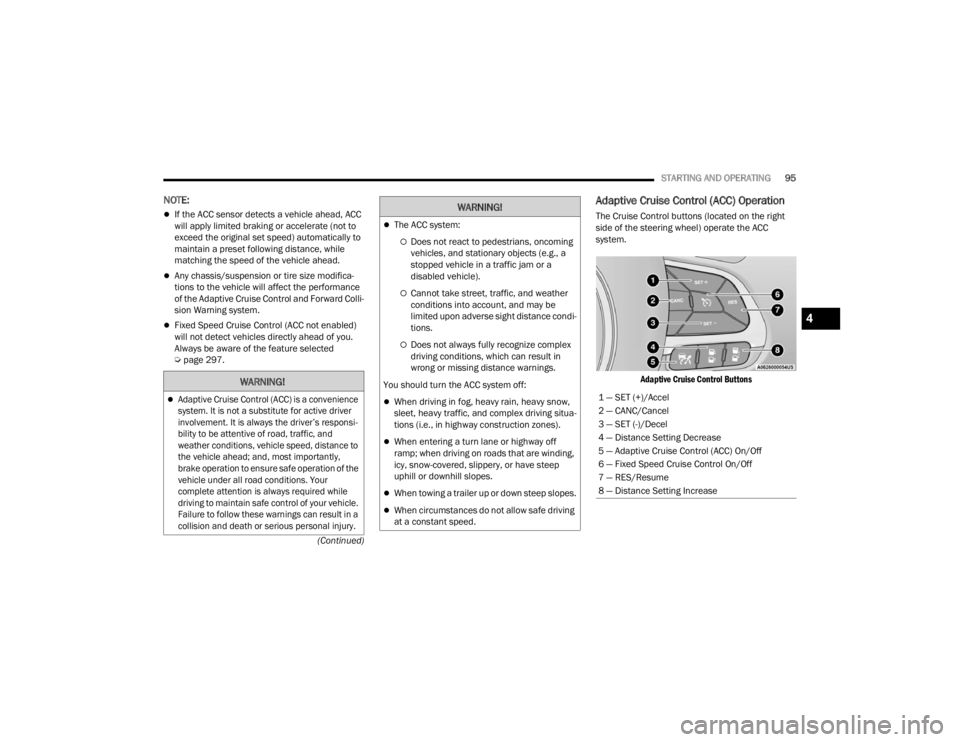
Adaptive Cruise Control (ACC) Operation
The Cruise Control buttons (located on the right
side of the steering wheel) operate the ACC
system.
Adaptive Cruise Control Buttons
WARNING!
Adaptive Cruise Control (ACC) is a convenience
system. It is not a substitute for active driver
involvement. It is always the driver’s responsi -
bility to be attentive of road, traffic, and
weather conditions, vehicle speed, distance to
the vehicle ahead; and, most importantly,
brake operation to ensure safe operation of the
vehicle under all road conditions. Your
complete attention is always required while
driving to maintain safe control of your vehicle.
Failure to follow these warnings can result in a
collision and death or serious personal injury.
The ACC system:
Does not react to pedestrians, oncoming
vehicles, and stationary objects (e.g., a
stopped vehicle in a traffic jam or a
disabled vehicle).
Cannot take street, traffic, and weather
conditions into account, and may be
limited upon adverse sight distance condi -
tions.
Does not always fully recognize complex
driving conditions, which can result in
wrong or missing distance warnings.
You should turn the ACC system off:
When driving in fog, heavy rain, heavy snow,
sleet, heavy traffic, and complex driving situa -
tions (i.e., in highway construction zones).
When entering a turn lane or highway off
ramp; when driving on roads that are winding,
icy, snow-covered, slippery, or have steep
uphill or downhill slopes.
When towing a trailer up or down steep slopes.
When circumstances do not allow safe driving
at a constant speed.
WARNING!
1 — SET (+)/Accel
2 — CANC/Cancel
3 — SET (-)/Decel
4 — Distance Setting Decrease
5 — Adaptive Cruise Control (ACC) On/Off
6 — Fixed Speed Cruise Control On/Off
7 — RES/Resume
8 — Distance Setting Increase
4
22_FD_OM_EN_USC_t.book Page 95
Page 98 of 312

96STARTING AND OPERATING
Adaptive Cruise Control (ACC) Menu
The instrument cluster display shows the current
ACC system settings. The information it displays
depends on ACC system status.
Push the Adaptive Cruise Control (ACC) on/off
button until one of the following shows in the
instrument cluster display:
Adaptive Cruise Control Off
When ACC is deactivated, the display will read
“Adaptive Cruise Control Off.”
Adaptive Cruise Control Ready
When ACC is activated but the vehicle speed
setting has not been selected, the display will read
“Adaptive Cruise Control Ready.”
Adaptive Cruise Control Set
When the SET (+) or the SET (-) button is pushed,
the display will read “ACC SET.”
When ACC is set, the set speed will appear in the
instrument cluster display.
The ACC screen may display once again if any of
the following ACC activity occurs:
System Cancel
Driver Override
System Off
ACC Proximity Warning
ACC Unavailable Warning The instrument cluster display will return to the last
display selected after five seconds of no ACC
display activity.
Activating Adaptive Cruise Control (ACC)
The minimum set speed for the ACC system is
20 mph (32 km/h).
When the system is turned on and in the ready
state, the instrument cluster display will read “ACC
Ready.”
When the system is off, the instrument cluster
display will read “Adaptive Cruise Control (ACC)
Off.”
NOTE:You cannot engage ACC under the following condi
-
tions:
When in 4WD Low
When the brakes are applied
When the parking brake is applied
When the transmission is in PARK, REVERSE or
NEUTRAL
When the vehicle speed is below the minimum
speed range
When the brakes are overheated
When the Electronic Stability Control (ESC),
Anti-Lock Brake System (ABS), or other stability
control systems are operating or have just oper -
ated
During automatic braking by the Full Brake
Control system (if equipped)
When Cruise Control is activated
To Activate/Deactivate
Push and release the Adaptive Cruise Control
(ACC) on/off button. The ACC menu in the
instrument cluster display will read “ACC Ready.”
To turn the system off, push and release the
Adaptive Cruise Control (ACC) on/off button again.
At this time, the system will turn off and the
instrument cluster display will read “Adaptive
Cruise Control (ACC) Off.”
WARNING!
Leaving the Adaptive Cruise Control (ACC)
system on when not in use is dangerous. You
could accidentally set the system or cause it to
go faster than you want. You could lose control
and have a collision. Always ensure the system
is off when you are not using it.
22_FD_OM_EN_USC_t.book Page 96
Page 99 of 312

STARTING AND OPERATING97
To Set A Desired ACC Speed
When the vehicle reaches the speed desired, push
the SET (+) button or the SET (-) button and
release. The instrument cluster display will show
the set speed.
NOTE:Fixed Speed Cruise Control can be used without
ACC enabled. To change between the different
modes, push the ACC on/off button which turns
the ACC and the Fixed Speed Cruise Control off.
Pushing the Fixed Speed Cruise Control on/off
button will result in turning on (changing to) Fixed
Speed Cruise Control mode.
ACC or Fixed Speed Cruise Control is set when the
vehicle speed is above 20 mph (32 km/h), the set speed shall be the current speed of the vehicle.
Neither system can be set below 20 mph
(32 km/h).
NOTE:
Keeping your foot on the accelerator pedal can
cause the vehicle to continue to accelerate
beyond the set speed. If this occurs, the
message “Adaptive Cruise Control Override” will
display in the instrument cluster display.
If you continue to accelerate beyond the set
speed while ACC is enabled, the system will not
be controlling the distance between your vehicle
and the vehicle ahead. The vehicle speed will
only be determined by the position of the accel-
erator pedal.
To Cancel
The following conditions cancel the system:
The brake pedal is applied.
The CANC button is pushed.
An Anti-Lock Brake System (ABS) event occurs.
The gear selector is removed from the DRIVE
position.
The braking temperature exceeds normal range
(overheated).
The Electronic Stability Control/Traction Control
System (ESC/TCS) activates.
The vehicle parking brake is applied.
The driver switches ESC to Full Off mode.
To Turn Off
The system will turn off and erase the set speed in
memory if:
The Adaptive Cruise Control (ACC) on/off button
is pushed.
The Fixed Speed Cruise Control on/off button is
pushed.
The ignition is placed in the OFF position.
To Resume Speed
If there is a set speed in the memory, push the RES
button and then remove your foot from the
accelerator pedal. The instrument cluster display
will show the last set speed.
ACC or Fixed Speed Cruise Control can only be
resumed at speeds above 20 mph (32 km/h).
NOTE:ACC cannot be resumed if there is a stationary
vehicle in front of your vehicle in close proximity.
WARNING!
In Fixed Speed Cruise Control mode, the system
will not react to vehicles ahead. In addition, the
proximity warning does not activate and no
alarm will sound even if you are too close to the
vehicle ahead since neither the presence of the
vehicle ahead nor the vehicle-to-vehicle distance
is detected. Be sure to maintain a safe distance
between your vehicle and the vehicle ahead.
Always be aware which mode is selected.
WARNING!
The Resume function should only be used if
traffic and road conditions permit. Resuming a
set speed that is too high or too low for
prevailing traffic and road conditions could
cause the vehicle to accelerate or decelerate too
sharply for safe operation. Failure to follow these
warnings can result in a collision and death or
serious personal injury.
4
22_FD_OM_EN_USC_t.book Page 97
Page 102 of 312

100STARTING AND OPERATING
NOTE:If the “ACC Front Radar Sensor Temporarily
Blocked” warning is active, Fixed Speed Cruise
Control is still available.
If weather conditions are not a factor, the driver
should examine the sensor. It may require cleaning
or removal of an obstruction. The sensor is located
in the center of the vehicle behind the lower grille.
To keep the ACC System operating properly, it is
important to note the following maintenance
items:
Always keep the sensor clean. Carefully wipe the
sensor lens with a soft cloth. Do not use
solvents or abrasive substances.
Do not remove any screws from the sensor.
Doing so could cause an ACC system malfunc -
tion or failure and require a sensor realignment.
If the sensor or front end of the vehicle is
damaged due to a collision, see an authorized
dealer for service.
Do not attach or install any accessories near the
sensor, including transparent material or after -
market grilles. Doing so could cause an ACC
system failure or malfunction.
When the condition that deactivated the system is
no longer present, the system will return to the
“Adaptive Cruise Control Off” state and will resume
function by simply reactivating it.
NOTE:
If the “ACC Front Radar Sensor Temporarily
Blocked” message occurs frequently (e.g. more
than once on every trip) without any snow, rain,
mud, or other obstruction, have the radar
sensor realigned at an authorized dealer.
Installing a snow plow, front-end protector, an
aftermarket grille or modifying the grille is not
recommended. Doing so may block the sensor
and inhibit ACC/Full Brake Control System oper -
ation.
“CLEAN FRONT WINDSHIELD” WARNING
The “ACC/FCW Limited Functionality Wipe Front
Windshield” warning will display when conditions
temporarily limit system performance. This most
often occurs at times of poor visibility, such as in
snow or heavy rain and fog. The ACC system may
also become temporarily blinded due to
obstructions, such as mud, dirt, or ice on
windshield and fog on the inside of glass. In these
cases, the instrument cluster display will read
“ACC/FCW Limited Functionality Wipe Front
Windshield” and the system will have degraded
performance.
The “ACC/FCW Limited Functionality Wipe Front
Windshield” message can sometimes be displayed
while driving in adverse weather conditions. The
ACC/Full Brake Control system will recover after the vehicle has left these areas. Under rare
conditions, when the camera is not tracking any
vehicles or objects in its path this warning may
temporarily occur.
If weather conditions are not a factor, the driver
should examine the windshield and the camera
located on the back side of the inside rear view
mirror. They may require cleaning or removal of an
obstruction.
When the condition that created limited
functionality is no longer present, the system will
return to full functionality.NOTE:If the “ACC/FCW Limited Functionality Wipe Front
Windshield” message occurs frequently (e.g. more
than once on every trip) without any snow, rain,
mud, or other obstruction, have the windshield and
forward facing camera inspected at an authorized
dealer.
SERVICE ACC/FCW WARNING
If the system turns off, and the instrument cluster
display reads “ACC/FCW Limited Functionality
Frontal Camera Service Required” or “Cruise
Control Service Required”, there may be an
internal system fault or a temporary malfunction
that limits ACC functionality. Although the vehicle is
still drivable under normal conditions, ACC will be
22_FD_OM_EN_USC_t.book Page 100
Page 121 of 312

STARTING AND OPERATING119
Cruise Control — If Equipped
Do not use in hilly terrain or with heavy loads.
When using the Cruise Control, if you experience
speed drops greater than 10 mph (16 km/h),
disengage until you can get back to cruising
speed.
Use Cruise Control in flat terrain and with light
loads to maximize fuel efficiency.
RECREATIONAL TOWING (BEHIND
MOTORHOME)
TOWING THIS VEHICLE BEHIND
A
NOTHER VEHICLE
NOTE:You must ensure that the Auto Park Brake feature
is disabled before towing this vehicle, to avoid
inadvertent Electric Park Brake engagement. The
Auto Park Brake feature is enabled or disabled via
the Customer Programmable Features in the
Uconnect Settings.
All-Wheel Drive (AWD) Models
Recreational towing (with all four wheels on the
ground, or using a towing dolly) is NOT ALLOWED.
This vehicle may be towed on a flatbed or vehicle
trailer provided all four wheels are OFF the ground.
DRIVING TIPS
DRIVING ON SLIPPERY SURFACES
Information in this section will aid in safe
controlled launches in adverse conditions.
Acceleration
Rapid acceleration on snow covered, wet, or other
slippery surfaces may cause the driving wheels to
pull erratically to the right or left. This phenomenon
occurs when there is a difference in the surface
traction under the front (driving) wheels.
TOWING
CONDITION WHEELS OFF
THE GROUND ALL-WHEEL
DRIVE (AWD)
Flat Tow NONE NOT ALLOWED
Dolly Tow REAR NOT ALLOWED
FRONT NOT ALLOWED
On Trailer ALL OK
NOTE:When towing your vehicle, always follow appli -
cable state and provincial laws. Contact state
and provincial Highway Safety offices for addi -
tional details.
CAUTION!
Towing this vehicle with ANY of its wheels on the
ground can cause severe transmission and/or
power transfer unit damage. Damage from
improper towing is not covered under the New
Vehicle Limited Warranty.
WARNING!
Rapid acceleration on slippery surfaces is
dangerous. Unequal traction can cause sudden
pulling of the front wheels. You could lose
control of the vehicle and possibly have a
collision. Accelerate slowly and carefully
whenever there is likely to be poor traction (ice,
snow, wet, mud, loose sand, etc.).
4
22_FD_OM_EN_USC_t.book Page 119
Page 301 of 312

299
INDEX
A
About Your Brakes......................................... 289Adaptive Cruise Control (ACC) (Cruise
Control)............................................................ 94Adding Engine Coolant (Antifreeze)............... 248Adding Fuel.................................................... 111Adding Washing Fluid.................................... 241Additives, Fuel............................................... 290Advance Phone Connectivity......................... 160Air Bag........................................................... 196Air Bag Operation...................................... 197Driver Knee Air Bag................................... 198Enhanced Accident Response......... 201, 234Event Data Recorder (EDR)....................... 234Front Air Bag............................................. 196If Deployment Occurs................................ 201Knee Impact Bolsters................................ 197Maintaining Your Air Bag System.............. 204Maintenance............................................. 204Redundant Air Bag Warning Light.............196Side Air Bags............................................. 198Transporting Pets...................................... 215Air Bag Light.................................................. 215Air Cleaner, Engine (Engine Air Cleaner
Filter)............................................................. 243Air Conditioner Maintenance......................... 244
Air Conditioner Refrigerant........................... 244Air Conditioner System................................. 244Air Conditioning................................................ 43Air Conditioning Filter..............................49, 244Air Conditioning, Operating Tips....................... 48Air Filter........................................................ 243Air PressureTires......................................................... 276AlarmArm The System.......................................... 21Disarm The System..................................... 21Security Alarm...................................... 21, 72All Wheel Drive (AWD)...................................... 90Alterations/ModificationsVehicle........................................................... 9Android Auto........................................ 162, 164Android Auto™
S
........................................ 162Antifreeze (Engine Coolant)................. 248, 292Disposal................................................... 249Anti-Lock Brake System (ABS)...................... 174Anti-Lock Warning Light................................... 72Apple CarPlay....................................... 162, 165Apple CarPlay® ¹.......................................... 164Assist, Hill Start............................................. 177Audio Settings............................................... 148Audio Systems (Radio).................................. 122
Auto Down Power Windows..............................53Auto Up Power Windows..................................53Automatic Door Locks......................................24Automatic Headlights.......................................37Automatic High Beams.....................................37Automatic Temperature Control (ATC)..............48Automatic Transmission......................... 85, 251Adding Fluid..................................... 251, 293Fluid And Filter Change............................. 251Fluid Change............................................. 251Fluid Level Check...................................... 251Fluid Type........................................ 251, 293Special Additives...................................... 251Axle Fluid....................................................... 293Axle Lubrication............................................ 293
B
Battery................................................... 70, 241Charging System Light.................................70Keyless Key Fob Replacement....................15Belts, Seat.................................................... 215Blind Spot Monitoring................................... 178BluetoothConnecting To A Particular MobilePhone Or Audio Device After Pairing
..... 156Body Mechanism Lubrication........................ 244
11
22_FD_OM_EN_USC_t.book Page 299
Page 302 of 312

300 B-Pillar Location
............................................. 273Brake Assist System...................................... 175Brake Control System, Electronic.................. 175Brake Fluid.................................................... 293Brake System...................................... 250, 289Anti-Lock (ABS).......................................... 289Fluid Check............................................... 293Master Cylinder......................................... 250Warning Light.............................................. 70Brightness, Interior Lights................................ 39Bulbs, Light.................................................... 216
C
Camera, Rear................................................ 110Capacities, Fluid............................................ 292Caps, Filler Oil (Engine)................................................ 240Radiator (Coolant Pressure)...................... 249Car Washes................................................... 286Carbon Monoxide Warning.................. 216, 217CD.................................................................. 150Cellular Phone............................................... 173Certification Label......................................... 112Chains, Tire.................................................... 283Chart, Tire Sizing............................................ 270Check Engine Light (Malfunction Indicator
Light)............................................................... 78Checking Your Vehicle For Safety.................. 214Checks, Safety............................................... 214Child Restraint............................................... 204
Child RestraintsBooster Seats........................................... 207Child Seat Installation.............................. 213How To Stow An unused ALR Seat Belt.... 211Infant And Child Restraints....................... 206LATCH Positions....................................... 208Locating The LATCH Anchorages.............. 210Lower Anchors And Tethers For Children.. 208Older Children And Child Restraints......... 206Seating Positions...................................... 207Cigar Lighter.................................................... 52Clean Air Gasoline......................................... 290CleaningWheels..................................................... 282Climate Control................................................ 43Clutch........................................................... 250Fluid......................................................... 250Coin Holder...................................................... 51Cold Weather Operation.................................. 80Compact Spare Tire...................................... 280Console............................................................ 51Floor............................................................ 51Contract, Service.......................................... 295Controls........................................................ 142Cooling Pressure Cap (Radiator Cap)............ 249Cooling System............................................. 247Adding Coolant (Antifreeze)...................... 248Coolant Level............................................ 249Cooling Capacity....................................... 292
Disposal Of Used Coolant......................... 249Drain, Flush, And Refill............................. 248Inspection........................................ 247, 249Points To Remember................................ 249Pressure Cap............................................ 249Radiator Cap............................................. 249Selection Of Coolant (Antifreeze)......................... 248, 292, 293Corrosion Protection..................................... 286Cruise Control (Speed Control).........................93Cruise Light............................................... 76, 77Customer Assistance.................................... 294Customer Programmable Features............... 123Cybersecurity................................................ 122
D
Daytime Running Lights...................................36Defroster, Rear Window...................................42Defroster, Windshield................................... 215De-Icer, Remote Start......................................20Deleting A Phone........................................... 156Diagnostic System, Onboard............................78Dimmer SwitchHeadlight.....................................................36DipsticksOil (Engine)............................................... 241Disabled Vehicle Towing............................... 232Disc Drive...................................................... 150Disconnecting............................................... 156
22_FD_OM_EN_USC_t.book Page 300
Page 305 of 312

303
Lap/Shoulder Belts
....................................... 190Latches.......................................................... 216Hood........................................................... 58Leaks, Fluid................................................... 216Life Of Tires................................................... 278Liftgate............................................................ 60Closing........................................................ 60Opening....................................................... 60Liftgate Window Wiper/Washer....................... 42Light Bulbs..................................................... 216Lighter Cigar............................................................ 52Lights............................................................. 216Adaptive Cruise Control............................... 72Air Bag....................................................... 215Audio System.............................................. 72Automatic Headlights.................................. 37Brake Warning............................................ 70Coolant Temperature.................................. 70Cruise................................................... 76, 77Daytime Running......................................... 36Dimmer Switch, Headlight........................... 36Drive Mode.................................................. 73Electric Power Steering............................... 71Electronic Park Brake.................................. 72Electronic Stability Control................... 72, 73Exterior............................................... 36, 216Exterior Bulb................................................ 76External Light.............................................. 73Fog....................................................... 38, 76
Fuel Cutoff................................................... 76Fuel Level.................................................... 76Full Brake Control........................................ 76Hazard Warning Flasher........................... 218Headlight Switch.......................................... 36Headlights................................................... 36Headlights On Reminder............................. 37High Beam............................................ 36, 77Hood Open.................................................. 71Icy Road Condition....................................... 76Immobilizer Fail........................................... 76Instrument Cluster....................................... 36Intensity Control.......................................... 39Interior......................................................... 38LaneSense.................................... 73, 76, 77Light Sensor................................................ 77Lights On Reminder..................................... 37Loose Fuel Filler Cap................................... 73Malfunction Indicator (Check Engine).......... 73Park............................................................. 76Passing........................................................ 37Seat Belt Reminder..................................... 71Security Alarm............................................. 72Service........................................................ 74Service LaneSense...................................... 73Service Stop Start........................................ 74Speed.......................................................... 77StopStart Active........................................... 77Tire Pressure Monitoring (TPMS).............. 185Transmission Fault...................................... 72
Transmission Temperature..........................75Trunk Open..................................................72Turn Signals................................ 38, 77, 216Vanity Mirror................................................33Loading Vehicle............................................. 112Tires.......................................................... 273LocksAutomatic Door............................................22Child Protection...........................................24Low Tire Pressure System............................. 185Lubrication, Body.......................................... 244Lug Nuts/Bolts.............................................. 289
M
Maintenance Free Battery............................ 241Maintenance Schedule................................. 235Malfunction Indicator Light (Check Engine).....73ManualService...................................................... 296Master CylinderBrakes...................................................... 250Media Mode.................................................. 150Methanol....................................................... 291Mirrors.............................................................33Heated.........................................................35Outside........................................................34Rearview......................................................33Vanity...........................................................33Modifications/AlterationsVehicle........................................................... 9
11
22_FD_OM_EN_USC_t.book Page 303