door lock FIAT 500X 2022 User Guide
[x] Cancel search | Manufacturer: FIAT, Model Year: 2022, Model line: 500X, Model: FIAT 500X 2022Pages: 312, PDF Size: 13.26 MB
Page 37 of 312
GETTING TO KNOW YOUR VEHICLE35
POWER FOLDING MIRRORS —
I
F EQUIPPED
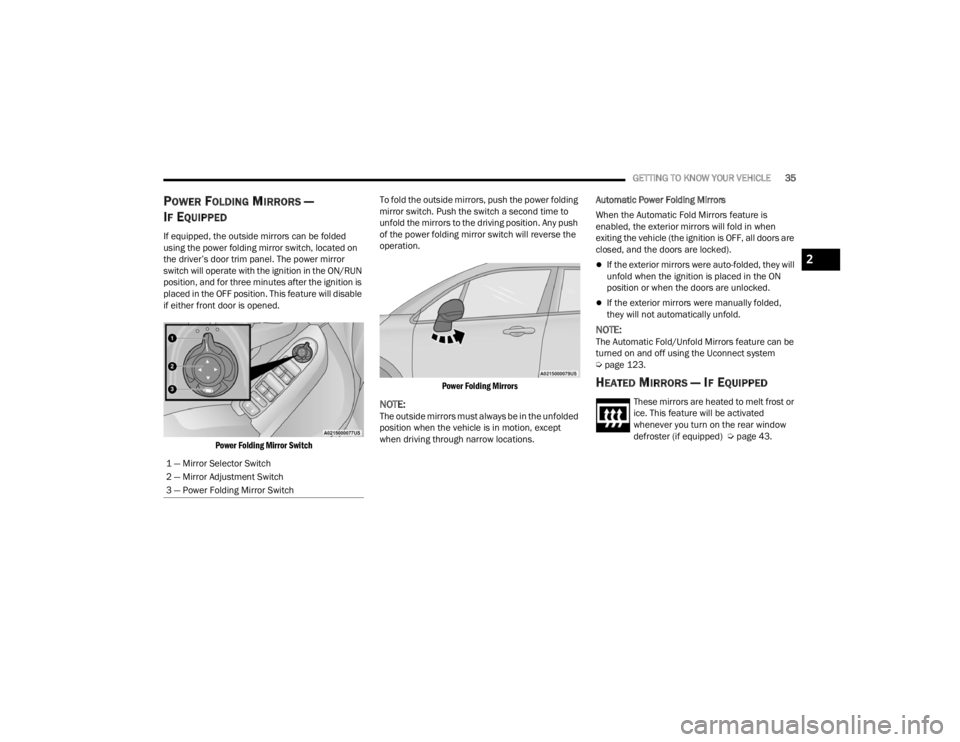
If equipped, the outside mirrors can be folded
using the power folding mirror switch, located on
the driver’s door trim panel. The power mirror
switch will operate with the ignition in the ON/RUN
position, and for three minutes after the ignition is
placed in the OFF position. This feature will disable
if either front door is opened.
Power Folding Mirror Switch
To fold the outside mirrors, push the power folding
mirror switch. Push the switch a second time to
unfold the mirrors to the driving position. Any push
of the power folding mirror switch will reverse the
operation.
Power Folding Mirrors
NOTE:The outside mirrors must always be in the unfolded
position when the vehicle is in motion, except
when driving through narrow locations. Automatic Power Folding Mirrors
When the Automatic Fold Mirrors feature is
enabled, the exterior mirrors will fold in when
exiting the vehicle (the ignition is OFF, all doors are
closed, and the doors are locked).
If the exterior mirrors were auto-folded, they will
unfold when the ignition is placed in the ON
position or when the doors are unlocked.
If the exterior mirrors were manually folded,
they will not automatically unfold.
NOTE:The Automatic Fold/Unfold Mirrors feature can be
turned on and off using the Uconnect system
Ú
page 123.
HEATED MIRRORS — IF EQUIPPED
These mirrors are heated to melt frost or
ice. This feature will be activated
whenever you turn on the rear window
defroster (if equipped) Ú page 43.
1 — Mirror Selector Switch
2 — Mirror Adjustment Switch
3 — Power Folding Mirror Switch
2
22_FD_OM_EN_USC_t.book Page 35
Page 40 of 312
38GETTING TO KNOW YOUR VEHICLE
FRONT FOG LIGHTS — IF EQUIPPED
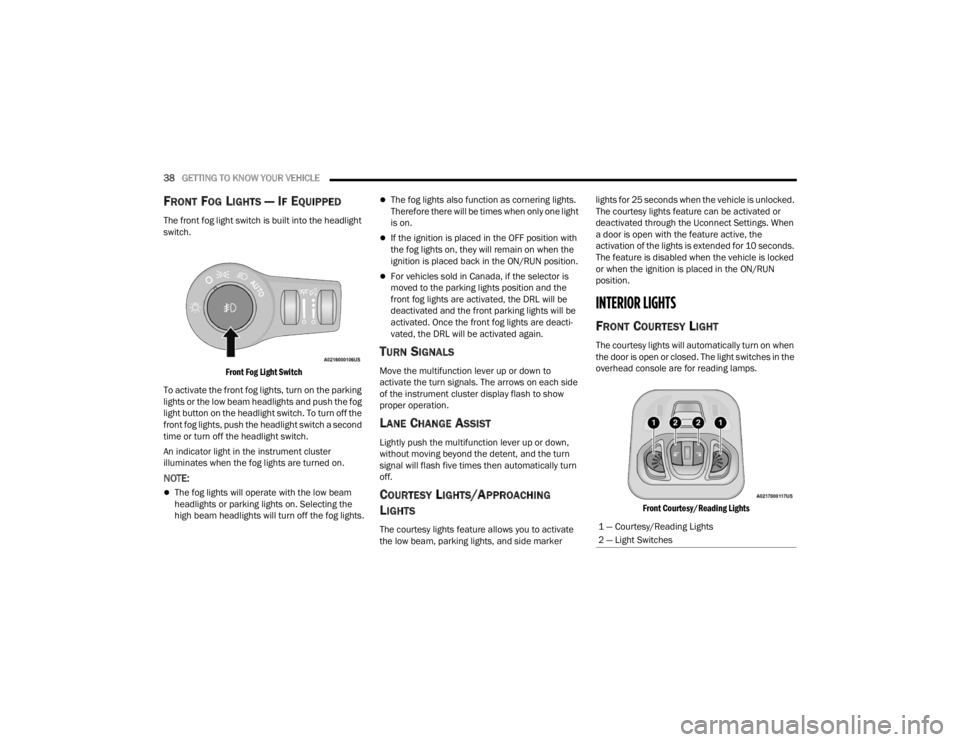
The front fog light switch is built into the headlight
switch.
Front Fog Light Switch
To activate the front fog lights, turn on the parking
lights or the low beam headlights and push the fog
light button on the headlight switch. To turn off the
front fog lights, push the headlight switch a second
time or turn off the headlight switch.
An indicator light in the instrument cluster
illuminates when the fog lights are turned on.
NOTE:
The fog lights will operate with the low beam
headlights or parking lights on. Selecting the
high beam headlights will turn off the fog lights.
The fog lights also function as cornering lights.
Therefore there will be times when only one light
is on.
If the ignition is placed in the OFF position with
the fog lights on, they will remain on when the
ignition is placed back in the ON/RUN position.
For vehicles sold in Canada, if the selector is
moved to the parking lights position and the
front fog lights are activated, the DRL will be
deactivated and the front parking lights will be
activated. Once the front fog lights are deacti -
vated, the DRL will be activated again.
TURN SIGNALS
Move the multifunction lever up or down to
activate the turn signals. The arrows on each side
of the instrument cluster display flash to show
proper operation.
LANE CHANGE ASSIST
Lightly push the multifunction lever up or down,
without moving beyond the detent, and the turn
signal will flash five times then automatically turn
off.
COURTESY LIGHTS/APPROACHING
L
IGHTS
The courtesy lights feature allows you to activate
the low beam, parking lights, and side marker lights for 25 seconds when the vehicle is unlocked.
The courtesy lights feature can be activated or
deactivated through the Uconnect Settings. When
a door is open with the feature active, the
activation of the lights is extended for 10 seconds.
The feature is disabled when the vehicle is locked
or when the ignition is placed in the ON/RUN
position.
INTERIOR LIGHTS
FRONT COURTESY LIGHT
The courtesy lights will automatically turn on when
the door is open or closed. The light switches in the
overhead console are for reading lamps.
Front Courtesy/Reading Lights
1 — Courtesy/Reading Lights
2 — Light Switches
22_FD_OM_EN_USC_t.book Page 38
Page 41 of 312
GETTING TO KNOW YOUR VEHICLE39
Push the driver or passenger light switch to
operate the reading lamps individually.
NOTE:
Before exiting the vehicle, make sure that the
interior lights are turned off. This will prevent the
battery from discharging once the doors are
closed.
If a light is left on it will automatically be turned
off after approximately 15 minutes after the
ignition is in the OFF position.
Dome Light Timing
The dome light will automatically illuminate when
the doors are unlocked, the doors are opened or
after the doors are closed.
Timing Entering The Vehicle
The dome lights illuminate in the following ways:
When the doors are unlocked, the dome light
will illuminate for approximately 27 seconds.
When one of the doors is opened, the dome light
will illuminate for approximately three minutes.
When the doors are closed, the dome light will
automatically shut off after approximately
27 seconds.
NOTE:The timing stops once the ignition is placed in the
ON/RUN position. The dome light will turn off under any of the
following conditions:
The dome light is disabled when the ignition is
placed in the ON/RUN position.
The dome lights will turn off automatically when
the doors are locked.
The dome lights will automatically turn off after
approximately 15 minutes of inactivity to
preserve the battery.
Timing Exiting The Vehicle
The dome light will illuminate under the following
conditions when the ignition is placed in the OFF
position:
The dome light will illuminate for 27 seconds
after the key is removed from the vehicle.
The opening of one of the doors (approximately
three minutes).
After closing a door (approximately 27 seconds).
The dome light timing is disabled when the doors
are locked.
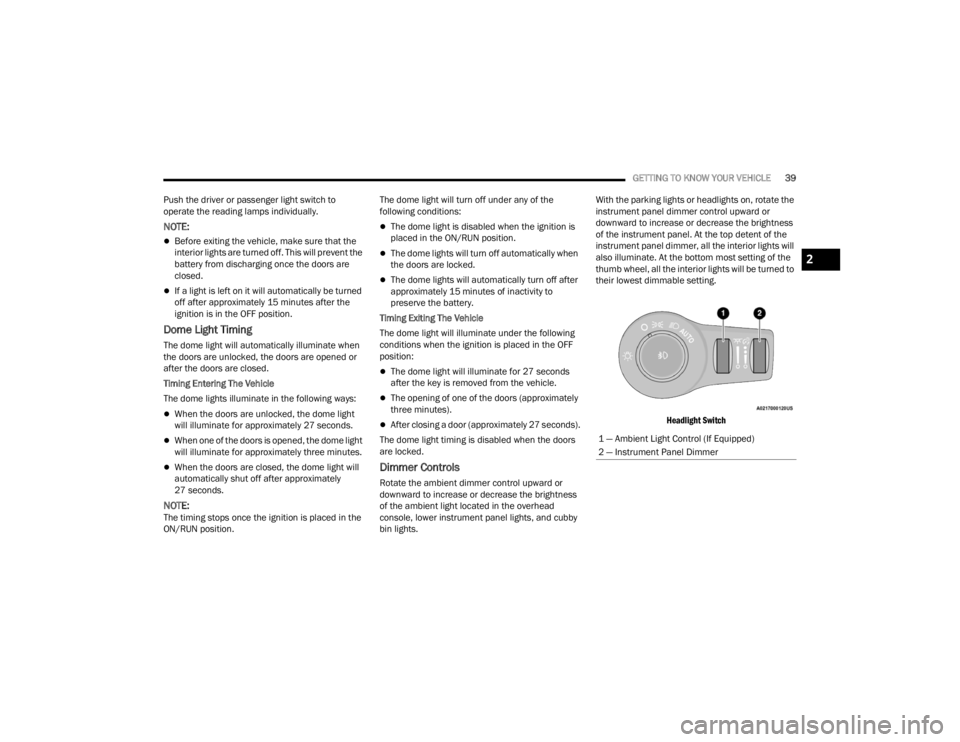
Dimmer Controls
Rotate the ambient dimmer control upward or
downward to increase or decrease the brightness
of the ambient light located in the overhead
console, lower instrument panel lights, and cubby
bin lights. With the parking lights or headlights on, rotate the
instrument panel dimmer control upward or
downward to increase or decrease the brightness
of the instrument panel. At the top detent of the
instrument panel dimmer, all the interior lights will
also illuminate. At the bottom most setting of the
thumb wheel, all the interior lights will be turned to
their lowest dimmable setting.
Headlight Switch
1 — Ambient Light Control (If Equipped)
2 — Instrument Panel Dimmer
2
22_FD_OM_EN_USC_t.book Page 39
Page 56 of 312
54GETTING TO KNOW YOUR VEHICLE
Auto-Up Feature With Anti-Pinch Protection
Lift the window switch up for a short period of time
and release; the window will go up automatically.
To stop the window from going all the way up
during the Auto-Up operation, pull up or push down
on the switch briefly.
To close the window part way, lift the window
switch briefly and release it when you want the
window to stop.
If the window runs into any obstacle during
auto-closure, it will reverse direction and then go
back down. Remove the obstacle and use the
window switch again to close the window.
NOTE:Any impact due to rough road conditions may
trigger the auto-reverse function unexpectedly
during auto-closure. If this happens, pull the switch
lightly and hold to close the window manually.
Reset Auto-Up
Should the Auto-Up feature be interrupted and
stop working, the feature will need to be reset. To
reset Auto-Up:
1. Pull the window switch up to close the window completely and continue to hold the switch up
for an additional two seconds after the
window is closed.
2. Push the window switch down firmly to open the window completely and continue to hold
the switch down for an additional two seconds
after the window is fully open.
NOTE:All doors must be closed before beginning the
Auto-Up reset procedure.
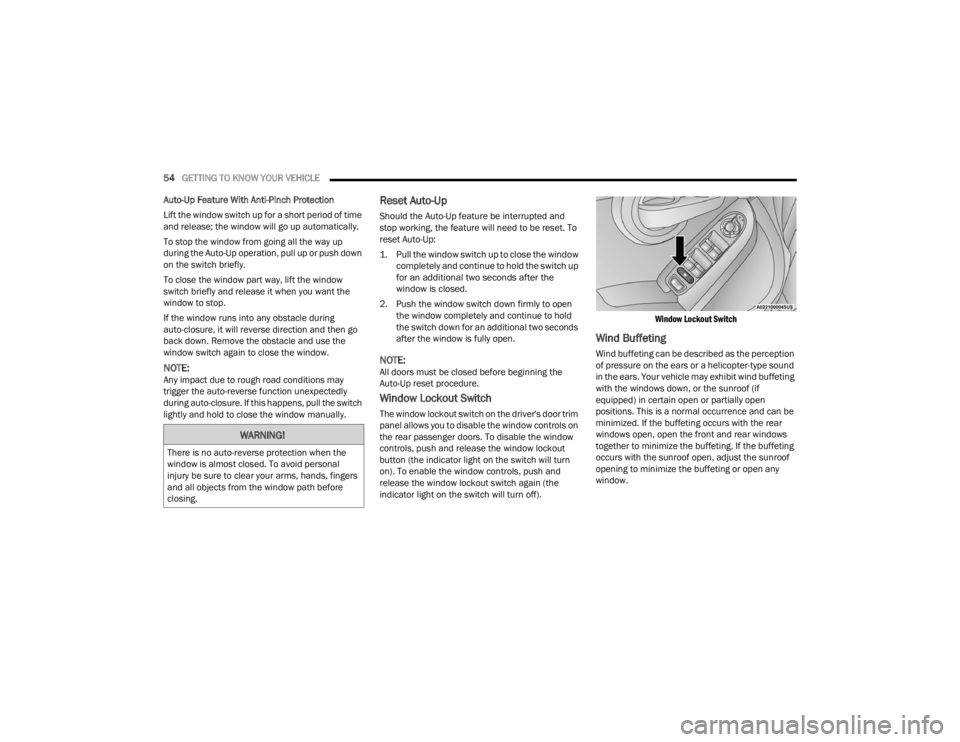
Window Lockout Switch
The window lockout switch on the driver's door trim
panel allows you to disable the window controls on
the rear passenger doors. To disable the window
controls, push and release the window lockout
button (the indicator light on the switch will turn
on). To enable the window controls, push and
release the window lockout switch again (the
indicator light on the switch will turn off).
Window Lockout Switch
Wind Buffeting
Wind buffeting can be described as the perception
of pressure on the ears or a helicopter-type sound
in the ears. Your vehicle may exhibit wind buffeting
with the windows down, or the sunroof (if
equipped) in certain open or partially open
positions. This is a normal occurrence and can be
minimized. If the buffeting occurs with the rear
windows open, open the front and rear windows
together to minimize the buffeting. If the buffeting
occurs with the sunroof open, adjust the sunroof
opening to minimize the buffeting or open any
window.
WARNING!
There is no auto-reverse protection when the
window is almost closed. To avoid personal
injury be sure to clear your arms, hands, fingers
and all objects from the window path before
closing.
22_FD_OM_EN_USC_t.book Page 54
Page 62 of 312
60GETTING TO KNOW YOUR VEHICLE
LIFTGATE
TO UNLOCK/OPEN THE LIFTGATE
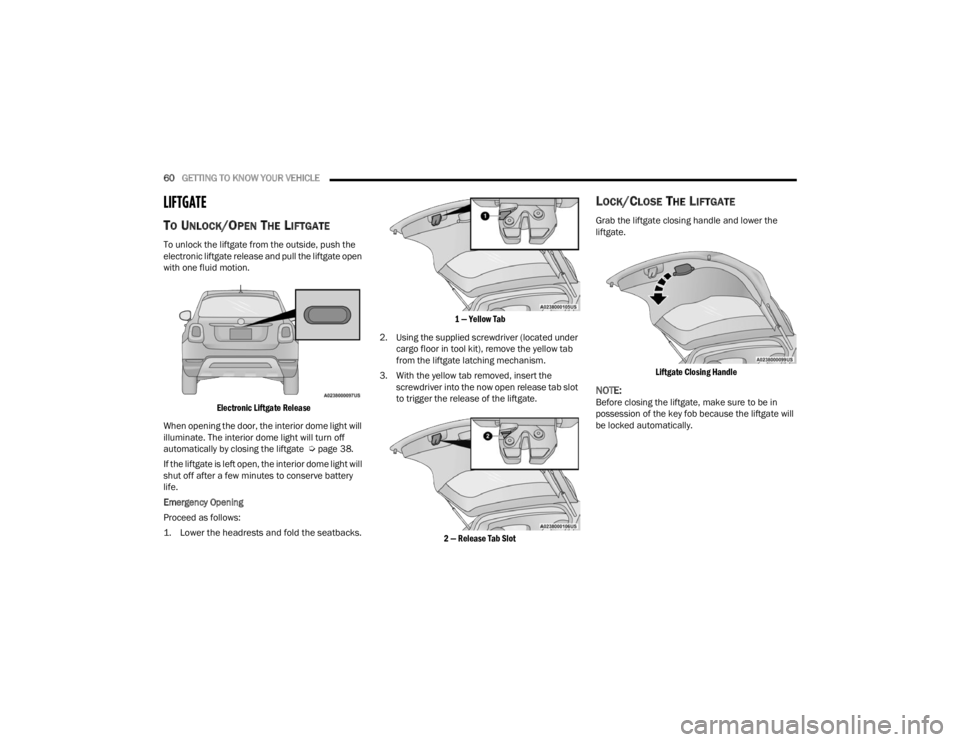
To unlock the liftgate from the outside, push the
electronic liftgate release and pull the liftgate open
with one fluid motion.
Electronic Liftgate Release
When opening the door, the interior dome light will
illuminate. The interior dome light will turn off
automatically by closing the liftgate Ú page 38.
If the liftgate is left open, the interior dome light will
shut off after a few minutes to conserve battery
life.
Emergency Opening
Proceed as follows:
1. Lower the headrests and fold the seatbacks.
1 — Yellow Tab
2. Using the supplied screwdriver (located under cargo floor in tool kit), remove the yellow tab
from the liftgate latching mechanism.
3. With the yellow tab removed, insert the screwdriver into the now open release tab slot
to trigger the release of the liftgate.
2 — Release Tab Slot
LOCK/CLOSE THE LIFTGATE
Grab the liftgate closing handle and lower the
liftgate.
Liftgate Closing Handle
NOTE:Before closing the liftgate, make sure to be in
possession of the key fob because the liftgate will
be locked automatically.
22_FD_OM_EN_USC_t.book Page 60
Page 68 of 312
66GETTING TO KNOW YOUR INSTRUMENT PANEL
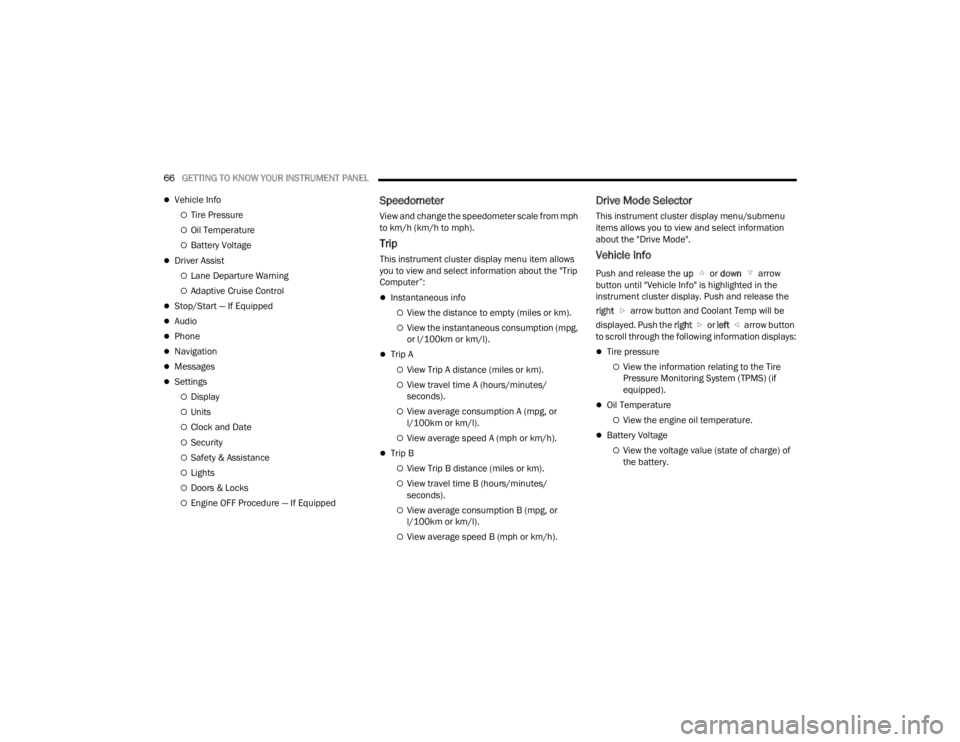
Vehicle Info
Tire Pressure
Oil Temperature
Battery Voltage
Driver Assist
Lane Departure Warning
Adaptive Cruise Control
Stop/Start — If Equipped
Audio
Phone
Navigation
Messages
Settings
Display
Units
Clock and Date
Security
Safety & Assistance
Lights
Doors & Locks
Engine OFF Procedure — If Equipped
Speedometer
View and change the speedometer scale from mph
to km/h (km/h to mph).
Trip
This instrument cluster display menu item allows
you to view and select information about the "Trip
Computer”:
Instantaneous info
View the distance to empty (miles or km).
View the instantaneous consumption (mpg,
or l/100km or km/l).
Trip A
View Trip A distance (miles or km).
View travel time A (hours/minutes/
seconds).
View average consumption A (mpg, or
l/100km or km/l).
View average speed A (mph or km/h).
Trip B
View Trip B distance (miles or km).
View travel time B (hours/minutes/
seconds).
View average consumption B (mpg, or
l/100km or km/l).
View average speed B (mph or km/h).
Drive Mode Selector
This instrument cluster display menu/submenu
items allows you to view and select information
about the "Drive Mode".
Vehicle Info
Push and release the up or down arrow
button until "Vehicle Info" is highlighted in the
instrument cluster display. Push and release the
right arrow button and Coolant Temp will be
displayed. Push the right or left arrow button
to scroll through the following information displays:
Tire pressure
View the information relating to the Tire
Pressure Monitoring System (TPMS) (if
equipped).
Oil Temperature
View the engine oil temperature.
Battery Voltage
View the voltage value (state of charge) of
the battery.
22_FD_OM_EN_USC_t.book Page 66
Page 70 of 312

68GETTING TO KNOW YOUR INSTRUMENT PANEL
Lights
Doors and Locks
Engine OFF Procedure — If Equipped
Display
By selecting "Display," you can access the following
settings:
Screen Setup: Allows you to configure the
display screen.
Language: Allows you to select the language in
which to display the information/warnings.
Automatic Reset Trip B: Allows you to set the
options to reset the Trip B (never, always, every
two hours or every eight hours).
Phone Repetition: Allows you to select “On” or
“Off”. The instrument cluster display can also
display the information concerning phone
mode. The information that can be displayed is
the connection status of the mobile phone
(phone connected or disconnected), the active
telephone calls/incoming/on hold, and the
management of double calls (first incoming
second waiting, etc.).
Navigation Repetition: Allows you to select “On”
or “Off” on the instrument cluster display, infor -
mation relating to the navigation mode.
Units
By selecting the item "Units Of Measure,” you can
select the unit of measure used in the display. Possible options are:
US
Metric
Custom
Clock And Date
By selecting the item "clock and date," you can
adjust the clock.
Possible options are:
Set Time: Adjust hours/minutes.
Set Format: Adjust the time format "12h"
(12 hours) or "24h" (24 hours).
Set Date: Adjust day/month/year.
Security
By selecting the item “Security,” you can make the
following adjustments:
Speed Warning: Set the vehicle speed limit
(mph or km/h), which the driver is notified
through a visual and acoustic signaling (display
of a message and a symbol on the display).
Seat Belt Buzzer: This function is only viewable
when the Seat Belt Reminder (SBR) system is
active.
Hill Start Assist: Activation/Deactivation of the
Hill Start Assist system. Safety And Assistance
By selecting the item "Safety & Assistance," you
can make the following adjustments:
Full Brake Control: A selection of operating
modes of the Full Brake Control system.
Full Brake Control Sensitivity: A selection of the
"readiness" of intervention of the Full Brake
Control system, based on the distance to the
obstacle.
Park Assist: A selection of the type of informa
-
tion provided by Park Assist.
Park Assist Vol.: A selection of the volume of
acoustic signals provided by Park Assist.
Rain Sensing Wipers: Enabling/disabling the
automatic operation of wipers in the event of
rain.
LaneSense Warning — If Equipped: A selection
of the "readiness" of intervention of LaneSense.
Warning Buzzer Volume: Increase or decrease
the volume of the buzzer by selecting “Low”,
“Medium”, or “High”.
Maintenance Brakes — If Equipped: Activation
of the procedure to carry out braking system
maintenance.
Auto Park Brake — If Equipped: Enable/disable
auto-insertion of the Electric Parking Brake.
22_FD_OM_EN_USC_t.book Page 68
Page 71 of 312
GETTING TO KNOW YOUR INSTRUMENT PANEL69
Lights
By selecting the item "Lights," you can make the
following adjustments:
Headlight Off Delay: Set the delay for headlight
shutoff after engine shutoff.
Headlight Sensitivity: Adjust the sensitivity of
headlight brightness.
Interior Ambient Lights: Increase or decrease
the brightness of the Interior Ambient Lights.
Greeting Lights: Enable/disable the vehicle’s
Greeting Lights.
Auto High Beam: Activate/deactivate the auto -
matic main beam headlights — If Equipped.
Daytime Lights: Activate/deactivate the daytime
running lights.
Cornering Lights: Activate/deactivate the
cornering lights — If Equipped.
Doors And Locks
By selecting the item "Doors & Locks," you can
make the following adjustments:
Auto Door Lock: Activate/deactivate the auto -
matic locking of the doors with the vehicle
moving.
Auto Unlock On Exit: Automatic unlocking of the
doors when exiting the vehicle.
Flash Light With Lock: Activate the direction indi -
cators when closing the doors.
Sound Horn With Lock: Activate/deactivate the
horn when pushing the lock button on the
Remote Keyless Entry. The options are "Off,"
"First Press,” and "Second Press."
Horn With Remote Start: Activate/deactivate
the horn at the Remote Starting of the engine
with the Remote Keyless Entry.
Remote Door Unlock Without Passive Entry:
Allows you to choose whether to unlock all the
doors or only the driver’s side door on the first
push of the unlock button on the Remote
Keyless Entry.
Door Unlock With Passive Entry: Allows you to
open the driver door only on the first push of the
unlock button on the Remote Keyless Entry or
using the passive entry handles on the doors or
liftgates.
Passive Entry — If Equipped: Activate the auto -
matic locking of the doors.
Engine OFF Procedure — If Equipped: Allows you
to turn off the engine from the instrument
cluster in the event of an ignition switch failure.
Instructions for turning off the engine via the
instrument cluster display controls will display in
the instrument cluster.
WARNING LIGHTS AND MESSAGES
The warning/indicator lights will illuminate in the
instrument panel together with a dedicated
message and/or acoustic signal when applicable.
These indications are indicative and precautionary
and as such must not be considered as exhaustive
and/or alternative to the information contained in
the Owner’s Manual, which you are advised to read
carefully in all cases. Always refer to the
information in this chapter in the event of a failure
indication. All active telltales will display first if
applicable. The system check menu may appear
different based upon equipment options and
current vehicle status. Some telltales are optional
and may not appear.
RED WARNING LIGHTS
Air Bag Warning Light
This warning light will illuminate to
indicate a fault with the air bag, and will
turn on for four to eight seconds as a bulb
check when the ignition is placed in the
ON/RUN position. This light will illuminate with a
single chime when a fault with the air bag has been
detected, it will stay on until the fault is cleared. If
the light is either not on during startup, stays on, or
turns on while driving, have the system inspected
at an authorized dealer as soon as possible.
3
22_FD_OM_EN_USC_t.book Page 69
Page 86 of 312

84STARTING AND OPERATING
In the unlikely event of a malfunction of the EPB
system, a yellow EPB fault lamp will illuminate. This
may be accompanied by the Brake Warning Light
flashing. In this status, some EPB functionalities
may be deactivated. In this event, urgent service of
the EPB system is required. Do not rely on the EPB
to hold the vehicle stationary.
AUTO PARK BRAKE
The EPB can be programmed to be applied
automatically whenever the vehicle speed is below
1.9 mph (3 km/h) and the automatic transmission
is placed in PARK whenever the ignition is in the
OFF position. Auto Park Brake is enabled and
disabled by customer selection through the
Customer Programmable Features section of the
Uconnect Settings.
Any single Auto Park Brake application can be
bypassed by pushing the EPB switch to the release
position while the transmission is placed in PARK
and the ignition is in the RUN position. In some cases, if the ignition is cycled from ON/RUN to OFF
and the gear selector is not firmly locked in the
PARK position, EPB applies automatically even if
Auto Park Brake has been previously disabled.
SAFEHOLD
SafeHold is a safety feature of the EPB system that
will engage the parking brake automatically if the
vehicle is left unsecured while the ignition switch is
in the RUN position.
The EPB will automatically engage if all of the
following conditions are met:
Vehicle speed is below 1.9 mph (3 km/h).
There is no attempt to press the brake pedal or
accelerator pedal.
The seat belt is unbuckled.
The driver door is open.
The vehicle is not in the PARK position.
SafeHold can be temporarily bypassed by pushing
the EPB switch while the driver door is open and
the brake pedal is pressed. Once manually
bypassed, SafeHold will be enabled again once the
vehicle reaches 12 mph (20 km/h) or the ignition
is cycled to the OFF position and back to RUN
position.
BRAKE SERVICE MODE
We recommend having your brakes serviced by an
authorized dealer. You should only make repairs
for which you have the knowledge and the right
equipment. You should only enter Brake Service
Mode during brake service.
When servicing your rear brakes, it may be
necessary for you or your technician to push the
rear piston into the rear caliper bore. With the EPB
system, this can only be done after retracting the
EPB actuator. The actuator retraction can be done
easily by entering the Brake Service Mode. This
menu based system will guide you through the
steps necessary to retract the EPB actuator in
order to perform rear brake service.
Service Mode has requirements that must be met
in order to be activated:
The vehicle must be at a standstill.
The parking brake must be disabled.
The transmission must be in PARK or NEUTRAL.
The EPB switch not activated.
The ignition is in the ON/RUN position.
The brake pedal not pressed.
While in service mode, the EPB fault lamp will flash
continuously while the ignition is placed in the ON
position.
WARNING!
Driving the vehicle with the parking brake
engaged, or repeated use of the parking brake
to slow the vehicle may cause serious damage to
the brake system. Be sure the parking brake is
fully disengaged before driving; failure to do so
can lead to brake failure and a collision.
22_FD_OM_EN_USC_t.book Page 84
Page 134 of 312

132MULTIMEDIA
Doors & Locks
After pressing the Doors & Locks button on the touchscreen, the following settings will be available:
NOTE:Depending on the vehicle’s options, feature settings may vary.
Setting Name Description
Auto Door Locks When this feature is selected, all doors will lock automatically when the
vehicle reaches a speed of 15 mph (24 km/h).
Auto Unlock On Exit When the Auto Unlock On Exit feature is selected, all doors will unlock when
the vehicle is stopped and the transmission is in the PARK or NEUTRAL
position and the driver's door is opened.
Flash Lights With Lock This setting will allow you to turn the flash lights with lock on or off.
Sound Horn With Lock This setting will allow you to set the Sound Horn With Lock feature “Off”, “1st
Press”, or “2nd Press”.
Sound Horn With Remote Start This setting will allow you to turn horn with remote start on or off.
Keyless Entry This feature allows you to lock and unlock the vehicle’s door(s) without having
to press the key fob lock or unlock button.
Remote Door Unlock
When “Driver” is programmed, only the driver’s door will unlock on the first
push of the key fob Unlock button; you must push the key fob Unlock button
twice to unlock the passengers’ doors. When “All” is programmed, all of the
doors will unlock on the first press of the key fob Unlock button.
If “All” is programmed, all doors will unlock no matter which Passive
Entry-equipped door handle is grasped. If “Driver” is programmed, only the
driver’s door will unlock when the driver’s door is grabbed. Touching the
handle more than once will only result in the driver’s door unlocking. If the
driver’s door is opened, the interior door lock/unlock switch can be used to
unlock all doors (or use key fob).
22_FD_OM_EN_USC_t.book Page 132