lights FIAT 500X 2022 Owner's Manual
[x] Cancel search | Manufacturer: FIAT, Model Year: 2022, Model line: 500X, Model: FIAT 500X 2022Pages: 312, PDF Size: 13.26 MB
Page 75 of 312
GETTING TO KNOW YOUR INSTRUMENT PANEL73
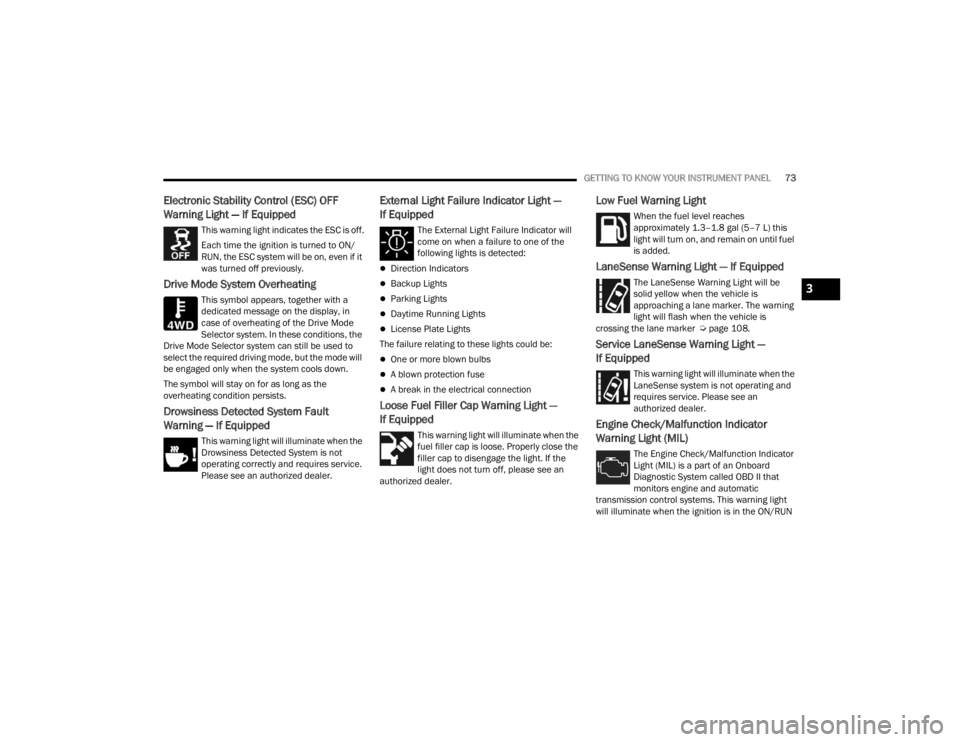
Electronic Stability Control (ESC) OFF
Warning Light — If Equipped
This warning light indicates the ESC is off.
Each time the ignition is turned to ON/
RUN, the ESC system will be on, even if it
was turned off previously.
Drive Mode System Overheating
This symbol appears, together with a
dedicated message on the display, in
case of overheating of the Drive Mode
Selector system. In these conditions, the
Drive Mode Selector system can still be used to
select the required driving mode, but the mode will
be engaged only when the system cools down.
The symbol will stay on for as long as the
overheating condition persists.
Drowsiness Detected System Fault
Warning — If Equipped
This warning light will illuminate when the
Drowsiness Detected System is not
operating correctly and requires service.
Please see an authorized dealer.
External Light Failure Indicator Light —
If Equipped
The External Light Failure Indicator will
come on when a failure to one of the
following lights is detected:
Direction Indicators
Backup Lights
Parking Lights
Daytime Running Lights
License Plate Lights
The failure relating to these lights could be:
One or more blown bulbs
A blown protection fuse
A break in the electrical connection
Loose Fuel Filler Cap Warning Light —
If Equipped
This warning light will illuminate when the
fuel filler cap is loose. Properly close the
filler cap to disengage the light. If the
light does not turn off, please see an
authorized dealer.
Low Fuel Warning Light
When the fuel level reaches
approximately 1.3–1.8 gal (5–7 L) this
light will turn on, and remain on until fuel
is added.
LaneSense Warning Light — If Equipped
The LaneSense Warning Light will be
solid yellow when the vehicle is
approaching a lane marker. The warning
light will flash when the vehicle is
crossing the lane marker Ú page 108.
Service LaneSense Warning Light —
If Equipped
This warning light will illuminate when the
LaneSense system is not operating and
requires service. Please see an
authorized dealer.
Engine Check/Malfunction Indicator
Warning Light (MIL)
The Engine Check/Malfunction Indicator
Light (MIL) is a part of an Onboard
Diagnostic System called OBD II that
monitors engine and automatic
transmission control systems. This warning light
will illuminate when the ignition is in the ON/RUN
3
22_FD_OM_EN_USC_t.book Page 73
Page 78 of 312
76GETTING TO KNOW YOUR INSTRUMENT PANEL
YELLOW INDICATOR LIGHTS
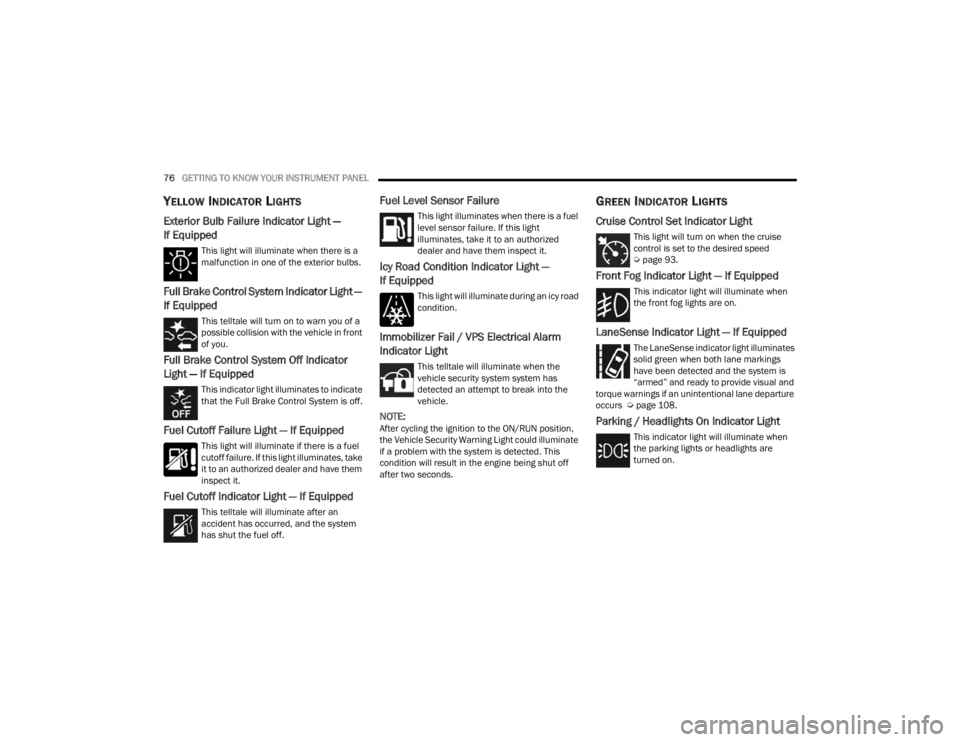
Exterior Bulb Failure Indicator Light —
If Equipped
This light will illuminate when there is a
malfunction in one of the exterior bulbs.
Full Brake Control System Indicator Light —
If Equipped
This telltale will turn on to warn you of a
possible collision with the vehicle in front
of you.
Full Brake Control System Off Indicator
Light — If Equipped
This indicator light illuminates to indicate
that the Full Brake Control System is off.
Fuel Cutoff Failure Light — If Equipped
This light will illuminate if there is a fuel
cutoff failure. If this light illuminates, take
it to an authorized dealer and have them
inspect it.
Fuel Cutoff Indicator Light — If Equipped
This telltale will illuminate after an
accident has occurred, and the system
has shut the fuel off.
Fuel Level Sensor Failure
This light illuminates when there is a fuel
level sensor failure. If this light
illuminates, take it to an authorized
dealer and have them inspect it.
Icy Road Condition Indicator Light —
If Equipped
This light will illuminate during an icy road
condition.
Immobilizer Fail / VPS Electrical Alarm
Indicator Light
This telltale will illuminate when the
vehicle security system system has
detected an attempt to break into the
vehicle.
NOTE:After cycling the ignition to the ON/RUN position,
the Vehicle Security Warning Light could illuminate
if a problem with the system is detected. This
condition will result in the engine being shut off
after two seconds.
GREEN INDICATOR LIGHTS
Cruise Control Set Indicator Light
This light will turn on when the cruise
control is set to the desired speed
Úpage 93.
Front Fog Indicator Light — If Equipped
This indicator light will illuminate when
the front fog lights are on.
LaneSense Indicator Light — If Equipped
The LaneSense indicator light illuminates
solid green when both lane markings
have been detected and the system is
“armed” and ready to provide visual and
torque warnings if an unintentional lane departure
occurs Ú page 108.
Parking / Headlights On Indicator Light
This indicator light will illuminate when
the parking lights or headlights are
turned on.
22_FD_OM_EN_USC_t.book Page 76
Page 79 of 312
GETTING TO KNOW YOUR INSTRUMENT PANEL77
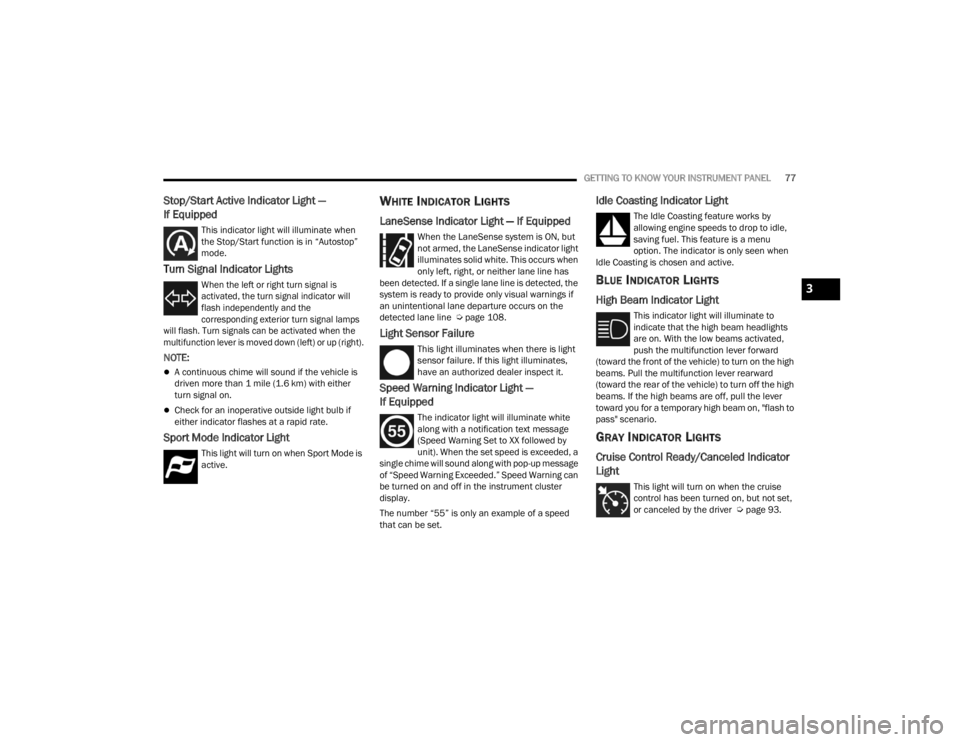
Stop/Start Active Indicator Light —
If Equipped
This indicator light will illuminate when
the Stop/Start function is in “Autostop”
mode.
Turn Signal Indicator Lights
When the left or right turn signal is
activated, the turn signal indicator will
flash independently and the
corresponding exterior turn signal lamps
will flash. Turn signals can be activated when the
multifunction lever is moved down (left) or up (right).
NOTE:
A continuous chime will sound if the vehicle is
driven more than 1 mile (1.6 km) with either
turn signal on.
Check for an inoperative outside light bulb if
either indicator flashes at a rapid rate.
Sport Mode Indicator Light
This light will turn on when Sport Mode is
active.
WHITE INDICATOR LIGHTS
LaneSense Indicator Light — If Equipped
When the LaneSense system is ON, but
not armed, the LaneSense indicator light
illuminates solid white. This occurs when
only left, right, or neither lane line has
been detected. If a single lane line is detected, the
system is ready to provide only visual warnings if
an unintentional lane departure occurs on the
detected lane line Ú page 108.
Light Sensor Failure
This light illuminates when there is light
sensor failure. If this light illuminates,
have an authorized dealer inspect it.
Speed Warning Indicator Light —
If Equipped
The indicator light will illuminate white
along with a notification text message
(Speed Warning Set to XX followed by
unit). When the set speed is exceeded, a
single chime will sound along with pop-up message
of “Speed Warning Exceeded.” Speed Warning can
be turned on and off in the instrument cluster
display.
The number “55” is only an example of a speed
that can be set.
Idle Coasting Indicator Light
The Idle Coasting feature works by
allowing engine speeds to drop to idle,
saving fuel. This feature is a menu
option. The indicator is only seen when
Idle Coasting is chosen and active.
BLUE INDICATOR LIGHTS
High Beam Indicator Light
This indicator light will illuminate to
indicate that the high beam headlights
are on. With the low beams activated,
push the multifunction lever forward
(toward the front of the vehicle) to turn on the high
beams. Pull the multifunction lever rearward
(toward the rear of the vehicle) to turn off the high
beams. If the high beams are off, pull the lever
toward you for a temporary high beam on, "flash to
pass" scenario.
GRAY INDICATOR LIGHTS
Cruise Control Ready/Canceled Indicator
Light
This light will turn on when the cruise
control has been turned on, but not set,
or canceled by the driver Ú page 93.
3
22_FD_OM_EN_USC_t.book Page 77
Page 101 of 312
STARTING AND OPERATING99
To increase the distance setting, push the
Distance Increase button and release. Each time
the button is pushed, the distance setting
increases by one bar (longer).
If there is no vehicle ahead, the vehicle will
maintain the set speed. If a slower moving vehicle
is detected in the same lane, the instrument
cluster display will show the ACC Set With Target
Detected Light. The system adjusts vehicle speed
automatically to maintain the distance setting,
regardless of the set speed.
The vehicle will then maintain the set distance
until:
The vehicle ahead accelerates to a speed above
the set speed.
The vehicle ahead moves out of your lane or
view of the sensor.
The distance setting is changed.
The system disengages Ú page 96.
The maximum braking applied by ACC is limited;
however, the driver can always apply the brakes
manually, if necessary.
NOTE:The brake lights will illuminate whenever the ACC
system applies the brakes. A Proximity Warning will alert the driver if ACC
predicts that its maximum braking level is not
sufficient to maintain the set distance. If this
occurs, a visual alert “BRAKE!” will appear in the
instrument cluster display and a chime will sound
while ACC continues to apply its maximum braking
capacity.
NOTE:The “BRAKE!” screen in the instrument cluster
display is a warning for the driver to take action
and does not necessarily mean that the Full Brake
Control system is applying the brakes autono
-
mously.
Overtake Aid
When driving with ACC engaged and following a
vehicle, the system will provide an additional
acceleration up to the ACC set speed to assist in
passing the vehicle. This additional acceleration is
triggered when the driver utilizes the left turn
signal and will only be active when passing on the
left hand side.
Display Warnings And Maintenance
“FRONT RADAR SENSOR TEMPORARILY
BLOCKED” WARNING
The “ACC Front Radar Sensor Temporarily
Blocked” warning will display and a chime will
sound when conditions temporarily limit system
performance.
This most often occurs at times of poor visibility,
such as in snow or heavy rain. The ACC system may
also become temporarily blinded due to
obstructions, such as mud, dirt or ice. In these
cases, the instrument cluster display will read
“ACC/FCW Unavailable Wipe Front Radar Sensor”
and the system will deactivate.
The “ACC Front Radar Sensor Temporarily
Blocked” message can sometimes be displayed
while driving in highly reflective areas (i.e. ice and
snow, or tunnels with reflective tiles). The ACC
system will recover after the vehicle has left these
areas. Under rare conditions, when the radar is not
tracking any vehicles or objects in its path this
warning may temporarily occur.
4
22_FD_OM_EN_USC_t.book Page 99
Page 119 of 312
STARTING AND OPERATING117
(Continued)
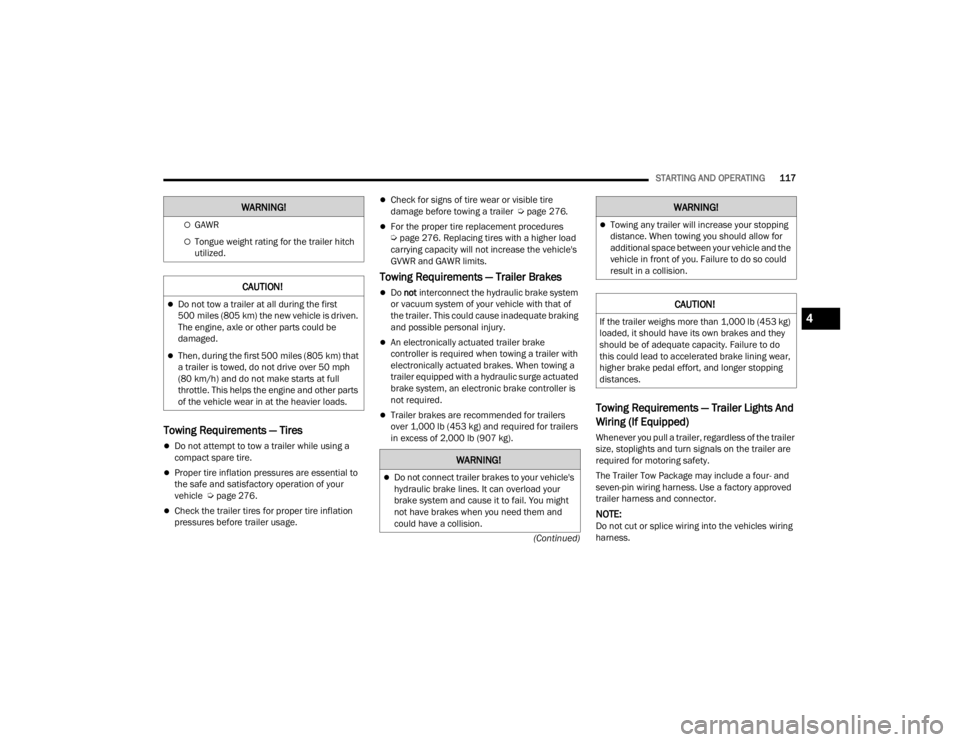
Towing Requirements — Tires
Do not attempt to tow a trailer while using a
compact spare tire.
Proper tire inflation pressures are essential to
the safe and satisfactory operation of your
vehicle Ú page 276.
Check the trailer tires for proper tire inflation
pressures before trailer usage.
Check for signs of tire wear or visible tire
damage before towing a trailer Ú page 276.
For the proper tire replacement procedures
Úpage 276. Replacing tires with a higher load
carrying capacity will not increase the vehicle's
GVWR and GAWR limits.
Towing Requirements — Trailer Brakes
Do not interconnect the hydraulic brake system
or vacuum system of your vehicle with that of
the trailer. This could cause inadequate braking
and possible personal injury.
An electronically actuated trailer brake
controller is required when towing a trailer with
electronically actuated brakes. When towing a
trailer equipped with a hydraulic surge actuated
brake system, an electronic brake controller is
not required.
Trailer brakes are recommended for trailers
over 1,000 lb (453 kg) and required for trailers
in excess of 2,000 lb (907 kg).Towing Requirements — Trailer Lights And
Wiring (If Equipped)
Whenever you pull a trailer, regardless of the trailer
size, stoplights and turn signals on the trailer are
required for motoring safety.
The Trailer Tow Package may include a four- and
seven-pin wiring harness. Use a factory approved
trailer harness and connector.
NOTE:Do not cut or splice wiring into the vehicles wiring
harness.
GAWR
Tongue weight rating for the trailer hitch
utilized.
CAUTION!
Do not tow a trailer at all during the first
500 miles (805 km) the new vehicle is driven.
The engine, axle or other parts could be
damaged.
Then, during the first 500 miles (805 km) that
a trailer is towed, do not drive over 50 mph
(80 km/h) and do not make starts at full
throttle. This helps the engine and other parts
of the vehicle wear in at the heavier loads.
WARNING!
WARNING!
Do not connect trailer brakes to your vehicle's
hydraulic brake lines. It can overload your
brake system and cause it to fail. You might
not have brakes when you need them and
could have a collision.
Towing any trailer will increase your stopping
distance. When towing you should allow for
additional space between your vehicle and the
vehicle in front of you. Failure to do so could
result in a collision.
CAUTION!
If the trailer weighs more than 1,000 lb (453 kg)
loaded, it should have its own brakes and they
should be of adequate capacity. Failure to do
this could lead to accelerated brake lining wear,
higher brake pedal effort, and longer stopping
distances.
WARNING!
4
22_FD_OM_EN_USC_t.book Page 117
Page 126 of 312
124MULTIMEDIA
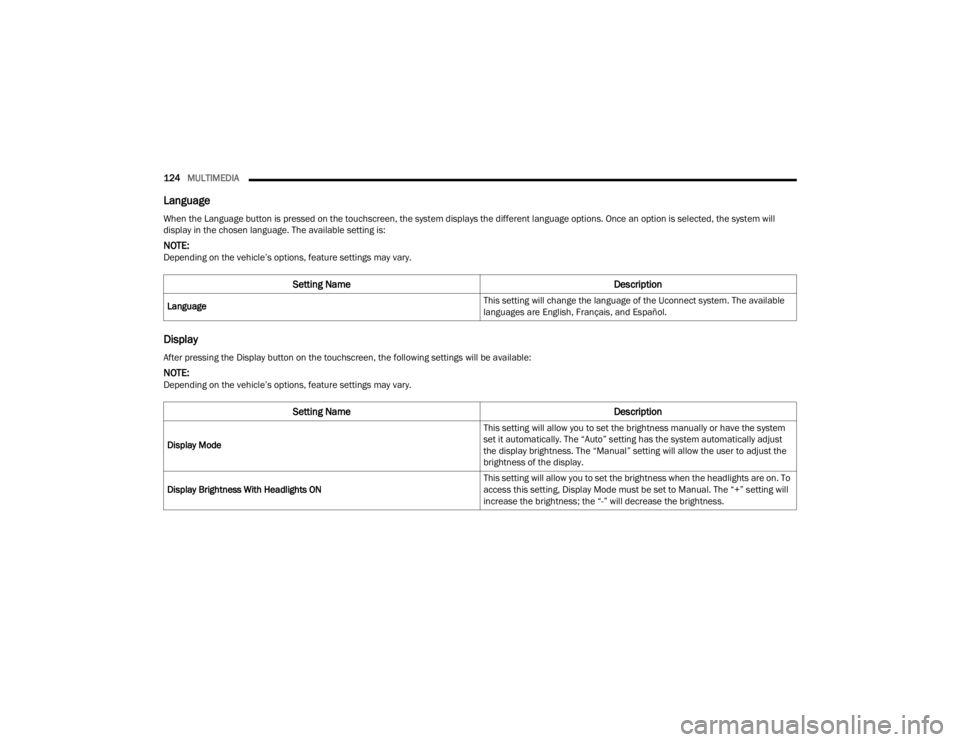
Language
Display
When the Language button is pressed on the touchscreen, the system displays the different language options. Once an option is selected, the system will
display in the chosen language. The available setting is:
NOTE:Depending on the vehicle’s options, feature settings may vary.
Setting Name Description
Language This setting will change the language of the Uconnect system. The available
languages are English, Français, and Español.
After pressing the Display button on the touchscreen, the following settings will be available:
NOTE:Depending on the vehicle’s options, feature settings may vary.
Setting Name
Description
Display Mode This setting will allow you to set the brightness manually or have the system
set it automatically. The “Auto” setting has the system automatically adjust
the display brightness. The “Manual” setting will allow the user to adjust the
brightness of the display.
Display Brightness With Headlights ON This setting will allow you to set the brightness when the headlights are on. To
access this setting, Display Mode must be set to Manual. The “+” setting will
increase the brightness; the “-” will decrease the brightness.
22_FD_OM_EN_USC_t.book Page 124
Page 127 of 312
MULTIMEDIA125
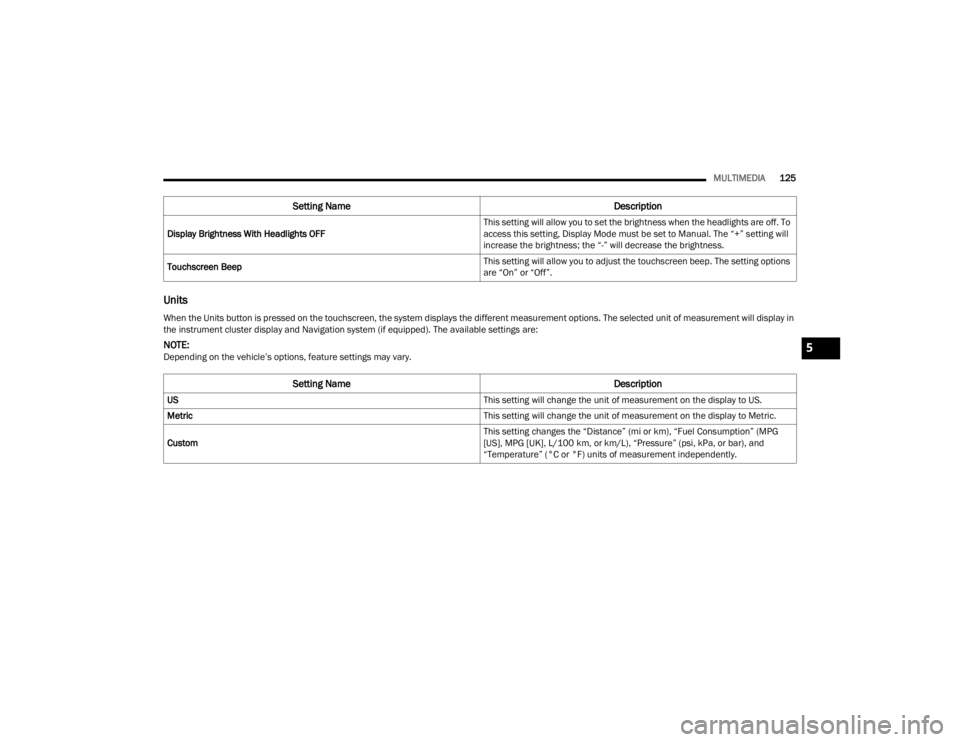
Units
Display Brightness With Headlights OFF This setting will allow you to set the brightness when the headlights are off. To
access this setting, Display Mode must be set to Manual. The “+” setting will
increase the brightness; the “-” will decrease the brightness.
Touchscreen Beep This setting will allow you to adjust the touchscreen beep. The setting options
are “On” or “Off”.
Setting Name
Description
When the Units button is pressed on the touchscreen, the system displays the different measurement options. The selected unit of measurement will display in
the instrument cluster display and Navigation system (if equipped). The available settings are:
NOTE:Depending on the vehicle’s options, feature settings may vary.
Setting NameDescription
US This setting will change the unit of measurement on the display to US.
Metric This setting will change the unit of measurement on the display to Metric.
Custom This setting changes the “Distance” (mi or km), “Fuel Consumption” (MPG
[US], MPG [UK], L/100 km, or km/L), “Pressure” (psi, kPa, or bar), and
“Temperature” (°C or °F) units of measurement independently.
5
22_FD_OM_EN_USC_t.book Page 125
Page 133 of 312
MULTIMEDIA131
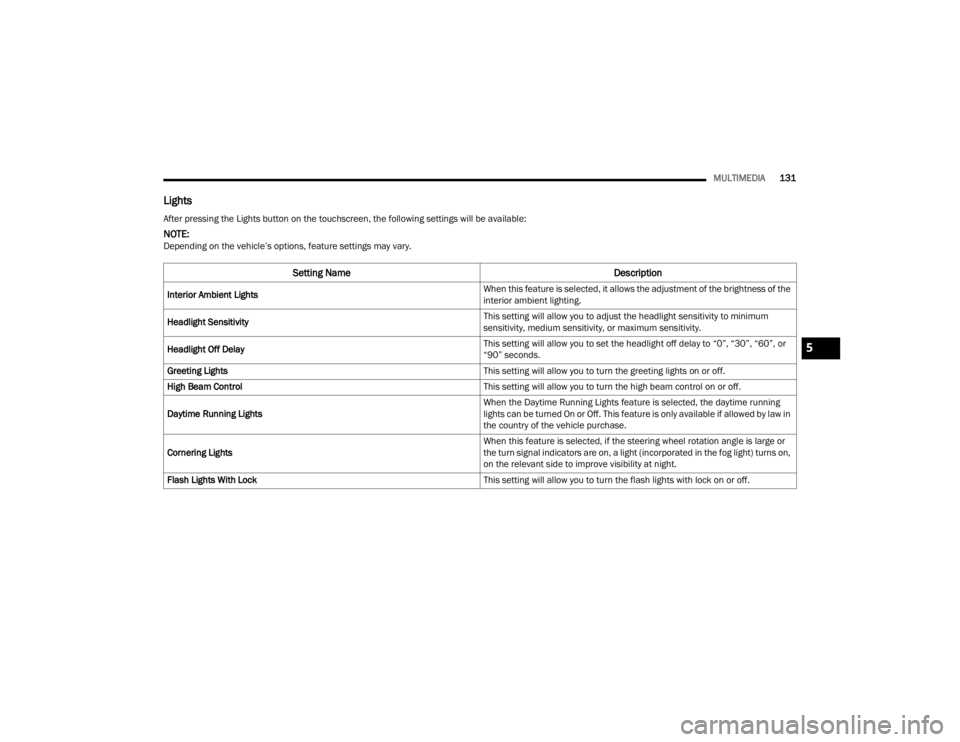
Lights
After pressing the Lights button on the touchscreen, the following settings will be available:
NOTE:Depending on the vehicle’s options, feature settings may vary.
Setting Name Description
Interior Ambient Lights When this feature is selected, it allows the adjustment of the brightness of the
interior ambient lighting.
Headlight Sensitivity This setting will allow you to adjust the headlight sensitivity to minimum
sensitivity, medium sensitivity, or maximum sensitivity.
Headlight Off Delay This setting will allow you to set the headlight off delay to “0”, “30”, “60”, or
“90” seconds.
Greeting Lights This setting will allow you to turn the greeting lights on or off.
High Beam Control This setting will allow you to turn the high beam control on or off.
Daytime Running Lights When the Daytime Running Lights feature is selected, the daytime running
lights can be turned On or Off. This feature is only available if allowed by law in
the country of the vehicle purchase.
Cornering Lights When this feature is selected, if the steering wheel rotation angle is large or
the turn signal indicators are on, a light (incorporated in the fog light) turns on,
on the relevant side to improve visibility at night.
Flash Lights With Lock This setting will allow you to turn the flash lights with lock on or off.
5
22_FD_OM_EN_USC_t.book Page 131
Page 134 of 312
132MULTIMEDIA
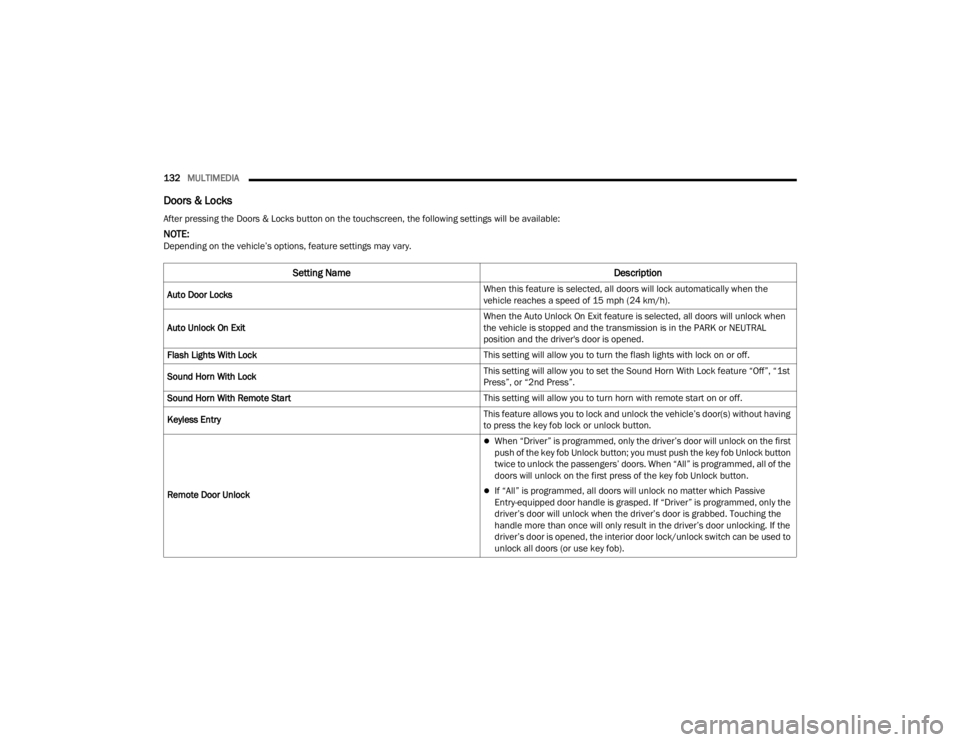
Doors & Locks
After pressing the Doors & Locks button on the touchscreen, the following settings will be available:
NOTE:Depending on the vehicle’s options, feature settings may vary.
Setting Name Description
Auto Door Locks When this feature is selected, all doors will lock automatically when the
vehicle reaches a speed of 15 mph (24 km/h).
Auto Unlock On Exit When the Auto Unlock On Exit feature is selected, all doors will unlock when
the vehicle is stopped and the transmission is in the PARK or NEUTRAL
position and the driver's door is opened.
Flash Lights With Lock This setting will allow you to turn the flash lights with lock on or off.
Sound Horn With Lock This setting will allow you to set the Sound Horn With Lock feature “Off”, “1st
Press”, or “2nd Press”.
Sound Horn With Remote Start This setting will allow you to turn horn with remote start on or off.
Keyless Entry This feature allows you to lock and unlock the vehicle’s door(s) without having
to press the key fob lock or unlock button.
Remote Door Unlock
When “Driver” is programmed, only the driver’s door will unlock on the first
push of the key fob Unlock button; you must push the key fob Unlock button
twice to unlock the passengers’ doors. When “All” is programmed, all of the
doors will unlock on the first press of the key fob Unlock button.
If “All” is programmed, all doors will unlock no matter which Passive
Entry-equipped door handle is grasped. If “Driver” is programmed, only the
driver’s door will unlock when the driver’s door is grabbed. Touching the
handle more than once will only result in the driver’s door unlocking. If the
driver’s door is opened, the interior door lock/unlock switch can be used to
unlock all doors (or use key fob).
22_FD_OM_EN_USC_t.book Page 132
Page 183 of 312
SAFETY181
Rear Cross Path (RCP)
RCP is intended to aid the driver when backing out
of parking spaces where their vision of oncoming
vehicles may be blocked. Proceed slowly and
cautiously out of the parking space until the rear
end of the vehicle is exposed. The RCP system will
then have a clear view of the cross traffic and if an
oncoming vehicle is detected, alert the driver.
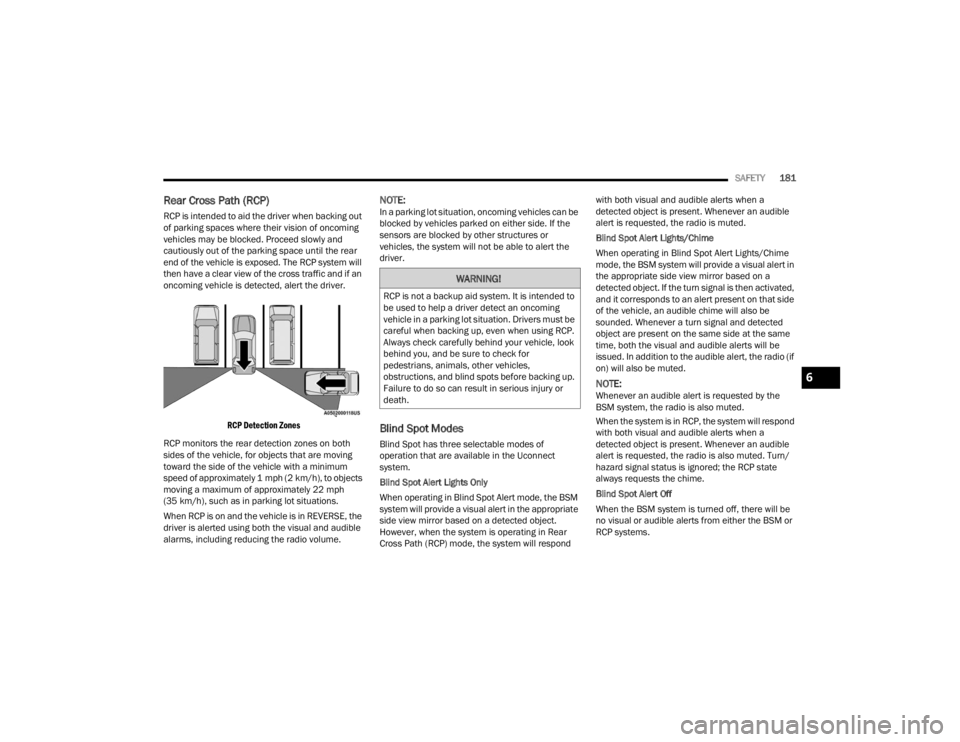
RCP Detection Zones
RCP monitors the rear detection zones on both
sides of the vehicle, for objects that are moving
toward the side of the vehicle with a minimum
speed of approximately 1 mph (2 km/h), to objects
moving a maximum of approximately 22 mph
(35 km/h), such as in parking lot situations.
When RCP is on and the vehicle is in REVERSE, the
driver is alerted using both the visual and audible
alarms, including reducing the radio volume.
NOTE:In a parking lot situation, oncoming vehicles can be
blocked by vehicles parked on either side. If the
sensors are blocked by other structures or
vehicles, the system will not be able to alert the
driver.
Blind Spot Modes
Blind Spot has three selectable modes of
operation that are available in the Uconnect
system.
Blind Spot Alert Lights Only
When operating in Blind Spot Alert mode, the BSM
system will provide a visual alert in the appropriate
side view mirror based on a detected object.
However, when the system is operating in Rear
Cross Path (RCP) mode, the system will respond with both visual and audible alerts when a
detected object is present. Whenever an audible
alert is requested, the radio is muted.
Blind Spot Alert Lights/Chime
When operating in Blind Spot Alert Lights/Chime
mode, the BSM system will provide a visual alert in
the appropriate side view mirror based on a
detected object. If the turn signal is then activated,
and it corresponds to an alert present on that side
of the vehicle, an audible chime will also be
sounded. Whenever a turn signal and detected
object are present on the same side at the same
time, both the visual and audible alerts will be
issued. In addition to the audible alert, the radio (if
on) will also be muted.
NOTE:Whenever an audible alert is requested by the
BSM system, the radio is also muted.
When the system is in RCP, the system will respond
with both visual and audible alerts when a
detected object is present. Whenever an audible
alert is requested, the radio is also muted. Turn/
hazard signal status is ignored; the RCP state
always requests the chime.
Blind Spot Alert Off
When the BSM system is turned off, there will be
no visual or audible alerts from either the BSM or
RCP systems.
WARNING!
RCP is not a backup aid system. It is intended to
be used to help a driver detect an oncoming
vehicle in a parking lot situation. Drivers must be
careful when backing up, even when using RCP.
Always check carefully behind your vehicle, look
behind you, and be sure to check for
pedestrians, animals, other vehicles,
obstructions, and blind spots before backing up.
Failure to do so can result in serious injury or
death.
6
22_FD_OM_EN_USC_t.book Page 181