radio FIAT 500X 2022 Owner's Guide
[x] Cancel search | Manufacturer: FIAT, Model Year: 2022, Model line: 500X, Model: FIAT 500X 2022Pages: 312, PDF Size: 13.26 MB
Page 179 of 312

SAFETY177
ESC Operation Modes
To disable ESC and other active safety systems,
follow the instruction below.
There are two operation modes of active safety
systems on the vehicle:
ESC On
Partial Off ESC On
All active safety systems are enabled. This is the
normal operating mode when driving a vehicle.
This mode should be used in most driving
conditions. The system will be in "ESC On" mode
every time the engine is started
NOTE:You are advised to select "Partial Off " mode only
for specific driving requirements.
Partial Off
By pressing the ESC OFF button located below the
radio screen when driving, the intervention of the
ESC and TCS systems is limited to braking action
on the single wheels.
The other systems remain enabled. Activation of
this mode is indicated by the warning lamp on the
instrument panel switching on (if equipped,
together with a message on the display).
To restore "ESC On" operating mode, press the
button below the radio screen again.
"ESC On" mode will automatically reactivate every
time the engine is started.
NOTE:When traveling on snowy roads with snow chains,
it may be helpful to activate "Partial Off" mode: in
these conditions, you can obtain better traction by
slipping the drive wheels.
Hill Start Assist (HSA)
HSA is designed to mitigate roll back from a
complete stop while on an incline. If the driver
releases the brake while stopped on an incline,
HSA will continue to hold the brake pressure for a
short period. If the driver does not apply the
throttle before this time expires, the system will
release brake pressure and the vehicle will roll
down the hill as normal.
The following conditions must be met in order for
HSA to activate:
The feature must be enabled.
The vehicle must be stopped.
The parking brake must be off.
The driver door must be closed.
The vehicle must be on a sufficient grade.
Vehicle modifications, or failure to properly
maintain your vehicle, may change the
handling characteristics of your vehicle, and
may negatively affect the performance of the
ESC system. Changes to the steering system,
suspension, braking system, tire type and size
or wheel size may adversely affect ESC perfor
-
mance. Improperly inflated and unevenly worn
tires may also degrade ESC performance. Any
vehicle modification or poor vehicle mainte -
nance that reduces the effectiveness of the
ESC system can increase the risk of loss of
vehicle control, vehicle rollover, personal
injury and death.
WARNING!WARNING!
When in “Partial Off” mode, the TCS functionality
of ESC, except for the limited slip feature
described in the Traction Control System (TCS)
section, has been disabled and the ESC OFF
Indicator Light will be illuminated. When in
“Partial Off” mode, the engine power reduction
feature of TCS is disabled, and the enhanced
vehicle stability offered by the ESC system is
reduced.
6
22_FD_OM_EN_USC_t.book Page 177
Page 181 of 312
SAFETY179
NOTE:
The BSM system DOES NOT alert the driver
about rapidly approaching vehicles that are
outside the detection zones.
If a trailer is connected to the vehicle, it is neces -
sary to deactivate BSM system manually by
settings menu to avoid a misdetection
Ú page 123.
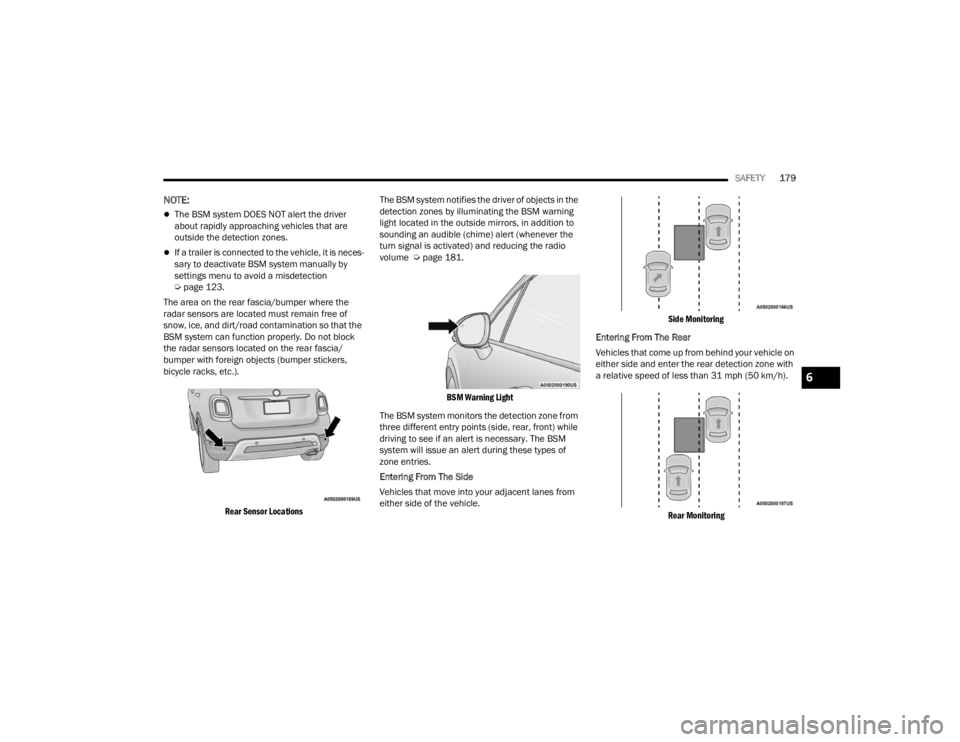
The area on the rear fascia/bumper where the
radar sensors are located must remain free of
snow, ice, and dirt/road contamination so that the
BSM system can function properly. Do not block
the radar sensors located on the rear fascia/
bumper with foreign objects (bumper stickers,
bicycle racks, etc.).
Rear Sensor Locations
The BSM system notifies the driver of objects in the
detection zones by illuminating the BSM warning
light located in the outside mirrors, in addition to
sounding an audible (chime) alert (whenever the
turn signal is activated) and reducing the radio
volume Ú
page 181.
BSM Warning Light
The BSM system monitors the detection zone from
three different entry points (side, rear, front) while
driving to see if an alert is necessary. The BSM
system will issue an alert during these types of
zone entries.
Entering From The Side
Vehicles that move into your adjacent lanes from
either side of the vehicle.
Side Monitoring
Entering From The Rear
Vehicles that come up from behind your vehicle on
either side and enter the rear detection zone with
a relative speed of less than 31 mph (50 km/h).
Rear Monitoring
6
22_FD_OM_EN_USC_t.book Page 179
Page 183 of 312
SAFETY181
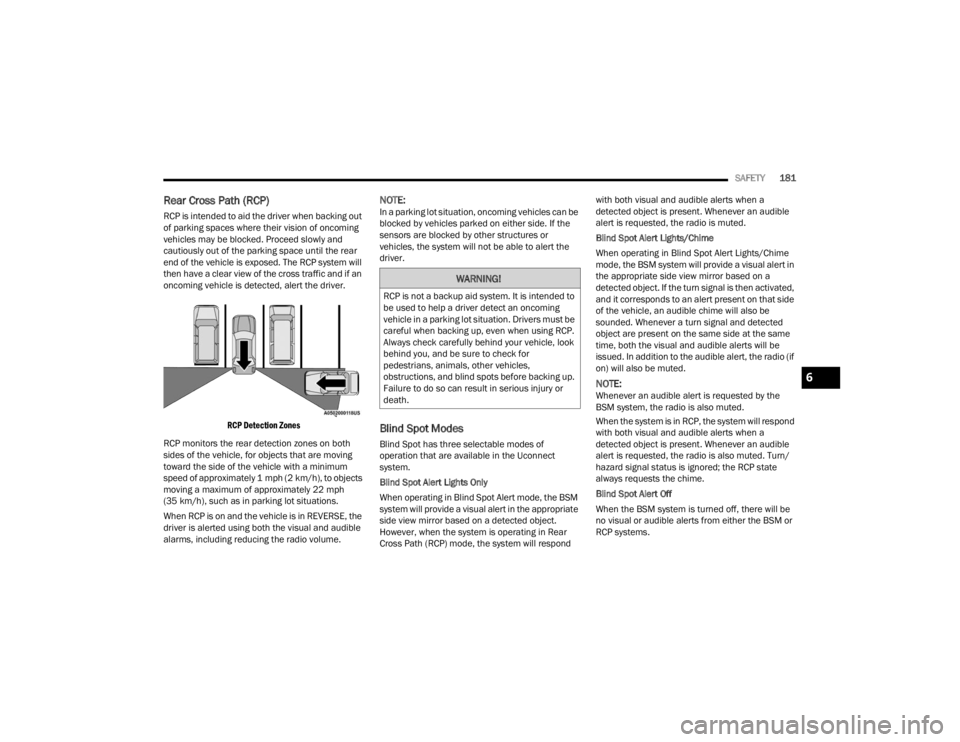
Rear Cross Path (RCP)
RCP is intended to aid the driver when backing out
of parking spaces where their vision of oncoming
vehicles may be blocked. Proceed slowly and
cautiously out of the parking space until the rear
end of the vehicle is exposed. The RCP system will
then have a clear view of the cross traffic and if an
oncoming vehicle is detected, alert the driver.
RCP Detection Zones
RCP monitors the rear detection zones on both
sides of the vehicle, for objects that are moving
toward the side of the vehicle with a minimum
speed of approximately 1 mph (2 km/h), to objects
moving a maximum of approximately 22 mph
(35 km/h), such as in parking lot situations.
When RCP is on and the vehicle is in REVERSE, the
driver is alerted using both the visual and audible
alarms, including reducing the radio volume.
NOTE:In a parking lot situation, oncoming vehicles can be
blocked by vehicles parked on either side. If the
sensors are blocked by other structures or
vehicles, the system will not be able to alert the
driver.
Blind Spot Modes
Blind Spot has three selectable modes of
operation that are available in the Uconnect
system.
Blind Spot Alert Lights Only
When operating in Blind Spot Alert mode, the BSM
system will provide a visual alert in the appropriate
side view mirror based on a detected object.
However, when the system is operating in Rear
Cross Path (RCP) mode, the system will respond with both visual and audible alerts when a
detected object is present. Whenever an audible
alert is requested, the radio is muted.
Blind Spot Alert Lights/Chime
When operating in Blind Spot Alert Lights/Chime
mode, the BSM system will provide a visual alert in
the appropriate side view mirror based on a
detected object. If the turn signal is then activated,
and it corresponds to an alert present on that side
of the vehicle, an audible chime will also be
sounded. Whenever a turn signal and detected
object are present on the same side at the same
time, both the visual and audible alerts will be
issued. In addition to the audible alert, the radio (if
on) will also be muted.
NOTE:Whenever an audible alert is requested by the
BSM system, the radio is also muted.
When the system is in RCP, the system will respond
with both visual and audible alerts when a
detected object is present. Whenever an audible
alert is requested, the radio is also muted. Turn/
hazard signal status is ignored; the RCP state
always requests the chime.
Blind Spot Alert Off
When the BSM system is turned off, there will be
no visual or audible alerts from either the BSM or
RCP systems.
WARNING!
RCP is not a backup aid system. It is intended to
be used to help a driver detect an oncoming
vehicle in a parking lot situation. Drivers must be
careful when backing up, even when using RCP.
Always check carefully behind your vehicle, look
behind you, and be sure to check for
pedestrians, animals, other vehicles,
obstructions, and blind spots before backing up.
Failure to do so can result in serious injury or
death.
6
22_FD_OM_EN_USC_t.book Page 181
Page 184 of 312

182SAFETY
NOTE:The BSM system will store the current operating
mode when the vehicle is shut off. Each time the
vehicle is started the previously stored mode will
be recalled and used.
Blind Spot Monitoring Fault Warnings
Blinded Sensor
In the case of a blinded sensor:
BSM Mirror Warning Lights are turned on contin -
uously.
An instrument cluster message will display
“Blind Spot Monitoring Unavailable - Wipe Rear
Bumper Corners.”
NOTE:The rear fascia/bumper must be clean and free of
any obstructing debris.
System Not Available
In the case of the system being temporarily
unavailable:
BSM Mirror Warning Lights are turned on contin -
uously.
An instrument cluster message will display
“Blind Spot Monitoring Temporarily Unavail -
able.” In the case of the system being completely
unavailable:
A chime will turn on.
An instrument cluster message will display
“Blind Spot Monitoring Unavailable - Service
Required.”
NOTE:The vehicle must be taken to the nearest autho
-
rized dealer for service.
FULL BRAKE CONTROL SYSTEM WITH
M
ITIGATION
The Full Brake Control system with Mitigation
provides the driver with audible warnings (through
the radio), visual warnings (within the instrument
cluster display), and may apply a brake jerk to warn
the driver when it detects a potential frontal
collision. The warnings and limited braking are
intended to provide the driver with enough time to
react, avoid or mitigate the potential collision.
NOTE:
The Full Brake Control system monitors the
information from the forward looking sensors as
well as the Electronic Brake Controller (EBC), to
calculate the probability of a forward collision.
When the system determines that a forward
collision is probable, the driver will be provided with audible and visual warnings and may
provide a brake jerk warning.
If the driver does not take action based upon
these progressive warnings, then the system
will provide a limited level of active braking to
help slow the vehicle and mitigate the potential
forward collision. If the driver reacts to the warn
-
ings by braking and the system determines that
the driver intends to avoid the collision by
braking but has not applied sufficient brake
force, the system will compensate and provide
additional brake force as required.
After the end of the intervention of automatic
braking, the transmission may remain in last gear
stored; therefore the car could lurch forward, once
the brakes release a few seconds later. If the Full
Brake Control system event stops the vehicle
completely, the system will hold the vehicle at
standstill for two seconds and then release the
brakes.
If a Full Brake Control system event begins at a
speed below 26 mph (42 km/h), the system may
provide the maximum braking possible to mitigate
the potential forward collision. If the Full Brake
Control system event stops the vehicle completely,
the system will hold the vehicle at standstill for two
seconds and then release the brakes.
22_FD_OM_EN_USC_t.book Page 182
Page 189 of 312

SAFETY187
NOTE:
The TPMS is not intended to replace normal tire
care and maintenance, or to provide warning of
a tire failure or condition.
The TPMS should not be used as a tire pressure
gauge while adjusting your tire pressure.
Driving on a significantly underinflated tire
causes the tire to overheat and can lead to tire
failure. Underinflation also reduces fuel effi -
ciency and tire tread life, and may affect the
vehicle’s handling and stopping ability.
The TPMS is not a substitute for proper tire
maintenance, and it is the driver’s responsibility
to maintain correct tire pressure using an accu -
rate tire gauge, even if underinflation has not
reached the level to trigger illumination of the
Tire Pressure Monitoring System Warning Light.
Seasonal temperature changes will affect tire
pressure, and the TPMS will monitor the actual
tire pressure in the tire.
Base System
This is the TPMS Warning Light located in
the instrument cluster.
The TPMS uses wireless technology with wheel rim
mounted electronic sensors to monitor tire
pressure levels. Sensors, mounted to each wheel as part of the valve stem, transmit tire pressure
readings to the receiver module.
NOTE:It is particularly important for you to check the tire
pressure in all of the tires on your vehicle regularly
and to maintain the proper pressure.
The TPMS consists of the following components:
Receiver module.
Four Tire Pressure Monitoring System sensors.
Tire Pressure Monitoring System Warning Light.
TIRE PRESSURE MONITORING SYSTEM LOW
PRESSURE WARNINGS
The Tire Pressure Monitoring System Warning Light
will illuminate in the instrument cluster, an
acoustic signal will be activated, and the “Check
left or right front/rear tire” text message will
display when one or more of the four active road
tire pressures are low. Should this occur, you
should stop as soon as possible, check the
inflation pressure of each tire on your vehicle, and
inflate each tire to the vehicle’s recommended
cold placard pressure value. The system will
automatically update and the Tire Pressure
Monitoring Warning Light will extinguish once the
updated tire pressures have been received. The
vehicle may need to be driven for up to 20 minutes
above 15 mph (24 km/h) to receive this
information.
CHECK TPMS WARNINGS
The Tire Pressure Monitoring System Warning Light
will flash on and off for 75 seconds and remain on
solid when a system fault is detected, an audible
chime will be activated and the “Service Tire
Pressure Monitoring System” text message will
display. If the ignition is cycled, this sequence will
repeat providing the system fault still exists. The
Tire Pressure Monitoring System Warning Light will
turn off when the fault condition no longer exists. A
system fault can occur with any of the following
scenarios:
Jamming due to electronic devices or driving
next to facilities emitting the same radio
frequencies as the TPMS sensors.
Installing some form of aftermarket window
tinting that affects radio wave signals.
Snow or ice around the wheels or wheel hous
-
ings.
Using tire chains on the vehicle.
Using wheels/tires not equipped with TPMS
sensors.
NOTE:Your vehicle may be equipped with a compact
spare wheel and tire assembly.
The compact spare tire does not have a Tire
Pressure Monitoring System sensor. Therefore,
the TPMS will not monitor the tire pressure in
the compact spare tire.
6
22_FD_OM_EN_USC_t.book Page 187
Page 199 of 312

SAFETY197
(Continued)
This vehicle may be equipped with a driver and/or
front passenger seat belt buckle switch that
detects whether the driver or front passenger seat
belt is buckled. The seat belt buckle switch may
adjust the inflation rate of the Advanced Front Air
Bags.
This vehicle may be equipped with driver and/or
front passenger seat track position sensors that
may adjust the inflation rate of the Advanced Front
Air Bags based upon seat position.
Front Air Bag Operation
Front Air Bags are designed to provide additional
protection by supplementing the seat belts. Front
air bags are not expected to reduce the risk of
injury in rear, side, or rollover collisions. The front
air bags will not deploy in all frontal collisions,
including some that may produce substantial
vehicle damage — for example, some pole
collisions, truck underrides, and angle offset
collisions.
On the other hand, depending on the type and
location of impact, front air bags may deploy in
crashes with little vehicle front-end damage but
that produce a severe initial deceleration.
Because air bag sensors measure vehicle
deceleration over time, vehicle speed and damage
by themselves are not good indicators of whether
or not an air bag should have deployed. Seat belts are necessary for your protection in all
collisions, and also are needed to help keep you in
position, away from an inflating air bag.
When the Occupants Restraint Controller (ORC)
detects a collision requiring the front air bags, it
signals the inflator units. A large quantity of
non-toxic gas is generated to inflate the front air
bags.
The steering wheel hub trim cover and the upper
passenger side of the instrument panel separate
and fold out of the way as the air bags inflate to
their full size. The front air bags fully inflate in less
time than it takes to blink your eyes. The front air
bags then quickly deflate while helping to restrain
the driver and front passenger.
Knee Impact Bolsters
The Knee Impact Bolsters help protect the knees
of the driver and front passenger, and position the
front occupants for improved interaction with the
front air bags.
WARNING!
No objects should be placed over or near the
air bag on the instrument panel or steering
wheel because any such objects could cause
harm if the vehicle is in a collision severe
enough to cause the air bag to inflate.
Do not put anything on or around the air bag
covers or attempt to open them manually. You
may damage the air bags and you could be
injured because the air bags may no longer be
functional. The protective covers for the air
bag cushions are designed to open only when
the air bags are inflating.
Relying on the air bags alone could lead to
more severe injuries in a collision. The air
bags work with your seat belt to restrain you
properly. In some collisions, air bags won’t
deploy at all. Always wear your seat belts even
though you have air bags.
WARNING!
WARNING!
Do not drill, cut, or tamper with the knee
impact bolsters in any way.
Do not mount any accessories to the knee
impact bolsters such as alarm lights, stereos,
citizen band radios, etc.
6
22_FD_OM_EN_USC_t.book Page 197
Page 220 of 312
218 (Continued)
IN CASE OF EMERGENCY
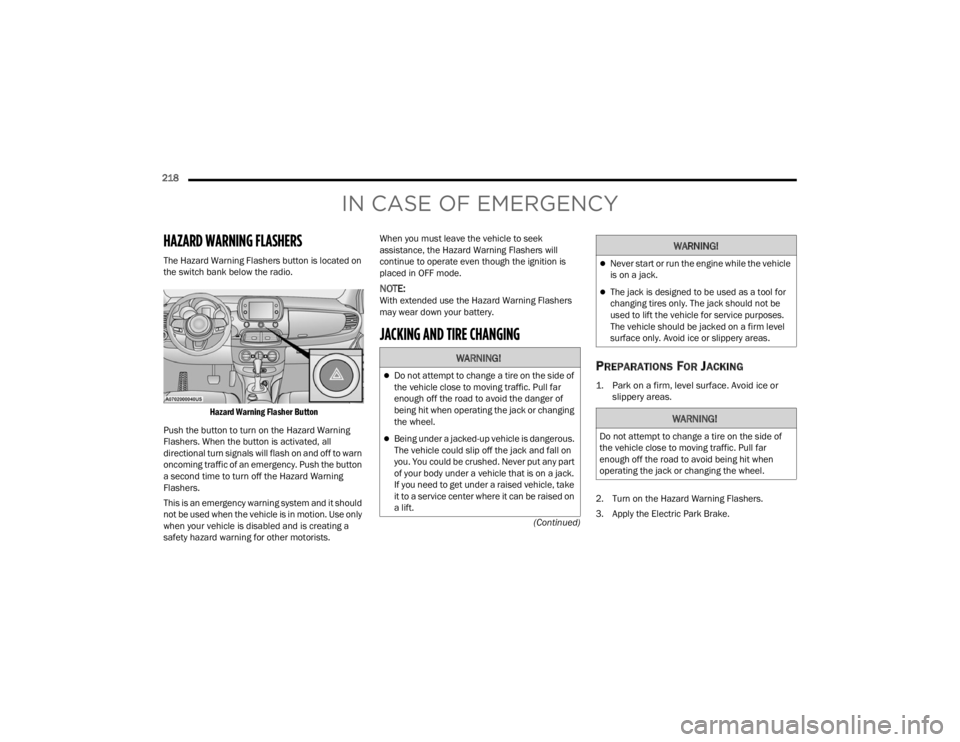
HAZARD WARNING FLASHERS
The Hazard Warning Flashers button is located on
the switch bank below the radio.
Hazard Warning Flasher Button
Push the button to turn on the Hazard Warning
Flashers. When the button is activated, all
directional turn signals will flash on and off to warn
oncoming traffic of an emergency. Push the button
a second time to turn off the Hazard Warning
Flashers.
This is an emergency warning system and it should
not be used when the vehicle is in motion. Use only
when your vehicle is disabled and is creating a
safety hazard warning for other motorists. When you must leave the vehicle to seek
assistance, the Hazard Warning Flashers will
continue to operate even though the ignition is
placed in OFF mode.
NOTE:With extended use the Hazard Warning Flashers
may wear down your battery.
JACKING AND TIRE CHANGING
PREPARATIONS FOR JACKING
1. Park on a firm, level surface. Avoid ice or
slippery areas.
2. Turn on the Hazard Warning Flashers.
3. Apply the Electric Park Brake.
WARNING!
Do not attempt to change a tire on the side of
the vehicle close to moving traffic. Pull far
enough off the road to avoid the danger of
being hit when operating the jack or changing
the wheel.
Being under a jacked-up vehicle is dangerous.
The vehicle could slip off the jack and fall on
you. You could be crushed. Never put any part
of your body under a vehicle that is on a jack.
If you need to get under a raised vehicle, take
it to a service center where it can be raised on
a lift.
Never start or run the engine while the vehicle
is on a jack.
The jack is designed to be used as a tool for
changing tires only. The jack should not be
used to lift the vehicle for service purposes.
The vehicle should be jacked on a firm level
surface only. Avoid ice or slippery areas.
WARNING!
Do not attempt to change a tire on the side of
the vehicle close to moving traffic. Pull far
enough off the road to avoid being hit when
operating the jack or changing the wheel.
WARNING!
22_FD_OM_EN_USC_t.book Page 218
Page 229 of 312
IN CASE OF EMERGENCY227
NOTE:When using a portable battery booster pack follow
the manufacturer’s operating instructions and
precautions.
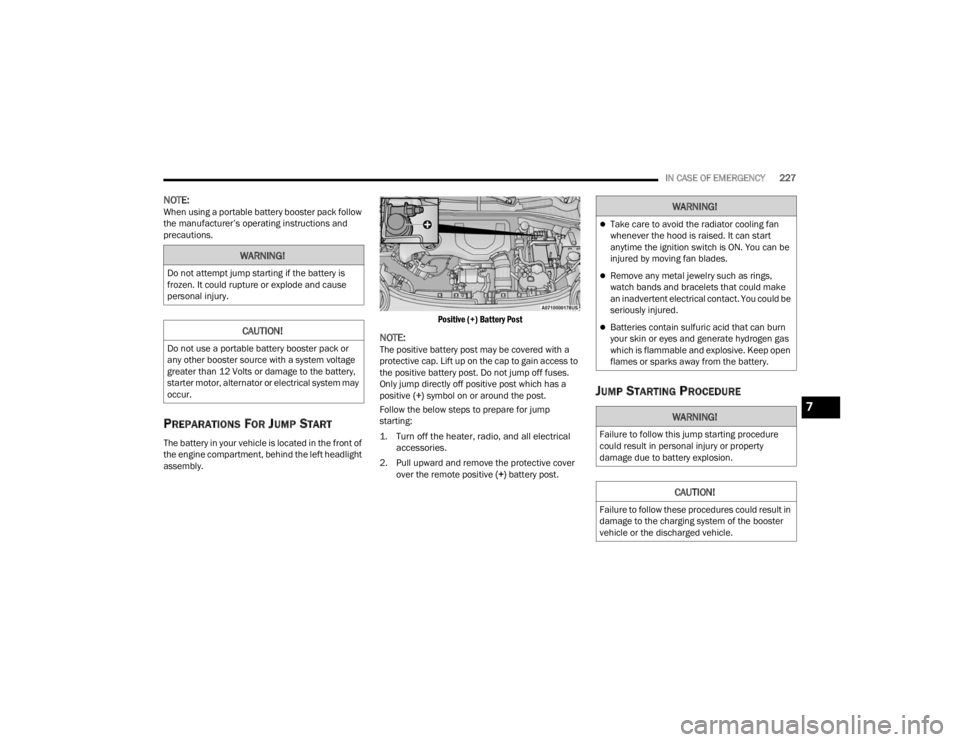
PREPARATIONS FOR JUMP START
The battery in your vehicle is located in the front of
the engine compartment, behind the left headlight
assembly.
Positive (+) Battery Post
NOTE:The positive battery post may be covered with a
protective cap. Lift up on the cap to gain access to
the positive battery post. Do not jump off fuses.
Only jump directly off positive post which has a
positive
(+) symbol on or around the post.
Follow the below steps to prepare for jump
starting:
1. Turn off the heater, radio, and all electrical accessories.
2. Pull upward and remove the protective cover over the remote positive (+) battery post.
JUMP STARTING PROCEDURE
WARNING!
Do not attempt jump starting if the battery is
frozen. It could rupture or explode and cause
personal injury.
CAUTION!
Do not use a portable battery booster pack or
any other booster source with a system voltage
greater than 12 Volts or damage to the battery,
starter motor, alternator or electrical system may
occur.
WARNING!
Take care to avoid the radiator cooling fan
whenever the hood is raised. It can start
anytime the ignition switch is ON. You can be
injured by moving fan blades.
Remove any metal jewelry such as rings,
watch bands and bracelets that could make
an inadvertent electrical contact. You could be
seriously injured.
Batteries contain sulfuric acid that can burn
your skin or eyes and generate hydrogen gas
which is flammable and explosive. Keep open
flames or sparks away from the battery.
WARNING!
Failure to follow this jump starting procedure
could result in personal injury or property
damage due to battery explosion.
CAUTION!
Failure to follow these procedures could result in
damage to the charging system of the booster
vehicle or the discharged vehicle.
7
22_FD_OM_EN_USC_t.book Page 227
Page 290 of 312

288SERVICING AND MAINTENANCE
Cleaning Plastic Instrument Cluster
Lenses
The lenses in front of the instruments in this
vehicle are molded in clear plastic. When cleaning
the lenses, care must be taken to avoid scratching
the plastic.
Clean with a wet soft cloth. A mild soap solution
may be used, but do not use high alcohol content
or abrasive cleaners. If soap is used, wipe clean
with a clean damp cloth. Dry with a soft cloth.
LEATHER SURFACES
Mopar® Total Clean is specifically recommended
for leather upholstery.
Your leather upholstery can be best preserved by
regular cleaning with a damp soft cloth. Small
particles of dirt can act as an abrasive and damage
the leather upholstery and should be removed
promptly with a damp cloth. Stubborn soils can be
removed easily with a soft cloth and Mopar® Total
Clean. Care should be taken to avoid soaking your
leather upholstery with any liquid. Please do not
use polishes, oils, cleaning fluids, solvents,
detergents, or ammonia-based cleaners to clean
your leather upholstery.
NOTE:If equipped with light colored leather, it tends to
show any foreign material, dirt, and fabric dye
transfer more so than darker colors. The leather is
designed for easy cleaning, and the manufacturer
recommends Mopar® total care leather cleaner
applied on a cloth to clean the leather seats as
needed.GLASS SURFACES
All glass surfaces should be cleaned on a regular
basis with Mopar® Glass Cleaner, or any
commercial household-type glass cleaner. Never
use an abrasive type cleaner. Use caution when
cleaning the inside rear window equipped with
electric defrosters or windows equipped with radio
antennas. Do not use scrapers or other sharp
instruments that may scratch the elements.
When cleaning the rear view mirror, spray cleaner
on the towel or cloth that you are using. Do not
spray cleaner directly on the mirror.
CAUTION!
Do not use Alcohol and Alcohol-based and/or
Ketone based cleaning products to clean leather
upholstery, as damage to the upholstery may
result.
22_FD_OM_EN_USC_t.book Page 288
Page 299 of 312

CUSTOMER ASSISTANCE297
To access your Owner's Information online, visit
www.mopar.com/om (US) or
www.owners.mopar.ca (Canada).
Or
Call Tech Authority toll free at:
1-800-890-4038 (US)
Owner's Manuals, Radio Manuals and Warranty
Information Books can be ordered through
Archway at:
1-800-387-1143 (Canada)
GENERAL INFORMATION
RADIO
The following regulatory statement applies to
RADIO devices equipped in this vehicle:
FCC ID: Y70VP2RFP
IC: 7812H-VP2RFP
This device complies with Part 15 of the FCC Rules
and with Innovation, Science and Economic
Development Canada license-exempt RSS
standard(s). Operation is subject to the following
two conditions:
1. This device may not cause harmful interference, and
2. This device must accept any interference received, including interference that may
cause undesired operation. Le présent appareil est conforme aux CNR
d`Innovation, Science and Economic Development
applicables aux appareils radio exempts de
licence. L'exploitation est autorisée aux deux
conditions suivantes:
1. l'appareil ne doit pas produire de brouillage,
et
2. l'utilisateur de l'appareil doit accepter tout brouillage radioélectrique subi, même si le
brouillage est susceptible d'en compromettre
le fonctionnement.
La operación de este equipo está sujeta a las
siguientes dos condiciones:
1. es posible que este equipo o dispositivo no cause interferencia perjudicial y
2. este equipo o dispositivo debe aceptar cualquier interferencia, incluyendo la que
pueda causar su operación no deseada.
RF Exposure Requirements
To comply with FCC RF exposure compliance
requirements, the device must be installed and
operated to provide a separation distance of at
least 20 cm from all persons.
This equipment complies with Canada radiation
exposure limits set forth for an uncontrolled
environment. This equipment should be installed
and operated with minimum distance 20 cm
between the radiator and your body. Déclaration d’exposition aux radiations
Cet équipement est conforme aux limites
d’exposition aux rayonnements ISED établies pour
un environnement non contrôlé. Cet équipement
doit être installé et utilisé avec un minimum de
20 cm de distance entre la source de rayonnement
et votre corps
NOTE:Changes or modifications not expressly approved
by the party responsible for compliance could void
the user’s authority to operate the equipment.
NOTE:Remarque: Les changements ou modifications
non expressément approuvés par la partie
responsable de la conformité peuvent annuler
l'autorisation de l'utilisateur à utiliser l'équi
-
pement.
ACC and FCW
This device complies with Part 15 of the FCC Rules
and with Industry Canada license-exempt RSS
standard(s). Operation is subject to the following
two conditions:
1. this device must not cause interference, and
2. this device must accept any interference, including interference that may cause
undesired operation of the device.
10
22_FD_OM_EN_USC_t.book Page 297