RON FIAT 500X 2022 Repair Manual
[x] Cancel search | Manufacturer: FIAT, Model Year: 2022, Model line: 500X, Model: FIAT 500X 2022Pages: 312, PDF Size: 13.26 MB
Page 105 of 312

STARTING AND OPERATING103
becomes inactive. When the vehicle is moving
forward, the system will remain active until the
vehicle speed remains below approximately
11 mph (18 km/h). Reducing the speed
approximately below 9 mph (15 km/h), the system
will come back active. When the vehicle is moving
in REVERSE, the system will remain active as long
as the speed remains below the maximum
operating speed of 7 mph (11 km/h). When the
maximum speed limit is exceeded, the system is
disabled and the Park Assist switch LED will
illuminate. The system will become active again if
the vehicle speed reduces below approximately
6 mph (9 km/h).
PARK ASSIST SENSORS
The four Park Assist sensors, located in the rear
fascia/bumper, monitor the area behind the
vehicle that is within the sensors’ field of view. The
sensors can detect obstacles from approximately
12 inches (30 cm) up to 59 inches (150 cm) from
the rear fascia/bumper in the horizontal direction,
depending on the location, type and orientation of
the obstacle. The four Park Assist sensors, located in the front
fascia/bumper (if equipped), monitor the area in
front of the vehicle that is within the sensors’ field
of view. The sensors can detect obstacles from
approximately 12 inches (30 cm) up to 39 inches
(100 cm) from the front fascia/bumper in the
horizontal direction, depending on the location,
type and orientation of the obstacle.
PARK ASSIST WARNING DISPLAY
The Park Assist Warning screen will only be
displayed if “Sound and Display” is selected from
the Uconnect system Ú page 123.
The Park Assist Warning screen is located within
the instrument cluster display. It provides visual
warnings to indicate the distance between the rear
fascia/bumper and/or front fascia/bumper and
the detected obstacle Ú page 64.
PARK ASSIST DISPLAY
The Park Assist warning screen will be displayed
when an obstacle is detected while the vehicle is in
DRIVE or REVERSE, as long as the vehicle speed is
below 7 mph (11 km/h) when in REVERSE and
below 11 mph (18 km/h) when in DRIVE. When the
vehicle is in REVERSE, the Park Assist warning
screen will always be displayed.
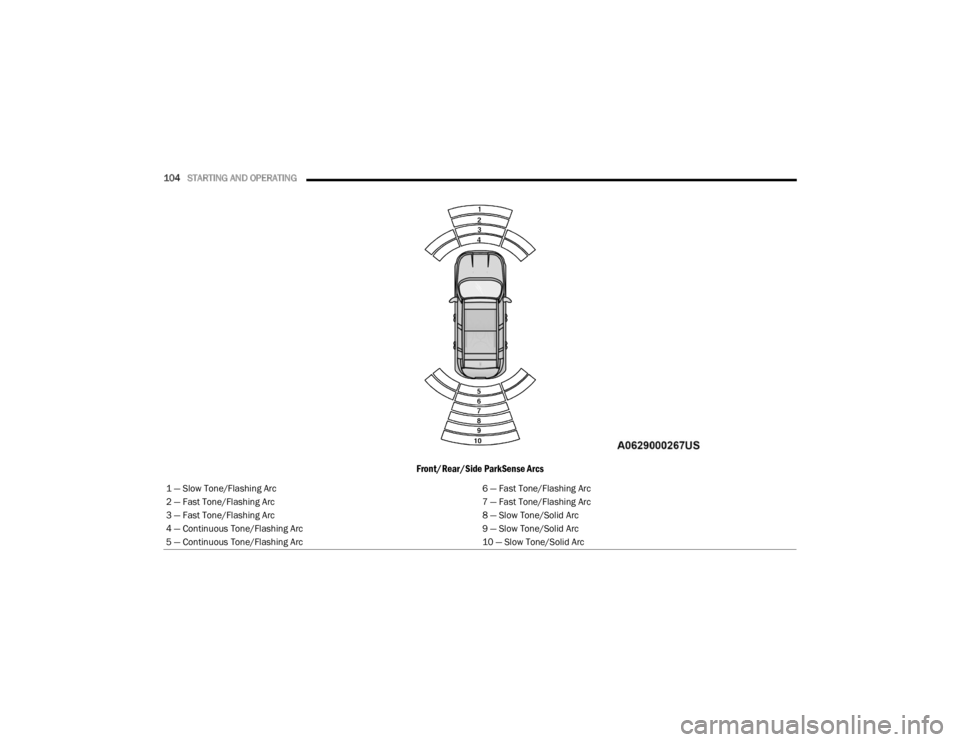
The system will indicate a detected obstacle by
showing a single arc in the left and/or right front or
rear regions based on the object’s distance and
location relative to the vehicle.
If an object is detected in the left and/or right front
or rear region, the display will show a single arc in
the left and/or right front or rear region and the
system will produce a tone. As the vehicle moves
closer to the object, the display will show the single
arc moving closer to the vehicle and the tone will
change from a single 1/2 second tone to slow, to
fast, to continuous.
4
22_FD_OM_EN_USC_t.book Page 103
Page 106 of 312
104STARTING AND OPERATING
Front/Rear/Side ParkSense Arcs
1 — Slow Tone/Flashing Arc 6 — Fast Tone/Flashing Arc
2 — Fast Tone/Flashing Arc 7 — Fast Tone/Flashing Arc
3 — Fast Tone/Flashing Arc 8 — Slow Tone/Solid Arc
4 — Continuous Tone/Flashing Arc 9 — Slow Tone/Solid Arc
5 — Continuous Tone/Flashing Arc 10 — Slow Tone/Solid Arc
22_FD_OM_EN_USC_t.book Page 104
Page 107 of 312

STARTING AND OPERATING105
The vehicle is close to the obstacle when the warning display shows one flashing arc and sounds a continuous tone. The following charts show the warning alert
operation when the system is detecting an obstacle:
NOTE:Park Assist will reduce the volume of the radio, if on, when the system is sounding an audible tone.
WARNING ALERTS FOR REAR
Rear Distance (inches/cm) Greater than
59 inches (150 cm) 59-52 inches
(150-130 cm) 52-41 inches
(130-105 cm) 41-34 inches
(105-85 cm) 34-24 inches
(85-60 cm) 24-12 inches
(60-30 cm) Less than
12 inches (30 cm)
Arcs — Left NoneNoneNoneNoneNone 6th Flashing 5th Flashing
Arcs — Center None10th Solid 9th Solid 8th Solid 7th Flashing 6th Flashing 5th Flashing
Arcs — Right NoneNoneNoneNoneNone 6th Flashing 5th Flashing
Audible Alert Chime None Audible chime increases as the object gets closer to the vehicle Continuous
Radio Volume Reduced No
Yes
WARNING ALERTS FOR FRONT
Front Distance
(inches/cm) Greater than
39 inches (100 cm) 39-32 inches
(100-80 cm) 32-24 inches
(80-60 cm) 24-12 inches
(60-30 cm) Less than 12 inches
(30 cm)
Arcs — Left NoneNoneNone3rd Flashing 4th Flashing
Arcs — Center None1st Solid2nd Flashing 3rd Flashing4th Flashing
Arcs — Right NoneNoneNone3rd Flashing 4th Flashing
Audible Alert Chime NoneAudible chime increases as the object gets close to the vehicle Continuous
Radio Volume Reduced No Yes
4
22_FD_OM_EN_USC_t.book Page 105
Page 108 of 312

106STARTING AND OPERATING
Front Park Assist Audible Alerts
Park Assist will turn off the Front Park Assist
audible alert (chime) after approximately three
seconds when an obstacle has been detected, the
vehicle is stationary, and brake pedal is applied. If
the obstacle has been detected within less than
12 inches (30 cm), then the Park Assist will not
turn off the Front Park Assist audible alert.
Adjustable Chime Volume Settings
Front and Rear chime volume settings can be
selected from the Customer-Programmable
Features section of the Uconnect system
Ú page 123.
If the Uconnect system is equipped, chime volume
settings will not be accessible from the instrument
cluster display.
The chime volume settings include low, medium,
and high.
Park Assist will retain its last known configuration
state through ignition cycles.
ENABLING AND DISABLING PARK
A
SSIST
Park Assist can be enabled and disabled
with the Park Assist switch, located on
the switch panel below the Uconnect
display. When the Park Assist switch is pushed to disable
the system, the instrument cluster display will
show the “Park Assist Disabled” message for
approximately five seconds Ú
page 64.
The Park Assist switch LED will be on when the
Park Assist system is disabled or requires service.
The Park Assist switch LED will be off when the
system is enabled. If the Park Assist switch is
pushed, and the system requires service, the Park
Assist switch LED will blink momentarily, and then
the LED will be on.
SERVICE THE PARK ASSIST SYSTEM
During vehicle start up, when the Park Assist System
has detected a faulted condition, the instrument
cluster display will actuate a single chime, once per
ignition cycle, and it will show the "PARK ASSIST
UNAVAILABLE WIPE REAR SENSORS", "PARK ASSIST
UNAVAILABLE WIPE FRONT SENSORS", or the "PARK
ASSIST UNAVAILABLE SERVICE REQUIRED" message
for five seconds.
If "PARK ASSIST UNAVAILABLE WIPE REAR
SENSORS" or "PARK ASSIST UNAVAILABLE WIPE
FRONT SENSORS" appears in the instrument
cluster display make sure the outer surface and
the underside of the rear fascia/bumper and/or
front fascia/bumper is clean and clear of snow,
ice, mud, dirt or other obstruction and then cycle
the ignition. If the message continues to appear
see an authorized dealer. If the "PARK ASSIST UNAVAILABLE SERVICE
REQUIRED" message appears in the instrument
cluster display, see an authorized dealer.
CLEANING THE PARK ASSIST SYSTEM
Clean the Park Assist sensors with water, car wash
soap and a soft cloth. Do not use rough or hard
cloths. Do not scratch or poke the sensors.
Otherwise, you could damage the sensors.
PARK ASSIST SYSTEM USAGE
P
RECAUTIONS
NOTE:
Ensure that the outer surface and the underside
of the front and rear fascia/bumper are clean
and clear of snow, ice, mud, dirt or other
obstruction to keep the Park Assist system oper -
ating properly.
Jackhammers, large trucks, and other vibra -
tions could affect the performance of Rear Park
Assist.
Clean the Park Assist sensors regularly, taking
care not to scratch or damage them. The
sensors must not be covered with ice, snow,
slush, mud, dirt or debris. Failure to do so can
result in the system not working properly. The
Park Assist system might not detect an obstacle
22_FD_OM_EN_USC_t.book Page 106
Page 109 of 312

STARTING AND OPERATING107
(Continued)
(Continued)
behind the fascia/bumper, or it could provide a
false indication that an obstacle is behind the
fascia/bumper.
Objects such as bicycle carriers, etc., must not
be placed within 12 inches (30 cm) from the
rear fascia/bumper while driving the vehicle.
Failure to do so can result in the system misin
-
terpreting a close object as a sensor problem,
causing a failure indication to be displayed in
the instrument cluster. If it is necessary to keep the trailer hitch and hitch
ball assembly mounted for a long period, it is
possible to filter out the trailer hitch and hitch ball
assembly presence within the sensor’s field of
view. The filtering operation must be performed
only by an authorized dealer.
WARNING!
Drivers must be careful when backing up even
when using Park Assist. Always check carefully
behind your vehicle, look behind you, and be
sure to check for pedestrians, animals, other
vehicles, obstructions, and blind spots before
backing up. You are responsible for safety and
must continue to pay attention to your
surroundings. Failure to do so can result in
serious injury or death.
Before using Park Assist, it is strongly recom
-
mended that the ball mount and hitch ball
assembly be disconnected from the vehicle
when the vehicle is not used for towing. Failure
to do so can result in injury or damage to vehi -
cles or obstacles because the hitch ball will be
much closer to the obstacle than the rear fascia
when the vehicle sounds the continuous tone.
Also, the sensors could detect the ball mount
and hitch ball assembly, depending on its size
and shape, giving a false indication that an
obstacle is behind the vehicle.
CAUTION!
Park Assist is only a parking aid and it is
unable to recognize every obstacle, including
small obstacles. Parking curbs might be
temporarily detected or not detected at all.
Obstacles located above or below the sensors
will not be detected when they are in close
proximity.
WARNING!
The vehicle must be driven slowly when using
Park Assist in order to be able to stop in time
when an obstacle is detected. It is recom -
mended that the driver looks over his/her
shoulder when using Park Assist.
CAUTION!
4
22_FD_OM_EN_USC_t.book Page 107
Page 112 of 312
110STARTING AND OPERATING
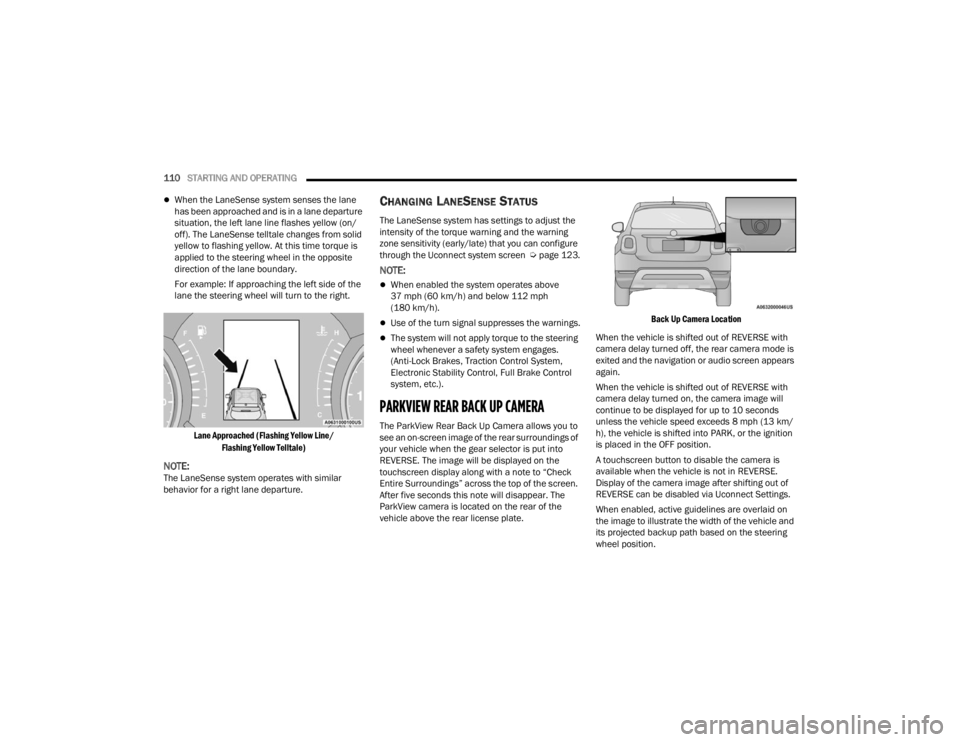
When the LaneSense system senses the lane
has been approached and is in a lane departure
situation, the left lane line flashes yellow (on/
off). The LaneSense telltale changes from solid
yellow to flashing yellow. At this time torque is
applied to the steering wheel in the opposite
direction of the lane boundary.
For example: If approaching the left side of the
lane the steering wheel will turn to the right.
Lane Approached (Flashing Yellow Line/ Flashing Yellow Telltale)
NOTE:The LaneSense system operates with similar
behavior for a right lane departure.
CHANGING LANESENSE STATUS
The LaneSense system has settings to adjust the
intensity of the torque warning and the warning
zone sensitivity (early/late) that you can configure
through the Uconnect system screen Úpage 123.
NOTE:
When enabled the system operates above
37 mph (60 km/h) and below 112 mph
(180 km/h).
Use of the turn signal suppresses the warnings.
The system will not apply torque to the steering
wheel whenever a safety system engages.
(Anti-Lock Brakes, Traction Control System,
Electronic Stability Control, Full Brake Control
system, etc.).
PARKVIEW REAR BACK UP CAMERA
The ParkView Rear Back Up Camera allows you to
see an on-screen image of the rear surroundings of
your vehicle when the gear selector is put into
REVERSE. The image will be displayed on the
touchscreen display along with a note to “Check
Entire Surroundings” across the top of the screen.
After five seconds this note will disappear. The
ParkView camera is located on the rear of the
vehicle above the rear license plate.
Back Up Camera Location
When the vehicle is shifted out of REVERSE with
camera delay turned off, the rear camera mode is
exited and the navigation or audio screen appears
again.
When the vehicle is shifted out of REVERSE with
camera delay turned on, the camera image will
continue to be displayed for up to 10 seconds
unless the vehicle speed exceeds 8 mph (13 km/
h), the vehicle is shifted into PARK, or the ignition
is placed in the OFF position.
A touchscreen button to disable the camera is
available when the vehicle is not in REVERSE.
Display of the camera image after shifting out of
REVERSE can be disabled via Uconnect Settings.
When enabled, active guidelines are overlaid on
the image to illustrate the width of the vehicle and
its projected backup path based on the steering
wheel position.
22_FD_OM_EN_USC_t.book Page 110
Page 114 of 312

112STARTING AND OPERATING
3. Fill the vehicle with fuel, and when the fuel nozzle “clicks” or shuts off, the fuel tank is full.
NOTE:Wait five seconds before removing the fuel nozzle
to allow fuel to drain from nozzle.
4. Pull the nozzle from the filler pipe and then close the door.
VEHICLE LOADING
CERTIFICATION LABEL
As required by National Highway Traffic Safety
Administration regulations, your vehicle has a
certification label affixed to the driver's side door or
pillar Ú page 273.
This label contains the month and year of
manufacture, Gross Vehicle Weight Rating
(GVWR), Gross Axle Weight Rating (GAWR) front
and rear, and Vehicle Identification Number (VIN).
A Month-Day-Hour (MDH) number is included on
this label and indicates the Month, Day and Hour of
manufacture. The bar code that appears on the
bottom of the label is your VIN.
Gross Vehicle Weight Rating (GVWR)
The GVWR is the total permissible weight of your
vehicle including driver, passengers, vehicle,
options and cargo. The label also specifies
maximum capacities of front and rear axle systems
(GAWR). Total load must be limited so GVWR and
front and rear GAWR are not exceeded.
Payload
The payload of a vehicle is defined as the allowable
load weight a truck can carry, including the weight
of the driver, all passengers, options and cargo.
Gross Axle Weight Rating (GAWR)
The GAWR is the maximum permissible load on the
front and rear axles. The load must be distributed
in the cargo area so that the GAWR of each axle is
not exceeded.
Each axle GAWR is determined by the components
in the system with the lowest load carrying capacity
(axle, springs, tires or wheels). Heavier axles or
suspension components sometimes specified by
purchasers for increased durability does not
necessarily increase the vehicle's GVWR.
Tire Size
The tire size on the Vehicle Certification Label
represents the actual tire size on your vehicle.
Replacement tires must be equal to the load
capacity of this tire size.
Rim Size
This is the rim size that is appropriate for the tire
size listed.
Inflation Pressure
This is the cold tire inflation pressure for your
vehicle for all loading conditions up to full GAWR.
Curb Weight
The curb weight of a vehicle is defined as the total
weight of the vehicle with all fluids, including
vehicle fuel, at full capacity conditions, and with no
occupants or cargo loaded into the vehicle. The
WARNING!
Do not affix objects/plugs to the end of the
filler neck other than what is provided on the
car.
The use of objects/plugs do not comply with
the vehicle and may cause pressure increases
inside the tank, creating dangerous condi -
tions.
Do not approach the neck of the tank with
open flames or lit cigarettes its an extreme fire
hazard. Also, avoid close contact with the filler
pipe with your face, do not inhale harmful
vapors.
Do not use your mobile phone in the vicinity of
the pump fuel nozzle, it can be a possible risk
of fire.
22_FD_OM_EN_USC_t.book Page 112
Page 115 of 312

STARTING AND OPERATING113
front and rear curb weight values are determined
by weighing your vehicle on a commercial scale
before any occupants or cargo are added.
Loading
The actual total weight and the weight of the front
and rear of your vehicle at the ground can best be
determined by weighing it when it is loaded and
ready for operation.
The entire vehicle should first be weighed on a
commercial scale to ensure that the GVWR has not
been exceeded. The weight on the front and rear of
the vehicle should then be determined separately
to be sure that the load is properly distributed over
the front and rear axle. Weighing the vehicle may
show that the GAWR of either the front or rear axles
has been exceeded but the total load is within the
specified GVWR. If so, weight must be shifted from
front to rear or rear to front as appropriate until the
specified weight limitations are met. Store the
heavier items down low and be sure that the
weight is distributed equally. Stow all loose items
securely before driving.
Improper weight distributions can have an adverse
effect on the way your vehicle steers and handles
and the way the brakes operate.
TRAILER TOWING
In this section you will find safety tips and
information on limits to the type of towing you can
reasonably do with your vehicle. Before towing a
trailer, carefully review this information to tow your
load as efficiently and safely as possible.
To maintain the New Vehicle Limited Warranty
coverage, follow the requirements and
recommendations in this manual concerning
vehicles used for trailer towing.
COMMON TOWING DEFINITIONS
The following trailer towing related definitions will
assist you in understanding the following
information:
Gross Vehicle Weight Rating (GVWR)
The GVWR is the total allowable weight of your
vehicle. This includes driver, passengers, cargo
and tongue weight. The total load must be limited
so that you do not exceed the GVWR Ú page 112.
Gross Trailer Weight (GTW)
The GTW is the weight of the trailer plus the weight
of all cargo, consumables and equipment
(permanent or temporary) loaded in or on the
trailer in its "loaded and ready for operation"
condition.
The recommended way to measure GTW is to put
your fully loaded trailer on a vehicle scale. The
entire weight of the trailer must be supported by
the scale.
Gross Combination Weight Rating (GCWR)
The GCWR is the total allowable weight of your
vehicle and trailer when weighed in combination.
Gross Axle Weight Rating (GAWR)
The GAWR is the maximum capacity of the front
and rear axles. Distribute the load over the front
and rear axles evenly. Make sure that you do not
exceed either front or rear GAWR Úpage 112.
CAUTION!
Do not load your vehicle any heavier than the
GVWR or the maximum front and rear GAWR. If
you do, parts on your vehicle can break, or it can
change the way your vehicle handles. This could
cause you to lose control. Also overloading can
shorten the life of your vehicle.
4
22_FD_OM_EN_USC_t.book Page 113
Page 116 of 312

114STARTING AND OPERATING
Tongue Weight (TW)
The TW is the downward force exerted on the hitch
ball by the trailer. You must consider this as part of
the load on your vehicle.
Frontal Area
The frontal area is the maximum height multiplied
by the maximum width of the front of a trailer.
Trailer Sway Control — Mechanical
The trailer sway control is a telescoping link that
can be installed between the hitch receiver and the
trailer tongue that typically provides adjustable
friction associated with the telescoping motion to
dampen any unwanted trailer swaying motions
while traveling.
Weight-Carrying Hitch
A weight-carrying hitch supports the trailer tongue
weight, just as if it were luggage located at a hitch
ball or some other connecting point of the vehicle.
These kinds of hitches are commonly used to tow
small and medium sized trailers.
Weight-Distributing Hitch
A weight-distributing system works by applying
leverage through spring (load) bars. They are
typically used for heavier loads to distribute trailer
tongue weight to the tow vehicle's front axle and
the trailer axle(s). When used in accordance with
the manufacturer's directions, it provides for a
more level ride, offering more consistent steering
and brake control thereby enhancing towing
safety. The addition of a friction/hydraulic sway
control also dampens sway caused by traffic and
crosswinds and contributes positively to tow
vehicle and trailer stability. Trailer sway control and
a weight distributing (load equalizing) hitch are
recommended for heavier Tongue Weights (TW)
and may be required depending on vehicle and
trailer configuration/loading to comply with Gross
Axle Weight Rating (GAWR) requirements.
WARNING!
It is important that you do not exceed the
maximum front or rear GAWR. A dangerous
driving condition can result if either rating is
exceeded.
WARNING!
An improperly adjusted Weight Distributing
Hitch system may reduce handling, stability,
braking performance, and could result in a
collision.
Weight Distributing Systems may not be
compatible with Surge Brake Couplers.
Consult with your hitch and trailer manufac-
turer or a reputable Recreational Vehicle
dealer for additional information.
22_FD_OM_EN_USC_t.book Page 114
Page 119 of 312

STARTING AND OPERATING117
(Continued)
Towing Requirements — Tires
Do not attempt to tow a trailer while using a
compact spare tire.
Proper tire inflation pressures are essential to
the safe and satisfactory operation of your
vehicle Ú page 276.
Check the trailer tires for proper tire inflation
pressures before trailer usage.
Check for signs of tire wear or visible tire
damage before towing a trailer Ú page 276.
For the proper tire replacement procedures
Úpage 276. Replacing tires with a higher load
carrying capacity will not increase the vehicle's
GVWR and GAWR limits.
Towing Requirements — Trailer Brakes
Do not interconnect the hydraulic brake system
or vacuum system of your vehicle with that of
the trailer. This could cause inadequate braking
and possible personal injury.
An electronically actuated trailer brake
controller is required when towing a trailer with
electronically actuated brakes. When towing a
trailer equipped with a hydraulic surge actuated
brake system, an electronic brake controller is
not required.
Trailer brakes are recommended for trailers
over 1,000 lb (453 kg) and required for trailers
in excess of 2,000 lb (907 kg).Towing Requirements — Trailer Lights And
Wiring (If Equipped)
Whenever you pull a trailer, regardless of the trailer
size, stoplights and turn signals on the trailer are
required for motoring safety.
The Trailer Tow Package may include a four- and
seven-pin wiring harness. Use a factory approved
trailer harness and connector.
NOTE:Do not cut or splice wiring into the vehicles wiring
harness.
GAWR
Tongue weight rating for the trailer hitch
utilized.
CAUTION!
Do not tow a trailer at all during the first
500 miles (805 km) the new vehicle is driven.
The engine, axle or other parts could be
damaged.
Then, during the first 500 miles (805 km) that
a trailer is towed, do not drive over 50 mph
(80 km/h) and do not make starts at full
throttle. This helps the engine and other parts
of the vehicle wear in at the heavier loads.
WARNING!
WARNING!
Do not connect trailer brakes to your vehicle's
hydraulic brake lines. It can overload your
brake system and cause it to fail. You might
not have brakes when you need them and
could have a collision.
Towing any trailer will increase your stopping
distance. When towing you should allow for
additional space between your vehicle and the
vehicle in front of you. Failure to do so could
result in a collision.
CAUTION!
If the trailer weighs more than 1,000 lb (453 kg)
loaded, it should have its own brakes and they
should be of adequate capacity. Failure to do
this could lead to accelerated brake lining wear,
higher brake pedal effort, and longer stopping
distances.
WARNING!
4
22_FD_OM_EN_USC_t.book Page 117