brake sensor FIAT 500X 2022 Owners Manual
[x] Cancel search | Manufacturer: FIAT, Model Year: 2022, Model line: 500X, Model: FIAT 500X 2022Pages: 312, PDF Size: 13.26 MB
Page 6 of 312

4
STOP/START SYSTEM ........................................... 91Automatic Mode ...............................................91
Possible Reasons The Engine Does Not
Autostop ............................................................91
To Start The Engine While In Autostop
Mode .................................................................92
To Manually Turn Off The Stop/Start
System ..............................................................92
To Manually Turn On The Stop/Start
System ..............................................................92
System Malfunction .........................................92
CRUISE CONTROL SYSTEMS — IF EQUIPPED..... 93
Cruise Control ...................................................93
Adaptive Cruise Control (ACC) .........................94
FRONT/REAR PARK ASSIST — IF EQUIPPED ... 102
Park Assist Sensors....................................... 103
Park Assist Warning Display ......................... 103Park Assist Display ........................................ 103
Enabling And Disabling Park Assist.............. 106
Service The Park Assist System ................... 106
Cleaning The Park Assist System ................. 106Park Assist System Usage Precautions ....... 106
LANESENSE — IF EQUIPPED ............................. 108
LaneSense Operation ................................... 108Turning LaneSense On Or Off ....................... 108
LaneSense Warning Message ...................... 108Changing LaneSense Status ........................ 110
PARKVIEW REAR BACK UP CAMERA .............. 110
REFUELING THE VEHICLE .................................. 111
VEHICLE LOADING .............................................. 112
Certification Label ......................................... 112 TRAILER TOWING ................................................ 113
Common Towing Definitions......................... 113
Trailer Hitch Classification ............................ 115
Trailer Towing Weights (Maximum Trailer
Weight Ratings) ............................................. 115Trailer And Tongue Weight............................ 116
Towing Requirements .................................. 116
Towing Tips .................................................... 118
RECREATIONAL TOWING (BEHIND
MOTORHOME) ..................................................... 119
Towing This Vehicle Behind Another
Vehicle ........................................................... 119
DRIVING TIPS ....................................................... 119
Driving On Slippery Surfaces ........................ 119
Driving Through Water ................................. 120
MULTIMEDIA
UCONNECT SYSTEMS ........................................ 122
CYBERSECURITY ................................................ 122
UCONNECT SETTINGS ........................................ 123Customer Programmable Features.............. 123
UCONNECT INTRODUCTION ............................... 138
System Overview .......................................... 138
Drag & Drop Menu Bar ................................. 140
Safety And General Information ................... 140
UCONNECT MODES ............................................. 141
Steering Wheel Audio Controls .................... 141
Radio Mode .................................................. 142
Media Mode .................................................. 150
Phone Mode ................................................. 152 ANDROID AUTO™ & APPLE CARPLAY® —
IF EQUIPPED ......................................................... 162
Android Auto™
S
........................................ 162
Apple CarPlay® ............................................. 164 Android Auto™ And Apple CarPlay® Tips
And Tricks ...................................................... 166
NAVIGATION MODE — IF EQUIPPED .................. 166
Navigation Main Menu ................................. 166
Navigating A Route........................................ 168
Search............................................................ 168
Current Route ................................................ 169
My Places....................................................... 171Parking ........................................................... 171
Gas Stations .................................................. 172Settings .......................................................... 172
RADIO OPERATION AND MOBILE PHONES...... 173
Regulatory And Safety Information .............. 173
SAFETY
SAFETY FEATURES .............................................. 174Anti-Lock Brake System (ABS)...................... 174
Electronic Brake Control (EBC) System ....... 175
AUXILIARY DRIVING SYSTEMS .......................... 178
Blind Spot Monitoring (BSM) —
If Equipped ................................................... 178
Full Brake Control System With
Mitigation ....................................................... 182Tire Pressure Monitoring System (TPMS) .... 185
22_FD_OM_EN_USC_t.book Page 4
Page 13 of 312
11
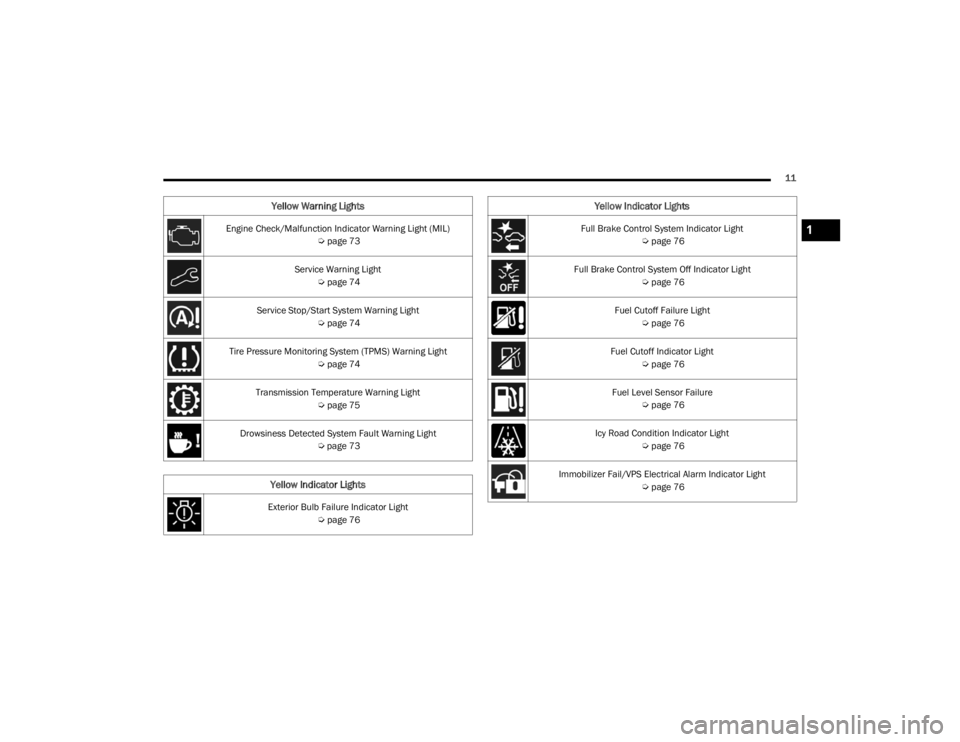
Engine Check/Malfunction Indicator Warning Light (MIL) Úpage 73
Service Warning Light Úpage 74
Service Stop/Start System Warning Light Úpage 74
Tire Pressure Monitoring System (TPMS) Warning Light Úpage 74
Transmission Temperature Warning Light Úpage 75
Drowsiness Detected System Fault Warning Light Úpage 73
Yellow Indicator Lights
Exterior Bulb Failure Indicator Light
Úpage 76
Yellow Warning Lights
Full Brake Control System Indicator Light
Úpage 76
Full Brake Control System Off Indicator Light Úpage 76
Fuel Cutoff Failure Light Úpage 76
Fuel Cutoff Indicator Light Úpage 76
Fuel Level Sensor Failure Úpage 76
Icy Road Condition Indicator Light Úpage 76
Immobilizer Fail/VPS Electrical Alarm Indicator Light Úpage 76
Yellow Indicator Lights
1
22_FD_OM_EN_USC_t.book Page 11
Page 78 of 312
76GETTING TO KNOW YOUR INSTRUMENT PANEL
YELLOW INDICATOR LIGHTS
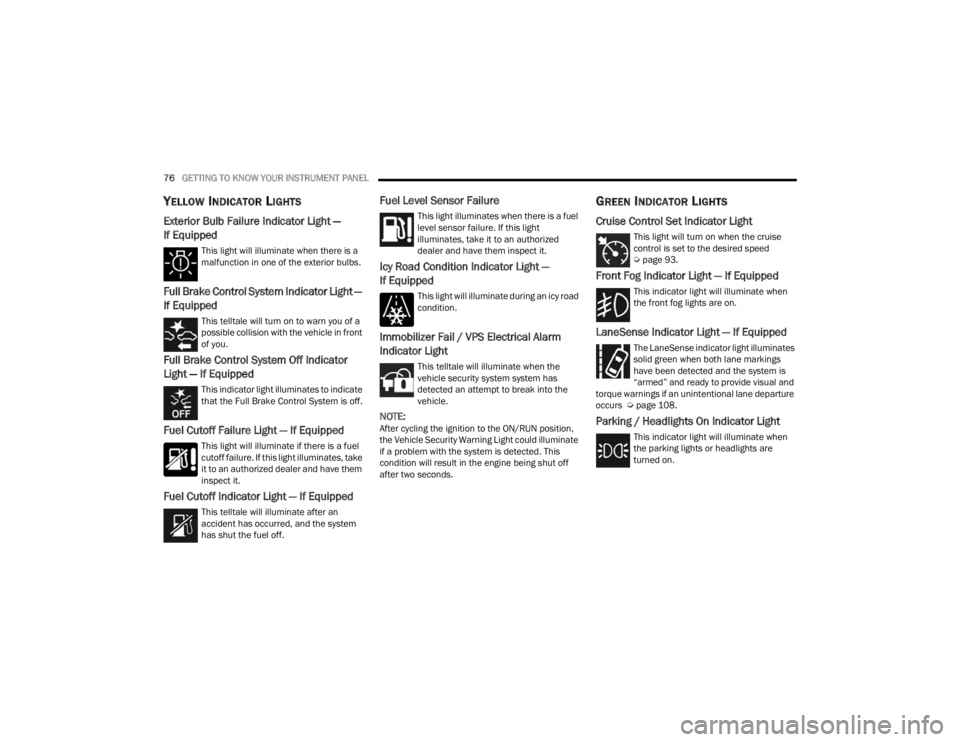
Exterior Bulb Failure Indicator Light —
If Equipped
This light will illuminate when there is a
malfunction in one of the exterior bulbs.
Full Brake Control System Indicator Light —
If Equipped
This telltale will turn on to warn you of a
possible collision with the vehicle in front
of you.
Full Brake Control System Off Indicator
Light — If Equipped
This indicator light illuminates to indicate
that the Full Brake Control System is off.
Fuel Cutoff Failure Light — If Equipped
This light will illuminate if there is a fuel
cutoff failure. If this light illuminates, take
it to an authorized dealer and have them
inspect it.
Fuel Cutoff Indicator Light — If Equipped
This telltale will illuminate after an
accident has occurred, and the system
has shut the fuel off.
Fuel Level Sensor Failure
This light illuminates when there is a fuel
level sensor failure. If this light
illuminates, take it to an authorized
dealer and have them inspect it.
Icy Road Condition Indicator Light —
If Equipped
This light will illuminate during an icy road
condition.
Immobilizer Fail / VPS Electrical Alarm
Indicator Light
This telltale will illuminate when the
vehicle security system system has
detected an attempt to break into the
vehicle.
NOTE:After cycling the ignition to the ON/RUN position,
the Vehicle Security Warning Light could illuminate
if a problem with the system is detected. This
condition will result in the engine being shut off
after two seconds.
GREEN INDICATOR LIGHTS
Cruise Control Set Indicator Light
This light will turn on when the cruise
control is set to the desired speed
Úpage 93.
Front Fog Indicator Light — If Equipped
This indicator light will illuminate when
the front fog lights are on.
LaneSense Indicator Light — If Equipped
The LaneSense indicator light illuminates
solid green when both lane markings
have been detected and the system is
“armed” and ready to provide visual and
torque warnings if an unintentional lane departure
occurs Ú page 108.
Parking / Headlights On Indicator Light
This indicator light will illuminate when
the parking lights or headlights are
turned on.
22_FD_OM_EN_USC_t.book Page 76
Page 82 of 312
80
STARTING AND OPERATING
STARTING THE ENGINE
Before starting your vehicle, adjust your seat,
adjust the inside and outside mirrors, fasten your
seat belt, and if present, instruct all other
occupants to buckle their seat belts.
Start the engine with the gear selector in the
NEUTRAL or PARK position. Apply the brake before
shifting to any driving range.Normal Starting
Proceed as follows:
1. Set the Electric Park Brake (EPB) and put the
gear selector in the PARK or NEUTRAL
position.
2. Press on the brake pedal, without pressing the accelerator.
3. Press the START/STOP ignition button and release it as soon as the engine is started.
4. If the engine does not start, place the ignition in the OFF position and wait 10-15 seconds
before attempting to restart the engine.
TIP START FEATURE
Do not press the accelerator. Briefly press the
START/STOP ignition button and release it. The
starter motor will continue to run but will
automatically disengage when the engine is
running.
COLD WEATHER OPERATION
To ensure reliable starting under extreme cold
conditions an externally powered electric block
heater (if equipped) is required below -20°F
(-29°C). To prevent possible engine damage while starting
at low temperatures, this vehicle will inhibit engine
cranking when the ambient temperature is less
than -20°F (-29°C), and the oil temperature
sensor reading indicates an engine block heater
has not been used. The message “Plug in Engine
Heater” will be displayed in the instrument cluster
when the ambient temperature is below -4°F
(-20°C) at the time the engine is shut off as a
reminder to avoid possible crank delays at the next
cold start.
EXTENDED PARK STARTING
NOTE:Extended Park condition occurs when the vehicle
has not been started or driven for at least 30 days.
1. Install a battery charger or jumper cables to
the battery to ensure a full battery charge
during the crank cycle.
2. Press the START/STOP ignition button and release it when the engine starts.
3. If the engine fails to start within 10 seconds, place the ignition in the OFF position, wait
10 to 15 seconds to allow the starter to cool,
then repeat the Extended Park Starting
procedure.
WARNING!
Never leave children alone in a vehicle, or with
access to an unlocked vehicle.
Allowing children to be in a vehicle unattended
is dangerous for a number of reasons. A child
or others could be seriously or fatally injured.
Children should be warned not to touch the
parking brake, brake pedal or the gear
selector.
Do not leave the key fob in or near the vehicle
(or in a location accessible to children), and do
not leave the ignition in the ON or RUN posi -
tion. A child could operate power windows,
other controls, or move the vehicle.
22_FD_OM_EN_USC_t.book Page 80
Page 96 of 312

94STARTING AND OPERATING
To Vary The Speed Setting
To Increase Or Decrease The Set Speed
When the Cruise Control is set, you can increase
speed by pushing the SET (+) button, or decrease
speed by pushing the SET (-) button.
U.S. Speed (mph)
Pushing the SET (+) , or SET (-) button once will
result in a 1 mph speed adjustment. Each
subsequent tap of the button results in an
adjustment of 1 mph.
If the button is continually pushed, the set
speed will continue to adjust until the button is
released, then the new set speed will be estab -
lished.
Metric Speed (km/h)
Pushing the SET (+), or SET (-) button once will
result in a 1 km/h speed adjustment. Each
subsequent tap of the button results in an
adjustment of 1 km/h.
If the button is continually pushed, the set
speed will continue to adjust until the button is
released, then the new set speed will be estab -
lished.
To Accelerate For Passing
While the Cruise Control is set, press the
accelerator to pass as you would normally. When
the pedal is released, the vehicle will return to the
set speed.
USING CRUISE CONTROL ON HILLS
The transmission may downshift on hills to
maintain the vehicle set speed.
The Cruise Control system maintains speed up and
down hills. A slight speed change on moderate hills
is normal. On steep hills, a greater speed loss or
gain may occur so it may be preferable to drive
without Cruise Control.
To Resume Speed
To resume a previously set speed, push the RES
button and release. Resume can be used at any
speed above 20 mph (32 km/h).
Deactivation
A tap on the brake pedal, pushing the CANC button,
ESC intervention, brake control mitigation,
Electronic Park Brake intervention, or normal
brake pressure while slowing the vehicle will
deactivate the Cruise Control without erasing the
set speed from memory.
Pushing the on/off button or placing the ignition in
the OFF position erases the set speed from
memory.
ADAPTIVE CRUISE CONTROL (ACC)
Adaptive Cruise Control (ACC) increases the driving
convenience provided by Cruise Control while
traveling on highways and major roadways.
However, it is not a safety system and not designed
to prevent collisions. Cruise Control function
performs differently if your vehicle is not equipped
with ACC Ú page 93.
ACC will allow you to keep Cruise Control engaged
in light to moderate traffic conditions without the
constant need to reset your speed. ACC utilizes a
radar sensor and a forward facing camera
designed to detect a vehicle directly ahead of you
to maintain a set speed.
WARNING!
Cruise Control can be dangerous where the
system cannot maintain a constant speed. Your
vehicle could go too fast for the conditions, and
you could lose control and have an accident. Do
not use Cruise Control in heavy traffic or on
roads that are winding, icy, snow-covered or
slippery.
22_FD_OM_EN_USC_t.book Page 94
Page 97 of 312
STARTING AND OPERATING95
(Continued)
NOTE:
If the ACC sensor detects a vehicle ahead, ACC
will apply limited braking or accelerate (not to
exceed the original set speed) automatically to
maintain a preset following distance, while
matching the speed of the vehicle ahead.
Any chassis/suspension or tire size modifica -
tions to the vehicle will affect the performance
of the Adaptive Cruise Control and Forward Colli -
sion Warning system.
Fixed Speed Cruise Control (ACC not enabled)
will not detect vehicles directly ahead of you.
Always be aware of the feature selected
Ú page 297.
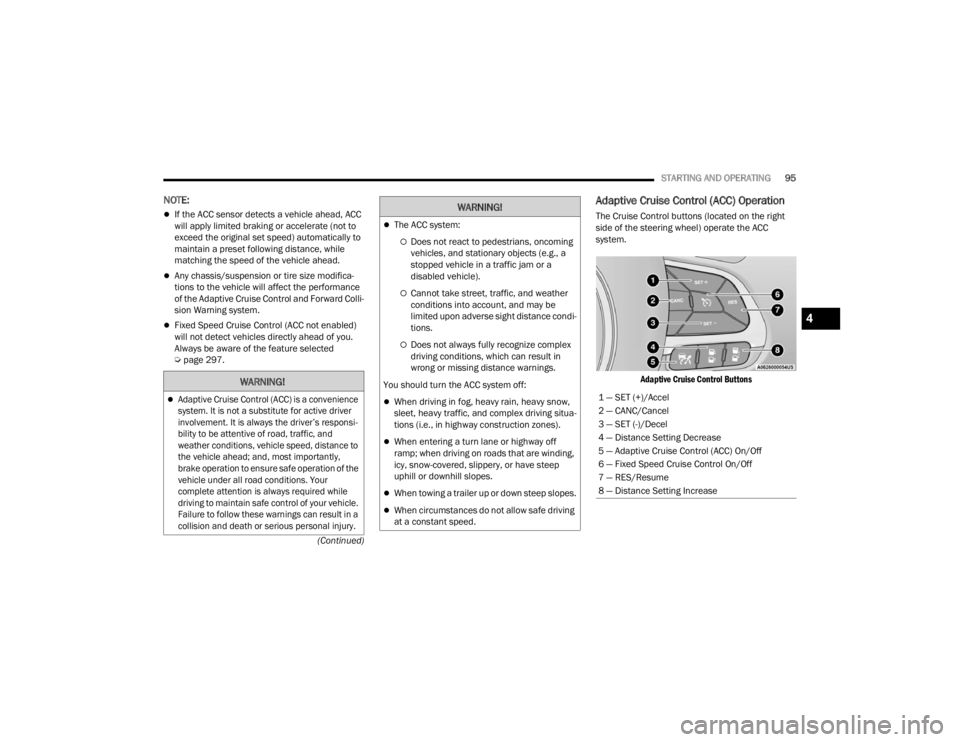
Adaptive Cruise Control (ACC) Operation
The Cruise Control buttons (located on the right
side of the steering wheel) operate the ACC
system.
Adaptive Cruise Control Buttons
WARNING!
Adaptive Cruise Control (ACC) is a convenience
system. It is not a substitute for active driver
involvement. It is always the driver’s responsi -
bility to be attentive of road, traffic, and
weather conditions, vehicle speed, distance to
the vehicle ahead; and, most importantly,
brake operation to ensure safe operation of the
vehicle under all road conditions. Your
complete attention is always required while
driving to maintain safe control of your vehicle.
Failure to follow these warnings can result in a
collision and death or serious personal injury.
The ACC system:
Does not react to pedestrians, oncoming
vehicles, and stationary objects (e.g., a
stopped vehicle in a traffic jam or a
disabled vehicle).
Cannot take street, traffic, and weather
conditions into account, and may be
limited upon adverse sight distance condi -
tions.
Does not always fully recognize complex
driving conditions, which can result in
wrong or missing distance warnings.
You should turn the ACC system off:
When driving in fog, heavy rain, heavy snow,
sleet, heavy traffic, and complex driving situa -
tions (i.e., in highway construction zones).
When entering a turn lane or highway off
ramp; when driving on roads that are winding,
icy, snow-covered, slippery, or have steep
uphill or downhill slopes.
When towing a trailer up or down steep slopes.
When circumstances do not allow safe driving
at a constant speed.
WARNING!
1 — SET (+)/Accel
2 — CANC/Cancel
3 — SET (-)/Decel
4 — Distance Setting Decrease
5 — Adaptive Cruise Control (ACC) On/Off
6 — Fixed Speed Cruise Control On/Off
7 — RES/Resume
8 — Distance Setting Increase
4
22_FD_OM_EN_USC_t.book Page 95
Page 101 of 312

STARTING AND OPERATING99
To increase the distance setting, push the
Distance Increase button and release. Each time
the button is pushed, the distance setting
increases by one bar (longer).
If there is no vehicle ahead, the vehicle will
maintain the set speed. If a slower moving vehicle
is detected in the same lane, the instrument
cluster display will show the ACC Set With Target
Detected Light. The system adjusts vehicle speed
automatically to maintain the distance setting,
regardless of the set speed.
The vehicle will then maintain the set distance
until:
The vehicle ahead accelerates to a speed above
the set speed.
The vehicle ahead moves out of your lane or
view of the sensor.
The distance setting is changed.
The system disengages Ú page 96.
The maximum braking applied by ACC is limited;
however, the driver can always apply the brakes
manually, if necessary.
NOTE:The brake lights will illuminate whenever the ACC
system applies the brakes. A Proximity Warning will alert the driver if ACC
predicts that its maximum braking level is not
sufficient to maintain the set distance. If this
occurs, a visual alert “BRAKE!” will appear in the
instrument cluster display and a chime will sound
while ACC continues to apply its maximum braking
capacity.
NOTE:The “BRAKE!” screen in the instrument cluster
display is a warning for the driver to take action
and does not necessarily mean that the Full Brake
Control system is applying the brakes autono
-
mously.
Overtake Aid
When driving with ACC engaged and following a
vehicle, the system will provide an additional
acceleration up to the ACC set speed to assist in
passing the vehicle. This additional acceleration is
triggered when the driver utilizes the left turn
signal and will only be active when passing on the
left hand side.
Display Warnings And Maintenance
“FRONT RADAR SENSOR TEMPORARILY
BLOCKED” WARNING
The “ACC Front Radar Sensor Temporarily
Blocked” warning will display and a chime will
sound when conditions temporarily limit system
performance.
This most often occurs at times of poor visibility,
such as in snow or heavy rain. The ACC system may
also become temporarily blinded due to
obstructions, such as mud, dirt or ice. In these
cases, the instrument cluster display will read
“ACC/FCW Unavailable Wipe Front Radar Sensor”
and the system will deactivate.
The “ACC Front Radar Sensor Temporarily
Blocked” message can sometimes be displayed
while driving in highly reflective areas (i.e. ice and
snow, or tunnels with reflective tiles). The ACC
system will recover after the vehicle has left these
areas. Under rare conditions, when the radar is not
tracking any vehicles or objects in its path this
warning may temporarily occur.
4
22_FD_OM_EN_USC_t.book Page 99
Page 102 of 312

100STARTING AND OPERATING
NOTE:If the “ACC Front Radar Sensor Temporarily
Blocked” warning is active, Fixed Speed Cruise
Control is still available.
If weather conditions are not a factor, the driver
should examine the sensor. It may require cleaning
or removal of an obstruction. The sensor is located
in the center of the vehicle behind the lower grille.
To keep the ACC System operating properly, it is
important to note the following maintenance
items:
Always keep the sensor clean. Carefully wipe the
sensor lens with a soft cloth. Do not use
solvents or abrasive substances.
Do not remove any screws from the sensor.
Doing so could cause an ACC system malfunc -
tion or failure and require a sensor realignment.
If the sensor or front end of the vehicle is
damaged due to a collision, see an authorized
dealer for service.
Do not attach or install any accessories near the
sensor, including transparent material or after -
market grilles. Doing so could cause an ACC
system failure or malfunction.
When the condition that deactivated the system is
no longer present, the system will return to the
“Adaptive Cruise Control Off” state and will resume
function by simply reactivating it.
NOTE:
If the “ACC Front Radar Sensor Temporarily
Blocked” message occurs frequently (e.g. more
than once on every trip) without any snow, rain,
mud, or other obstruction, have the radar
sensor realigned at an authorized dealer.
Installing a snow plow, front-end protector, an
aftermarket grille or modifying the grille is not
recommended. Doing so may block the sensor
and inhibit ACC/Full Brake Control System oper -
ation.
“CLEAN FRONT WINDSHIELD” WARNING
The “ACC/FCW Limited Functionality Wipe Front
Windshield” warning will display when conditions
temporarily limit system performance. This most
often occurs at times of poor visibility, such as in
snow or heavy rain and fog. The ACC system may
also become temporarily blinded due to
obstructions, such as mud, dirt, or ice on
windshield and fog on the inside of glass. In these
cases, the instrument cluster display will read
“ACC/FCW Limited Functionality Wipe Front
Windshield” and the system will have degraded
performance.
The “ACC/FCW Limited Functionality Wipe Front
Windshield” message can sometimes be displayed
while driving in adverse weather conditions. The
ACC/Full Brake Control system will recover after the vehicle has left these areas. Under rare
conditions, when the camera is not tracking any
vehicles or objects in its path this warning may
temporarily occur.
If weather conditions are not a factor, the driver
should examine the windshield and the camera
located on the back side of the inside rear view
mirror. They may require cleaning or removal of an
obstruction.
When the condition that created limited
functionality is no longer present, the system will
return to full functionality.NOTE:If the “ACC/FCW Limited Functionality Wipe Front
Windshield” message occurs frequently (e.g. more
than once on every trip) without any snow, rain,
mud, or other obstruction, have the windshield and
forward facing camera inspected at an authorized
dealer.
SERVICE ACC/FCW WARNING
If the system turns off, and the instrument cluster
display reads “ACC/FCW Limited Functionality
Frontal Camera Service Required” or “Cruise
Control Service Required”, there may be an
internal system fault or a temporary malfunction
that limits ACC functionality. Although the vehicle is
still drivable under normal conditions, ACC will be
22_FD_OM_EN_USC_t.book Page 100
Page 108 of 312

106STARTING AND OPERATING
Front Park Assist Audible Alerts
Park Assist will turn off the Front Park Assist
audible alert (chime) after approximately three
seconds when an obstacle has been detected, the
vehicle is stationary, and brake pedal is applied. If
the obstacle has been detected within less than
12 inches (30 cm), then the Park Assist will not
turn off the Front Park Assist audible alert.
Adjustable Chime Volume Settings
Front and Rear chime volume settings can be
selected from the Customer-Programmable
Features section of the Uconnect system
Ú page 123.
If the Uconnect system is equipped, chime volume
settings will not be accessible from the instrument
cluster display.
The chime volume settings include low, medium,
and high.
Park Assist will retain its last known configuration
state through ignition cycles.
ENABLING AND DISABLING PARK
A
SSIST
Park Assist can be enabled and disabled
with the Park Assist switch, located on
the switch panel below the Uconnect
display. When the Park Assist switch is pushed to disable
the system, the instrument cluster display will
show the “Park Assist Disabled” message for
approximately five seconds Ú
page 64.
The Park Assist switch LED will be on when the
Park Assist system is disabled or requires service.
The Park Assist switch LED will be off when the
system is enabled. If the Park Assist switch is
pushed, and the system requires service, the Park
Assist switch LED will blink momentarily, and then
the LED will be on.
SERVICE THE PARK ASSIST SYSTEM
During vehicle start up, when the Park Assist System
has detected a faulted condition, the instrument
cluster display will actuate a single chime, once per
ignition cycle, and it will show the "PARK ASSIST
UNAVAILABLE WIPE REAR SENSORS", "PARK ASSIST
UNAVAILABLE WIPE FRONT SENSORS", or the "PARK
ASSIST UNAVAILABLE SERVICE REQUIRED" message
for five seconds.
If "PARK ASSIST UNAVAILABLE WIPE REAR
SENSORS" or "PARK ASSIST UNAVAILABLE WIPE
FRONT SENSORS" appears in the instrument
cluster display make sure the outer surface and
the underside of the rear fascia/bumper and/or
front fascia/bumper is clean and clear of snow,
ice, mud, dirt or other obstruction and then cycle
the ignition. If the message continues to appear
see an authorized dealer. If the "PARK ASSIST UNAVAILABLE SERVICE
REQUIRED" message appears in the instrument
cluster display, see an authorized dealer.
CLEANING THE PARK ASSIST SYSTEM
Clean the Park Assist sensors with water, car wash
soap and a soft cloth. Do not use rough or hard
cloths. Do not scratch or poke the sensors.
Otherwise, you could damage the sensors.
PARK ASSIST SYSTEM USAGE
P
RECAUTIONS
NOTE:
Ensure that the outer surface and the underside
of the front and rear fascia/bumper are clean
and clear of snow, ice, mud, dirt or other
obstruction to keep the Park Assist system oper -
ating properly.
Jackhammers, large trucks, and other vibra -
tions could affect the performance of Rear Park
Assist.
Clean the Park Assist sensors regularly, taking
care not to scratch or damage them. The
sensors must not be covered with ice, snow,
slush, mud, dirt or debris. Failure to do so can
result in the system not working properly. The
Park Assist system might not detect an obstacle
22_FD_OM_EN_USC_t.book Page 106
Page 178 of 312

176SAFETY
(Continued)
Electronic Roll Mitigation (ERM)
ERM anticipates the potential for wheel lift by
monitoring the driver’s steering wheel input and
the speed of the vehicle. When ERM determines
that the rate of change of the steering wheel angle
and vehicle’s speed are sufficient to potentially
cause wheel lift, it then applies the appropriate
brake and may also reduce engine power to lessen
the chance that wheel lift will occur. ERM can only
reduce the chance of wheel lift occurring during
severe or evasive driving maneuvers; it cannot
prevent wheel lift due to other factors, such as
road conditions, leaving the roadway, striking
objects or other vehicles.
Electronic Stability Control (ESC)
ESC enhances directional control and stability of
the vehicle under various driving conditions. ESC
corrects for oversteering or understeering of the
vehicle by applying the brake of the appropriate
wheel(s) to counteract the above conditions.
Engine power may also be reduced to help the
vehicle maintain the desired path.
Oversteer - when the vehicle is turning more
than appropriate for the steering wheel position.
Understeer - when the vehicle is turning less
than appropriate for the steering wheel position.
ESC uses sensors in the vehicle to determine the
vehicle path intended by the driver and compares
it to the actual path of the vehicle. When the actual
path does not match the intended path, ESC
applies the brake of the appropriate wheel to
assist in counteracting the oversteer or understeer
condition.
The ESC Activation/Malfunction Indicator Light
located in the instrument cluster will start to flash
as soon as the ESC system becomes active. The
ESC Activation/Malfunction Indicator Light also
flashes when the TCS is active. If the ESC
Activation/Malfunction Indicator Light begins to
flash during acceleration, ease up on the
accelerator and apply as little throttle as possible.
Be sure to adapt your speed and driving to the
prevailing road conditions.
WARNING!
Many factors, such as vehicle loading, road
conditions and driving conditions, influence the
chance that wheel lift or rollover may occur. ERM
cannot prevent all wheel lift or rollovers,
especially those that involve leaving the roadway
or striking objects or other vehicles. The
capabilities of an ERM-equipped vehicle must
never be exploited in a reckless or dangerous
manner which could jeopardize the user's safety
or the safety of others.
WARNING!
Electronic Stability Control (ESC) cannot
prevent the natural laws of physics from
acting on the vehicle, nor can it increase the
traction afforded by prevailing road condi -
tions. ESC cannot prevent accidents, including
those resulting from excessive speed in turns,
driving on very slippery surfaces, or hydro -
planing. ESC also cannot prevent accidents
resulting from loss of vehicle control due to
inappropriate driver input for the conditions.
Only a safe, attentive, and skillful driver can
prevent accidents. The capabilities of an ESC
equipped vehicle must never be exploited in a
reckless or dangerous manner which could
jeopardize the user’s safety or the safety of
others.
22_FD_OM_EN_USC_t.book Page 176