child lock FIAT 500X 2022 Owners Manual
[x] Cancel search | Manufacturer: FIAT, Model Year: 2022, Model line: 500X, Model: FIAT 500X 2022Pages: 312, PDF Size: 13.26 MB
Page 4 of 312

2
INTRODUCTION
SYMBOLS KEY ...........................................................8
ROLLOVER WARNING ............................................. 8
VEHICLE MODIFICATIONS/ALTERATIONS .............9
SYMBOL GLOSSARY.................................................9
GETTING TO KNOW YOUR VEHICLE
KEYS ....................................................................... 14 Key Fob .............................................................14
SENTRY KEY ........................................................... 17
IGNITION SWITCH .................................................. 17
Keyless Enter ‘n Go™ Ignition .........................17
REMOTE START — IF EQUIPPED .......................... 18
How To Use Remote Start ................................19
To Exit Remote Start Mode ..............................19
Remote Start Front Defrost Activation —
If Equipped........................................................20
Remote Start Comfort Systems —
If Equipped .......................................................20
Remote Start Windshield Wiper De–Icer
And Rear Defrost Activation — If Equipped.....20
Remote Start Cancel Message —
If Equipped........................................................20
VEHICLE SECURITY SYSTEM — IF EQUIPPED ..... 21
To Arm The System .........................................21
To Disarm The System ....................................21
Disabling ...........................................................21 DOORS .....................................................................22
Manual Door Locks ..........................................22
Power Door Locks ............................................22
Keyless Enter ‘n Go™ — Passive Entry
(If Equipped) .....................................................23
Automatic Door Locks — If Equipped .............24
Child-Protection Door Lock System —
Rear Doors ........................................................24
STEERING WHEEL ..................................................25
Manual Tilt/Telescoping Steering Column .....25
SEATS ......................................................................26
Manual Adjustment (Front Seats) ...................26
Manual Adjustment (Rear Seats) ....................27
Power Adjustment Front Seats —
If Equipped........................................................28
Heated Seats — If Equipped ...........................29
Head Restraints ..............................................30
UCONNECT VOICE RECOGNITION .........................32
Introducing Voice Recognition.........................32
Get Started .......................................................32
Basic Voice Commands ...................................32
Additional Information .....................................32
MIRRORS ...............................................................33
Inside Rearview Mirror .....................................33
Illuminated Vanity Mirrors —
If Equipped .......................................................33
Outside Mirrors ................................................34
Power Mirrors ...................................................34
Folding Mirror ...................................................34
Power Folding Mirrors — If Equipped ..............35
Heated Mirrors — If Equipped..........................35 EXTERIOR LIGHTS.................................................. 36
Headlight Switch ............................................. 36
Daytime Running Lights (DRLs) —
If Equipped ...................................................... 36
High Beams ...................................................... 36
Automatic High Beam Headlamp Control —
If Equipped .......................................................37
Flash-To-Pass ................................................... 37
Automatic Headlights — If Equipped .............. 37
Parking Lights ................................................... 37
Headlight Time Delay ...................................... 37
Front Fog Lights — If Equipped .......................38
Turn Signals...................................................... 38
Lane Change Assist ......................................... 38
Courtesy Lights/Approaching Lights ............... 38
INTERIOR LIGHTS ................................................. 38
Front Courtesy Light......................................... 38
Cargo Area Lights ............................................. 40
WINDSHIELD WIPERS AND WASHERS .............. 40
Windshield Wiper Operation ........................... 40
Rain Sensing Wipers — If Equipped ................41
Rear Window Wiper/Washer ........................... 42
Windshield Wiper De-Icer — If Equipped ........ 42
CLIMATE CONTROLS ............................................ 43
Automatic Climate Control Descriptions And
Functions .......................................................... 43
Manual Climate Control Descriptions And
Functions .......................................................... 46
Automatic Temperature Control (ATC) ........... 48
Climate Voice Recognition............................... 48
Operating Tips .................................................48
22_FD_OM_EN_USC_t.book Page 2
Page 18 of 312
16GETTING TO KNOW YOUR VEHICLE
(Continued)
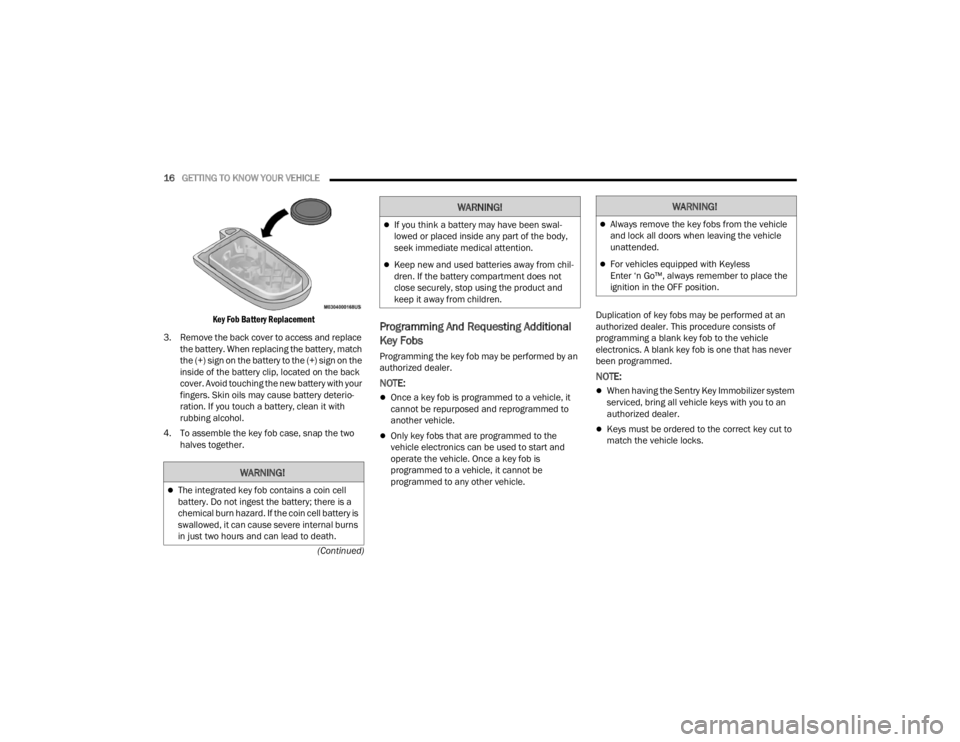
Key Fob Battery Replacement
3. Remove the back cover to access and replace the battery. When replacing the battery, match
the (+) sign on the battery to the (+) sign on the
inside of the battery clip, located on the back
cover. Avoid touching the new battery with your
fingers. Skin oils may cause battery deterio -
ration. If you touch a battery, clean it with
rubbing alcohol.
4. To assemble the key fob case, snap the two halves together.
Programming And Requesting Additional
Key Fobs
Programming the key fob may be performed by an
authorized dealer.
NOTE:
Once a key fob is programmed to a vehicle, it
cannot be repurposed and reprogrammed to
another vehicle.
Only key fobs that are programmed to the
vehicle electronics can be used to start and
operate the vehicle. Once a key fob is
programmed to a vehicle, it cannot be
programmed to any other vehicle. Duplication of key fobs may be performed at an
authorized dealer. This procedure consists of
programming a blank key fob to the vehicle
electronics. A blank key fob is one that has never
been programmed.
NOTE:
When having the Sentry Key Immobilizer system
serviced, bring all vehicle keys with you to an
authorized dealer.
Keys must be ordered to the correct key cut to
match the vehicle locks.
WARNING!
The integrated key fob contains a coin cell
battery. Do not ingest the battery; there is a
chemical burn hazard. If the coin cell battery is
swallowed, it can cause severe internal burns
in just two hours and can lead to death.
If you think a battery may have been swal-
lowed or placed inside any part of the body,
seek immediate medical attention.
Keep new and used batteries away from chil
-
dren. If the battery compartment does not
close securely, stop using the product and
keep it away from children.
WARNING!WARNING!
Always remove the key fobs from the vehicle
and lock all doors when leaving the vehicle
unattended.
For vehicles equipped with Keyless
Enter ‘n Go™, always remember to place the
ignition in the OFF position.
22_FD_OM_EN_USC_t.book Page 16
Page 20 of 312
18GETTING TO KNOW YOUR VEHICLE
(Continued)
NOTE:The vehicle will not start if the key fob is located
inside the cargo area and the liftgate is opened.
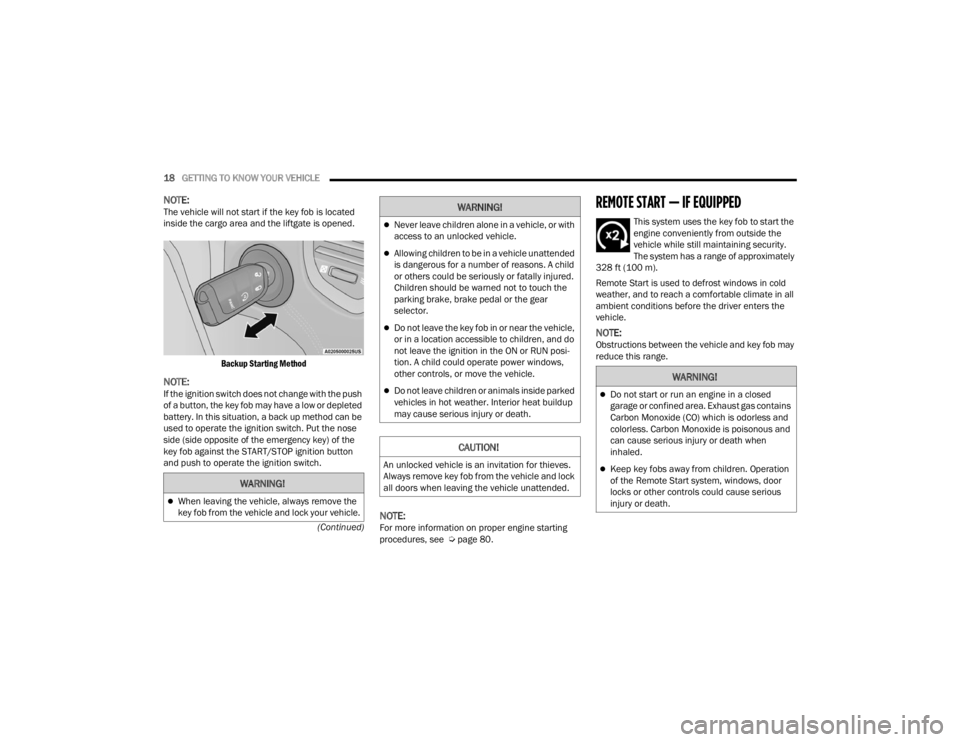
Backup Starting Method
NOTE:If the ignition switch does not change with the push
of a button, the key fob may have a low or depleted
battery. In this situation, a back up method can be
used to operate the ignition switch. Put the nose
side (side opposite of the emergency key) of the
key fob against the START/STOP ignition button
and push to operate the ignition switch.
NOTE:For more information on proper engine starting
procedures, see Ú page 80.
REMOTE START — IF EQUIPPED
This system uses the key fob to start the
engine conveniently from outside the
vehicle while still maintaining security.
The system has a range of approximately
328 ft (100 m).
Remote Start is used to defrost windows in cold
weather, and to reach a comfortable climate in all
ambient conditions before the driver enters the
vehicle.
NOTE:Obstructions between the vehicle and key fob may
reduce this range.
WARNING!
When leaving the vehicle, always remove the
key fob from the vehicle and lock your vehicle.
Never leave children alone in a vehicle, or with
access to an unlocked vehicle.
Allowing children to be in a vehicle unattended
is dangerous for a number of reasons. A child
or others could be seriously or fatally injured.
Children should be warned not to touch the
parking brake, brake pedal or the gear
selector.
Do not leave the key fob in or near the vehicle,
or in a location accessible to children, and do
not leave the ignition in the ON or RUN posi -
tion. A child could operate power windows,
other controls, or move the vehicle.
Do not leave children or animals inside parked
vehicles in hot weather. Interior heat buildup
may cause serious injury or death.
CAUTION!
An unlocked vehicle is an invitation for thieves.
Always remove key fob from the vehicle and lock
all doors when leaving the vehicle unattended.
WARNING!
WARNING!
Do not start or run an engine in a closed
garage or confined area. Exhaust gas contains
Carbon Monoxide (CO) which is odorless and
colorless. Carbon Monoxide is poisonous and
can cause serious injury or death when
inhaled.
Keep key fobs away from children. Operation
of the Remote Start system, windows, door
locks or other controls could cause serious
injury or death.
22_FD_OM_EN_USC_t.book Page 18
Page 21 of 312

GETTING TO KNOW YOUR VEHICLE19
HOW TO USE REMOTE START
Push and release the Remote Start button on the
key fob twice within five seconds. The vehicle
doors will lock, the parking lights will flash, and the
horn will chirp twice (if programmed). Then the
engine will start and the vehicle will remain in the
Remote Start mode for a 15 minute cycle. Pushing
the Remote Start button a third time shuts the
engine off.
With Remote Start, the engine will only run for
15 minutes.
If an engine fault is present or fuel level is low,
the vehicle will start and then shut down in 10
seconds.
The parking lights will turn on and remain on
during Remote Start mode.
For security, power window and power sunroof
operation (if equipped) are disabled when the
vehicle is in the Remote Start mode.
The ignition must be placed in the ON/RUN posi -
tion before the Remote Start sequence can be
repeated for a third cycle. All of the following conditions must be met before
the engine will remote start:
Gear Selector in PARK
Doors closed
Hood closed
Liftgate closed
Hazard switch off
Brake switch inactive (brake pedal not pressed)
Battery at an acceptable charge level
PANIC button not pushed
System not disabled from previous Remote
Start event
Vehicle Security Light flashing
Ignition in OFF position
Fuel level meets minimum requirement
Vehicle Security system is not signaling an intru
-
sion
Malfunction Indicator Light (MIL) is not illumi -
nated
TO EXIT REMOTE START MODE
To drive the vehicle after starting the Remote Start
system, push and release the START/STOP ignition
button while pressing the brake pedal prior to the
end of the 15 minute cycle.
The Remote Start system will turn the engine off
with another push and release of the Remote Start
button on the key fob, or if the engine is allowed to
run for the entire 15 minute cycle. Once the
ignition is placed in the ON/RUN position, the
climate controls will resume the previously set
operations (temperature, blower control, etc.).
NOTE:
For vehicles equipped with the Keyless
Enter ‘n Go™ — Passive Entry feature, the
WARNING!
Do not start or run an engine in a closed
garage or confined area. Exhaust gas contains
Carbon Monoxide (CO) which is odorless and
colorless. Carbon Monoxide is poisonous and
can cause serious injury or death when
inhaled.
Keep key fobs away from children. Operation
of the Remote Start system, windows, door
locks or other controls could cause serious
injury or death.
2
22_FD_OM_EN_USC_t.book Page 19
Page 24 of 312
22GETTING TO KNOW YOUR VEHICLE
DOORS
MANUAL DOOR LOCKS
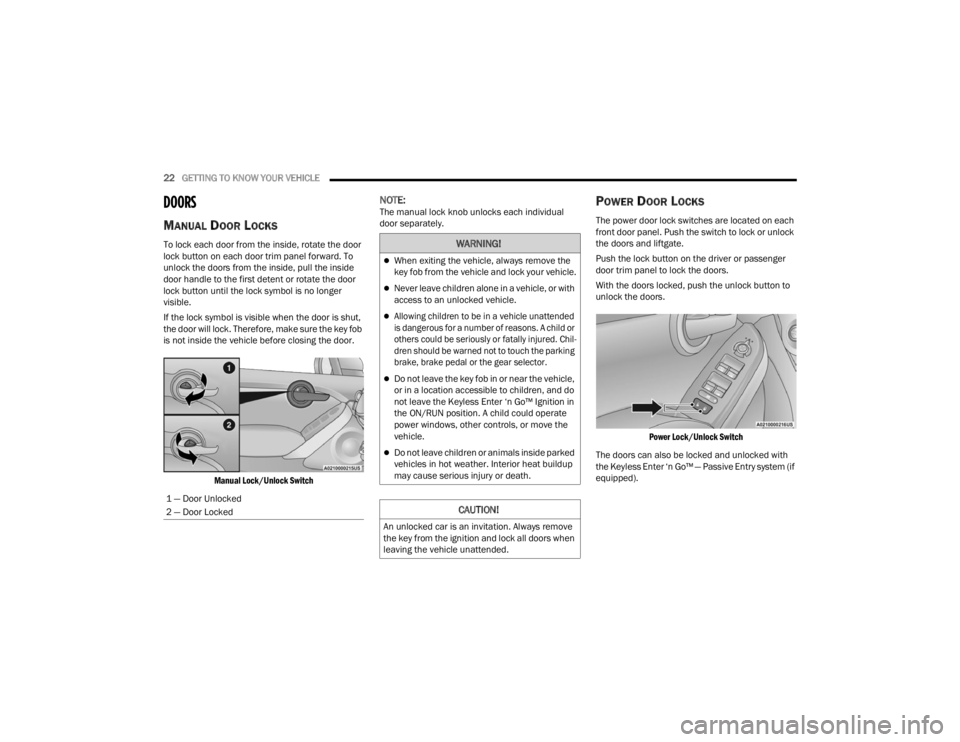
To lock each door from the inside, rotate the door
lock button on each door trim panel forward. To
unlock the doors from the inside, pull the inside
door handle to the first detent or rotate the door
lock button until the lock symbol is no longer
visible.
If the lock symbol is visible when the door is shut,
the door will lock. Therefore, make sure the key fob
is not inside the vehicle before closing the door.
Manual Lock/Unlock Switch
NOTE:The manual lock knob unlocks each individual
door separately.POWER DOOR LOCKS
The power door lock switches are located on each
front door panel. Push the switch to lock or unlock
the doors and liftgate.
Push the lock button on the driver or passenger
door trim panel to lock the doors.
With the doors locked, push the unlock button to
unlock the doors.
Power Lock/Unlock Switch
The doors can also be locked and unlocked with
the Keyless Enter ‘n Go™ — Passive Entry system (if
equipped).
1 — Door Unlocked
2 — Door Locked
WARNING!
When exiting the vehicle, always remove the
key fob from the vehicle and lock your vehicle.
Never leave children alone in a vehicle, or with
access to an unlocked vehicle.
Allowing children to be in a vehicle unattended
is dangerous for a number of reasons. A child or
others could be seriously or fatally injured. Chil -
dren should be warned not to touch the parking
brake, brake pedal or the gear selector.
Do not leave the key fob in or near the vehicle,
or in a location accessible to children, and do
not leave the Keyless Enter ‘n Go™ Ignition in
the ON/RUN position. A child could operate
power windows, other controls, or move the
vehicle.
Do not leave children or animals inside parked
vehicles in hot weather. Interior heat buildup
may cause serious injury or death.
CAUTION!
An unlocked car is an invitation. Always remove
the key from the ignition and lock all doors when
leaving the vehicle unattended.
22_FD_OM_EN_USC_t.book Page 22
Page 26 of 312
24GETTING TO KNOW YOUR VEHICLE
detected outside the vehicle. The vehicle will not
unlock the doors when any of the following condi -
tions are met:
The doors are manually locked using the door
lock knobs.
There is a valid Passive Entry key fob outside the
vehicle and within 5 ft (1.5 m) of either Passive
Entry door handle.
To Lock The Vehicle’s Doors And Liftgate
With one of the vehicle’s Passive Entry key fobs
within 5 ft (1.5 m) of either front door handles,
pushing the Passive Entry lock button will lock the
vehicle.
Push The Door Handle Button To Lock
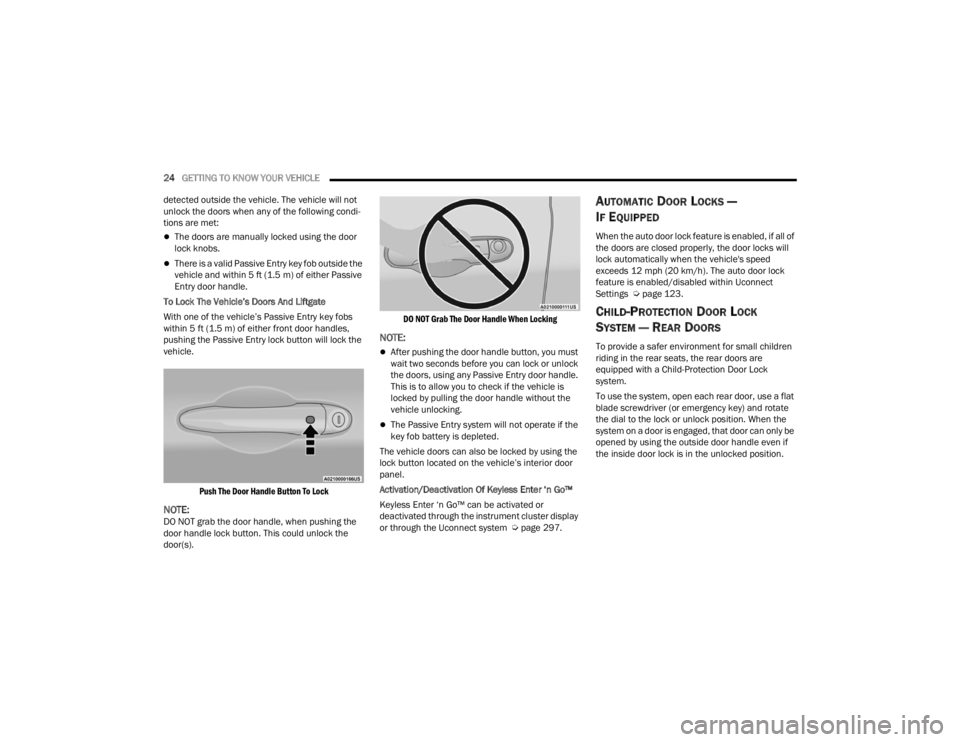
NOTE:DO NOT grab the door handle, when pushing the
door handle lock button. This could unlock the
door(s).
DO NOT Grab The Door Handle When Locking
NOTE:
After pushing the door handle button, you must
wait two seconds before you can lock or unlock
the doors, using any Passive Entry door handle.
This is to allow you to check if the vehicle is
locked by pulling the door handle without the
vehicle unlocking.
The Passive Entry system will not operate if the
key fob battery is depleted.
The vehicle doors can also be locked by using the
lock button located on the vehicle’s interior door
panel.
Activation/Deactivation Of Keyless Enter ‘n Go™
Keyless Enter ‘n Go™ can be activated or
deactivated through the instrument cluster display
or through the Uconnect system Ú page 297.
AUTOMATIC DOOR LOCKS —
I
F EQUIPPED
When the auto door lock feature is enabled, if all of
the doors are closed properly, the door locks will
lock automatically when the vehicle's speed
exceeds 12 mph (20 km/h). The auto door lock
feature is enabled/disabled within Uconnect
Settings Ú page 123.
CHILD-PROTECTION DOOR LOCK
S
YSTEM — REAR DOORS
To provide a safer environment for small children
riding in the rear seats, the rear doors are
equipped with a Child-Protection Door Lock
system.
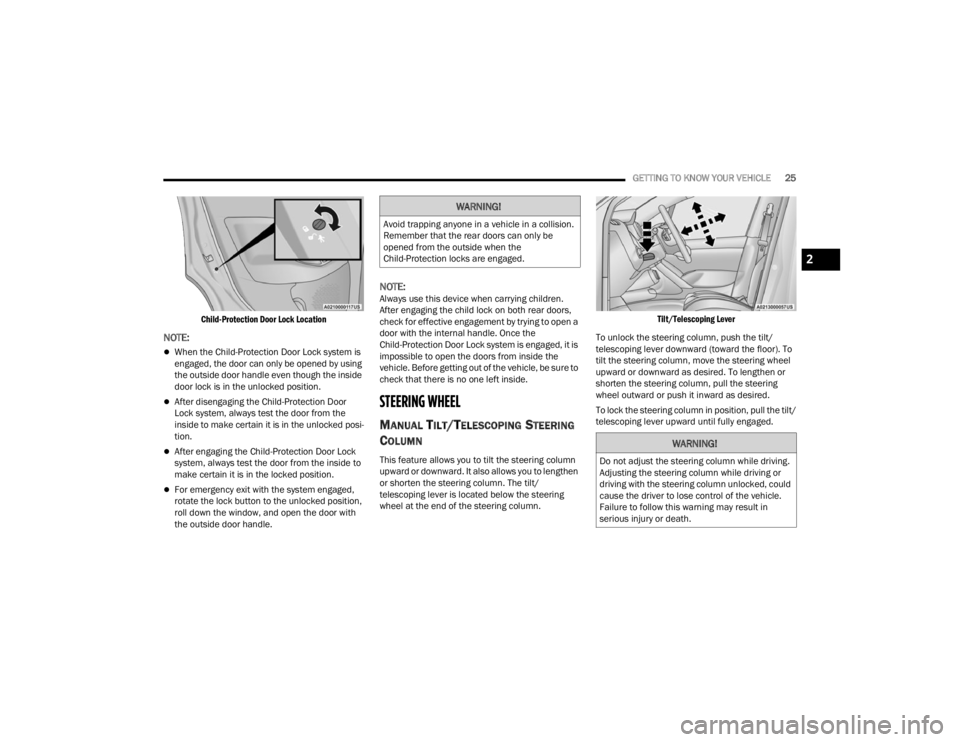
To use the system, open each rear door, use a flat
blade screwdriver (or emergency key) and rotate
the dial to the lock or unlock position. When the
system on a door is engaged, that door can only be
opened by using the outside door handle even if
the inside door lock is in the unlocked position.
22_FD_OM_EN_USC_t.book Page 24
Page 27 of 312
GETTING TO KNOW YOUR VEHICLE25
Child-Protection Door Lock Location
NOTE:
When the Child-Protection Door Lock system is
engaged, the door can only be opened by using
the outside door handle even though the inside
door lock is in the unlocked position.
After disengaging the Child-Protection Door
Lock system, always test the door from the
inside to make certain it is in the unlocked posi -
tion.
After engaging the Child-Protection Door Lock
system, always test the door from the inside to
make certain it is in the locked position.
For emergency exit with the system engaged,
rotate the lock button to the unlocked position,
roll down the window, and open the door with
the outside door handle.
NOTE:Always use this device when carrying children.
After engaging the child lock on both rear doors,
check for effective engagement by trying to open a
door with the internal handle. Once the
Child-Protection Door Lock system is engaged, it is
impossible to open the doors from inside the
vehicle. Before getting out of the vehicle, be sure to
check that there is no one left inside.
STEERING WHEEL
MANUAL TILT/TELESCOPING STEERING
C
OLUMN
This feature allows you to tilt the steering column
upward or downward. It also allows you to lengthen
or shorten the steering column. The tilt/
telescoping lever is located below the steering
wheel at the end of the steering column.
Tilt/Telescoping Lever
To unlock the steering column, push the tilt/
telescoping lever downward (toward the floor). To
tilt the steering column, move the steering wheel
upward or downward as desired. To lengthen or
shorten the steering column, pull the steering
wheel outward or push it inward as desired.
To lock the steering column in position, pull the tilt/
telescoping lever upward until fully engaged.
WARNING!
Avoid trapping anyone in a vehicle in a collision.
Remember that the rear doors can only be
opened from the outside when the
Child-Protection locks are engaged.
WARNING!
Do not adjust the steering column while driving.
Adjusting the steering column while driving or
driving with the steering column unlocked, could
cause the driver to lose control of the vehicle.
Failure to follow this warning may result in
serious injury or death.
2
22_FD_OM_EN_USC_t.book Page 25
Page 30 of 312
28GETTING TO KNOW YOUR VEHICLE
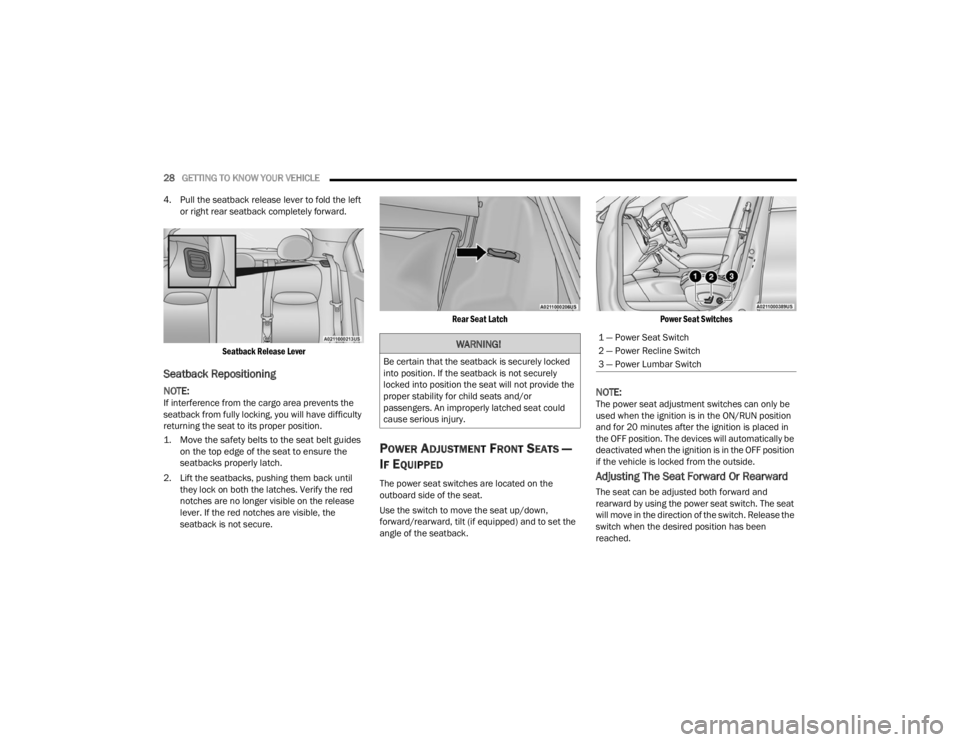
4. Pull the seatback release lever to fold the left or right rear seatback completely forward.
Seatback Release Lever
Seatback Repositioning
NOTE:If interference from the cargo area prevents the
seatback from fully locking, you will have difficulty
returning the seat to its proper position.
1. Move the safety belts to the seat belt guides on the top edge of the seat to ensure the
seatbacks properly latch.
2. Lift the seatbacks, pushing them back until they lock on both the latches. Verify the red
notches are no longer visible on the release
lever. If the red notches are visible, the
seatback is not secure.
Rear Seat Latch
POWER ADJUSTMENT FRONT SEATS —
I
F EQUIPPED
The power seat switches are located on the
outboard side of the seat.
Use the switch to move the seat up/down,
forward/rearward, tilt (if equipped) and to set the
angle of the seatback.
Power Seat Switches
NOTE:The power seat adjustment switches can only be
used when the ignition is in the ON/RUN position
and for 20 minutes after the ignition is placed in
the OFF position. The devices will automatically be
deactivated when the ignition is in the OFF position
if the vehicle is locked from the outside.
Adjusting The Seat Forward Or Rearward
The seat can be adjusted both forward and
rearward by using the power seat switch. The seat
will move in the direction of the switch. Release the
switch when the desired position has been
reached.
WARNING!
Be certain that the seatback is securely locked
into position. If the seatback is not securely
locked into position the seat will not provide the
proper stability for child seats and/or
passengers. An improperly latched seat could
cause serious injury.
1 — Power Seat Switch
2 — Power Recline Switch
3 — Power Lumbar Switch
22_FD_OM_EN_USC_t.book Page 28
Page 57 of 312
GETTING TO KNOW YOUR VEHICLE55
SUNROOF — IF EQUIPPED
The sunroof has two glass panels (the front one is
operational and the rear one fixed) and is
equipped with two manual operated sunshades,
front and rear.
The power sunroof can be operated only when the
ignition is placed in ON/RUN.
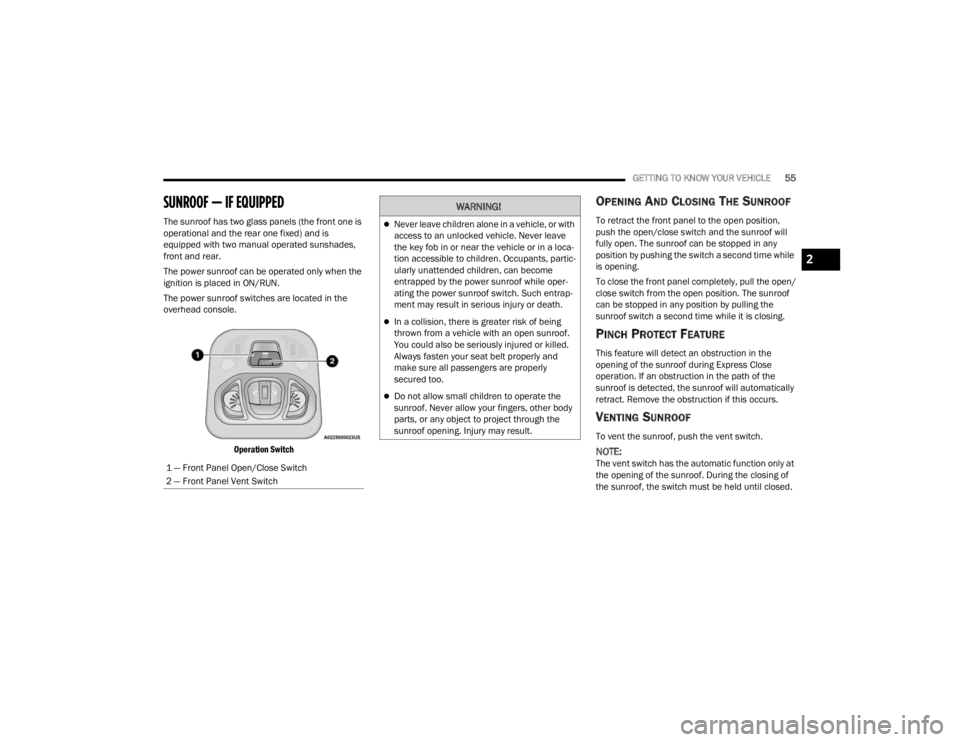
The power sunroof switches are located in the
overhead console.
Operation Switch
OPENING AND CLOSING THE SUNROOF
To retract the front panel to the open position,
push the open/close switch and the sunroof will
fully open. The sunroof can be stopped in any
position by pushing the switch a second time while
is opening.
To close the front panel completely, pull the open/
close switch from the open position. The sunroof
can be stopped in any position by pulling the
sunroof switch a second time while it is closing.
PINCH PROTECT FEATURE
This feature will detect an obstruction in the
opening of the sunroof during Express Close
operation. If an obstruction in the path of the
sunroof is detected, the sunroof will automatically
retract. Remove the obstruction if this occurs.
VENTING SUNROOF
To vent the sunroof, push the vent switch.
NOTE:The vent switch has the automatic function only at
the opening of the sunroof. During the closing of
the sunroof, the switch must be held until closed.
1 — Front Panel Open/Close Switch
2 — Front Panel Vent Switch
WARNING!
Never leave children alone in a vehicle, or with
access to an unlocked vehicle. Never leave
the key fob in or near the vehicle or in a loca
-
tion accessible to children. Occupants, partic -
ularly unattended children, can become
entrapped by the power sunroof while oper -
ating the power sunroof switch. Such entrap -
ment may result in serious injury or death.
In a collision, there is greater risk of being
thrown from a vehicle with an open sunroof.
You could also be seriously injured or killed.
Always fasten your seat belt properly and
make sure all passengers are properly
secured too.
Do not allow small children to operate the
sunroof. Never allow your fingers, other body
parts, or any object to project through the
sunroof opening. Injury may result.
2
22_FD_OM_EN_USC_t.book Page 55
Page 59 of 312
GETTING TO KNOW YOUR VEHICLE57
POWER FOLDING ROOF — IF EQUIPPED
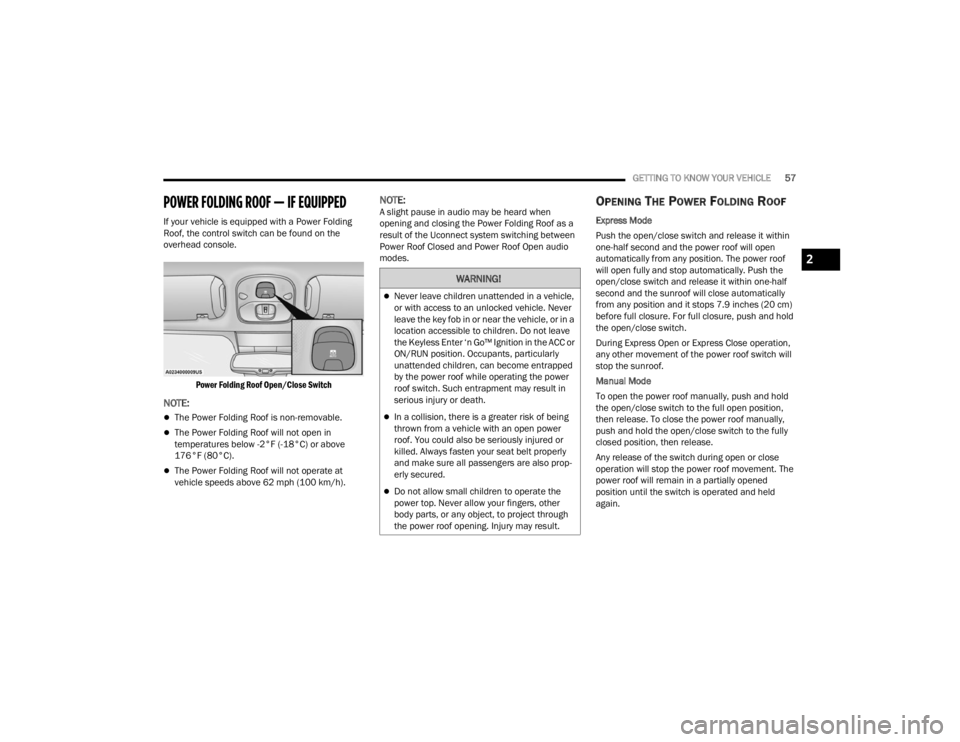
If your vehicle is equipped with a Power Folding
Roof, the control switch can be found on the
overhead console.
Power Folding Roof Open/Close Switch
NOTE:
The Power Folding Roof is non-removable.
The Power Folding Roof will not open in
temperatures below -2°F (-18°C) or above
176°F (80°C).
The Power Folding Roof will not operate at
vehicle speeds above 62 mph (100 km/h).
NOTE:A slight pause in audio may be heard when
opening and closing the Power Folding Roof as a
result of the Uconnect system switching between
Power Roof Closed and Power Roof Open audio
modes.OPENING THE POWER FOLDING ROOF
Express Mode
Push the open/close switch and release it within
one-half second and the power roof will open
automatically from any position. The power roof
will open fully and stop automatically. Push the
open/close switch and release it within one-half
second and the sunroof will close automatically
from any position and it stops 7.9 inches (20 cm)
before full closure. For full closure, push and hold
the open/close switch.
During Express Open or Express Close operation,
any other movement of the power roof switch will
stop the sunroof.
Manual Mode
To open the power roof manually, push and hold
the open/close switch to the full open position,
then release. To close the power roof manually,
push and hold the open/close switch to the fully
closed position, then release.
Any release of the switch during open or close
operation will stop the power roof movement. The
power roof will remain in a partially opened
position until the switch is operated and held
again.
WARNING!
Never leave children unattended in a vehicle,
or with access to an unlocked vehicle. Never
leave the key fob in or near the vehicle, or in a
location accessible to children. Do not leave
the Keyless Enter ‘n Go™ Ignition in the ACC or
ON/RUN position. Occupants, particularly
unattended children, can become entrapped
by the power roof while operating the power
roof switch. Such entrapment may result in
serious injury or death.
In a collision, there is a greater risk of being
thrown from a vehicle with an open power
roof. You could also be seriously injured or
killed. Always fasten your seat belt properly
and make sure all passengers are also prop -
erly secured.
Do not allow small children to operate the
power top. Never allow your fingers, other
body parts, or any object, to project through
the power roof opening. Injury may result.
2
22_FD_OM_EN_USC_t.book Page 57