warning light FIAT 500X 2022 Owners Manual
[x] Cancel search | Manufacturer: FIAT, Model Year: 2022, Model line: 500X, Model: FIAT 500X 2022Pages: 312, PDF Size: 13.26 MB
Page 4 of 312
2
INTRODUCTION
SYMBOLS KEY ...........................................................8
ROLLOVER WARNING ............................................. 8
VEHICLE MODIFICATIONS/ALTERATIONS .............9
SYMBOL GLOSSARY.................................................9
GETTING TO KNOW YOUR VEHICLE
KEYS ....................................................................... 14 Key Fob .............................................................14
SENTRY KEY ........................................................... 17
IGNITION SWITCH .................................................. 17
Keyless Enter ‘n Go™ Ignition .........................17
REMOTE START — IF EQUIPPED .......................... 18
How To Use Remote Start ................................19
To Exit Remote Start Mode ..............................19
Remote Start Front Defrost Activation —
If Equipped........................................................20
Remote Start Comfort Systems —
If Equipped .......................................................20
Remote Start Windshield Wiper De–Icer
And Rear Defrost Activation — If Equipped.....20
Remote Start Cancel Message —
If Equipped........................................................20
VEHICLE SECURITY SYSTEM — IF EQUIPPED ..... 21
To Arm The System .........................................21
To Disarm The System ....................................21
Disabling ...........................................................21 DOORS .....................................................................22
Manual Door Locks ..........................................22
Power Door Locks ............................................22
Keyless Enter ‘n Go™ — Passive Entry
(If Equipped) .....................................................23
Automatic Door Locks — If Equipped .............24
Child-Protection Door Lock System —
Rear Doors ........................................................24
STEERING WHEEL ..................................................25
Manual Tilt/Telescoping Steering Column .....25
SEATS ......................................................................26
Manual Adjustment (Front Seats) ...................26
Manual Adjustment (Rear Seats) ....................27
Power Adjustment Front Seats —
If Equipped........................................................28
Heated Seats — If Equipped ...........................29
Head Restraints ..............................................30
UCONNECT VOICE RECOGNITION .........................32
Introducing Voice Recognition.........................32
Get Started .......................................................32
Basic Voice Commands ...................................32
Additional Information .....................................32
MIRRORS ...............................................................33
Inside Rearview Mirror .....................................33
Illuminated Vanity Mirrors —
If Equipped .......................................................33
Outside Mirrors ................................................34
Power Mirrors ...................................................34
Folding Mirror ...................................................34
Power Folding Mirrors — If Equipped ..............35
Heated Mirrors — If Equipped..........................35 EXTERIOR LIGHTS.................................................. 36
Headlight Switch ............................................. 36
Daytime Running Lights (DRLs) —
If Equipped ...................................................... 36
High Beams ...................................................... 36
Automatic High Beam Headlamp Control —
If Equipped .......................................................37
Flash-To-Pass ................................................... 37
Automatic Headlights — If Equipped .............. 37
Parking Lights ................................................... 37
Headlight Time Delay ...................................... 37
Front Fog Lights — If Equipped .......................38
Turn Signals...................................................... 38
Lane Change Assist ......................................... 38
Courtesy Lights/Approaching Lights ............... 38
INTERIOR LIGHTS ................................................. 38
Front Courtesy Light......................................... 38
Cargo Area Lights ............................................. 40
WINDSHIELD WIPERS AND WASHERS .............. 40
Windshield Wiper Operation ........................... 40
Rain Sensing Wipers — If Equipped ................41
Rear Window Wiper/Washer ........................... 42
Windshield Wiper De-Icer — If Equipped ........ 42
CLIMATE CONTROLS ............................................ 43
Automatic Climate Control Descriptions And
Functions .......................................................... 43
Manual Climate Control Descriptions And
Functions .......................................................... 46
Automatic Temperature Control (ATC) ........... 48
Climate Voice Recognition............................... 48
Operating Tips .................................................48
22_FD_OM_EN_USC_t.book Page 2
Page 5 of 312
3
INTERIOR STORAGE AND EQUIPMENT ............... 50 Storage..............................................................50
USB/Media Player Control ...............................51
Power Outlets ..................................................52
Cigar Lighter — If Equipped .............................52
Ashtray — If Equipped ......................................52
Grab Handles....................................................53
WINDOWS............................................................... 53
Power Window Controls ...................................53
SUNROOF — IF EQUIPPED .................................... 55
Opening And Closing The Sunroof...................55
Pinch Protect Feature ......................................55
Venting Sunroof ................................................55
Sun Shade ........................................................56
Sunroof Maintenance ......................................56
Emergency Operation.......................................56
Power Sunroof Relearn Procedure..................56
POWER FOLDING ROOF — IF EQUIPPED ............ 57
Opening The Power Folding Roof ....................57
Closing The Power Roof ...................................58
Power Roof Maintenance ................................58
Ignition Off Operation .......................................58
Relearn Procedure ...........................................58
HOOD ...................................................................... 58
To Open The Hood ............................................58
To Close The Hood ...........................................59 LIFTGATE ................................................................. 60
To Unlock/Open The Liftgate...........................60
Lock/Close The Liftgate ...................................60
Cargo Area Features ........................................61
GETTING TO KNOW YOUR
INSTRUMENT PANEL
INSTRUMENT CLUSTER .........................................63
Instrument Cluster Descriptions .....................64
INSTRUMENT CLUSTER DISPLAY .......................64
Instrument Cluster Display Control Buttons ...64
Engine Oil Change Reset — If Equipped .........65
Instrument Cluster Display Main Menu ..........65
WARNING LIGHTS AND MESSAGES ....................69
Red Warning Lights ..........................................69
Yellow Warning Lights ......................................72
Yellow Indicator Lights .....................................76
Green Indicator Lights .....................................76
White Indicator Lights ......................................77
Blue Indicator Lights ........................................77
Gray Indicator Lights ........................................77
ONBOARD DIAGNOSTIC SYSTEM — OBD II.........78
Onboard Diagnostic System (OBD II)
Cybersecurity ....................................................78
EMISSIONS INSPECTION AND MAINTENANCE
PROGRAMS.............................................................78
STARTING AND OPERATING
STARTING THE ENGINE ......................................... 80
Tip Start Feature ............................................. 80
Cold Weather Operation .................................. 80
Extended Park Starting ....................................80
If Engine Fails To Start ....................................81
After Starting — Warming Up The Engine ....... 81
Stopping The Engine ........................................ 81
Turbocharger “Cool Down” — If Equipped ...... 82
ENGINE BREAK-IN RECOMMENDATIONS .......... 82
ELECTRIC PARK BRAKE (EPB) ............................. 82
Auto Park Brake ............................................... 84
SafeHold ........................................................... 84
Brake Service Mode......................................... 84
AUTOMATIC TRANSMISSION .............................. 85
Gear Selector.................................................... 86
Gear Ranges ..................................................... 86
Transmission Limp Home Mode ..................... 89
Ignition Park Interlock...................................... 89
Brake Transmission Shift Interlock (BTSI)
System ..............................................................89
ALL-WHEEL DRIVE (AWD) — IF EQUIPPED ........ 90
DYNAMIC SELECTOR — IF EQUIPPED ................. 90
Warning Messages........................................... 90
ELECTRIC POWER STEERING .............................. 90
22_FD_OM_EN_USC_t.book Page 3
Page 11 of 312
9
VEHICLE MODIFICATIONS/ALTERATIONS
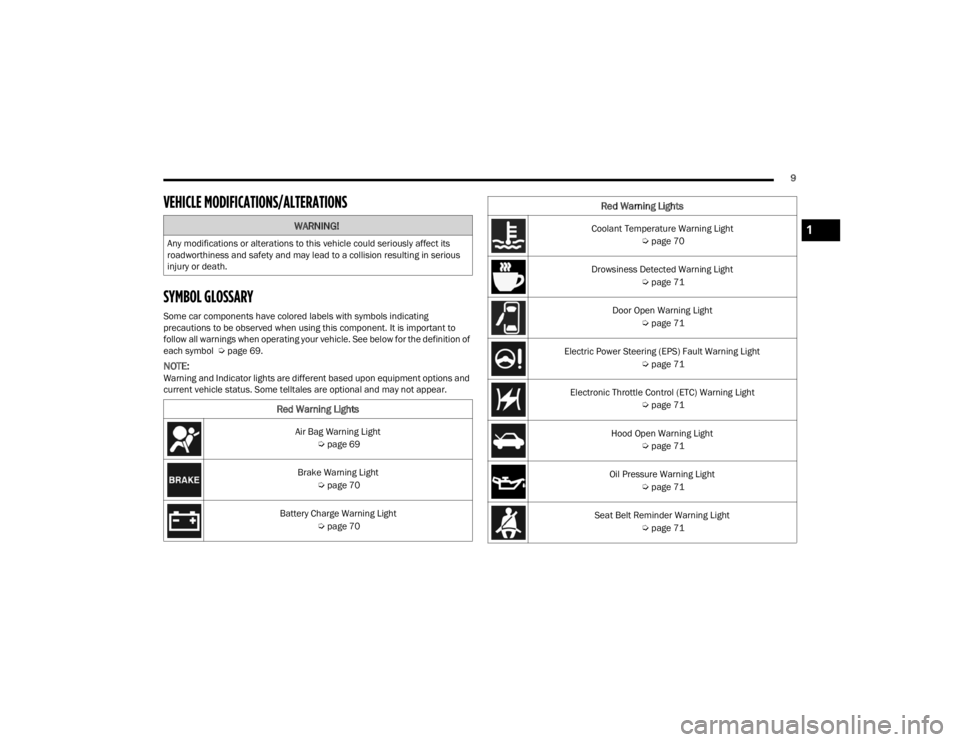
SYMBOL GLOSSARY
Some car components have colored labels with symbols indicating
precautions to be observed when using this component. It is important to
follow all warnings when operating your vehicle. See below for the definition of
each symbol Úpage 69.
NOTE:Warning and Indicator lights are different based upon equipment options and
current vehicle status. Some telltales are optional and may not appear.
WARNING!
Any modifications or alterations to this vehicle could seriously affect its
roadworthiness and safety and may lead to a collision resulting in serious
injury or death.
Red Warning Lights
Air Bag Warning Light
Úpage 69
Brake Warning Light Úpage 70
Battery Charge Warning Light Úpage 70
Coolant Temperature Warning Light
Úpage 70
Drowsiness Detected Warning Light Úpage 71
Door Open Warning Light Úpage 71
Electric Power Steering (EPS) Fault Warning Light Úpage 71
Electronic Throttle Control (ETC) Warning Light Úpage 71
Hood Open Warning Light Úpage 71
Oil Pressure Warning Light Úpage 71
Seat Belt Reminder Warning Light Úpage 71
Red Warning Lights
1
22_FD_OM_EN_USC_t.book Page 9
Page 12 of 312
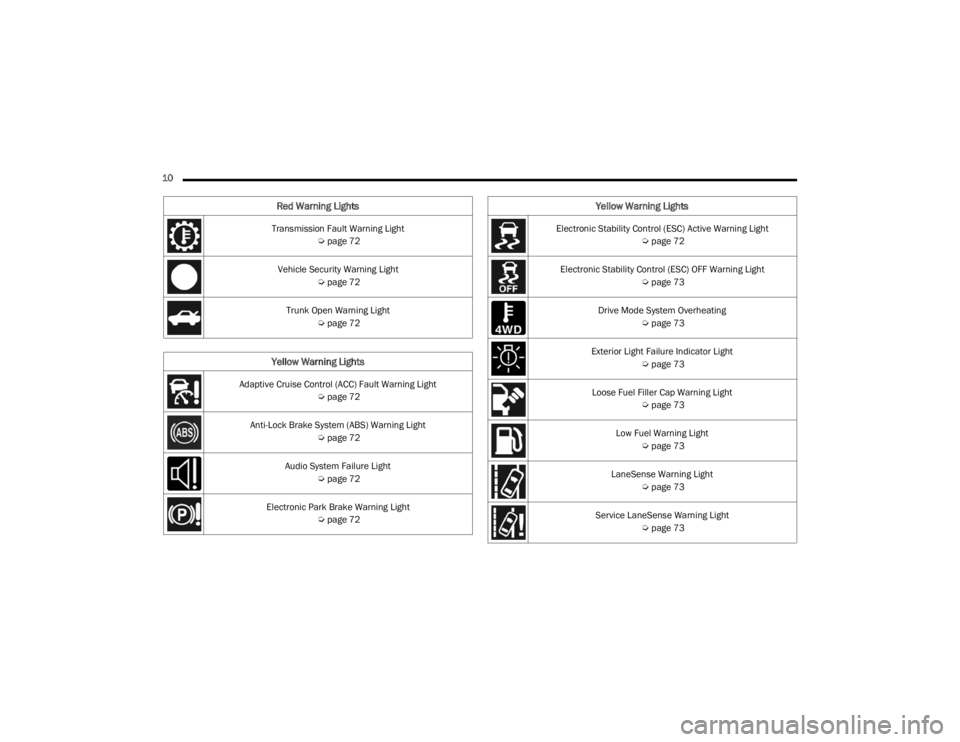
10 Transmission Fault Warning Light Úpage 72
Vehicle Security Warning Light Úpage 72
Trunk Open Warning Light Úpage 72
Yellow Warning Lights
Adaptive Cruise Control (ACC) Fault Warning Light
Úpage 72
Anti-Lock Brake System (ABS) Warning Light Úpage 72
Audio System Failure Light Úpage 72
Electronic Park Brake Warning Light Úpage 72
Red Warning Lights
Electronic Stability Control (ESC) Active Warning Light
Úpage 72
Electronic Stability Control (ESC) OFF Warning Light Úpage 73
Drive Mode System Overheating Úpage 73
Exterior Light Failure Indicator Light Úpage 73
Loose Fuel Filler Cap Warning Light Úpage 73
Low Fuel Warning Light Úpage 73
LaneSense Warning Light Úpage 73
Service LaneSense Warning Light Úpage 73
Yellow Warning Lights
22_FD_OM_EN_USC_t.book Page 10
Page 13 of 312
11
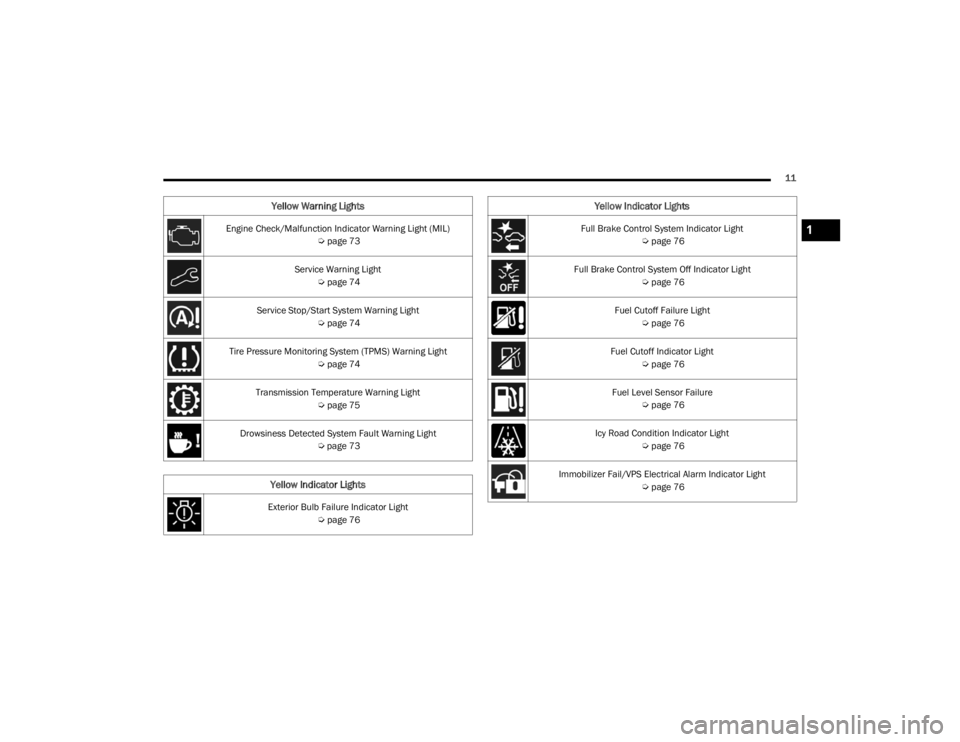
Engine Check/Malfunction Indicator Warning Light (MIL) Úpage 73
Service Warning Light Úpage 74
Service Stop/Start System Warning Light Úpage 74
Tire Pressure Monitoring System (TPMS) Warning Light Úpage 74
Transmission Temperature Warning Light Úpage 75
Drowsiness Detected System Fault Warning Light Úpage 73
Yellow Indicator Lights
Exterior Bulb Failure Indicator Light
Úpage 76
Yellow Warning Lights
Full Brake Control System Indicator Light
Úpage 76
Full Brake Control System Off Indicator Light Úpage 76
Fuel Cutoff Failure Light Úpage 76
Fuel Cutoff Indicator Light Úpage 76
Fuel Level Sensor Failure Úpage 76
Icy Road Condition Indicator Light Úpage 76
Immobilizer Fail/VPS Electrical Alarm Indicator Light Úpage 76
Yellow Indicator Lights
1
22_FD_OM_EN_USC_t.book Page 11
Page 14 of 312
12
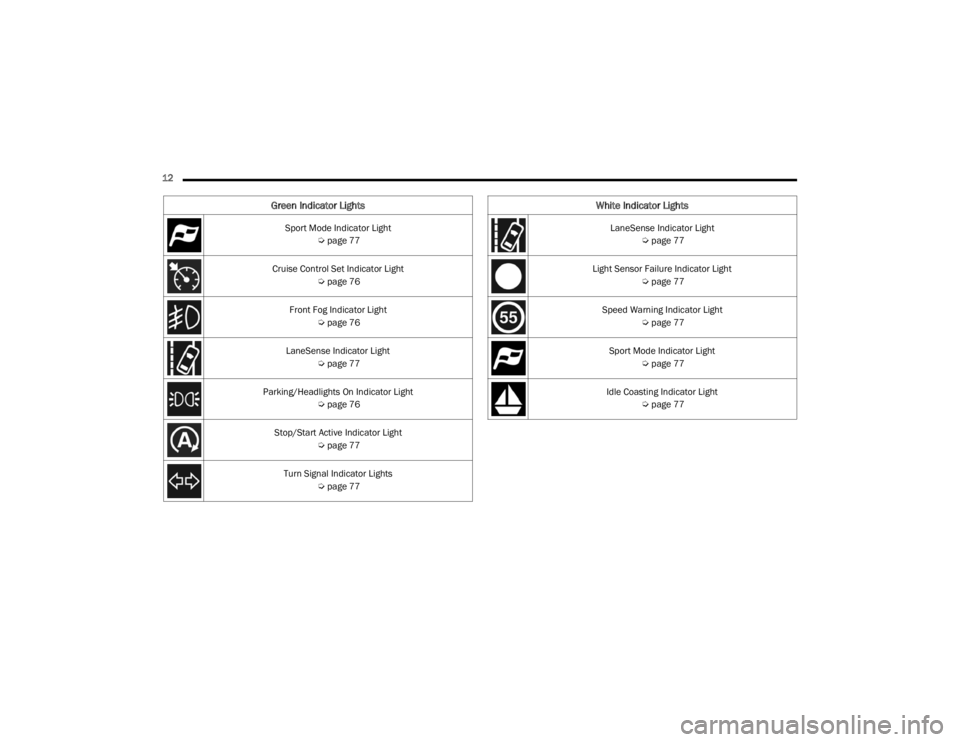
Green Indicator Lights
Sport Mode Indicator Light Úpage 77
Cruise Control Set Indicator Light Úpage 76
Front Fog Indicator Light Úpage 76
LaneSense Indicator Light Úpage 77
Parking/Headlights On Indicator Light Úpage 76
Stop/Start Active Indicator Light Úpage 77
Turn Signal Indicator Lights Úpage 77
White Indicator Lights
LaneSense Indicator Light
Úpage 77
Light Sensor Failure Indicator Light Úpage 77
Speed Warning Indicator Light Úpage 77
Sport Mode Indicator Light Úpage 77
Idle Coasting Indicator Light Úpage 77
22_FD_OM_EN_USC_t.book Page 12
Page 21 of 312
GETTING TO KNOW YOUR VEHICLE19
HOW TO USE REMOTE START
Push and release the Remote Start button on the
key fob twice within five seconds. The vehicle
doors will lock, the parking lights will flash, and the
horn will chirp twice (if programmed). Then the
engine will start and the vehicle will remain in the
Remote Start mode for a 15 minute cycle. Pushing
the Remote Start button a third time shuts the
engine off.
With Remote Start, the engine will only run for
15 minutes.
If an engine fault is present or fuel level is low,
the vehicle will start and then shut down in 10
seconds.
The parking lights will turn on and remain on
during Remote Start mode.
For security, power window and power sunroof
operation (if equipped) are disabled when the
vehicle is in the Remote Start mode.
The ignition must be placed in the ON/RUN posi -
tion before the Remote Start sequence can be
repeated for a third cycle. All of the following conditions must be met before
the engine will remote start:
Gear Selector in PARK
Doors closed
Hood closed
Liftgate closed
Hazard switch off
Brake switch inactive (brake pedal not pressed)
Battery at an acceptable charge level
PANIC button not pushed
System not disabled from previous Remote
Start event
Vehicle Security Light flashing
Ignition in OFF position
Fuel level meets minimum requirement
Vehicle Security system is not signaling an intru
-
sion
Malfunction Indicator Light (MIL) is not illumi -
nated
TO EXIT REMOTE START MODE
To drive the vehicle after starting the Remote Start
system, push and release the START/STOP ignition
button while pressing the brake pedal prior to the
end of the 15 minute cycle.
The Remote Start system will turn the engine off
with another push and release of the Remote Start
button on the key fob, or if the engine is allowed to
run for the entire 15 minute cycle. Once the
ignition is placed in the ON/RUN position, the
climate controls will resume the previously set
operations (temperature, blower control, etc.).
NOTE:
For vehicles equipped with the Keyless
Enter ‘n Go™ — Passive Entry feature, the
WARNING!
Do not start or run an engine in a closed
garage or confined area. Exhaust gas contains
Carbon Monoxide (CO) which is odorless and
colorless. Carbon Monoxide is poisonous and
can cause serious injury or death when
inhaled.
Keep key fobs away from children. Operation
of the Remote Start system, windows, door
locks or other controls could cause serious
injury or death.
2
22_FD_OM_EN_USC_t.book Page 19
Page 38 of 312
36GETTING TO KNOW YOUR VEHICLE
EXTERIOR LIGHTS
HEADLIGHT SWITCH
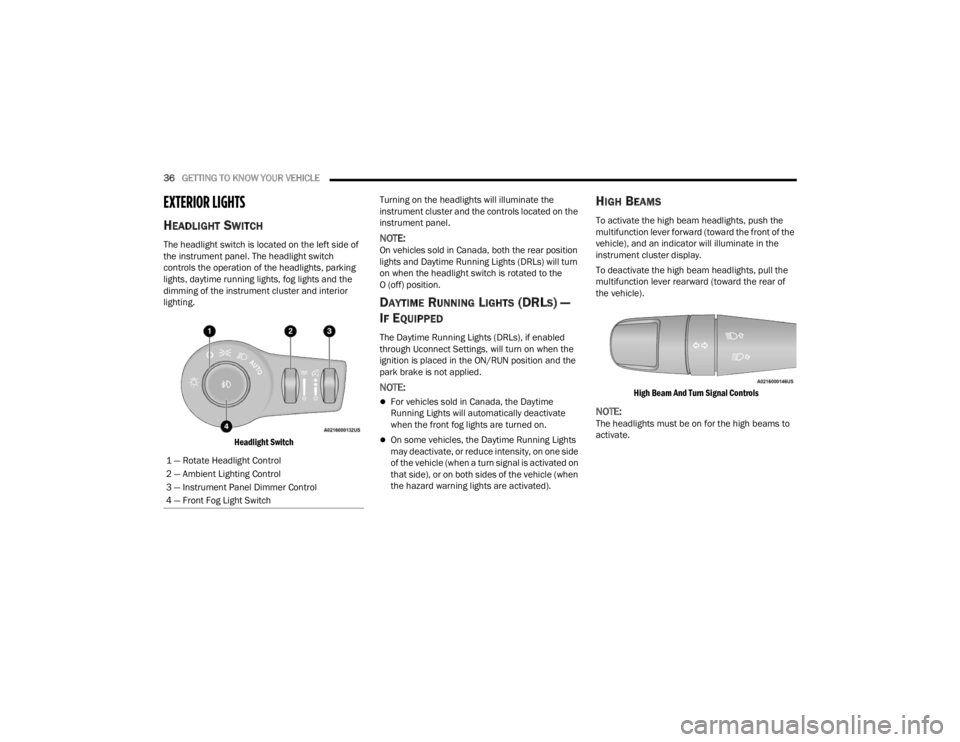
The headlight switch is located on the left side of
the instrument panel. The headlight switch
controls the operation of the headlights, parking
lights, daytime running lights, fog lights and the
dimming of the instrument cluster and interior
lighting.
Headlight Switch
Turning on the headlights will illuminate the
instrument cluster and the controls located on the
instrument panel.NOTE:On vehicles sold in Canada, both the rear position
lights and Daytime Running Lights (DRLs) will turn
on when the headlight switch is rotated to the
O (off) position.
DAYTIME RUNNING LIGHTS (DRLS) —
I
F EQUIPPED
The Daytime Running Lights (DRLs), if enabled
through Uconnect Settings, will turn on when the
ignition is placed in the ON/RUN position and the
park brake is not applied.
NOTE:
For vehicles sold in Canada, the Daytime
Running Lights will automatically deactivate
when the front fog lights are turned on.
On some vehicles, the Daytime Running Lights
may deactivate, or reduce intensity, on one side
of the vehicle (when a turn signal is activated on
that side), or on both sides of the vehicle (when
the hazard warning lights are activated).
HIGH BEAMS
To activate the high beam headlights, push the
multifunction lever forward (toward the front of the
vehicle), and an indicator will illuminate in the
instrument cluster display.
To deactivate the high beam headlights, pull the
multifunction lever rearward (toward the rear of
the vehicle).
High Beam And Turn Signal Controls
NOTE:The headlights must be on for the high beams to
activate.
1 — Rotate Headlight Control
2 — Ambient Lighting Control
3 — Instrument Panel Dimmer Control
4 — Front Fog Light Switch
22_FD_OM_EN_USC_t.book Page 36
Page 54 of 312
52GETTING TO KNOW YOUR VEHICLE
POWER OUTLETS
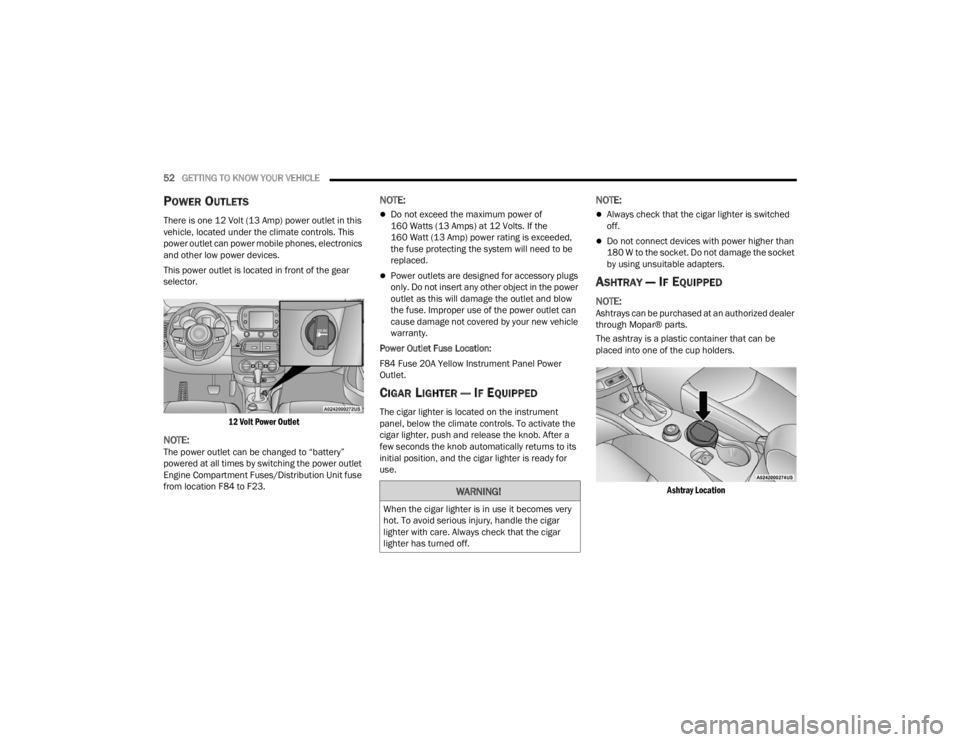
There is one 12 Volt (13 Amp) power outlet in this
vehicle, located under the climate controls. This
power outlet can power mobile phones, electronics
and other low power devices.
This power outlet is located in front of the gear
selector.
12 Volt Power Outlet
NOTE:The power outlet can be changed to “battery”
powered at all times by switching the power outlet
Engine Compartment Fuses/Distribution Unit fuse
from location F84 to F23.
NOTE:
Do not exceed the maximum power of
160 Watts (13 Amps) at 12 Volts. If the
160 Watt (13 Amp) power rating is exceeded,
the fuse protecting the system will need to be
replaced.
Power outlets are designed for accessory plugs
only. Do not insert any other object in the power
outlet as this will damage the outlet and blow
the fuse. Improper use of the power outlet can
cause damage not covered by your new vehicle
warranty.
Power Outlet Fuse Location:
F84 Fuse 20A Yellow Instrument Panel Power
Outlet.
CIGAR LIGHTER — IF EQUIPPED
The cigar lighter is located on the instrument
panel, below the climate controls. To activate the
cigar lighter, push and release the knob. After a
few seconds the knob automatically returns to its
initial position, and the cigar lighter is ready for
use.
NOTE:
Always check that the cigar lighter is switched
off.
Do not connect devices with power higher than
180 W to the socket. Do not damage the socket
by using unsuitable adapters.
ASHTRAY — IF EQUIPPED
NOTE:Ashtrays can be purchased at an authorized dealer
through Mopar® parts.
The ashtray is a plastic container that can be
placed into one of the cup holders.
Ashtray Location
WARNING!
When the cigar lighter is in use it becomes very
hot. To avoid serious injury, handle the cigar
lighter with care. Always check that the cigar
lighter has turned off.
22_FD_OM_EN_USC_t.book Page 52
Page 56 of 312
54GETTING TO KNOW YOUR VEHICLE
Auto-Up Feature With Anti-Pinch Protection
Lift the window switch up for a short period of time
and release; the window will go up automatically.
To stop the window from going all the way up
during the Auto-Up operation, pull up or push down
on the switch briefly.
To close the window part way, lift the window
switch briefly and release it when you want the
window to stop.
If the window runs into any obstacle during
auto-closure, it will reverse direction and then go
back down. Remove the obstacle and use the
window switch again to close the window.
NOTE:Any impact due to rough road conditions may
trigger the auto-reverse function unexpectedly
during auto-closure. If this happens, pull the switch
lightly and hold to close the window manually.
Reset Auto-Up
Should the Auto-Up feature be interrupted and
stop working, the feature will need to be reset. To
reset Auto-Up:
1. Pull the window switch up to close the window completely and continue to hold the switch up
for an additional two seconds after the
window is closed.
2. Push the window switch down firmly to open the window completely and continue to hold
the switch down for an additional two seconds
after the window is fully open.
NOTE:All doors must be closed before beginning the
Auto-Up reset procedure.
Window Lockout Switch
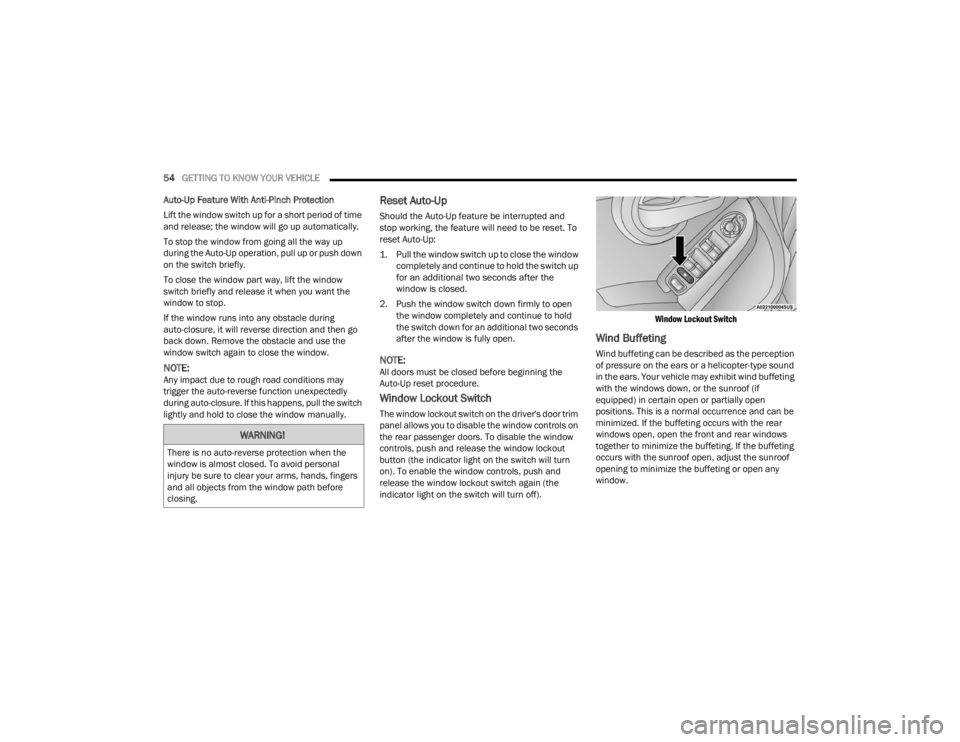
The window lockout switch on the driver's door trim
panel allows you to disable the window controls on
the rear passenger doors. To disable the window
controls, push and release the window lockout
button (the indicator light on the switch will turn
on). To enable the window controls, push and
release the window lockout switch again (the
indicator light on the switch will turn off).
Window Lockout Switch
Wind Buffeting
Wind buffeting can be described as the perception
of pressure on the ears or a helicopter-type sound
in the ears. Your vehicle may exhibit wind buffeting
with the windows down, or the sunroof (if
equipped) in certain open or partially open
positions. This is a normal occurrence and can be
minimized. If the buffeting occurs with the rear
windows open, open the front and rear windows
together to minimize the buffeting. If the buffeting
occurs with the sunroof open, adjust the sunroof
opening to minimize the buffeting or open any
window.
WARNING!
There is no auto-reverse protection when the
window is almost closed. To avoid personal
injury be sure to clear your arms, hands, fingers
and all objects from the window path before
closing.
22_FD_OM_EN_USC_t.book Page 54