display FIAT BRAVO 2009 2.G Owner's Manual
[x] Cancel search | Manufacturer: FIAT, Model Year: 2009, Model line: BRAVO, Model: FIAT BRAVO 2009 2.GPages: 246, PDF Size: 4.1 MB
Page 34 of 246
33
SAFETY
DEVICES
CORRECT USE
OF THE CAR
WARNING
LIGHTS AND
MESSAGES
IN AN
EMERGENCY
CAR
MAINTENANCE
TECHNICAL
SPECIFICATIONS
INDEX
DASHBOARD
AND CONTROLS
Button vol.
(Adjusting the button volume)
With this function the volume of the
roger-beep accompanying the activation
of buttons MODE,
Õand Ôcan be ad-
justed according to 8 levels.
To adjust the volume proceed as follows:
– briefly press button MODE: the previ-
ously set volume “level” will flash on the
display;
– press button
Õor Ôfor setting;
– briefly press button MODEto go back
to the menu screen or press the button
for long to go back to the standard screen
without storing settings.
Belt Buzzer
(S.B.R. buzzer reactivation)
This function can be only displayed after
Fiat Dealership has deactivated the S.B.R.
system (see paragraph “S.B.R. system” in
section “Safety devices”).Service (Scheduled Servicing)
Through this function it is possible to dis-
play information connected to proper car
servicing.
Proceed as follows:
– briefly press button MODE: service in
km or mi, according to previous setting,
will be displayed (see paragraph “Distance
unit”);
– briefly press button MODEto go back
to the menu screen or press the button
for long to go back to the standard screen
without storing settings.NoteThe “Service schedule” includes car
maintenance every 30,000 km (or 18,000
miles) or every year; this is shown auto-
matically, with the ignition key at MAR,
starting from 2,000 km (or equivalent val-
ue in miles) or 30 days from this deadline
and it is shown again every 200 km (or
equivalent value in miles). Below 200 km
servicing indications are displayed more
frequently. Servicing indication will be dis-
played in km or mi according to previous
setting. When a programmed maintenance
interval (coupon) is near to come, turning
the ignition key to MAR, the display will
show the message “Service” followed by
the number of km/mi or days to go before
car servicing. Contact a Fiat Dealership to
carry out any service operation provided
by the “Service schedule” and to reset the
display.
023-036 BRAVO GB:023-036 BRAVO GB 11-11-2009 10:51 Pagina 33
Page 35 of 246
34
SAFETY
DEVICES
CORRECT USE
OF THE CAR
WARNING
LIGHTS AND
MESSAGES
IN AN
EMERGENCY
CAR
MAINTENANCE
TECHNICAL
SPECIFICATIONS
INDEX
DASHBOARD
AND CONTROLS
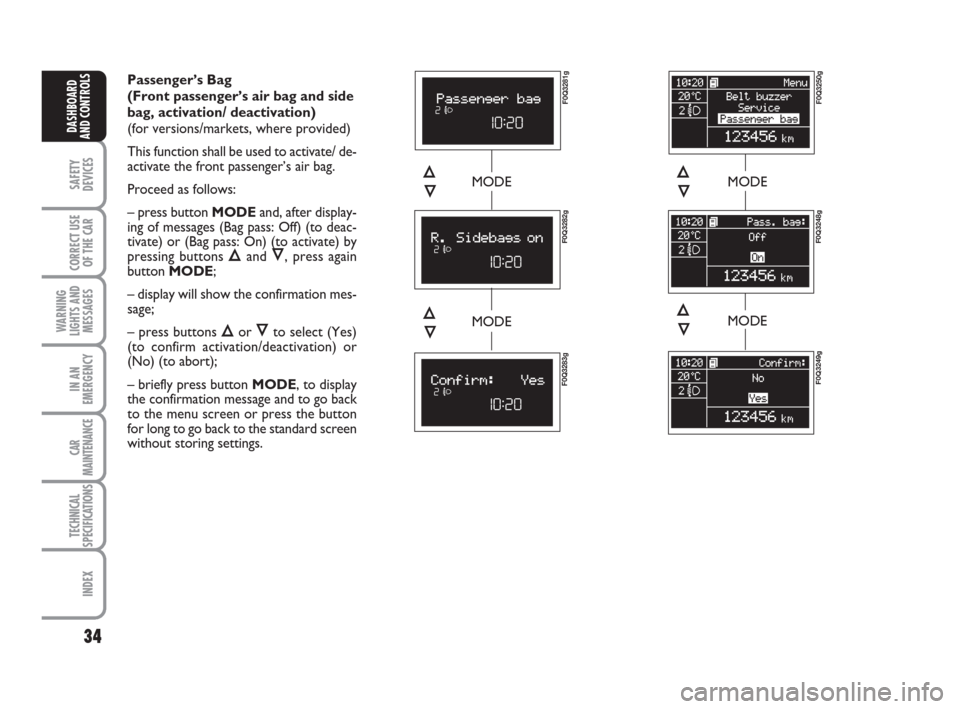
Passenger’s Bag
(Front passenger’s air bag and side
bag, activation/ deactivation)
(for versions/markets, where provided)
This function shall be used to activate/ de-
activate the front passenger’s air bag.
Proceed as follows:
– press button MODEand, after display-
ing of messages (Bag pass: Off) (to deac-
tivate) or (Bag pass: On) (to activate) by
pressing buttons
Õand Ô, press again
button MODE;
– display will show the confirmation mes-
sage;
– press buttons
Õor Ôto select (Yes)
(to confirm activation/deactivation) or
(No) (to abort);
– briefly press button MODE, to display
the confirmation message and to go back
to the menu screen or press the button
for long to go back to the standard screen
without storing settings.
MODEMODE
MODE
F0Q3250g
F0Q3248g
Õ
Ô
F0Q3249g
MODEÕ
Ô
F0Q3281g
F0Q3282g
Õ
Ô
F0Q3283g
Õ
Ô
023-036 BRAVO GB:023-036 BRAVO GB 11-11-2009 10:51 Pagina 34
Page 36 of 246
35
SAFETY
DEVICES
CORRECT USE
OF THE CAR
WARNING
LIGHTS AND
MESSAGES
IN AN
EMERGENCY
CAR
MAINTENANCE
TECHNICAL
SPECIFICATIONS
INDEX
DASHBOARD
AND CONTROLS
Cornerning light
(activation/deactivation of
“Cornering lights”)
(for versions/markets,
where provided)
This function makes it possible to acti-
vate/deactivate the “Cornering lights” (see
the description in the “Exterior lights”
paragraph).
Proceed as follows to activate/deactivate
the lights (ON/OFF):
– press the MODEbutton briefly, the dis-
play will show On or Off flashing depend-
ing on the previous setting;
– press the
Õor Ôbutton to make the
selection;
– press the MODEbutton briefly to re-
turn to the menu screen or press the but-
ton for longer to return to the standard
screen without memorizing.
Exit Menu
This is the last function that closes the cir-
cular setting cycle listed in the initial menu
screen.
Briefly press button MODEto go back to
the standard screen without storing set-
tings.
Press button
Ôto return to the first menu
option (Speed Beep).
TRIP COMPUTER
General features
The “Trip computer” displays information
(with ignition key at MAR), relating to the
operating status of the car. This function
comprises two separate and independent
trips: “Trip A” and “Trip B” concerning
the “complete mission” of the car (jour-
ney).
Both functions are resettable (reset - start
of new mission).
“Trip A” shall be used to display the fig-
ures relating to:
– Range
– Trip distance
– Average consumption
– Instant consumption
– Average speed
– Travel time (driving time).“Trip B” displays the figures relating to:
– Trip distance B
– Average consumption B
– Average speed B
– Travel time B (driving time).
Note“Trip B” function can be excluded
(see paragraph “Trip B On/Off”). “Range”
and “Instant consumption” cannot be re-
set.
Values displayed
Range
This value shows the distance in km (or
mi) that the car can still cover before
needing fuel, assuming that driving condi-
tions are kept unvaried. The display will
show “----” in the following cases:
– value lower than 50 km (or 30 mi)
– car left parked with engine running for
long.
IMPORTANT The variation of the auton-
omy value can be influenced by different
factors: driving style (see what is described
in paragraph “Driving style” in the chap-
ter “Start-up and driving”), type of route
(highways, urban, mountain, etc…), use
conditions of the car (load transported,
tire pressure, etc…). What was described
previously must be taken in consideration
when planning a trip.
023-036 BRAVO GB:023-036 BRAVO GB 11-11-2009 10:51 Pagina 35
Page 37 of 246
36
SAFETY
DEVICES
CORRECT USE
OF THE CAR
WARNING
LIGHTS AND
MESSAGES
IN AN
EMERGENCY
CAR
MAINTENANCE
TECHNICAL
SPECIFICATIONS
INDEX
DASHBOARD
AND CONTROLS
Trip distance
This value shows the distance covered
from the start of the new mission.
Average consumption
This value shows the average consump-
tion from the start of the new mission.
Instant consumption
Represents the indicative average of con-
sumptions from the beginning of the new
mission.
Average speed
This value shows the car average speed as
a function of the overall time elapsed since
the start of the new mission.
Travel time
This value shows the time elapsed since
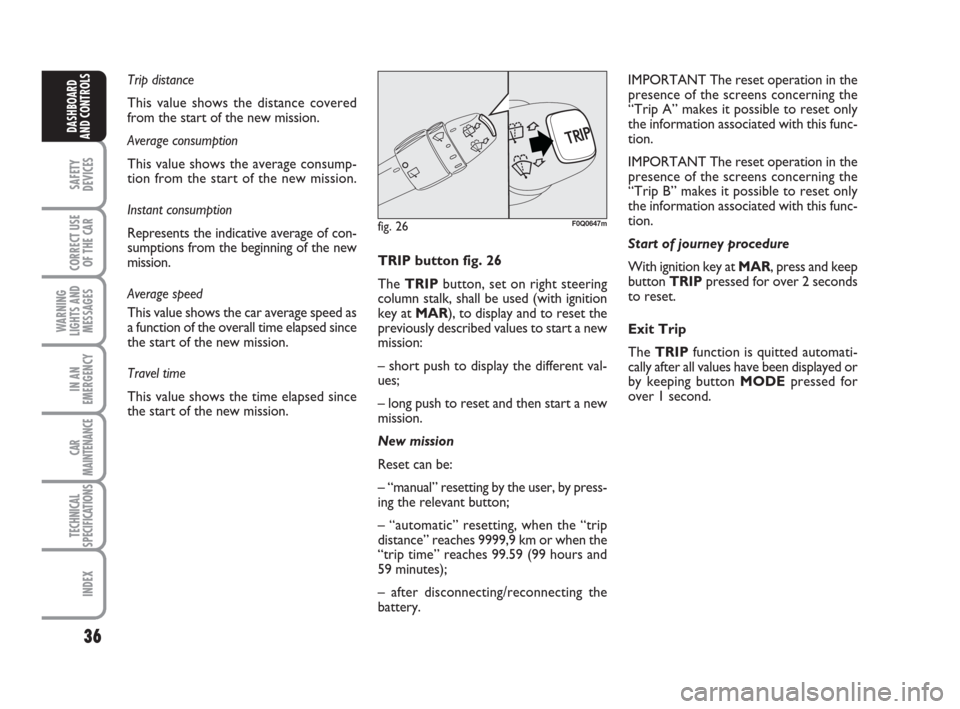
the start of the new mission.TRIP button fig. 26
The TRIPbutton, set on right steering
column stalk, shall be used (with ignition
key at MAR), to display and to reset the
previously described values to start a new
mission:
– short push to display the different val-
ues;
– long push to reset and then start a new
mission.
New mission
Reset can be:
– “manual” resetting by the user, by press-
ing the relevant button;
– “automatic” resetting, when the “trip
distance” reaches 9999,9 km or when the
“trip time” reaches 99.59 (99 hours and
59 minutes);
– after disconnecting/reconnecting the
battery.IMPORTANT The reset operation in the
presence of the screens concerning the
“Trip A” makes it possible to reset only
the information associated with this func-
tion.
IMPORTANT The reset operation in the
presence of the screens concerning the
“Trip B” makes it possible to reset only
the information associated with this func-
tion.
Start of journey procedure
With ignition key at MAR, press and keep
button TRIPpressed for over 2 seconds
to reset.
Exit Trip
The TRIPfunction is quitted automati-
cally after all values have been displayed or
by keeping button MODEpressed for
over 1 second.
fig. 26F0Q0647m
023-036 BRAVO GB:023-036 BRAVO GB 11-11-2009 10:51 Pagina 36
Page 50 of 246
49
SAFETY
DEVICES
CORRECT USE
OF THE CAR
WARNING
LIGHTS AND
MESSAGES
IN AN
EMERGENCY
CAR
MAINTENANCE
TECHNICAL
SPECIFICATIONS
INDEX
DASHBOARD
AND CONTROLS
F0Q0611mfig. 44
AUTOMATIC
TWO-ZONE CLIMATE
CONTROL SYSTEM
(for versions/markets, where provided)
DESCRIPTION
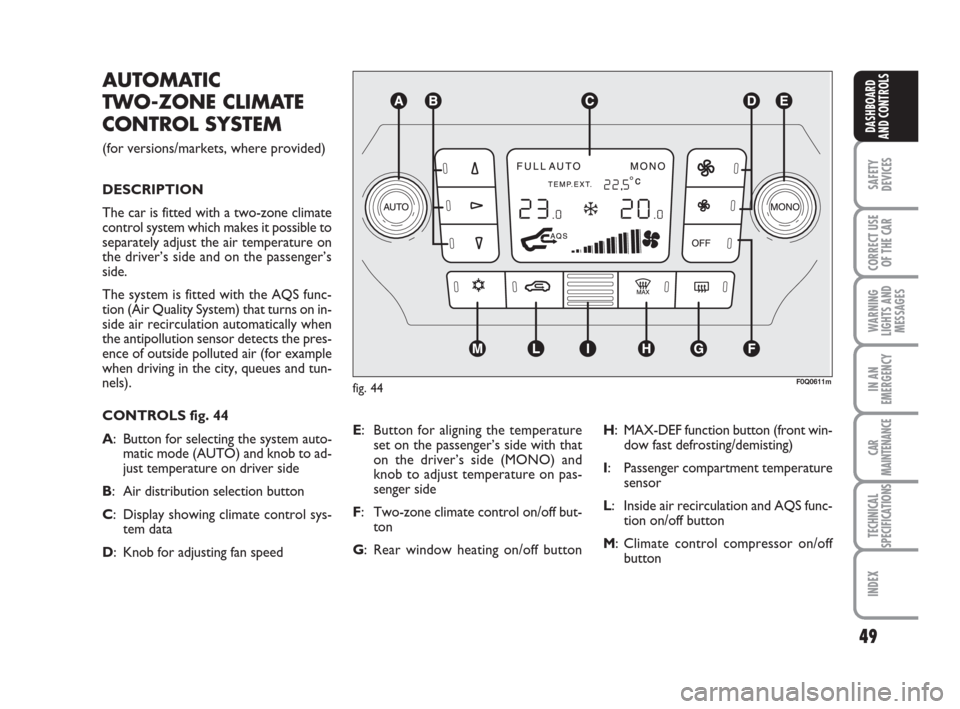
The car is fitted with a two-zone climate
control system which makes it possible to
separately adjust the air temperature on
the driver’s side and on the passenger’s
side.
The system is fitted with the AQS func-
tion (Air Quality System) that turns on in-
side air recirculation automatically when
the antipollution sensor detects the pres-
ence of outside polluted air (for example
when driving in the city, queues and tun-
nels).
CONTROLS fig. 44
A: Button for selecting the system auto-
matic mode (AUTO) and knob to ad-
just temperature on driver side
B: Air distribution selection button
C: Display showing climate control sys-
tem data
D: Knob for adjusting fan speedE: Button for aligning the temperature
set on the passenger’s side with that
on the driver’s side (MONO) and
knob to adjust temperature on pas-
senger side
F: Two-zone climate control on/off but-
ton
G: Rear window heating on/off buttonH: MAX-DEF function button (front win-
dow fast defrosting/demisting)
I: Passenger compartment temperature
sensor
L: Inside air recirculation and AQS func-
tion on/off button
M: Climate control compressor on/off
button
037-056 BRAVO GB:037-056 BRAVO GB 11-11-2009 10:52 Pagina 49
Page 51 of 246
50
SAFETY
DEVICES
CORRECT USE
OF THE CAR
WARNING
LIGHTS AND
MESSAGES
IN AN
EMERGENCY
CAR
MAINTENANCE
TECHNICAL
SPECIFICATIONS
INDEX
DASHBOARD
AND CONTROLS
SWITCHING THE CLIMATE
CONTROL SYSTEM ON
The system can be started by pressing any
button, but it is advisable to set the tem-
peratures required on the display;
then press button AUTO.
It is possible to personalise required tem-
peratures (driver and passenger) with a
maximum difference of 7°C.
The climate control system compressor
works only with the engine running and
outside temperature over 4°C.It is possible to personalise the choices
made automatically by the system inter-
vening manually on the following controls:
❒fan speed adjustment knob;
❒air distribution selection button;
❒inside air recirculation and AQS func-
tion on/off button;
❒climate control compressor button.
It is inadvisable to use air re-
circulation on rainy/cold
days as it would considerably increase
the possibility of windows misting up
inside.
WARNING
HOW TO USE THE
AUTOMATIC FUNCTION
(AUTO)
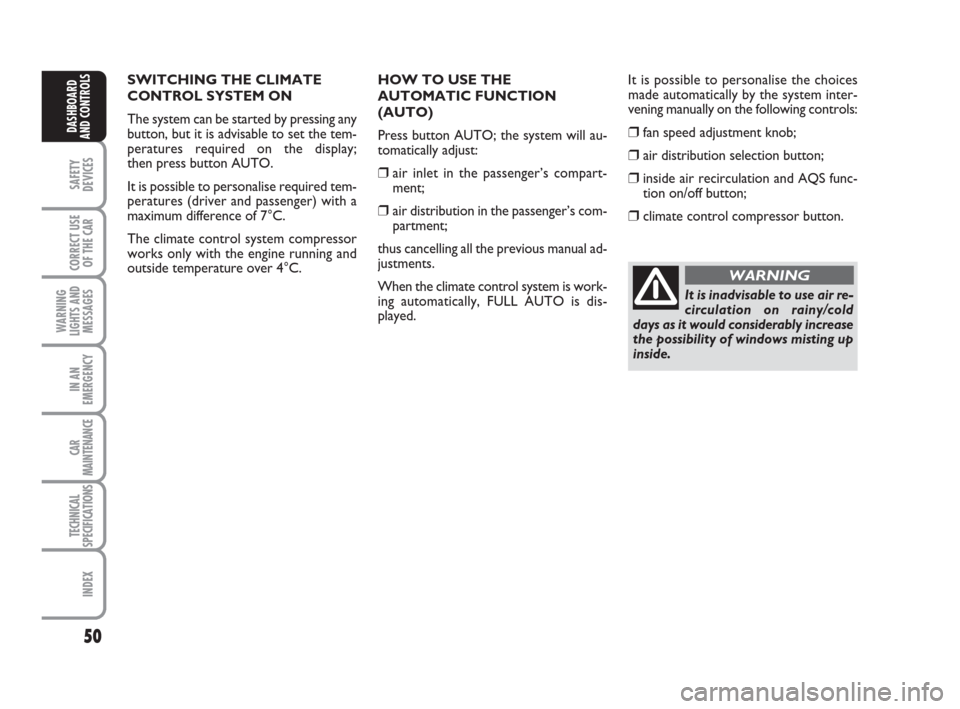
Press button AUTO; the system will au-
tomatically adjust:
❒air inlet in the passenger’s compart-
ment;
❒air distribution in the passenger’s com-
partment;
thus cancelling all the previous manual ad-
justments.
When the climate control system is work-
ing automatically, FULL AUTO is dis-
played.
037-056 BRAVO GB:037-056 BRAVO GB 11-11-2009 10:52 Pagina 50
Page 52 of 246
51
SAFETY
DEVICES
CORRECT USE
OF THE CAR
WARNING
LIGHTS AND
MESSAGES
IN AN
EMERGENCY
CAR
MAINTENANCE
TECHNICAL
SPECIFICATIONS
INDEX
DASHBOARD
AND CONTROLS
FAN SPEED ADJUSTMENT
To adjust the fan speed, press button
p.
The 12 selectable speeds are shown by the
lighting up of the bars on the climate con-
trol system display:
❒max fan speed = all bars lit
❒min fan speed = one bar lit.
The fan can be cut off (all bars off) only if
the climate control compressor has been
switched off pressing button
❄.
To restore automatic fan speed control,
after a manual adjustment, press button
AUTO.FAST FRONT WINDOW
DEMISTING/DEFROSTING
(MAX-DEF function)
Pressing button
-the climate control
automatically activates timed operation of
all the functions required to quicken
demisting/defrosting of the windscreen
and front side windows, i.e.:
❒switches on climate control compres-
sor (if outside temperature exceeds
4°C);
❒switches off inside air recirculation, if
on (button led
Toff);
❒switches on heated rear window (but-
ton led
-on) and door mirror coils;
❒sets max air temperature;
❒activates proper air flow.HEATED REAR WINDOW
AND DOOR MIRROR
DEMISTING/DEFROSTING
Pressing button
(activates this function.
When this function is on, the button led
is on.
This function is timed and switches off au-
tomatically after 20 minutes. To cut out
this function press again button
(.
IMPORTANT Do not apply stickers on
the inside of the rear window over the
heating filaments to avoid damage that
might cause it to stop working properly.
IMPORTANT Press button
Tto ob-
tain outside air inlet into passenger com-
partment (in this event the button led is
off).
037-056 BRAVO GB:037-056 BRAVO GB 11-11-2009 10:52 Pagina 51
Page 53 of 246
52
SAFETY
DEVICES
CORRECT USE
OF THE CAR
WARNING
LIGHTS AND
MESSAGES
IN AN
EMERGENCY
CAR
MAINTENANCE
TECHNICAL
SPECIFICATIONS
INDEX
DASHBOARD
AND CONTROLS
AQS (Air Quality System)
function activation
The AQS function, (message AQS on the
display), turns on air recirculation auto-
matically when it detects the presence of
outside polluted air (for example when
driving in queues and tunnels).
IMPORTANT When the AQS function is
active, after 15 minutes of consecutive in-
ternal air recirculation, the climate con-
trol system enables outside air inlet (re-
gardless of air pollution level) for approx.
1 minute to change air inside the passen-
ger compartment. INSIDE AIR RECIRCULATION
ON/OFF AND AQS FUNCTION
(Air Quality System) BUTTON
Press button
T.
Inside air recirculation is controlled by
three operating logics:
❒automatic control, indicated by message
AQS on the display and button led
Toff;
❒forced switching off (inside air recircu-
lation always off with air inlet from out-
side), button led
Toff;
❒forced switching on (inside air recircu-
lation always on with air inlet from out-
side), button led
Ton.Pressing button OFF, the climate control
system turns on automatically the inside
air recirculation function (button led
Ton). In these conditions it is how-
ever possible to take air from the outside
(and vice versa) pressing button
T(button led off).
With button OFF pressed (button led on),
the AQS (Air Quality System) function
cannot be activated.
IMPORTANT The inside air recirculation
system makes it possible to reach the re-
quired “heating” or “cooling” conditions
faster. It is however inadvisable to use it
on rainy/cold days as it would consider-
ably increase the possibility of the win-
dows misting inside, especially if the cli-
mate control system is off. It is advisable
to turn on the inside air recirculation sys-
tem in queues or tunnels to avoid admit-
ting polluted air from outside. The pro-
longed use of this function should how-
ever be avoided, especially with several
persons on board, to avoid the possibili-
ty of the windows misting inside.
037-056 BRAVO GB:037-056 BRAVO GB 11-11-2009 10:52 Pagina 52
Page 54 of 246
53
SAFETY
DEVICES
CORRECT USE
OF THE CAR
WARNING
LIGHTS AND
MESSAGES
IN AN
EMERGENCY
CAR
MAINTENANCE
TECHNICAL
SPECIFICATIONS
INDEX
DASHBOARD
AND CONTROLS
ALIGNMENT OF SET
TEMPERATURES
(MONO function)
Pressing button MONO automatically
aligns the temperature on the passenger’s
side with that on the driver’s side.
Turn the knob AUTO or MONO to
raise/reduce the temperature between the
two zones by the same value.
Press again MONO to disable the func-
tion.CLIMATE CONTROL
COMPRESSOR ON/OFF
Press button
❄to switch on the climate
control compressor.
Compressor on
❒button led ❄on;
❒symbol ❄on the display, lit.
Compressor off
❒button led ❄off;
❒symbol ❄on the display, off;
❒inside air recirculation off;
❒AQS function disabled.
With the climate control compressor off,
it is not possible to admit air to the pas-
senger compartment with a temperature
below the outside temperature; in this
case symbol ò flashes on the display.
The switching off of the climate control
compressor remains in storage even when
the engine has been stopped. To restore
automatic control for switching on the cli-
mate control compressor, press button
❄or AUTO, in which case, the other man-
ual settings set will be cancelled.AIR DISTRIBUTION SELECTION
Pressing one or more buttons
Q/E/Zit
is possible to choose manually 7 of the
possible air distributions to the passenger
compartment:
QAir flow to the windscreen and
front side window vents to demist
or defrost them.
ZAir flow towards the front and
rear lower parts of the passenger
compartment. This type of distri-
bution allows heating of the pas-
senger compartment in the short-
est time.
Q
ZESplitting of the air flow between
front and rear vents, centre and
side dashboard outlets, rear out-
let, windscreen and front side win-
dow demisting vents.
EAir flow to the dashboard centre
and side outlets (passenger’s
body).
037-056 BRAVO GB:037-056 BRAVO GB 11-11-2009 10:52 Pagina 53
Page 55 of 246
54
SAFETY
DEVICES
CORRECT USE
OF THE CAR
WARNING
LIGHTS AND
MESSAGES
IN AN
EMERGENCY
CAR
MAINTENANCE
TECHNICAL
SPECIFICATIONS
INDEX
DASHBOARD
AND CONTROLS
QSplitting of the air flow between
Zfeet vents and windscreen and
front side window demisting/ de-
frosting vents. This type of air dis-
tribution allows satisfactory heat-
ing of the passenger compartment
while preventing possible misting
of the windows.
ESplitting of the air flow between
Zfeet vents (warmest air) and the
dashboard centre and side outlets
and the rear outlet (coolest air).
QSplitting of the air flow between
Ecentre and side dashboard outlets,
rear outlet and windscreen and
side window demisting/defrosting
vents. This type of air distribution
allows satisfactory ventilation of
the passenger compartment while
preventing possible misting of the
windows.IMPORTANT For operation of the cli-
mate control system, at least one of but-
tons
Q/E/Zshall be activated. Deacti-
vation of all buttons
Q/E/Zis therefore
not enabled by the system.
IMPORTANT To switch the system on
again, press button OFF; this operation re-
sets all operating conditions stored before
switching off.
To restore automatic air distribution con-
trol after a manual selection, press button
AUTO.
SUPPLEMENTARY HEATER
(for versions/markets, where provided)
This device heats up the passenger com-
partment more rapidly in cold weather
conditions with the engine coolant tem-
perature very low.
In the above climate conditions, the de-
vice comes on automatically when the en-
gine is started with at least one bar of the
fan speed indicator lit up.
The radiator is turned off automatically
when conditions of comfort are achieved.
IMPORTANT heater activation is pre-
vented if the battery voltage is too low.SWITCHING THE CLIMATE
CONTROL SYSTEM OFF
Press button OFF.
The following information is displayed:
❒writing OFF;
❒outside temperature;
❒inside air recirculation on (button led
Ton).
037-056 BRAVO GB:037-056 BRAVO GB 11-11-2009 10:52 Pagina 54