key FIAT BRAVO 2012 2.G User Guide
[x] Cancel search | Manufacturer: FIAT, Model Year: 2012, Model line: BRAVO, Model: FIAT BRAVO 2012 2.GPages: 299, PDF Size: 5.81 MB
Page 22 of 299
TURNING THE ALARM ON
With the doors, bonnet and tailgate closed and the
ignition key either turned to STOP or removed,
point the key with remote control towards the
vehicle and press and release button
.
Excluding some markets, the system produces an
acoustic signal (beep) and enables door locking.
The switching on of the alarm is preceded by
a self-diagnosis stage: if a fault is detected, the
system emits a new acoustic signal together with
the display of a message (see “Warning lights and
messages” chapter).
In this case switch off the alarm by pressing
,
check that all the doors, bonnet and tailgate are
closed correctly; then switch the alarm back on by
pressing the
button.If a door, the bonnet and the tailgate are not
properly shut, they will be excluded from the check
by the alarm system.
If the alarm emits an acoustic signal even when the
doors, bonnet and tailgate are correctly closed, a
failure has occurred in system operation.
Go to a Fiat Dealership.
IMPORTANT The alarm does not come on when
the central locking is activated using the metal
insert in the key.
IMPORTANT The alarm is adapted to meet
requirements in various countries.
18GETTING TO
KNOW YOUR CAR
SAFETY
STARTING AND
DRIVING
WARNING LIGHTS
AND MESSAGES
IN AN EMERGENCY
SERVICING AND
MAINTENANCE
TECHNICAL
SPECIFICATIONS
INDEX
Page 23 of 299
TURNING THE ALARM OFF
Press button
on the key with remote control.
The following operations are performed
(excluding some versions for specific markets):
❒direction indicators flash twice;
❒there are two short acoustic signals (beeps);
❒doors are unlocked.
IMPORTANT The alarm does not switch off when
the central opening is activated using the metal
insert in the key.VOLUME SENSING/ANTI-LIFT
PROTECTION
To guarantee the correct operation of the
protection system it is advisable to shut all the side
windows and the sun roof (for versions/markets,
where provided).
If necessary, the function can be turned off (if, for
example, you are leaving an animal in the car) by
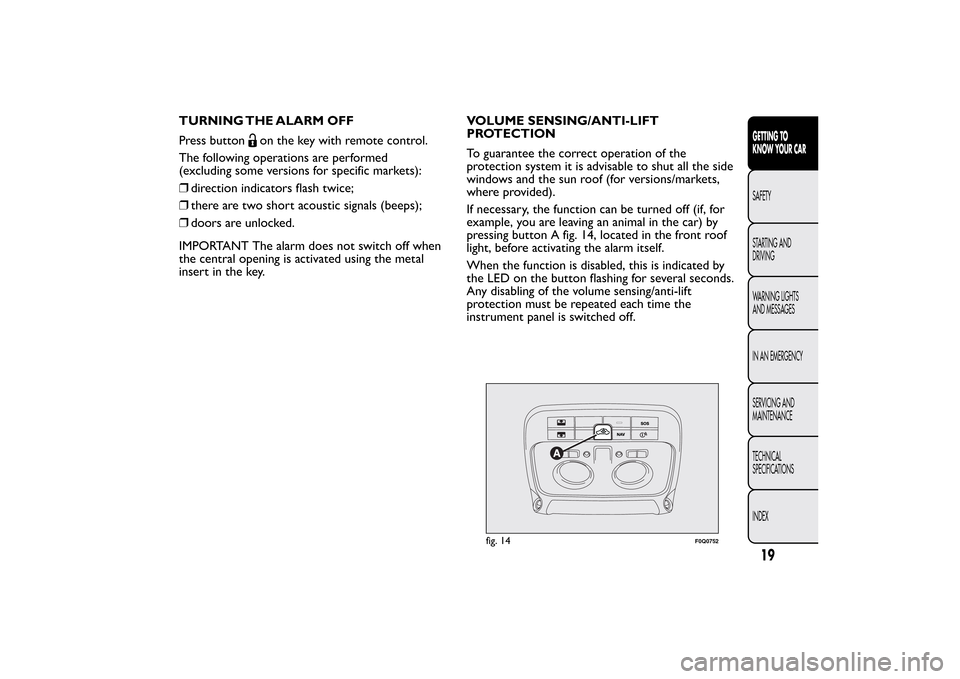
pressing button A fig. 14, located in the front roof
light, before activating the alarm itself.
When the function is disabled, this is indicated by
the LED on the button flashing for several seconds.
Any disabling of the volume sensing/anti-lift
protection must be repeated each time the
instrument panel is switched off.
fig. 14
F0Q0752
19GETTING TO
KNOW YOUR CARSAFETY
STARTING AND
DRIVING
WARNING LIGHTS
AND MESSAGES
IN AN EMERGENCY
SERVICING AND
MAINTENANCE
TECHNICAL
SPECIFICATIONS
INDEX
Page 24 of 299
BREAK-IN ATTEMPT INDICATION
Any break-in attempt is indicated by the warning
light
(or symbol in the display) lighting up,
together with a message shown in the display
(see “Warning lights and messages” chapter).DISABLING THE ALARM
To turn the alarm off completely (for example,
if the vehicle is not being used for a long time), the
vehicle must be closed by turning the metal insert
of the key with remote control in the lock.
IMPORTANT If the batteries of the key with
remote control run out or the system fails, the
alarm can be switched off by placing the key in the
ignition switch and turning it to MAR-ON.
20GETTING TO
KNOW YOUR CAR
SAFETY
STARTING AND
DRIVING
WARNING LIGHTS
AND MESSAGES
IN AN EMERGENCY
SERVICING AND
MAINTENANCE
TECHNICAL
SPECIFICATIONS
INDEX
Page 25 of 299
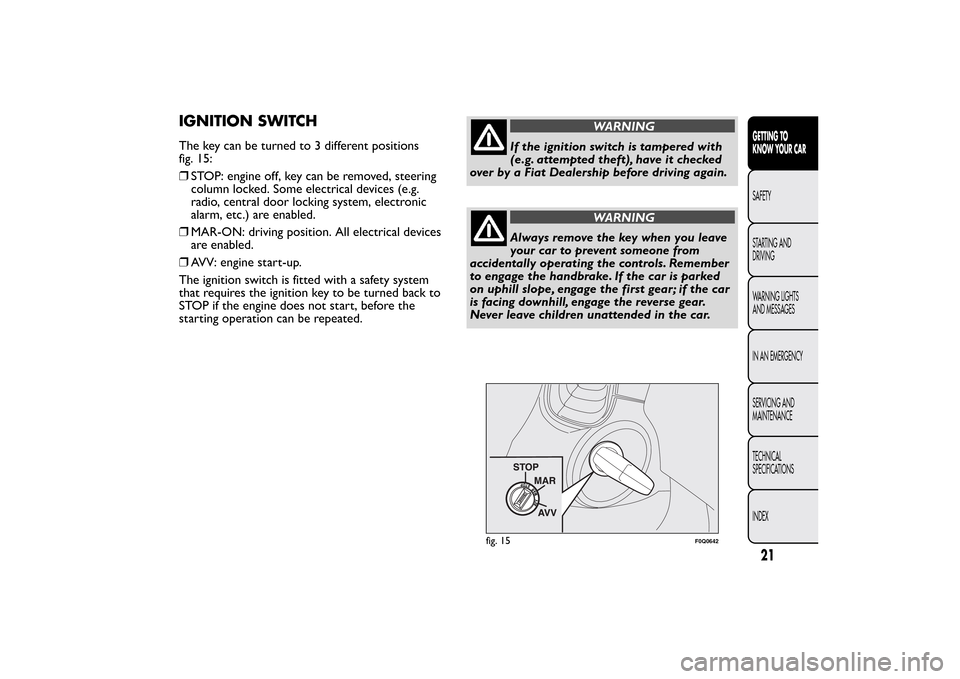
IGNITION SWITCHThe key can be turned to 3 different positions
fig. 15:
❒STOP: engine off, key can be removed, steering
column locked. Some electrical devices (e.g.
radio, central door locking system, electronic
alarm, etc.) are enabled.
❒MAR-ON: driving position. All electrical devices
are enabled.
❒AVV: engine start-up.
The ignition switch is fitted with a safety system
that requires the ignition key to be turned back to
STOP if the engine does not start, before the
starting operation can be repeated.
WARNING
If the ignition switch is tampered with
(e.g. attempted theft), have it checked
over by a Fiat Dealership before driving again.
WARNING
Always remove the key when you leave
your car to prevent someone from
accidentally operating the controls. Remember
to engage the handbrake. If the car is parked
on uphill slope, engage the first gear; if the car
is facing downhill, engage the reverse gear.
Never leave children unattended in the car.
fig. 15
F0Q0642
21GETTING TO
KNOW YOUR CARSAFETY
STARTING AND
DRIVING
WARNING LIGHTS
AND MESSAGES
IN AN EMERGENCY
SERVICING AND
MAINTENANCE
TECHNICAL
SPECIFICATIONS
INDEX
Page 26 of 299
STEERING LOCK
Engagement
When at STOP, remove the key and turn the
steering wheel until it locks.
Disengagement
Move the steering wheel slightly as you turn the
ignition key to MAR-ON.
IMPORTANT In some parking conditions (e.g.:
wheels turned) the effort required to move the
steering wheel and disengage the steering lock may
be increased.
WARNING
It is absolutely forbidden to carr y out
any aftermarket operation involving
steering system or steering column
modifications (e.g.: installation of anti-theft
device) that could badly affect performance
and safety, invalidate the warranty and also
result in non-compliance of the car with
type-approval requirements.
WARNING
Never remove the key while the car is
moving.The steering wheel will lock
as soon as it is turned.This holds true for cars
being towed as well.
22GETTING TO
KNOW YOUR CAR
SAFETY
STARTING AND
DRIVING
WARNING LIGHTS
AND MESSAGES
IN AN EMERGENCY
SERVICING AND
MAINTENANCE
TECHNICAL
SPECIFICATIONS
INDEX
Page 36 of 299
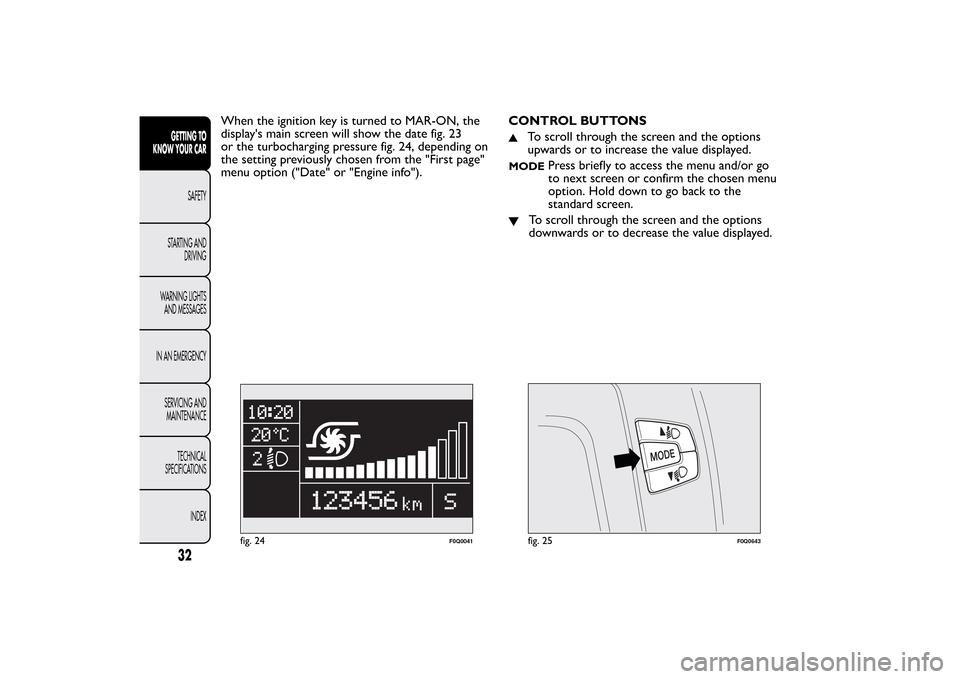
When the ignition key is turned to MAR-ON, the
display's main screen will show the date fig. 23
or the turbocharging pressure fig. 24, depending on
the setting previously chosen from the "First page"
menu option ("Date" or "Engine info").CONTROL BUTTONS
To scroll through the screen and the options
upwards or to increase the value displayed.
MODE
Press briefly to access the menu and/or go
to next screen or confirm the chosen menu
option. Hold down to go back to the
standard screen.
To scroll through the screen and the options
downwards or to decrease the value displayed.
fig. 24
F0Q0041
fig. 25
F0Q0643
32GETTING TO
KNOW YOUR CAR
SAFETY
STARTING AND
DRIVING
WARNING LIGHTS
AND MESSAGES
IN AN EMERGENCY
SERVICING AND
MAINTENANCE
TECHNICAL
SPECIFICATIONS
INDEX
Page 43 of 299
Set date (Setting the date)
Using this function it is possible to update the date
(day - month - year).
Proceed as follows to update:
❒briefly press the MODE button: the year starts
flashing on the display;
❒press the
or
button to make the adjustment;
❒briefly press the MODE button: the month
starts flashing on the display;
❒press the
or
button to make the adjustment;
❒briefly press the MODE button: the day starts
flashing on the display;
❒press the buttonor
for setting.
NOTE The setting will increase or decrease by one
unit each time
or
is pressed. Hold down the
button to increase/decrease the setting rapidly and
automatically. Complete the setting by briefly
pressing the button when you approach the
required value.
❒briefly press the MODE button to return to the
menu screen or hold the button down to return
to the standard screen without memorising.First page (Display of information on the
main screen)
This function allows you to choose the information
you would like to display on the main screen.
You can choose to display the date or the
turbocharger boost pressure.
To select either option, proceed as follows:
❒briefly press the MODE button: "First page" will
appear on the display;
❒briefly press the MODE button again to display
the "Date" and "Engine info" options;
❒press
or
to select the information you wish
to see on the main page of the display;
❒briefly press the MODE button to store the
selection and go back to the previous menu
screen or hold the button down to go back to
the standard screen without memorising.
When the key is turned to MAR-ON and the initial
check stage is over, the reconfigurable multifunction
display will show the information previously set via
the “First page” menu function.
39GETTING TO
KNOW YOUR CARSAFETY
STARTING AND
DRIVING
WARNING LIGHTS
AND MESSAGES
IN AN EMERGENCY
SERVICING AND
MAINTENANCE
TECHNICAL
SPECIFICATIONS
INDEX
Page 46 of 299
Button volume (adjusting the button
volume)
This function may be used to adjust (up to 8 levels)
the volume of the acoustic signal made when the
MODE,
and
buttons are pressed.
To set the desired volume, proceed as follows:
❒press the MODE button briefly, making the
display flash the previously set volume "level";
❒press the
or
button to make the adjustment;
❒briefly press the MODE button to return to the
menu screen or hold the button down to return
to the standard screen without memorising.
Belt buzzer (Buzzer activation for SBR
indication)
This function can only be displayed after a Fiat
Dealership has deactivated the SBR system (see
paragraph “SBR system” in the “Safety” chapter).Service (Scheduled servicing)
Using this function you can display information
about the mileage intervals for car servicing.
To consult this information, proceed as follows:
❒briefly press the MODE button: the display
shows service requirements in km or mi
according to the previous setting (see paragraph
“Distance unit of measurement”);
❒briefly press the MODE button to go back to the
menu screen or hold the button down to go back
to the standard screen.
Note The "Scheduled Servicing Plan" requires the
car to be serviced every 30,000 km (or 18,000
miles). This is automatically displayed, when the
ignition key is turned to MAR-ON, starting from
2,000 km (or the equivalent in miles) from this
point and reappears every 200 km (or the
equivalent in miles). Below 200 km servicing
indications are more frequent. The indication will
appear in kilometres or miles depending on the unit
of measurement settings. When the next
scheduled servicing is approaching, the message
"Service" will appear on the display, followed by the
number of kilometres or miles left, when the
ignition key is turned to MAR-ON. Go to a Fiat
Dealership, where the "Scheduled Servicing Plan"
operations will be performed and the message will
be reset.
42GETTING TO
KNOW YOUR CAR
SAFETY
STARTING AND
DRIVING
WARNING LIGHTS
AND MESSAGES
IN AN EMERGENCY
SERVICING AND
MAINTENANCE
TECHNICAL
SPECIFICATIONS
INDEX
Page 48 of 299
TRIP COMPUTERGeneral information
The Trip computer is used to display information
on car operation when the key is turned to
MAR-ON. Two separate trips, called “Trip A” and
“Trip B”, are provided to monitor the entire
mission (journey) in a reciprocally independent
manner.
Both functions can be reset (reset - start of a new
journey).
“Trip A” is used to display the figures relating to:
❒Range
❒Distance covered
❒Average consumption
❒Instantaneous consumption
❒Average speed
❒Trip time (driving time).
“Trip B” is used to display the figures relating to:
❒Distance travelled B
❒Average consumption B
❒Average speed B
❒Trip time B (driving time).
NoteThe “Trip B” function may be disabled (see
“Activating Trip B”). The “Range” and “Instant
consumption" parameters cannot be reset.Values displayed
Range
This indicates the approximate distance which can
be travelled with the amount of fuel present in
thetank.“----”will appear on the display in the
following cases:
❒range value lower than 50 km (or 30 mi)
❒car parked with engine running for an extended
period.
IMPORTANT The range value variation can be
affected by several factors: driving style, type of
route (motorway, urban, mountain roads, etc.),
conditions of use (load, tyre pressures, etc.). Trip
planning must therefore take the above into
account.
Distance covered
Shows the distance covered since the start of the
new journey.
Average consumption
Shows the approximate average fuel consumption
since the start of the new journey.
Instantaneous consumption
This indicates the fuel consumption. The value is
constantly updated. The display will show “----”if
the car is parked with the engine running.
44GETTING TO
KNOW YOUR CAR
SAFETY
STARTING AND
DRIVING
WARNING LIGHTS
AND MESSAGES
IN AN EMERGENCY
SERVICING AND
MAINTENANCE
TECHNICAL
SPECIFICATIONS
INDEX
Page 49 of 299
Average speed
This shows the average car speed as a function of
the overall time elapsed since the start of the
new journey.
Tr i p t i me
The time elapsed since the start of a new journey.
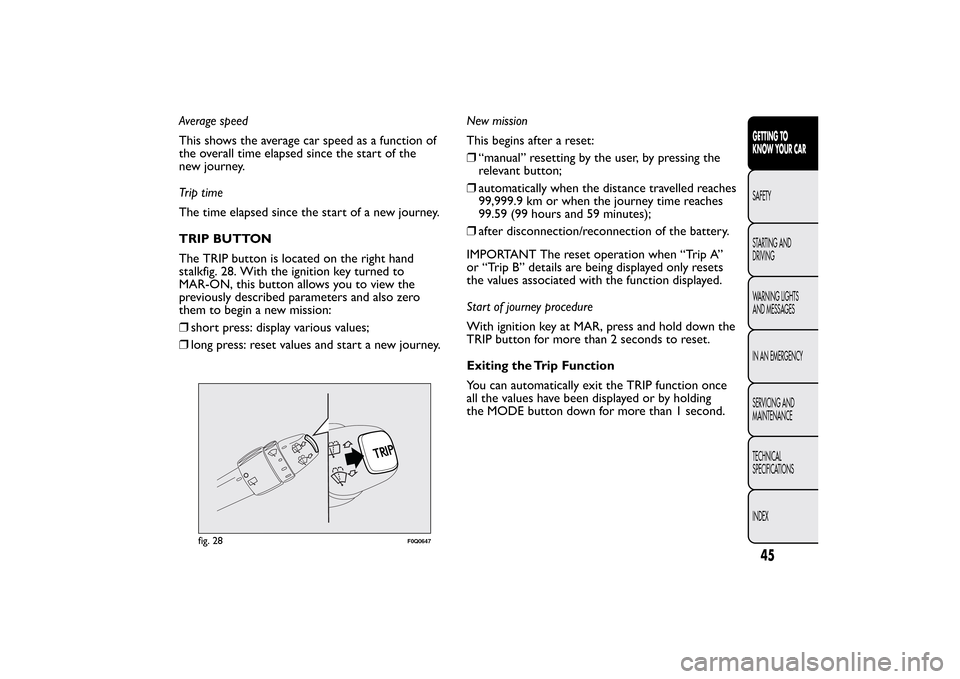
TRIP BUTTON
The TRIP button is located on the right hand
stalkfig. 28. With the ignition key turned to
MAR-ON, this button allows you to view the
previously described parameters and also zero
them to begin a new mission:
❒short press: display various values;
❒long press: reset values and start a new journey.New mission
This begins after a reset:
❒“manual” resetting by the user, by pressing the
relevant button;
❒automatically when the distance travelled reaches
99,999.9 km or when the journey time reaches
99.59 (99 hours and 59 minutes);
❒after disconnection/reconnection of the battery.
IMPORTANT The reset operation when “Trip A”
or “Trip B” details are being displayed only resets
the values associated with the function displayed.
Start of journey procedure
With ignition key at MAR, press and hold down the
TRIP button for more than 2 seconds to reset.
Exiting the Trip Function
You can automatically exit the TRIP function once
all the values have been displayed or by holding
the MODE button down for more than 1 second.
fig. 28
F0Q0647
45GETTING TO
KNOW YOUR CARSAFETY
STARTING AND
DRIVING
WARNING LIGHTS
AND MESSAGES
IN AN EMERGENCY
SERVICING AND
MAINTENANCE
TECHNICAL
SPECIFICATIONS
INDEX