Back FIAT DOBLO 2008 1.G User Guide
[x] Cancel search | Manufacturer: FIAT, Model Year: 2008, Model line: DOBLO, Model: FIAT DOBLO 2008 1.GPages: 222, PDF Size: 3.39 MB
Page 32 of 222
31GETTING TO KNOW YOUR VEHICLE
– briefly press button MODEto go
back to the menu screen or press the
button for long to go back to the stan-
dard screen without storing settings.
To cancel the setting, proceed as fol-
lows:
– briefly press button MODE: (On)
will flash on the display;
– press button –: (Off) will flash on
the display;
– briefly press button MODEto go
back to the menu screen or press the
button for long to go back to the stan-
dard screen without storing settings.
Trip B On/Off (Trip B)
Through this option it is possible to
activate (On) or deactivate (Off) the
Trip B (partial trip). Speed limit (Speed Beep)
With this function it is possible to set
the vehicle speed limit (km/h or mph),
when this limit is exceeded the driver
is immediately alerted (see section
“Warning lights and messages”).
To set the speed limit, proceed as
follows:
– briefly press button MODE: (Off)
will flash on the display;
– press button +: (On) will flash on
the display;
– briefly press button MODEand
then + or – to set the required speed
(during setting the value flashes).
NoteThe possible setting is be-
tween 30 and 250 km/h, or between
20 and 155 mph depending on the unit
set previously (see “Distance unit
(Dist. Unit)” paragraph described lat-
er. Every press on button +/ –in-
creases/decreases by 5 units. Keeping
the button +/ –pressed obtains the
automatic fast increase or decrease.
When you are near the required set-
ting complete adjustment by single
presses.For further details see paragraph
“Trip computer”.
For activation / deactivation, proceed
as follows:
– briefly press button MODE: (On)
or (Off) will flash on the display (ac-
cording to previous setting);
– press button +or –for setting;
– briefly press button MODEto go
back to the menu screen or press the
button for long to go back to the stan-
dard screen without storing settings.
Set clock (Set clock)
This function enables to set the
clock.
To set the clock (hours - minutes)
proceed as follows:
– briefly press button MODE:
“hours” will flash on the display;
001-105 Doblo GB 16-12-2008 14:22 Pagina 31
Page 33 of 222
32GETTING TO KNOW YOUR VEHICLE
– press button +or –for setting;
– briefly press button MODE: “min-
utes” will flash on the display;
– press button +or –for setting.
NoteEvery press on the button +
or –increases/decreases by one unit.
Keeping the button pressed obtains
automatic fast increase/decrease.
When you are near the required set-
ting complete adjustment by single
presses.
– briefly press button MODEto go
back to the menu screen or press the
button for long to go back to the stan-
dard screen without storing settings.
Clock mode (Clck. Mode)
This function is used to set the clock
in the 12h (12 hours) or 24h (24
hours) mode.
For setting proceed as follows:
– briefly press button MODE12h or
24h will flash on the display (accord-
ing to previous setting);
– press button +or –for setting;– briefly press button MODEto go
back to the menu screen or press the
button for long to go back to the stan-
dard screen without storing settings.
Set date (Adjust Date)
This function enables to update the
date (year - month - day).
To correct the date proceed as fol-
lows:
– briefly press button MODE:
“year” will flash on the display;
– press button +or –for setting;
– briefly press button MODE:
“month” will flash on the display;
– press button +or –for setting;
– briefly press button MODE: “day”
will flash on the display;
– press button +or –for setting.NoteEvery press on the button +
or –increases/decreases by one unit.
Keeping the button pressed obtains
automatic fast increase/decrease.
When you are near the required set-
ting complete adjustment by single
presses.
– briefly press button MODEto go
back to the menu screen or press the
button for long to go back to the stan-
dard screen without storing settings.
001-105 Doblo GB 16-12-2008 14:22 Pagina 32
Page 34 of 222
33GETTING TO KNOW YOUR VEHICLE
“Distance” unit (Dist. Unit)
With this function it is possible to set
the unit in km or mi.
To set the required unit proceed as
follows:
– briefly press button MODE: km or
mi will flash on the display (according
to previous setting);
– press button +or –for setting;
– briefly press button MODEto go
back to the menu screen or press the
button for long to go back to the stan-
dard screen without storing settings. Automatic door locking with
vehicle running (Autoclose)
(where provided)
When activated (On), this function
locks automatically the doors when
the vehicle speed exceeds 20 km/h.
To activate (On) or to deactivate
(Off) this function proceed as follows:
– briefly press button MODE: On or
Off will flash on the display (according
to previous setting);
– press button +or –for setting;
– briefly press button MODEto go
back to the menu screen or press the
button for long to go back to the stan-
dard screen without storing settings.“Consumption” unit (Cons.)
If the distance unit set is km (see pre-
vious paragraph) the display will enable
to set the fuel consumption unit (km/l
or l/100km).
If the distance unit set is mi (see pre-
vious paragraph) fuel consumption will
be displayed in mpg.
To set the required unit proceed as
follows:
– briefly press button MODE: km/l
or l/100km will flash on the display (ac-
cording to previous setting);
– press button +or –for setting;
– briefly press button MODEto go
back to the menu screen or press the
button for long to go back to the stan-
dard screen without storing settings.
001-105 Doblo GB 16-12-2008 14:22 Pagina 33
Page 35 of 222
34GETTING TO KNOW YOUR VEHICLE
“Temperature” unit (Temp.
Unit) (where provided)
This function enables to set the tem-
perature unit (°C or °F).
To set the required unit proceed as
follows:
– briefly press button MODE: °C or
°F will flash on the display (according
to previous setting);
– press button +or –for setting;
– briefly press button MODEto go
back to the menu screen or press the
button for long to go back to the stan-
dard screen without storing settings.
Selecting the language (Lang.)
Display messages can be shown in
different languages: Italian, German,
English, Spanish, French, Portuguese,
Polish and Dutch.
To set the required language pro-
ceed as follows:
– briefly press button MODE: the
previously set “language” will flash on
the display;– press button +or –for setting;
– briefly press button MODEto go
back to the menu screen or press the
button for long to go back to the stan-
dard screen without storing settings.
Adjusting the failure/warning
buzzer volume (Buzzer Vol.)
With this function the volume of the
buzzer accompanying any failure/warn-
ing indication can be adjusted accord-
ing to 8 levels.
To adjust the volume proceed as fol-
lows:
– briefly press button MODE: the
previously set volume “level” will flash
on the display;
– press button +or –for setting;
– briefly press button MODEto go
back to the menu screen or press the
button for long to go back to the stan-
dard screen without storing settings.Adjusting the button volume
(Button Vol.)
With this function the volume of the
roger-beep accompanying the activa-
tion of buttons MODE, +and – can
be adjusted according to 8 levels.
To adjust the volume proceed as fol-
lows:
– briefly press button MODE: the
previously set volume “level” will flash
on the display;
– press button +or –for setting;
– briefly press button MODEto go
back to the menu screen or press the
button for long to go back to the stan-
dard screen without storing settings.
001-105 Doblo GB 16-12-2008 14:22 Pagina 34
Page 36 of 222
35GETTING TO KNOW YOUR VEHICLE
vice schedule, see section “Vehicle
maintenance”. Service indications will
be displayed km or mi according to
previous unit setting. When a pro-
grammed maintenance interval
(coupon) is near to come, turning the
ignition key to MAR, the display will
show the message “Service” followed
by the number of km/mi to go before
vehicle servicing. “Scheduled servicing”
message is displayed in km/mi or days
according to the approaching service
interval. Contact Fiat Dealershipto
carry out any service operation pro-
vided by the “Service schedule” or
“Annual inspection schedule”, and to
reset the display. Scheduled Servicing (Service)
Through this function it is possible to
display information connected to
proper vehicle servicing.
Proceed as follows:
– briefly press button MODE: ser-
vice in km or mi, according to previ-
ous setting, will be displayed (see para-
graph “Distance unit”);
– press button +or –to select dis-
playing in days;
– briefly press button MODEto go
back to the menu screen or press the
button for long to go back to the stan-
dard screen.
NoteThe “Service schedule” in-
cludes vehicle maintenance every
20,000 km (or 12,000 mi) or every
year; this is shown automatically, with
the ignition key at MAR, starting from
2,000 km (or 1,240 mi) or 30 days
from this deadline and it is shown again
every 200 km (or 124 mi) or 3 days.
Below 200 km servicing indications are
displayed more frequently. As con-
cerns 1.3 Multijet versions, change air
cleaner, engine oil and engine oil fil-
ter at the intervals specified in the Ser-Exit Menu
This is the last function that closes
the circular setting cycle listed in the
initial menu screen.
Briefly press button MODEto go
back to the standard screen.
Press button – to return to the first
menu option (Speed Beep).
001-105 Doblo GB 16-12-2008 14:22 Pagina 35
Page 49 of 222
Once you have released
the lever, check that the
seat is firmly locked in the
runners by trying to move it back
and forth. Failure to lock the seat
in place could result in the seat
moving suddenly and dangerous-
ly.
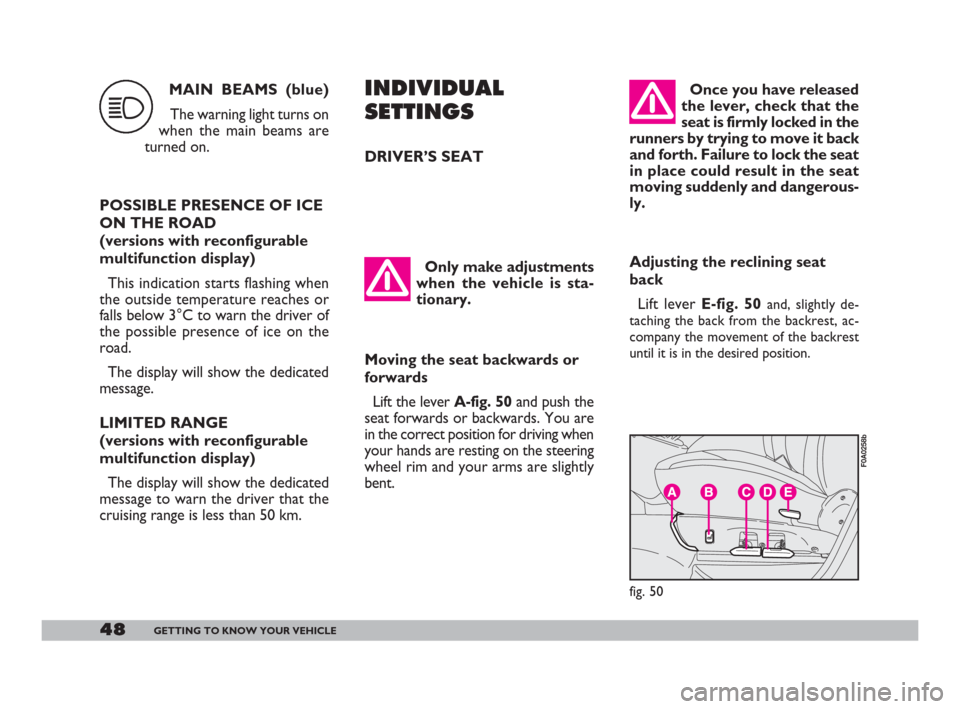
Adjusting the reclining seat
back
Lift lever E-fig. 50
and, slightly de-
taching the back from the backrest, ac-
company the movement of the backrest
until it is in the desired position.
48GETTING TO KNOW YOUR VEHICLE
INDIVIDUAL
SETTINGS
DRIVER’S SEAT
Only make adjustments
when the vehicle is sta-
tionary.
Moving the seat backwards or
forwards
Lift the lever A-fig. 50and push the
seat forwards or backwards. You are
in the correct position for driving when
your hands are resting on the steering
wheel rim and your arms are slightly
bent.
fig. 50
F0A0258b
MAIN BEAMS (blue)
The warning light turns on
when the main beams are
turned on.
POSSIBLE PRESENCE OF ICE
ON THE ROAD
(versions with reconfigurable
multifunction display)
This indication starts flashing when
the outside temperature reaches or
falls below 3°C to warn the driver of
the possible presence of ice on the
road.
The display will show the dedicated
message.
LIMITED RANGE
(versions with reconfigurable
multifunction display)
The display will show the dedicated
message to warn the driver that the
cruising range is less than 50 km.
1
001-105 Doblo GB 16-12-2008 14:22 Pagina 48
Page 50 of 222
49GETTING TO KNOW YOUR VEHICLE
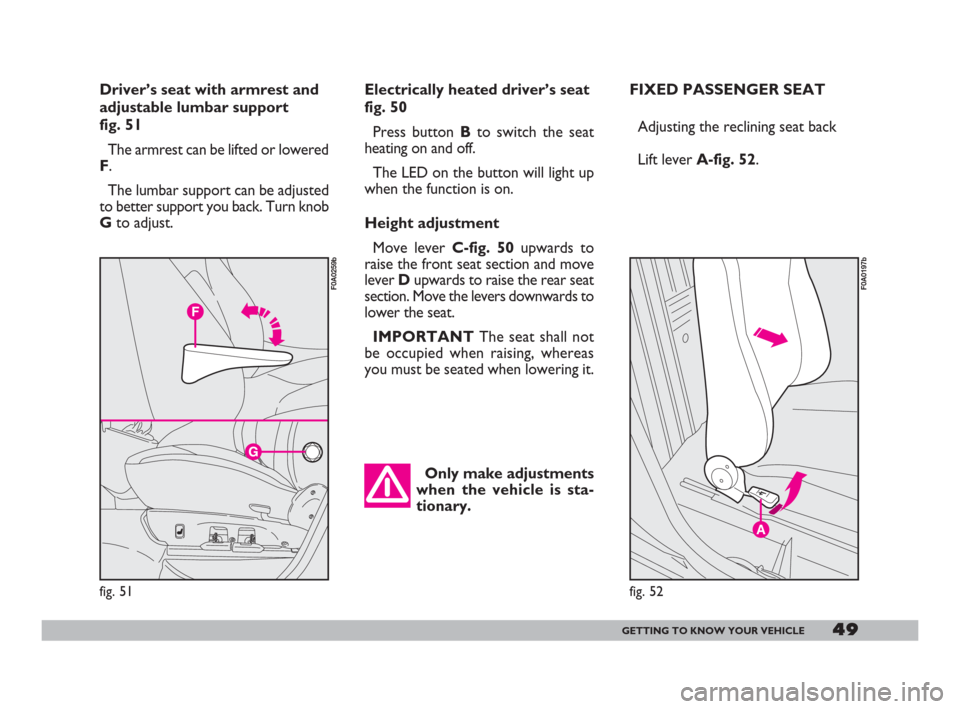
Electrically heated driver’s seat
fig. 50
Press button Bto switch the seat
heating on and off.
The LED on the button will light up
when the function is on.
Height adjustment
Move lever C-fig. 50upwards to
raise the front seat section and move
lever Dupwards to raise the rear seat
section. Move the levers downwards to
lower the seat.
IMPORTANTThe seat shall not
be occupied when raising, whereas
you must be seated when lowering it.FIXED PASSENGER SEAT
Adjusting the reclining seat back
Lift lever A-fig. 52.
A
fig. 52
F0A0197b
Only make adjustments
when the vehicle is sta-
tionary.
Driver’s seat with armrest and
adjustable lumbar support
fig. 51
The armrest can be lifted or lowered
F.
The lumbar support can be adjusted
to better support you back. Turn knob
Gto adjust.
fig. 51
F0A0259b
001-105 Doblo GB 16-12-2008 14:22 Pagina 49
Page 51 of 222
50GETTING TO KNOW YOUR VEHICLE
Once you have released
the lever, check that the
seat is firmly locked in the
runners by trying to move it back
and forth. Failure to lock the seat
in place could result in the seat
moving suddenly and dangerous-
ly.
FOLDING FRONT
PASSENGER SEAT
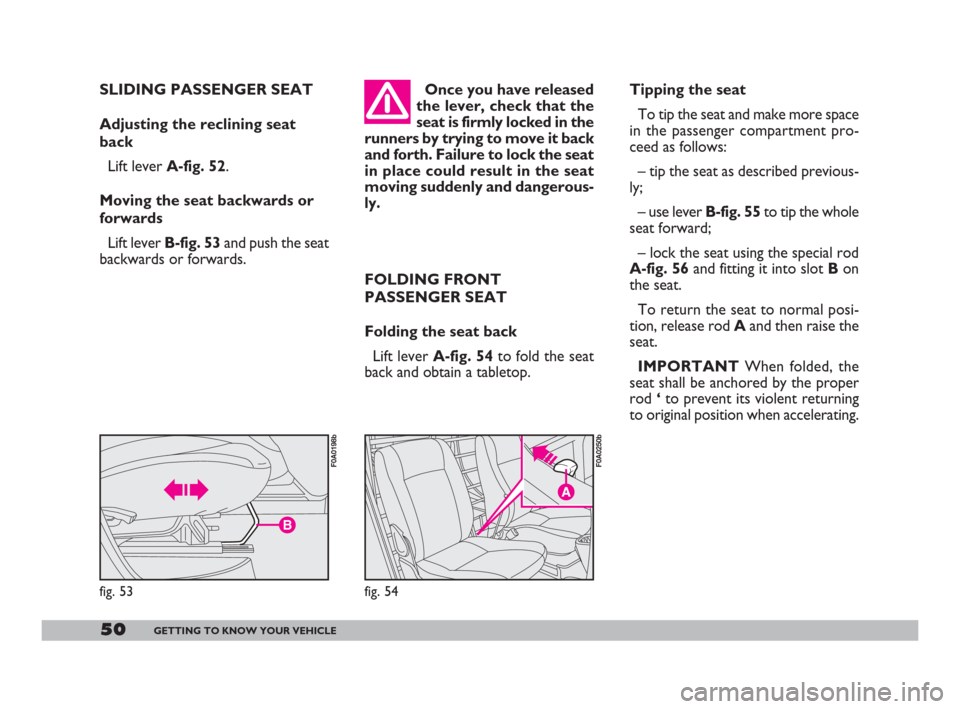
Folding the seat back
Lift lever A-fig. 54to fold the seat
back and obtain a tabletop.Tipping the seat
To tip the seat and make more space
in the passenger compartment pro-
ceed as follows:
– tip the seat as described previous-
ly;
– use lever B-fig. 55to tip the whole
seat forward;
– lock the seat using the special rod
A-fig. 56and fitting it into slot Bon
the seat.
To return the seat to normal posi-
tion, release rod Aand then raise the
seat.
IMPORTANTWhen folded, the
seat shall be anchored by the proper
rod ‘to prevent its violent returning
to original position when accelerating.
fig. 54
F0A0250b
SLIDING PASSENGER SEAT
Adjusting the reclining seat
back
Lift lever A-fig. 52.
Moving the seat backwards or
forwards
Lift lever B-fig. 53and push the seat
backwards or forwards.
B
fig. 53
F0A0198b
001-105 Doblo GB 16-12-2008 14:22 Pagina 50
Page 53 of 222
The ladder shall only be
tilted with the vehicle sta-
tionary and the door
open.
52GETTING TO KNOW YOUR VEHICLE
You cannot open the
left-hand sliding side door
while refuelling when the
flap is open (see “At the filling
station” in this section).
Versions with two sliding side
doors
Open either of the two sliding side
doors to access the rear seats. ACCESSING
THE REAR SEATS
Versions with one sliding side
door (on passenger side)
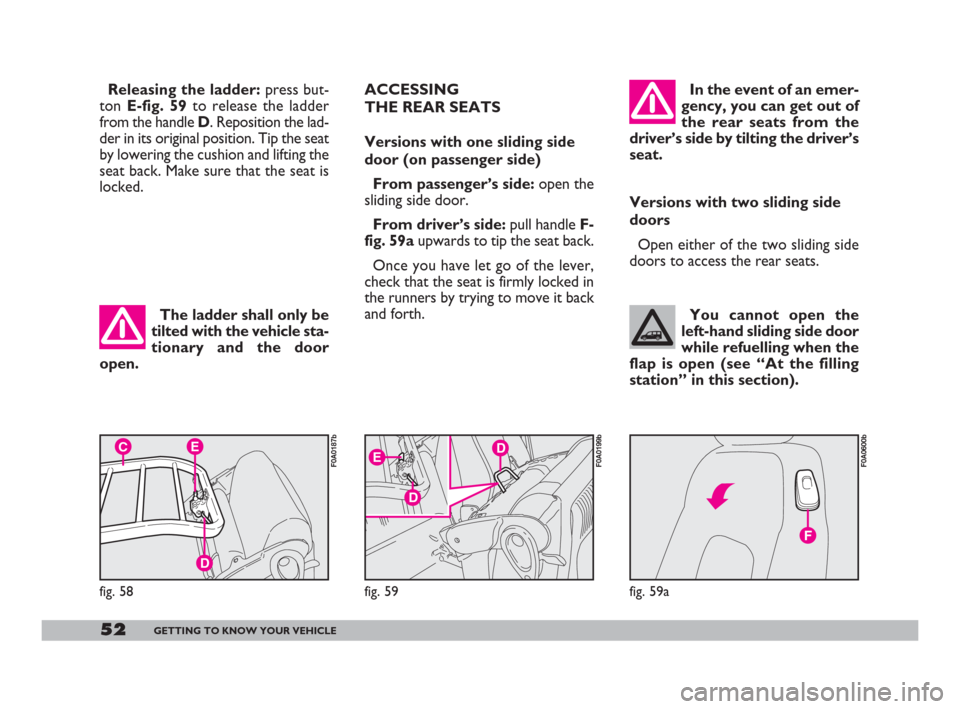
From passenger’s side: open the
sliding side door.
From driver’s side:pull handle F-
fig. 59aupwards to tip the seat back.
Once you have let go of the lever,
check that the seat is firmly locked in
the runners by trying to move it back
and forth.In the event of an emer-
gency, you can get out of
the rear seats from the
driver’s side by tilting the driver’s
seat.
EC
D
fig. 58
F0A0187bD
D
E
fig. 59
F0A0199b
Releasing the ladder: press but-
ton E-fig. 59to release the ladder
from the handle D. Reposition the lad-
der in its original position. Tip the seat
by lowering the cushion and lifting the
seat back. Make sure that the seat is
locked.
fig. 59a
F0A0600b
001-105 Doblo GB 16-12-2008 14:22 Pagina 52
Page 55 of 222
54GETTING TO KNOW YOUR VEHICLE
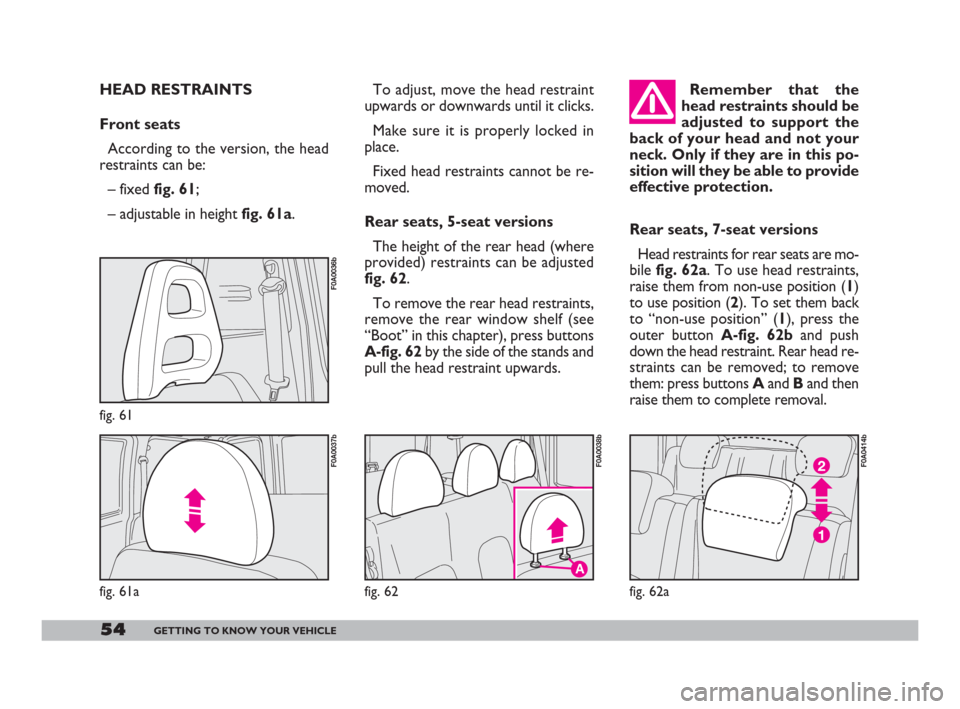
Rear seats, 7-seat versions
Head restraints for rear seats are mo-
bile fig. 62a. To use head restraints,
raise them from non-use position (1)
to use position (2). To set them back
to “non-use position” (1), press the
outer button A-fig. 62band push
down the head restraint. Rear head re-
straints can be removed; to remove
them: press buttons Aand Band then
raise them to complete removal.
fig. 62a
F0A0414b
A
fig. 62
F0A0038b
To adjust, move the head restraint
upwards or downwards until it clicks.
Make sure it is properly locked in
place.
Fixed head restraints cannot be re-
moved.
Rear seats, 5-seat versions
The height of the rear head (where
provided) restraints can be adjusted
fig. 62.
To remove the rear head restraints,
remove the rear window shelf (see
“Boot” in this chapter), press buttons
A-fig. 62by the side of the stands and
pull the head restraint upwards.Remember that the
head restraints should be
adjusted to support the
back of your head and not your
neck. Only if they are in this po-
sition will they be able to provide
effective protection.
fig. 61a fig. 61
F0A0037b
HEAD RESTRAINTS
Front seats
According to the version, the head
restraints can be:
– fixed fig. 61;
– adjustable in height fig. 61a.
F0A0036b
001-105 Doblo GB 16-12-2008 14:22 Pagina 54