key FIAT DOBLO PANORAMA 2016 2.G Owner's Manual
[x] Cancel search | Manufacturer: FIAT, Model Year: 2016, Model line: DOBLO PANORAMA, Model: FIAT DOBLO PANORAMA 2016 2.GPages: 323, PDF Size: 25.46 MB
Page 60 of 323
WINDOW OPENING/
CLOSING BY MEANS OF
A KEY WITH REMOTE
CONTROL
(for versions/markets, where provided)
The windows can be opened/closed by
holding down the unlocking
/
locking
button of the key with remote
control respectively.
The windows move simultaneously as
long as the corresponding button is
held down; they will stop when they
reach the upper or lower end of travel
position, or the button is released.
ELECTRIC WINDOWS
SYSTEM INITIALISATION
The window automatic lifting control
system must be reinitialised as a result
of:
❒on front doors:
– protection fuse or battery
disconnection;
❒on rear doors:
– protection fuse or battery
disconnection when the window is
moving;
– door opening with window moving,
due to the intervention of the anti-pinch
system;
– 50 window movements without ever
closing the window;– 3 door opening movements, with
moving window, without ever closing
the window.
Proceed as follows for the initialisation:
1. completely close the driver's door
window, keeping the operating button
pressed for at least 5 seconds after the
(upper) end of travel position
2. proceed in the same way on the
passenger's side door button and on
the buttons of rear doors.
WARNING
28) Incorrect use of the electric
windows may be dangerous.
Before and during their operation,
ensure that any passengers are
not at risk from the moving glass
either by personal objects getting
caught in the mechanism or by
being hit by it directly.
29) When leaving the vehicle,
always remove the ignition key to
avoid the risk of injury due to
accidental operation of the
electric windows.
CONTROLS
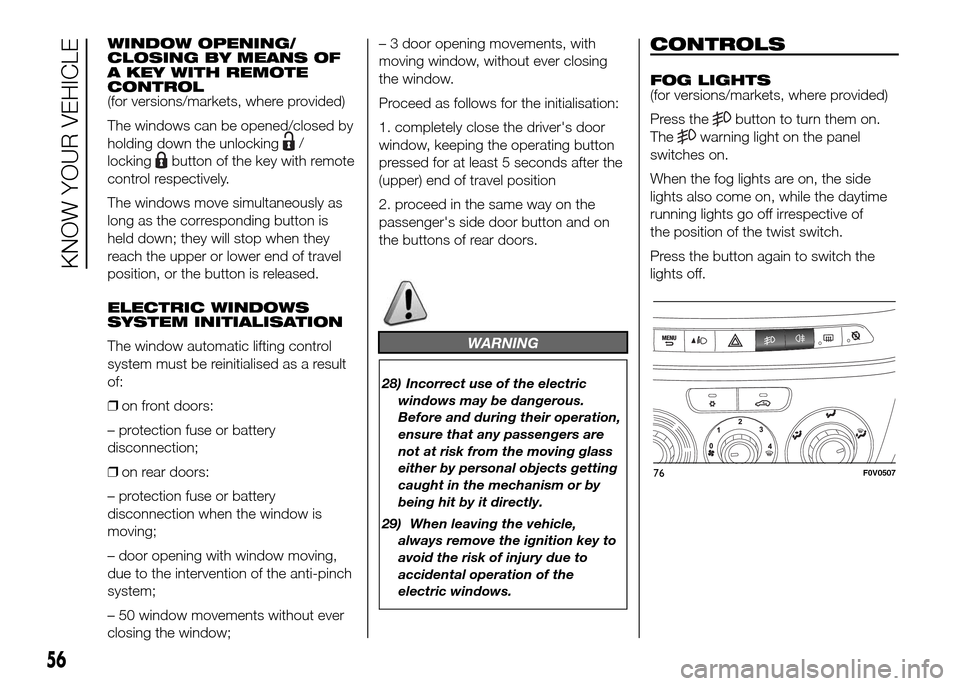
FOG LIGHTS
(for versions/markets, where provided)
Press the
button to turn them on.
The
warning light on the panel
switches on.
When the fog lights are on, the side
lights also come on, while the daytime
running lights go off irrespective of
the position of the twist switch.
Press the button again to switch the
lights off.
76F0V0507
56
KNOW YOUR VEHICLE
Page 62 of 323
WARNING
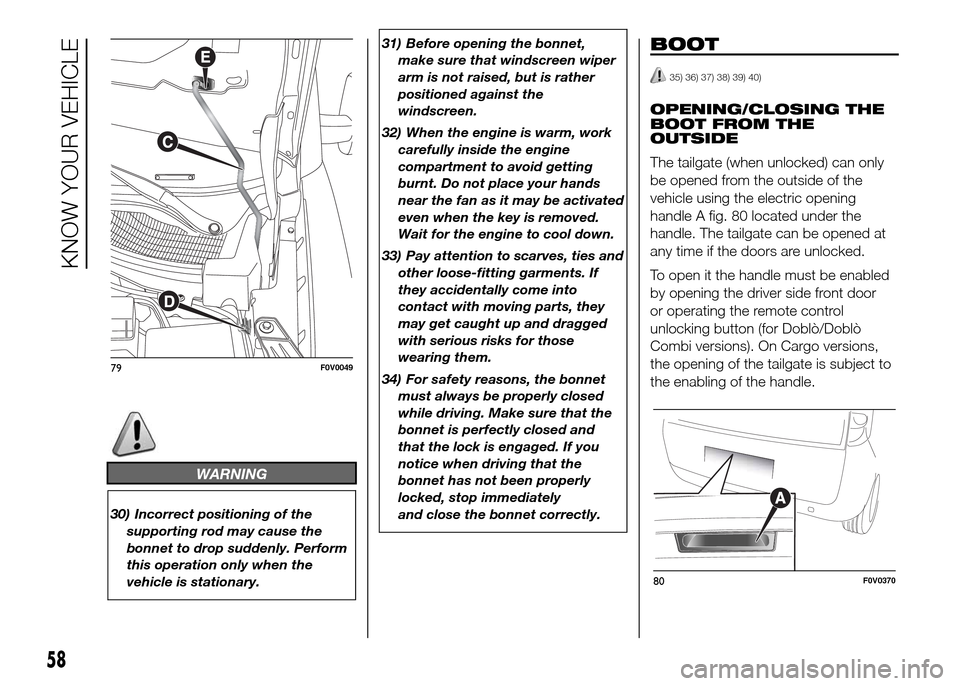
30) Incorrect positioning of the
supporting rod may cause the
bonnet to drop suddenly. Perform
this operation only when the
vehicle is stationary.31) Before opening the bonnet,
make sure that windscreen wiper
arm is not raised, but is rather
positioned against the
windscreen.
32) When the engine is warm, work
carefully inside the engine
compartment to avoid getting
burnt. Do not place your hands
near the fan as it may be activated
even when the key is removed.
Wait for the engine to cool down.
33) Pay attention to scarves, ties and
other loose-fitting garments. If
they accidentally come into
contact with moving parts, they
may get caught up and dragged
with serious risks for those
wearing them.
34) For safety reasons, the bonnet
must always be properly closed
while driving. Make sure that the
bonnet is perfectly closed and
that the lock is engaged. If you
notice when driving that the
bonnet has not been properly
locked, stop immediately
and close the bonnet correctly.
BOOT
35) 36) 37) 38) 39) 40)
OPENING/CLOSING THE
BOOT FROM THE
OUTSIDE
The tailgate (when unlocked) can only
be opened from the outside of the
vehicle using the electric opening
handle A fig. 80 located under the
handle. The tailgate can be opened at
any time if the doors are unlocked.
To open it the handle must be enabled
by opening the driver side front door
or operating the remote control
unlocking button (for Doblò/Doblò
Combi versions). On Cargo versions,
the opening of the tailgate is subject to
the enabling of the handle.
79F0V0049
80F0V0370
58
KNOW YOUR VEHICLE
Page 63 of 323
The handle is enabled after pressing the
third button on the remote control or
by operating the unlocking button from
the interior of the vehicle. Opening
can also take place by using the
mechanical key or the metal insert of
the remote control key in the driver side
door pawl.
7)
EMERGENCY OPENING
FROM THE INSIDE
In the event of an emergency, you can
open the boot from inside the vehicle
as follows:
❒open the sliding side door and fully
fold the rear seats;
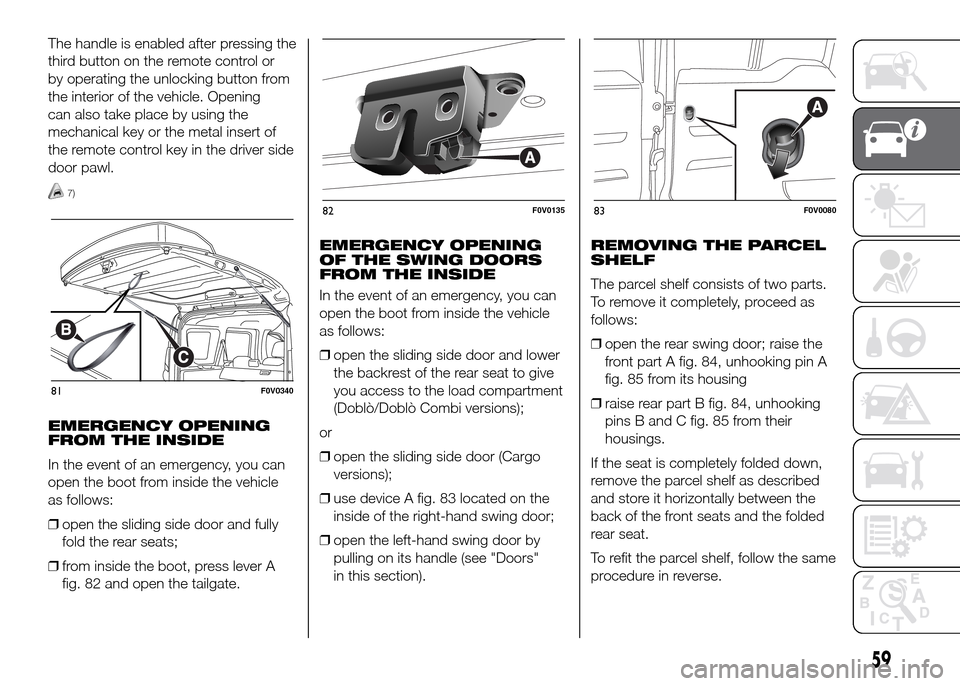
❒from inside the boot, press lever A
fig. 82 and open the tailgate.EMERGENCY OPENING
OF THE SWING DOORS
FROM THE INSIDE
In the event of an emergency, you can
open the boot from inside the vehicle
as follows:
❒open the sliding side door and lower
the backrest of the rear seat to give
you access to the load compartment
(Doblò/Doblò Combi versions);
or
❒open the sliding side door (Cargo
versions);
❒use device A fig. 83 located on the
inside of the right-hand swing door;
❒open the left-hand swing door by
pulling on its handle (see "Doors"
in this section).REMOVING THE PARCEL
SHELF
The parcel shelf consists of two parts.
To remove it completely, proceed as
follows:
❒open the rear swing door; raise the
front part A fig. 84, unhooking pin A
fig. 85 from its housing
❒raise rear part B fig. 84, unhooking
pins B and C fig. 85 from their
housings.
If the seat is completely folded down,
remove the parcel shelf as described
and store it horizontally between the
back of the front seats and the folded
rear seat.
To refit the parcel shelf, follow the same
procedure in reverse.
81F0V0340
82F0V013583F0V0080
59
Page 66 of 323
IMPORTANT
7) To close the tailgate use handle B
fig. 81. Do not try to close the
tailgate by pressing on the side
shock absorbers C fig. 81. Also be
careful not to knock the side
shock absorbers when you load
the boot, to avoid damaging them.
INTERIOR FITTINGS
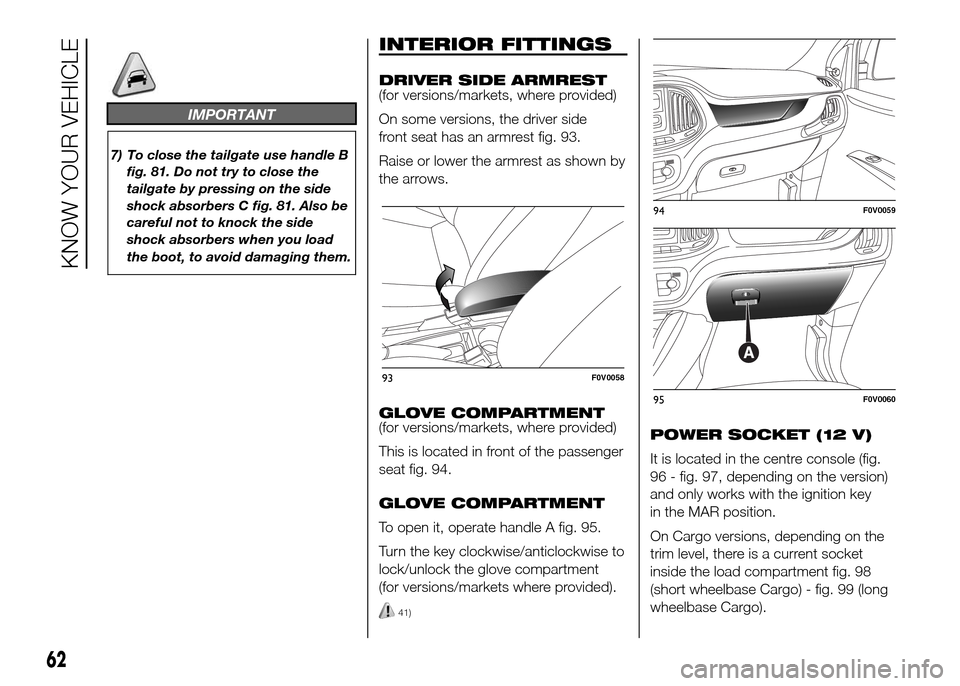
DRIVER SIDE ARMREST
(for versions/markets, where provided)
On some versions, the driver side
front seat has an armrest fig. 93.
Raise or lower the armrest as shown by
the arrows.
GLOVE COMPARTMENT
(for versions/markets, where provided)
This is located in front of the passenger
seat fig. 94.
GLOVE COMPARTMENT
To open it, operate handle A fig. 95.
Turn the key clockwise/anticlockwise to
lock/unlock the glove compartment
(for versions/markets where provided).
41)
POWER SOCKET (12 V)
It is located in the centre console (fig.
96 - fig. 97, depending on the version)
and only works with the ignition key
in the MAR position.
On Cargo versions, depending on the
trim level, there is a current socket
inside the load compartment fig. 98
(short wheelbase Cargo) - fig. 99 (long
wheelbase Cargo).
93F0V0058
94F0V0059
95F0V0060
62
KNOW YOUR VEHICLE
Page 68 of 323
FRONT ODDMENT SHELF
(for versions/markets, where provided)
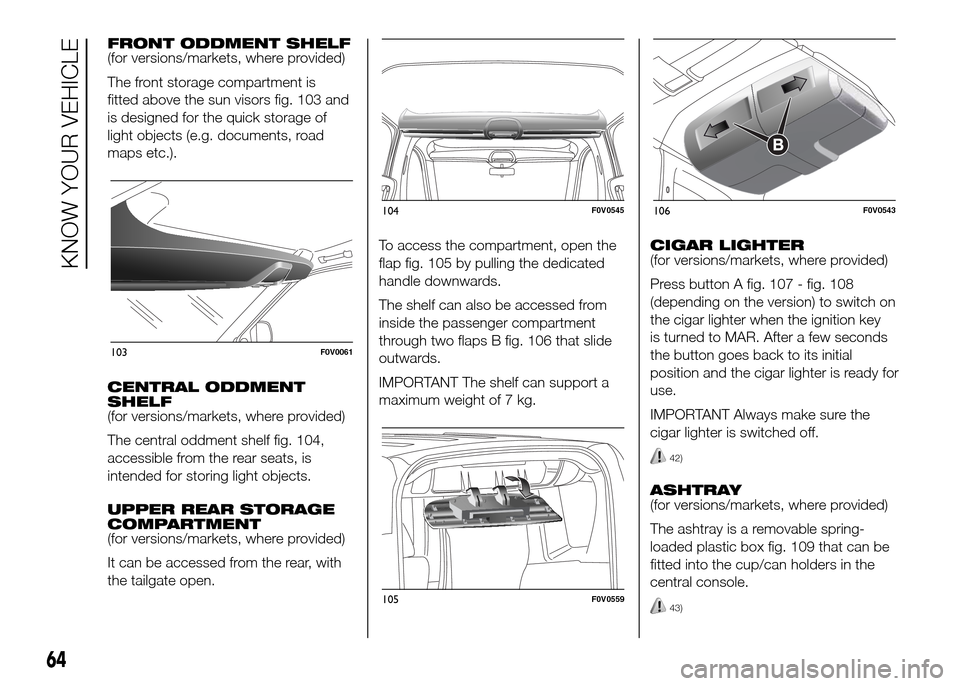
The front storage compartment is
fitted above the sun visors fig. 103 and
is designed for the quick storage of
light objects (e.g. documents, road
maps etc.).
CENTRAL ODDMENT
SHELF
(for versions/markets, where provided)
The central oddment shelf fig. 104,
accessible from the rear seats, is
intended for storing light objects.
UPPER REAR STORAGE
COMPARTMENT
(for versions/markets, where provided)
It can be accessed from the rear, with
the tailgate open.To access the compartment, open the
flap fig. 105 by pulling the dedicated
handle downwards.
The shelf can also be accessed from
inside the passenger compartment
through two flaps B fig. 106 that slide
outwards.
IMPORTANT The shelf can support a
maximum weight of 7 kg.CIGAR LIGHTER
(for versions/markets, where provided)
Press button A fig. 107 - fig. 108
(depending on the version) to switch on
the cigar lighter when the ignition key
is turned to MAR. After a few seconds
the button goes back to its initial
position and the cigar lighter is ready for
use.
IMPORTANT Always make sure the
cigar lighter is switched off.
42)
ASHTRAY
(for versions/markets, where provided)
The ashtray is a removable spring-
loaded plastic box fig. 109 that can be
fitted into the cup/can holders in the
central console.
43)
103F0V0061
104F0V0545
105F0V0559
106F0V0543
64
KNOW YOUR VEHICLE
Page 70 of 323
ROOF RACK/SKI
RACK
44) 45)
8) 9)
FASTENERS
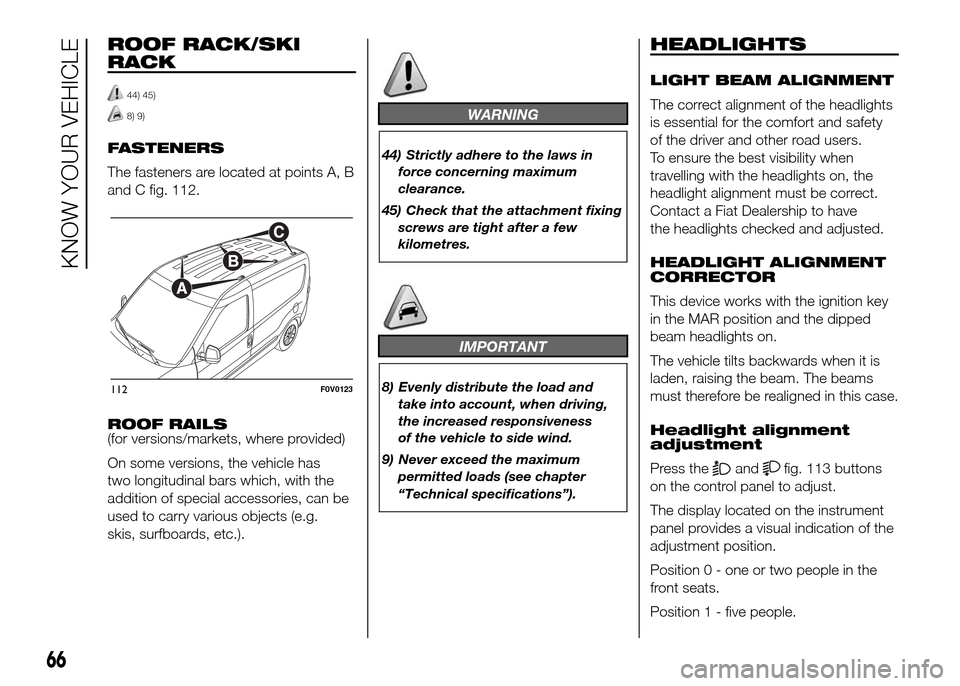
The fasteners are located at points A, B
and C fig. 112.
ROOF RAILS
(for versions/markets, where provided)
On some versions, the vehicle has
two longitudinal bars which, with the
addition of special accessories, can be
used to carry various objects (e.g.
skis, surfboards, etc.).
WARNING
44) Strictly adhere to the laws in
force concerning maximum
clearance.
45) Check that the attachment fixing
screws are tight after a few
kilometres.
IMPORTANT
8) Evenly distribute the load and
take into account, when driving,
the increased responsiveness
of the vehicle to side wind.
9) Never exceed the maximum
permitted loads (see chapter
“Technical specifications”).
HEADLIGHTS
LIGHT BEAM ALIGNMENT
The correct alignment of the headlights
is essential for the comfort and safety
of the driver and other road users.
To ensure the best visibility when
travelling with the headlights on, the
headlight alignment must be correct.
Contact a Fiat Dealership to have
the headlights checked and adjusted.
HEADLIGHT ALIGNMENT
CORRECTOR
This device works with the ignition key
in the MAR position and the dipped
beam headlights on.
The vehicle tilts backwards when it is
laden, raising the beam. The beams
must therefore be realigned in this case.
Headlight alignment
adjustment
Press the
andfig. 113 buttons
on the control panel to adjust.
The display located on the instrument
panel provides a visual indication of the
adjustment position.
Position 0 - one or two people in the
front seats.
Position 1 - five people.
112F0V0123
66
KNOW YOUR VEHICLE
Page 79 of 323
DIGITAL DISPLAY
STANDARD SCREEN
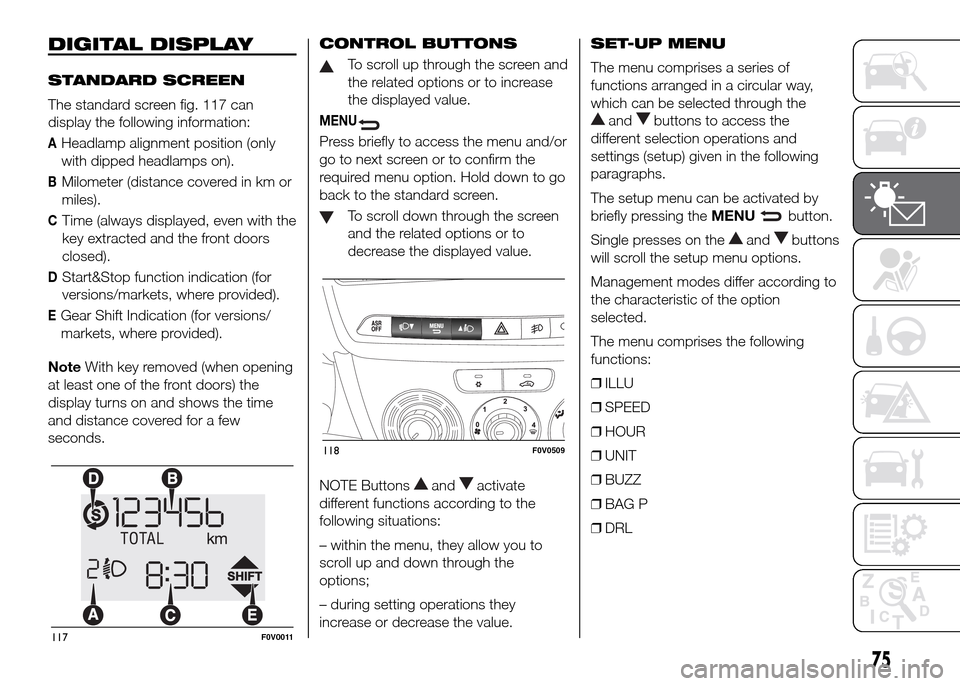
The standard screen fig. 117 can
display the following information:
AHeadlamp alignment position (only
with dipped headlamps on).
BMilometer (distance covered in km or
miles).
CTime (always displayed, even with the
key extracted and the front doors
closed).
DStart&Stop function indication (for
versions/markets, where provided).
EGear Shift Indication (for versions/
markets, where provided).
NoteWith key removed (when opening
at least one of the front doors) the
display turns on and shows the time
and distance covered for a few
seconds.CONTROL BUTTONS
To scroll up through the screen and
the related options or to increase
the displayed value.
MENU
Press briefly to access the menu and/or
go to next screen or to confirm the
required menu option. Hold down to go
back to the standard screen.
To scroll down through the screen
and the related options or to
decrease the displayed value.
NOTE Buttons
andactivate
different functions according to the
following situations:
– within the menu, they allow you to
scroll up and down through the
options;
– during setting operations they
increase or decrease the value.SET-UP MENU
The menu comprises a series of
functions arranged in a circular way,
which can be selected through the
andbuttons to access the
different selection operations and
settings (setup) given in the following
paragraphs.
The setup menu can be activated by
briefly pressing theMENU
button.
Single presses on the
andbuttons
will scroll the setup menu options.
Management modes differ according to
the characteristic of the option
selected.
The menu comprises the following
functions:
❒ILLU
❒SPEED
❒HOUR
❒UNIT
❒BUZZ
❒BAG P
❒DRL
117F0V0011
118F0V0509
75
Page 82 of 323
Daytime running lights
(DRL)
This function allows you to activate/
deactivate the daytime running lights.
Proceed as follows to activate or
deactivate this function:
- press theMENU
button briefly:
the display will show the wording DRL;
- press the
orbutton to activate
(On) or deactivate (Off) the daytime
running lights;
- press theMENU
button briefly to
return to the submenu screen or hold
the button down to return to the main
menu screen without saving;
MULTIFUNCTION
DISPLAY
(for versions/markets, where provided)
The vehicle may be equipped with a
multifunction display that gives the
driver useful information depending on
the previous settings.
STANDARD SCREEN
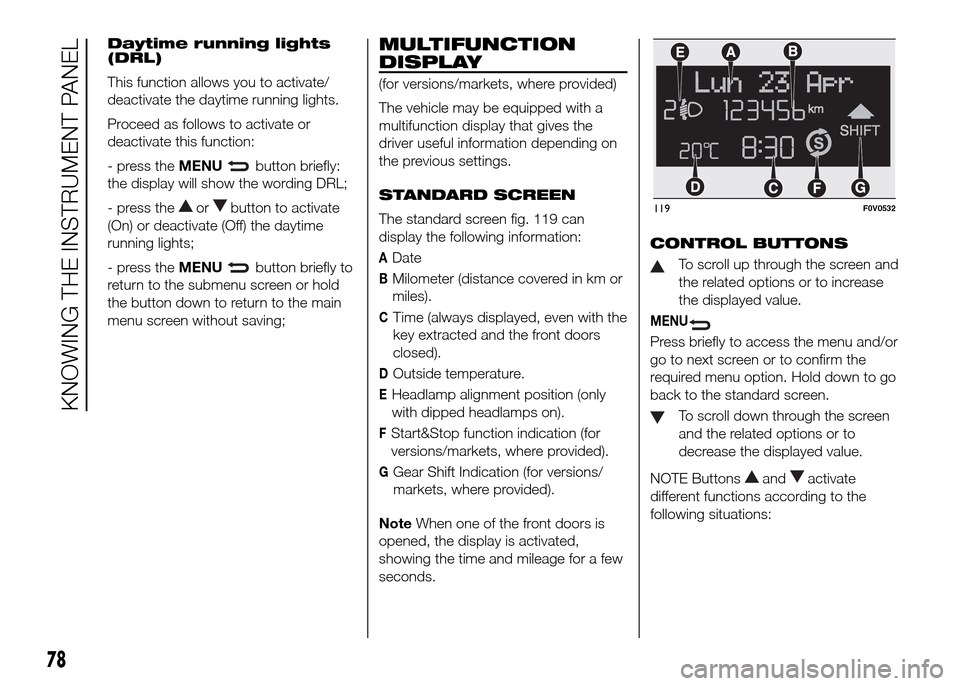
The standard screen fig. 119 can
display the following information:
ADate
BMilometer (distance covered in km or
miles).
CTime (always displayed, even with the
key extracted and the front doors
closed).
DOutside temperature.
EHeadlamp alignment position (only
with dipped headlamps on).
FStart&Stop function indication (for
versions/markets, where provided).
GGear Shift Indication (for versions/
markets, where provided).
NoteWhen one of the front doors is
opened, the display is activated,
showing the time and mileage for a few
seconds.CONTROL BUTTONS
To scroll up through the screen and
the related options or to increase
the displayed value.
MENU
Press briefly to access the menu and/or
go to next screen or to confirm the
required menu option. Hold down to go
back to the standard screen.
To scroll down through the screen
and the related options or to
decrease the displayed value.
NOTE Buttons
andactivate
different functions according to the
following situations:
119F0V0532
78
KNOWING THE INSTRUMENT PANEL
Page 88 of 323
NOTE The “Scheduled Servicing Plan”
includes vehicle maintenance at fixed
intervals; refer to the “Maintenance and
care” chapter. This message is
displayed automatically when the key is
turned to MAR, starting at 2,000 km
(or equivalent value in miles) from when
the next service is due and reappearing
every 200 km (or equivalent value in
miles). Below 200 km servicing
indications are more frequent. The
display will be in km or mi depending
on the settings of the unit of
measurement. When the next
scheduled service is approaching, the
word “Service” will appear on the
display, followed by the number of
kilometres or miles left, when the key is
turned to MAR. Go to a Fiat Dealership,
where the "Scheduled Servicing Plan"
operations will be performed and the
message will be reset.
Activating/deactivating
front passenger side
airbag and side bag for
chest/head protection
(for versions/markets, where provided)
This function is used to activate/
deactivate the front and side passenger
airbags (for versions/markets where
provided).
Proceed as follows:– press theMENUbutton and
then, after displaying the message "Bag
pass: Off" (to deactivate) or "Bag pass:
On" (to activate) by means of the
andbuttons, press theMENU
button again;
– the confirmation request message
appears in the display;
– by pressing the
orbuttons
select (Yes) (to confirm activation/
deactivation) or (No) (to cancel);
– press theMENU
button briefly: a
message confirming the selection will
be displayed and you will return to
the menu screen or, pressing the button
for longer, you will return to the
standard screen without saving.
Daytime running lights
(DRL)
With this function it is possible to turn
the daytime running lights on and off.
Proceed as follows to activate or
deactivate this function:
– press theMENU
button briefly to
display a submenu;
– press theMENU
button briefly to
make the display flash On or Off
according to the previous setting;
– press the
orbutton to select;– press theMENU
button briefly to
return to the submenu screen or hold
the button down to return to the main
menu screen without saving;
– hold theMENU
button down
again to return to the standard screen
or to the main menu according to
where you are in the menu.
Exit Menu
This is the last function that closes the
cycle of settings listed in the menu
screen.
Pressing theMENU
button briefly
will return the display to the standard
screen without storing.
Press button
to return to the first
menu item on the display (Speed
Beep).
84
KNOWING THE INSTRUMENT PANEL
Page 89 of 323
TRIP COMPUTER
IN BRIEF
The Trip computer is used to display
information on vehicle operation
when the ignition key is turned to
MAR. This function allows you to
define two separate trips, called "Trip
A" and "Trip B", for monitoring the
"complete mission" (journey) of
the vehicle in a reciprocally
independent manner. Both functions
can be reset (reset means start of
a new journey).
"Trip A" can be used to display the
values relating to:
❒External temperature
❒Range
❒Distance travelled A
❒Average consumption A
❒Instant consumption
❒Average speed A
❒Trip time A (driving time)
❒Reset Trip A
"Trip B", available on multifunction
display only, is used to display
the values relating to:❒Distance travelled B
❒Average consumption B
❒Average speed B
❒Trip time B (driving time)
❒Trip B reset
11)
Values displayed
External temperature
Indicates the temperature outside the
vehicle passenger compartment.
Range (for versions/markets, where
provided)
This indicates the distance that can still
be travelled with the fuel in the tank,
assuming that driving style remains
unvaried. The display will show the
reading "----"when the following
events take place:
❒range is lower than 50 km (or
corresponding figure in mi)
❒vehicle is left parked with the engine
running for a long timeIMPORTANT The range can be affected
by several factors: driving style (see
paragraph “Driving style” in the
“Starting and driving” section), type of
route (motorway, towns and cities,
mountain roads, etc…), usage
conditions (load, tyre pressures, etc…).
Trip planning must therefore take the
above into account.
Distance travelled
This value shows the distance travelled
from the start of the new journey.
Average consumption (for versions/
markets, where provided)
This value shows the approximate
average fuel consumption from the start
of the new journey.
Instant consumption (for versions/
markets where provided)
This value shows the fuel consumption.
The value is constantly updated. The
display will show "----"ifthevehicle is
parked with the engine running.
85