ignition FIAT DUCATO 2006 3.G Owner's Manual
[x] Cancel search | Manufacturer: FIAT, Model Year: 2006, Model line: DUCATO, Model: FIAT DUCATO 2006 3.GPages: 258, PDF Size: 4.05 MB
Page 63 of 258
62GETTING TO KNOW YOUR VEHICLE
fig. 87
F0D0132m
fig. 88
F0D0134m
fig. 89
F0D0136m
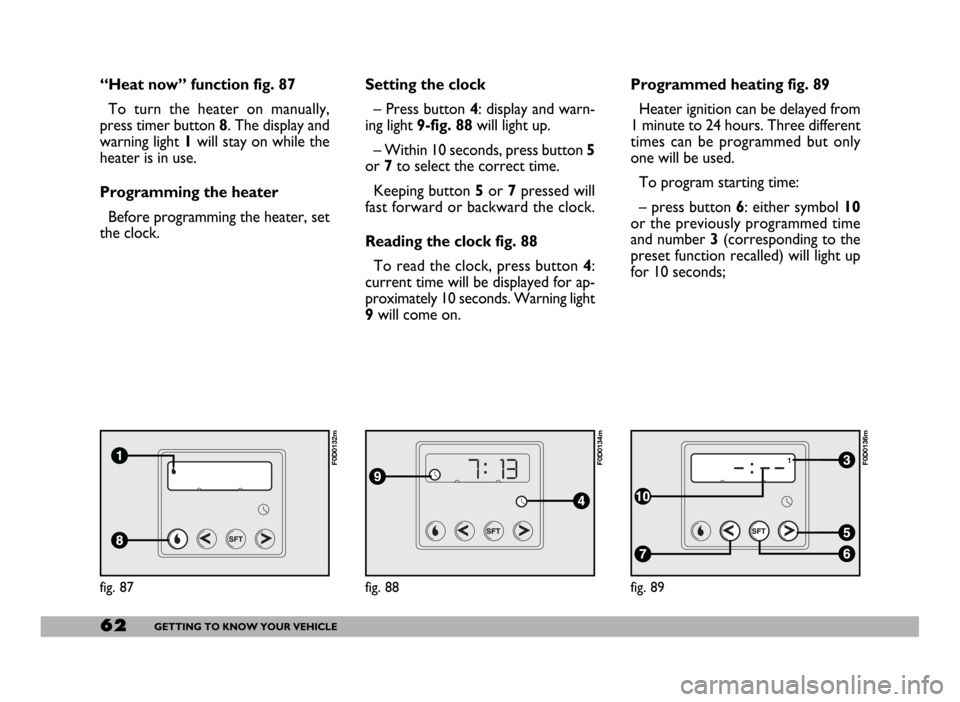
“Heat now” function fig. 87
To turn the heater on manually,
press timer button 8. The display and
warning light 1will stay on while the
heater is in use.
Programming the heater
Before programming the heater, set
the clock.Setting the clock
– Press button 4: display and warn-
ing light 9-fig. 88will light up.
– Within 10 seconds, press button 5
or 7to select the correct time.
Keeping button 5or 7pressed will
fast forward or backward the clock.
Reading the clock fig. 88
To read the clock, press button 4:
current time will be displayed for ap-
proximately 10 seconds. Warning light
9will come on.Programmed heating fig. 89
Heater ignition can be delayed from
1 minute to 24 hours. Three different
times can be programmed but only
one will be used.
To program starting time:
– press button 6: either symbol 10
or the previously programmed time
and number 3 (corresponding to the
preset function recalled) will light up
for 10 seconds;
Page 66 of 258
65GETTING TO KNOW YOUR VEHICLE
STEERING COLUMN
STALKS
LEFT-HAND STALK
The left-hand stalk operates most of
the external lights.
The external lights can only be
switched on when the ignition key is
at MAR. The instrument panel and
the heating/ventilation (or climate con-
trol system) controls and the cigar
lighter ring will come on with the ex-
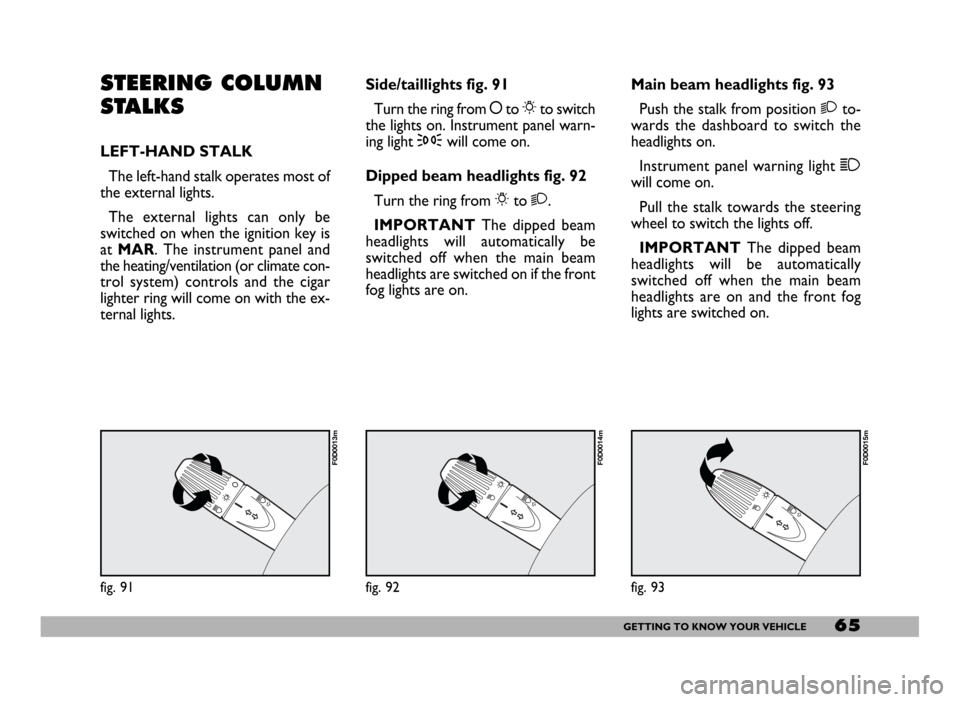
ternal lights.Side/taillights fig. 91
Turn the ring from åto 6to switch
the lights on. Instrument panel warn-
ing light 3will come on.
Dipped beam headlights fig. 92
Turn the ring from 6to 2.
IMPORTANTThe dipped beam
headlights will automatically be
switched off when the main beam
headlights are switched on if the front
fog lights are on.Main beam headlights fig. 93
Push the stalk from position 2to-
wards the dashboard to switch the
headlights on.
Instrument panel warning light 1
will come on.
Pull the stalk towards the steering
wheel to switch the lights off.
IMPORTANTThe dipped beam
headlights will be automatically
switched off when the main beam
headlights are on and the front fog
lights are switched on.
fig. 91
F0D0013m
fig. 92
F0D0014m
fig. 93
F0D0015m
Page 67 of 258
66GETTING TO KNOW YOUR VEHICLE
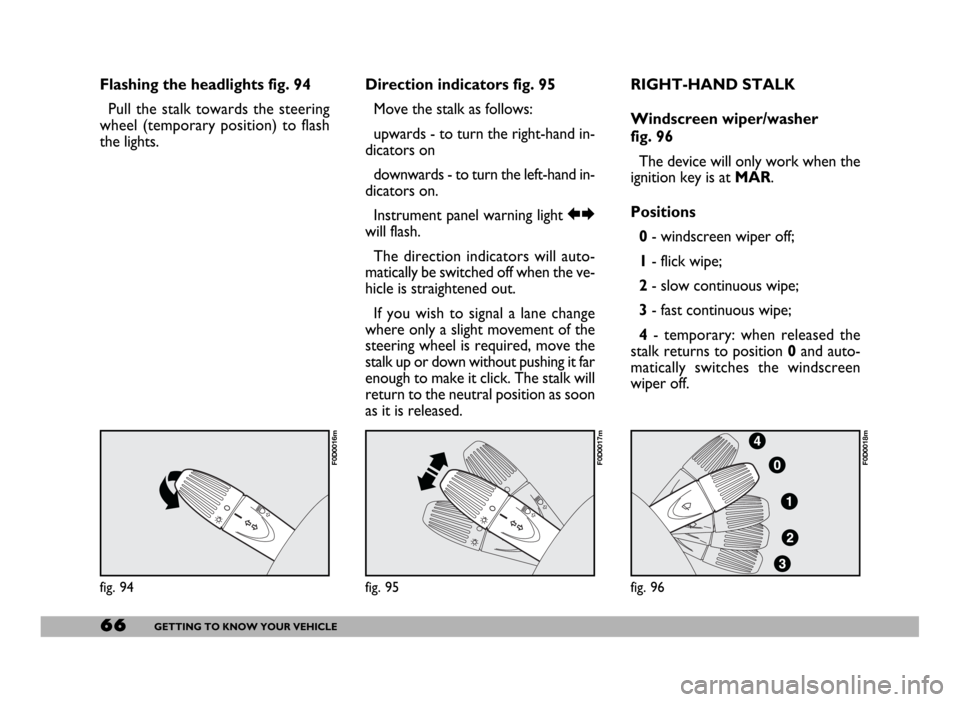
Flashing the headlights fig. 94
Pull the stalk towards the steering
wheel (temporary position) to flash
the lights.Direction indicators fig. 95
Move the stalk as follows:
upwards - to turn the right-hand in-
dicators on
downwards - to turn the left-hand in-
dicators on.
Instrument panel warning light RE
will flash.
The direction indicators will auto-
matically be switched off when the ve-
hicle is straightened out.
If you wish to signal a lane change
where only a slight movement of the
steering wheel is required, move the
stalk up or down without pushing it far
enough to make it click. The stalk will
return to the neutral position as soon
as it is released.RIGHT-HAND STALK
Windscreen wiper/washer
fig. 96
The device will only work when the
ignition key is at MAR.
Positions
0- windscreen wiper off;
1- flick wipe;
2- slow continuous wipe;
3- fast continuous wipe;
4- temporary: when released the
stalk returns to position 0and auto-
matically switches the windscreen
wiper off.
fig. 94
F0D0016m
fig. 95
F0D0017m
fig. 96
F0D0018m
Page 73 of 258
72GETTING TO KNOW YOUR VEHICLE
fig. 104
F0D00164m
fig. 105
F0D105m
All direction indicators will flash and
the instrument panel warning lights r
and ycome on when the button is
pressed regardless of the ignition key
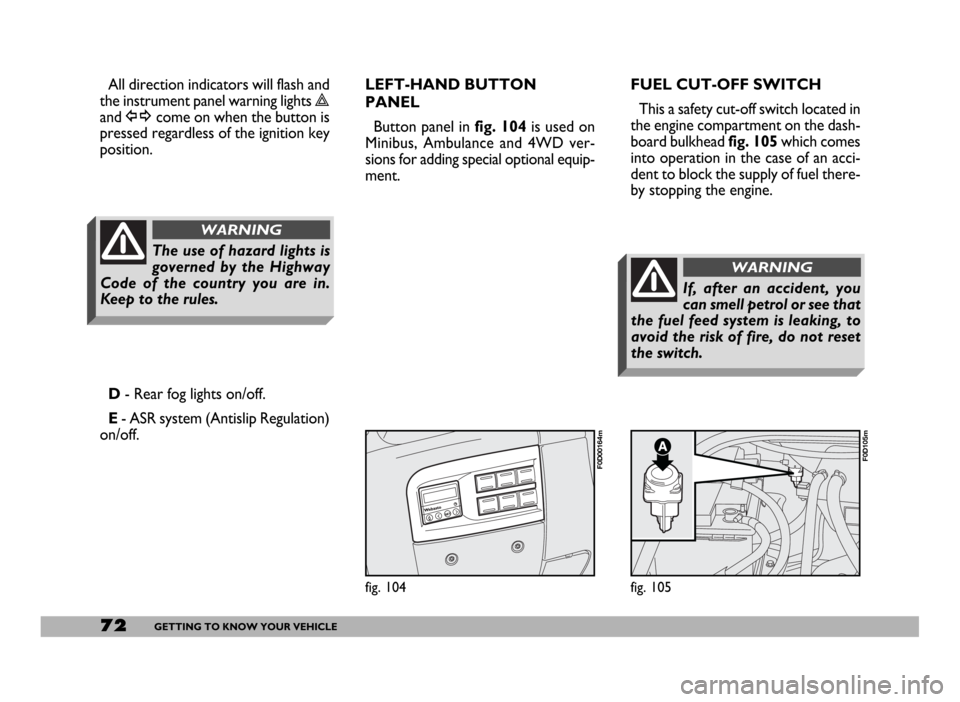
position.FUEL CUT-OFF SWITCH
This a safety cut-off switch located in
the engine compartment on the dash-
board bulkhead fig. 105which comes
into operation in the case of an acci-
dent to block the supply of fuel there-
by stopping the engine.
D- Rear fog lights on/off.
E- ASR system (Antislip Regulation)
on/off.LEFT-HAND BUTTON
PANEL
Button panel in fig. 104is used on
Minibus, Ambulance and 4WD ver-
sions for adding special optional equip-
ment.
The use of hazard lights is
governed by the Highway
Code of the country you are in.
Keep to the rules.
WARNING
If, after an accident, you
can smell petrol or see that
the fuel feed system is leaking, to
avoid the risk of fire, do not reset
the switch.
WARNING
Page 74 of 258
73GETTING TO KNOW YOUR VEHICLE
Inspect the vehicle carefully to make
sure there is no fuel leak in the en-
gine compartment, under the vehicle
or near the fuel tank.
If you cannot see any fuel leaks and
the vehicle is in a fit state to continue
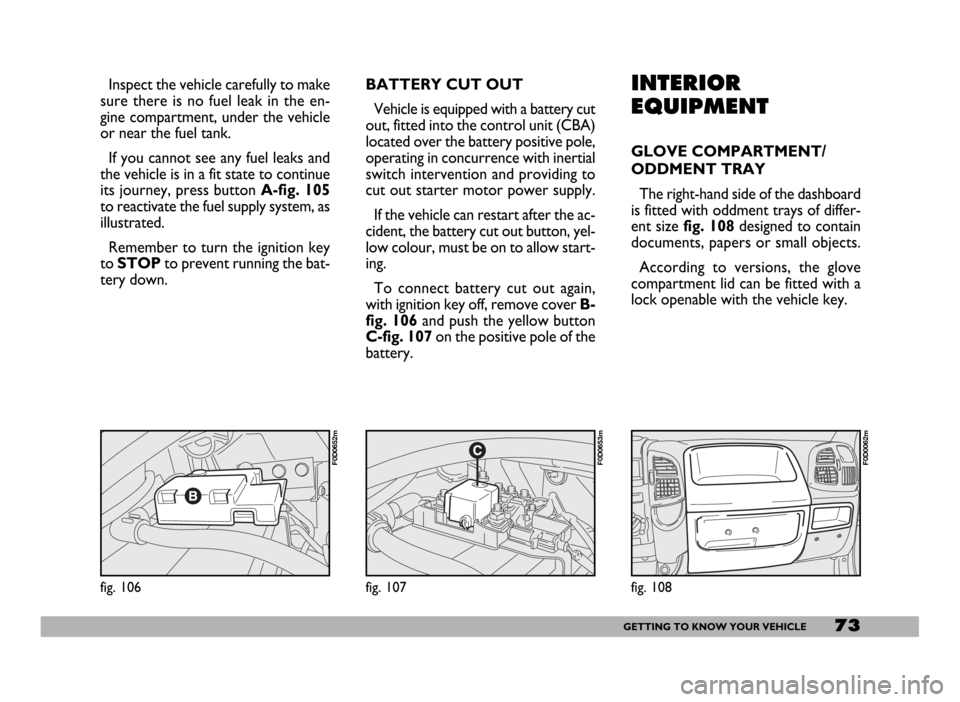
its journey, press button A-fig. 105
to reactivate the fuel supply system, as
illustrated.
Remember to turn the ignition key
to STOPto prevent running the bat-
tery down.INTERIOR
EQUIPMENT
GLOVE COMPARTMENT/
ODDMENT TRAY
The right-hand side of the dashboard
is fitted with oddment trays of differ-
ent sizefig. 108designed to contain
documents, papers or small objects.
According to versions, the glove
compartment lid can be fitted with a
lock openable with the vehicle key.
fig. 108
F0D0062m
fig. 106
F0D0652m
fig. 107
F0D0653m
BATTERY CUT OUT
Vehicle is equipped with a battery cut
out, fitted into the control unit (CBA)
located over the battery positive pole,
operating in concurrence with inertial
switch intervention and providing to
cut out starter motor power supply.
If the vehicle can restart after the ac-
cident, the battery cut out button, yel-
low colour, must be on to allow start-
ing.
To connect battery cut out again,
with ignition key off, remove cover B-
fig. 106 and push the yellow button
C-fig. 107 on the positive pole of the
battery.
Page 76 of 258
75GETTING TO KNOW YOUR VEHICLE
When tilted, the box cover becomes
a writing/reading desk with a clip to
hold sheets/papers, similar to that
shown in fig. 112.
Refrigerator version (food box)
In the refrigerator version, the box
has an internal space of about 12 litres
capacity that can contain 2 one and a
half litre bottles. In this version the
box is insulated and it is fitted with an
electric device to warm up or cool the
box interior as required.
This box can be used as food con-
tainer. Food shall be suitably packed
to avoid direct contact with the inner
walls of the box.
When used for cooling, a tempera-
ture difference of approx. 18 °C can
be achieved between the temperature
inside the box and that of the passen-
ger compartment after a certain time
of operation (with insulated cover and
plug closed). The lowest possible tem-
perature that can be reached in any
case is not lower than 8 -10 °C.To prevent the risk of running the bat-
tery down, the system is connected via
the ignition key; as a result the box will
only work when the engine is running.
You should remove perishables from
the box if you leave the vehicle parked
for longer than two hours.
For proper operation it is necessary
that ventilation grids (outside the box
and on one of the inside walls) should
not be clogged.
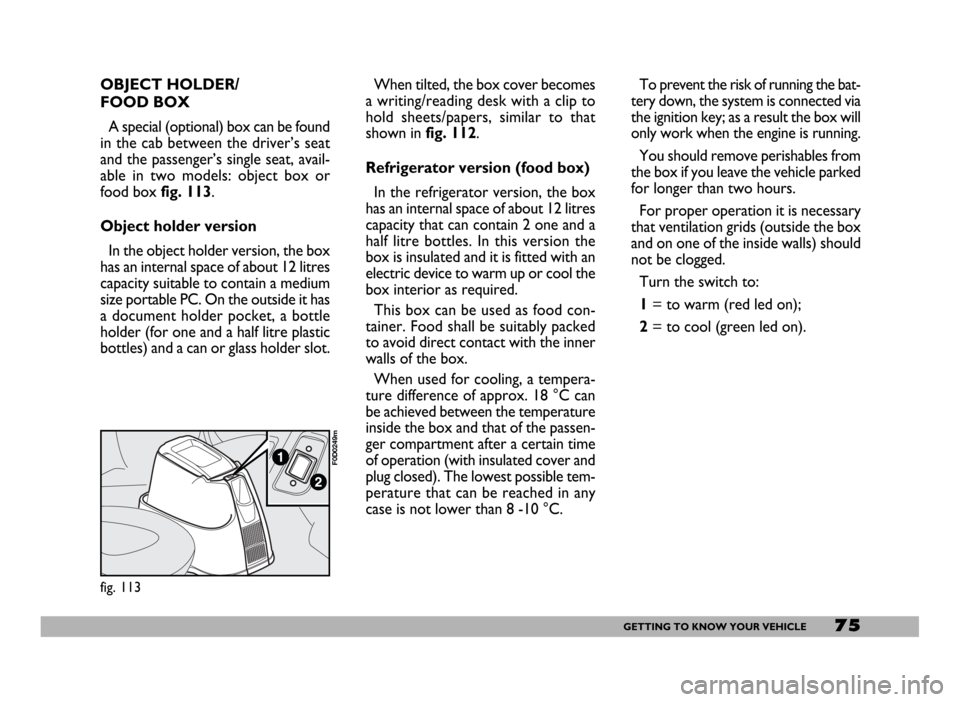
Turn the switch to:
1= to warm (red led on);
2= to cool (green led on).
fig. 113
F0D0249m
OBJECT HOLDER/
FOOD BOX
A special (optional) box can be found
in the cab between the driver’s seat
and the passenger’s single seat, avail-
able in two models: object box or
food box fig. 113.
Object holder version
In the object holder version, the box
has an internal space of about 12 litres
capacity suitable to contain a medium
size portable PC. On the outside it has
a document holder pocket, a bottle
holder (for one and a half litre plastic
bottles) and a can or glass holder slot.
Page 77 of 258
76GETTING TO KNOW YOUR VEHICLE
IMPORTANTWith the engine off
and the ignition key at MAR, pro-
longed use (e.g.: for more than an
hour) of accessories with high current
intake could deploy the battery, even
preventing the engine from starting. CURRENT SOCKET
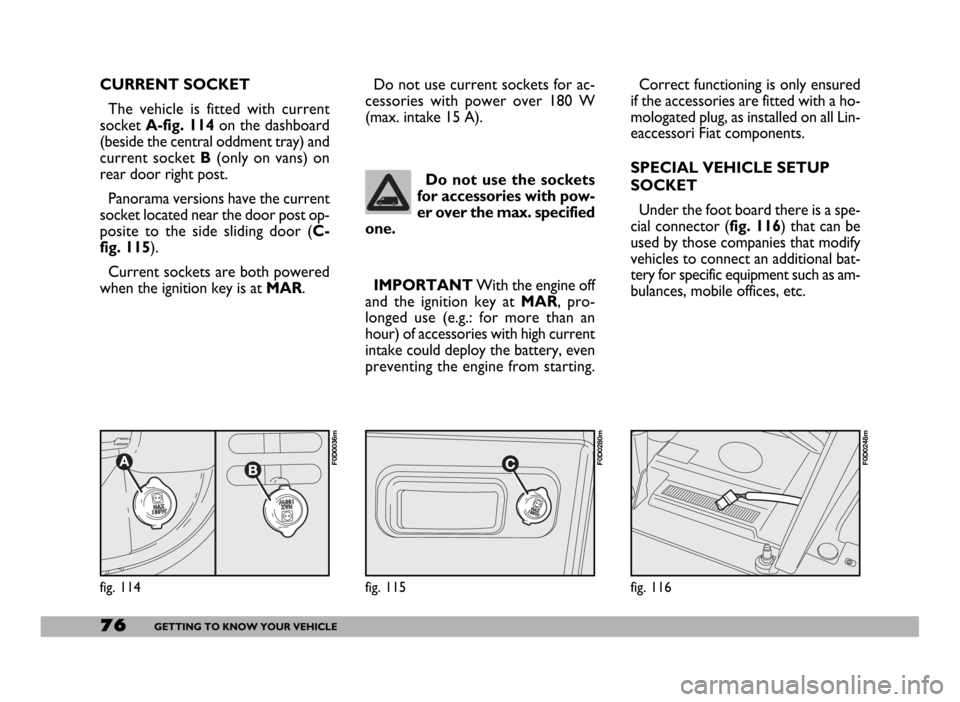
The vehicle is fitted with current
socket A-fig. 114on the dashboard
(beside the central oddment tray) and
current socket B(only on vans) on
rear door right post.
Panorama versions have the current
socket located near the door post op-
posite to the side sliding door (C-
fig. 115).
Current sockets are both powered
when the ignition key is at MAR.
fig. 116
F0D0248m
Do not use the sockets
for accessories with pow-
er over the max. specified
one.
fig. 114
F0D0036m
Correct functioning is only ensured
if the accessories are fitted with a ho-
mologated plug, as installed on all Lin-
eaccessori Fiat components.
SPECIAL VEHICLE SETUP
SOCKET
Under the foot board there is a spe-
cial connector (fig. 116) that can be
used by those companies that modify
vehicles to connect an additional bat-
tery for specific equipment such as am-
bulances, mobile offices, etc. Do not use current sockets for ac-
cessories with power over 180 W
(max. intake 15 A).
fig. 115
F0D0280m
Page 85 of 258
84GETTING TO KNOW YOUR VEHICLE
Improper use of the electri-
cal windows can be danger-
ous. Before and during their oper-
ation ensure that any passengers in
the vehicle are not at risk from the
moving glass either by personal ob-
jects getting caught in the mecha-
nism or by being injured by it di-
rectly.
WARNING
Always remove the ignition
key when you get out of the
vehicle to prevent the electric win-
dows being operated accidentally
and constituting a danger to the
people left in the vehicle
WARNING
BONNET
OPENING
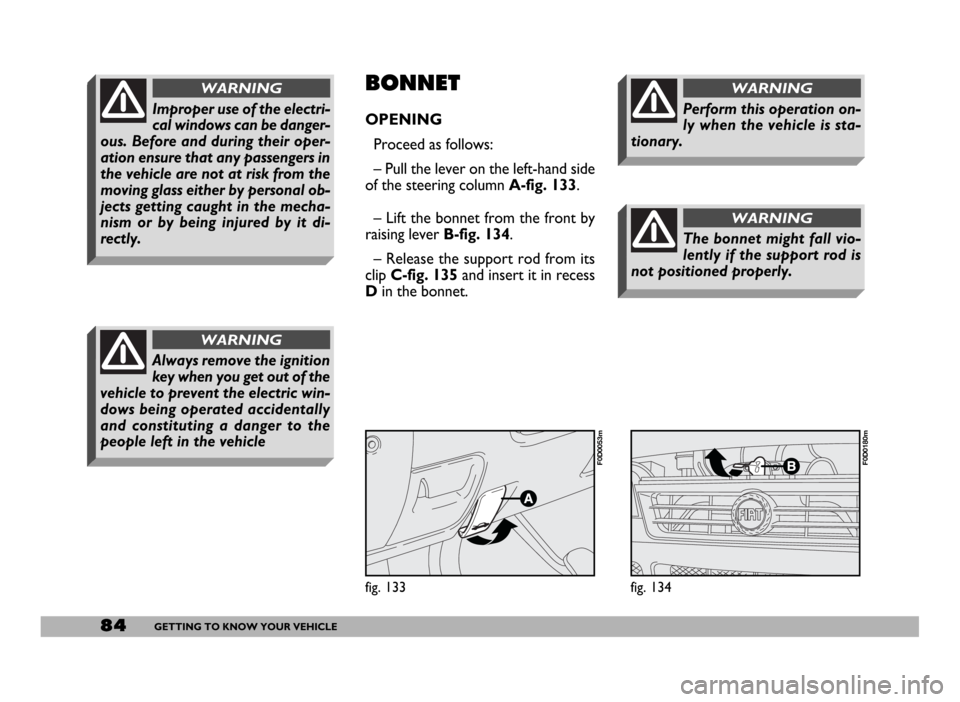
Proceed as follows:
– Pull the lever on the left-hand side
of the steering column A-fig. 133.
– Lift the bonnet from the front by
raising lever B-fig. 134.
– Release the support rod from its
clipC-fig. 135and insert it in recess
Din the bonnet.
fig. 133
F0D0053m
fig. 134
F0D0180m
The bonnet might fall vio-
lently if the support rod is
not positioned properly.
WARNING
Perform this operation on-
ly when the vehicle is sta-
tionary.
WARNING
Page 93 of 258
92GETTING TO KNOW YOUR VEHICLE
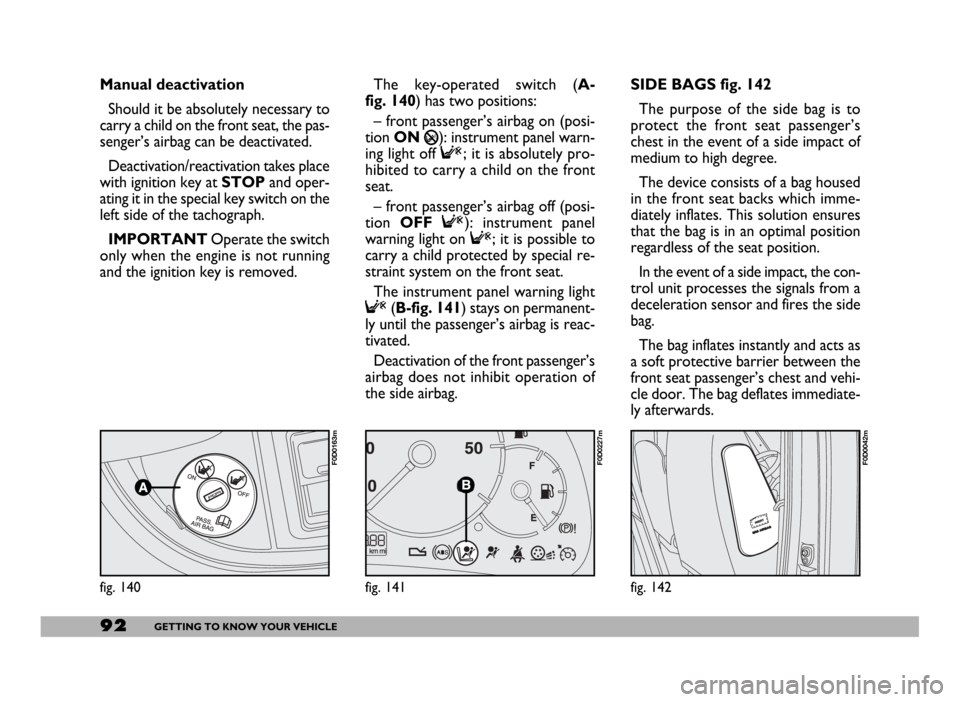
SIDE BAGS fig. 142
The purpose of the side bag is to
protect the front seat passenger’s
chest in the event of a side impact of
medium to high degree.
The device consists of a bag housed
in the front seat backs which imme-
diately inflates. This solution ensures
that the bag is in an optimal position
regardless of the seat position.
In the event of a side impact, the con-
trol unit processes the signals from a
deceleration sensor and fires the side
bag.
The bag inflates instantly and acts as
a soft protective barrier between the
front seat passenger’s chest and vehi-
cle door. The bag deflates immediate-
ly afterwards.
fig. 142
F0D0042m
fig. 140
F0D0163m
Manual deactivation
Should it be absolutely necessary to
carry a child on the front seat, the pas-
senger’s airbag can be deactivated.
Deactivation/reactivation takes place
with ignition key at STOPand oper-
ating it in the special key switch on the
left side of the tachograph.
IMPORTANTOperate the switch
only when the engine is not running
and the ignition key is removed.The key-operated switch (A-
fig. 140) has two positions:
– front passenger’s airbag on (posi-
tion ON
P): instrument panel warn-
ing light off F; it is absolutely pro-
hibited to carry a child on the front
seat.
– front passenger’s airbag off (posi-
tion OFF F): instrument panel
warning light on F; it is possible to
carry a child protected by special re-
straint system on the front seat.
The instrument panel warning light
F(B-fig. 141) stays on permanent-
ly until the passenger’s airbag is reac-
tivated.
Deactivation of the front passenger’s
airbag does not inhibit operation of
the side airbag.
fig. 141
F0D0227m
Page 95 of 258
94GETTING TO KNOW YOUR VEHICLE
If the vehicle changes owner-
ship, the new owner must be in-
formed of the method of use of
airbags and the above warnings
and also be given this Owner
Handbook.
The triggering of pretensioners
and front and side airbags is de-
cided in a differentiated manner
by the electronic control unit, de-
pending on the type of crash. The
failure to deploy one or more of
them does not mean that the sys-
tem is not working properly.
If the ¬warning light does
not turn on when turning
the ignition key to MAR or if it stays
on when travelling, this could indi-
cate a failure in safety retaining sys-
tems; under this condition air bags
or pretensioners could not trigger
in the event of collision or, in a re-
stricted number of cases, they could
trigger accidentally. Stop the car
and contact Fiat Dealership to have
the system checked immediately.
WARNING
If the vehicle has been
stolen or an attempt to
steal it has been made, if it has
been subjected to vandals or floods,
have the airbag system checked by
Fiat Dealership.
WARNING
Do not apply stickers or
other objects to the steer-
ing wheel or to the airbag console
on the passenger’s side. Never trav-
el with objects on your lap, in front
of your chest or with a pipe, pencil,
etc. between your lips; injury may
result in the event of the airbag be-
ing triggered.
WARNING
Always keep your hands on
the steering wheel rim
when driving, so that if the airbag
is triggered, it can inflate without
meeting any obstacles which could
cause serious harm to you. Do not
drive with the body bent forwards,
keep the seat back rest in the erect
position and lean your back well
against it.
WARNING
When the passenger’s front
airbag is active (passenger
front airbag deactivation switch at
ON), the
Fwarning light will
come on for approx. 4 seconds and
flash for other four seconds when
the ignition key is turned to MAR to
remind the driver that the passen-
ger’s front and side airbags (where
provided) will be fired in the event
of a crash. The warning light should
go off immediately afterwards.
WARNING