Button FIAT DUCATO 2006 3.G Owner's Guide
[x] Cancel search | Manufacturer: FIAT, Model Year: 2006, Model line: DUCATO, Model: FIAT DUCATO 2006 3.GPages: 258, PDF Size: 4.05 MB
Page 71 of 258
70GETTING TO KNOW YOUR VEHICLE
To increase the memorised
speed
The speed memorised can be in-
creased in two ways:
1 -pressing the accelerator and then
memorising the new speed reached
(pressing button + for more than
three seconds);
2 -pressing briefly button +: each
pressing will correspond to a slight in-
crease in speed (about 2.5 km/h) while
pressing continuously will correspond
to a continuous speed increase. Re-
leasing the button the new speed will
be memorised automatically.
To reduce the memorised
speed
The speed memorised can be re-
duced in two ways:
1 -disengaging the device (for in-
stance pressing the brake pedal) and
then memorising the new speed
(pressing button +for more than
three seconds);
2 -pressing button –until reaching
the new speed which will be memo-
rised automatically.To set to zero the memorised
speed
The memorised speed is automati-
cally reset:
– turning the engine off;
– pressing buttonOFF.Do not engage the device in town or
in busy flowing traffic conditions.
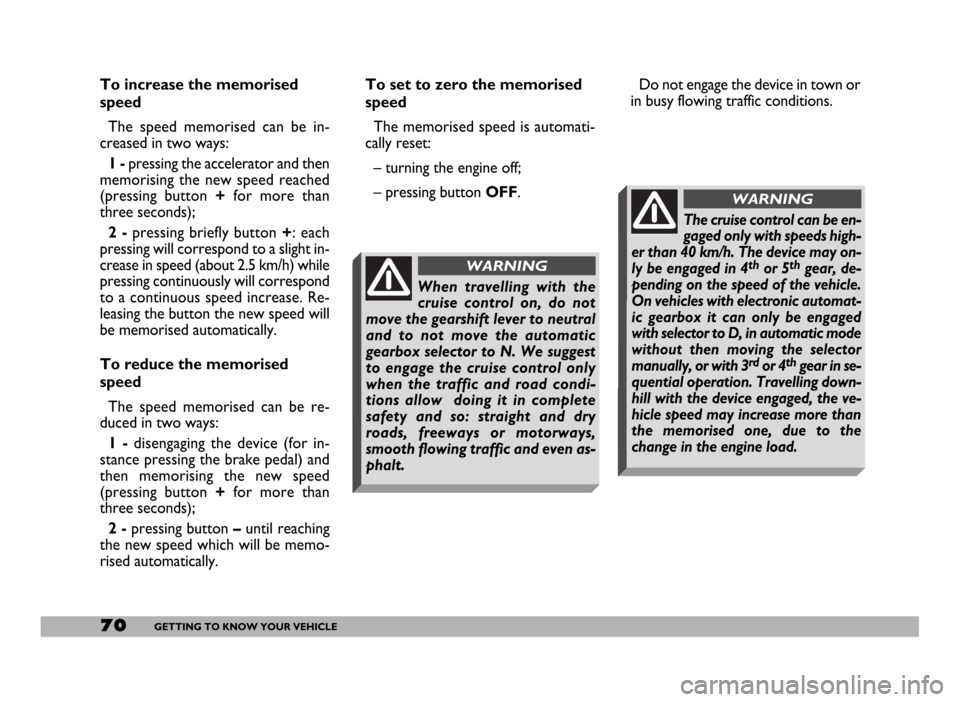
When travelling with the
cruise control on, do not
move the gearshift lever to neutral
and to not move the automatic
gearbox selector to N. We suggest
to engage the cruise control only
when the traffic and road condi-
tions allow doing it in complete
safety and so: straight and dry
roads, freeways or motorways,
smooth flowing traffic and even as-
phalt.
WARNING
The cruise control can be en-
gaged only with speeds high-
er than 40 km/h. The device may on-
ly be engaged in 4
thor 5thgear, de-
pending on the speed of the vehicle.
On vehicles with electronic automat-
ic gearbox it can only be engaged
with selector to D, in automatic mode
without then moving the selector
manually, or with 3
rdor 4thgear in se-
quential operation. Travelling down-
hill with the device engaged, the ve-
hicle speed may increase more than
the memorised one, due to the
change in the engine load.
WARNING
Page 72 of 258
71GETTING TO KNOW YOUR VEHICLE
CONTROLS
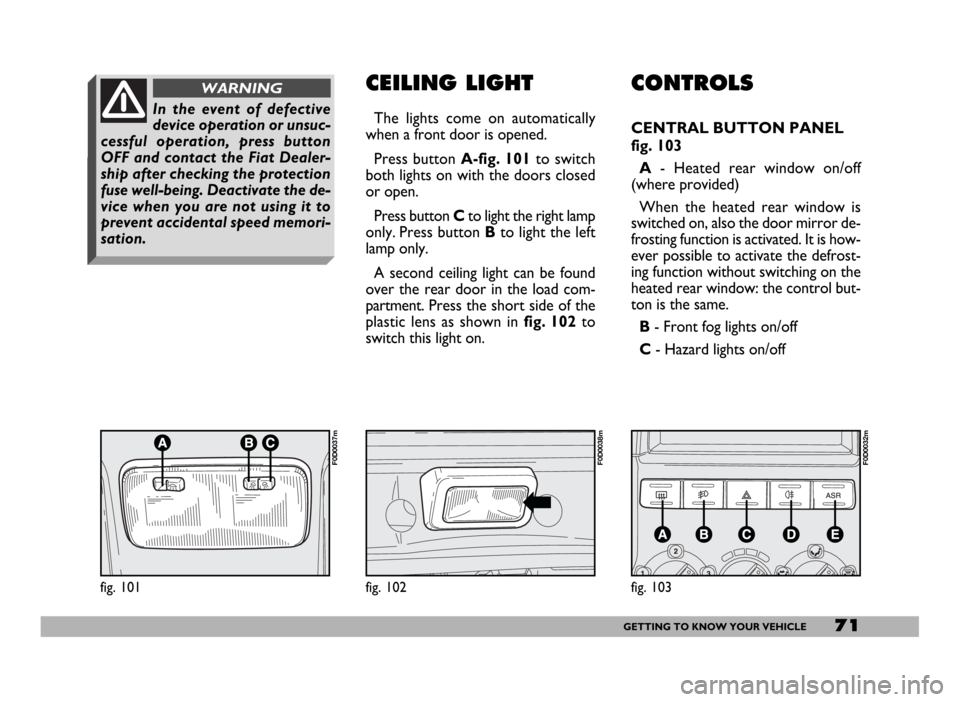
CENTRAL BUTTON PANEL
fig. 103
A- Heated rear window on/off
(where provided)
When the heated rear window is
switched on, also the door mirror de-
frosting function is activated. It is how-
ever possible to activate the defrost-
ing function without switching on the
heated rear window: the control but-
ton is the same.
B - Front fog lights on/off
C- Hazard lights on/off
CEILING LIGHT
The lights come on automatically
when a front door is opened.
Press button A-fig. 101to switch
both lights on with the doors closed
or open.
Press button Cto light the right lamp
only. Press button Bto light the left
lamp only.
A second ceiling light can be found
over the rear door in the load com-
partment. Press the short side of the
plastic lens as shown in fig. 102to
switch this light on.
fig. 101
F0D0037m
fig. 102
F0D0038m
In the event of defective
device operation or unsuc-
cessful operation, press button
OFF and contact the Fiat Dealer-
ship after checking the protection
fuse well-being. Deactivate the de-
vice when you are not using it to
prevent accidental speed memori-
sation.
WARNING
fig. 103
F0D0032m
Page 73 of 258
72GETTING TO KNOW YOUR VEHICLE
fig. 104
F0D00164m
fig. 105
F0D105m
All direction indicators will flash and
the instrument panel warning lights r
and ycome on when the button is
pressed regardless of the ignition key
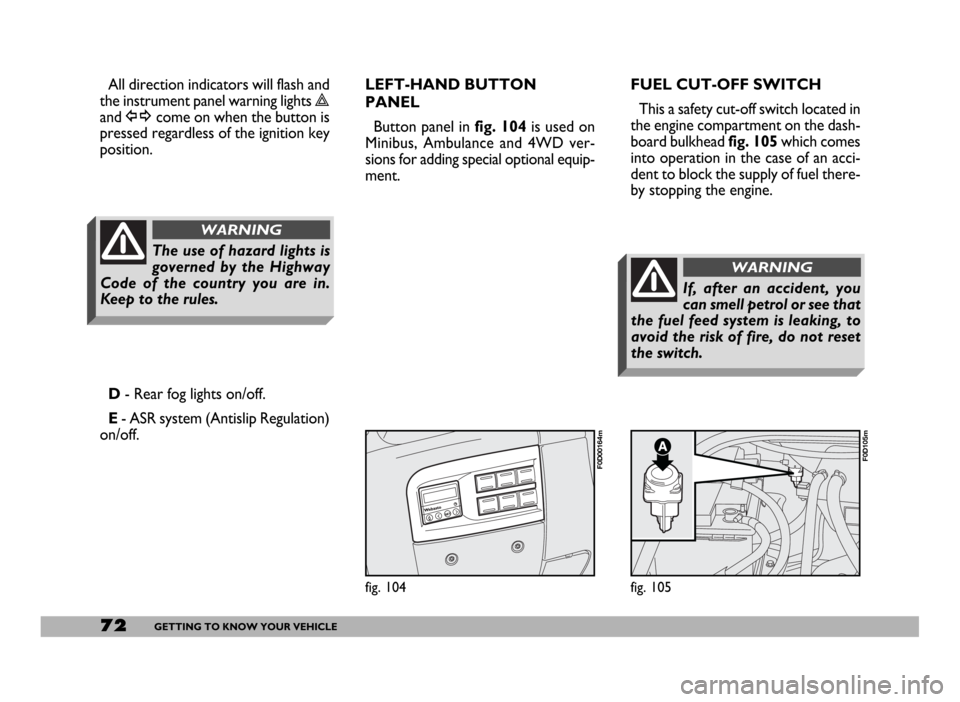
position.FUEL CUT-OFF SWITCH
This a safety cut-off switch located in
the engine compartment on the dash-
board bulkhead fig. 105which comes
into operation in the case of an acci-
dent to block the supply of fuel there-
by stopping the engine.
D- Rear fog lights on/off.
E- ASR system (Antislip Regulation)
on/off.LEFT-HAND BUTTON
PANEL
Button panel in fig. 104is used on
Minibus, Ambulance and 4WD ver-
sions for adding special optional equip-
ment.
The use of hazard lights is
governed by the Highway
Code of the country you are in.
Keep to the rules.
WARNING
If, after an accident, you
can smell petrol or see that
the fuel feed system is leaking, to
avoid the risk of fire, do not reset
the switch.
WARNING
Page 74 of 258
73GETTING TO KNOW YOUR VEHICLE
Inspect the vehicle carefully to make
sure there is no fuel leak in the en-
gine compartment, under the vehicle
or near the fuel tank.
If you cannot see any fuel leaks and
the vehicle is in a fit state to continue
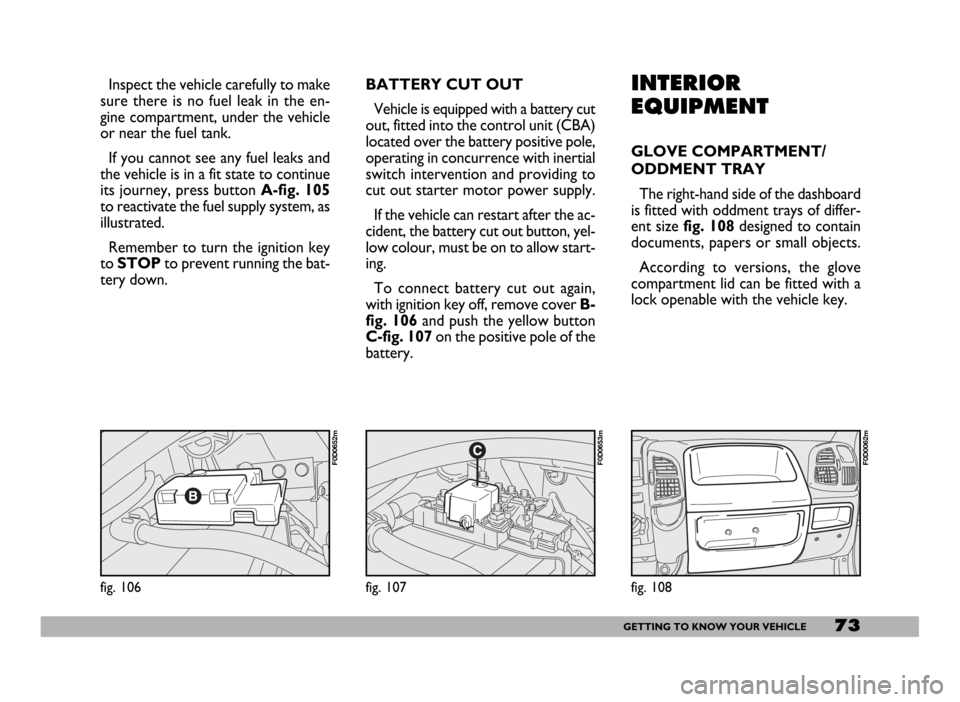
its journey, press button A-fig. 105
to reactivate the fuel supply system, as
illustrated.
Remember to turn the ignition key
to STOPto prevent running the bat-
tery down.INTERIOR
EQUIPMENT
GLOVE COMPARTMENT/
ODDMENT TRAY
The right-hand side of the dashboard
is fitted with oddment trays of differ-
ent sizefig. 108designed to contain
documents, papers or small objects.
According to versions, the glove
compartment lid can be fitted with a
lock openable with the vehicle key.
fig. 108
F0D0062m
fig. 106
F0D0652m
fig. 107
F0D0653m
BATTERY CUT OUT
Vehicle is equipped with a battery cut
out, fitted into the control unit (CBA)
located over the battery positive pole,
operating in concurrence with inertial
switch intervention and providing to
cut out starter motor power supply.
If the vehicle can restart after the ac-
cident, the battery cut out button, yel-
low colour, must be on to allow start-
ing.
To connect battery cut out again,
with ignition key off, remove cover B-
fig. 106 and push the yellow button
C-fig. 107 on the positive pole of the
battery.
Page 80 of 258
79GETTING TO KNOW YOUR VEHICLE
IMPORTANT NOTES
Do not use abrasive detergents or
solvents to clean the device. To clean
its external surface, use a wet cloth or
special products for cleaning synthet-
ic materials.
The multimeter is installed and
sealed with lead by authorised per-
sonnel: access to the device and rele-
vant power and recording cables is
forbidden.
The vehicle owner is responsible for
governing the instrument use. The in-
spection must be carried out at least
every two years and will include a test
to confirm correct operation.
After the inspection, check that the
plate is updated with specified data.DRIVER’S CAB DOORS
Opening by hand from
the outside
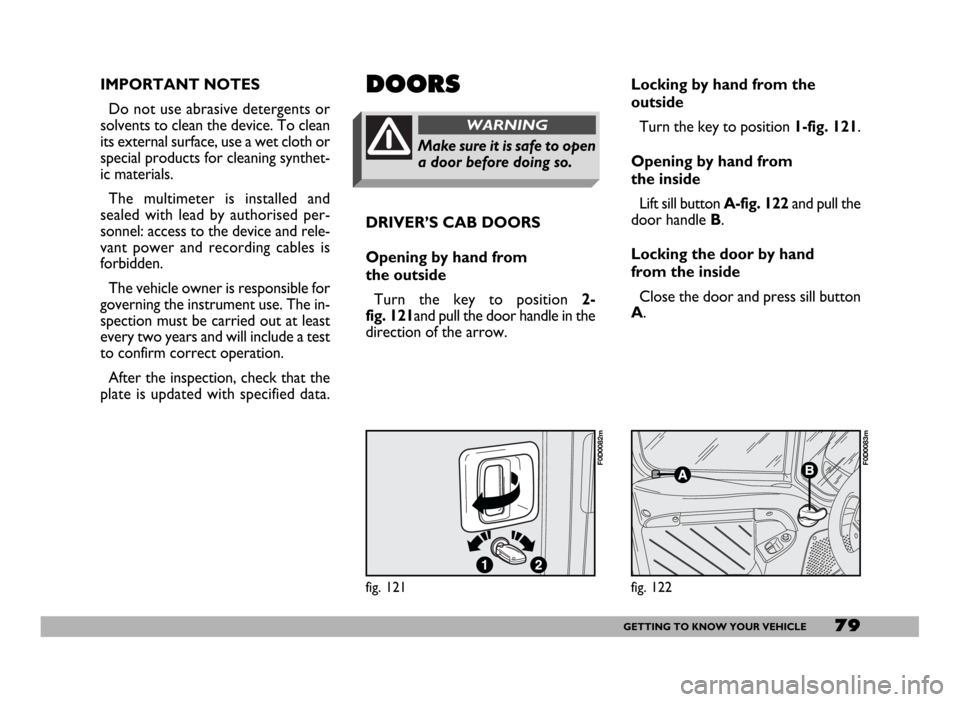
Turn the key to position 2-
fig. 121and pull the door handle in the
direction of the arrow.DOORS
Make sure it is safe to open
a door before doing so.
WARNING
Locking by hand from the
outside
Turn the key to position 1-fig. 121.
Opening by hand from
the inside
Lift sill button A-fig. 122and pull the
door handle B.
Locking the door by hand
from the inside
Close the door and press sill button
A.
fig. 121
F0D0082m
fig. 122
F0D0083m
Page 82 of 258
81GETTING TO KNOW YOUR VEHICLE
REAR DOUBLE DOORS
Opening the first door by hand
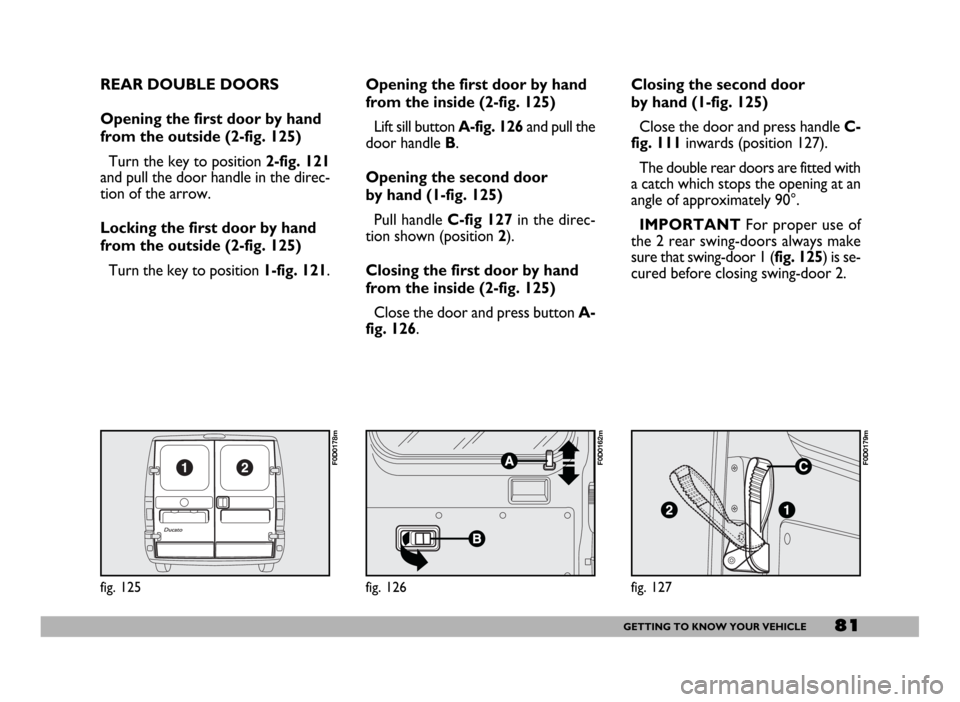
from the outside (2-fig. 125)
Turn the key to position 2-fig. 121
and pull the door handle in the direc-
tion of the arrow.
Locking the first door by hand
from the outside (2-fig. 125)
Turn the key to position 1-fig. 121.
fig. 125
F0D0178m
Opening the first door by hand
from the inside (2-fig. 125)
Lift sill button A-fig. 126and pull the
door handle B.
Opening the second door
by hand (1-fig. 125)
Pull handle C-fig 127in the direc-
tion shown (position2).
Closing the first door by hand
from the inside (2-fig. 125)
Close the door and press button A-
fig. 126.Closing the second door
by hand (1-fig. 125)
Close the door and press handle C-
fig. 111inwards (position 127).
The double rear doors are fitted with
a catch which stops the opening at an
angle of approximately 90°.
IMPORTANTFor proper use of
the 2 rear swing-doors always make
sure that swing-door 1 (fig. 125) is se-
cured before closing swing-door 2.
fig. 127
F0D0179m
fig. 126
F0D0162m
Page 84 of 258
83GETTING TO KNOW YOUR VEHICLE
CENTRAL DOOR LOCKING
IMPORTANTCentral door locking
is active on all doors if front doors (cab
doors) are used for opening/closing.
When operating one of the rear or
side door lock, only that door will be
locked/unlocked.
From the outside
When the doors are closed, insert
and turn the key in the lock of one of
the driver’s cab doors.
From the inside
When the doors are closed, press
(to lock) or lift (to unlock) one of the
driver’s cab door safety sill buttons.
IMPORTANT If one of the cab
doors is not shut properly or there is
a failure in the system, the central
locking feature will not work and, af-
ter some attempts, the device will stop
working for about 2 minutes. In these
two minutes, the doors can be locked
or unlocked manually without the
electrical system coming into play.After the two minutes, the control
unit is ready to receive commands
once more. If the reason for the mal-
functioning has been removed, the de-
vice will start to work properly again.
If not, it will cut once more.
FRONT DOOR WINDOW
REGULATORS
Manual control
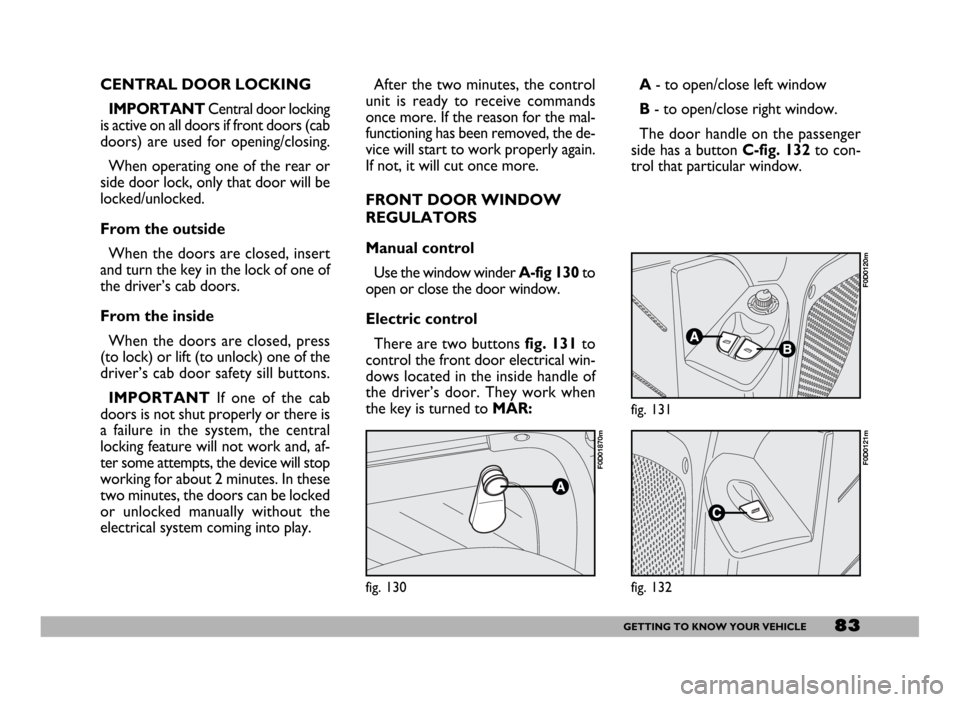
Use the window winderA-fig 130to
open or close the door window.
Electric control
There are two buttons fig. 131to
control the front door electrical win-
dows located in the inside handle of
the driver’s door. They work when
the key is turned to MAR:A- to open/close left window
B- to open/close right window.
The door handle on the passenger
side has a button C-fig. 132to con-
trol that particular window.
fig. 130
F0D01870m
fig. 131
F0D0120m
fig. 132
F0D0121m
Page 98 of 258
97GETTING TO KNOW YOUR VEHICLE
SWITCHING THE ASR
SYSTEM ON AND OFF
The ASR function switches on auto-
matically each time the engine is
started.
When travelling the device can be
switched off and on again pressing
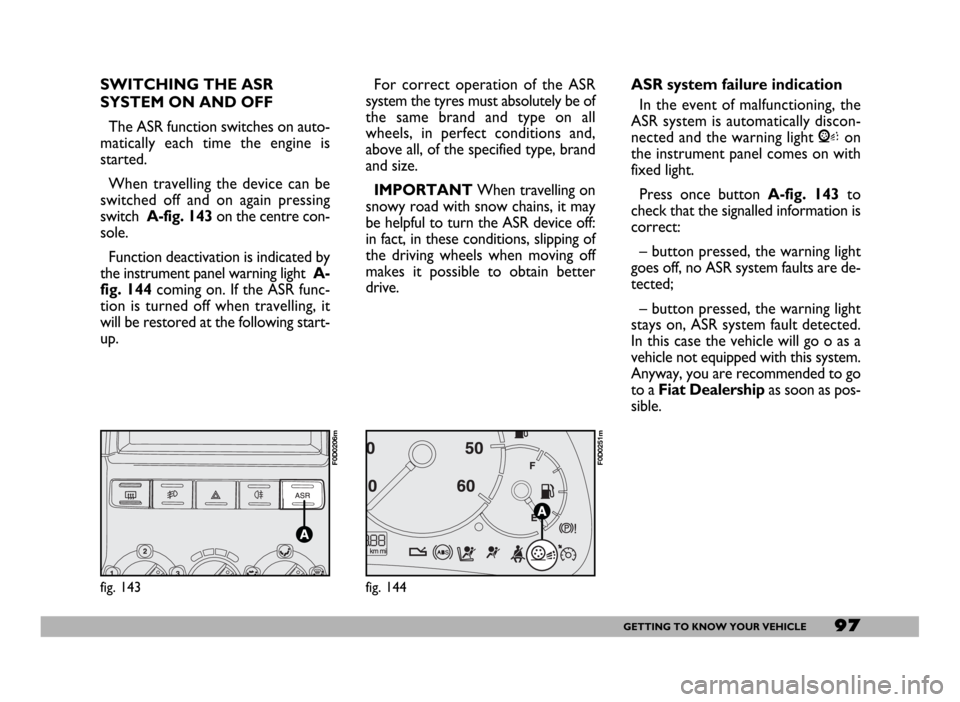
switch A-fig. 143 on the centre con-
sole.
Function deactivation is indicated by
the instrument panel warning light A-
fig. 144coming on. If the ASR func-
tion is turned off when travelling, it
will be restored at the following start-
up.For correct operation of the ASR
system the tyres must absolutely be of
the same brand and type on all
wheels, in perfect conditions and,
above all, of the specified type, brand
and size.
IMPORTANTWhen travelling on
snowy road with snow chains, it may
be helpful to turn the ASR device off:
in fact, in these conditions, slipping of
the driving wheels when moving off
makes it possible to obtain better
drive.
fig. 143
F0D0206m
ASR system failure indication
In the event of malfunctioning, the
ASR system is automatically discon-
nected and the warning light Von
the instrument panel comes on with
fixed light.
Press once button A-fig. 143to
check that the signalled information is
correct:
– button pressed, the warning light
goes off, no ASR system faults are de-
tected;
– button pressed, the warning light
stays on, ASR system fault detected.
In this case the vehicle will go o as a
vehicle not equipped with this system.
Anyway, you are recommended to go
to a Fiat Dealershipas soon as pos-
sible.
fig. 144
F0D0251m
Page 106 of 258
105GETTING THE BEST OUT OF YOUR VEHICLE
G G
E E
T T
T T
I I
N N
G G
T T
H H
E E
B B
E E
S S
T T
O O
U U
T T
O O
F F
Y Y
O O
U U
R R
V V
E E
H H
I I
C C
L L
E E
STARTING
THE ENGINE HOW TO START PETROL
VERSIONS
IMPORTANT Do not press the
accelerator until the engine has start-
ed.
1) Ensure that the handbrake is up.
2)Put the gear lever into neutral.
3)Press the clutch pedal down to
the floor without touching the accel-
erator.
4) Turn the ignition key to AVVand
release it as soon as the engine starts.
If the engine does not start at the
first attempt, return the ignition key
to STOP before trying to start the
engine again.
If the warning light Ystays on when
the ignition key is at MAR, turn the
key to STOPand then to MAR; if the
warning light stays on, try with the
other keys provided.
If you are still unable to start the en-
gine, go to a Fiat Dealership.IMPORTANTDo not leave the ig-
nition key at MAR when the engine is
off.
Minibus and School Bus versions:
press the ignition enable button lo-
cated to the left of the steering col-
umn as shown in the specific supple-
ment to this handbook.
Never touch the high volt-
age cables (spark plug ca-
bles) when the engine is running.
WARNING
It is dangerous to let the en-
gine run in a garage of oth-
er closed area. The engine con-
sumes oxygen and gives off carbon
dioxide, carbon monoxide and oth-
er poisonous fumes.
WARNING
Page 108 of 258
107GETTING THE BEST OUT OF YOUR VEHICLE
If you still cannot start the engine,
get in touch with a Fiat Dealership.
IMPORTANT When the outside
temperature is low, it is important to
note that the use of a more fluid oil
will facilitate starting the cold engine.
Therefore, in winter, follow the advice
in chapter “Technical specifications”,
paragraph “Fluids and lubricants”.
IMPORTANTNever leave the igni-
tion key at MARwhen the engine is off.
Minibus and School Bus versions:
press the ignition enable button lo-
cated to the left of the steering col-
umn as shown in the specific supple-
ment to this handbook.HOW TO WARM UP
THE ENGINE AFTER IT
HAS JUST STARTED
(petrol and diesel versions)
– Begin to move forward slowly let-
ting the engine turn at medium revs.
Do not accelerate abruptly.
– Do not push the engine to its lim-
it for the first few kilometres. You are
recommended to wait until the
coolant temperature indicator starts
to move.
EMERGENCY START-UP
If the Fiat CODE system fails to
recognise that code transmitted by the
ignition key (warning light Yon the
instrument panel lit) the emergency
start-up can be performed by using the
CODE card code.
See the “In an emergency” section.Catalysed vehicles must
not be bump started
(pushed, towed or coast-
ed downhill) as this could cause
fuel to flow into the catalytic ex-
haust system and damage it be-
yond repair.
Remember that until the
engine has started the
brake booster and power steering
systems will not work and a greater
effort will therefore be required to
depress the brake pedal or turn the
steering wheel.
WARNING