warning FIAT DUCATO 2006 3.G Service Manual
[x] Cancel search | Manufacturer: FIAT, Model Year: 2006, Model line: DUCATO, Model: FIAT DUCATO 2006 3.GPages: 258, PDF Size: 4.05 MB
Page 65 of 258
64GETTING TO KNOW YOUR VEHICLE
– Always remember to turn the
heater off when refuelling or standing
in service stations to avoid fires and
explosions.
– Do not park the vehicle over in-
flammable material such as paper, dry
grass or leaves: fire risk!
– The temperature near the heater
must never exceed 120°C (e.g. during
painting operations in a workshop
oven). Higher temperatures could
damage the electronic control unit
components.
– When the engine is off, the heater
runs off the battery: it is consequently
important to run the engine for a cer-
tain period of time in order to restore
the battery charge.– Follow the prescriptions in “Vehi-
cle maintenance” section at paragraph
“Engine coolant level” to check the
coolant level. The coolant in the cir-
cuit must contain at least 10% an-
tifreeze fluid.
– Maintenance and repairs must al-
ways be carried out by a Fiat Deal-
ershipand only genuine spare parts
must be used.
MAINTENANCE
Have the heater checked at a Fiat
Dealership periodically (always be-
fore winter). This will ensure safe and
cheap running and long appliance life.
The heater burns fuel in the
same way as the engine,
though, of course, to a lesser degree
and therefore to avoid intoxication
and suffocation, never use the sup-
plementary heater in closed areas,
garages or workshops not equipped
with specific exhaust evacuation
devices even for short periods of
time.
WARNING
Page 66 of 258
65GETTING TO KNOW YOUR VEHICLE
STEERING COLUMN
STALKS
LEFT-HAND STALK
The left-hand stalk operates most of
the external lights.
The external lights can only be
switched on when the ignition key is
at MAR. The instrument panel and
the heating/ventilation (or climate con-
trol system) controls and the cigar
lighter ring will come on with the ex-
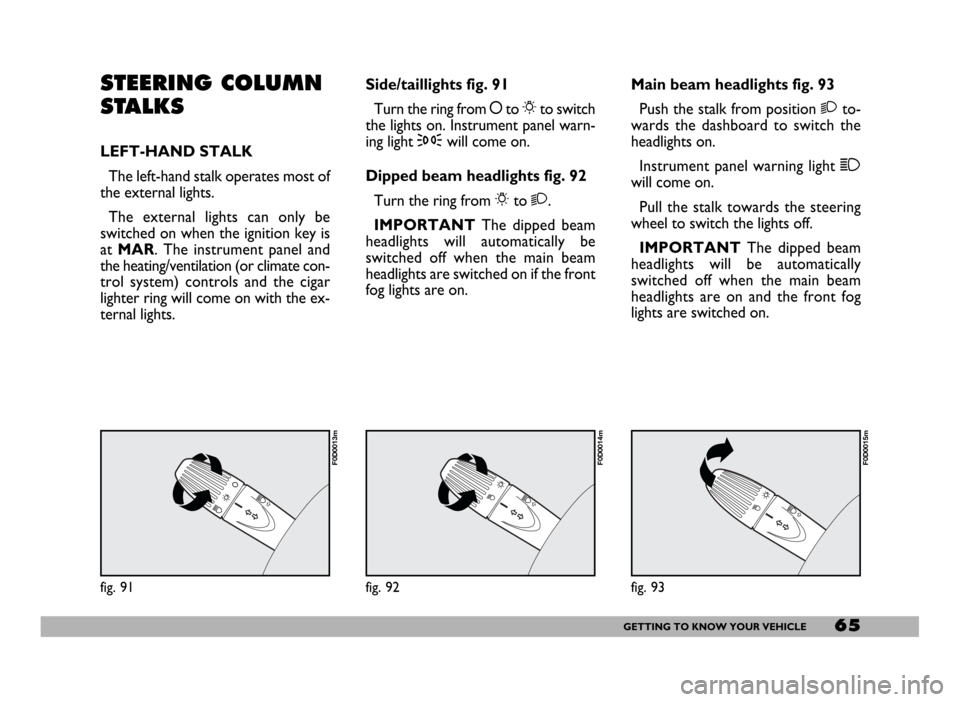
ternal lights.Side/taillights fig. 91
Turn the ring from åto 6to switch
the lights on. Instrument panel warn-
ing light 3will come on.
Dipped beam headlights fig. 92
Turn the ring from 6to 2.
IMPORTANTThe dipped beam
headlights will automatically be
switched off when the main beam
headlights are switched on if the front
fog lights are on.Main beam headlights fig. 93
Push the stalk from position 2to-
wards the dashboard to switch the
headlights on.
Instrument panel warning light 1
will come on.
Pull the stalk towards the steering
wheel to switch the lights off.
IMPORTANTThe dipped beam
headlights will be automatically
switched off when the main beam
headlights are on and the front fog
lights are switched on.
fig. 91
F0D0013m
fig. 92
F0D0014m
fig. 93
F0D0015m
Page 67 of 258
66GETTING TO KNOW YOUR VEHICLE
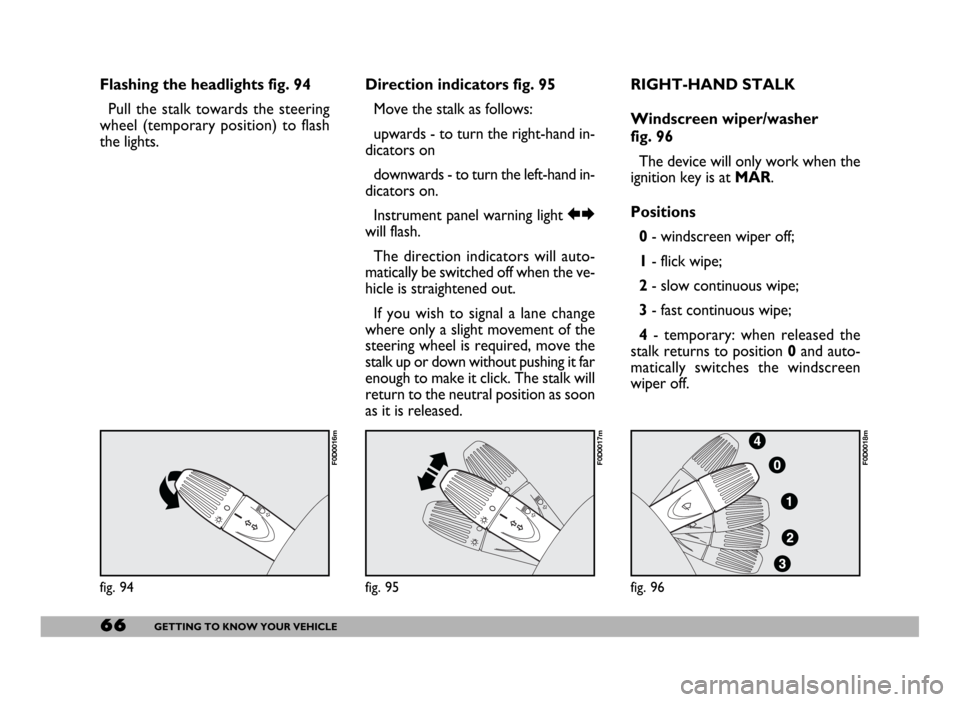
Flashing the headlights fig. 94
Pull the stalk towards the steering
wheel (temporary position) to flash
the lights.Direction indicators fig. 95
Move the stalk as follows:
upwards - to turn the right-hand in-
dicators on
downwards - to turn the left-hand in-
dicators on.
Instrument panel warning light RE
will flash.
The direction indicators will auto-
matically be switched off when the ve-
hicle is straightened out.
If you wish to signal a lane change
where only a slight movement of the
steering wheel is required, move the
stalk up or down without pushing it far
enough to make it click. The stalk will
return to the neutral position as soon
as it is released.RIGHT-HAND STALK
Windscreen wiper/washer
fig. 96
The device will only work when the
ignition key is at MAR.
Positions
0- windscreen wiper off;
1- flick wipe;
2- slow continuous wipe;
3- fast continuous wipe;
4- temporary: when released the
stalk returns to position 0and auto-
matically switches the windscreen
wiper off.
fig. 94
F0D0016m
fig. 95
F0D0017m
fig. 96
F0D0018m
Page 69 of 258
68GETTING TO KNOW YOUR VEHICLE
IMPORTANTThe cruise control
can be engaged only with speeds high-
er than 40 km/h.
The device is automatically discon-
nected in one of the following cases:
– pressing the brake pedal;
– pressing the clutch pedal;
– inadvertently moving the automat-
ic gearbox selector to N. A special horn warns any people near
the vehicle that the driver is manoeu-
vring it.
Through four sensors located in the
bumper, the system detects the dis-
tance between the vehicle and possi-
ble obstacles; the driver is warned by
an intermittent acoustic signal with in-
creasing frequency, which is automat-
ically activated when the reverse gear
is engaged.CRUISE CONTROL
GENERAL FEATURES
The cruise control, with electronic
control, allows driving the vehicle at
a desired speed, without pressing the
accelerator pedal. This allows reduc-
ing the driving fatigue on motorways,
especially during long journeys, be-
cause the memorised speed is auto-
matically maintained.
Never set gear selector to
N (vehicles fitted with au-
tomatic gearbox) when the vehicle
is moving.
WARNING
The Cruise Control must be
activated only when the
traffic and the path allow keeping,
for a distance long enough, a con-
stant speed in complete safety.
WARNING
Page 71 of 258
70GETTING TO KNOW YOUR VEHICLE
To increase the memorised
speed
The speed memorised can be in-
creased in two ways:
1 -pressing the accelerator and then
memorising the new speed reached
(pressing button + for more than
three seconds);
2 -pressing briefly button +: each
pressing will correspond to a slight in-
crease in speed (about 2.5 km/h) while
pressing continuously will correspond
to a continuous speed increase. Re-
leasing the button the new speed will
be memorised automatically.
To reduce the memorised
speed
The speed memorised can be re-
duced in two ways:
1 -disengaging the device (for in-
stance pressing the brake pedal) and
then memorising the new speed
(pressing button +for more than
three seconds);
2 -pressing button –until reaching
the new speed which will be memo-
rised automatically.To set to zero the memorised
speed
The memorised speed is automati-
cally reset:
– turning the engine off;
– pressing buttonOFF.Do not engage the device in town or
in busy flowing traffic conditions.
When travelling with the
cruise control on, do not
move the gearshift lever to neutral
and to not move the automatic
gearbox selector to N. We suggest
to engage the cruise control only
when the traffic and road condi-
tions allow doing it in complete
safety and so: straight and dry
roads, freeways or motorways,
smooth flowing traffic and even as-
phalt.
WARNING
The cruise control can be en-
gaged only with speeds high-
er than 40 km/h. The device may on-
ly be engaged in 4
thor 5thgear, de-
pending on the speed of the vehicle.
On vehicles with electronic automat-
ic gearbox it can only be engaged
with selector to D, in automatic mode
without then moving the selector
manually, or with 3
rdor 4thgear in se-
quential operation. Travelling down-
hill with the device engaged, the ve-
hicle speed may increase more than
the memorised one, due to the
change in the engine load.
WARNING
Page 72 of 258
71GETTING TO KNOW YOUR VEHICLE
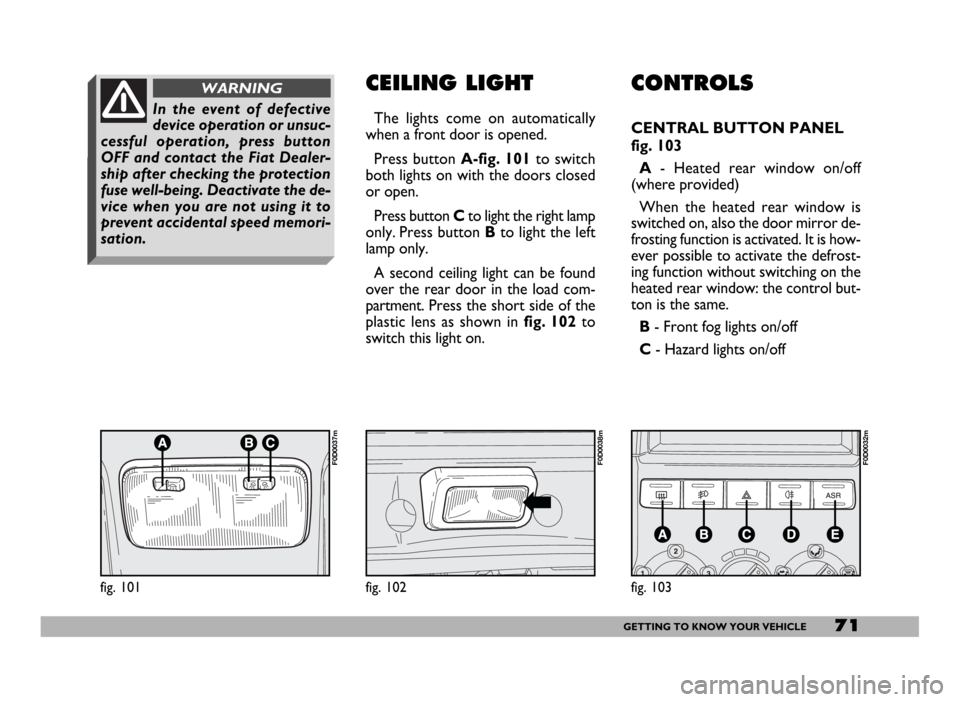
CONTROLS
CENTRAL BUTTON PANEL
fig. 103
A- Heated rear window on/off
(where provided)
When the heated rear window is
switched on, also the door mirror de-
frosting function is activated. It is how-
ever possible to activate the defrost-
ing function without switching on the
heated rear window: the control but-
ton is the same.
B - Front fog lights on/off
C- Hazard lights on/off
CEILING LIGHT
The lights come on automatically
when a front door is opened.
Press button A-fig. 101to switch
both lights on with the doors closed
or open.
Press button Cto light the right lamp
only. Press button Bto light the left
lamp only.
A second ceiling light can be found
over the rear door in the load com-
partment. Press the short side of the
plastic lens as shown in fig. 102to
switch this light on.
fig. 101
F0D0037m
fig. 102
F0D0038m
In the event of defective
device operation or unsuc-
cessful operation, press button
OFF and contact the Fiat Dealer-
ship after checking the protection
fuse well-being. Deactivate the de-
vice when you are not using it to
prevent accidental speed memori-
sation.
WARNING
fig. 103
F0D0032m
Page 73 of 258
72GETTING TO KNOW YOUR VEHICLE
fig. 104
F0D00164m
fig. 105
F0D105m
All direction indicators will flash and
the instrument panel warning lights r
and ycome on when the button is
pressed regardless of the ignition key
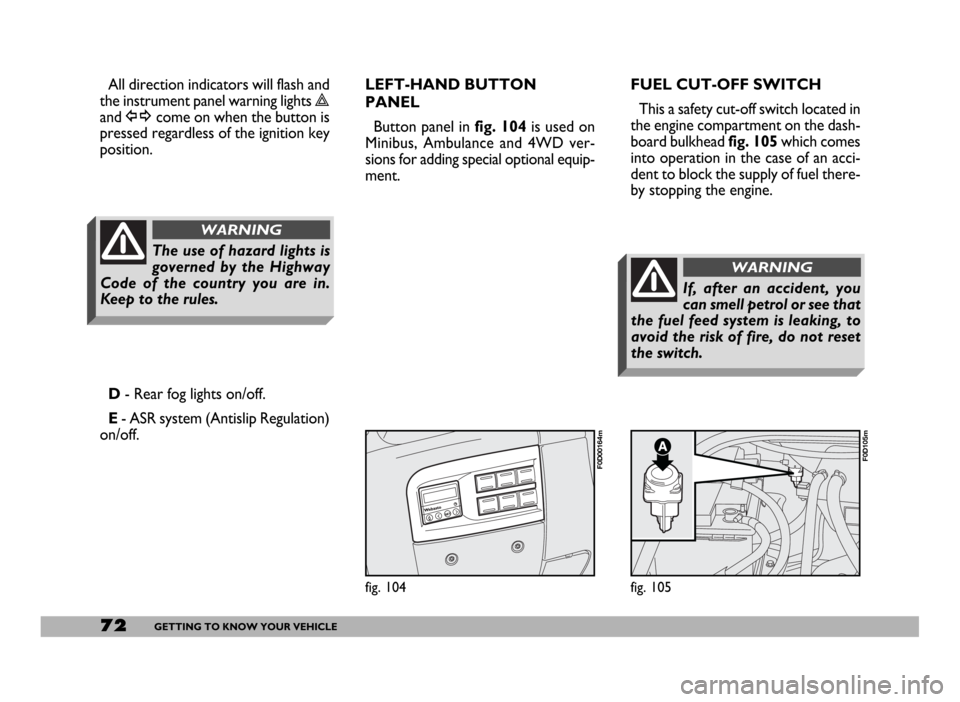
position.FUEL CUT-OFF SWITCH
This a safety cut-off switch located in
the engine compartment on the dash-
board bulkhead fig. 105which comes
into operation in the case of an acci-
dent to block the supply of fuel there-
by stopping the engine.
D- Rear fog lights on/off.
E- ASR system (Antislip Regulation)
on/off.LEFT-HAND BUTTON
PANEL
Button panel in fig. 104is used on
Minibus, Ambulance and 4WD ver-
sions for adding special optional equip-
ment.
The use of hazard lights is
governed by the Highway
Code of the country you are in.
Keep to the rules.
WARNING
If, after an accident, you
can smell petrol or see that
the fuel feed system is leaking, to
avoid the risk of fire, do not reset
the switch.
WARNING
Page 78 of 258
77GETTING TO KNOW YOUR VEHICLE
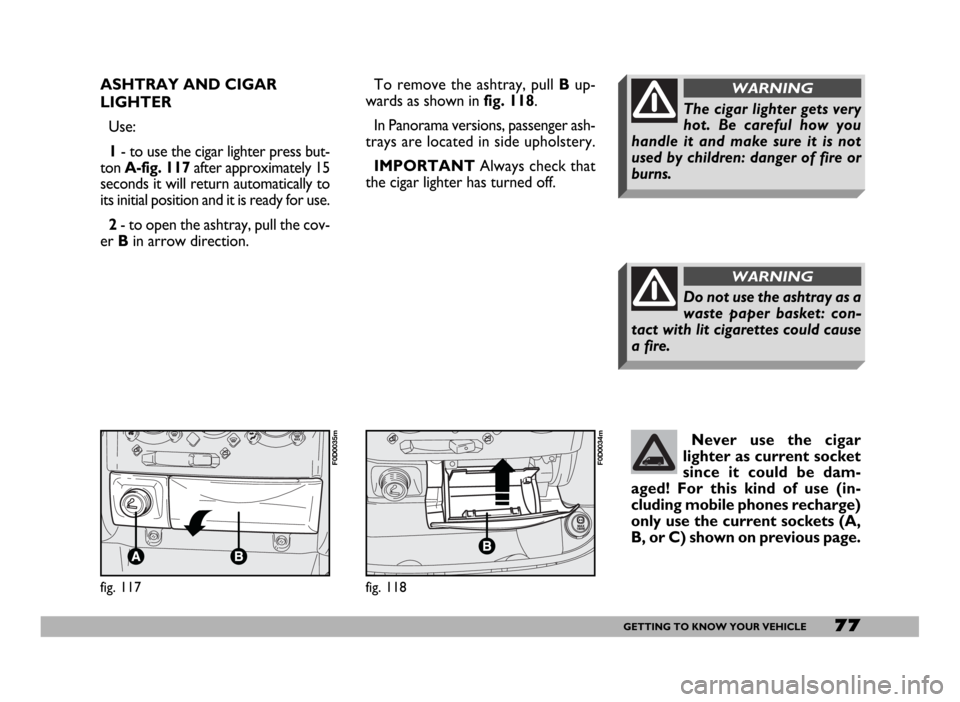
ASHTRAY AND CIGAR
LIGHTER
Use:
1- to use the cigar lighter press but-
ton A-fig. 117after approximately 15
seconds it will return automatically to
its initial position and it is ready for use.
2- to open the ashtray, pull the cov-
er Bin arrow direction.To remove the ashtray, pull Bup-
wards as shown in fig. 118.
In Panorama versions, passenger ash-
trays are located in side upholstery.
IMPORTANTAlways check that
the cigar lighter has turned off.
Do not use the ashtray as a
waste paper basket: con-
tact with lit cigarettes could cause
a fire.
WARNING
The cigar lighter gets very
hot. Be careful how you
handle it and make sure it is not
used by children: danger of fire or
burns.
WARNING
fig. 117
F0D0035m
fig. 118
F0D0034m
Never use the cigar
lighter as current socket
since it could be dam-
aged! For this kind of use (in-
cluding mobile phones recharge)
only use the current sockets (A,
B, or C) shown on previous page.
Page 80 of 258
79GETTING TO KNOW YOUR VEHICLE
IMPORTANT NOTES
Do not use abrasive detergents or
solvents to clean the device. To clean
its external surface, use a wet cloth or
special products for cleaning synthet-
ic materials.
The multimeter is installed and
sealed with lead by authorised per-
sonnel: access to the device and rele-
vant power and recording cables is
forbidden.
The vehicle owner is responsible for
governing the instrument use. The in-
spection must be carried out at least
every two years and will include a test
to confirm correct operation.
After the inspection, check that the
plate is updated with specified data.DRIVER’S CAB DOORS
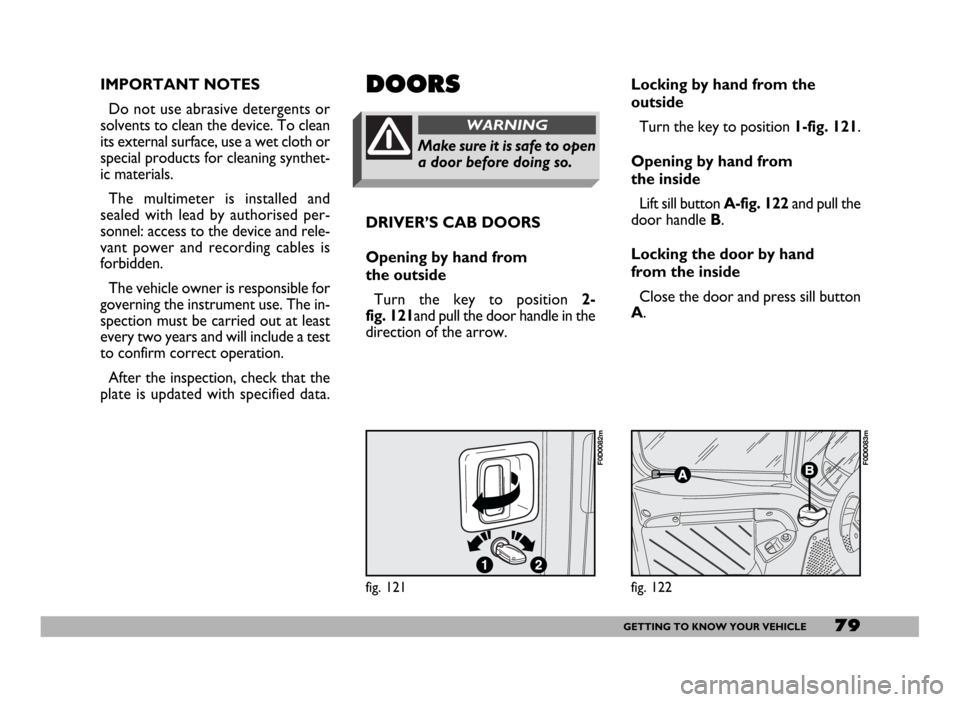
Opening by hand from
the outside
Turn the key to position 2-
fig. 121and pull the door handle in the
direction of the arrow.DOORS
Make sure it is safe to open
a door before doing so.
WARNING
Locking by hand from the
outside
Turn the key to position 1-fig. 121.
Opening by hand from
the inside
Lift sill button A-fig. 122and pull the
door handle B.
Locking the door by hand
from the inside
Close the door and press sill button
A.
fig. 121
F0D0082m
fig. 122
F0D0083m
Page 81 of 258
80GETTING TO KNOW YOUR VEHICLE
SIDE SLIDING DOOR
When leaving the vehicle
parked with the sliding
doors open, always check that the
door hooks are properly fastened
into the retaining device.
WARNING
fig. 123
F0D0084m
Do not move the vehicle
with side doors open.
WARNING
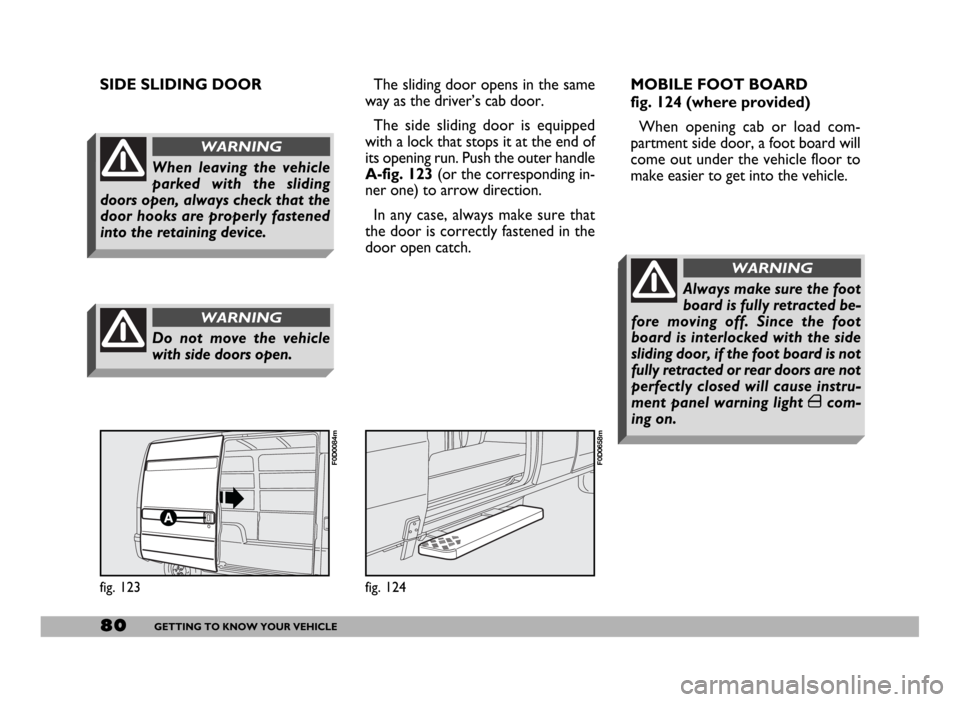
The sliding door opens in the same
way as the driver’s cab door.
The side sliding door is equipped
with a lock that stops it at the end of
its opening run. Push the outer handle
A-fig. 123(or the corresponding in-
ner one) to arrow direction.
In any case, always make sure that
the door is correctly fastened in the
door open catch.
fig. 124
F0D0658m
MOBILE FOOT BOARD
fig. 124 (where provided)
When opening cab or load com-
partment side door, a foot board will
come out under the vehicle floor to
make easier to get into the vehicle.
Always make sure the foot
board is fully retracted be-
fore moving off. Since the foot
board is interlocked with the side
sliding door, if the foot board is not
fully retracted or rear doors are not
perfectly closed will cause instru-
ment panel warning light ´com-
ing on.
WARNING