Start FIAT DUCATO 2007 3.G User Guide
[x] Cancel search | Manufacturer: FIAT, Model Year: 2007, Model line: DUCATO, Model: FIAT DUCATO 2007 3.GPages: 282, PDF Size: 4.71 MB
Page 36 of 282
35
SAFETY
DEVICES
CORRECT USE
OF THE
VEHICLE
WARNING
LIGHTS AND
MESSAGES
IN AN
EMERGENCY
VEHICLE
MAINTENANCE
TECHNICAL
SPECIFICATIONS
INDEX
DASHBOARD
AND CONTROLS
TRIP COMPUTER
General features
The “Trip computer” displays information
(with ignition key at MAR), relating to the
operating status of the vehicle. This func-
tion comprises two separate and inde-
pendent trips: “Trip A” and “Trip B” con-
cerning the “complete mission” of the ve-
hicle (journey).
Both functions are resettable (reset - start
of new mission).
“Trip A” shall be used to display the fig-
ures relating to:
– External temperature
– Range
– Trip distance
– Average consumption
– Instant consumption
– Average speed
– Travel time (driving time).“Trip B”, available on multifunction display
only, shall be used to display the figures
relating to:
– Trip distance B
– Average consumption B
– Average speed B
– Travel time B (driving time).
Note“Trip B” function can be excluded
(see paragraph “Trip B On/Off”). “Range”
and “Instant consumption” cannot be re-
set.
Values displayed
External temperature
It indicates the external temperature of
the driver compartment.
Range
This value shows the distance in km (or
mi) that the vehicle can still cover before
needing fuel, assuming that driving condi-
tions are kept unvaried. The display will
show “----” in the following cases:
– value lower than 50 km (or 30 mi)
– vehicle left parked with engine running
for long.
Trip distance
This value shows the distance covered
from the start of the new mission. Exit Menu
This is the last function that closes the cir-
cular setting cycle listed in the initial menu
screen.
Briefly press button MODEto go back to
the standard screen without storing set-
tings.
Press button ▼to return to the first menu
option (Speed Beep).
001-036 Ducato GB 6-11-2007 9:53 Pagina 35
Page 37 of 282
36
SAFETY
DEVICES
CORRECT USE
OF THE
VEHICLE
WARNING
LIGHTS AND
MESSAGES
IN AN
EMERGENCY
VEHICLE
MAINTENANCE
TECHNICAL
SPECIFICATIONS
INDEX
DASHBOARD
AND CONTROLS
Average consumption
This value shows the average consump-
tion from the start of the new mission.
Instant consumption
This value shows instant fuel consumption
(this value is updated second by second).
If parking the vehicle with engine on,
the display will show “----”.
Average speed
This value shows the vehicle average
speed as a function of the overall time
elapsed since the start of the new mission.
Travel time
This value shows the time elapsed since
the start of the new mission.
IMPORTANT Lacking information, Trip
computer values are displayed with “----”.
When normal operating condition is re-
set, calculation of different units will
restart regularly. Values displayed before
the failure will not be reset.
fig. 22F0N0019m
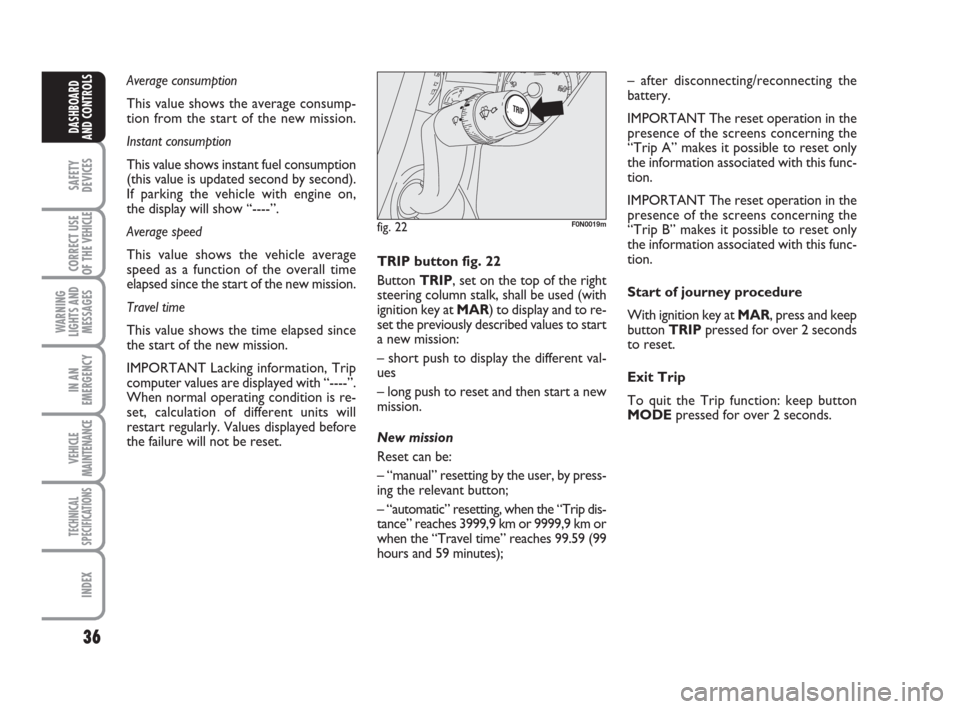
TRIP button fig. 22
Button TRIP, set on the top of the right
steering column stalk, shall be used (with
ignition key at MAR) to display and to re-
set the previously described values to start
a new mission:
– short push to display the different val-
ues
– long push to reset and then start a new
mission.
New mission
Reset can be:
– “manual” resetting by the user, by press-
ing the relevant button;
– “automatic” resetting, when the “Trip dis-
tance” reaches 3999,9 km or 9999,9 km or
when the “Travel time” reaches 99.59 (99
hours and 59 minutes);– after disconnecting/reconnecting the
battery.
IMPORTANT The reset operation in the
presence of the screens concerning the
“Trip A” makes it possible to reset only
the information associated with this func-
tion.
IMPORTANT The reset operation in the
presence of the screens concerning the
“Trip B” makes it possible to reset only
the information associated with this func-
tion.
Start of journey procedure
With ignition key at MAR, press and keep
button TRIPpressed for over 2 seconds
to reset.
Exit Trip
To quit the Trip function: keep button
MODEpressed for over 2 seconds.
001-036 Ducato GB 6-11-2007 9:53 Pagina 36
Page 51 of 282
50
SAFETY
DEVICES
CORRECT USE
OF THE
VEHICLE
WARNING
LIGHTS AND
MESSAGES
IN AN
EMERGENCY
VEHICLE
MAINTENANCE
TECHNICAL
SPECIFICATIONS
INDEX
DASHBOARD
AND CONTROLS
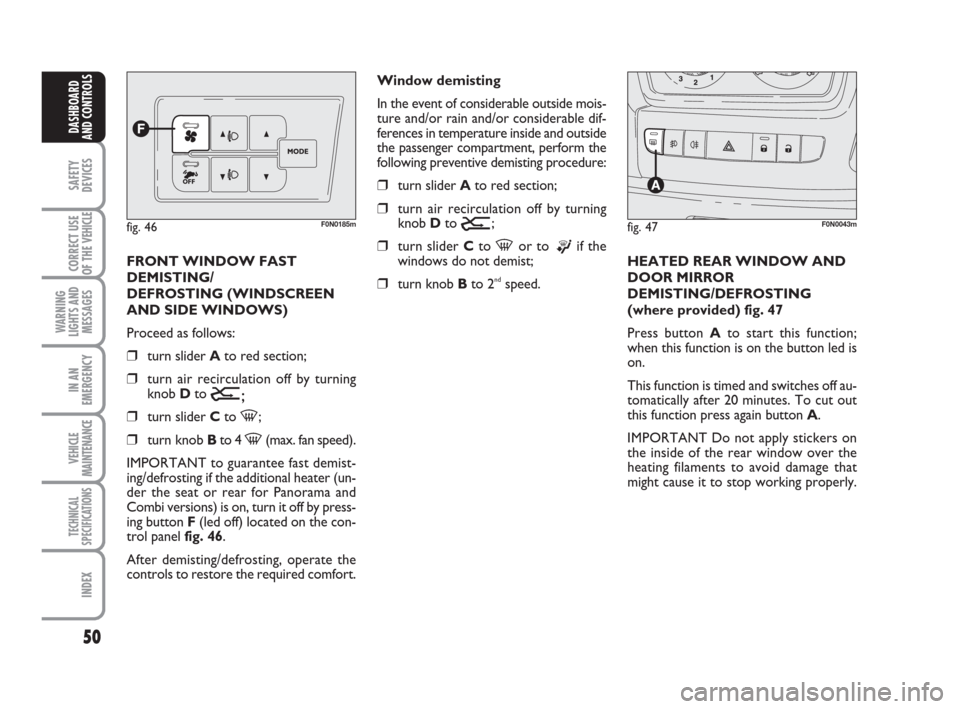
FRONT WINDOW FAST
DEMISTING/
DEFROSTING (WINDSCREEN
AND SIDE WINDOWS)
Proceed as follows:
❒turn slider Ato red section;
❒turn air recirculation off by turning
knob D to
Ú;
❒turn slider Cto -;
❒turn knob Bto 4 -(max. fan speed).
IMPORTANT to guarantee fast demist-
ing/defrosting if the additional heater (un-
der the seat or rear for Panorama and
Combi versions) is on, turn it off by press-
ing button F(led off) located on the con-
trol panel fig. 46.
After demisting/defrosting, operate the
controls to restore the required comfort.Window demisting
In the event of considerable outside mois-
ture and/or rain and/or considerable dif-
ferences in temperature inside and outside
the passenger compartment, perform the
following preventive demisting procedure:
❒turn slider Ato red section;
❒turn air recirculation off by turning
knob D to
Ú;
❒turn slider Cto -or to ®if the
windows do not demist;
❒turn knob Bto 2ndspeed.HEATED REAR WINDOW AND
DOOR MIRROR
DEMISTING/DEFROSTING
(where provided) fig. 47
Press button Ato start this function;
when this function is on the button led is
on.
This function is timed and switches off au-
tomatically after 20 minutes. To cut out
this function press again button A.
IMPORTANT Do not apply stickers on
the inside of the rear window over the
heating filaments to avoid damage that
might cause it to stop working properly.
fig. 46F0N0185mfig. 47F0N0043m
037-101 Ducato GB 6-11-2007 9:56 Pagina 50
Page 55 of 282
54
SAFETY
DEVICES
CORRECT USE
OF THE
VEHICLE
WARNING
LIGHTS AND
MESSAGES
IN AN
EMERGENCY
VEHICLE
MAINTENANCE
TECHNICAL
SPECIFICATIONS
INDEX
DASHBOARD
AND CONTROLS
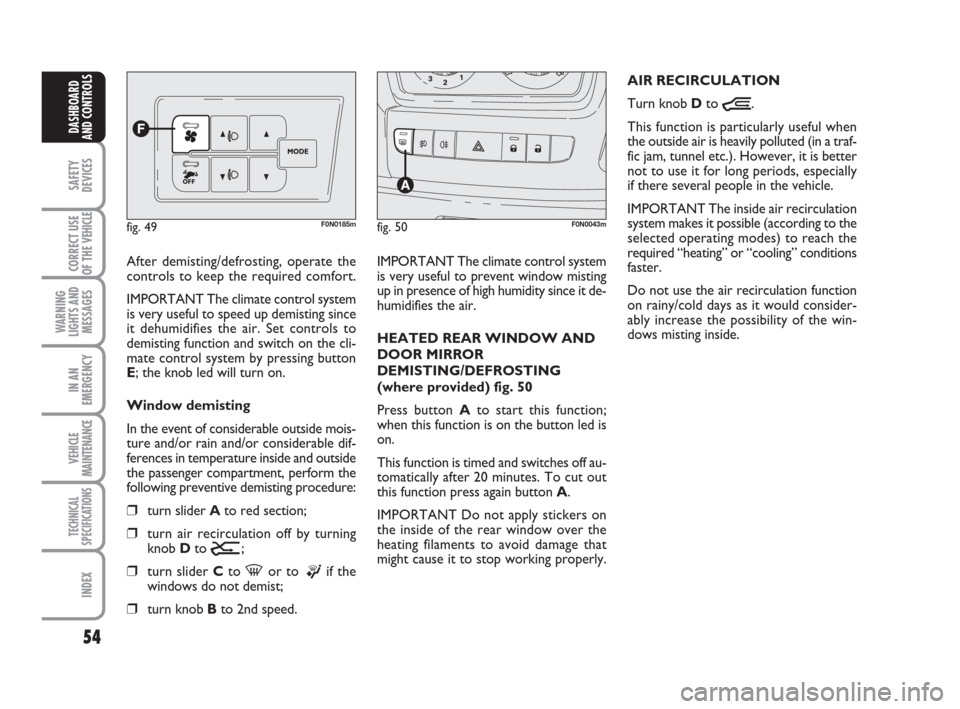
After demisting/defrosting, operate the
controls to keep the required comfort.
IMPORTANT The climate control system
is very useful to speed up demisting since
it dehumidifies the air. Set controls to
demisting function and switch on the cli-
mate control system by pressing button
E; the knob led will turn on.
Window demisting
In the event of considerable outside mois-
ture and/or rain and/or considerable dif-
ferences in temperature inside and outside
the passenger compartment, perform the
following preventive demisting procedure:
❒turn slider Ato red section;
❒turn air recirculation off by turning
knob Dto
Ú;
❒turn slider Cto -or to ®if the
windows do not demist;
❒turn knob Bto 2nd speed.
fig. 49F0N0185m
IMPORTANT The climate control system
is very useful to prevent window misting
up in presence of high humidity since it de-
humidifies the air.
HEATED REAR WINDOW AND
DOOR MIRROR
DEMISTING/DEFROSTING
(where provided) fig. 50
Press button Ato start this function;
when this function is on the button led is
on.
This function is timed and switches off au-
tomatically after 20 minutes. To cut out
this function press again button A.
IMPORTANT Do not apply stickers on
the inside of the rear window over the
heating filaments to avoid damage that
might cause it to stop working properly.AIR RECIRCULATION
Turn knob Dto
Ò.
This function is particularly useful when
the outside air is heavily polluted (in a traf-
fic jam, tunnel etc.). However, it is better
not to use it for long periods, especially
if there several people in the vehicle.
IMPORTANT The inside air recirculation
system makes it possible (according to the
selected operating modes) to reach the
required “heating” or “cooling” conditions
faster.
Do not use the air recirculation function
on rainy/cold days as it would consider-
ably increase the possibility of the win-
dows misting inside.
fig. 50F0N0043m
037-101 Ducato GB 6-11-2007 9:56 Pagina 54
Page 58 of 282
57
SAFETY
DEVICES
CORRECT USE
OF THE
VEHICLE
WARNING
LIGHTS AND
MESSAGES
IN AN
EMERGENCY
VEHICLE
MAINTENANCE
TECHNICAL
SPECIFICATIONS
INDEX
DASHBOARD
AND CONTROLS
SWITCHING THE CLIMATE
CONTROL SYSTEM ON
The system can be started in different
ways, but it is advisable to press the AU-
TO button and then to turn the knob to
set the temperatures required on the dis-
play.
This way the system will start working
completely automatically to reach the
comfort temperature as quickly as possi-
ble. The system will set air temperature,
quantity and distribution and it will con-
trol the air recirculation function and the
activation of conditioner compressor.During fully automatic operation, the on-
ly manual settings required are the fol-
lowing:
❒Òair recirculation, to keep it always
on or off;
❒Zto speed up demisting/defrosting of
windscreen, front side windows, rear
window and door mirrors;
During full automatic system operation,
you can change at any time set tempera-
ture, air distribution and fan speed by us-
ing the relevant buttons or knobs: the sys-
tem will automatically change its settings
to adjust to the new requirements. During FULL AUTO operation, changing
air distribution and/or flow and/or com-
pressor activation and/or air recirculation
will make the FULL wording disappear. In
this way functions will pass from automatic
control to manual control until pressing
again the AUTO button. With one or
more functions engaged manually, the ad-
justment of the temperature of the air ad-
mitted to the passenger compartment
continues to be controlled automatically
by the system, except with the climate
control compressor off: under this condi-
tion in fact, the temperature of the air ad-
mitted to the passenger compartment
cannot be lower than outside air temper-
ature.
037-101 Ducato GB 6-11-2007 9:56 Pagina 57
Page 64 of 282
63
SAFETY
DEVICES
CORRECT USE
OF THE
VEHICLE
WARNING
LIGHTS AND
MESSAGES
IN AN
EMERGENCY
VEHICLE
MAINTENANCE
TECHNICAL
SPECIFICATIONS
INDEX
DASHBOARD
AND CONTROLS
With the compressor off, if the outside
temperature is higher than set, the system
is not able to meet the request. This is in-
dicated by the temperature setting flash-
ing, after which the AUTO message is
turned off.
With the compressor disabled, it is pos-
sible to zero the fan speed manually (no
bars displayed).
With the compressor enabled and the en-
gine started, the fan speed may only drop
to minimum (one bar displayed).Fast window
demisting/defrosting
button (D)
Press this button: the
climate control system will automatically
switch on all the functions required for
fast windscreen and front side window
demisting/defrosting, that is:
❒switches on climate control compres-
sor when climatic conditions are suit-
able;
❒air recirculation off;
❒maximum air temperature HI on both
areas;
❒activates proper fan speed according
to engine coolant temperature to lim-
it the flow into the passenger com-
partment of air not warm enough to
demist the windows;
❒directs air flow to windscreen and
front side windows vents;
❒turns heated rear window on
IMPORTANT Fast demisting/defrosting
function stays on for about 3 minutes,
since engine coolant temperature reach-
es a temperature suitable for fast window
demisting.
When the max. demisting/defrosting func-
tion is on, the button led and the heated
rear window button led will turn on; FULL
AUTO wording on the display will turn
off.
037-101 Ducato GB 6-11-2007 9:56 Pagina 63
Page 67 of 282
66
SAFETY
DEVICES
CORRECT USE
OF THE
VEHICLE
WARNING
LIGHTS AND
MESSAGES
IN AN
EMERGENCY
VEHICLE
MAINTENANCE
TECHNICAL
SPECIFICATIONS
INDEX
DASHBOARD
AND CONTROLS
SELF-STANDING
SUPPLEMENTARY
HEATER
(where provided)
Fiat Ducato can be equipped, upon re-
quest, with two different self-standing
heaters: one is totally automatic whereas
the other is programmable.
AUTOMATIC VERSION
The supplementary heater will activate au-
tomatically with engine turned on and
proper engine coolant and outside tem-
perature conditions. Deactivation is always
automatic.
IMPORTANT During periods of low tem-
perature when the device is activated,
check that the fuel level is higher than the
reserve. Otherwise the device could lock
and require the assistance of the Fiat
Dealership.PROGRAMMABLE VERSION
The supplementary heater is totally inde-
pendent from the engine and can be used
to:
❒heat the passenger compartment
when the engine is off;
❒defrost the windows;
❒heat the engine coolant and conse-
quently the engine before starting.The system consists of:
❒diesel burner to heat coolant with ex-
haust fume muffler;
❒metering pump connected to the ve-
hicle fuel pipes to feed the burner;
❒heat exchanger connected to the en-
gine cooling system pipes;
The heater burns fuel in the
same way as the engine,
though, of course, to a lesser degree
and therefore to avoid intoxication
and suffocation, never use the sup-
plementary heater in closed areas,
garages or workshops not equipped
with specific exhaust evacuation de-
vices even for short periods of time.
WARNING
037-101 Ducato GB 6-11-2007 9:56 Pagina 66
Page 68 of 282
67
SAFETY
DEVICES
CORRECT USE
OF THE
VEHICLE
WARNING
LIGHTS AND
MESSAGES
IN AN
EMERGENCY
VEHICLE
MAINTENANCE
TECHNICAL
SPECIFICATIONS
INDEX
DASHBOARD
AND CONTROLS
In cold weather, the supplementary heater
warms and circulates constant tempera-
ture fluid in the engine cooling system for
the time required to ensure optimal en-
gine ignition and passenger compartment
temperature conditions.
The heater can be started automatically
(programmed by means of the digital
timer) or manually by pressing the “heat
now” button on the timer.
When the heater is turned on (automat-
ically or manually), the electronic control
unit operates the fluid circulation pump
and safely ignites the burner according to
preset and controlled modes.
❒control unit connected to the
heater/ventilation unit for automatic
operation;
❒electronic control unit to check and
adjusted the integrated heater burner;
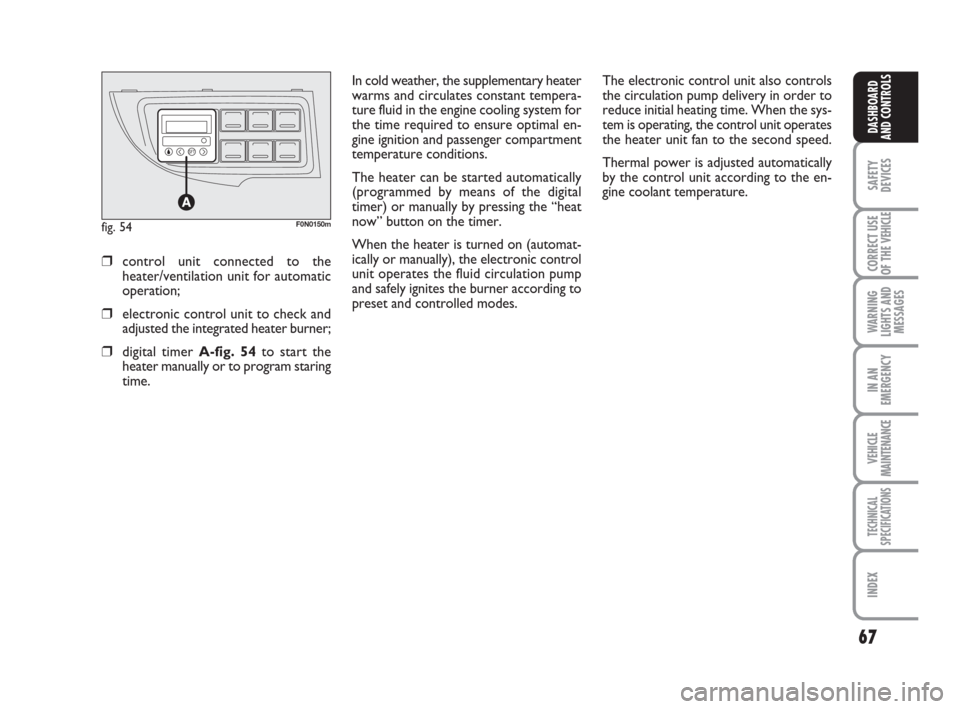
❒digital timer A-fig. 54to start the
heater manually or to program staring
time.The electronic control unit also controls
the circulation pump delivery in order to
reduce initial heating time. When the sys-
tem is operating, the control unit operates
the heater unit fan to the second speed.
Thermal power is adjusted automatically
by the control unit according to the en-
gine coolant temperature.
fig. 54F0N0150m
037-101 Ducato GB 6-11-2007 9:56 Pagina 67
Page 69 of 282
68
SAFETY
DEVICES
CORRECT USE
OF THE
VEHICLE
WARNING
LIGHTS AND
MESSAGES
IN AN
EMERGENCY
VEHICLE
MAINTENANCE
TECHNICAL
SPECIFICATIONS
INDEX
DASHBOARD
AND CONTROLS
IMPORTANT The heater is equipped with
a thermal switch which cuts off the heater
in the event of overheating caused by low
or leaking coolant. In this case, press the
program selection button to start the
heater again after repairing the cooling sys-
tem fault and/or topping up the fluid.
The heater can turn itself off after engine
ignition or if the flame goes out. In this
case, turn the heater off manually and at-
tempt to turn it back on again. If you can-
not turn the heater on, contact a Fiat
Dealership.Turning the heater on
If an automatic climate control system is
fitted, the control unit sets air tempera-
ture and distribution when the parking
heater is turned on.
When a manual heater/climate control
system is fitted, to achieve peak heater
performance, check that the passenger
compartment heater/ventilation unit air
temperature knob is in “warm air” posi-
tion.
For preferential passenger compartment
preheating, turn the air distribution knob
to position
©.
For preferential windscreen demisting, set
the air distribution knob to position
-.
To obtain both functions, set the air dis-
tribution knob to position
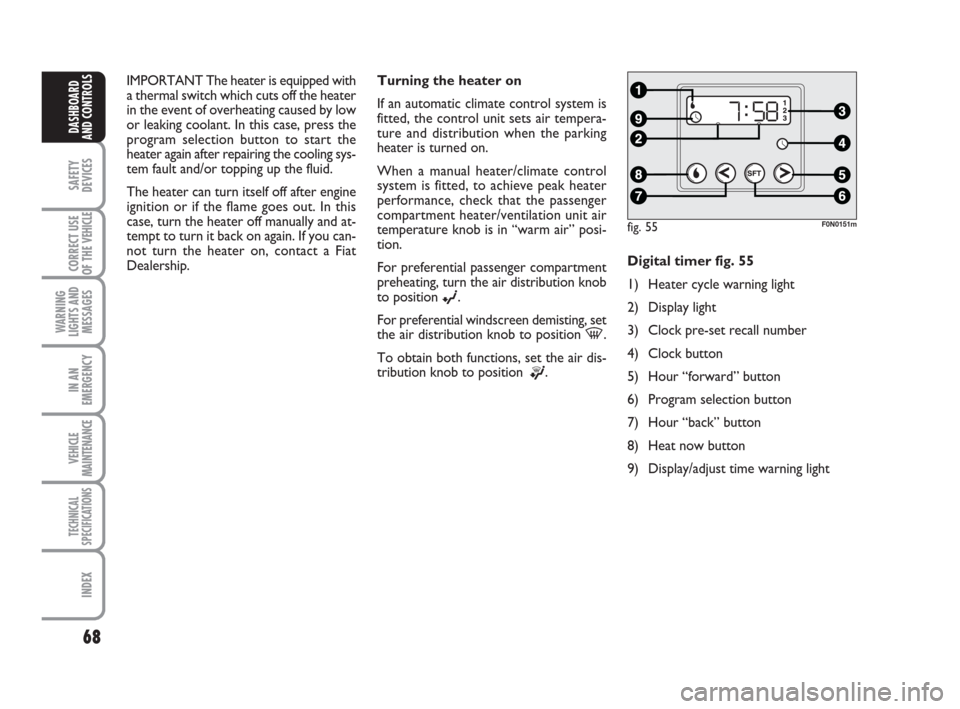
®.Digital timer fig. 55
1) Heater cycle warning light
2) Display light
3) Clock pre-set recall number
4) Clock button
5) Hour “forward” button
6) Program selection button
7) Hour “back” button
8) Heat now button
9) Display/adjust time warning light
fig. 55F0N0151m
037-101 Ducato GB 6-11-2007 9:56 Pagina 68
Page 70 of 282
69
SAFETY
DEVICES
CORRECT USE
OF THE
VEHICLE
WARNING
LIGHTS AND
MESSAGES
IN AN
EMERGENCY
VEHICLE
MAINTENANCE
TECHNICAL
SPECIFICATIONS
INDEX
DASHBOARD
AND CONTROLS
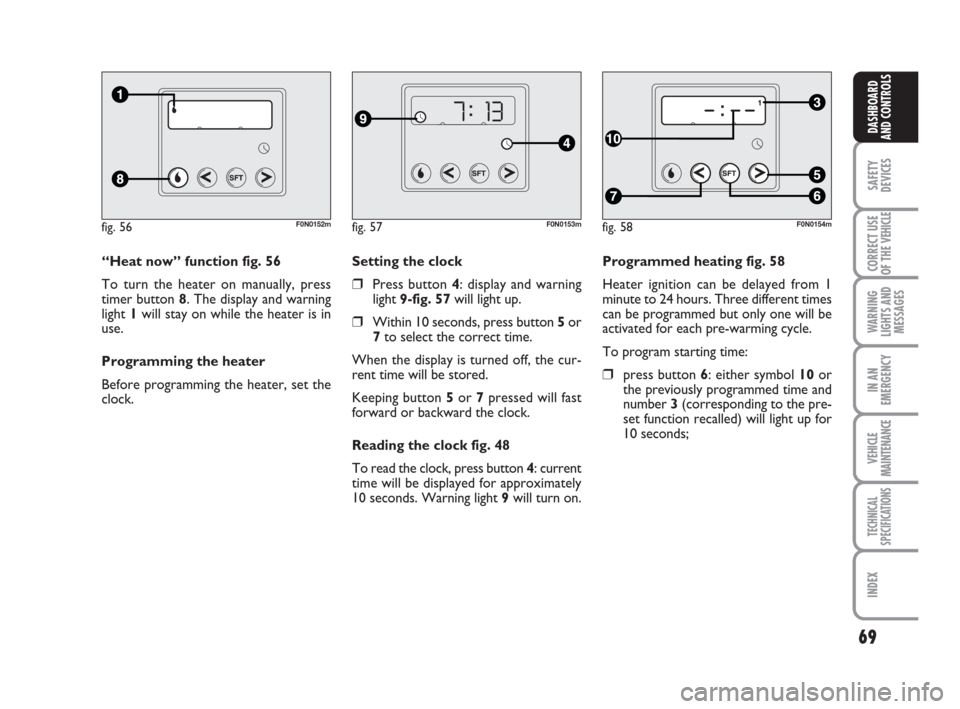
Programmed heating fig. 58
Heater ignition can be delayed from 1
minute to 24 hours. Three different times
can be programmed but only one will be
activated for each pre-warming cycle.
To program starting time:
❒press button 6: either symbol 10 or
the previously programmed time and
number 3 (corresponding to the pre-
set function recalled) will light up for
10 seconds; Setting the clock
❒Press button 4: display and warning
light 9-fig. 57will light up.
❒Within 10 seconds, press button 5or
7to select the correct time.
When the display is turned off, the cur-
rent time will be stored.
Keeping button 5or 7pressed will fast
forward or backward the clock.
Reading the clock fig. 48
To read the clock, press button 4: current
time will be displayed for approximately
10 seconds. Warning light 9will turn on. “Heat now” function fig. 56
To turn the heater on manually, press
timer button 8. The display and warning
light 1will stay on while the heater is in
use.
Programming the heater
Before programming the heater, set the
clock.
fig. 56F0N0152mfig. 57F0N0153mfig. 58F0N0154m
037-101 Ducato GB 6-11-2007 9:56 Pagina 69