head light FIAT DUCATO 2007 3.G User Guide
[x] Cancel search | Manufacturer: FIAT, Model Year: 2007, Model line: DUCATO, Model: FIAT DUCATO 2007 3.GPages: 282, PDF Size: 4.71 MB
Page 45 of 282
44
SAFETY
DEVICES
CORRECT USE
OF THE
VEHICLE
WARNING
LIGHTS AND
MESSAGES
IN AN
EMERGENCY
VEHICLE
MAINTENANCE
TECHNICAL
SPECIFICATIONS
INDEX
DASHBOARD
AND CONTROLS
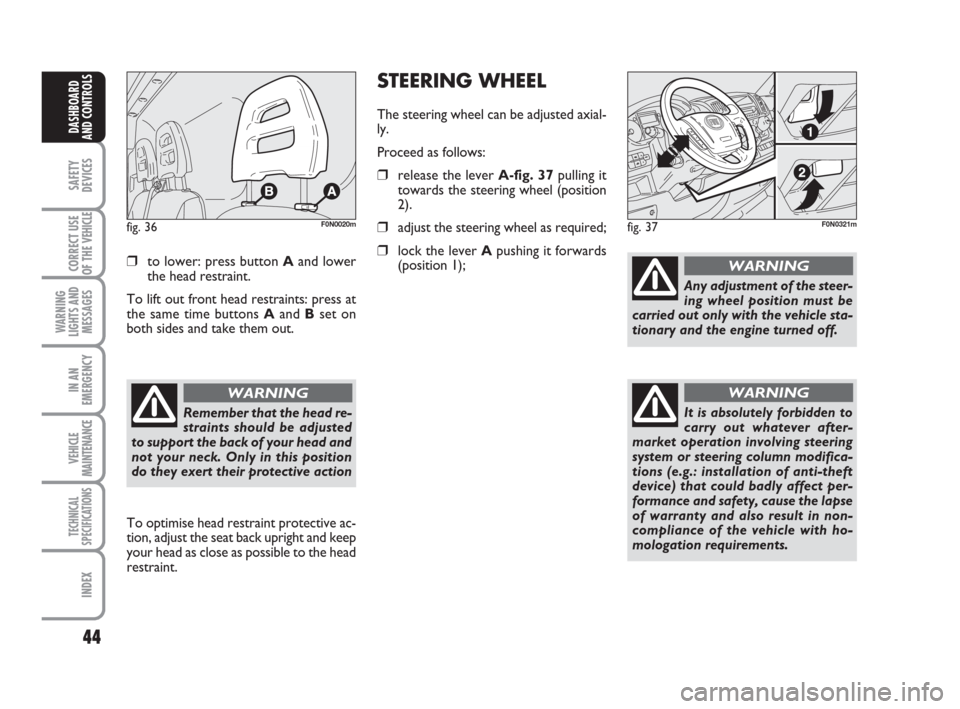
❒to lower: press button Aand lower
the head restraint.
To lift out front head restraints: press at
the same time buttons Aand Bset on
both sides and take them out.
fig. 36F0N0020m
To optimise head restraint protective ac-
tion, adjust the seat back upright and keep
your head as close as possible to the head
restraint.
Remember that the head re-
straints should be adjusted
to support the back of your head and
not your neck. Only in this position
do they exert their protective action
WARNING
STEERING WHEEL
The steering wheel can be adjusted axial-
ly.
Proceed as follows:
❒release the lever A-fig. 37pulling it
towards the steering wheel (position
2).
❒adjust the steering wheel as required;
❒lock the lever Apushing it forwards
(position 1);
fig. 37F0N0321m
Any adjustment of the steer-
ing wheel position must be
carried out only with the vehicle sta-
tionary and the engine turned off.
WARNING
It is absolutely forbidden to
carry out whatever after-
market operation involving steering
system or steering column modifica-
tions (e.g.: installation of anti-theft
device) that could badly affect per-
formance and safety, cause the lapse
of warranty and also result in non-
compliance of the vehicle with ho-
mologation requirements.
WARNING
037-101 Ducato GB 6-11-2007 9:56 Pagina 44
Page 73 of 282
72
SAFETY
DEVICES
CORRECT USE
OF THE
VEHICLE
WARNING
LIGHTS AND
MESSAGES
IN AN
EMERGENCY
VEHICLE
MAINTENANCE
TECHNICAL
SPECIFICATIONS
INDEX
DASHBOARD
AND CONTROLS
fig. 60F0N0233mfig. 61F0N0185m
SUPPLEMENTARY REAR
HEATER
(where provided for Panorama and
Combi versions)
Panorama and Combi versions are pro-
vided with main plus (optional) supple-
mentary heater with control located on
the headlining above the second seat row
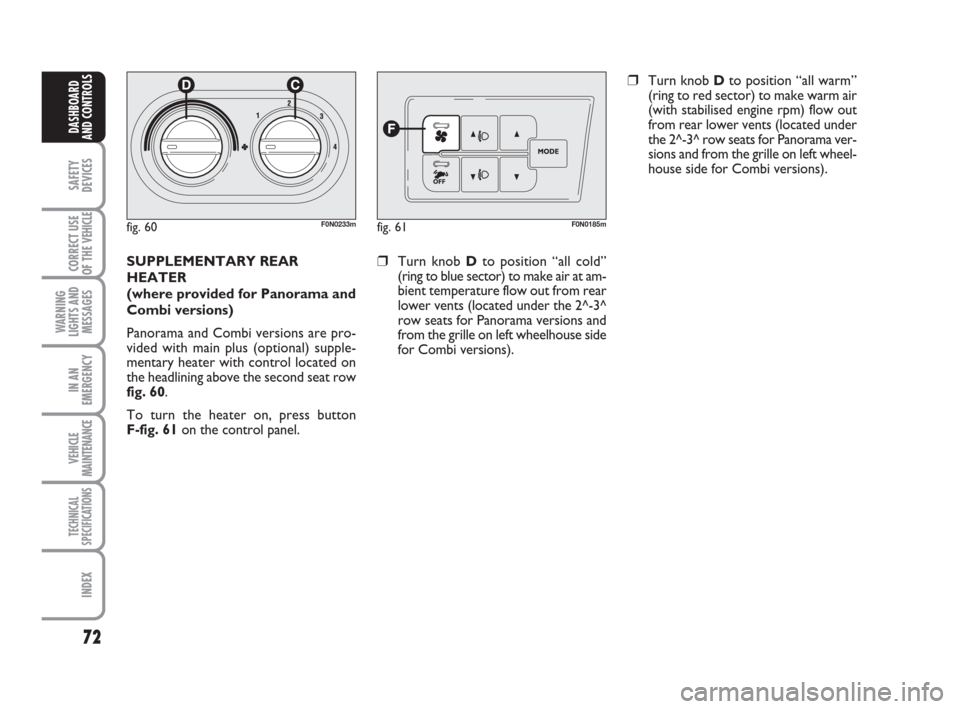
fig. 60.
To turn the heater on, press button
F-fig. 61on the control panel.❒Turn knob Dto position “all cold”
(ring to blue sector) to make air at am-
bient temperature flow out from rear
lower vents (located under the 2^-3^
row seats for Panorama versions and
from the grille on left wheelhouse side
for Combi versions).
❒Turn knob Dto position “all warm”
(ring to red sector) to make warm air
(with stabilised engine rpm) flow out
from rear lower vents (located under
the 2^-3^ row seats for Panorama ver-
sions and from the grille on left wheel-
house side for Combi versions).
037-101 Ducato GB 6-11-2007 9:56 Pagina 72
Page 74 of 282
73
SAFETY
DEVICES
CORRECT USE
OF THE
VEHICLE
WARNING
LIGHTS AND
MESSAGES
IN AN
EMERGENCY
VEHICLE
MAINTENANCE
TECHNICAL
SPECIFICATIONS
INDEX
DASHBOARD
AND CONTROLS
SUPPLEMENTARY REAR AIR
CONDITIONER
(where provided for Panorama and
Combi versions)
Panorama and Combi versions are pro-
vided with main plus (optional) supple-
mentary heater/air conditioner with con-
trol located on the headlining above the
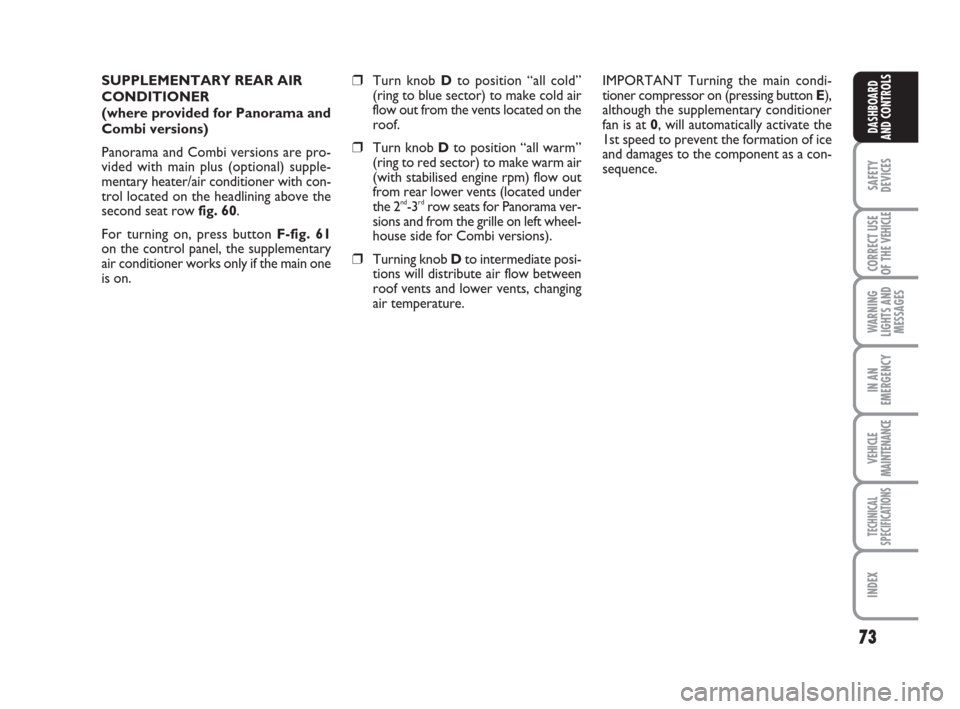
second seat row fig. 60.
For turning on, press button F-fig. 61
on the control panel, the supplementary
air conditioner works only if the main one
is on.❒Turn knob Dto position “all cold”
(ring to blue sector) to make cold air
flow out from the vents located on the
roof.
❒Turn knob Dto position “all warm”
(ring to red sector) to make warm air
(with stabilised engine rpm) flow out
from rear lower vents (located under
the 2
nd-3rdrow seats for Panorama ver-
sions and from the grille on left wheel-
house side for Combi versions).
❒Turning knob Dto intermediate posi-
tions will distribute air flow between
roof vents and lower vents, changing
air temperature.IMPORTANT Turning the main condi-
tioner compressor on (pressing button E),
although the supplementary conditioner
fan is at 0, will automatically activate the
1st speed to prevent the formation of ice
and damages to the component as a con-
sequence.
037-101 Ducato GB 6-11-2007 9:56 Pagina 73
Page 75 of 282
74
SAFETY
DEVICES
CORRECT USE
OF THE
VEHICLE
WARNING
LIGHTS AND
MESSAGES
IN AN
EMERGENCY
VEHICLE
MAINTENANCE
TECHNICAL
SPECIFICATIONS
INDEX
DASHBOARD
AND CONTROLS
EXTERNAL LIGHTS
The left-hand stalk operates most of the
external lights.
The external lights can only be switched
on when the ignition key is at ON.
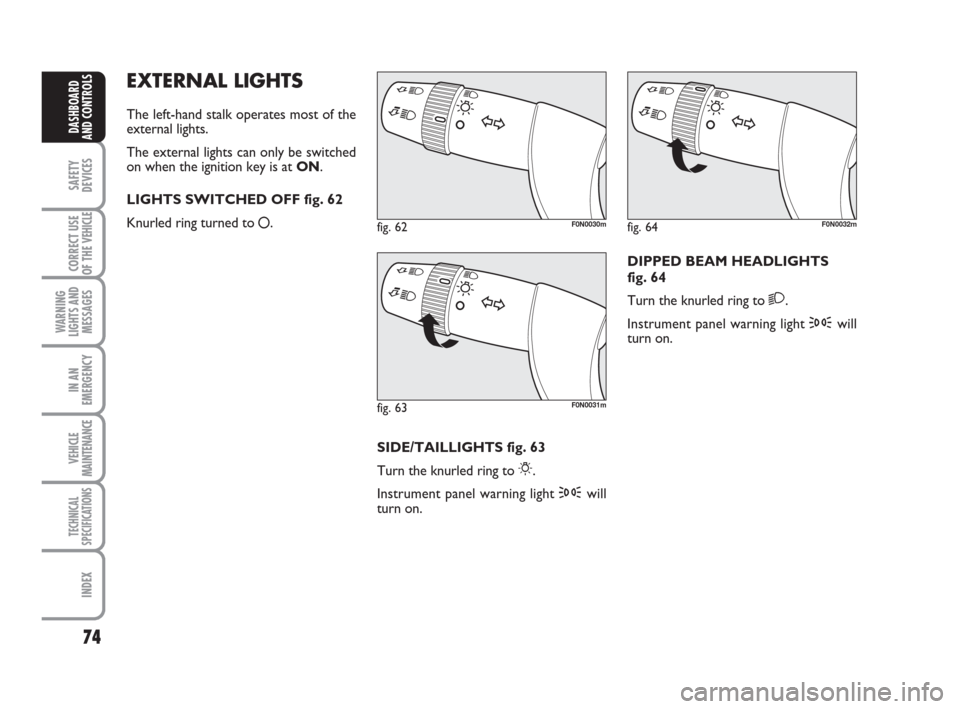
LIGHTS SWITCHED OFF fig. 62
Knurled ring turned to
å.
fig. 62F0N0030m
fig. 63F0N0031m
fig. 64F0N0032m
SIDE/TAILLIGHTS fig. 63
Turn the knurled ring to
6.
Instrument panel warning light 3will
turn on.DIPPED BEAM HEADLIGHTS
fig. 64
Turn the knurled ring to
2.
Instrument panel warning light 3will
turn on.
037-101 Ducato GB 6-11-2007 9:56 Pagina 74
Page 76 of 282
75
SAFETY
DEVICES
CORRECT USE
OF THE
VEHICLE
WARNING
LIGHTS AND
MESSAGES
IN AN
EMERGENCY
VEHICLE
MAINTENANCE
TECHNICAL
SPECIFICATIONS
INDEX
DASHBOARD
AND CONTROLS
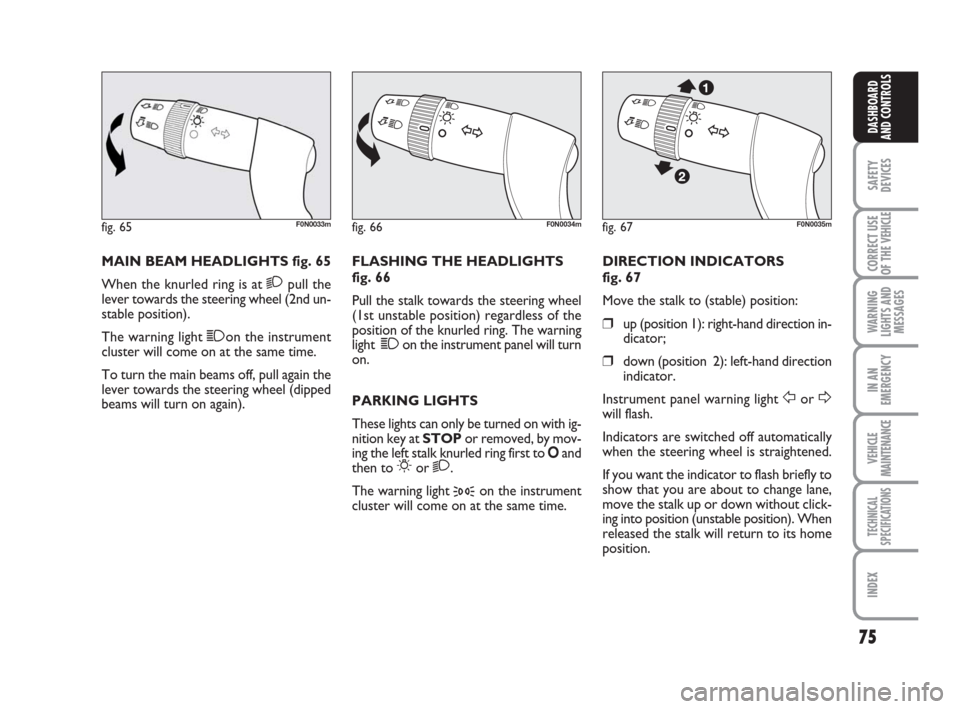
MAIN BEAM HEADLIGHTS fig. 65
When the knurled ring is at
2pull the
lever towards the steering wheel (2nd un-
stable position).
The warning light 1on the instrument
cluster will come on at the same time.
To turn the main beams off, pull again the
lever towards the steering wheel (dipped
beams will turn on again).FLASHING THE HEADLIGHTS
fig. 66
Pull the stalk towards the steering wheel
(1st unstable position) regardless of the
position of the knurled ring. The warning
light 1on the instrument panel will turn
on.
PARKING LIGHTS
These lights can only be turned on with ig-
nition key at STOP or removed, by mov-
ing the left stalk knurled ring first to Oand
then to
6or 2.
The warning light
3on the instrument
cluster will come on at the same time.DIRECTION INDICATORS
fig. 67
Move the stalk to (stable) position:
❒up (position 1): right-hand direction in-
dicator;
❒down (position 2): left-hand direction
indicator.
Instrument panel warning light
ForDwill flash.
Indicators are switched off automatically
when the steering wheel is straightened.
If you want the indicator to flash briefly to
show that you are about to change lane,
move the stalk up or down without click-
ing into position (unstable position). When
released the stalk will return to its home
position.
fig. 65F0N0033mfig. 66F0N0034mfig. 67F0N0035m
037-101 Ducato GB 6-11-2007 9:56 Pagina 75
Page 77 of 282
76
SAFETY
DEVICES
CORRECT USE
OF THE
VEHICLE
WARNING
LIGHTS AND
MESSAGES
IN AN
EMERGENCY
VEHICLE
MAINTENANCE
TECHNICAL
SPECIFICATIONS
INDEX
DASHBOARD
AND CONTROLS
“FOLLOW ME HOME”
DEVICE
This function allows the illumination of the
space in front of the vehicle for a preset
period of time.
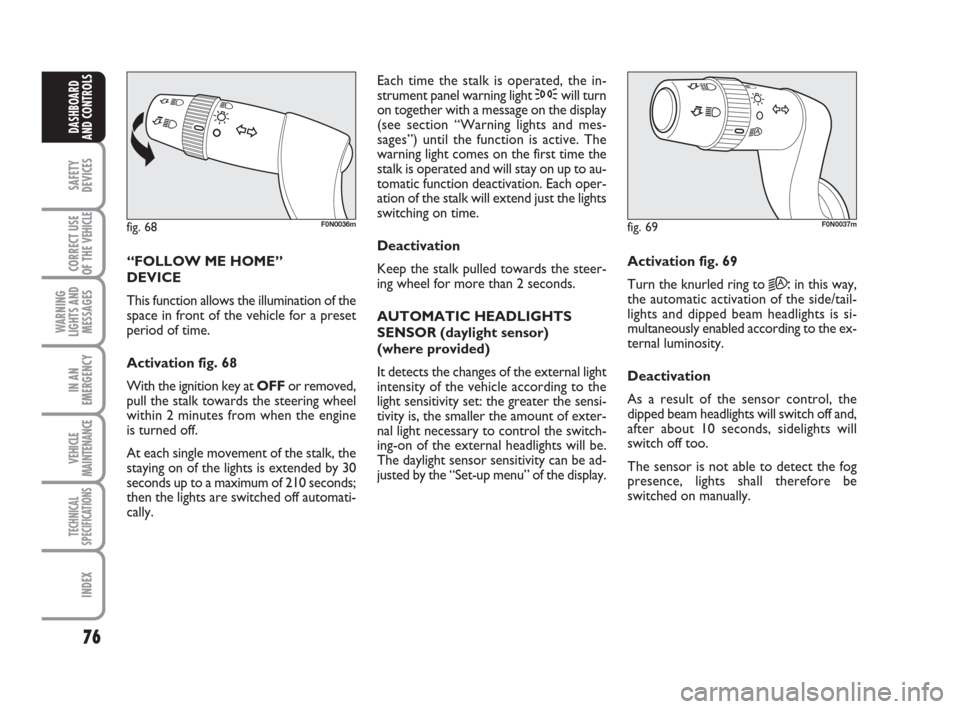
Activation fig. 68
With the ignition key at OFFor removed,
pull the stalk towards the steering wheel
within 2 minutes from when the engine
is turned off.
At each single movement of the stalk, the
staying on of the lights is extended by 30
seconds up to a maximum of 210 seconds;
then the lights are switched off automati-
cally. Each time the stalk is operated, the in-
strument panel warning light 3will turn
on together with a message on the display
(see section “Warning lights and mes-
sages”) until the function is active. The
warning light comes on the first time the
stalk is operated and will stay on up to au-
tomatic function deactivation. Each oper-
ation of the stalk will extend just the lights
switching on time.
Deactivation
Keep the stalk pulled towards the steer-
ing wheel for more than 2 seconds.
AUTOMATIC HEADLIGHTS
SENSOR (daylight sensor)
(where provided)
It detects the changes of the external light
intensity of the vehicle according to the
light sensitivity set: the greater the sensi-
tivity is, the smaller the amount of exter-
nal light necessary to control the switch-
ing-on of the external headlights will be.
The daylight sensor sensitivity can be ad-
justed by the “Set-up menu” of the display.Activation fig. 69
Turn the knurled ring to
2A:in this way,
the automatic activation of the side/tail-
lights and dipped beam headlights is si-
multaneously enabled according to the ex-
ternal luminosity.
Deactivation
As a result of the sensor control, the
dipped beam headlights will switch off and,
after about 10 seconds, sidelights will
switch off too.
The sensor is not able to detect the fog
presence, lights shall therefore be
switched on manually.
fig. 68F0N0036mfig. 69F0N0037m
037-101 Ducato GB 6-11-2007 9:56 Pagina 76
Page 79 of 282
78
SAFETY
DEVICES
CORRECT USE
OF THE
VEHICLE
WARNING
LIGHTS AND
MESSAGES
IN AN
EMERGENCY
VEHICLE
MAINTENANCE
TECHNICAL
SPECIFICATIONS
INDEX
DASHBOARD
AND CONTROLS
RAIN SENSOR
(where provided)
The rain sensor is located behind the dri-
ving mirror in contact with the windscreen
and has the purpose of automatically ad-
just, during the intermittent operation, the
frequency of the windscreen wiper
strokes as to the rain intensity.
IMPORTANT Keep clean the glass in the
sensor area.
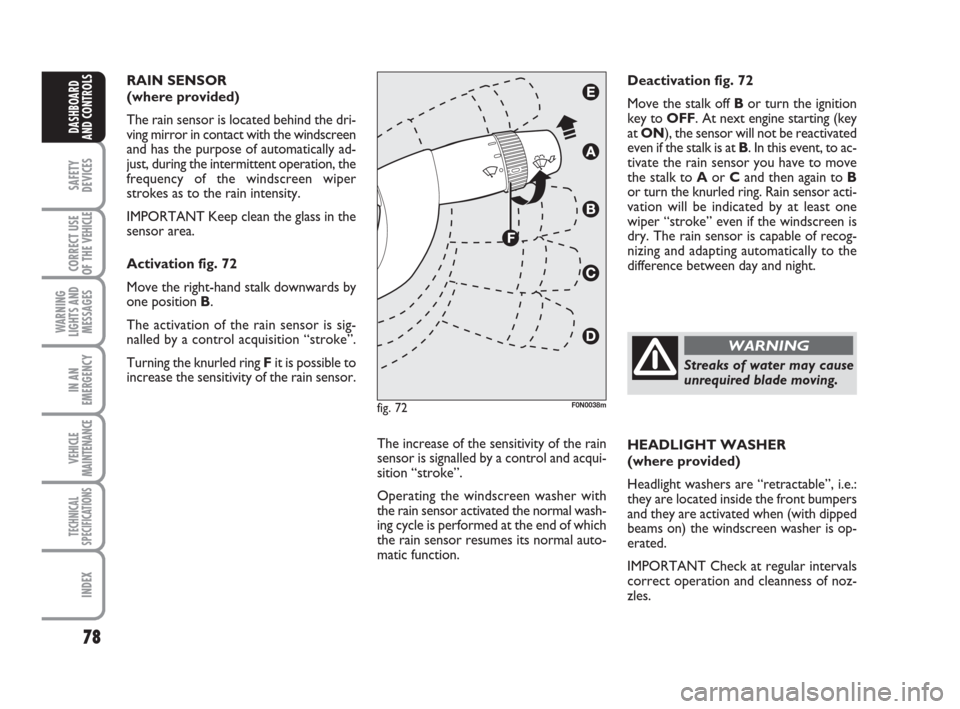
Activation fig. 72
Move the right-hand stalk downwards by
one position B.
The activation of the rain sensor is sig-
nalled by a control acquisition “stroke”.
Turning the knurled ring Fit is possible to
increase the sensitivity of the rain sensor.
The increase of the sensitivity of the rain
sensor is signalled by a control and acqui-
sition “stroke”.
Operating the windscreen washer with
the rain sensor activated the normal wash-
ing cycle is performed at the end of which
the rain sensor resumes its normal auto-
matic function.HEADLIGHT WASHER
(where provided)
Headlight washers are “retractable”, i.e.:
they are located inside the front bumpers
and they are activated when (with dipped
beams on) the windscreen washer is op-
erated.
IMPORTANT Check at regular intervals
correct operation and cleanness of noz-
zles. Deactivation fig. 72
Move the stalk off Bor turn the ignition
key to OFF. At next engine starting (key
at ON), the sensor will not be reactivated
even if the stalk is at B. In this event, to ac-
tivate the rain sensor you have to move
the stalk to Aor Cand then again to B
or turn the knurled ring. Rain sensor acti-
vation will be indicated by at least one
wiper “stroke” even if the windscreen is
dry. The rain sensor is capable of recog-
nizing and adapting automatically to the
difference between day and night.
fig. 72F0N0038m
Streaks of water may cause
unrequired blade moving.
WARNING
037-101 Ducato GB 6-11-2007 9:56 Pagina 78
Page 84 of 282
83
SAFETY
DEVICES
CORRECT USE
OF THE
VEHICLE
WARNING
LIGHTS AND
MESSAGES
IN AN
EMERGENCY
VEHICLE
MAINTENANCE
TECHNICAL
SPECIFICATIONS
INDEX
DASHBOARD
AND CONTROLS
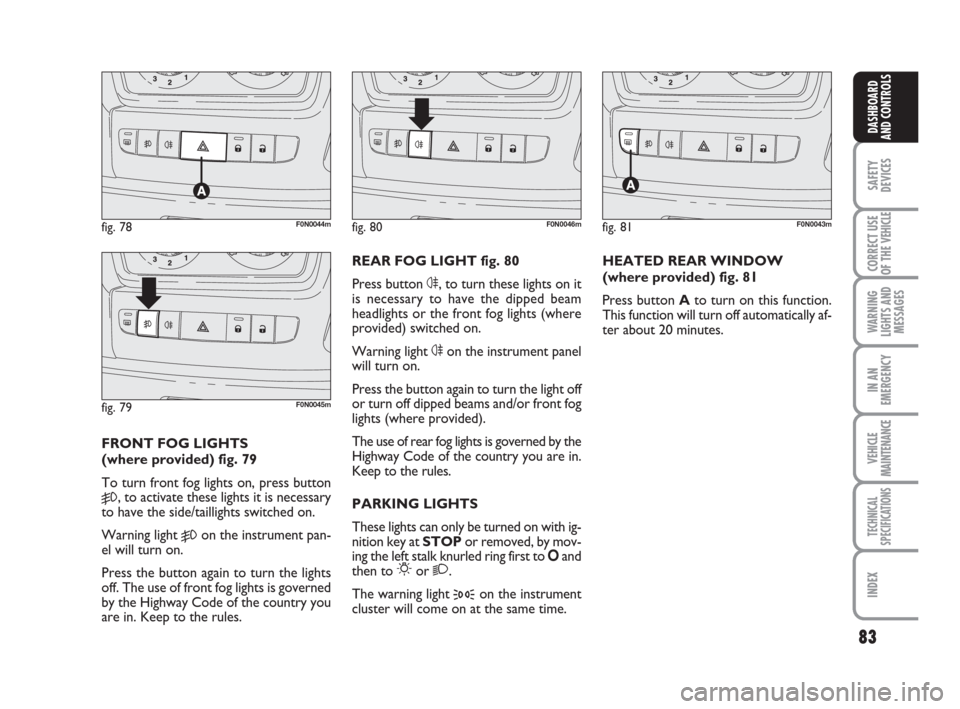
FRONT FOG LIGHTS
(where provided) fig. 79
To turn front fog lights on, press button
5, to activate these lights it is necessary
to have the side/taillights switched on.
Warning light
5on the instrument pan-
el will turn on.
Press the button again to turn the lights
off. The use of front fog lights is governed
by the Highway Code of the country you
are in. Keep to the rules.REAR FOG LIGHT fig. 80
Press button 4, to turn these lights on it
is necessary to have the dipped beam
headlights or the front fog lights (where
provided) switched on.
Warning light 4on the instrument panel
will turn on.
Press the button again to turn the light off
or turn off dipped beams and/or front fog
lights (where provided).
The use of rear fog lights is governed by the
Highway Code of the country you are in.
Keep to the rules.
PARKING LIGHTS
These lights can only be turned on with ig-
nition key at STOP or removed, by mov-
ing the left stalk knurled ring first to Oand
then to
6or 2.
The warning light
3on the instrument
cluster will come on at the same time.HEATED REAR WINDOW
(where provided) fig. 81
Press button Ato turn on this function.
This function will turn off automatically af-
ter about 20 minutes.
fig. 78F0N0044m
fig. 79F0N0045m
fig. 80F0N0046mfig. 81F0N0043m
037-101 Ducato GB 6-11-2007 9:56 Pagina 83
Page 85 of 282
84
SAFETY
DEVICES
CORRECT USE
OF THE
VEHICLE
WARNING
LIGHTS AND
MESSAGES
IN AN
EMERGENCY
VEHICLE
MAINTENANCE
TECHNICAL
SPECIFICATIONS
INDEX
DASHBOARD
AND CONTROLS
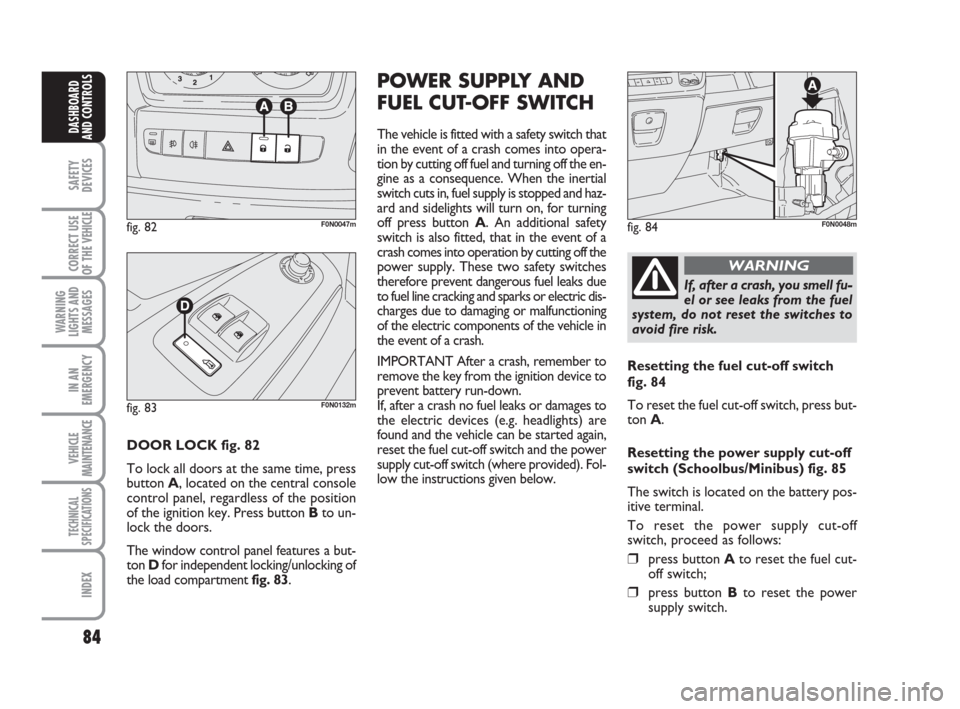
DOOR LOCK fig. 82
To lock all doors at the same time, press
button A, located on the central console
control panel, regardless of the position
of the ignition key. Press button Bto un-
lock the doors.
The window control panel features a but-
ton Dfor independent locking/unlocking of
the load compartment fig. 83.
POWER SUPPLY AND
FUEL CUT-OFF SWITCH
The vehicle is fitted with a safety switch that
in the event of a crash comes into opera-
tion by cutting off fuel and turning off the en-
gine as a consequence. When the inertial
switch cuts in, fuel supply is stopped and haz-
ard and sidelights will turn on, for turning
off press button A. An additional safety
switch is also fitted, that in the event of a
crash comes into operation by cutting off the
power supply. These two safety switches
therefore prevent dangerous fuel leaks due
to fuel line cracking and sparks or electric dis-
charges due to damaging or malfunctioning
of the electric components of the vehicle in
the event of a crash.
IMPORTANT After a crash, remember to
remove the key from the ignition device to
prevent battery run-down.
If, after a crash no fuel leaks or damages to
the electric devices (e.g. headlights) are
found and the vehicle can be started again,
reset the fuel cut-off switch and the power
supply cut-off switch (where provided). Fol-
low the instructions given below.
fig. 82F0N0047mfig. 84F0N0048m
If, after a crash, you smell fu-
el or see leaks from the fuel
system, do not reset the switches to
avoid fire risk.
WARNING
Resetting the fuel cut-off switch
fig. 84
To reset the fuel cut-off switch, press but-
ton A.
Resetting the power supply cut-off
switch (Schoolbus/Minibus) fig. 85
The switch is located on the battery pos-
itive terminal.
To reset the power supply cut-off
switch, proceed as follows:
❒press button Ato reset the fuel cut-
off switch;
❒press button Bto reset the power
supply switch.
fig. 83F0N0132m
037-101 Ducato GB 6-11-2007 9:56 Pagina 84
Page 86 of 282
85
SAFETY
DEVICES
CORRECT USE
OF THE
VEHICLE
WARNING
LIGHTS AND
MESSAGES
IN AN
EMERGENCY
VEHICLE
MAINTENANCE
TECHNICAL
SPECIFICATIONS
INDEX
DASHBOARD
AND CONTROLS
fig. 85F0N0127m
fig. 87F0N0050m
fig. 86F0N0049m
fig. 88F0N0051m
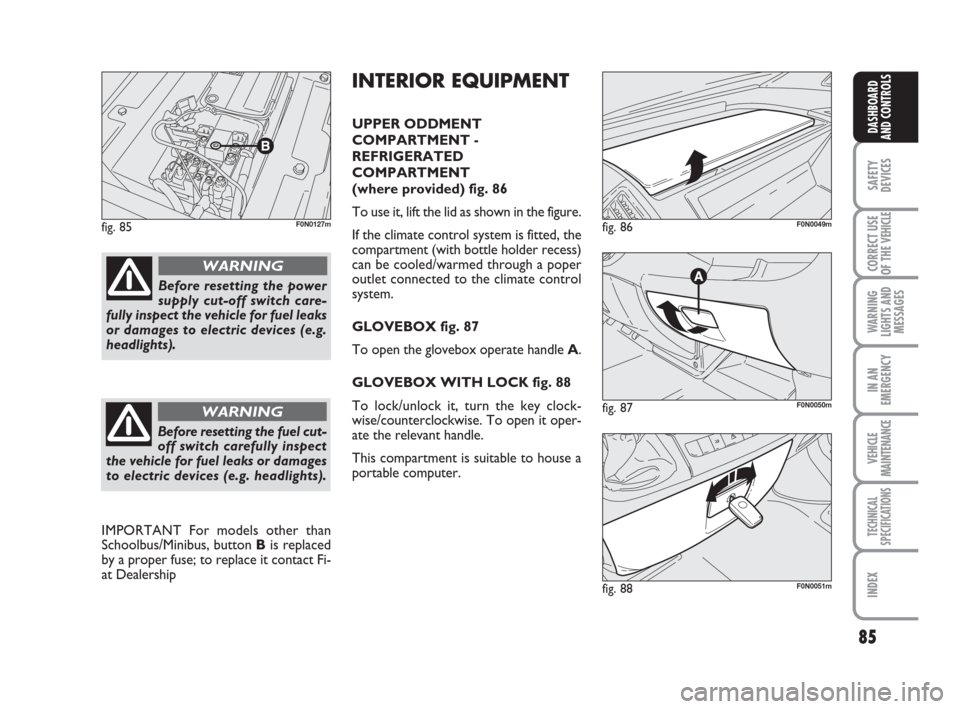
INTERIOR EQUIPMENT
UPPER ODDMENT
COMPARTMENT -
REFRIGERATED
COMPARTMENT
(where provided) fig. 86
To use it, lift the lid as shown in the figure.
If the climate control system is fitted, the
compartment (with bottle holder recess)
can be cooled/warmed through a poper
outlet connected to the climate control
system.
GLOVEBOX fig. 87
To open the glovebox operate handle A.
GLOVEBOX WITH LOCK fig. 88
To lock/unlock it, turn the key clock-
wise/counterclockwise. To open it oper-
ate the relevant handle.
This compartment is suitable to house a
portable computer.
Before resetting the power
supply cut-off switch care-
fully inspect the vehicle for fuel leaks
or damages to electric devices (e.g.
headlights).
WARNING
Before resetting the fuel cut-
off switch carefully inspect
the vehicle for fuel leaks or damages
to electric devices (e.g. headlights).
WARNING
IMPORTANT For models other than
Schoolbus/Minibus, button Bis replaced
by a proper fuse; to replace it contact Fi-
at Dealership
037-101 Ducato GB 6-11-2007 9:56 Pagina 85