lock FIAT DUCATO 2009 3.G User Guide
[x] Cancel search | Manufacturer: FIAT, Model Year: 2009, Model line: DUCATO, Model: FIAT DUCATO 2009 3.GPages: 282, PDF Size: 4.55 MB
Page 23 of 282
22
SAFETY
DEVICES
CORRECT USE
OF THE
VEHICLE
WARNING
LIGHTS AND
MESSAGES
IN AN
EMERGENCY
VEHICLE
MAINTENANCE
TECHNICAL
SPECIFICATIONS
INDEX
DASHBOARD
AND CONTROLS
SETUP MENU fig. 18
The menu comprises a series of functions
arranged in a “circular fashion” which can
be selected through buttons ▲and ▼to
access the different select operations and
settings (setup) given in the following para-
graphs.
The setup menu can be activated by press-
ing briefly button MODE.
Single presses on buttons ▲and ▼will
scroll the setup menu options.
Handling modes differ with each other ac-
cording to the characteristic of the option
selected.Selecting a menu option
– press briefly button MODEto select
the menu option to set;
– press buttons ▲and ▼(by single press-
es) to select the new setting;
– press briefly button MODEto store the
new setting and to go back to the previ-
ously selected menu option.
Selecting “Set Clock”
– briefly press button MODEto select
the first value to change (hours);
– press buttons ▲and ▼(by single press-
es) to select the new setting;
– briefly press button MODEto store the
new setting and to go to the next setup
menu option (minutes);
– after setting the values with the same
procedure, you’ll go back to the menu op-
tion previously selected.Press the button MODE for long
– to quit the set up menu if you are in the
menu;
– to quit the displayed menu if you are set-
ting an option;
– to save only the settings stored yet (and
confirmed by pressing button MODE).
The setup menu displaying is timed; when
quitting the menu due to timing expiry, on-
ly settings stored yet by the user (and con-
firmed by pressing briefly button MODE)
will be saved.
Page 25 of 282
24
SAFETY
DEVICES
CORRECT USE
OF THE
VEHICLE
WARNING
LIGHTS AND
MESSAGES
IN AN
EMERGENCY
VEHICLE
MAINTENANCE
TECHNICAL
SPECIFICATIONS
INDEX
DASHBOARD
AND CONTROLS
Setting the speed limit (SPEEd)
With this function it is possible to set the
vehicle speed limit (km/h or mph), when
this limit is exceeded the driver is imme-
diately alerted (see section “Warning lights
and messages”).
To set the speed limit, proceed as follows:
– briefly press button MODE, the display
will show the wording (SPEEd) and the
unit (km/h) or (mph) previously set;
– press button▲or ▼to select speed
limit activation (On) or deactivation
(OFF);
– if the function has been activated (On),
press buttons ▲or ▼to select the re-
quired speed limit and then press MODE
to confirm;
NoteThe possible setting is between 30
and 200 km/h, or between 20 and 125
mph depending on the unit set previous-
ly (see paragraph “Setting the distance unit
(Unit)”) described later. Every press on
button ▲/▼increases/decreases by 5
units. Keeping the button ▲/▼pressed
obtains the automatic fast increase or de-
crease. When you are near the required
setting complete adjustment by single
presses.
– briefly press button MODEto go back
to the menu screen or press the button
for long to go back to the standard screen
without storing settings.Setting the clock (Hour)
With this function it is possible to set the
clock.
To set the required unit proceed as fol-
lows:
– briefly press button MODE, “hours”
will flash on the display;
– press button ▲or ▼for setting;
– briefly press button MODE, “minutes”
will flash on the display;
– press button ▲or ▼for setting;
– briefly press button MODEto go back
to the menu screen or press the button
for long to go back to the standard screen
without storing settings.
Adjusting the buzzer volume
(bUZZ)
This function enables to adjust the volume
of the buzzer accompanying any fail-
ure/warning indication.
To adjust the volume proceed as follows:
– briefly press button MODE, the display
will show the wording (bUZZ);
– press button ▲or ▼to select the re-
quired volume (volume can be adjusted ac-
cording to 8 levels).
– briefly press button MODEto go back
to the menu screen or press the button
for long to go back to the standard screen
without storing settings.Setting the distance unit (Unit)
With this function it is possible to set the
unit.
To set the required unit proceed as fol-
lows:
– briefly press button MODE, the display
will show the wording (Unit) and the pre-
viously set unit (km) or (mi);
– press button ▲or ▼to select the re-
quired distance unit.
– briefly press button MODE
to go back
to the menu screen or press the button
for long to go back to the standard screen
without storing settings.
Page 27 of 282
26
SAFETY
DEVICES
CORRECT USE
OF THE
VEHICLE
WARNING
LIGHTS AND
MESSAGES
IN AN
EMERGENCY
VEHICLE
MAINTENANCE
TECHNICAL
SPECIFICATIONS
INDEX
DASHBOARD
AND CONTROLS
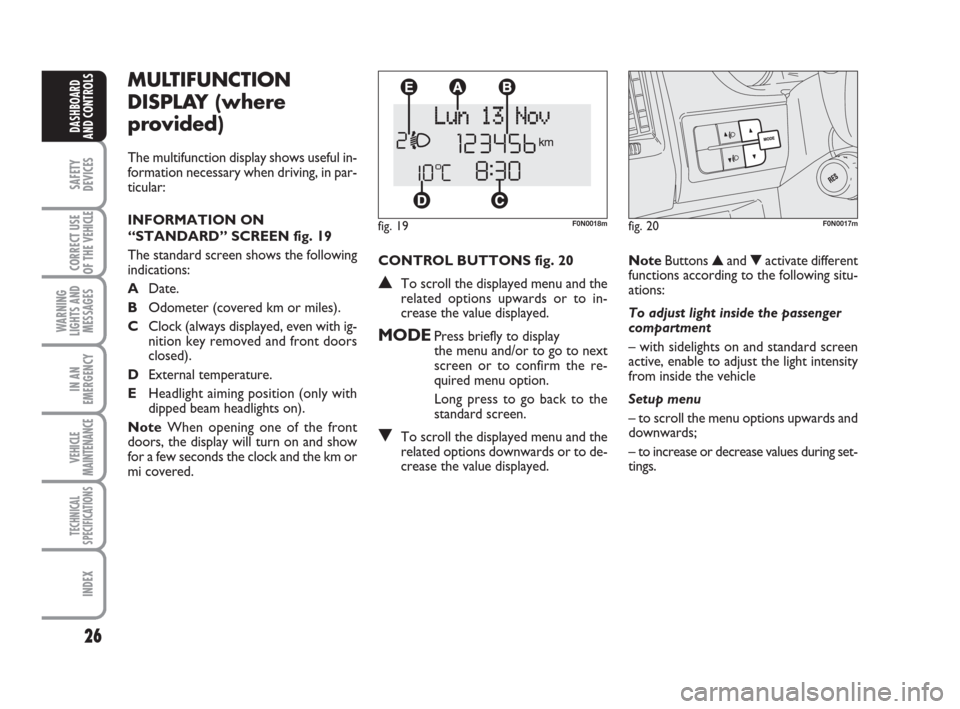
CONTROL BUTTONS fig. 20
▲To scroll the displayed menu and the
related options upwards or to in-
crease the value displayed.
MODEPress briefly to display
the menu and/or to go to next
screen or to confirm the re-
quired menu option.
Long press to go back to the
standard screen.
▼To scroll the displayed menu and the
related options downwards or to de-
crease the value displayed.
MULTIFUNCTION
DISPLAY (where
provided)
The multifunction display shows useful in-
formation necessary when driving, in par-
ticular:
INFORMATION ON
“STANDARD” SCREEN fig. 19
The standard screen shows the following
indications:
ADate.
BOdometer (covered km or miles).
CClock (always displayed, even with ig-
nition key removed and front doors
closed).
DExternal temperature.
EHeadlight aiming position (only with
dipped beam headlights on).
NoteWhen opening one of the front
doors, the display will turn on and show
for a few seconds the clock and the km or
mi covered.
fig. 19F0N0018m
NoteButtons ▲and ▼activate different
functions according to the following situ-
ations:
To adjust light inside the passenger
compartment
– with sidelights on and standard screen
active, enable to adjust the light intensity
from inside the vehicle
Setup menu
– to scroll the menu options upwards and
downwards;
– to increase or decrease values during set-
tings.
fig. 20F0N0017m
Page 31 of 282
30
SAFETY
DEVICES
CORRECT USE
OF THE
VEHICLE
WARNING
LIGHTS AND
MESSAGES
IN AN
EMERGENCY
VEHICLE
MAINTENANCE
TECHNICAL
SPECIFICATIONS
INDEX
DASHBOARD
AND CONTROLS
– if selecting “Mode”:briefly press button
MODE, “24h” or “12h” mode will flash
on the display;
– press button ▲or ▼to select “24h” or
“12h”.
After setting, briefly press button MODE
to go back to the submenu screen or
press the button for long to go back to the
main menu screen without storing set-
tings.
– press again button MODEfor long to
go back to the standard screen or to the
main menu according to the current menu
level. Set clock (Set time)
This function enables to set the clock
through two sub-menus: “Time” and
“Mode”.
Proceed as follows:
– briefly press button MODE, the display
will show the two sub-menus “Time” and
“Mode”;
– press button ▲or ▼to surf the two
sub-menus;
– select the required option and then
press button MODE;
– if selecting “Time”: briefly press button
MODE, “hours” will flash on the display;
– press button ▲or ▼for setting;
– briefly press button MODE, “minutes”
will flash on the display;
– press button ▲or ▼for setting;Set date (Set Date)
This function enables to update the date
(year - month - day).
To correct the date proceed as follows:
– briefly press button MODE, “day” will
flash on the display;
– press button ▲or ▼for setting;
– briefly press button MODE, “month”
will flash on the display;
– press button ▲or ▼for setting;
– briefly press button MODE, “year” will
flash on the display;
– press button ▲or ▼for setting.
NoteEvery press on button ▲or ▼in-
creases/decreases by 1 unit. Keeping the
button pressed obtains automatic fast in-
crease or decrease. When you are near
the required setting complete adjustment
by single presses.
– briefly press button MODEto go back
to the menu screen or press the button
for long to go back to the standard screen
without storing settings.
Page 32 of 282
31
SAFETY
DEVICES
CORRECT USE
OF THE
VEHICLE
WARNING
LIGHTS AND
MESSAGES
IN AN
EMERGENCY
VEHICLE
MAINTENANCE
TECHNICAL
SPECIFICATIONS
INDEX
DASHBOARD
AND CONTROLS
Automatic door locking with
vehicle running (Autoclose)
When activated (On), this function locks
automatically the doors when the vehicle
speed exceeds 20 km/h.
To activate (On) or to deactivate (Off) this
function proceed as follows:
– briefly press button MODEto display
the submenu;
– briefly press button MODE : (On) or
(Off) will flash on the display (according to
previous setting);
– press button ▲or ▼for setting;
– briefly press button MODEto go back
to the menu screen or press the button
for long to go back to the standard screen
without storing settings;
– press again button MODEfor long to
go back to the standard screen or to the
main menu according to the current menu
level. Audio repetition (See radio)
With this function the display repeats in-
formation relevant to the sound system.
– Radio: selected radio station frequency
or RDS message, automatic tuning acti-
vation or AutoSTore;
– audio CD, MP3 CD: track number;
– CD Changer: CD number and track
number;
To activate (On) or to deactivate (Off)
sound system info displaying proceed as
follows:
– briefly press button MODE: (On) or
(Off)will flash on the display (according to
previous setting);
– press button ▲or ▼for setting;
– briefly press button MODEto go back
to the menu screen or press the button
for long to go back to the standard screen
without storing settings.Set unit (Units)
With this function it is possible to set the
units through three sub-menus: “Distances”,
“Consumption” and “Temperature”.
To set the required unit proceed as follows:
– briefly press button MODE, to display
the three sub-menus;
– press button ▲or ▼to surf the three
sub-menus;
– select the required sub-menu and then
press briefly button MODE;
– if selecting “Distances”: briefly press button
MODEthe display will show “km” or “mi”
(according to previous setting);
– press button ▲or ▼for setting;
– if selecting “Consumption”: briefly press but-
ton MODEthe display will show “km/l”,
“l/100km” or “mpg” (according to previous
setting);
Page 38 of 282
37
SAFETY
DEVICES
CORRECT USE
OF THE
VEHICLE
WARNING
LIGHTS AND
MESSAGES
IN AN
EMERGENCY
VEHICLE
MAINTENANCE
TECHNICAL
SPECIFICATIONS
INDEX
DASHBOARD
AND CONTROLS
Fabric upholstery of your Fiat
Ducato is purpose-made to
withstand common wear re-
sulting from normal use of the
vehicle. It is however absolutely neces-
sary to prevent hard and/or prolonged
scratching/scraping caused by clothing
accessories like metallic buckles, studs,
“Velcro” fixings, etc. that stressing lo-
cally the fabric could break yarns and
damage the upholstery as a conse-
quence.
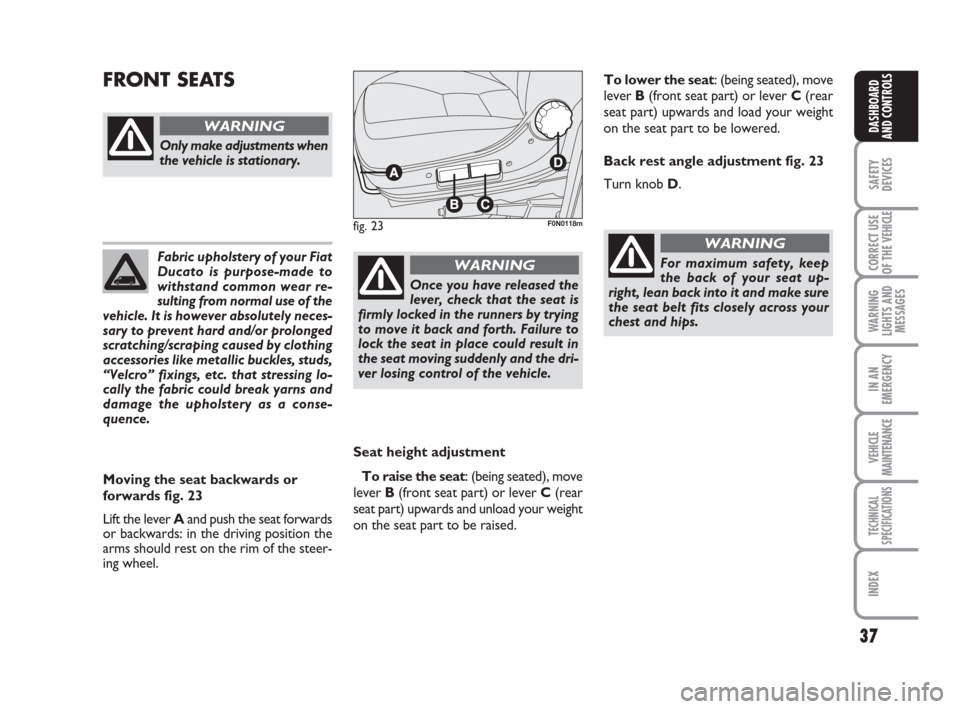
Seat height adjustment
To raise the seat: (being seated), move
lever B (front seat part) or lever C (rear
seat part) upwards and unload your weight
on the seat part to be raised.
FRONT SEATS
fig. 23F0N0118m
Only make adjustments when
the vehicle is stationary.
WARNING
Moving the seat backwards or
forwards fig. 23
Lift the lever Aand push the seat forwards
or backwards: in the driving position the
arms should rest on the rim of the steer-
ing wheel.
Once you have released the
lever, check that the seat is
firmly locked in the runners by trying
to move it back and forth. Failure to
lock the seat in place could result in
the seat moving suddenly and the dri-
ver losing control of the vehicle.
WARNINGFor maximum safety, keep
the back of your seat up-
right, lean back into it and make sure
the seat belt fits closely across your
chest and hips.
WARNING
To lower the seat: (being seated), move
lever B(front seat part) or lever C(rear
seat part) upwards and load your weight
on the seat part to be lowered.
Back rest angle adjustment fig. 23
Turn knob D.
Page 40 of 282
39
SAFETY
DEVICES
CORRECT USE
OF THE
VEHICLE
WARNING
LIGHTS AND
MESSAGES
IN AN
EMERGENCY
VEHICLE
MAINTENANCE
TECHNICAL
SPECIFICATIONS
INDEX
DASHBOARD
AND CONTROLS
Only make adjustments
when the vehicle is station-
ary. Specially when revolving the seat,
make sure it is not interfering with the
handbrake lever.
Make sure the outer armrest
(door side) is completely up-
right before unfastening the seat belts
and getting out of the vehicle.
WARNING
Should it be absolutely nec-
essary to carry a child seat
on the front passenger’s seat, make
sure to deactivate the front passen-
ger’s air bag, to fasten the passenger’s
seat belt and to lower completely the
armrests to prevent their accidental
moving.
WARNING
REVOLVING SEAT WITH
INTEGRAL SEAT
BELT (where provided)
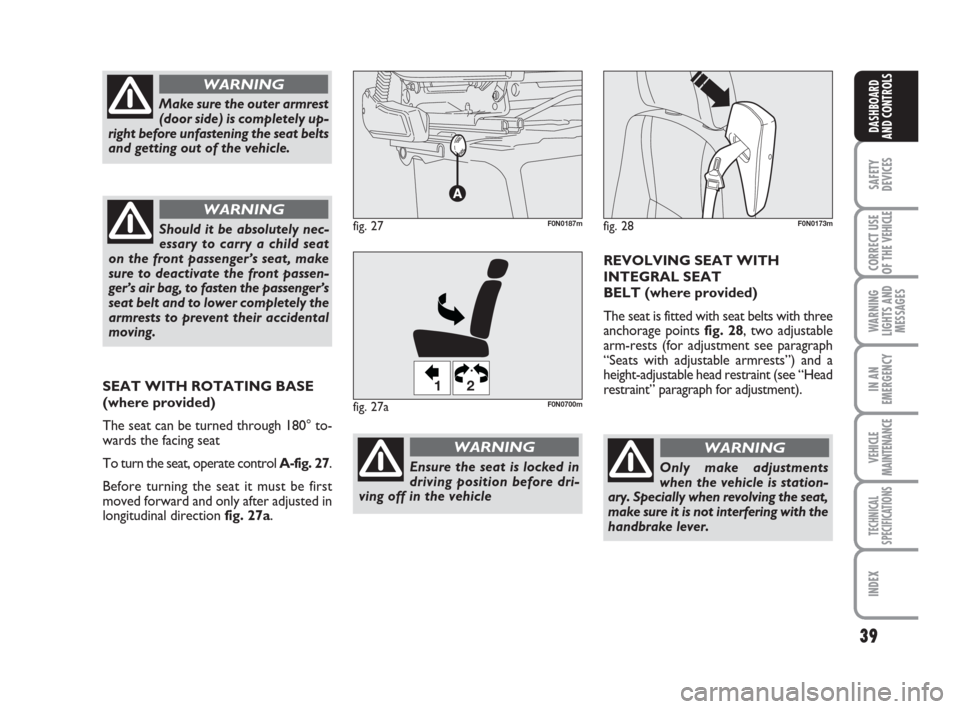
The seat is fitted with seat belts with three
anchorage points fig. 28, two adjustable
arm-rests (for adjustment see paragraph
“Seats with adjustable armrests”) and a
height-adjustable head restraint (see “Head
restraint” paragraph for adjustment).
WARNING
fig. 28F0N0173mfig. 27F0N0187m
Ensure the seat is locked in
driving position before dri-
ving off in the vehicle
WARNING
SEAT WITH ROTATING BASE
(where provided)
The seat can be turned through 180° to-
wards the facing seat
To turn the seat, operate control A-fig. 27.
Before turning the seat it must be first
moved forward and only after adjusted in
longitudinal direction fig. 27a.
fig. 27a
12
F0N0700m
Page 41 of 282
40
SAFETY
DEVICES
CORRECT USE
OF THE
VEHICLE
WARNING
LIGHTS AND
MESSAGES
IN AN
EMERGENCY
VEHICLE
MAINTENANCE
TECHNICAL
SPECIFICATIONS
INDEX
DASHBOARD
AND CONTROLS
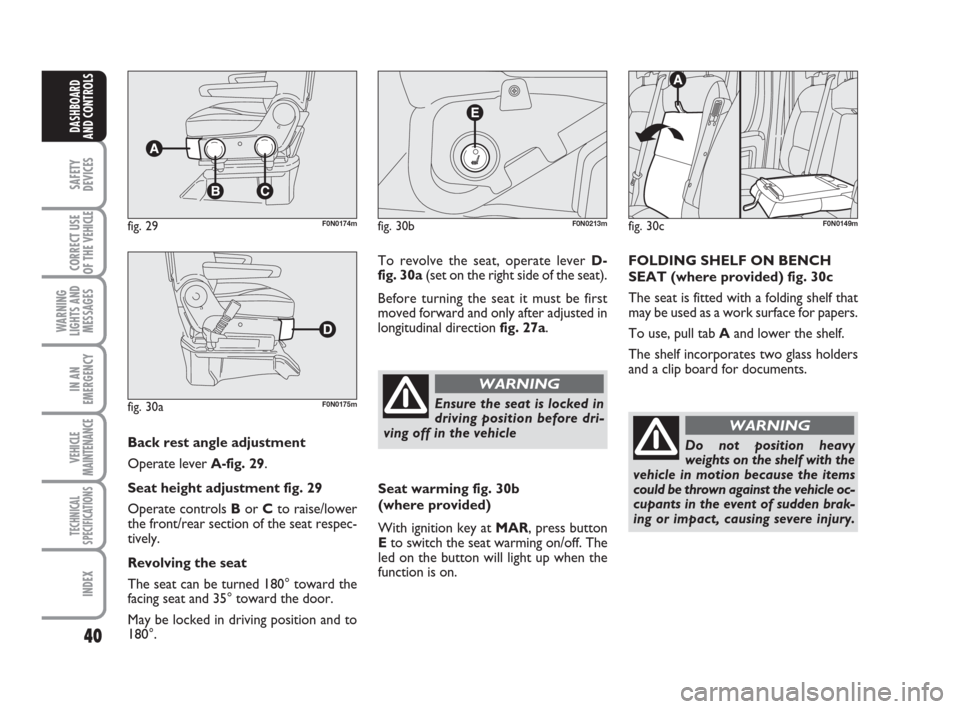
Back rest angle adjustment
Operate lever A-fig. 29.
Seat height adjustment fig. 29
Operate controls Bor Cto raise/lower
the front/rear section of the seat respec-
tively.
Revolving the seat
The seat can be turned 180° toward the
facing seat and 35° toward the door.
May be locked in driving position and to
180°.
fig. 29F0N0174m
fig. 30aF0N0175m
To revolve the seat, operate lever D-
fig. 30a(set on the right side of the seat).
Before turning the seat it must be first
moved forward and only after adjusted in
longitudinal direction fig. 27a.
fig. 30bF0N0213m
Ensure the seat is locked in
driving position before dri-
ving off in the vehicle
WARNING
Seat warming fig. 30b
(where provided)
With ignition key at MAR, press button
Eto switch the seat warming on/off. The
led on the button will light up when the
function is on.
fig. 30cF0N0149m
FOLDING SHELF ON BENCH
SEAT (where provided) fig. 30c
The seat is fitted with a folding shelf that
may be used as a work surface for papers.
To use, pull tab Aand lower the shelf.
The shelf incorporates two glass holders
and a clip board for documents.
Do not position heavy
weights on the shelf with the
vehicle in motion because the items
could be thrown against the vehicle oc-
cupants in the event of sudden brak-
ing or impact, causing severe injury.
WARNING
Page 42 of 282
41
SAFETY
DEVICES
CORRECT USE
OF THE
VEHICLE
WARNING
LIGHTS AND
MESSAGES
IN AN
EMERGENCY
VEHICLE
MAINTENANCE
TECHNICAL
SPECIFICATIONS
INDEX
DASHBOARD
AND CONTROLS
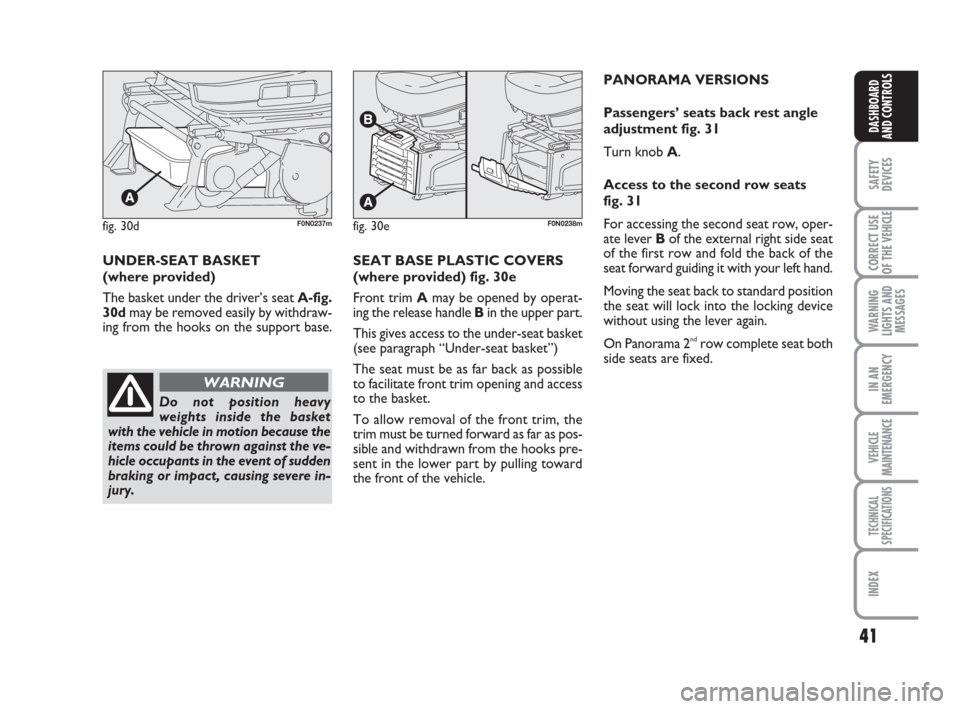
fig. 30dF0N0237mfig. 30eF0N0238m
UNDER-SEAT BASKET
(where provided)
The basket under the driver’s seat A-fig.
30dmay be removed easily by withdraw-
ing from the hooks on the support base.
Do not position heavy
weights inside the basket
with the vehicle in motion because the
items could be thrown against the ve-
hicle occupants in the event of sudden
braking or impact, causing severe in-
jury.
WARNING
SEAT BASE PLASTIC COVERS
(where provided) fig. 30e
Front trim Amay be opened by operat-
ing the release handle Bin the upper part.
This gives access to the under-seat basket
(see paragraph “Under-seat basket”)
The seat must be as far back as possible
to facilitate front trim opening and access
to the basket.
To allow removal of the front trim, the
trim must be turned forward as far as pos-
sible and withdrawn from the hooks pre-
sent in the lower part by pulling toward
the front of the vehicle.PANORAMA VERSIONS
Passengers’ seats back rest angle
adjustment fig. 31
Turn knob A.
Access to the second row seats
fig. 31
For accessing the second seat row, oper-
ate lever Bof the external right side seat
of the first row and fold the back of the
seat forward guiding it with your left hand.
Moving the seat back to standard position
the seat will lock into the locking device
without using the lever again.
On Panorama 2
ndrow complete seat both
side seats are fixed.
Page 44 of 282
43
SAFETY
DEVICES
CORRECT USE
OF THE
VEHICLE
WARNING
LIGHTS AND
MESSAGES
IN AN
EMERGENCY
VEHICLE
MAINTENANCE
TECHNICAL
SPECIFICATIONS
INDEX
DASHBOARD
AND CONTROLS
HEAD RESTRAINTS
FRONT fig. 36
On certain versions head restraints are ad-
justable in height and they lock automati-
cally in the required position.
To adjust head restraints
❒to raise: raise the head restraint until
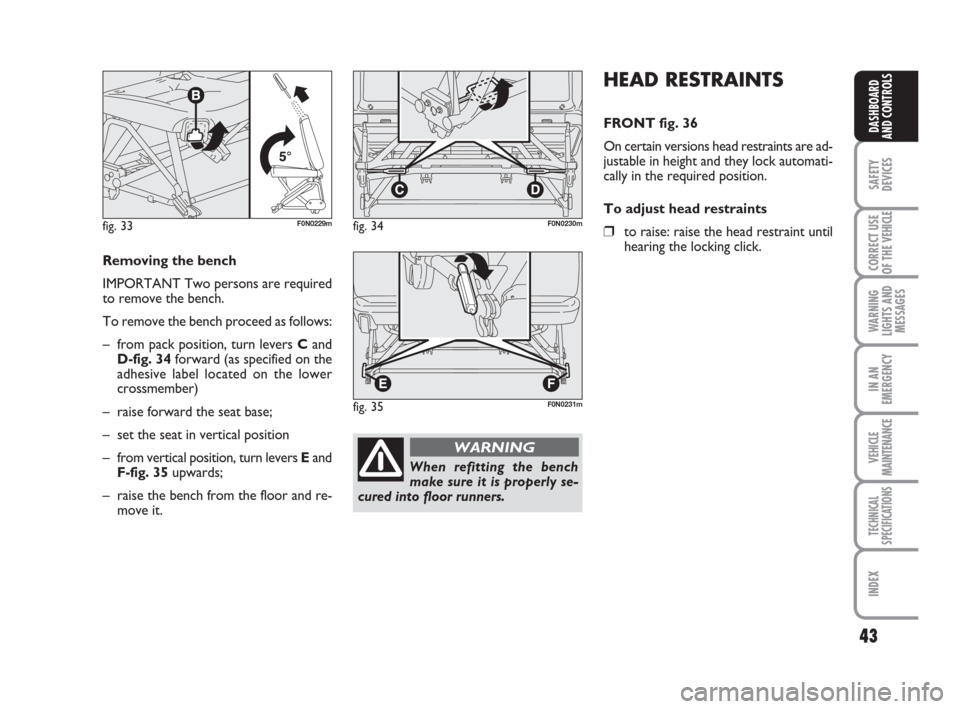
hearing the locking click.fig. 33F0N0229mfig. 34F0N0230m
fig. 35F0N0231m
Removing the bench
IMPORTANT Two persons are required
to remove the bench.
To remove the bench proceed as follows:
– from pack position, turn levers Cand
D-fig. 34forward (as specified on the
adhesive label located on the lower
crossmember)
– raise forward the seat base;
– set the seat in vertical position
– from vertical position, turn levers Eand
F-fig. 35upwards;
– raise the bench from the floor and re-
move it.
When refitting the bench
make sure it is properly se-
cured into floor runners.
WARNING