ignition FIAT DUCATO 2009 3.G Owner's Manual
[x] Cancel search | Manufacturer: FIAT, Model Year: 2009, Model line: DUCATO, Model: FIAT DUCATO 2009 3.GPages: 282, PDF Size: 4.55 MB
Page 79 of 282
78
SAFETY
DEVICES
CORRECT USE
OF THE
VEHICLE
WARNING
LIGHTS AND
MESSAGES
IN AN
EMERGENCY
VEHICLE
MAINTENANCE
TECHNICAL
SPECIFICATIONS
INDEX
DASHBOARD
AND CONTROLS
RAIN SENSOR
(where provided)
The rain sensor is located behind the dri-
ving mirror in contact with the windscreen
and has the purpose of automatically ad-
just, during the intermittent operation, the
frequency of the windscreen wiper
strokes as to the rain intensity.
IMPORTANT Keep clean the glass in the
sensor area.
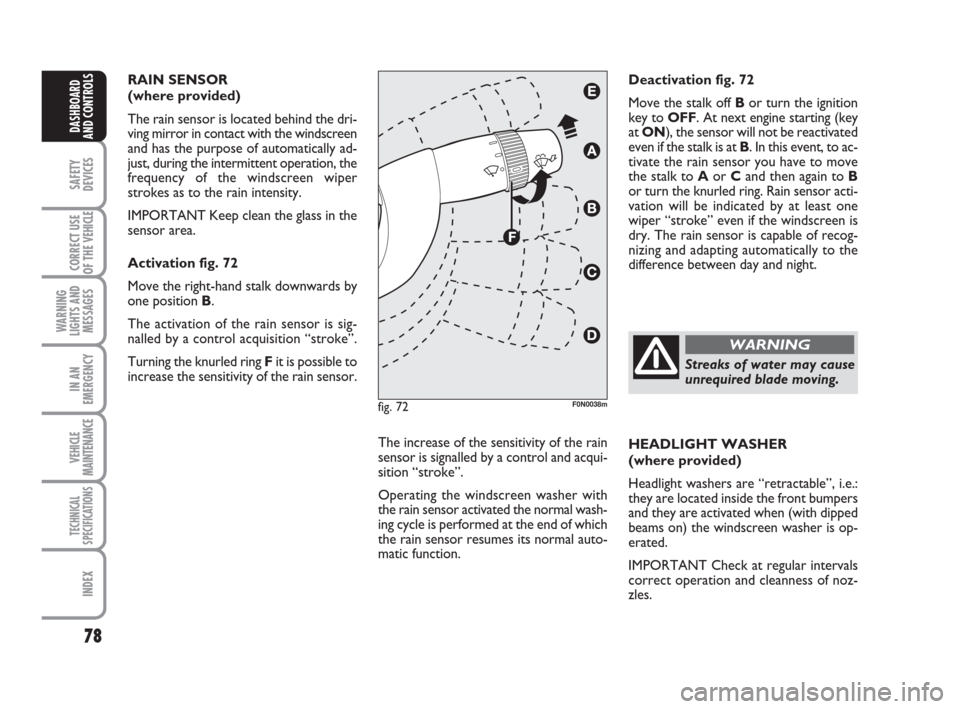
Activation fig. 72
Move the right-hand stalk downwards by
one position B.
The activation of the rain sensor is sig-
nalled by a control acquisition “stroke”.
Turning the knurled ring Fit is possible to
increase the sensitivity of the rain sensor.
The increase of the sensitivity of the rain
sensor is signalled by a control and acqui-
sition “stroke”.
Operating the windscreen washer with
the rain sensor activated the normal wash-
ing cycle is performed at the end of which
the rain sensor resumes its normal auto-
matic function.HEADLIGHT WASHER
(where provided)
Headlight washers are “retractable”, i.e.:
they are located inside the front bumpers
and they are activated when (with dipped
beams on) the windscreen washer is op-
erated.
IMPORTANT Check at regular intervals
correct operation and cleanness of noz-
zles. Deactivation fig. 72
Move the stalk off Bor turn the ignition
key to OFF. At next engine starting (key
at ON), the sensor will not be reactivated
even if the stalk is at B. In this event, to ac-
tivate the rain sensor you have to move
the stalk to Aor Cand then again to B
or turn the knurled ring. Rain sensor acti-
vation will be indicated by at least one
wiper “stroke” even if the windscreen is
dry. The rain sensor is capable of recog-
nizing and adapting automatically to the
difference between day and night.
fig. 72F0N0038m
Streaks of water may cause
unrequired blade moving.
WARNING
Page 82 of 282
81
SAFETY
DEVICES
CORRECT USE
OF THE
VEHICLE
WARNING
LIGHTS AND
MESSAGES
IN AN
EMERGENCY
VEHICLE
MAINTENANCE
TECHNICAL
SPECIFICATIONS
INDEX
DASHBOARD
AND CONTROLS
CEILING LIGHTS
FRONT CEILING LIGHT WITH
SPOT LIGHTS
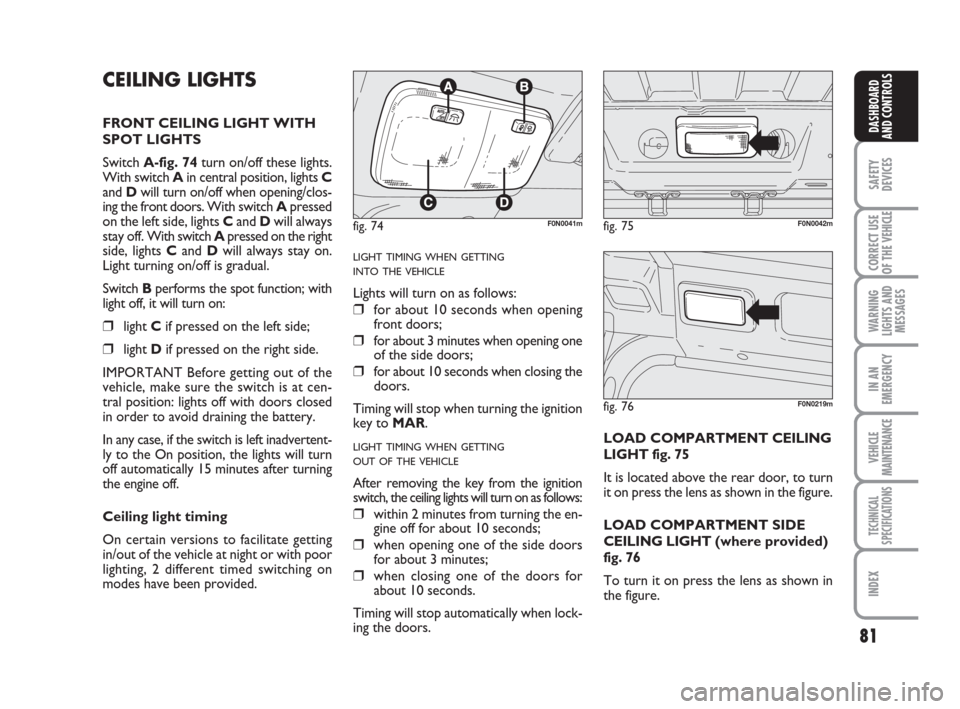
Switch A-fig. 74turn on/off these lights.
With switch A in central position, lights C
and Dwill turn on/off when opening/clos-
ing the front doors. With switch Apressed
on the left side, lights Cand Dwill always
stay off. With switch Apressed on the right
side, lights Cand Dwill always stay on.
Light turning on/off is gradual.
Switch Bperforms the spot function; with
light off, it will turn on:
❒light Cif pressed on the left side;
❒light Dif pressed on the right side.
IMPORTANT Before getting out of the
vehicle, make sure the switch is at cen-
tral position: lights off with doors closed
in order to avoid draining the battery.
In any case, if the switch is left inadvertent-
ly to the On position, the lights will turn
off automatically 15 minutes after turning
the engine off.
Ceiling light timing
On certain versions to facilitate getting
in/out of the vehicle at night or with poor
lighting, 2 different timed switching on
modes have been provided.
LIGHT TIMING WHEN GETTING
INTO THE VEHICLE
Lights will turn on as follows:
❒for about 10 seconds when opening
front doors;
❒for about 3 minutes when opening one
of the side doors;
❒for about 10 seconds when closing the
doors.
Timing will stop when turning the ignition
key to MAR.
LIGHT TIMING WHEN GETTING
OUT OF THE VEHICLE
After removing the key from the ignition
switch, the ceiling lights will turn on as follows:
❒within 2 minutes from turning the en-
gine off for about 10 seconds;
❒when opening one of the side doors
for about 3 minutes;
❒when closing one of the doors for
about 10 seconds.
Timing will stop automatically when lock-
ing the doors.LOAD COMPARTMENT CEILING
LIGHT fig. 75
It is located above the rear door, to turn
it on press the lens as shown in the figure.
LOAD COMPARTMENT SIDE
CEILING LIGHT (where provided)
fig. 76
To turn it on press the lens as shown in
the figure.
fig. 74F0N0041mfig. 75F0N0042m
fig. 76F0N0219m
Page 83 of 282
82
SAFETY
DEVICES
CORRECT USE
OF THE
VEHICLE
WARNING
LIGHTS AND
MESSAGES
IN AN
EMERGENCY
VEHICLE
MAINTENANCE
TECHNICAL
SPECIFICATIONS
INDEX
DASHBOARD
AND CONTROLS
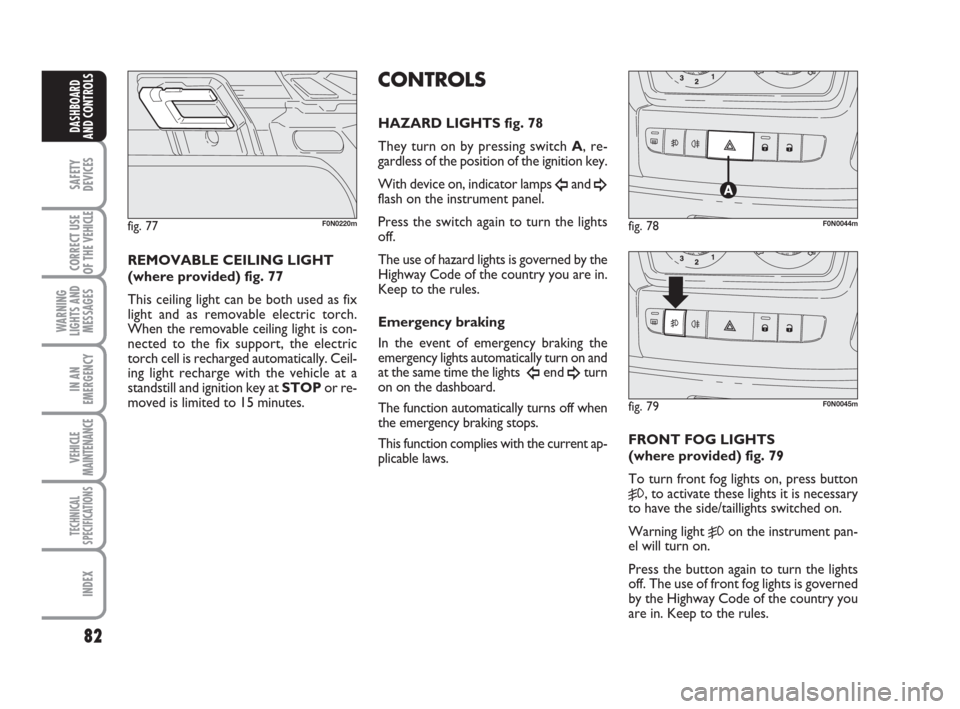
REMOVABLE CEILING LIGHT
(where provided) fig. 77
This ceiling light can be both used as fix
light and as removable electric torch.
When the removable ceiling light is con-
nected to the fix support, the electric
torch cell is recharged automatically. Ceil-
ing light recharge with the vehicle at a
standstill and ignition key at STOPor re-
moved is limited to 15 minutes.
FRONT FOG LIGHTS
(where provided) fig. 79
To turn front fog lights on, press button
5, to activate these lights it is necessary
to have the side/taillights switched on.
Warning light
5on the instrument pan-
el will turn on.
Press the button again to turn the lights
off. The use of front fog lights is governed
by the Highway Code of the country you
are in. Keep to the rules.
fig. 77F0N0220m
CONTROLS
HAZARD LIGHTS fig. 78
They turn on by pressing switch A, re-
gardless of the position of the ignition key.
With device on, indicator lamps
Îand ¥flash on the instrument panel.
Press the switch again to turn the lights
off.
The use of hazard lights is governed by the
Highway Code of the country you are in.
Keep to the rules.
Emergency braking
In the event of emergency braking the
emergency lights automatically turn on and
at the same time the lights
Îend ¥turn
on on the dashboard.
The function automatically turns off when
the emergency braking stops.
This function complies with the current ap-
plicable laws.
fig. 78F0N0044m
fig. 79F0N0045m
Page 84 of 282
83
SAFETY
DEVICES
CORRECT USE
OF THE
VEHICLE
WARNING
LIGHTS AND
MESSAGES
IN AN
EMERGENCY
VEHICLE
MAINTENANCE
TECHNICAL
SPECIFICATIONS
INDEX
DASHBOARD
AND CONTROLS
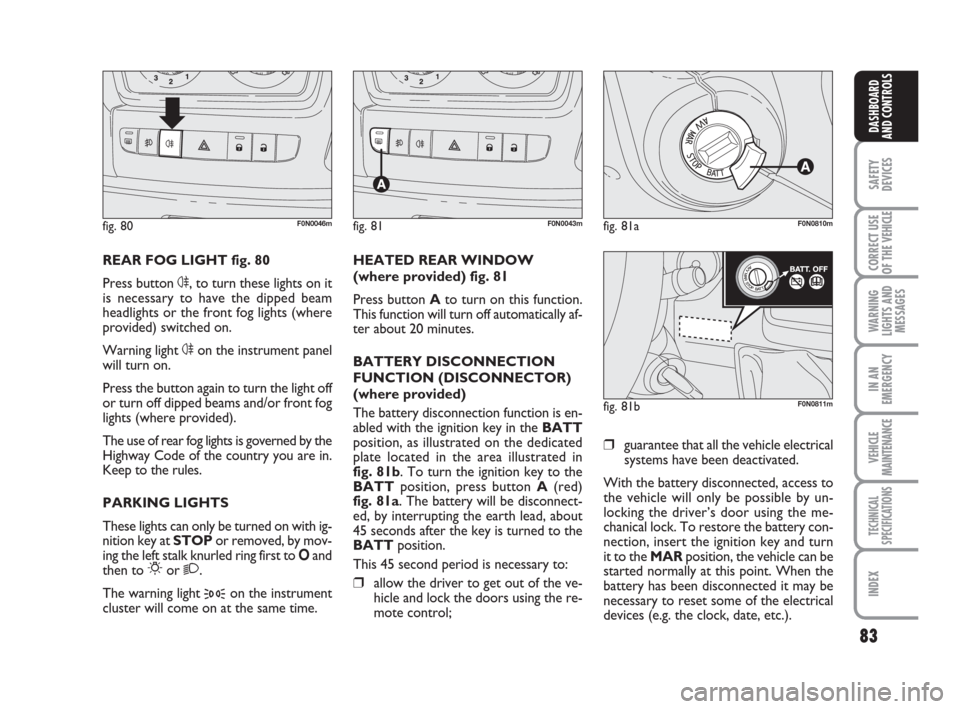
REAR FOG LIGHT fig. 80
Press button 4, to turn these lights on it
is necessary to have the dipped beam
headlights or the front fog lights (where
provided) switched on.
Warning light 4on the instrument panel
will turn on.
Press the button again to turn the light off
or turn off dipped beams and/or front fog
lights (where provided).
The use of rear fog lights is governed by the
Highway Code of the country you are in.
Keep to the rules.
PARKING LIGHTS
These lights can only be turned on with ig-
nition key at STOP or removed, by mov-
ing the left stalk knurled ring first to Oand
then to
6or 2.
The warning light
3on the instrument
cluster will come on at the same time.HEATED REAR WINDOW
(where provided) fig. 81
Press button Ato turn on this function.
This function will turn off automatically af-
ter about 20 minutes.
BATTERY DISCONNECTION
FUNCTION (DISCONNECTOR)
(where provided)
The battery disconnection function is en-
abled with the ignition key in the BATT
position, as illustrated on the dedicated
plate located in the area illustrated in
fig. 81b. To turn the ignition key to the
BATTposition, press button A(red)
fig. 81a. The battery will be disconnect-
ed, by interrupting the earth lead, about
45 seconds after the key is turned to the
BATTposition.
This 45 second period is necessary to:❒allow the driver to get out of the ve-
hicle and lock the doors using the re-
mote control;
fig. 80F0N0046mfig. 81F0N0043mfig. 81aF0N0810m
fig. 81bF0N0811m
❒guarantee that all the vehicle electrical
systems have been deactivated.
With the battery disconnected, access to
the vehicle will only be possible by un-
locking the driver’s door using the me-
chanical lock. To restore the battery con-
nection, insert the ignition key and turn
it to the MARposition, the vehicle can be
started normally at this point. When the
battery has been disconnected it may be
necessary to reset some of the electrical
devices (e.g. the clock, date, etc.).
Page 85 of 282
84
SAFETY
DEVICES
CORRECT USE
OF THE
VEHICLE
WARNING
LIGHTS AND
MESSAGES
IN AN
EMERGENCY
VEHICLE
MAINTENANCE
TECHNICAL
SPECIFICATIONS
INDEX
DASHBOARD
AND CONTROLS
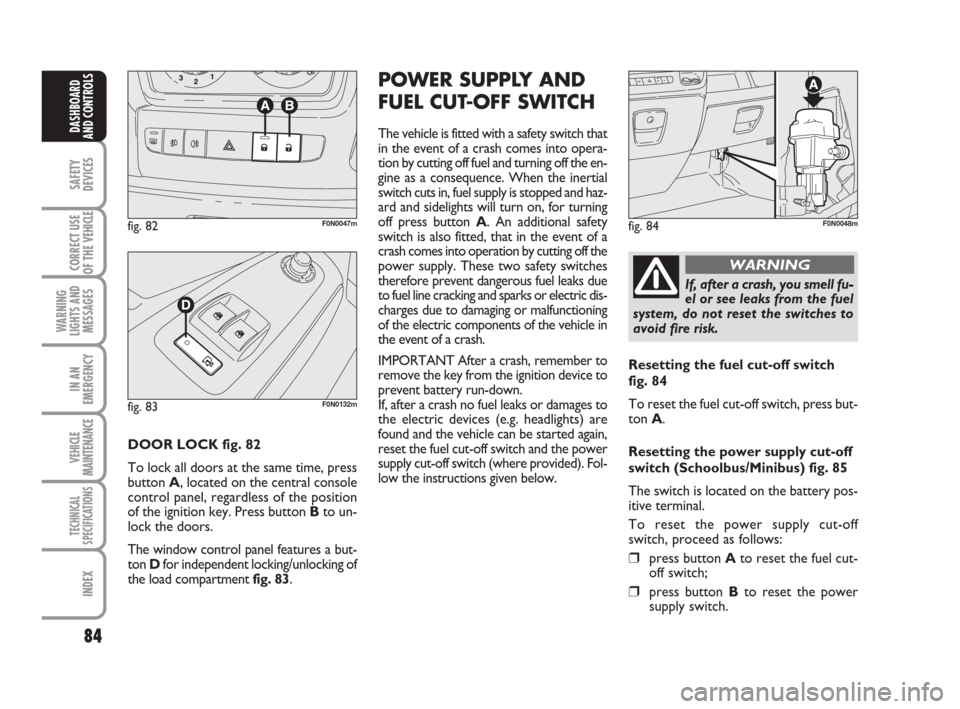
DOOR LOCK fig. 82
To lock all doors at the same time, press
button A, located on the central console
control panel, regardless of the position
of the ignition key. Press button Bto un-
lock the doors.
The window control panel features a but-
ton Dfor independent locking/unlocking of
the load compartment fig. 83.
POWER SUPPLY AND
FUEL CUT-OFF SWITCH
The vehicle is fitted with a safety switch that
in the event of a crash comes into opera-
tion by cutting off fuel and turning off the en-
gine as a consequence. When the inertial
switch cuts in, fuel supply is stopped and haz-
ard and sidelights will turn on, for turning
off press button A. An additional safety
switch is also fitted, that in the event of a
crash comes into operation by cutting off the
power supply. These two safety switches
therefore prevent dangerous fuel leaks due
to fuel line cracking and sparks or electric dis-
charges due to damaging or malfunctioning
of the electric components of the vehicle in
the event of a crash.
IMPORTANT After a crash, remember to
remove the key from the ignition device to
prevent battery run-down.
If, after a crash no fuel leaks or damages to
the electric devices (e.g. headlights) are
found and the vehicle can be started again,
reset the fuel cut-off switch and the power
supply cut-off switch (where provided). Fol-
low the instructions given below.
fig. 82F0N0047mfig. 84F0N0048m
If, after a crash, you smell fu-
el or see leaks from the fuel
system, do not reset the switches to
avoid fire risk.
WARNING
Resetting the fuel cut-off switch
fig. 84
To reset the fuel cut-off switch, press but-
ton A.
Resetting the power supply cut-off
switch (Schoolbus/Minibus) fig. 85
The switch is located on the battery pos-
itive terminal.
To reset the power supply cut-off
switch, proceed as follows:
❒press button Ato reset the fuel cut-
off switch;
❒press button Bto reset the power
supply switch.
fig. 83F0N0132m
Page 88 of 282

87
SAFETY
DEVICES
CORRECT USE
OF THE
VEHICLE
WARNING
LIGHTS AND
MESSAGES
IN AN
EMERGENCY
VEHICLE
MAINTENANCE
TECHNICAL
SPECIFICATIONS
INDEX
DASHBOARD
AND CONTROLS
fig. 94F0N0054m
GLASS HOLDER - CAN HOLDER
fig. 94
Glass - can holder recesses are located on
the central panel. CIGAR LIGHTER fig. 95
It is located in the central panel.
Press button Ato switch on the cigar
lighter with ignition key at MAR.
After about 15 seconds the button will re-
turn to its initial position and is ready for
use.
IMPORTANT Always check that the cig-
ar lighter has turned off.ASHTRAY fig. 96
The ashtray is a removable plastic box that
can be fitted into the glass/can recesses on
the central panel.
IMPORTANT Do not use the ashtray as
waste paper basket: it might set on fire in
contact with cigarette stubs.
fig. 95F0N0055m
The cigar lighter gets very
hot. Handle it with care and
make sure that it is not used by chil-
dren: danger of fire and/or burns.
WARNING
fig. 96F0N0146m
Page 91 of 282
90
SAFETY
DEVICES
CORRECT USE
OF THE
VEHICLE
WARNING
LIGHTS AND
MESSAGES
IN AN
EMERGENCY
VEHICLE
MAINTENANCE
TECHNICAL
SPECIFICATIONS
INDEX
DASHBOARD
AND CONTROLS
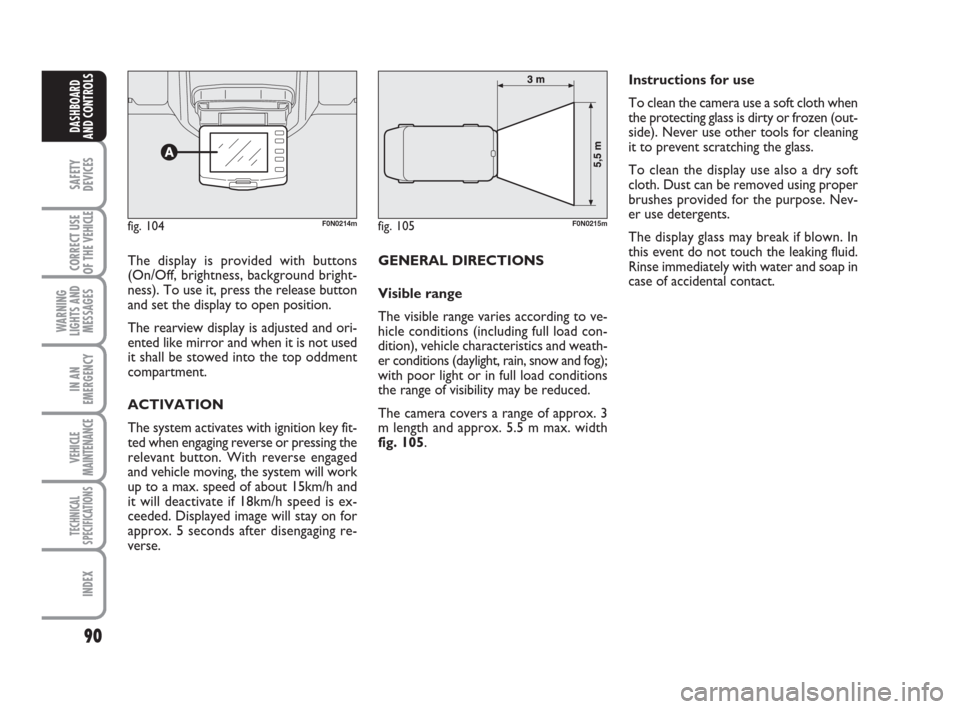
The display is provided with buttons
(On/Off, brightness, background bright-
ness). To use it, press the release button
and set the display to open position.
The rearview display is adjusted and ori-
ented like mirror and when it is not used
it shall be stowed into the top oddment
compartment.
ACTIVATION
The system activates with ignition key fit-
ted when engaging reverse or pressing the
relevant button. With reverse engaged
and vehicle moving, the system will work
up to a max. speed of about 15km/h and
it will deactivate if 18km/h speed is ex-
ceeded. Displayed image will stay on for
approx. 5 seconds after disengaging re-
verse. GENERAL DIRECTIONS
Visible range
The visible range varies according to ve-
hicle conditions (including full load con-
dition), vehicle characteristics and weath-
er conditions (daylight, rain, snow and fog);
with poor light or in full load conditions
the range of visibility may be reduced.
The camera covers a range of approx. 3
m length and approx. 5.5 m max. width
fig. 105.Instructions for use
To clean the camera use a soft cloth when
the protecting glass is dirty or frozen (out-
side). Never use other tools for cleaning
it to prevent scratching the glass.
To clean the display use also a dry soft
cloth. Dust can be removed using proper
brushes provided for the purpose. Nev-
er use detergents.
The display glass may break if blown. In
this event do not touch the leaking fluid.
Rinse immediately with water and soap in
case of accidental contact.
fig. 104F0N0214mfig. 105F0N0215m
Page 95 of 282
94
SAFETY
DEVICES
CORRECT USE
OF THE
VEHICLE
WARNING
LIGHTS AND
MESSAGES
IN AN
EMERGENCY
VEHICLE
MAINTENANCE
TECHNICAL
SPECIFICATIONS
INDEX
DASHBOARD
AND CONTROLS
DEAD LOCK DEVICE
(where provided)
This safety device enables to inhibit:
❒door internal handles;
❒locking/unlocking buttons A-B fig. 110;
thus hindering doors opening from inside
the passenger’s compartment in case of at-
tempt to break-into (e.g.: window breaking).
The dead lock device guarantees the best
protection against unwanted access.
Therefore, it should be actuated every
time the vehicle is parked and left unat-
tended.
Once the dead lock device
has been actuated, doors
cannot be opened from the passen-
ger’s compartment in any way what-
soever. For this reason, make sure
there are no person left inside the ve-
hicle. If the battery of the key with
remote control is down, the dead lock
device can be deactivated only by fit-
ting the metal insert of the key in
both front door revolving plugs as de-
scribed previously: in this case the
dead lock device will stay engaged
only on the rear doors.
WARNINGDevice activation
The dead lock device is automatically ac-
tivated on every door when pressing twice
briefly the remote control button
Ø, fig.
107.
Device activation is indicated by 3 flashing
of direction indicators and flashing of the
button led A-fig. 110.
If one of the doors is not perfectly closed,
the dead lock device will not activate, thus
preventing that a person getting into the ve-
hicle from the open door remains blocked
inside the passenger’s compartment when
she/he closes the door.
Device deactivation
The device is deactivated automatically on
every door in the following cases:
❒when opening the driver’s door using
the key without remote control;
❒when unlocking doors using the re-
mote control;
❒turning the ignition key to MAR.
Page 99 of 282
98
SAFETY
DEVICES
CORRECT USE
OF THE
VEHICLE
WARNING
LIGHTS AND
MESSAGES
IN AN
EMERGENCY
VEHICLE
MAINTENANCE
TECHNICAL
SPECIFICATIONS
INDEX
DASHBOARD
AND CONTROLS
Automatic continuous operation
All versions are equipped with automatic
raising and lowering of the front, driver's
side window.
Automatic continuous operation activates
by pressing one of the control switches
for over half a second. The window will
stop when it is completely open or when
pressing the button again.
IMPORTANT With ignition key at STOP
or removed, the power windows remain
activated for about 3 minutes and are de-
activated immediately the moment a door
is opened.
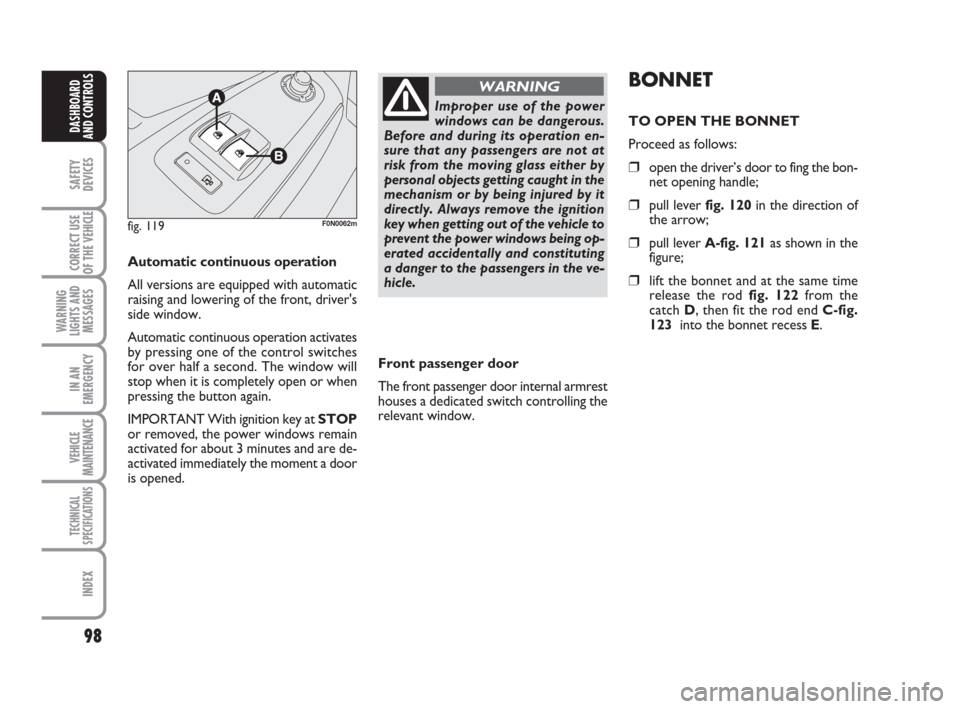
fig. 119F0N0062m
Improper use of the power
windows can be dangerous.
Before and during its operation en-
sure that any passengers are not at
risk from the moving glass either by
personal objects getting caught in the
mechanism or by being injured by it
directly. Always remove the ignition
key when getting out of the vehicle to
prevent the power windows being op-
erated accidentally and constituting
a danger to the passengers in the ve-
hicle.
WARNINGBONNET
TO OPEN THE BONNET
Proceed as follows:
❒open the driver’s door to fing the bon-
net opening handle;
❒pull lever fig. 120in the direction of
the arrow;
❒pull lever A-fig. 121as shown in the
figure;
❒lift the bonnet and at the same time
release the rod fig. 122 from the
catch D, then fit the rod end C-fig.
123 into the bonnet recess E.
Front passenger door
The front passenger door internal armrest
houses a dedicated switch controlling the
relevant window.
Page 102 of 282
101
SAFETY
DEVICES
CORRECT USE
OF THE
VEHICLE
WARNING
LIGHTS AND
MESSAGES
IN AN
EMERGENCY
VEHICLE
MAINTENANCE
TECHNICAL
SPECIFICATIONS
INDEX
DASHBOARD
AND CONTROLS
HEADLIGHTS
ADJUSTING THE HEADLIGHT
BEAM
Proper adjustment of the headlight beams
is of vital importance for your safety and
comfort and also for the other road users.
To ensure you and other drivers have the
best visibility conditions when travelling
with the headlights on, the headlights must
be set properly. Contact Fiat Dealership
to have the headlights properly adjusted.
fig. 125F0N0067m
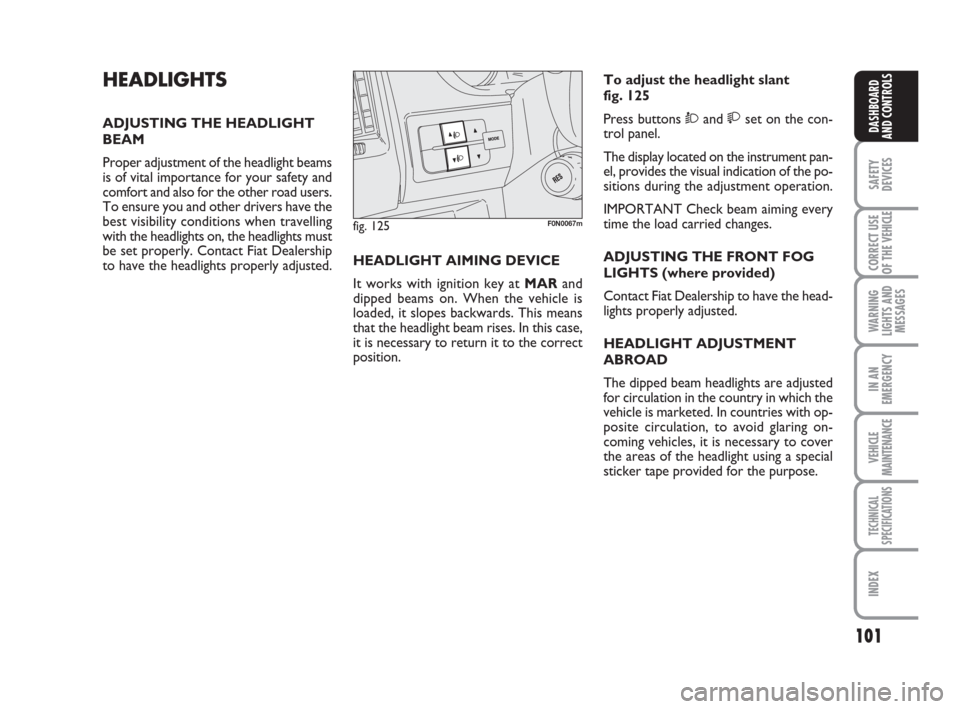
HEADLIGHT AIMING DEVICE
It works with ignition key at MARand
dipped beams on. When the vehicle is
loaded, it slopes backwards. This means
that the headlight beam rises. In this case,
it is necessary to return it to the correct
position.To adjust the headlight slant
fig. 125
Press buttons Òand set on the con-
trol panel.
The display located on the instrument pan-
el, provides the visual indication of the po-
sitions during the adjustment operation.
IMPORTANT Check beam aiming every
time the load carried changes.
ADJUSTING THE FRONT FOG
LIGHTS (where provided)
Contact Fiat Dealership to have the head-
lights properly adjusted.
HEADLIGHT ADJUSTMENT
ABROAD
The dipped beam headlights are adjusted
for circulation in the country in which the
vehicle is marketed. In countries with op-
posite circulation, to avoid glaring on-
coming vehicles, it is necessary to cover
the areas of the headlight using a special
sticker tape provided for the purpose.