door lock FIAT DUCATO 2014 3.G User Guide
[x] Cancel search | Manufacturer: FIAT, Model Year: 2014, Model line: DUCATO, Model: FIAT DUCATO 2014 3.GPages: 367, PDF Size: 20.39 MB
Page 57 of 367
Deactivating the device
To deactivate the device, turn ring nut A
toO.
The deactivation of the device is
indicated by the
warning light
switching off on the instrument panel
and, on some versions, by a message
and
symbol on the display.
Automatic deactivation
of device
The device deactivates automatically in
the event of fault in the system.
WARNING
27) When travelling with the device
active, never move the gear lever
to neutral.
28) If the device is faulty, turn ring
nutAtoO, check the condition
of the fuse and contact a Fiat
Dealership.
ROOF LIGHTSFRONT ROOF LIGHT WITH
SPOT LIGHTS
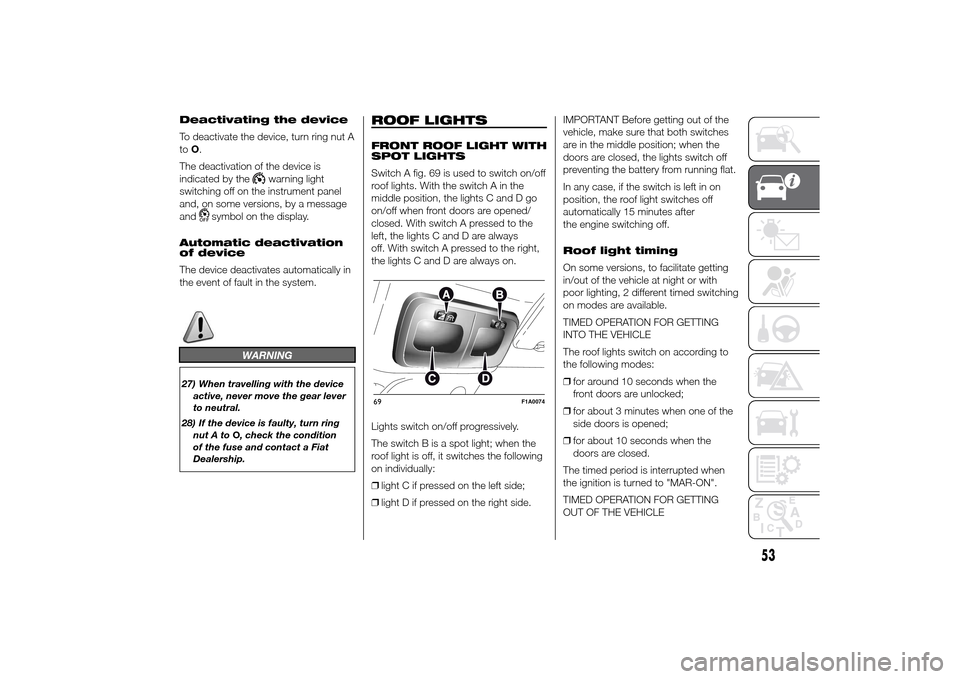
Switch A fig. 69 is used to switch on/off
roof lights. With the switch A in the
middle position, the lights C and D go
on/off when front doors are opened/
closed. With switch A pressed to the
left, the lights C and D are always
off. With switch A pressed to the right,
the lights C and D are always on.
Lights switch on/off progressively.
The switch B is a spot light; when the
roof light is off, it switches the following
on individually:
❒light C if pressed on the left side;
❒light D if pressed on the right side.IMPORTANT Before getting out of the
vehicle, make sure that both switches
are in the middle position; when the
doors are closed, the lights switch off
preventing the battery from running flat.
In any case, if the switch is left in on
position, the roof light switches off
automatically 15 minutes after
the engine switching off.
Roof light timing
On some versions, to facilitate getting
in/out of the vehicle at night or with
poor lighting, 2 different timed switching
on modes are available.
TIMED OPERATION FOR GETTING
INTO THE VEHICLE
The roof lights switch on according to
the following modes:
❒for around 10 seconds when the
front doors are unlocked;
❒for about 3 minutes when one of the
side doors is opened;
❒for about 10 seconds when the
doors are closed.
The timed period is interrupted when
the ignition is turned to "MAR-ON".
TIMED OPERATION FOR GETTING
OUT OF THE VEHICLE69
F1A0074
53
Page 58 of 367
After removing the key from the ignition,
the roof lights switch on according to
the following modes:
❒within 2 minutes of the engine being
switched off for a period of around
10 seconds;
❒when one of the side doors is
opened for a period of around
3 minutes;
❒when one of the doors is closed for a
period of about 10 seconds.
The timed period ends automatically
when the doors are locked.
LOAD COMPARTMENT
REAR COURTESY LIGHT
This is located above the rear door.
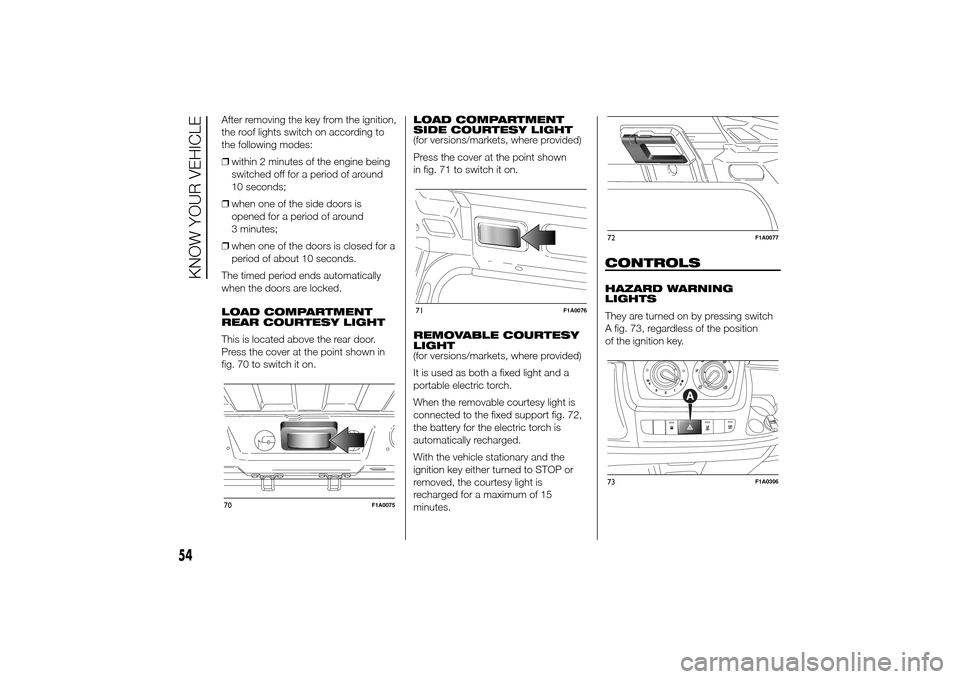
Press the cover at the point shown in
fig. 70 to switch it on.LOAD COMPARTMENT
SIDE COURTESY LIGHT
(for versions/markets, where provided)
Press the cover at the point shown
in fig. 71 to switch it on.
REMOVABLE COURTESY
LIGHT
(for versions/markets, where provided)
It is used as both a fixed light and a
portable electric torch.
When the removable courtesy light is
connected to the fixed support fig. 72,
the battery for the electric torch is
automatically recharged.
With the vehicle stationary and the
ignition key either turned to STOP or
removed, the courtesy light is
recharged for a maximum of 15
minutes.
CONTROLSHAZARD WARNING
LIGHTS
They are turned on by pressing switch
A fig. 73, regardless of the position
of the ignition key.
70
F1A0075
71
F1A0076
72
F1A0077
73
F1A0306
54
KNOW YOUR VEHICLE
Page 60 of 367
BATTERY
DISCONNECTION
FUNCTION
(DISCONNECTOR)
(for versions/markets, where provided)
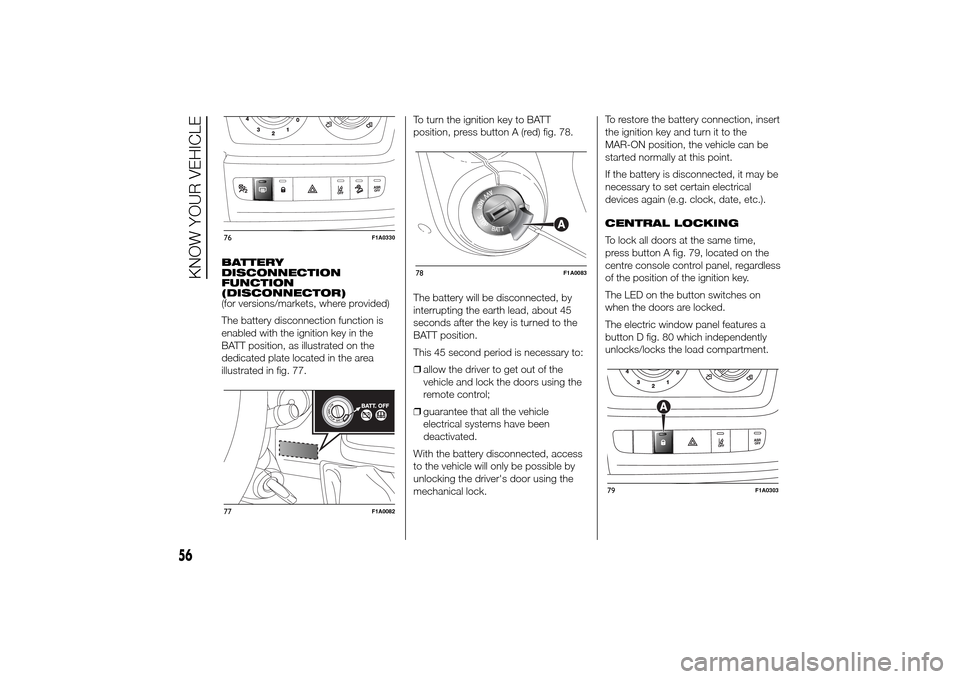
The battery disconnection function is
enabled with the ignition key in the
BATT position, as illustrated on the
dedicated plate located in the area
illustrated in fig. 77.To turn the ignition key to BATT
position, press button A (red) fig. 78.
The battery will be disconnected, by
interrupting the earth lead, about 45
seconds after the key is turned to the
BATT position.
This 45 second period is necessary to:
❒allow the driver to get out of the
vehicle and lock the doors using the
remote control;
❒guarantee that all the vehicle
electrical systems have been
deactivated.
With the battery disconnected, access
to the vehicle will only be possible by
unlocking the driver's door using the
mechanical lock.To restore the battery connection, insert
the ignition key and turn it to the
MAR-ON position, the vehicle can be
started normally at this point.
If the battery is disconnected, it may be
necessary to set certain electrical
devices again (e.g. clock, date, etc.).
CENTRAL LOCKING
To lock all doors at the same time,
press button A fig. 79, located on the
centre console control panel, regardless
of the position of the ignition key.
The LED on the button switches on
when the doors are locked.
The electric window panel features a
button D fig. 80 which independently
unlocks/locks the load compartment.76
F1A0330
77
F1A0082
78
F1A0083
79
F1A0303
56
KNOW YOUR VEHICLE
Page 63 of 367
CUP HOLDER - CAN
HOLDER - BOTTLE
HOLDER ON
DASHBOARD
(for versions/markets, where provided)
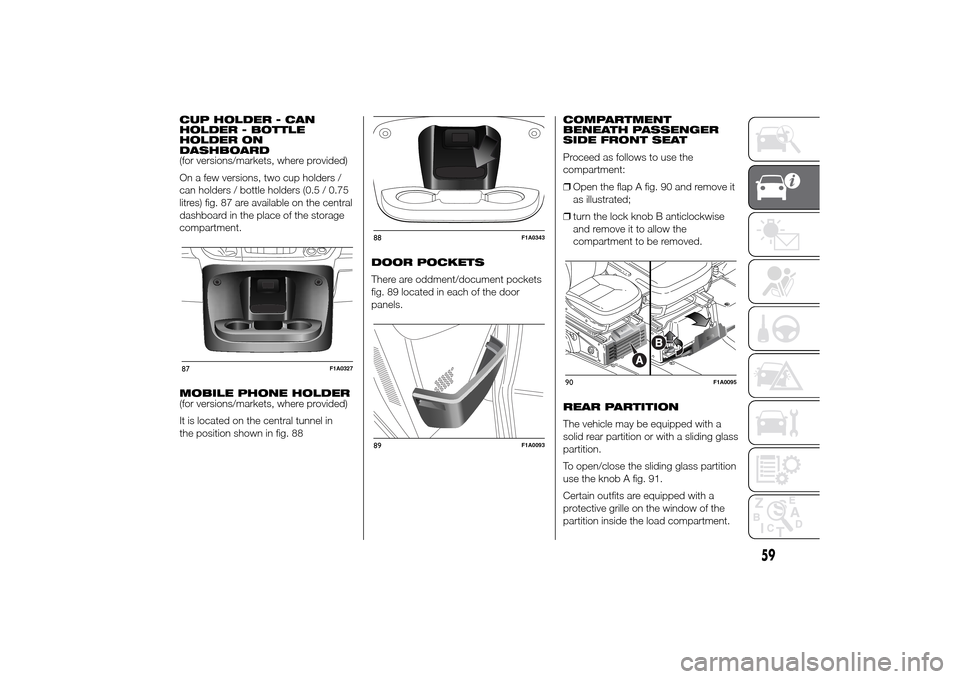
On a few versions, two cup holders /
can holders / bottle holders (0.5 / 0.75
litres) fig. 87 are available on the central
dashboard in the place of the storage
compartment.
MOBILE PHONE HOLDER
(for versions/markets, where provided)
It is located on the central tunnel in
the position shown in fig. 88DOOR POCKETS
There are oddment/document pockets
fig. 89 located in each of the door
panels.COMPARTMENT
BENEATH PASSENGER
SIDE FRONT SEAT
Proceed as follows to use the
compartment:
❒Open the flap A fig. 90 and remove it
as illustrated;
❒turn the lock knob B anticlockwise
and remove it to allow the
compartment to be removed.
REAR PARTITION
The vehicle may be equipped with a
solid rear partition or with a sliding glass
partition.
To open/close the sliding glass partition
use the knob A fig. 91.
Certain outfits are equipped with a
protective grille on the window of the
partition inside the load compartment.87
F1A0327
88
F1A0343
89
F1A0093
90
F1A0095
59
Page 69 of 367
During the adjustment the LED located
on the button (A or B) corresponding
to the direction of travel, flashes.
If, after selecting a button, the LED
remains lit up (for about 5 seconds)
rather than flashing, this means that the
adjustment is temporarily unavailable.
Possible causes may be as follows:
❒insufficient air reserve: the function is
restored by starting the engine;
❒the system has reached a threshold
working temperature: wait a few
minutes to let it cool down before
operating the buttons again.
The level selected with the vehicle
stationary is maintained up to a speed
of about 20 km/h; when this speed
is exceeded, the system will
automatically restore the normal level:
“ride 0”.
IMPORTANT
4) Before manually adjusting with
doors open, make sure there is
enough space around the vehicle
for this kind of operation.
DOORSDOOR CENTRAL
LOCKING/UNLOCKING
Locking doors from the
outside
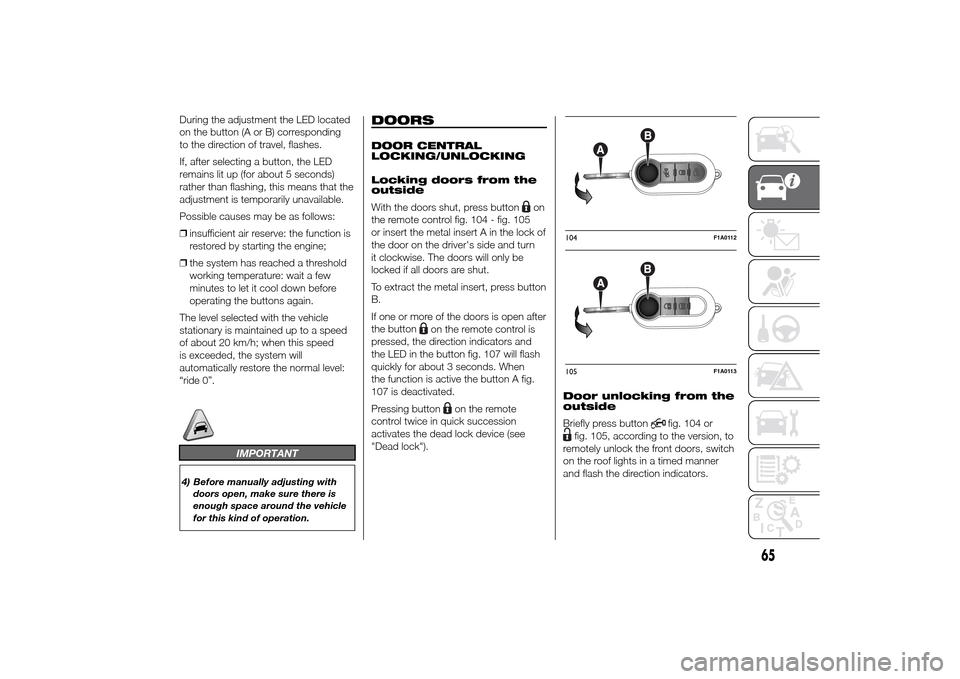
With the doors shut, press button
on
the remote control fig. 104 - fig. 105
or insert the metal insert A in the lock of
the door on the driver's side and turn
it clockwise. The doors will only be
locked if all doors are shut.
To extract the metal insert, press button
B.
If one or more of the doors is open after
the button
on the remote control is
pressed, the direction indicators and
the LED in the button fig. 107 will flash
quickly for about 3 seconds. When
the function is active the button A fig.
107 is deactivated.
Pressing button
on the remote
control twice in quick succession
activates the dead lock device (see
"Dead lock").Door unlocking from the
outside
Briefly press button
fig. 104 or
fig. 105, according to the version, to
remotely unlock the front doors, switch
on the roof lights in a timed manner
and flash the direction indicators.104
F1A0112
105
F1A0113
65
Page 70 of 367
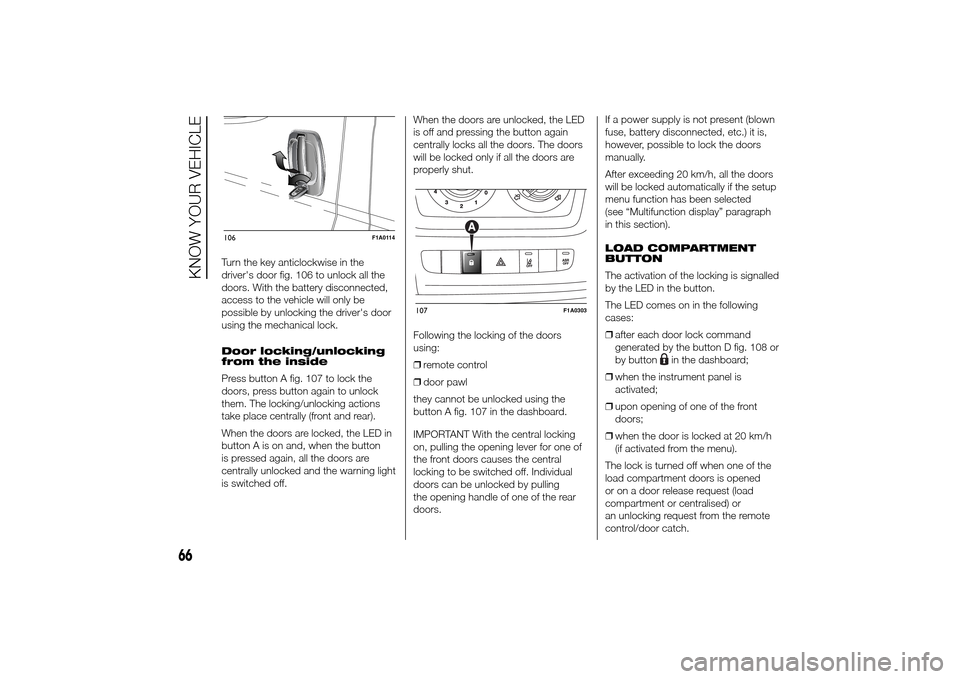
Turn the key anticlockwise in the
driver's door fig. 106 to unlock all the
doors. With the battery disconnected,
access to the vehicle will only be
possible by unlocking the driver's door
using the mechanical lock.
Door locking/unlocking
from the inside
Press button A fig. 107 to lock the
doors, press button again to unlock
them. The locking/unlocking actions
take place centrally (front and rear).
When the doors are locked, the LED in
button A is on and, when the button
is pressed again, all the doors are
centrally unlocked and the warning light
is switched off.When the doors are unlocked, the LED
is off and pressing the button again
centrally locks all the doors. The doors
will be locked only if all the doors are
properly shut.
Following the locking of the doors
using:
❒remote control
❒door pawl
they cannot be unlocked using the
button A fig. 107 in the dashboard.
IMPORTANT With the central locking
on, pulling the opening lever for one of
the front doors causes the central
locking to be switched off. Individual
doors can be unlocked by pulling
the opening handle of one of the rear
doors.If a power supply is not present (blown
fuse, battery disconnected, etc.) it is,
however, possible to lock the doors
manually.
After exceeding 20 km/h, all the doors
will be locked automatically if the setup
menu function has been selected
(see “Multifunction display” paragraph
in this section).
LOAD COMPARTMENT
BUTTON
The activation of the locking is signalled
by the LED in the button.
The LED comes on in the following
cases:
❒after each door lock command
generated by the button D fig. 108 or
by button
in the dashboard;
❒when the instrument panel is
activated;
❒upon opening of one of the front
doors;
❒when the door is locked at 20 km/h
(if activated from the menu).
The lock is turned off when one of the
load compartment doors is opened
or on a door release request (load
compartment or centralised) or
an unlocking request from the remote
control/door catch.
106
F1A0114
107
F1A0303
66
KNOW YOUR VEHICLE
Page 71 of 367
DEAD LOCK
(for versions/markets, where provided)
This safety device inhibits the operation
of:
❒interior handles
locking/unlocking button A fig. 107
thereby preventing the opening of the
doors from inside the passenger
compartment if there has been
a break-in attempt (e.g. a window has
been broken).
The dead lock device therefore offers
the best possible protection against
break-in attempts. We recommend
engaging it whenever the vehicle is
parked and left unattended.
34)
Device activation
The dead lock device is automatically
activated on every door with two short
presses on the button
on the key
with remote control fig. 104.
Device activation is indicated by 3
flashes of the direction indicators and a
flash of the LED on button A fig. 107
on the dashboard.
If one or more of the doors is not
perfectly shut, the dead lock device will
not be activated, thus preventing a
person getting into the car through the
open door and, on shutting, it,
remaining stuck inside the passenger
compartment.
Device deactivation
The system is disabled automatically on
every door in the following cases:
❒if the mechanical key is turned to the
opening position in the driver's door;
❒by unlocking the doors using the
remote control;
❒by turning the ignition key to the
MAR-ON position.SLIDING SIDE DOOR
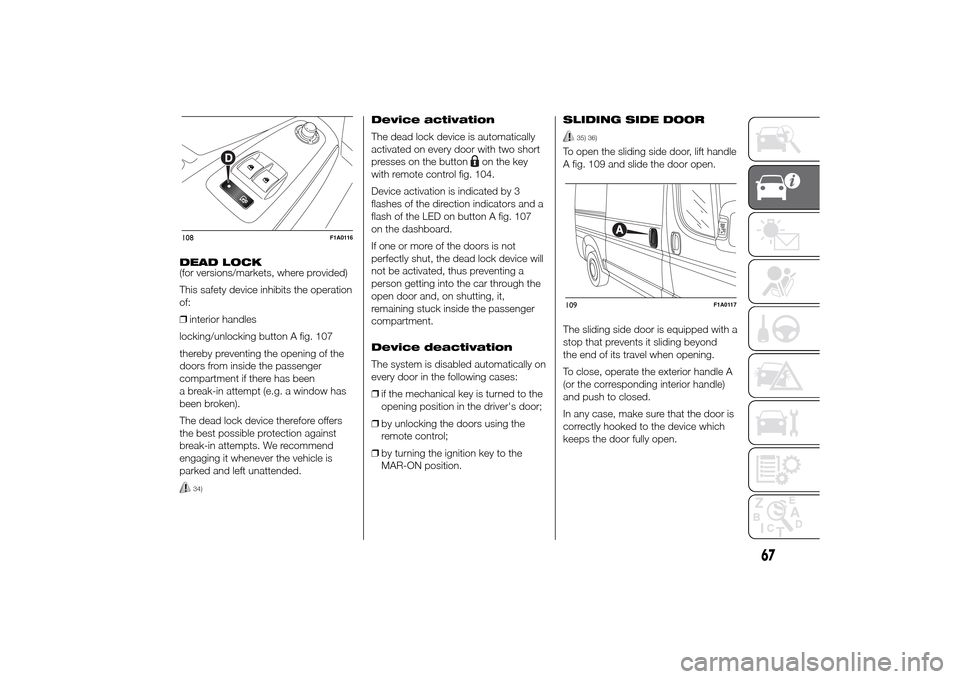
35) 36)
To open the sliding side door, lift handle
A fig. 109 and slide the door open.
The sliding side door is equipped with a
stop that prevents it sliding beyond
the end of its travel when opening.
To close, operate the exterior handle A
(or the corresponding interior handle)
and push to closed.
In any case, make sure that the door is
correctly hooked to the device which
keeps the door fully open.
108
F1A0116
109
F1A0117
67
Page 72 of 367
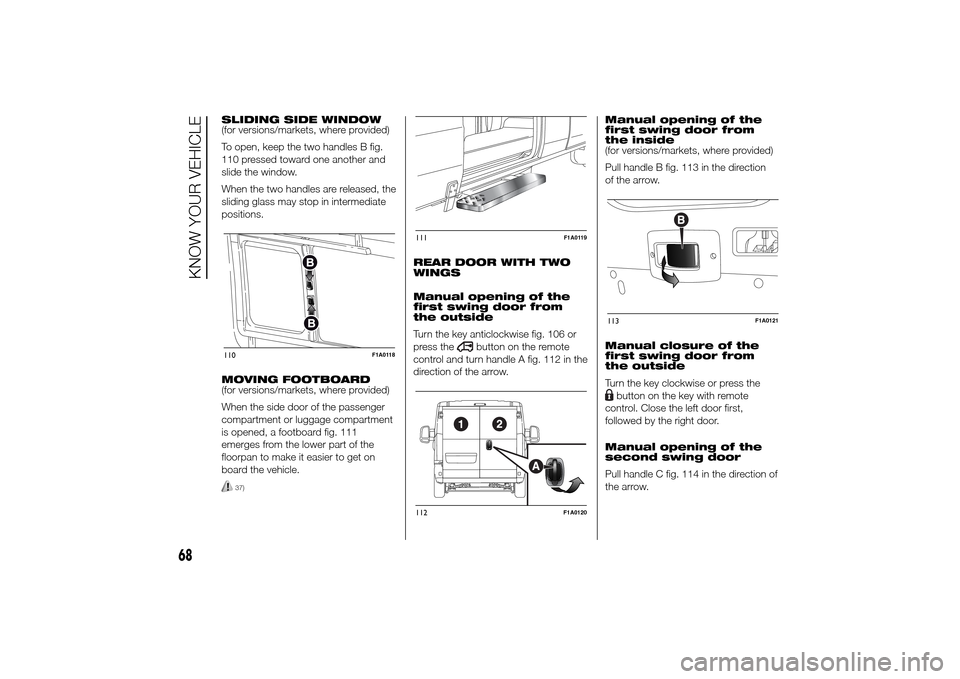
SLIDING SIDE WINDOW
(for versions/markets, where provided)
To open, keep the two handles B fig.
110 pressed toward one another and
slide the window.
When the two handles are released, the
sliding glass may stop in intermediate
positions.
MOVING FOOTBOARD
(for versions/markets, where provided)
When the side door of the passenger
compartment or luggage compartment
is opened, a footboard fig. 111
emerges from the lower part of the
floorpan to make it easier to get on
board the vehicle.
37)
REAR DOOR WITH TWO
WINGS
Manual opening of the
first swing door from
the outside
Turn the key anticlockwise fig. 106 or
press the
button on the remote
control and turn handle A fig. 112 in the
direction of the arrow.Manual opening of the
first swing door from
the inside
(for versions/markets, where provided)
Pull handle B fig. 113 in the direction
of the arrow.
Manual closure of the
first swing door from
the outside
Turn the key clockwise or press the
button on the key with remote
control. Close the left door first,
followed by the right door.
Manual opening of the
second swing door
Pull handle C fig. 114 in the direction of
the arrow.
110
F1A0118
111
F1A0119
112
F1A0120
113
F1A0121
68
KNOW YOUR VEHICLE
Page 73 of 367
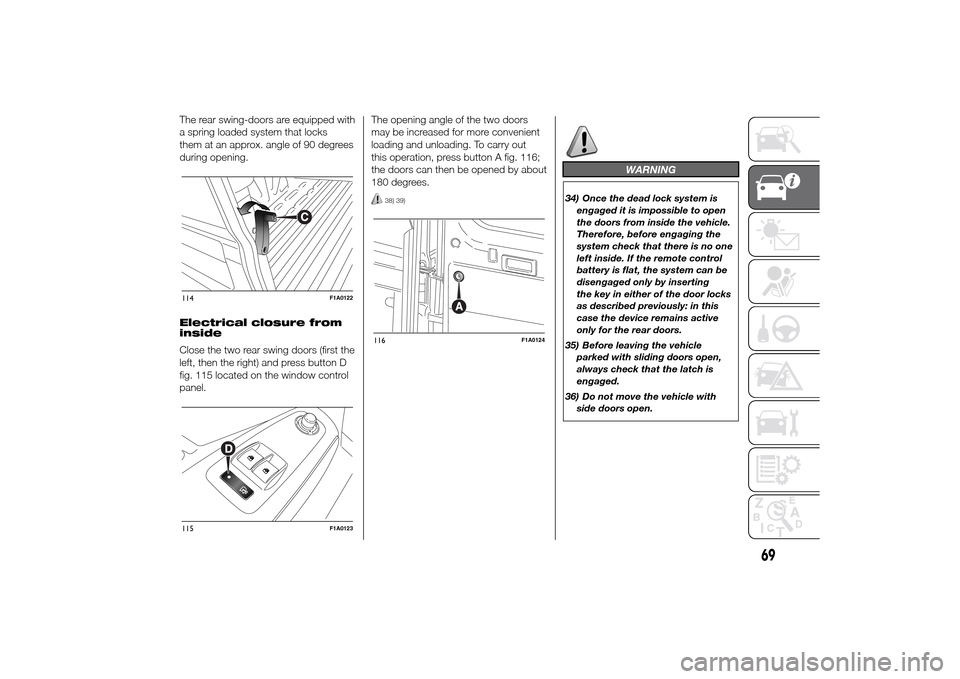
The rear swing-doors are equipped with
a spring loaded system that locks
them at an approx. angle of 90 degrees
during opening.
Electrical closure from
inside
Close the two rear swing doors (first the
left, then the right) and press button D
fig. 115 located on the window control
panel.The opening angle of the two doors
may be increased for more convenient
loading and unloading. To carry out
this operation, press button A fig. 116;
the doors can then be opened by about
180 degrees.
38) 39)
WARNING
34) Once the dead lock system is
engaged it is impossible to open
the doors from inside the vehicle.
Therefore, before engaging the
system check that there is no one
left inside. If the remote control
battery is flat, the system can be
disengaged only by inserting
the key in either of the door locks
as described previously: in this
case the device remains active
only for the rear doors.
35) Before leaving the vehicle
parked with sliding doors open,
always check that the latch is
engaged.
36) Do not move the vehicle with
side doors open.
114
F1A0122
115
F1A0123
116
F1A0124
69
Page 74 of 367
37) Before setting off after parking
or before moving the vehicle in
any way, ensure that the
footboard is fully stowed away. As
the movement of the platform is
linked to that of the sliding side
door, the
warning light in the
instrument panel comes on if it is
not fully retracted in the same
way as when the rear doors are
not shut.
38) This spring loaded system has
activation forces that were
designed for optimum comfort.
Accidental knocks or a strong
gust of wind may release the
springs and close the doors
spontaneously.
39) With the doors opened to 180
degrees, no locking system is
effective. Do not use this opening
with the vehicle parked on a
gradient or when it is windy.
ELECTRIC WINDOWSELECTRIC
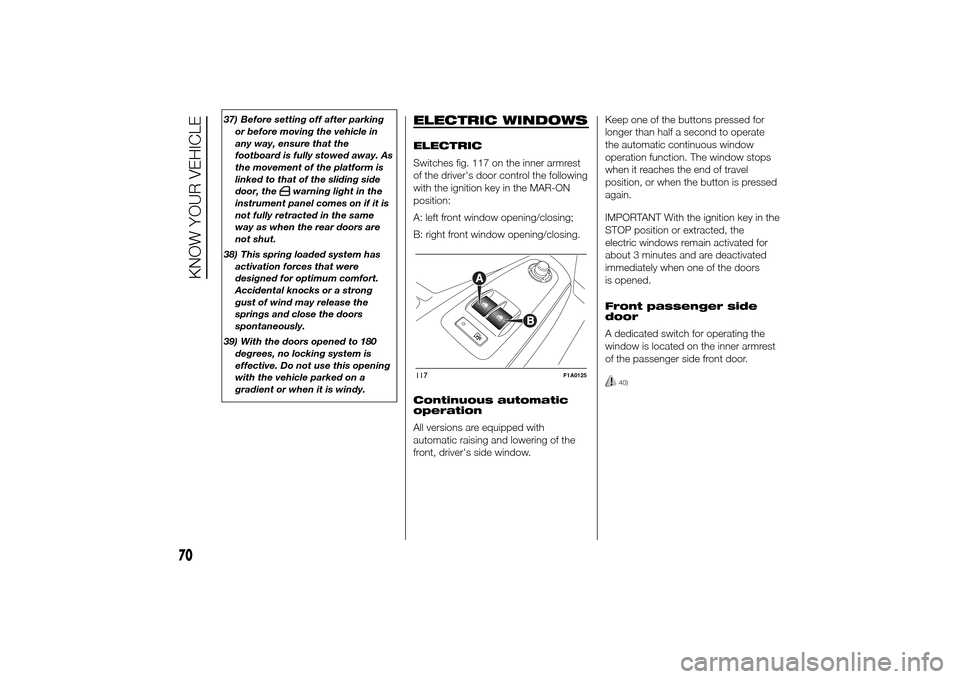
Switches fig. 117 on the inner armrest
of the driver's door control the following
with the ignition key in the MAR-ON
position:
A: left front window opening/closing;
B: right front window opening/closing.
Continuous automatic
operation
All versions are equipped with
automatic raising and lowering of the
front, driver's side window.Keep one of the buttons pressed for
longer than half a second to operate
the automatic continuous window
operation function. The window stops
when it reaches the end of travel
position, or when the button is pressed
again.
IMPORTANT With the ignition key in the
STOP position or extracted, the
electric windows remain activated for
about 3 minutes and are deactivated
immediately when one of the doors
is opened.
Front passenger side
door
A dedicated switch for operating the
window is located on the inner armrest
of the passenger side front door.
40)
117
F1A0125
70
KNOW YOUR VEHICLE