ignition FIAT DUCATO 2014 3.G Owner's Manual
[x] Cancel search | Manufacturer: FIAT, Model Year: 2014, Model line: DUCATO, Model: FIAT DUCATO 2014 3.GPages: 367, PDF Size: 20.39 MB
Page 74 of 367
37) Before setting off after parking
or before moving the vehicle in
any way, ensure that the
footboard is fully stowed away. As
the movement of the platform is
linked to that of the sliding side
door, the
warning light in the
instrument panel comes on if it is
not fully retracted in the same
way as when the rear doors are
not shut.
38) This spring loaded system has
activation forces that were
designed for optimum comfort.
Accidental knocks or a strong
gust of wind may release the
springs and close the doors
spontaneously.
39) With the doors opened to 180
degrees, no locking system is
effective. Do not use this opening
with the vehicle parked on a
gradient or when it is windy.
ELECTRIC WINDOWSELECTRIC
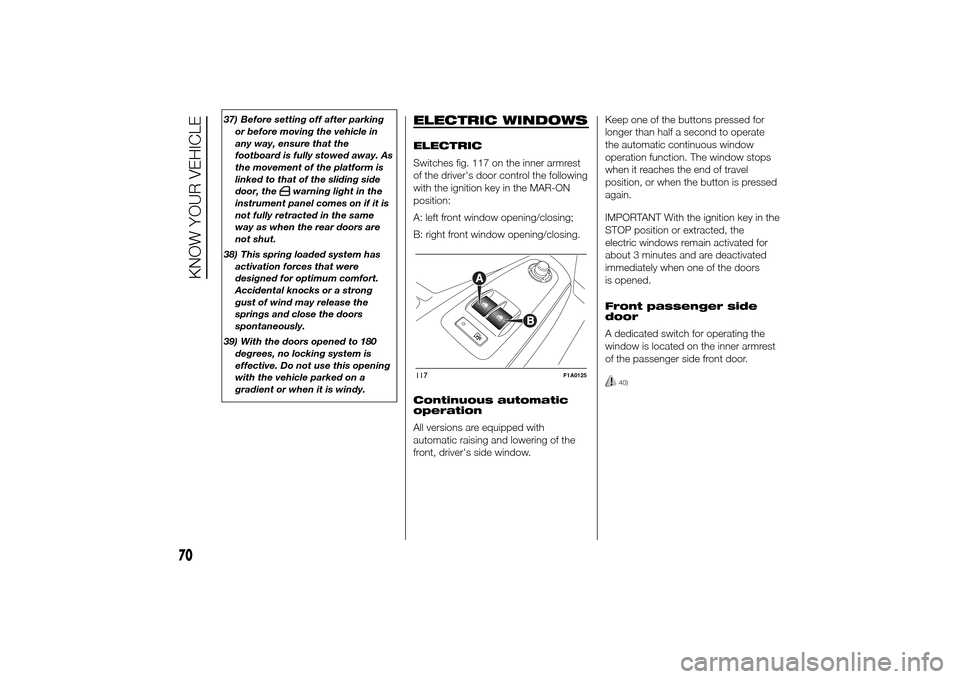
Switches fig. 117 on the inner armrest
of the driver's door control the following
with the ignition key in the MAR-ON
position:
A: left front window opening/closing;
B: right front window opening/closing.
Continuous automatic
operation
All versions are equipped with
automatic raising and lowering of the
front, driver's side window.Keep one of the buttons pressed for
longer than half a second to operate
the automatic continuous window
operation function. The window stops
when it reaches the end of travel
position, or when the button is pressed
again.
IMPORTANT With the ignition key in the
STOP position or extracted, the
electric windows remain activated for
about 3 minutes and are deactivated
immediately when one of the doors
is opened.
Front passenger side
door
A dedicated switch for operating the
window is located on the inner armrest
of the passenger side front door.
40)
117
F1A0125
70
KNOW YOUR VEHICLE
Page 75 of 367
WARNING
40) Incorrect use of the electric
windows may be dangerous.
Before and during operation,
always check that nobody is
exposed to the risk of being
injured either directly by the
moving window or through
objects getting caught or by being
hit. When leaving the vehicle,
always remove the key from the
ignition switch to avoid the risk of
injury to anyone remaining in
the car due to accidental
operation of the electric windows.
BONNETOPENING
Proceed as follows:
❒open the driver's door to gain access
to the bonnet release handle;
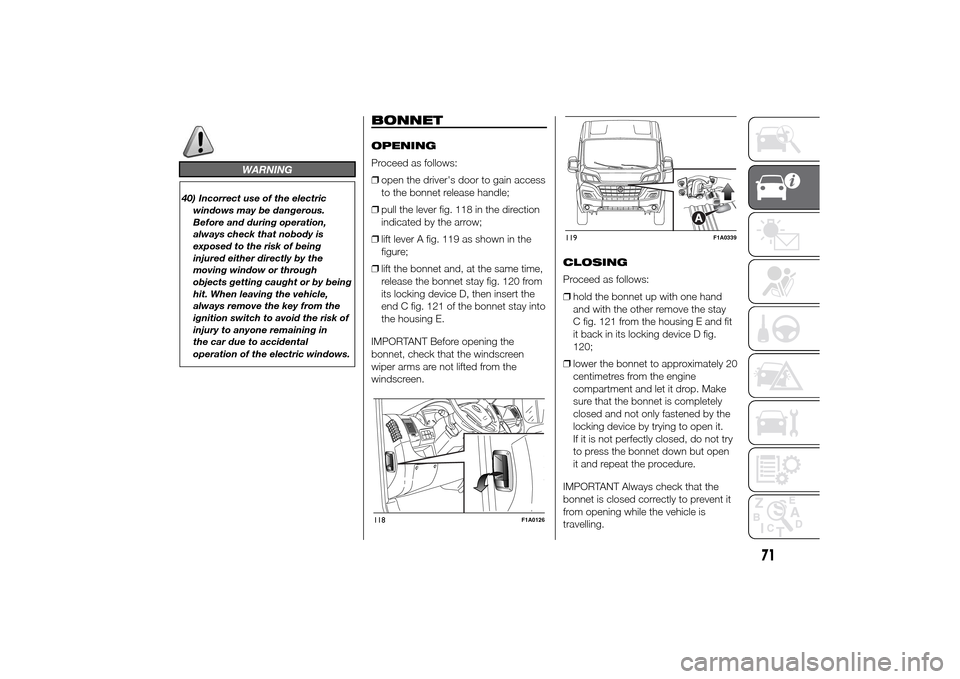
❒pull the lever fig. 118 in the direction
indicated by the arrow;
❒lift lever A fig. 119 as shown in the
figure;
❒lift the bonnet and, at the same time,
release the bonnet stay fig. 120 from
its locking device D, then insert the
end C fig. 121 of the bonnet stay into
the housing E.
IMPORTANT Before opening the
bonnet, check that the windscreen
wiper arms are not lifted from the
windscreen.CLOSING
Proceed as follows:
❒hold the bonnet up with one hand
and with the other remove the stay
C fig. 121 from the housing E and fit
it back in its locking device D fig.
120;
❒lower the bonnet to approximately 20
centimetres from the engine
compartment and let it drop. Make
sure that the bonnet is completely
closed and not only fastened by the
locking device by trying to open it.
If it is not perfectly closed, do not try
to press the bonnet down but open
it and repeat the procedure.
IMPORTANT Always check that the
bonnet is closed correctly to prevent it
from opening while the vehicle is
travelling.118
F1A0126
119
F1A0339
71
Page 77 of 367
WARNING
44) After travelling for a few
kilometres, check to ensure that
the fixing screws for the
attachments are well tightened.
45) Evenly distribute the load and
take into account, when driving,
the increased responsiveness
of the vehicle to side wind.
IMPORTANT
5) The size of the loads you
transport must strictly comply
with currently applicable
regulations.
6) Never exceed the maximum
permitted loads (see “Technical
specifications” section).
HEADLIGHTSLIGHT BEAM ALIGNMENT
The correct alignment of the headlights
is essential for the comfort and safety
of the driver and other road users.
To ensure the best visibility when
travelling with the headlights on, the
headlight alignment must be correct.
Contact a Fiat Dealership to have
the headlights checked and adjusted.
HEADLIGHT ALIGNMENT
CORRECTOR
This device works with the ignition key
in the MAR-ON position and the dipped
beam headlights on.
The vehicle tilts backwards when it is
laden, raising the beam.
The beams must therefore be realigned
in this case.
Headlight alignment
adjustment
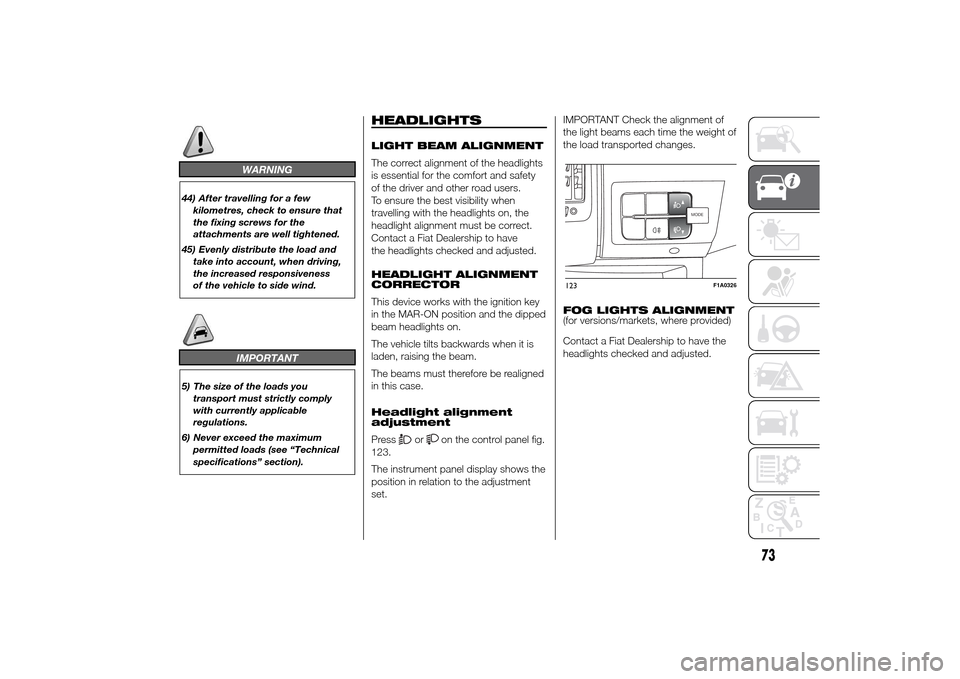
Press
or
on the control panel fig.
123.
The instrument panel display shows the
position in relation to the adjustment
set.IMPORTANT Check the alignment of
the light beams each time the weight of
the load transported changes.
FOG LIGHTS ALIGNMENT
(for versions/markets, where provided)
Contact a Fiat Dealership to have the
headlights checked and adjusted.
MODEMODE
123
F1A0326
73
Page 86 of 367
❒interference caused by electronic
devices or radio frequency emissions
similar to those of the TPM sensors.
❒Application of tinted films which
interfere with the signals of the radio
waves.
❒Presence of snow or ice on the
wheels or the wheel arches.
❒Use of snow chains.
❒Use of wheels/tyres not equipped
with TPM sensors.
❒The space-saver wheel is not
equipped with the tyre pressure
control sensor. Therefore, the tyre
pressure is not controlled by the
system.
❒If the space-saver wheel replaces a
tyre with a pressure lower than the
insufficient pressure limit, an acoustic
signal will be emitted and the warning
light
will switch on at the next
ignition cycle.❒When the original tyre is repaired or
replaced and it is mounted back on
the vehicle to replace the space-
saver wheel, the TPMS will update
automatically and the warning light
will switch off, provided that the
pressure of none of the four tyres is
below the insufficient pressure limit.
You may need to drive the vehicle for
about 20 minutes at a speed higher
than 20 km/h to allow the TPMS
to receive this information.IMPORTANT
INFORMATION
WARNING
65) The TPMS is optimised for the
original tyres and wheels
provided. TPMS pressures and
alerts have been defined
according to the size of the tyres
mounted on the vehicle. Using
equipment with different size,
type or kind may cause irregular
system operation or sensor
damage. Non-original spare
wheels can damage the sensor.
Do not use tyre sealant or
balancing weights if the vehicle is
equipped with TPMS as these
may damage the sensors.
66) If the system signals a pressure
decrease on a specific tyre, it is
recommended to check the
pressure on all four tyres.
67) TPMS does not relieve the driver
from the obligation to check the
tyre pressure every month; it is
not even to be considered a
replacing system for maintenance
or a safety system.
82
KNOW YOUR VEHICLE
Page 101 of 367
VEHICLE INACTIVITY
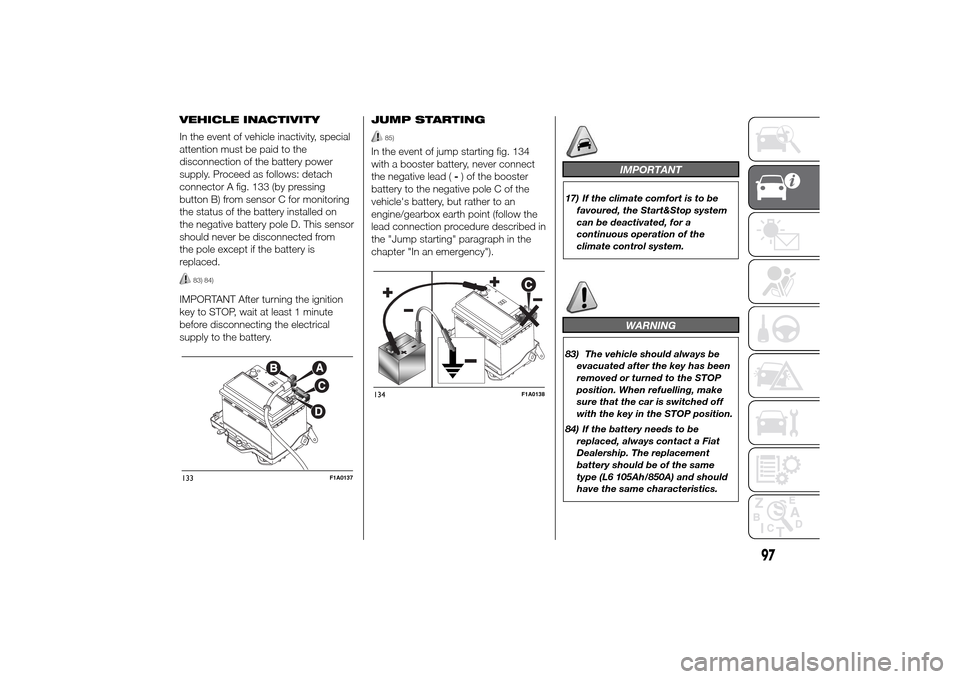
In the event of vehicle inactivity, special
attention must be paid to the
disconnection of the battery power
supply. Proceed as follows: detach
connector A fig. 133 (by pressing
button B) from sensor C for monitoring
the status of the battery installed on
the negative battery pole D. This sensor
should never be disconnected from
the pole except if the battery is
replaced.
83) 84)
IMPORTANT After turning the ignition
key to STOP, wait at least 1 minute
before disconnecting the electrical
supply to the battery.JUMP STARTING
85)
In the event of jump starting fig. 134
with a booster battery, never connect
the negative lead (-) of the booster
battery to the negative pole C of the
vehicle's battery, but rather to an
engine/gearbox earth point (follow the
lead connection procedure described in
the "Jump starting" paragraph in the
chapter "In an emergency").
IMPORTANT
17) If the climate comfort is to be
favoured, the Start&Stop system
can be deactivated, for a
continuous operation of the
climate control system.
WARNING
83) The vehicle should always be
evacuated after the key has been
removed or turned to the STOP
position. When refuelling, make
sure that the car is switched off
with the key in the STOP position.
84) If the battery needs to be
replaced, always contact a Fiat
Dealership. The replacement
battery should be of the same
type (L6 105Ah/850A) and should
have the same characteristics.
133
F1A0137
134
F1A0138
97
Page 105 of 367
When using or parking the vehicle for a
long time in the mountains or cold
areas, it is advisable to refuel using
locally available diesel fuel.
In this case, it is also advisable to keep
the tank over 50% full.
18)
FILLING THE TANK
To fill the tank completely, top-up twice
after the first click of the fuel supply
gun. Further top-ups could cause faults
in the fuel supply system.
FUEL TANK CAP
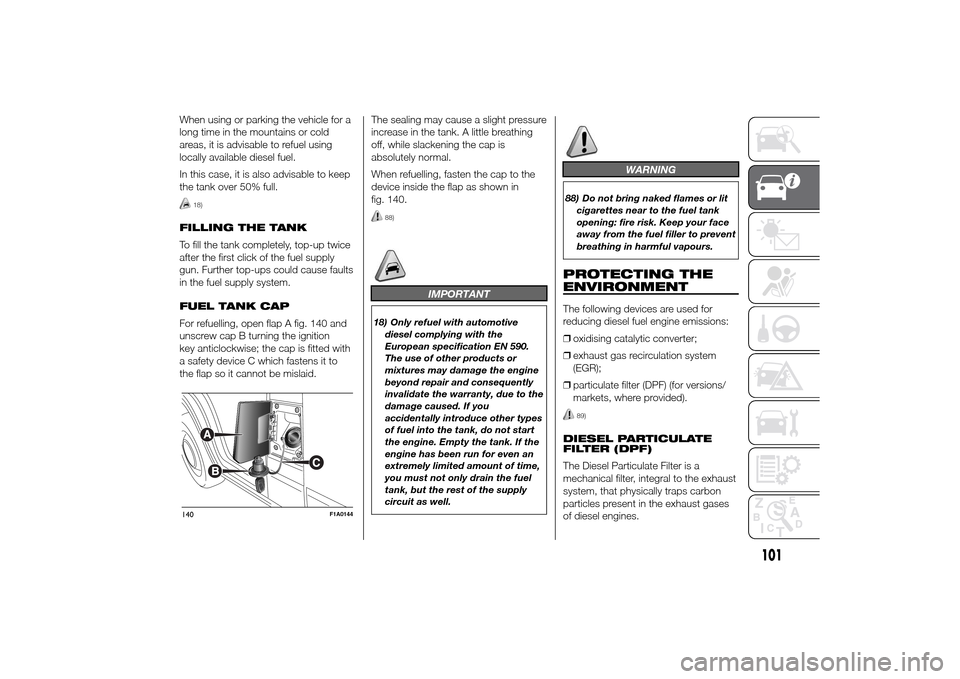
For refuelling, open flap A fig. 140 and
unscrew cap B turning the ignition
key anticlockwise; the cap is fitted with
a safety device C which fastens it to
the flap so it cannot be mislaid.The sealing may cause a slight pressure
increase in the tank. A little breathing
off, while slackening the cap is
absolutely normal.
When refuelling, fasten the cap to the
device inside the flap as shown in
fig. 140.
88)
IMPORTANT
18) Only refuel with automotive
diesel complying with the
European specification EN 590.
The use of other products or
mixtures may damage the engine
beyond repair and consequently
invalidate the warranty, due to the
damage caused. If you
accidentally introduce other types
of fuel into the tank, do not start
the engine. Empty the tank. If the
engine has been run for even an
extremely limited amount of time,
you must not only drain the fuel
tank, but the rest of the supply
circuit as well.
WARNING
88) Do not bring naked flames or lit
cigarettes near to the fuel tank
opening: fire risk. Keep your face
away from the fuel filler to prevent
breathing in harmful vapours.PROTECTING THE
ENVIRONMENTThe following devices are used for
reducing diesel fuel engine emissions:
❒oxidising catalytic converter;
❒exhaust gas recirculation system
(EGR);
❒particulate filter (DPF) (for versions/
markets, where provided).
89)
DIESEL PARTICULATE
FILTER (DPF)
The Diesel Particulate Filter is a
mechanical filter, integral to the exhaust
system, that physically traps carbon
particles present in the exhaust gases
of diesel engines.
140
F1A0144
101
Page 112 of 367
SPEEDOMETER (speed
indicator)
Indicator A shows the speed of the car.
REV COUNTER
Indicator C shows the engine revs.
IMPORTANT The electronic injection
control system gradually shuts off
the flow of fuel when the engine
is over-revving, resulting in a gradual
loss of engine power.
When the engine is idling, the rev
counter may indicate a gradual or
sudden increase of the speed.
This is normal and does not indicate a
fault. It may be caused, for example, by
the activation of the climate control
system or fan. In these cases, a slow
change in revs is used to protect the
battery charge.
FUEL LEVEL GAUGE
Needle E shows the amount of fuel left
in the tank.
E - tank empty.
F - tank full (see the description in
paragraph "Vehicle refuelling" in this
chapter).The warning light on the indicator
switches on when there are about
10-12 litres of fuel (for versions with
tank capacity 90-120 l) or 10 l (for
versions with tank capacity 60 l)
remaining in the tank.
Do not travel with the tank nearly empty
to prevent damaging the catalytic
converter.
IMPORTANT The needle will point to E
and the warning light will flash to
indicate a fault in the system. If this is
the case, go to a Fiat Dealership to
have the system checked.
IMPORTANT It is not advisable to
activate the additional Webasto heater
in reserve conditions.
ENGINE COOLANT
TEMPERATURE
INDICATOR
The needle D shows the temperature of
the engine coolant and starts
supplying indications when the fluid
temperature exceeds approx. 50°C. In
normal use, the needle could assume
different positions within the scale,
depending on the usage conditions.
C - Low engine coolant temperature.
H - High engine coolant temperature.The warning light on the indicator may
light up (and a message on the display
may appear on certain versions) to
indicate that the coolant fluid
temperature is too high; in this case,
stop the engine and contact a Fiat
Dealership.
19)
ENGINE OIL LEVEL
GAUGE
(for versions/markets, where provided)
The gauge provides a graphic indication
of the level of oil in the engine.
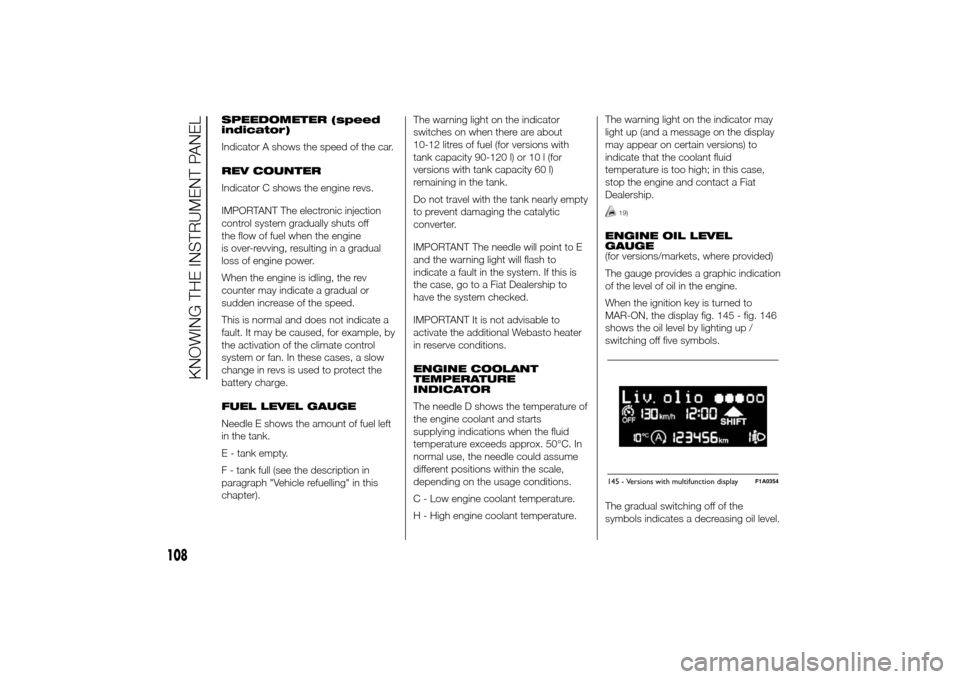
When the ignition key is turned to
MAR-ON, the display fig. 145 - fig. 146
shows the oil level by lighting up /
switching off five symbols.
The gradual switching off of the
symbols indicates a decreasing oil level.145 - Versions with multifunction display
F1A0354
108
KNOWING THE INSTRUMENT PANEL
Page 121 of 367
– briefly press the MODE button; the
display shows the estimated km
distance to the next oil change
(depending on the driving mode);
– briefly press button MODE to go back
to the menu screen or press the button
for longer to go back to the standard
screen.
NoteThe "Scheduled Servicing Plan"
requires the vehicle to be serviced every
48,000 km (or 30,000 mi). This
indication will appear automatically, with
the key at MAR-ON, starting from
2,000 km (or 1,240 mi) and will be
displayed every 200 km (or 124 mi). Oil
change notification messages are
displayed in the same way. Use the
and
buttons to alternate
between displaying scheduled servicing
and engine oil change information.
Below 200 km servicing indications are
more frequent. The display will be in
km or mi depending on the
measurement unit settings. When the
next scheduled service is approaching,
the word “Service” will appear on the
display, followed by the number of
kilometres or miles left, when the key is
turned to MAR-ON. Contact a Fiat
Dealership to carry out any service
operation in the "Scheduled servicing
plan" and to reset the display.NoteWhen an oil change is nearly due
and the ignition key is turned to
MAR-ON, the display will show a
dedicated message. Engine
performance will decrease still driving in
these conditions. When the change is
due, the dedicated message will
reappear on the display together with
the activation of both the
and
warning lights. Contact a Fiat
Dealership.
Activating/deactivating
front passenger side
airbags and side bags
for chest protection
(Passenger airbag)
(for versions/markets, where provided)
This function allows the passenger
side airbag to be activated/deactivated.
Proceed as follows:
❒press the MODE button and, after
the message "Bag pass: Off" (to
deactivate) or "Bag pass: On" (to
activate) is displayed by pressing the
and
buttons, press the
MODE button again;
❒the confirmation request message
will appear on the display;
❒by pressing the
or
buttons, select (Yes) (to confirm
activation/deactivation) or (No) (to
cancel);❒press the MODE button briefly and a
message confirming the selection will
be displayed, then you will return to
the menu screen, or hold the button
down to return to the standard
screen without storing.
Daytime running lights
(DRL)
(for versions/markets, where provided)
With this function is possible to turn the
daytime running lights on and off.
Proceed as follows to activate or
deactivate this function:
❒briefly press the MODE button. The
display shows a submenu;
❒briefly press the MODE button. "On"
or "Off" flash on the display,
according to what has been
previously set;
❒press
or
to make your
choice;
❒briefly press the MODE button to
return to the submenu screen or hold
the button down to return to the
main menu screen without storing;
❒press the MODE button again to
return to the standard screen or
to the main menu according to the
menu items where you are in.
117
Page 122 of 367
Automatic main beam
headlights
(for versions/markets, where provided)
This function activates/deactivates
the automatic headlights.
Proceed as follows to activate or
deactivate this function:
❒briefly press the MODE button. The
display shows a submenu;
❒briefly press the MODE button. "On"
or "Off" flash on the display,
according to what has been
previously set;
❒press
or
to make your
choice;
❒briefly press the MODE button to
return to the submenu screen or hold
the button down to return to the
main menu screen without storing;
❒press the MODE button again to
return to the standard screen or
to the main menu according to the
menu items where you are in.
Exit Menu
This is the last function that closes the
cycle of settings listed in the menu
screen.
Pressing the MODE button briefly will
return the display to the standard
screen without storing.Press button
to return to the first
menu item (Speed Beep).
TRIP COMPUTER
IN BRIEF
The Trip computer is used to display
information on vehicle operation
when the ignition key is turned to
MAR-ON. This function allows you to
define two separate trips, called
"Trip A" and "Trip B", for monitoring
the "complete mission" (journey)
of the vehicle in a reciprocally
independent manner. Both functions
can be reset (reset means start of
a new journey).
“Trip A” is used to display the figures
relating to:
❒Outside temperature
❒Range
❒Distance travelled A
❒Average consumption A
❒Instant fuel consumption
❒Average speed A
❒Trip time A (driving time).
❒Reset Trip A
"Trip B", available on multifunction
display only, is used to display
the values relating to:
118
KNOWING THE INSTRUMENT PANEL
Page 123 of 367
❒Distance travelled B
❒Average consumption B
❒Average speed B
❒Trip time B (driving time).
20)
Values displayed
Outside temperature
Indicates the temperature outside the
vehicle passenger compartment.
Range (for versions/markets, where
provided)
This indicates the distance that can still
be travelled with the fuel in the tank,
assuming that driving style remains
unvaried. The display will show the
reading '-----' when the following
events take place:
❒range value lower than 50 km (or 30
mi)
❒vehicle is left parked with the engine
running for a long time.IMPORTANT The range can be affected
by several factors: driving style (see
paragraph “Driving style” in the
“Starting and driving” section), type of
route (motorway, towns and cities,
mountain roads, etc…), usage
conditions (load, tyre pressures, etc…).
Trip planning must therefore take the
above into account.
Distance travelled
This value shows the distance covered
from the start of the new journey.
Average consumption (for versions/
markets, where provided)
This value shows the approximate
average fuel consumption from the start
of the new journey.
Instant consumption (for versions/
markets where provided)
This value shows the fuel consumption.
The value is constantly updated. The
display will show “----”ifthecar
is parked with the engine running.Average speed
This value shows the car's average
speed based on the overall time
elapsed since the start of the new
journey.
Trip time
Time elapsed since the start of the new
journey.
IMPORTANT If there is no information,
the Trip computer displays "----" in
place of the value. When normal
operating conditions are restored, the
counting of the various values is
resumed, without either zeroing the
values displayed prior to the problem,
or starting a new mission.
TRIP control button
The TRIP button is located on the right
stalk fig. 150. With the ignition key
turned to MAR-ON, this button allows
you to view the previously described
values and also zero them to begin
a new journey:
❒brief press to access the various
values displays;
❒long press to reset and then start a
new mission.
119