without FIAT DUCATO 2014 3.G Owner's Manual
[x] Cancel search | Manufacturer: FIAT, Model Year: 2014, Model line: DUCATO, Model: FIAT DUCATO 2014 3.GPages: 367, PDF Size: 20.39 MB
Page 118 of 367
❒press
or
to make your
choice;
❒briefly press the MODE button to
return to the menu screen or hold the
button down to return to the
standard screen without storing.
Rain sensor
(Rain sensor setting adjustment)
(for versions/markets, where provided)
This function allows you to adjust the
rain sensor sensitivity to 4 levels.
To set the required sensitivity level,
proceed as follows:
❒briefly press the MODE button. The
sensitivity “level” set previously
flashes on the display;
❒press the
or
button to
make the adjustment;
❒briefly press the MODE button to
return to the menu screen or hold the
button down to return to the
standard screen without storing.
Trip B On/Off (Trip B
data)
This function can be used to activate
(On) or deactivate (Off) the Trip B
display (partial trip).
For more information see the "Trip
computer" paragraph.For activation/deactivation, proceed as
follows:
- briefly press the MODE button: ON or
OFF flashes on the display (depending
the previous setting);
- press the
or
button to
select;
- press the MODE button briefly to
return to the menu screen or hold the
button down to return to the standard
screen without storing.
Traffic sign
This function allows you to activate (On)
or deactivate (Off) the Traffic Sign
function to recognise the traffic signs
(no overtaking or speed limits).
For activation/deactivation, proceed as
follows:
- briefly press the MODE button: ON or
OFF flashes on the display (depending
the previous setting);
- press the
or
button to
select;
- press the MODE button briefly to
return to the menu screen or hold the
button down to return to the standard
screen without storing.Setting the clock (Set
time)
This function allows you to set the clock
through two submenus: “Time” and
“Format”.
To carry out the adjustment, proceed as
follows:
- briefly press the MODE button and
two submenus, "Time" and "Format",
will be displayed;
- press the
or
button to
switch between the two submenus;
- once you have selected the submenu
to be changed, press button MODE
briefly;
- if you enter the "Time" submenu,
pressing the MODE button briefly
makes the "hours" flash on the display;
- press the
or
button to
adjust;
- briefly press the MODE button: the
"minutes" starts to flash on the display;
- press the
or
button to
adjust;
– if you enter the "Format" submenu,
pressing the MODE button briefly
makes the display format flash on the
display;
- press the
or
button to
select "24h" or "12h" mode.
114
KNOWING THE INSTRUMENT PANEL
Page 119 of 367
When you have made the adjustment,
briefly press the MODE button to go
back to the submenu screen or hold
the button down to go back to the main
menu screen without storing.
- press the MODE button again to
return to the standard screen or to the
main menu according to where you
are in the menu.
Setting the date (Set
Date)
This function allows updating of the
date (day - month - year).
Proceed as follows to update:
- briefly press the MODE button: the
day starts flashing on the display (dd);
- press the
or
button to
adjust;
- briefly press the MODE button: the
month starts flashing on the display
(mm);
- press the
or
button to
adjust;
- briefly press the MODE button: the
year starts flashing on the display
(yyyy);
- press the buttonor
for
setting.NoteThe setting will increase or
decrease by one unit each time the
or
button is pressed.
Keeping the button pressed causes an
automatic rapid value increase/
decrease. Complete the adjustment
with single presses of the button when
you approach the desired value.
- press the MODE button briefly to
return to the menu screen or hold the
button down to return to the standard
screen without storing.
Automatic central
locking with vehicle
moving (Autoclose)
After activation (On), this function allows
the automatic locking of the doors
when the speed exceeds 20 km/h.
Proceed as follows to activate (On) or
deactivate (Off) this function:
- briefly press the MODE button to
display a submenu;
- briefly press the MODE button: ON or
OFF flashes on the display (depending
the previous setting);
- press theor
button to
select;
- press the MODE button briefly to
return to the submenu screen or hold
the button down to return to the main
menu screen without storing;- press the MODE button again to
return to the standard screen or to the
main menu according to where you
are in the menu.
Set units (Measurement
units)
With this function it is possible to set
the unit of measurement using three
submenus: "Distance", "Consumption"
and "Temperature".
To set the desired unit of measurement,
proceed as follows:
- briefly press the MODE button to
display the three submenus;
- press button
or
to
navigate through the three submenus;
- once you have selected the submenu
to be changed, press button MODE
briefly;
- if you enter the "Distances" submenu,
pressing the MODE button briefly
makes the display show "km" or "mi"
(depending on the previous setting);
- press the
or
button
to select;
- if you enter the "Consumption"
submenu, pressing the MODE button
briefly makes "km/l", "l/100km" or
"mpg" appear on the display
(depending on the previous setting);
115
Page 120 of 367
If the set distance unit is "km", the
display enables setting of the fuel
consumption unit (km/l or l/100km).
If the set distance unit is "mi", the
display shows the amount of fuel
consumed in "mpg".
- press the
or
button to
select;
- if you enter the "Temperature"
submenu, pressing the MODE button
makes "°C" or "°F" appear on the
display (depending on the previous
setting);
- press the
or
button to
select;
When you have made the adjustment,
briefly press the MODE button to go
back to the submenu screen or hold
the button down to go back to the main
menu screen without storing.
- press the MODE button again to
return to the standard screen or to the
main menu according to where you
are in the menu.Selecting the language
(Language)
Display messages can be shown in
different languages: Italian, German,
English, Spanish, French, Portuguese
and Dutch.
To set the desired language, proceed
as follows:
- briefly press the MODE button: the
previously set "language" starts flashing
on the display;
- press the
or
button to
select;
- press the MODE button briefly to
return to the menu screen or hold the
button down to return to the standard
screen without storing.
Adjust the failure/
warning buzzer volume
(Buzzer Volume)
With this function the volume of the
acoustic signal which accompanies the
display of failure/warning can be
adjusted according to 8 levels.
To set the desired volume, proceed as
follows:
- briefly press the MODE button: the
previously set volume "level" will flash
on the display;- press the
or
button to
adjust;
- press the MODE button briefly to
return to the menu screen or hold the
button down to return to the standard
screen without storing.
Service
Scheduled servicing
Using this function you can display
information about the mileage intervals
for vehicle servicing.
To consult this information, proceed as
follows:
– briefly press the MODE button: the
display shows service requirements in
km or mi according to the previous
setting (see paragraph “Unit of
measure”);
– briefly press button MODE to go back
to the menu screen or press the button
for longer to go back to the standard
screen.
Oil change
This function displays information
regarding the remaining mileage before
the next oil change.
To consult this information, proceed as
follows:
116
KNOWING THE INSTRUMENT PANEL
Page 121 of 367
– briefly press the MODE button; the
display shows the estimated km
distance to the next oil change
(depending on the driving mode);
– briefly press button MODE to go back
to the menu screen or press the button
for longer to go back to the standard
screen.
NoteThe "Scheduled Servicing Plan"
requires the vehicle to be serviced every
48,000 km (or 30,000 mi). This
indication will appear automatically, with
the key at MAR-ON, starting from
2,000 km (or 1,240 mi) and will be
displayed every 200 km (or 124 mi). Oil
change notification messages are
displayed in the same way. Use the
and
buttons to alternate
between displaying scheduled servicing
and engine oil change information.
Below 200 km servicing indications are
more frequent. The display will be in
km or mi depending on the
measurement unit settings. When the
next scheduled service is approaching,
the word “Service” will appear on the
display, followed by the number of
kilometres or miles left, when the key is
turned to MAR-ON. Contact a Fiat
Dealership to carry out any service
operation in the "Scheduled servicing
plan" and to reset the display.NoteWhen an oil change is nearly due
and the ignition key is turned to
MAR-ON, the display will show a
dedicated message. Engine
performance will decrease still driving in
these conditions. When the change is
due, the dedicated message will
reappear on the display together with
the activation of both the
and
warning lights. Contact a Fiat
Dealership.
Activating/deactivating
front passenger side
airbags and side bags
for chest protection
(Passenger airbag)
(for versions/markets, where provided)
This function allows the passenger
side airbag to be activated/deactivated.
Proceed as follows:
❒press the MODE button and, after
the message "Bag pass: Off" (to
deactivate) or "Bag pass: On" (to
activate) is displayed by pressing the
and
buttons, press the
MODE button again;
❒the confirmation request message
will appear on the display;
❒by pressing the
or
buttons, select (Yes) (to confirm
activation/deactivation) or (No) (to
cancel);❒press the MODE button briefly and a
message confirming the selection will
be displayed, then you will return to
the menu screen, or hold the button
down to return to the standard
screen without storing.
Daytime running lights
(DRL)
(for versions/markets, where provided)
With this function is possible to turn the
daytime running lights on and off.
Proceed as follows to activate or
deactivate this function:
❒briefly press the MODE button. The
display shows a submenu;
❒briefly press the MODE button. "On"
or "Off" flash on the display,
according to what has been
previously set;
❒press
or
to make your
choice;
❒briefly press the MODE button to
return to the submenu screen or hold
the button down to return to the
main menu screen without storing;
❒press the MODE button again to
return to the standard screen or
to the main menu according to the
menu items where you are in.
117
Page 122 of 367
Automatic main beam
headlights
(for versions/markets, where provided)
This function activates/deactivates
the automatic headlights.
Proceed as follows to activate or
deactivate this function:
❒briefly press the MODE button. The
display shows a submenu;
❒briefly press the MODE button. "On"
or "Off" flash on the display,
according to what has been
previously set;
❒press
or
to make your
choice;
❒briefly press the MODE button to
return to the submenu screen or hold
the button down to return to the
main menu screen without storing;
❒press the MODE button again to
return to the standard screen or
to the main menu according to the
menu items where you are in.
Exit Menu
This is the last function that closes the
cycle of settings listed in the menu
screen.
Pressing the MODE button briefly will
return the display to the standard
screen without storing.Press button
to return to the first
menu item (Speed Beep).
TRIP COMPUTER
IN BRIEF
The Trip computer is used to display
information on vehicle operation
when the ignition key is turned to
MAR-ON. This function allows you to
define two separate trips, called
"Trip A" and "Trip B", for monitoring
the "complete mission" (journey)
of the vehicle in a reciprocally
independent manner. Both functions
can be reset (reset means start of
a new journey).
“Trip A” is used to display the figures
relating to:
❒Outside temperature
❒Range
❒Distance travelled A
❒Average consumption A
❒Instant fuel consumption
❒Average speed A
❒Trip time A (driving time).
❒Reset Trip A
"Trip B", available on multifunction
display only, is used to display
the values relating to:
118
KNOWING THE INSTRUMENT PANEL
Page 123 of 367
❒Distance travelled B
❒Average consumption B
❒Average speed B
❒Trip time B (driving time).
20)
Values displayed
Outside temperature
Indicates the temperature outside the
vehicle passenger compartment.
Range (for versions/markets, where
provided)
This indicates the distance that can still
be travelled with the fuel in the tank,
assuming that driving style remains
unvaried. The display will show the
reading '-----' when the following
events take place:
❒range value lower than 50 km (or 30
mi)
❒vehicle is left parked with the engine
running for a long time.IMPORTANT The range can be affected
by several factors: driving style (see
paragraph “Driving style” in the
“Starting and driving” section), type of
route (motorway, towns and cities,
mountain roads, etc…), usage
conditions (load, tyre pressures, etc…).
Trip planning must therefore take the
above into account.
Distance travelled
This value shows the distance covered
from the start of the new journey.
Average consumption (for versions/
markets, where provided)
This value shows the approximate
average fuel consumption from the start
of the new journey.
Instant consumption (for versions/
markets where provided)
This value shows the fuel consumption.
The value is constantly updated. The
display will show “----”ifthecar
is parked with the engine running.Average speed
This value shows the car's average
speed based on the overall time
elapsed since the start of the new
journey.
Trip time
Time elapsed since the start of the new
journey.
IMPORTANT If there is no information,
the Trip computer displays "----" in
place of the value. When normal
operating conditions are restored, the
counting of the various values is
resumed, without either zeroing the
values displayed prior to the problem,
or starting a new mission.
TRIP control button
The TRIP button is located on the right
stalk fig. 150. With the ignition key
turned to MAR-ON, this button allows
you to view the previously described
values and also zero them to begin
a new journey:
❒brief press to access the various
values displays;
❒long press to reset and then start a
new mission.
119
Page 132 of 367
IMPORTANT
21) If the
warning light switches on when driving, stop the engine immediately and contact an Fiat Dealership.
Warning lights on
panelWhat it means What to do
amberINJECTION/EOBD SYSTEM FAILURE
In normal conditions, when the ignition key is turned to
MAR-ON the warning light switches on, but it should
switch off as soon as the engine is started.
The operation of warning light
may be checked by
the traffic police using specific devices. Comply with the
laws and regulations of the country where you are
driving.
22)
If the warning light stays on or switches on when driving,
it means that the injection system is not working
properly; in particular, if the warning light comes on
constantly, this indicates a malfunction in the supply/
ignition system that could cause excessive exhaust
emissions, a possible loss of performance, poor
driveability and high fuel consumption.
On some versions, the display shows the dedicated
message.
The warning light switches off if the malfunction
disappears, but it is still stored by the system.Under these conditions, you may continue
travelling at a moderate speed without
demanding excessive effort from the
engine. Prolonged use of the car with the
warning light on constantly may cause
damage.
Contact a Fiat Dealership as soon as
possible.
128
KNOWING THE INSTRUMENT PANEL
Page 133 of 367
Warning lights on
panelWhat it means What to do
amberABS FAILURE
When the key is turned to MAR-ON, the warning light
switches on but should switch off after a few seconds.
The warning light switches on to indicate a system fault.
In this case the braking system will work as normal, but
without the extra performance offered by the ABS.
The display shows the dedicated message.Drive carefully and contact a Fiat
Dealership as soon as possible.amberFUEL RESERVE
When the key is turned to MAR-ON, the warning light
switches on but should switch off after a few seconds.
The warning light switches on when there are about
10-12 litres of fuel (for versions with tank capacity
90-120 l) or 10 l (for versions with tank capacity 60 l)
remaining in the tank.
IMPORTANT The warning light will blink to indicate a
system fault. If this is the case, go to a Fiat Dealership to
have the system checked.
129
Page 150 of 367
SEAT BELTSUSING THE SEAT BELTS
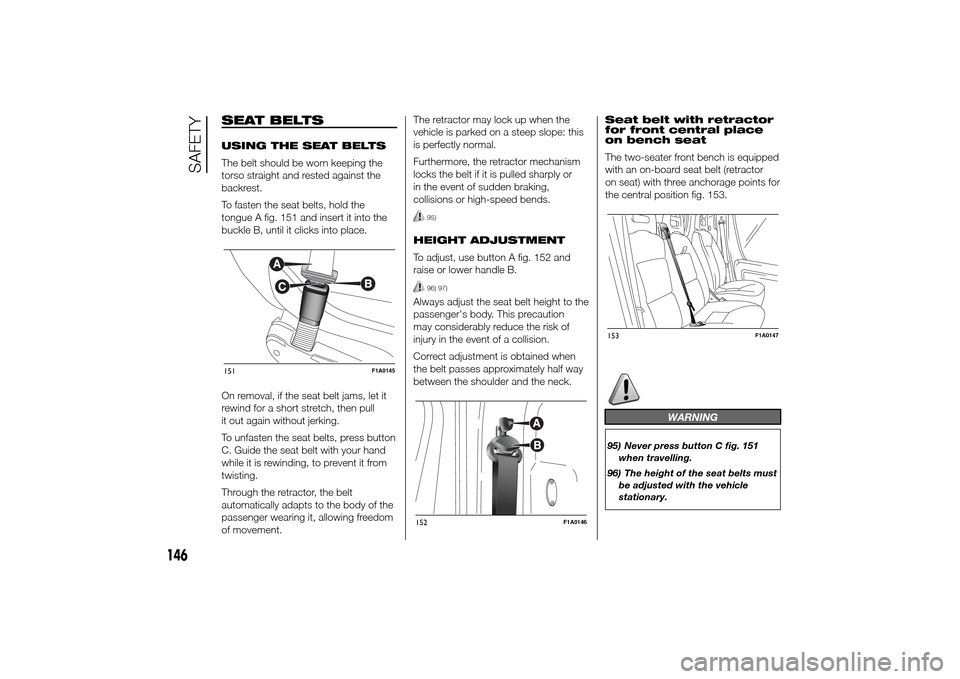
The belt should be worn keeping the
torso straight and rested against the
backrest.
To fasten the seat belts, hold the
tongue A fig. 151 and insert it into the
buckle B, until it clicks into place.
On removal, if the seat belt jams, let it
rewind for a short stretch, then pull
it out again without jerking.
To unfasten the seat belts, press button
C. Guide the seat belt with your hand
while it is rewinding, to prevent it from
twisting.
Through the retractor, the belt
automatically adapts to the body of the
passenger wearing it, allowing freedom
of movement.The retractor may lock up when the
vehicle is parked on a steep slope: this
is perfectly normal.
Furthermore, the retractor mechanism
locks the belt if it is pulled sharply or
in the event of sudden braking,
collisions or high-speed bends.
95)
HEIGHT ADJUSTMENT
To adjust, use button A fig. 152 and
raise or lower handle B.
96) 97)
Always adjust the seat belt height to the
passenger's body. This precaution
may considerably reduce the risk of
injury in the event of a collision.
Correct adjustment is obtained when
the belt passes approximately half way
between the shoulder and the neck.Seat belt with retractor
for front central place
on bench seat
The two-seater front bench is equipped
with an on-board seat belt (retractor
on seat) with three anchorage points for
the central position fig. 153.
WARNING
95) Never press button C fig. 151
when travelling.
96) The height of the seat belts must
be adjusted with the vehicle
stationary.
151
F1A0145
152
F1A0146
153
F1A0147
146
SAFETY
Page 152 of 367
LOAD LIMITERS
To increase passenger safety, the front
seat belt retractors contain a load
limiter which controls the force acting
on the chest and shoulders during
the belt restraining action in the event of
a head-on collision.
GENERAL
INSTRUCTIONS FOR
USING THE SEAT BELTS
The driver is responsible for respecting
(and ensuring that all the other
passengers also respect) the local laws
in force regarding the use of seat belts.
Always fasten the seat belts before
setting off.
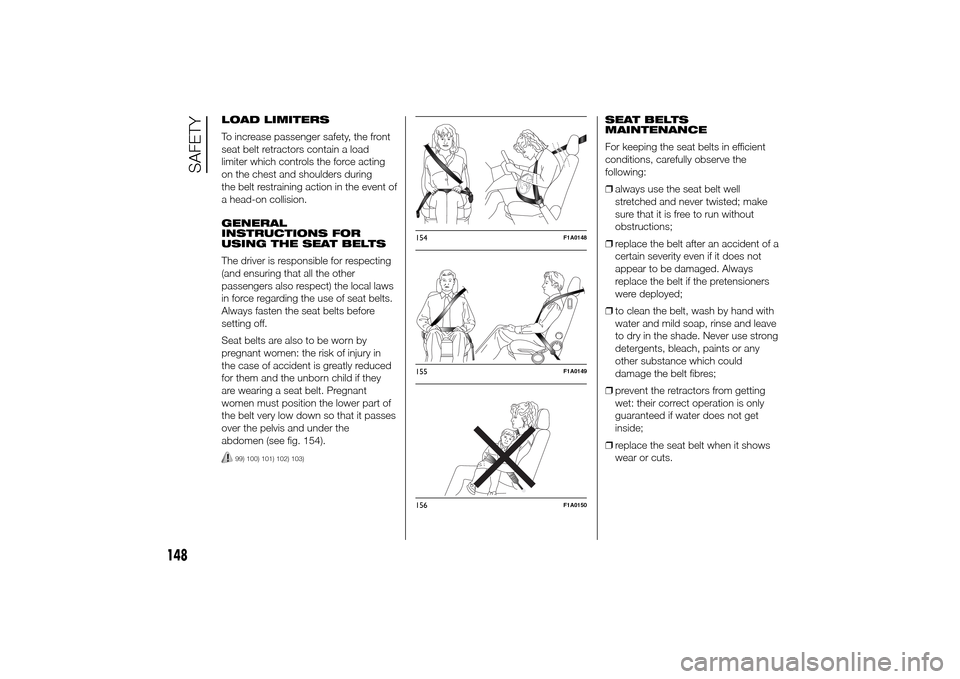
Seat belts are also to be worn by
pregnant women: the risk of injury in
the case of accident is greatly reduced
for them and the unborn child if they
are wearing a seat belt. Pregnant
women must position the lower part of
the belt very low down so that it passes
over the pelvis and under the
abdomen (see fig. 154).
99) 100) 101) 102) 103)
SEAT BELTS
MAINTENANCE
For keeping the seat belts in efficient
conditions, carefully observe the
following:
❒always use the seat belt well
stretched and never twisted; make
sure that it is free to run without
obstructions;
❒replace the belt after an accident of a
certain severity even if it does not
appear to be damaged. Always
replace the belt if the pretensioners
were deployed;
❒to clean the belt, wash by hand with
water and mild soap, rinse and leave
to dry in the shade. Never use strong
detergents, bleach, paints or any
other substance which could
damage the belt fibres;
❒prevent the retractors from getting
wet: their correct operation is only
guaranteed if water does not get
inside;
❒replace the seat belt when it shows
wear or cuts.
154
F1A0148
155
F1A0149
156
F1A0150
148
SAFETY