Deactivate FIAT DUCATO 2014 3.G Owner's Guide
[x] Cancel search | Manufacturer: FIAT, Model Year: 2014, Model line: DUCATO, Model: FIAT DUCATO 2014 3.GPages: 367, PDF Size: 20.39 MB
Page 101 of 367
VEHICLE INACTIVITY
In the event of vehicle inactivity, special
attention must be paid to the
disconnection of the battery power
supply. Proceed as follows: detach
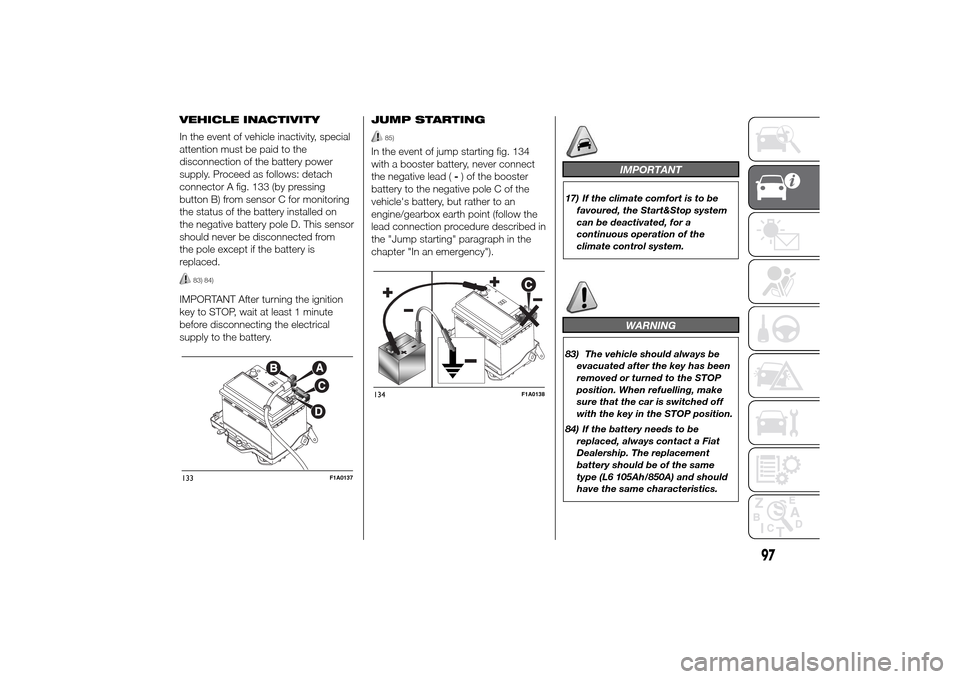
connector A fig. 133 (by pressing
button B) from sensor C for monitoring
the status of the battery installed on
the negative battery pole D. This sensor
should never be disconnected from
the pole except if the battery is
replaced.
83) 84)
IMPORTANT After turning the ignition
key to STOP, wait at least 1 minute
before disconnecting the electrical
supply to the battery.JUMP STARTING
85)
In the event of jump starting fig. 134
with a booster battery, never connect
the negative lead (-) of the booster
battery to the negative pole C of the
vehicle's battery, but rather to an
engine/gearbox earth point (follow the
lead connection procedure described in
the "Jump starting" paragraph in the
chapter "In an emergency").
IMPORTANT
17) If the climate comfort is to be
favoured, the Start&Stop system
can be deactivated, for a
continuous operation of the
climate control system.
WARNING
83) The vehicle should always be
evacuated after the key has been
removed or turned to the STOP
position. When refuelling, make
sure that the car is switched off
with the key in the STOP position.
84) If the battery needs to be
replaced, always contact a Fiat
Dealership. The replacement
battery should be of the same
type (L6 105Ah/850A) and should
have the same characteristics.
133
F1A0137
134
F1A0138
97
Page 117 of 367
Speed limit (Speed
Beep)
This function makes it possible to set
the vehicle speed limit (km/h or mph).
When this limit is exceeded the driver is
immediately alerted (see “Warning
lights and messages” section).
To set the desired speed limit, proceed
as follows:
- briefly press the MODE button: the
display will show the wording (Speed
Beep);
press button
or
to select
speed limit activation (On) or
deactivation (Off);
- if the function has been activated (On),
press the
or
button to
select the desired speed limit and then
press MODE to confirm.NoteSetting is possible between 30
and 200 km/h, or 20 and 125 mph,
according to the previously set unit.
See the "Setting the unit of
measurement (Measurement unit)"
paragraph described below. The setting
will increase/decrease by 5 units each
time button
/
is pressed.
Hold down the
/
button to
automatically increase/decrease the
setting rapidly. Complete the
adjustment with single presses of the
button when you approach the desired
value.
- press the MODE button briefly to
return to the menu screen or hold the
button down to return to the standard
screen without storing.
To cancel the setting, proceed as
follows:
- briefly press button MODE, (On) will
flash on the display;
- press button
, (Off) will flash on
the display;
- press the MODE button briefly to
return to the menu screen or hold the
button down to return to the standard
screen without storing.Headlight sensor
sensitivity adjustment
(for versions/markets, where provided)
With this function it is possible to adjust
the rain headlight sensitivity according
to 3 levels.
To set the required sensitivity level,
proceed as follows:
– briefly press the MODE button: the
previously set sensitivity “level” starts to
flash on the display;
– press the
or
button to
make the adjustment;
– press the MODE button briefly to
return to the menu screen or hold the
button down to return to the standard
screen without storing.
Cornering lights
(Activation/deactivation of
“Cornering lights”)
(for versions/markets, where provided)
This function activates/deactivates
("On"/"Off") the cornering lights (see the
description in the “Exterior lights”
paragraph).
Proceed as follows to activate/
deactivate the lights:
❒briefly press the MODE button. "On"
or "Off" flash on the display,
according to what has been
previously set;
113
Page 118 of 367
❒press
or
to make your
choice;
❒briefly press the MODE button to
return to the menu screen or hold the
button down to return to the
standard screen without storing.
Rain sensor
(Rain sensor setting adjustment)
(for versions/markets, where provided)
This function allows you to adjust the
rain sensor sensitivity to 4 levels.
To set the required sensitivity level,
proceed as follows:
❒briefly press the MODE button. The
sensitivity “level” set previously
flashes on the display;
❒press the
or
button to
make the adjustment;
❒briefly press the MODE button to
return to the menu screen or hold the
button down to return to the
standard screen without storing.
Trip B On/Off (Trip B
data)
This function can be used to activate
(On) or deactivate (Off) the Trip B
display (partial trip).
For more information see the "Trip
computer" paragraph.For activation/deactivation, proceed as
follows:
- briefly press the MODE button: ON or
OFF flashes on the display (depending
the previous setting);
- press the
or
button to
select;
- press the MODE button briefly to
return to the menu screen or hold the
button down to return to the standard
screen without storing.
Traffic sign
This function allows you to activate (On)
or deactivate (Off) the Traffic Sign
function to recognise the traffic signs
(no overtaking or speed limits).
For activation/deactivation, proceed as
follows:
- briefly press the MODE button: ON or
OFF flashes on the display (depending
the previous setting);
- press the
or
button to
select;
- press the MODE button briefly to
return to the menu screen or hold the
button down to return to the standard
screen without storing.Setting the clock (Set
time)
This function allows you to set the clock
through two submenus: “Time” and
“Format”.
To carry out the adjustment, proceed as
follows:
- briefly press the MODE button and
two submenus, "Time" and "Format",
will be displayed;
- press the
or
button to
switch between the two submenus;
- once you have selected the submenu
to be changed, press button MODE
briefly;
- if you enter the "Time" submenu,
pressing the MODE button briefly
makes the "hours" flash on the display;
- press the
or
button to
adjust;
- briefly press the MODE button: the
"minutes" starts to flash on the display;
- press the
or
button to
adjust;
– if you enter the "Format" submenu,
pressing the MODE button briefly
makes the display format flash on the
display;
- press the
or
button to
select "24h" or "12h" mode.
114
KNOWING THE INSTRUMENT PANEL
Page 119 of 367
When you have made the adjustment,
briefly press the MODE button to go
back to the submenu screen or hold
the button down to go back to the main
menu screen without storing.
- press the MODE button again to
return to the standard screen or to the
main menu according to where you
are in the menu.
Setting the date (Set
Date)
This function allows updating of the
date (day - month - year).
Proceed as follows to update:
- briefly press the MODE button: the
day starts flashing on the display (dd);
- press the
or
button to
adjust;
- briefly press the MODE button: the
month starts flashing on the display
(mm);
- press the
or
button to
adjust;
- briefly press the MODE button: the
year starts flashing on the display
(yyyy);
- press the buttonor
for
setting.NoteThe setting will increase or
decrease by one unit each time the
or
button is pressed.
Keeping the button pressed causes an
automatic rapid value increase/
decrease. Complete the adjustment
with single presses of the button when
you approach the desired value.
- press the MODE button briefly to
return to the menu screen or hold the
button down to return to the standard
screen without storing.
Automatic central
locking with vehicle
moving (Autoclose)
After activation (On), this function allows
the automatic locking of the doors
when the speed exceeds 20 km/h.
Proceed as follows to activate (On) or
deactivate (Off) this function:
- briefly press the MODE button to
display a submenu;
- briefly press the MODE button: ON or
OFF flashes on the display (depending
the previous setting);
- press theor
button to
select;
- press the MODE button briefly to
return to the submenu screen or hold
the button down to return to the main
menu screen without storing;- press the MODE button again to
return to the standard screen or to the
main menu according to where you
are in the menu.
Set units (Measurement
units)
With this function it is possible to set
the unit of measurement using three
submenus: "Distance", "Consumption"
and "Temperature".
To set the desired unit of measurement,
proceed as follows:
- briefly press the MODE button to
display the three submenus;
- press button
or
to
navigate through the three submenus;
- once you have selected the submenu
to be changed, press button MODE
briefly;
- if you enter the "Distances" submenu,
pressing the MODE button briefly
makes the display show "km" or "mi"
(depending on the previous setting);
- press the
or
button
to select;
- if you enter the "Consumption"
submenu, pressing the MODE button
briefly makes "km/l", "l/100km" or
"mpg" appear on the display
(depending on the previous setting);
115
Page 121 of 367
– briefly press the MODE button; the
display shows the estimated km
distance to the next oil change
(depending on the driving mode);
– briefly press button MODE to go back
to the menu screen or press the button
for longer to go back to the standard
screen.
NoteThe "Scheduled Servicing Plan"
requires the vehicle to be serviced every
48,000 km (or 30,000 mi). This
indication will appear automatically, with
the key at MAR-ON, starting from
2,000 km (or 1,240 mi) and will be
displayed every 200 km (or 124 mi). Oil
change notification messages are
displayed in the same way. Use the
and
buttons to alternate
between displaying scheduled servicing
and engine oil change information.
Below 200 km servicing indications are
more frequent. The display will be in
km or mi depending on the
measurement unit settings. When the
next scheduled service is approaching,
the word “Service” will appear on the
display, followed by the number of
kilometres or miles left, when the key is
turned to MAR-ON. Contact a Fiat
Dealership to carry out any service
operation in the "Scheduled servicing
plan" and to reset the display.NoteWhen an oil change is nearly due
and the ignition key is turned to
MAR-ON, the display will show a
dedicated message. Engine
performance will decrease still driving in
these conditions. When the change is
due, the dedicated message will
reappear on the display together with
the activation of both the
and
warning lights. Contact a Fiat
Dealership.
Activating/deactivating
front passenger side
airbags and side bags
for chest protection
(Passenger airbag)
(for versions/markets, where provided)
This function allows the passenger
side airbag to be activated/deactivated.
Proceed as follows:
❒press the MODE button and, after
the message "Bag pass: Off" (to
deactivate) or "Bag pass: On" (to
activate) is displayed by pressing the
and
buttons, press the
MODE button again;
❒the confirmation request message
will appear on the display;
❒by pressing the
or
buttons, select (Yes) (to confirm
activation/deactivation) or (No) (to
cancel);❒press the MODE button briefly and a
message confirming the selection will
be displayed, then you will return to
the menu screen, or hold the button
down to return to the standard
screen without storing.
Daytime running lights
(DRL)
(for versions/markets, where provided)
With this function is possible to turn the
daytime running lights on and off.
Proceed as follows to activate or
deactivate this function:
❒briefly press the MODE button. The
display shows a submenu;
❒briefly press the MODE button. "On"
or "Off" flash on the display,
according to what has been
previously set;
❒press
or
to make your
choice;
❒briefly press the MODE button to
return to the submenu screen or hold
the button down to return to the
main menu screen without storing;
❒press the MODE button again to
return to the standard screen or
to the main menu according to the
menu items where you are in.
117
Page 122 of 367
Automatic main beam
headlights
(for versions/markets, where provided)
This function activates/deactivates
the automatic headlights.
Proceed as follows to activate or
deactivate this function:
❒briefly press the MODE button. The
display shows a submenu;
❒briefly press the MODE button. "On"
or "Off" flash on the display,
according to what has been
previously set;
❒press
or
to make your
choice;
❒briefly press the MODE button to
return to the submenu screen or hold
the button down to return to the
main menu screen without storing;
❒press the MODE button again to
return to the standard screen or
to the main menu according to the
menu items where you are in.
Exit Menu
This is the last function that closes the
cycle of settings listed in the menu
screen.
Pressing the MODE button briefly will
return the display to the standard
screen without storing.Press button
to return to the first
menu item (Speed Beep).
TRIP COMPUTER
IN BRIEF
The Trip computer is used to display
information on vehicle operation
when the ignition key is turned to
MAR-ON. This function allows you to
define two separate trips, called
"Trip A" and "Trip B", for monitoring
the "complete mission" (journey)
of the vehicle in a reciprocally
independent manner. Both functions
can be reset (reset means start of
a new journey).
“Trip A” is used to display the figures
relating to:
❒Outside temperature
❒Range
❒Distance travelled A
❒Average consumption A
❒Instant fuel consumption
❒Average speed A
❒Trip time A (driving time).
❒Reset Trip A
"Trip B", available on multifunction
display only, is used to display
the values relating to:
118
KNOWING THE INSTRUMENT PANEL
Page 142 of 367
Warning lights on
panelWhat it means What to do
greenRIGHT-HAND DIRECTION INDICATOR
The warning light turns on when the direction
indicator control stalk is moved upwards or,
together with the left indicator, when the hazard
warning light button is pressed.greenFOG LIGHTS
The warning light comes on when the front fog
lights are turned on.greenCRUISE CONTROL
(for versions/markets, where provided)
The digital warning light switches on in the display
when the ignition key is turned to MAR-ON, but it
should switch off after a few seconds, if the
Cruise Control is deactivated.
The warning light is lit up on the display by
rotating the Cruise Control ring nut to ON or
,
depending on the version. On certain versions a
dedicated message is displayed.
greenSPEED LIMITER
(for versions/markets, where provided)
The warning light on the dial switches on when
the function is activated.
On certain versions a dedicated message is
displayed.
138
KNOWING THE INSTRUMENT PANEL
Page 147 of 367
What it means What to do
START&STOP SYSTEM ACTIVATION/
DEACTIVATION
(for versions/markets, where provided)
Start&Stop system activation
A message will appear on the display when the
Start&Stop system is activated. In this case the
LED located on the
button is off (see the
“Start&Stop” paragraph in the "Knowing your
vehicle" chapter).
Start&Stop system deactivation
A dedicated message will appear on the display
when the Start&Stop system is deactivated.
The LED on the
button is on when the system
is deactivated.
START&STOP FAILURE
If the Start&Stop system is faulty the
symbol
switches on in the display along with a dedicated
message.
143
Page 151 of 367
97) After the adjustment, always
check that the cursor to which the
ring is fastened is locked in one
of the preset positions. Release
the grip and push downwards
to enable the locking device to
click if the grip has not been
released in one of the possible
positions.
SBR SYSTEM
IN BRIEF
The vehicle is fitted with a Seat Belt
Reminder system (SBR), consisting of
a buzzer and a flashing warning light
on the instrument panel which
warns the driver that the seat belt
must be fastened.
The buzzer can be deactivated (until the
next engine stop) as follows:
❒fasten the driver's seat belt;
❒turn the ignition key to the MAR-ON
position;
❒wait for over 20 seconds and then
release one of the seat belts.
For permanent deactivation, contact a
Fiat Dealership.
With digital display, the SBR system
can only be reactivated at a Fiat
Dealership.
With multifunction display, the SBR
system can also be reactivated through
the set-up menu.
PRETENSIONERSTo increase the protective efficiency of
the front seat belts, the vehicle is fitted
with pretensioners. These devices, in
the event of a head-on crash or side
impact, rewind the seat belts a few
centimetres. In this way, they ensure
that the belts fit tightly to the wearer
before the restraining action begins.
The retractor locks to indicate that the
pretensioner has intervened; the seat
belt cannot be drawn back up even
when guiding it manually.
IMPORTANT To obtain the highest
degree of protection from the action of
the pretensioner, wear the seat belt
tight to the chest and pelvis.
A slight discharge of smoke may be
produced during the activation of the
pretensioner which is not harmful and
does not involve any fire hazard.
The pretensioner does not require any
maintenance or lubrication. Any
changes to its original conditions will
invalidate its efficiency. If, due to
unusual natural events (floods, sea
storms, etc.), the device has been
affected by water and mud, it must
absolutely be replaced.
98)25)
147
Page 157 of 367
Below is a summary of
the main safety rules to
be followed when
carrying children
❒The recommended position for
installing child restraint systems is on
the rear seat, as it is the most
protected area in the event of an
impact.
❒If the passenger's front airbag is
deactivated always check the
dedicated LED on button
on the
instrument panel to make sure that it
has actually been deactivated.
❒Carefully follow the instructions that
come with the child restraint system,
which the manufacturer must supply.
Keep the instructions in the vehicle
along with the other papers and this
handbook. Do not use second-hand
child restraint systems without
instructions.
❒Always check that the seat belt is
well fastened by pulling on it.
❒Only one child is to be strapped into
each restraint system; never carry
two children using one child restraint
system.
❒Always check that the seat belts do
not restrain the child's throat.
❒While travelling, do not let the child sit
incorrectly or unfasten the belts.❒Never carry children on your lap,
even newborns. No-one can restrain
a child in the event of an accident.
❒In the event of an accident, replace
the child restraint system with a
new one.
153