warning FIAT DUCATO 2014 3.G Repair Manual
[x] Cancel search | Manufacturer: FIAT, Model Year: 2014, Model line: DUCATO, Model: FIAT DUCATO 2014 3.GPages: 367, PDF Size: 20.39 MB
Page 110 of 367
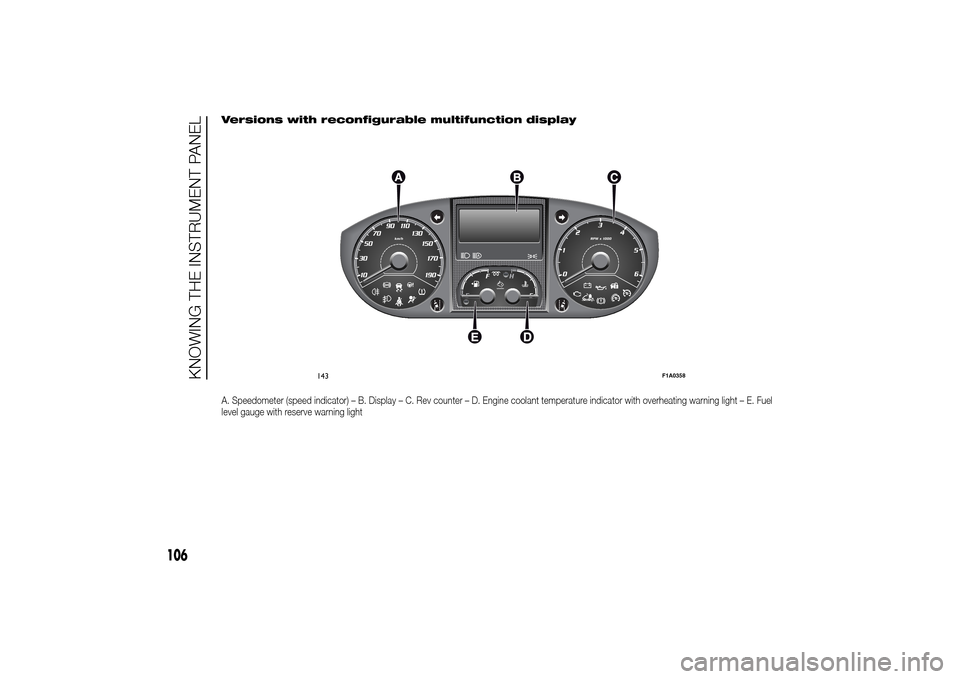
Versions with reconfigurable multifunction displayA. Speedometer (speed indicator) – B. Display – C. Rev counter – D. Engine coolant temperature indicator with overheating warning light – E. Fuel
level gauge with reserve warning light
143
F1A0358
106
KNOWING THE INSTRUMENT PANEL
Page 111 of 367
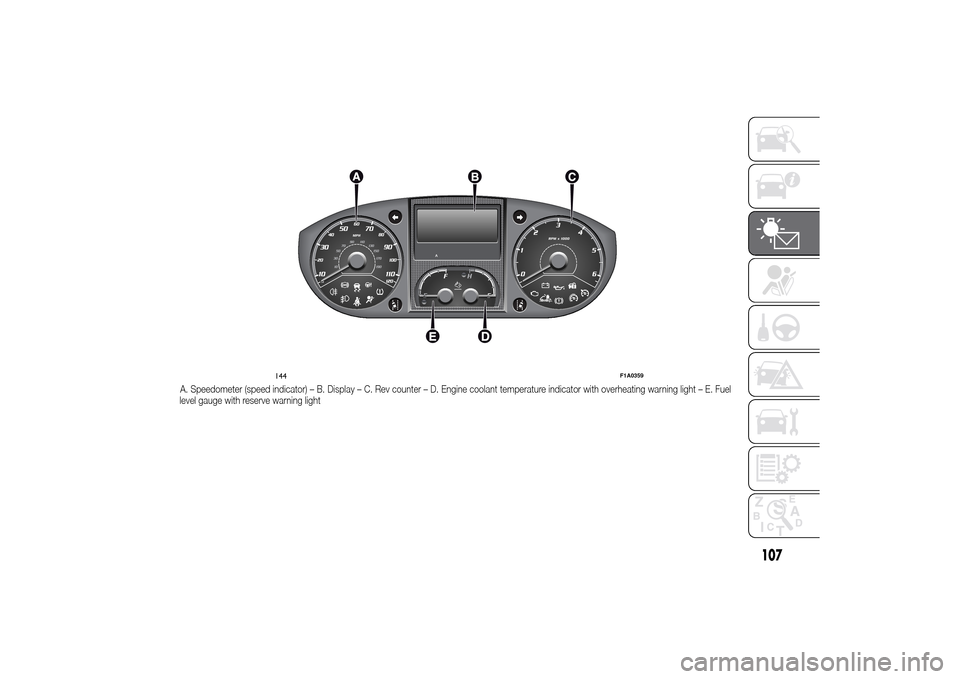
A. Speedometer (speed indicator) – B. Display – C. Rev counter – D. Engine coolant temperature indicator with overheating warning light – E. Fuel
level gauge with reserve warning light
144
F1A0359
107
Page 112 of 367
SPEEDOMETER (speed
indicator)
Indicator A shows the speed of the car.
REV COUNTER
Indicator C shows the engine revs.
IMPORTANT The electronic injection
control system gradually shuts off
the flow of fuel when the engine
is over-revving, resulting in a gradual
loss of engine power.
When the engine is idling, the rev
counter may indicate a gradual or
sudden increase of the speed.
This is normal and does not indicate a
fault. It may be caused, for example, by
the activation of the climate control
system or fan. In these cases, a slow
change in revs is used to protect the
battery charge.
FUEL LEVEL GAUGE
Needle E shows the amount of fuel left
in the tank.
E - tank empty.
F - tank full (see the description in
paragraph "Vehicle refuelling" in this
chapter).The warning light on the indicator
switches on when there are about
10-12 litres of fuel (for versions with
tank capacity 90-120 l) or 10 l (for
versions with tank capacity 60 l)
remaining in the tank.
Do not travel with the tank nearly empty
to prevent damaging the catalytic
converter.
IMPORTANT The needle will point to E
and the warning light will flash to
indicate a fault in the system. If this is
the case, go to a Fiat Dealership to
have the system checked.
IMPORTANT It is not advisable to
activate the additional Webasto heater
in reserve conditions.
ENGINE COOLANT
TEMPERATURE
INDICATOR
The needle D shows the temperature of
the engine coolant and starts
supplying indications when the fluid
temperature exceeds approx. 50°C. In
normal use, the needle could assume
different positions within the scale,
depending on the usage conditions.
C - Low engine coolant temperature.
H - High engine coolant temperature.The warning light on the indicator may
light up (and a message on the display
may appear on certain versions) to
indicate that the coolant fluid
temperature is too high; in this case,
stop the engine and contact a Fiat
Dealership.
19)
ENGINE OIL LEVEL
GAUGE
(for versions/markets, where provided)
The gauge provides a graphic indication
of the level of oil in the engine.
When the ignition key is turned to
MAR-ON, the display fig. 145 - fig. 146
shows the oil level by lighting up /
switching off five symbols.
The gradual switching off of the
symbols indicates a decreasing oil level.145 - Versions with multifunction display
F1A0354
108
KNOWING THE INSTRUMENT PANEL
Page 113 of 367
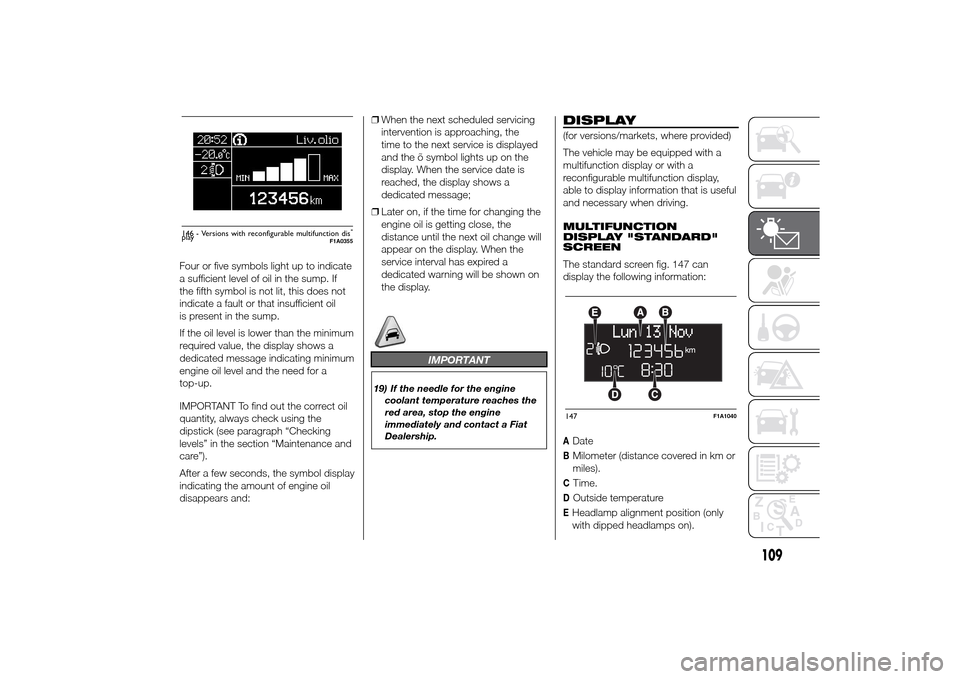
Four or five symbols light up to indicate
a sufficient level of oil in the sump. If
the fifth symbol is not lit, this does not
indicate a fault or that insufficient oil
is present in the sump.
If the oil level is lower than the minimum
required value, the display shows a
dedicated message indicating minimum
engine oil level and the need for a
top-up.
IMPORTANT To find out the correct oil
quantity, always check using the
dipstick (see paragraph “Checking
levels” in the section “Maintenance and
care”).
After a few seconds, the symbol display
indicating the amount of engine oil
disappears and:❒When the next scheduled servicing
intervention is approaching, the
time to the next service is displayed
and the õ symbol lights up on the
display. When the service date is
reached, the display shows a
dedicated message;
❒Later on, if the time for changing the
engine oil is getting close, the
distance until the next oil change will
appear on the display. When the
service interval has expired a
dedicated warning will be shown on
the display.
IMPORTANT
19) If the needle for the engine
coolant temperature reaches the
red area, stop the engine
immediately and contact a Fiat
Dealership.
DISPLAY(for versions/markets, where provided)
The vehicle may be equipped with a
multifunction display or with a
reconfigurable multifunction display,
able to display information that is useful
and necessary when driving.
MULTIFUNCTION
DISPLAY "STANDARD"
SCREEN
The standard screen fig. 147 can
display the following information:ADateBMilometer (distance covered in km or
miles).CTime.DOutside temperatureEHeadlamp alignment position (only
with dipped headlamps on).
Liv.olio
MAX MIN
146 - Versions with reconfigurable multifunction dis-
play
F1A0355
147
F1A1040
109
Page 115 of 367
Setup menu
- within the menu, they allow you to
scroll up and down;
- during setting operations they allow
an increase or decrease.
SETUP MENU
Setup menu functions
The menu comprises a series of
functions arranged in a circular way,
which can be selected through the
and
buttons to access the
different selection operations and
settings (setup) given in the following
paragraphs. A submenu is provided for
some items (Clock and Unit setting).
The setup menu can be activated
by pressing the MODE button briefly.
The menu comprises the following
functions:
❒Menu
❒Lighting
❒Headlight alignment corrector
❒Speed warning
❒Headlight sensor
❒Cornering lights
❒Rain sensor
❒Trip B activation❒Traffic sign
❒Set time
❒Set date
❒Autoclose
❒Units of measurement
❒Language
❒Warning volume
❒Service
❒Passenger airbag
❒Daytime Running Lights
❒Automatic main beam headlights
❒Exit menu
Single presses of the
or
buttons permit navigation
through the setup menu options.
Operating modes are different
according to the characteristics of the
option selected.
Selecting an option from the main
menu without a submenu:
- briefly press the MODE button to
select the main menu option that needs
to be changed;
- press the
or
buttons (with
a single press) to select the new
setting;- briefly press the MODE button to
store the new setting and at the same
time go back to the previously selected
menu option.
Selecting an option from the main
menu with a submenu:
- briefly press the MODE button to
display the first submenu option;
- press the
or
buttons (with
a single press) to scroll through all
submenu options;
- briefly press the MODE button to
select the displayed submenu option
and to open the relevant settings menu;
- press the
or
buttons
(with a single press) to choose the new
setting for this submenu option;
- briefly press the MODE button to
store the setting and return to the
previously selected submenu option.
Selecting “Date” and “Set Clock”:
- briefly press the MODE button to
select the first value to be changed (e.g.
hours / minutes or year / month / day);
- press the
or
buttons (with
a single press) to select the new
setting;
111
Page 117 of 367
Speed limit (Speed
Beep)
This function makes it possible to set
the vehicle speed limit (km/h or mph).
When this limit is exceeded the driver is
immediately alerted (see “Warning
lights and messages” section).
To set the desired speed limit, proceed
as follows:
- briefly press the MODE button: the
display will show the wording (Speed
Beep);
press button
or
to select
speed limit activation (On) or
deactivation (Off);
- if the function has been activated (On),
press the
or
button to
select the desired speed limit and then
press MODE to confirm.NoteSetting is possible between 30
and 200 km/h, or 20 and 125 mph,
according to the previously set unit.
See the "Setting the unit of
measurement (Measurement unit)"
paragraph described below. The setting
will increase/decrease by 5 units each
time button
/
is pressed.
Hold down the
/
button to
automatically increase/decrease the
setting rapidly. Complete the
adjustment with single presses of the
button when you approach the desired
value.
- press the MODE button briefly to
return to the menu screen or hold the
button down to return to the standard
screen without storing.
To cancel the setting, proceed as
follows:
- briefly press button MODE, (On) will
flash on the display;
- press button
, (Off) will flash on
the display;
- press the MODE button briefly to
return to the menu screen or hold the
button down to return to the standard
screen without storing.Headlight sensor
sensitivity adjustment
(for versions/markets, where provided)
With this function it is possible to adjust
the rain headlight sensitivity according
to 3 levels.
To set the required sensitivity level,
proceed as follows:
– briefly press the MODE button: the
previously set sensitivity “level” starts to
flash on the display;
– press the
or
button to
make the adjustment;
– press the MODE button briefly to
return to the menu screen or hold the
button down to return to the standard
screen without storing.
Cornering lights
(Activation/deactivation of
“Cornering lights”)
(for versions/markets, where provided)
This function activates/deactivates
("On"/"Off") the cornering lights (see the
description in the “Exterior lights”
paragraph).
Proceed as follows to activate/
deactivate the lights:
❒briefly press the MODE button. "On"
or "Off" flash on the display,
according to what has been
previously set;
113
Page 120 of 367
If the set distance unit is "km", the
display enables setting of the fuel
consumption unit (km/l or l/100km).
If the set distance unit is "mi", the
display shows the amount of fuel
consumed in "mpg".
- press the
or
button to
select;
- if you enter the "Temperature"
submenu, pressing the MODE button
makes "°C" or "°F" appear on the
display (depending on the previous
setting);
- press the
or
button to
select;
When you have made the adjustment,
briefly press the MODE button to go
back to the submenu screen or hold
the button down to go back to the main
menu screen without storing.
- press the MODE button again to
return to the standard screen or to the
main menu according to where you
are in the menu.Selecting the language
(Language)
Display messages can be shown in
different languages: Italian, German,
English, Spanish, French, Portuguese
and Dutch.
To set the desired language, proceed
as follows:
- briefly press the MODE button: the
previously set "language" starts flashing
on the display;
- press the
or
button to
select;
- press the MODE button briefly to
return to the menu screen or hold the
button down to return to the standard
screen without storing.
Adjust the failure/
warning buzzer volume
(Buzzer Volume)
With this function the volume of the
acoustic signal which accompanies the
display of failure/warning can be
adjusted according to 8 levels.
To set the desired volume, proceed as
follows:
- briefly press the MODE button: the
previously set volume "level" will flash
on the display;- press the
or
button to
adjust;
- press the MODE button briefly to
return to the menu screen or hold the
button down to return to the standard
screen without storing.
Service
Scheduled servicing
Using this function you can display
information about the mileage intervals
for vehicle servicing.
To consult this information, proceed as
follows:
– briefly press the MODE button: the
display shows service requirements in
km or mi according to the previous
setting (see paragraph “Unit of
measure”);
– briefly press button MODE to go back
to the menu screen or press the button
for longer to go back to the standard
screen.
Oil change
This function displays information
regarding the remaining mileage before
the next oil change.
To consult this information, proceed as
follows:
116
KNOWING THE INSTRUMENT PANEL
Page 121 of 367
– briefly press the MODE button; the
display shows the estimated km
distance to the next oil change
(depending on the driving mode);
– briefly press button MODE to go back
to the menu screen or press the button
for longer to go back to the standard
screen.
NoteThe "Scheduled Servicing Plan"
requires the vehicle to be serviced every
48,000 km (or 30,000 mi). This
indication will appear automatically, with
the key at MAR-ON, starting from
2,000 km (or 1,240 mi) and will be
displayed every 200 km (or 124 mi). Oil
change notification messages are
displayed in the same way. Use the
and
buttons to alternate
between displaying scheduled servicing
and engine oil change information.
Below 200 km servicing indications are
more frequent. The display will be in
km or mi depending on the
measurement unit settings. When the
next scheduled service is approaching,
the word “Service” will appear on the
display, followed by the number of
kilometres or miles left, when the key is
turned to MAR-ON. Contact a Fiat
Dealership to carry out any service
operation in the "Scheduled servicing
plan" and to reset the display.NoteWhen an oil change is nearly due
and the ignition key is turned to
MAR-ON, the display will show a
dedicated message. Engine
performance will decrease still driving in
these conditions. When the change is
due, the dedicated message will
reappear on the display together with
the activation of both the
and
warning lights. Contact a Fiat
Dealership.
Activating/deactivating
front passenger side
airbags and side bags
for chest protection
(Passenger airbag)
(for versions/markets, where provided)
This function allows the passenger
side airbag to be activated/deactivated.
Proceed as follows:
❒press the MODE button and, after
the message "Bag pass: Off" (to
deactivate) or "Bag pass: On" (to
activate) is displayed by pressing the
and
buttons, press the
MODE button again;
❒the confirmation request message
will appear on the display;
❒by pressing the
or
buttons, select (Yes) (to confirm
activation/deactivation) or (No) (to
cancel);❒press the MODE button briefly and a
message confirming the selection will
be displayed, then you will return to
the menu screen, or hold the button
down to return to the standard
screen without storing.
Daytime running lights
(DRL)
(for versions/markets, where provided)
With this function is possible to turn the
daytime running lights on and off.
Proceed as follows to activate or
deactivate this function:
❒briefly press the MODE button. The
display shows a submenu;
❒briefly press the MODE button. "On"
or "Off" flash on the display,
according to what has been
previously set;
❒press
or
to make your
choice;
❒briefly press the MODE button to
return to the submenu screen or hold
the button down to return to the
main menu screen without storing;
❒press the MODE button again to
return to the standard screen or
to the main menu according to the
menu items where you are in.
117
Page 125 of 367
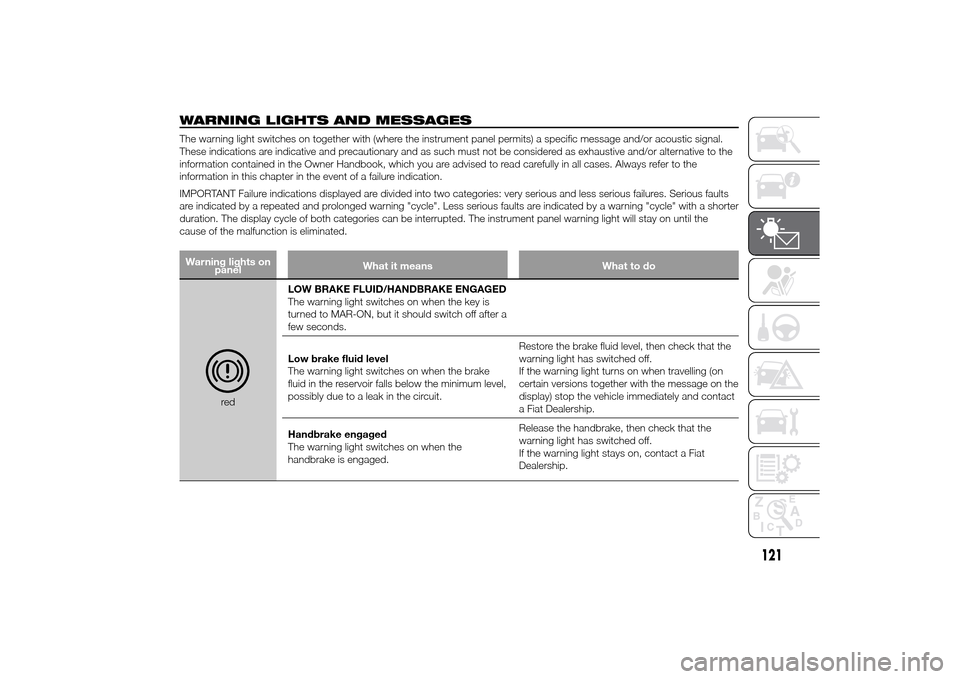
WARNING LIGHTS AND MESSAGESThe warning light switches on together with (where the instrument panel permits) a specific message and/or acoustic signal.
These indications are indicative and precautionary and as such must not be considered as exhaustive and/or alternative to the
information contained in the Owner Handbook, which you are advised to read carefully in all cases. Always refer to the
information in this chapter in the event of a failure indication.
IMPORTANT Failure indications displayed are divided into two categories: very serious and less serious failures. Serious faults
are indicated by a repeated and prolonged warning "cycle". Less serious faults are indicated by a warning "cycle" with a shorter
duration. The display cycle of both categories can be interrupted. The instrument panel warning light will stay on until the
cause of the malfunction is eliminated.Warning lights on
panelWhat it means What to do
redLOW BRAKE FLUID/HANDBRAKE ENGAGED
The warning light switches on when the key is
turned to MAR-ON, but it should switch off after a
few seconds.
Low brake fluid level
The warning light switches on when the brake
fluid in the reservoir falls below the minimum level,
possibly due to a leak in the circuit.Restore the brake fluid level, then check that the
warning light has switched off.
If the warning light turns on when travelling (on
certain versions together with the message on the
display) stop the vehicle immediately and contact
a Fiat Dealership.
Handbrake engaged
The warning light switches on when the
handbrake is engaged.Release the handbrake, then check that the
warning light has switched off.
If the warning light stays on, contact a Fiat
Dealership.
121
Page 126 of 367
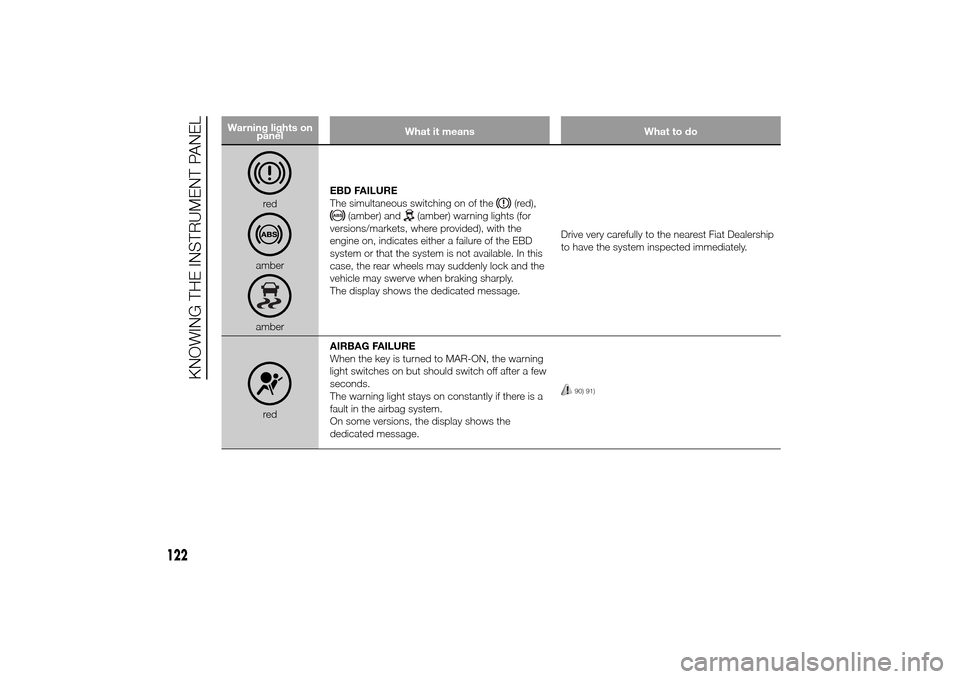
Warning lights on
panelWhat it means What to do
redamberamberEBD FAILURE
The simultaneous switching on of the
(red),
(amber) and
(amber) warning lights (for
versions/markets, where provided), with the
engine on, indicates either a failure of the EBD
system or that the system is not available. In this
case, the rear wheels may suddenly lock and the
vehicle may swerve when braking sharply.
The display shows the dedicated message.Drive very carefully to the nearest Fiat Dealership
to have the system inspected immediately.
redAIRBAG FAILURE
When the key is turned to MAR-ON, the warning
light switches on but should switch off after a few
seconds.
The warning light stays on constantly if there is a
fault in the airbag system.
On some versions, the display shows the
dedicated message.
90) 91)
122
KNOWING THE INSTRUMENT PANEL