lock FIAT DUCATO 2015 3.G User Guide
[x] Cancel search | Manufacturer: FIAT, Model Year: 2015, Model line: DUCATO, Model: FIAT DUCATO 2015 3.GPages: 387, PDF Size: 20.76 MB
Page 27 of 387
The seat can be turned 180º toward
the seat on the opposite side. To turn it,
see the "Seat with revolving base"
paragraph.
4-SEATER BENCH SEAT
(Crew Cab Van versions)
(for versions/markets, where provided)
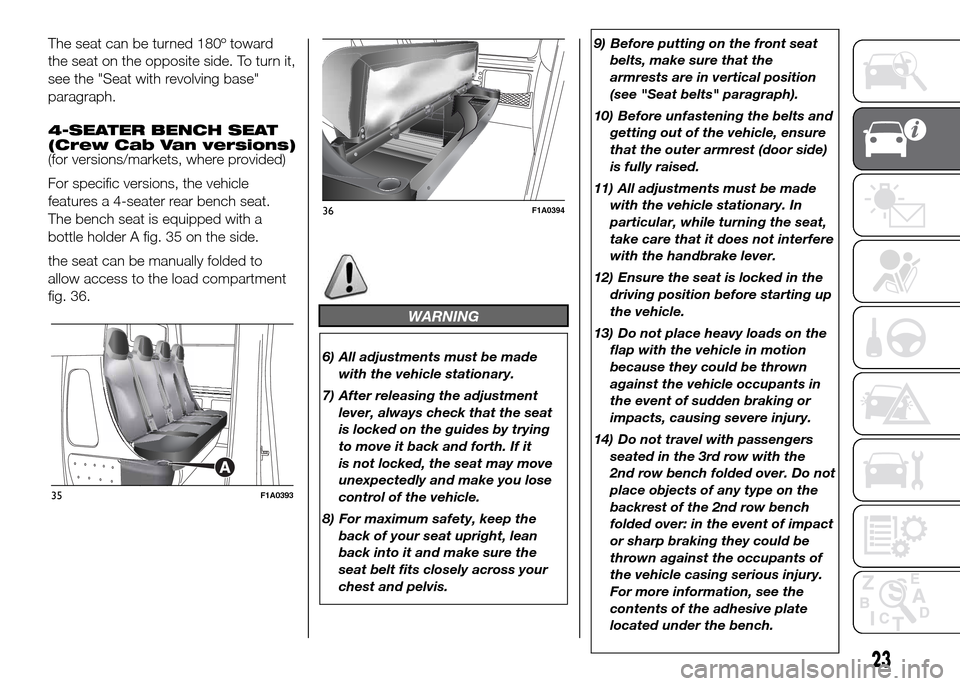
For specific versions, the vehicle
features a 4-seater rear bench seat.
The bench seat is equipped with a
bottle holder A fig. 35 on the side.
the seat can be manually folded to
allow access to the load compartment
fig. 36.
WARNING
6) All adjustments must be made
with the vehicle stationary.
7) After releasing the adjustment
lever, always check that the seat
is locked on the guides by trying
to move it back and forth. If it
is not locked, the seat may move
unexpectedly and make you lose
control of the vehicle.
8) For maximum safety, keep the
back of your seat upright, lean
back into it and make sure the
seat belt fits closely across your
chest and pelvis.9) Before putting on the front seat
belts, make sure that the
armrests are in vertical position
(see "Seat belts" paragraph).
10) Before unfastening the belts and
getting out of the vehicle, ensure
that the outer armrest (door side)
is fully raised.
11) All adjustments must be made
with the vehicle stationary. In
particular, while turning the seat,
take care that it does not interfere
with the handbrake lever.
12) Ensure the seat is locked in the
driving position before starting up
the vehicle.
13) Do not place heavy loads on the
flap with the vehicle in motion
because they could be thrown
against the vehicle occupants in
the event of sudden braking or
impacts, causing severe injury.
14) Do not travel with passengers
seated in the 3rd row with the
2nd row bench folded over. Do not
place objects of any type on the
backrest of the 2nd row bench
folded over: in the event of impact
or sharp braking they could be
thrown against the occupants of
the vehicle casing serious injury.
For more information, see the
contents of the adhesive plate
located under the bench.
35F1A0393
36F1A0394
23
Page 28 of 387
15) When refitting the bench, ensure
that it is correctly locked to the
floor guides.
IMPORTANT
2) The fabric upholstery of your
vehicle is designed to withstand
the normal wear and tear of your
vehicle for a long time. You are
however recommended to avoid
strong and/or continuous
scratching with clothing
accessories such as metal
buckles, studs, Velcro fastenings
and the like, as these items cause
stress of the cover fabric that
could lead to yarn breaking and
damage the upholstery.
HEAD RESTRAINTS
FRONT
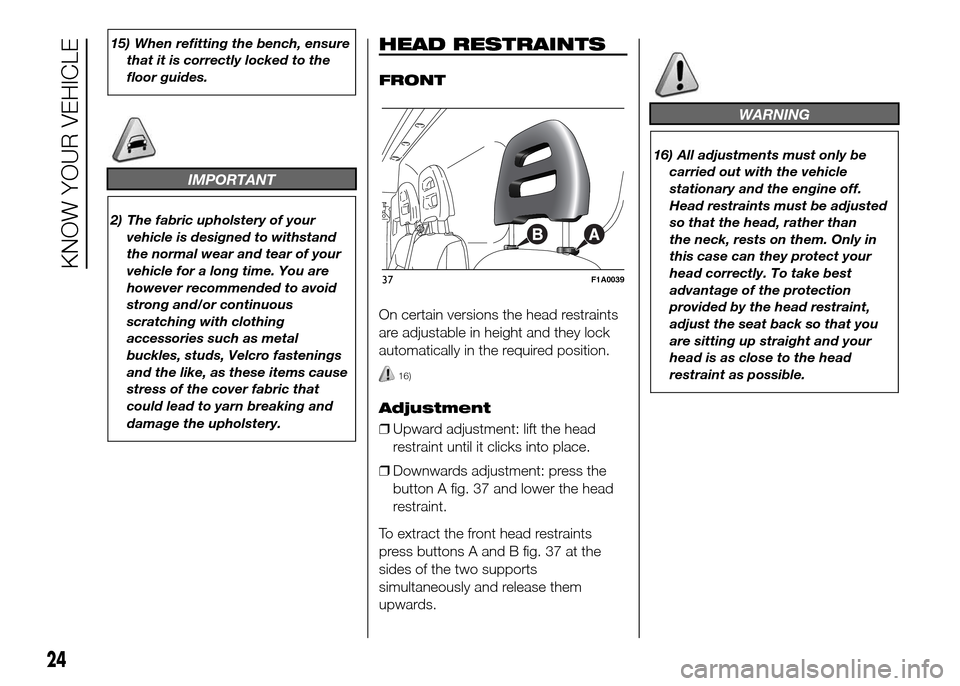
On certain versions the head restraints
are adjustable in height and they lock
automatically in the required position.
16)
Adjustment
❒Upward adjustment: lift the head
restraint until it clicks into place.
❒Downwards adjustment: press the
button A fig. 37 and lower the head
restraint.
To extract the front head restraints
press buttons A and B fig. 37 at the
sides of the two supports
simultaneously and release them
upwards.
WARNING
16) All adjustments must only be
carried out with the vehicle
stationary and the engine off.
Head restraints must be adjusted
so that the head, rather than
the neck, rests on them. Only in
this case can they protect your
head correctly. To take best
advantage of the protection
provided by the head restraint,
adjust the seat back so that you
are sitting up straight and your
head is as close to the head
restraint as possible.
37F1A0039
24
KNOW YOUR VEHICLE
Page 29 of 387
STEERING WHEEL
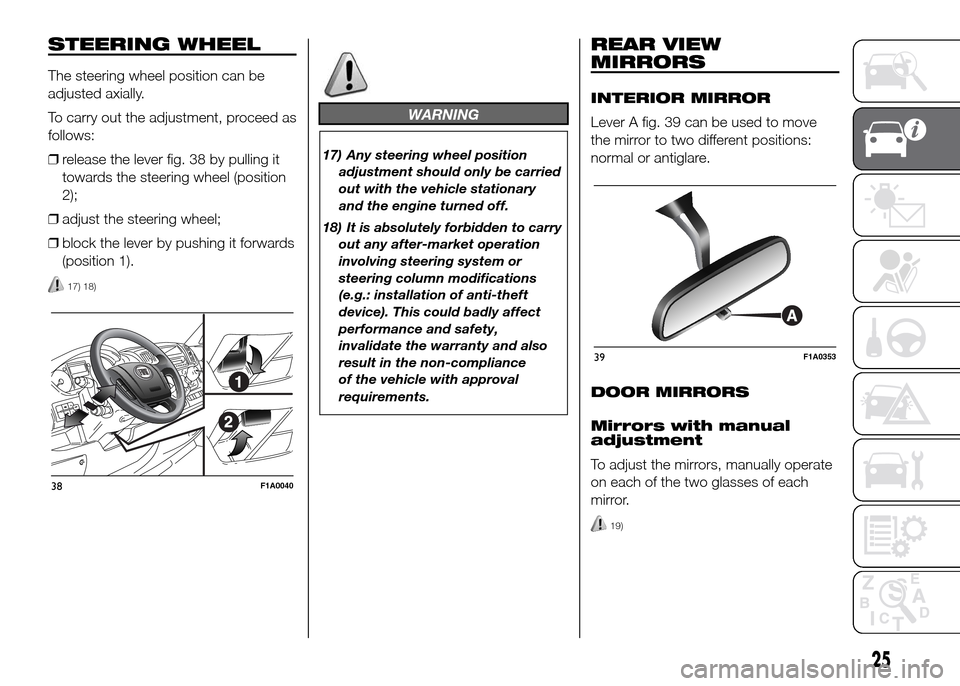
The steering wheel position can be
adjusted axially.
To carry out the adjustment, proceed as
follows:
❒release the lever fig. 38 by pulling it
towards the steering wheel (position
2);
❒adjust the steering wheel;
❒block the lever by pushing it forwards
(position 1).
17) 18)
WARNING
17) Any steering wheel position
adjustment should only be carried
out with the vehicle stationary
and the engine turned off.
18) It is absolutely forbidden to carry
out any after-market operation
involving steering system or
steering column modifications
(e.g.: installation of anti-theft
device). This could badly affect
performance and safety,
invalidate the warranty and also
result in the non-compliance
of the vehicle with approval
requirements.
REAR VIEW
MIRRORS
INTERIOR MIRROR
Lever A fig. 39 can be used to move
the mirror to two different positions:
normal or antiglare.
DOOR MIRRORS
Mirrors with manual
adjustment
To adjust the mirrors, manually operate
on each of the two glasses of each
mirror.
19)
38F1A0040
39F1A0353
25
Page 41 of 387
CONTROLS
Air temperature
adjustment knob (I)
Turn the knob either clockwise or
counterclockwise to increase or lower
the requested temperature in the
passenger compartment.
The set temperature is shown on the
display.
Turn the knob either fully to the right or
fully to the left to the extreme HI or
LO position to turn the maximum
heating or maximum cooling functions
on:
❒HI function (maximum heating): select
by turning the temperature knob
clockwise beyond the maximum
value (32°C).
This function may be used to heat up
the passenger compartment by
exploiting the system's potential to the
full. In this event, the system stops
controlling the temperature
automatically and sets the air mixing to
maximum heating. The air speed and
distribution are fixed.
In particular, if the heating fluid is not
sufficiently hot, the maximum fan speed
does not come on straight away in
order to limit the intake of insufficiently
hot air to the passenger compartment.All manual settings will be allowed when
this function is on.
To switch the function off, simply turn
the temperature knob anticlockwise
and set the required temperature.
❒LO function (maximum cooling):
select by turning the temperature
knob anticlockwise beyond the
minimum value (16°C).
This function may be used to cool
down the passenger compartment by
exploiting the system's potential to
the full. In this event, the system stops
controlling the temperature
automatically and sets the air mixing to
maximum cooling. The air speed and
distribution are fixed. All manual
settings will be allowed when this
function is on.
To switch the function off, simply turn
the temperature knob anticlockwise
and set the required temperature.Air distribution buttons
(B)
By pressing these buttons, it is possible
to set one of the seven possible air
distributions manually:
Air flow to the windscreen and front
side window vents to demist or defrost
them.
Air flow to the central and side
dashboard vents to ventilate chest and
face during the hot season.
Air flow to the front and rear footwell
vents. Thanks to the natural tendency
of hot air to rise, this distribution pattern
allows the passenger compartment to
warm up as quickly as possible,
providing an immediate feeling of
warmth.
Air flow distributed between
footwell vents (hotter air) and central
and side dashboard vents (cooler air).
This distribution mode is particularly
useful in spring and autumn on sunny
days.
Air flow distributed between the
footwell vents and the windscreen
and front side window defrosting/
demisting vents. This allows an
adequate warming of the passenger
compartment and prevents the
windows from misting up.
37
Page 45 of 387
ADDITIONAL
HEATER
(for versions/markets, where provided)
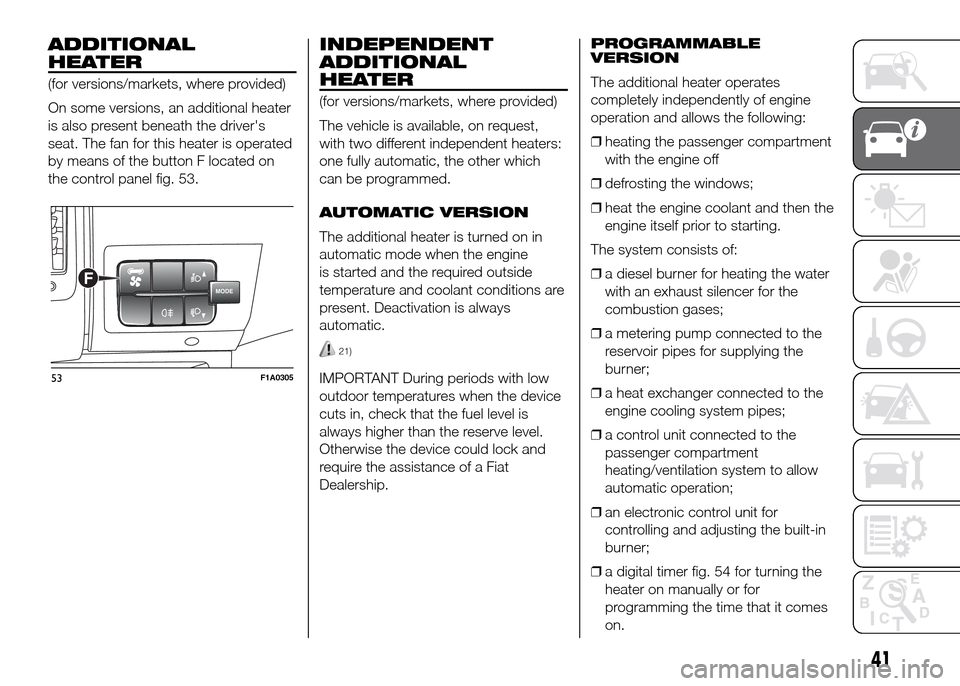
On some versions, an additional heater
is also present beneath the driver's
seat. The fan for this heater is operated
by means of the button F located on
the control panel fig. 53.
INDEPENDENT
ADDITIONAL
HEATER
(for versions/markets, where provided)
The vehicle is available, on request,
with two different independent heaters:
one fully automatic, the other which
can be programmed.
AUTOMATIC VERSION
The additional heater is turned on in
automatic mode when the engine
is started and the required outside
temperature and coolant conditions are
present. Deactivation is always
automatic.
21)
IMPORTANT During periods with low
outdoor temperatures when the device
cuts in, check that the fuel level is
always higher than the reserve level.
Otherwise the device could lock and
require the assistance of a Fiat
Dealership.PROGRAMMABLE
VERSION
The additional heater operates
completely independently of engine
operation and allows the following:
❒heating the passenger compartment
with the engine off
❒defrosting the windows;
❒heat the engine coolant and then the
engine itself prior to starting.
The system consists of:
❒a diesel burner for heating the water
with an exhaust silencer for the
combustion gases;
❒a metering pump connected to the
reservoir pipes for supplying the
burner;
❒a heat exchanger connected to the
engine cooling system pipes;
❒a control unit connected to the
passenger compartment
heating/ventilation system to allow
automatic operation;
❒an electronic control unit for
controlling and adjusting the built-in
burner;
❒a digital timer fig. 54 for turning the
heater on manually or for
programming the time that it comes
on.
MODEF
53F1A0305
41
Page 47 of 387
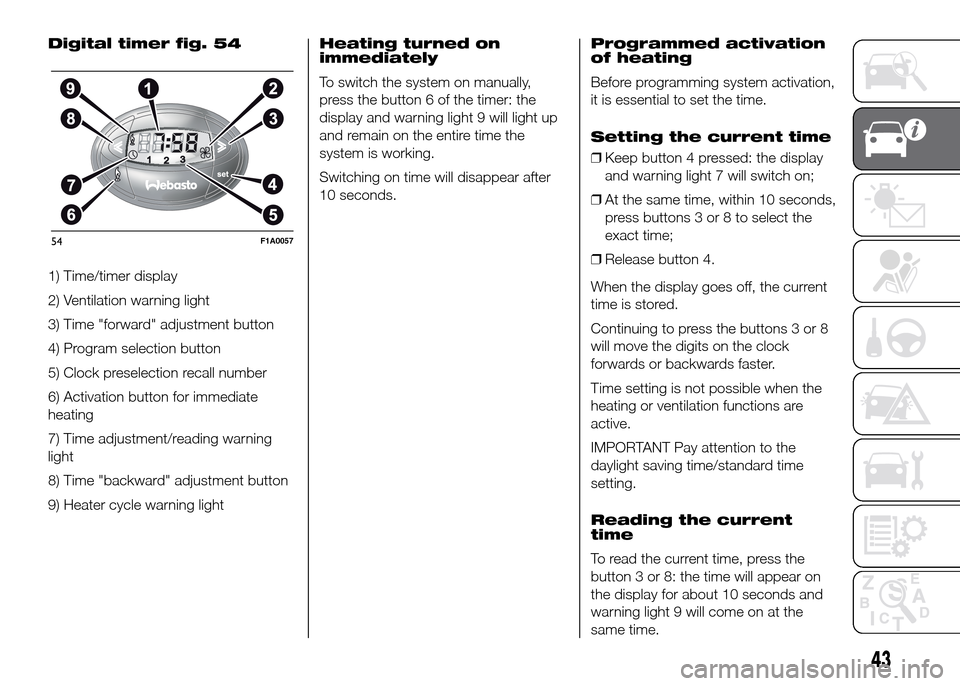
Digital timer fig. 54
1) Time/timer display
2) Ventilation warning light
3) Time "forward" adjustment button
4) Program selection button
5) Clock preselection recall number
6) Activation button for immediate
heating
7) Time adjustment/reading warning
light
8) Time "backward" adjustment button
9) Heater cycle warning lightHeating turned on
immediately
To switch the system on manually,
press the button 6 of the timer: the
display and warning light 9 will light up
and remain on the entire time the
system is working.
Switching on time will disappear after
10 seconds.Programmed activation
of heating
Before programming system activation,
it is essential to set the time.
Setting the current time
❒Keep button 4 pressed: the display
and warning light 7 will switch on;
❒At the same time, within 10 seconds,
press buttons 3 or 8 to select the
exact time;
❒Release button 4.
When the display goes off, the current
time is stored.
Continuing to press the buttons 3 or 8
will move the digits on the clock
forwards or backwards faster.
Time setting is not possible when the
heating or ventilation functions are
active.
IMPORTANT Pay attention to the
daylight saving time/standard time
setting.
Reading the current
time
To read the current time, press the
button 3 or 8: the time will appear on
the display for about 10 seconds and
warning light 9 will come on at the
same time.
54F1A0057
43
Page 48 of 387
Programming the
switching on time
Activation can be programmed with an
advance of between 1 minute and 24
hours. Three different activation times
may be selected, but only one can
be activated for each pre-heating cycle.
The duration of activation can be
selected between 10 and 60 minutes.
To program the activation time:
❒press button 4: the symbol 10 or the
time set previously and the number 5
corresponding to the preselection
recalled will light up in the display for
10 seconds.
IMPORTANT If you wish to recall other
preselected times, press button 4
from time to time within 10 seconds.
– within 10 seconds, press the buttons
3 or 8 to select the desired switching
on time.
IMPORTANT The confirmation that the
time has been memorised is given by:
❒the disappearance of the switching
on time;
❒the presence of the preselection
number 5;
❒the lighting of the display.IMPORTANT When the boiler comes
on:
❒the flame warning light 9 switches on
in the display;
❒the preselection number 5 goes out.
Standard settings:
Preselected time 1: 6:00
Preselected time 2: 16:00
Preselected time 3: 22:00
IMPORTANT Factory pre-settings are
cancelled with a new setting.
Preselected times are stored until the
following change. If the clock is
detached from the on-board network
(e.g. if the battery is disconnected), the
factory pre-settings are restored.
Deactivation of the
programmed switching
on time
To delete the programmed activation
time, press button 4 briefly: the display
lighting will go off and the number 5
relating to the preselected time will
disappear.Recalling one of the
preselected switching
on times
Operate button 4 within 10 seconds
until the program number with the
desired preselected time is displayed.
The preselected time you have chosen
to set is automatically activated after
about 10 seconds without the need for
any further confirmation with another
button.
Activate the preselected time taking
into account the safety instructions for
the operation of the independent
heating (for this purpose consult the
Owner's Manual for use of independent
heating).
IMPORTANT Independent heating
switches on at the preselected time,
both with vehicle parked and while
driving.
IMPORTANT The programmed
switching on time can be altered or
cancelled by following the instructions
given previously.
44
KNOW YOUR VEHICLE
Page 49 of 387
Operation duration
setting
Hold the button pressed. At the same
time press button 3 or 8.
The time and warning light 7 are
displayed.
Hold button 4 pressed again. At the
same time press button 3 or 8.
The preset activation duration is
displayed and warning light 9 or 2
flashes.
Set the activation duration with button
3or8.
The set activation duration is stored as
soon as the text in the display
disappears, or pressing button 4.Switching the heating
system off
Deactivation of the system, depending
on the type of activation (automatic
or manual), may be:
❒automaticwhen the programmed
duration is over; when the set time
is over, the display switches off.
❒manualpressing the “immediate
heating” button on the timer again
(flame button 6).
In both cases, the heating warning light,
the display lighting and the passenger
compartment heater fan go off and
burning stops.
The fluid circulation pump continues to
work for around two minutes to
dissipate as much heat as possible; the
heater can be turned back on during
this stage.
22)
IMPORTANT The parking heater goes
off when battery voltage is low to allow
the vehicle to be started.
IMPORTANT Before turning on the
device, ensure that the fuel level is
above the reserve. Otherwise the
device could lock and require
the assistance of a Fiat Dealership.
❒Always turn off the heater when
refuelling and near service stations to
avoid the risk of explosion or fire
hazards.
❒Do not park the vehicle on
inflammable material such as paper,
grass or dry leaves: fire hazard!
❒The temperature near the heater
should not exceed 120°C (e.g. during
oven painting in a body shop). The
electronic control unit components
may be damaged at higher
temperatures.
❒Whilst the heater is operating with the
engine switched off, it absorbs
energy from the battery; the engine
should therefore be left running
for a while to make sure that the
battery is properly recharged.
45
Page 62 of 387
ROOF LIGHTS
FRONT ROOF LIGHT WITH
SPOT LIGHTS
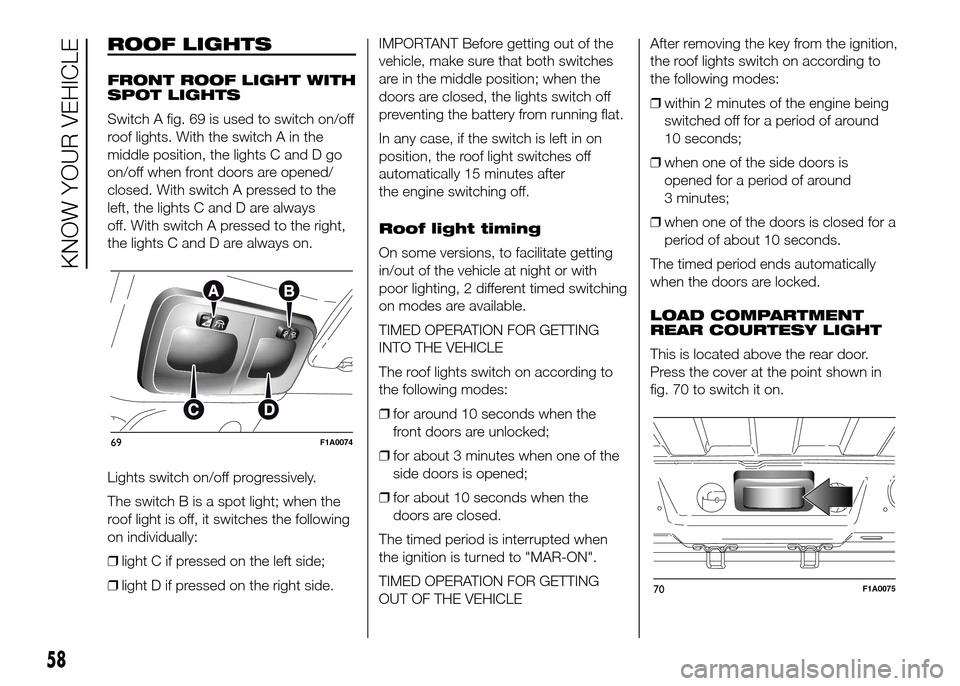
Switch A fig. 69 is used to switch on/off
roof lights. With the switch A in the
middle position, the lights C and D go
on/off when front doors are opened/
closed. With switch A pressed to the
left, the lights C and D are always
off. With switch A pressed to the right,
the lights C and D are always on.
Lights switch on/off progressively.
The switch B is a spot light; when the
roof light is off, it switches the following
on individually:
❒light C if pressed on the left side;
❒light D if pressed on the right side.IMPORTANT Before getting out of the
vehicle, make sure that both switches
are in the middle position; when the
doors are closed, the lights switch off
preventing the battery from running flat.
In any case, if the switch is left in on
position, the roof light switches off
automatically 15 minutes after
the engine switching off.
Roof light timing
On some versions, to facilitate getting
in/out of the vehicle at night or with
poor lighting, 2 different timed switching
on modes are available.
TIMED OPERATION FOR GETTING
INTO THE VEHICLE
The roof lights switch on according to
the following modes:
❒for around 10 seconds when the
front doors are unlocked;
❒for about 3 minutes when one of the
side doors is opened;
❒for about 10 seconds when the
doors are closed.
The timed period is interrupted when
the ignition is turned to "MAR-ON".
TIMED OPERATION FOR GETTING
OUT OF THE VEHICLEAfter removing the key from the ignition,
the roof lights switch on according to
the following modes:
❒within 2 minutes of the engine being
switched off for a period of around
10 seconds;
❒when one of the side doors is
opened for a period of around
3 minutes;
❒when one of the doors is closed for a
period of about 10 seconds.
The timed period ends automatically
when the doors are locked.
LOAD COMPARTMENT
REAR COURTESY LIGHT
This is located above the rear door.
Press the cover at the point shown in
fig. 70 to switch it on.
69F1A0074
70F1A0075
58
KNOW YOUR VEHICLE
Page 65 of 387
BATTERY
DISCONNECTION
FUNCTION
(DISCONNECTOR)
(for versions/markets, where provided)
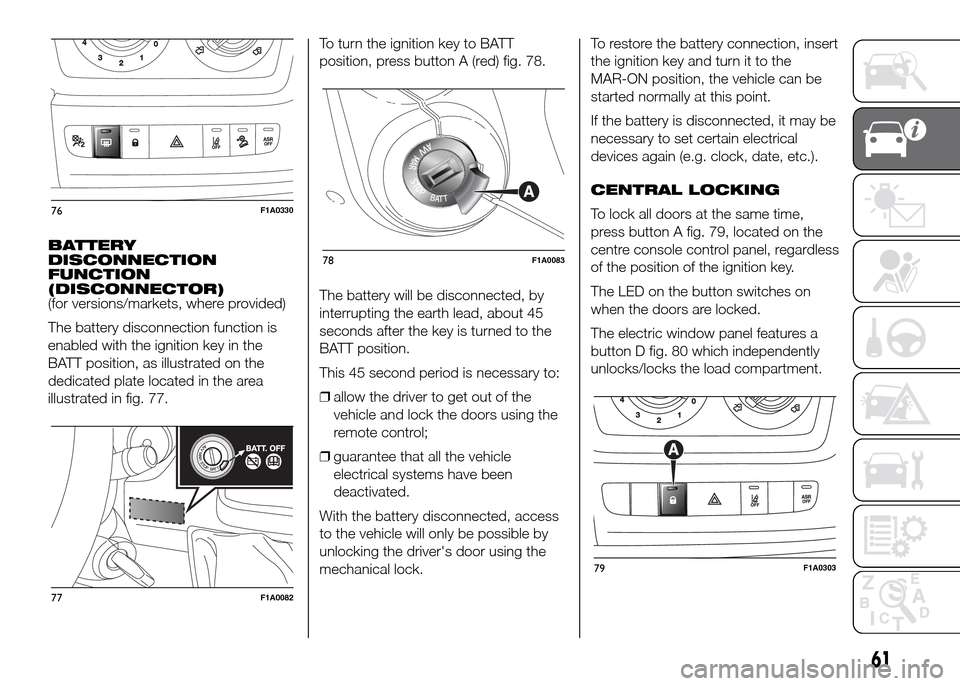
The battery disconnection function is
enabled with the ignition key in the
BATT position, as illustrated on the
dedicated plate located in the area
illustrated in fig. 77.To turn the ignition key to BATT
position, press button A (red) fig. 78.
The battery will be disconnected, by
interrupting the earth lead, about 45
seconds after the key is turned to the
BATT position.
This 45 second period is necessary to:
❒allow the driver to get out of the
vehicle and lock the doors using the
remote control;
❒guarantee that all the vehicle
electrical systems have been
deactivated.
With the battery disconnected, access
to the vehicle will only be possible by
unlocking the driver's door using the
mechanical lock.To restore the battery connection, insert
the ignition key and turn it to the
MAR-ON position, the vehicle can be
started normally at this point.
If the battery is disconnected, it may be
necessary to set certain electrical
devices again (e.g. clock, date, etc.).
CENTRAL LOCKING
To lock all doors at the same time,
press button A fig. 79, located on the
centre console control panel, regardless
of the position of the ignition key.
The LED on the button switches on
when the doors are locked.
The electric window panel features a
button D fig. 80 which independently
unlocks/locks the load compartment.
76F1A0330
77F1A0082
78F1A0083
79F1A0303
61