Indicator FIAT DUCATO 2016 3.G User Guide
[x] Cancel search | Manufacturer: FIAT, Model Year: 2016, Model line: DUCATO, Model: FIAT DUCATO 2016 3.GPages: 296, PDF Size: 15.08 MB
Page 73 of 296
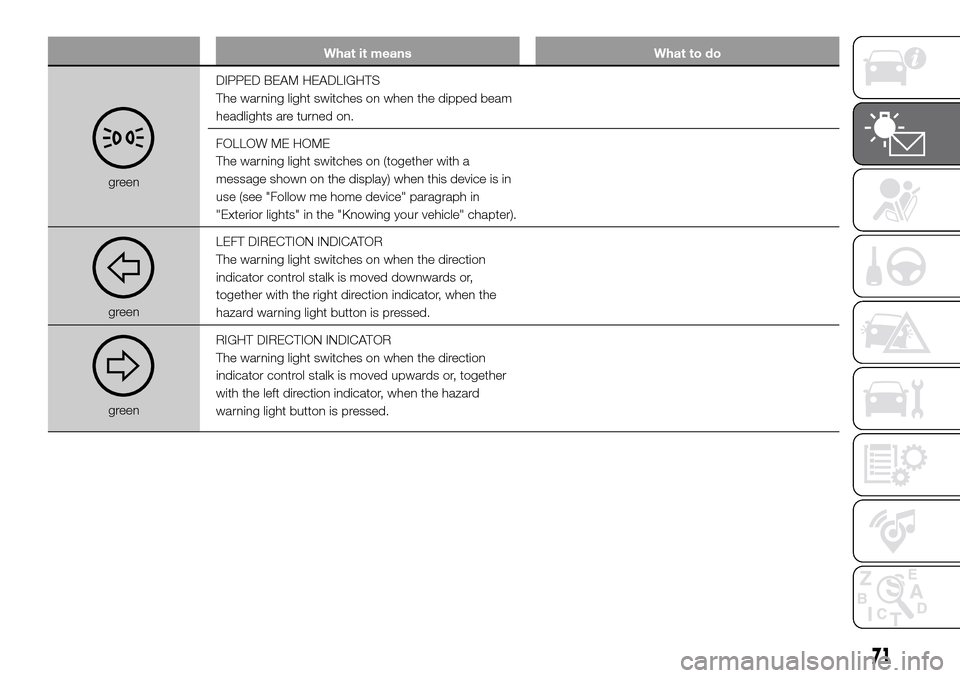
What it means What to do
greenDIPPED BEAM HEADLIGHTS
The warning light switches on when the dipped beam
headlights are turned on.
FOLLOW ME HOME
The warning light switches on (together with a
message shown on the display) when this device is in
use (see "Follow me home device" paragraph in
"Exterior lights" in the "Knowing your vehicle" chapter).
greenLEFT DIRECTION INDICATOR
The warning light switches on when the direction
indicator control stalk is moved downwards or,
together with the right direction indicator, when the
hazard warning light button is pressed.
greenRIGHT DIRECTION INDICATOR
The warning light switches on when the direction
indicator control stalk is moved upwards or, together
with the left direction indicator, when the hazard
warning light button is pressed.
71
Page 76 of 296
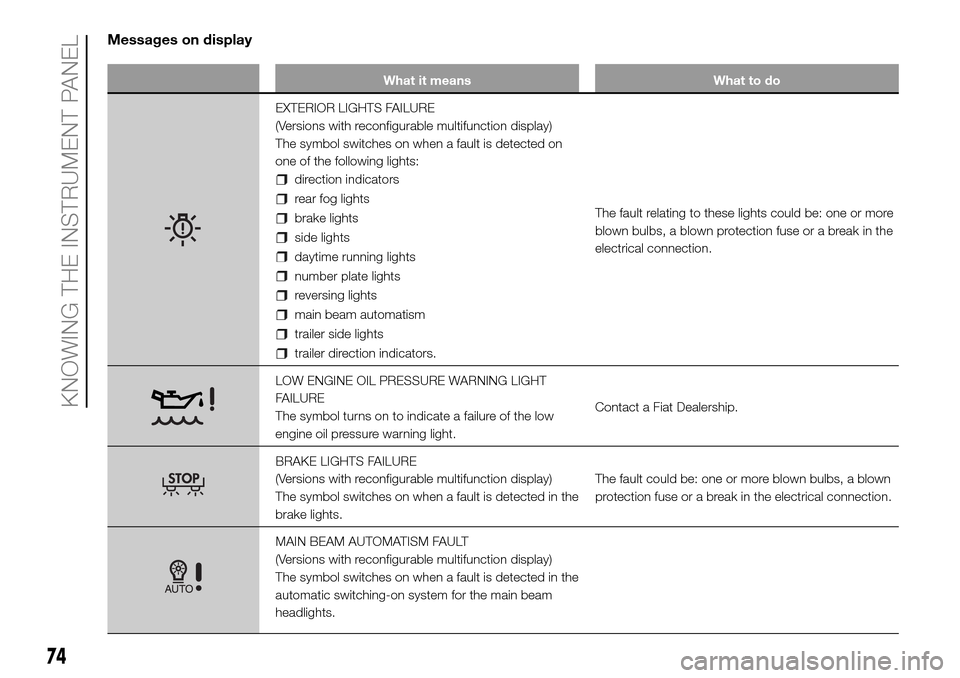
Messages on display
What it means What to do
EXTERIOR LIGHTS FAILURE
(Versions with reconfigurable multifunction display)
The symbol switches on when a fault is detected on
one of the following lights:
direction indicators
rear fog lights
brake lights
side lights
daytime running lights
number plate lights
reversing lights
main beam automatism
trailer side lights
trailer direction indicators.The fault relating to these lights could be: one or more
blown bulbs, a blown protection fuse or a break in the
electrical connection.
LOW ENGINE OIL PRESSURE WARNING LIGHT
FAILURE
The symbol turns on to indicate a failure of the low
engine oil pressure warning light.Contact a Fiat Dealership.
BRAKE LIGHTS FAILURE
(Versions with reconfigurable multifunction display)
The symbol switches on when a fault is detected in the
brake lights.The fault could be: one or more blown bulbs, a blown
protection fuse or a break in the electrical connection.
MAIN BEAM AUTOMATISM FAULT
(Versions with reconfigurable multifunction display)
The symbol switches on when a fault is detected in the
automatic switching-on system for the main beam
headlights.
74
KNOWING THE INSTRUMENT PANEL
Page 78 of 296
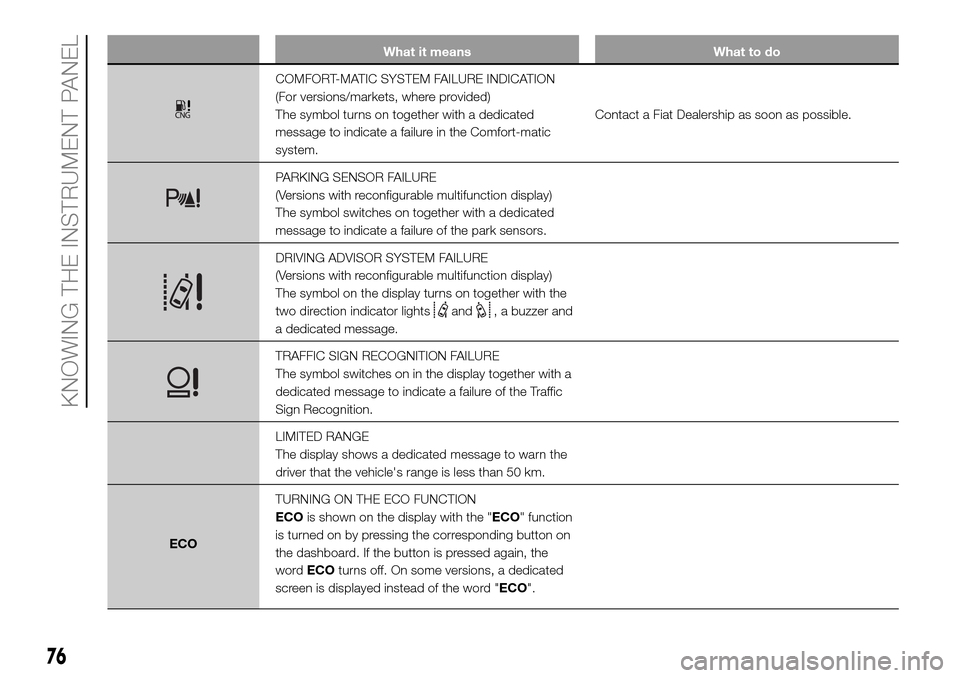
What it means What to do
COMFORT-MATIC SYSTEM FAILURE INDICATION
(For versions/markets, where provided)
The symbol turns on together with a dedicated
message to indicate a failure in the Comfort-matic
system.Contact a Fiat Dealership as soon as possible.
PARKING SENSOR FAILURE
(Versions with reconfigurable multifunction display)
The symbol switches on together with a dedicated
message to indicate a failure of the park sensors.
DRIVING ADVISOR SYSTEM FAILURE
(Versions with reconfigurable multifunction display)
The symbol on the display turns on together with the
two direction indicator lights
and, a buzzer and
a dedicated message.
TRAFFIC SIGN RECOGNITION FAILURE
The symbol switches on in the display together with a
dedicated message to indicate a failure of the Traffic
Sign Recognition.
LIMITED RANGE
The display shows a dedicated message to warn the
driver that the vehicle's range is less than 50 km.
ECOTURNING ON THE ECO FUNCTION
ECOis shown on the display with the "ECO" function
is turned on by pressing the corresponding button on
the dashboard. If the button is pressed again, the
wordECOturns off. On some versions, a dedicated
screen is displayed instead of the word "ECO".
76
KNOWING THE INSTRUMENT PANEL
Page 91 of 296
DRIVING ADVISOR
(lane crossing warning)
(for versions/markets, where provided)
77) 78) 79)The Driving Advisor is a warning system
that notifies the driver if he/she crosses
the lane because he/she has been
distracted.
A video sensor, fitted on the windscreen
near the interior rear view mirror,
detects the lane demarcation lines and
the position of the vehicle in relation
to them.
IMPORTANT On cars with Driving
Advisor, it is advisable to contact a Fiat
Dealership should the windscreen
need to be replaced. If the repair is
carried out at a specialist window
replacement centre, it is still necessary
to go to a Fiat Dealership to have the
camera calibrated.
OPERATION
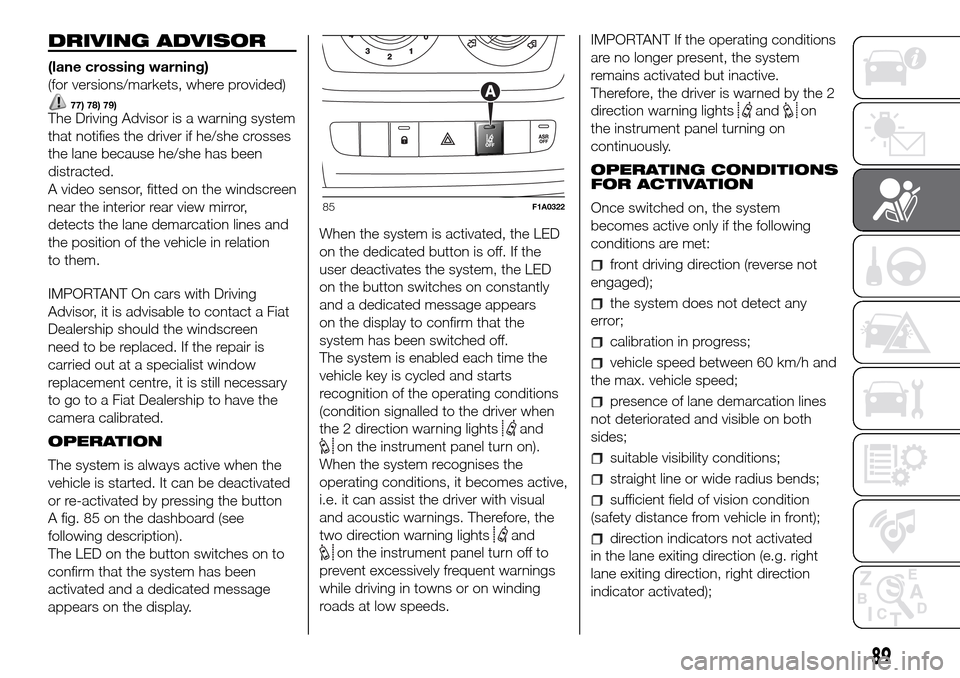
The system is always active when the
vehicle is started. It can be deactivated
or re-activated by pressing the button
A fig. 85 on the dashboard (see
following description).
The LED on the button switches on to
confirm that the system has been
activated and a dedicated message
appears on the display.When the system is activated, the LED
on the dedicated button is off. If the
user deactivates the system, the LED
on the button switches on constantly
and a dedicated message appears
on the display to confirm that the
system has been switched off.
The system is enabled each time the
vehicle key is cycled and starts
recognition of the operating conditions
(condition signalled to the driver when
the 2 direction warning lights
and
on the instrument panel turn on).
When the system recognises the
operating conditions, it becomes active,
i.e. it can assist the driver with visual
and acoustic warnings. Therefore, the
two direction warning lights
and
on the instrument panel turn off to
prevent excessively frequent warnings
while driving in towns or on winding
roads at low speeds.IMPORTANT If the operating conditions
are no longer present, the system
remains activated but inactive.
Therefore, the driver is warned by the 2
direction warning lights
andon
the instrument panel turning on
continuously.
OPERATING CONDITIONS
FOR ACTIVATION
Once switched on, the system
becomes active only if the following
conditions are met:
front driving direction (reverse not
engaged);
the system does not detect any
error;
calibration in progress;
vehicle speed between 60 km/h and
the max. vehicle speed;
presence of lane demarcation lines
not deteriorated and visible on both
sides;
suitable visibility conditions;
straight line or wide radius bends;
sufficient field of vision condition
(safety distance from vehicle in front);
direction indicators not activated
in the lane exiting direction (e.g. right
lane exiting direction, right direction
indicator activated);
85F1A0322
89
Page 92 of 296
vehicle direction getting constantly
closer to the lane demarcation lines (the
vehicle trajectory is within the lane
demarcation lines);
vehicle not constantly next to the
lane demarcation line.
ACTIVATING/
DEACTIVATING THE
SYSTEM
When the system is active, if the vehicle
gets close to one of the side
demarcation lines or one of the two
lane demarcation lines, the driver is
warned with an acoustic signal (coming
from the crossed line side if the vehicle
is equipped with the radio navigation
system) along with the corresponding
direction warning light (
or) lighting
up.
If the driver turns on the direction
indicator in order to change lanes or for
overtaking, then the system will switch
off the driver warning.
If the driver keeps deliberately with the
lane change manoeuvre, the system
interrupts the warning, remaining
enabled if the operating conditions are
not satisfied or active if the operating
conditions are exceeded (see the
dedicated paragraph).SWITCHING OFF THE
SYSTEM
Manual mode
The system can be switched off by
pressing button A fig. 85 on the
dashboard.
The LED on the button switches on and
a message appears on the display to
confirm that the system has been
switched off.
Automatic mode
If the Start&Stop is active the system
deactivates automatically. The system
will reactivate and check its operating
conditions again after the vehicle has
been started.
SYSTEM FAILURE
In the event of malfunction, the system
signals the fault to the driver with a
message on the display, an acoustic
warning and by turning on the
icon
on the display (for versions/markets,
where provided).
IMPORTANT NOTES
The Driving Advisor cannot operate due
to a not perfectly balanced and
excessive load.The operation of the system can be
adversely affected in some cases
by the morphology of the territory/road
being driven on (e.g. driving over
humps), poor visibility conditions (e.g.
fog, rain, snow), extreme light
conditions (e.g. glare of the sun,
darkness), lack of cleanliness
or damage, even partial, to the
windscreen in the area in front of the
camera.
The Driving Advisor cannot operate
following a malfunction of the following
safety systems: ABS, ESC, ASR and
Traction Plus.
The operation of the system can be
adversely affected by poor visibility
conditions (e.g. fog, rain, snow),
extreme light conditions (glare of the
sun, darkness), lack of cleaning or
damage, even partial, to the
windscreen in the area in front the
camera.
The area of the windscreen by the
camera must not be partly or totally
obscured by objects (e.g. stickers,
protective film, etc.).
90
SAFETY
Page 133 of 296
These two systems ensure compliance
with the diesel emissions requirements;
at the same it maintains fuel saving
levels, driveability, torque and power.
For the system messages and warnings
refer to the "Warning lights and
messages" paragraph in the "Knowing
the instrument panel" section.
Notes
When you stop the vehicle you
could hear a distinct click coming from
under the vehicle due to the UREA
injection system, this is normal.
The UREA injection system pump
continues to operate for a short period
of time after the engine is switched
off, to purge the circuit. This is normal,
and you can still hear its noise from
under the vehicle.
VERSION WITH
METHANE SYSTEM
(Natural Power)
37) 38)
INTRODUCTION
The "Natural Power" version of the Fiat
Ducato features two fuel system, one
primary natural gas (methane) system
and one emergency petrol system.
METHANE CYLINDERS
The vehicle is equipped with five
cylinders (total capacity of about 218
litres) located under the vehicle floor
and protected by two special shields.
The cylinders are the tank that contains
the methane in its compressed
gaseous state (nominal pressure of 200
bar at 15°C). The methane, stored in
the cylinders at high pressure, flows
through a dedicated pipe to reach the
pressure regulator/reduction unit which
supplies the 4 methane injectors at
low pressure (about 6 bar).
IMPORTANT If gas is smelled, switch
from methane operation to petrol
operation and immediately go to a Fiat
Dealership to have the vehicle checked
and possible system faults excluded.FUEL SWITCHING
LOGICS
Management of switching between the
two different fuel supplies is fully
automatic, and carried out by the
engine control unit.
When the residual amount of methane
drops below 1/5 of the cylinder
capacity, the lowest level and the edges
of the other levels flash to indicate the
reserve state and that refuelling fig. 119
is required.
If the methane runs out, it is
automatically switched to petrol; on the
display, all the empty segments stop
flashing and then the
indicator near
the CNG icon fig. 120 turns on.
Having reached the reserve methane
pressure threshold, and completely
filled the methane tank, the system
forces the switch to petrol for 5
seconds, with the aim of keeping the
petrol fuel supply system fully efficient.
119F1A0436
131
Page 147 of 296
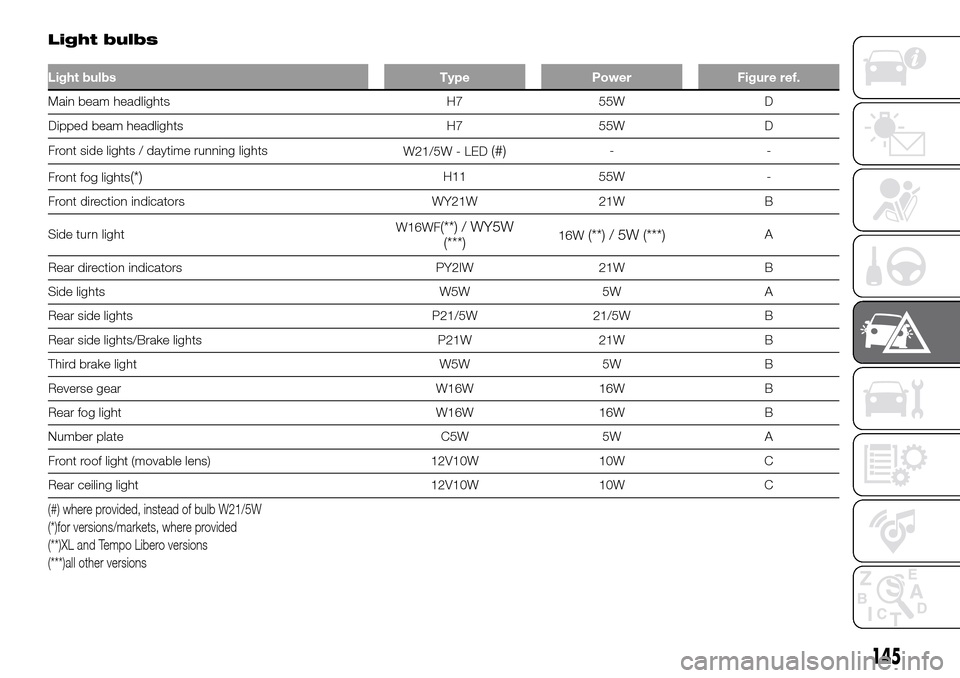
Light bulbs
Light bulbs Type Power Figure ref.
Main beam headlights H7 55W D
Dipped beam headlights H7 55W D
Front side lights / daytime running lights
W21/5W - LED
(#)--
Front fog lights
(*)H11 55W -
Front direction indicators WY21W 21W B
Side turn lightW16WF
(**) / WY5W
(***)16W(**) / 5W (***)A
Rear direction indicators PY2IW 21W B
Side lights W5W 5W A
Rear side lights P21/5W 21/5W B
Rear side lights/Brake lights P21W 21W B
Third brake light W5W 5W B
Reverse gear W16W 16W B
Rear fog light W16W 16W B
Number plate C5W 5W A
Front roof light (movable lens) 12V10W 10W C
Rear ceiling light 12V10W 10W C
(#) where provided, instead of bulb W21/5W
(*)for versions/markets, where provided
(**)XL and Tempo Libero versions
(***)all other versions
145
Page 148 of 296
REPLACING AN
EXTERIOR BULB
FRONT LIGHT CLUSTERS
To remove the headlight, operate as
follows:
open the bonnet by following the
procedure in the "Bonnet/Luggage
Compartment" paragraph in the
"Knowing your vehicle" chapter;
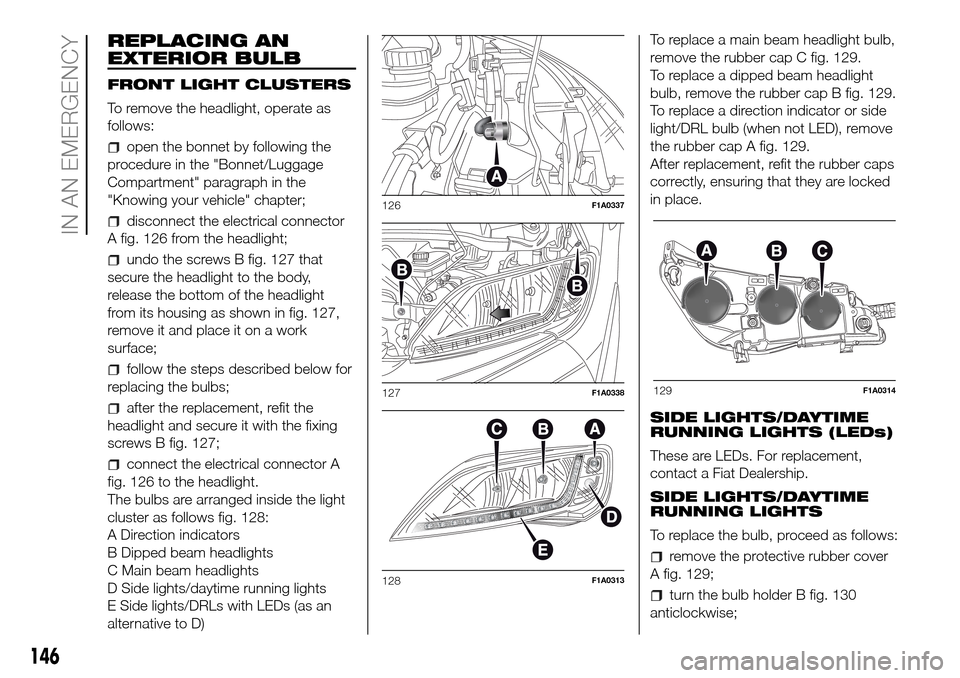
disconnect the electrical connector
A fig. 126 from the headlight;
undo the screws B fig. 127 that
secure the headlight to the body,
release the bottom of the headlight
from its housing as shown in fig. 127,
remove it and place it on a work
surface;
follow the steps described below for
replacing the bulbs;
after the replacement, refit the
headlight and secure it with the fixing
screws B fig. 127;
connect the electrical connector A
fig. 126 to the headlight.
The bulbs are arranged inside the light
cluster as follows fig. 128:
A Direction indicators
B Dipped beam headlights
C Main beam headlights
D Side lights/daytime running lights
E Side lights/DRLs with LEDs (as an
alternative to D)To replace a main beam headlight bulb,
remove the rubber cap C fig. 129.
To replace a dipped beam headlight
bulb, remove the rubber cap B fig. 129.
To replace a direction indicator or side
light/DRL bulb (when not LED), remove
the rubber cap A fig. 129.
After replacement, refit the rubber caps
correctly, ensuring that they are locked
in place.
SIDE LIGHTS/DAYTIME
RUNNING LIGHTS (LEDs)
These are LEDs. For replacement,
contact a Fiat Dealership.
SIDE LIGHTS/DAYTIME
RUNNING LIGHTS
To replace the bulb, proceed as follows:
remove the protective rubber cover
A fig. 129;
turn the bulb holder B fig. 130
anticlockwise;
126F1A0337
127F1A0338
128F1A0313
129F1A0314
146
IN AN EMERGENCY
Page 150 of 296
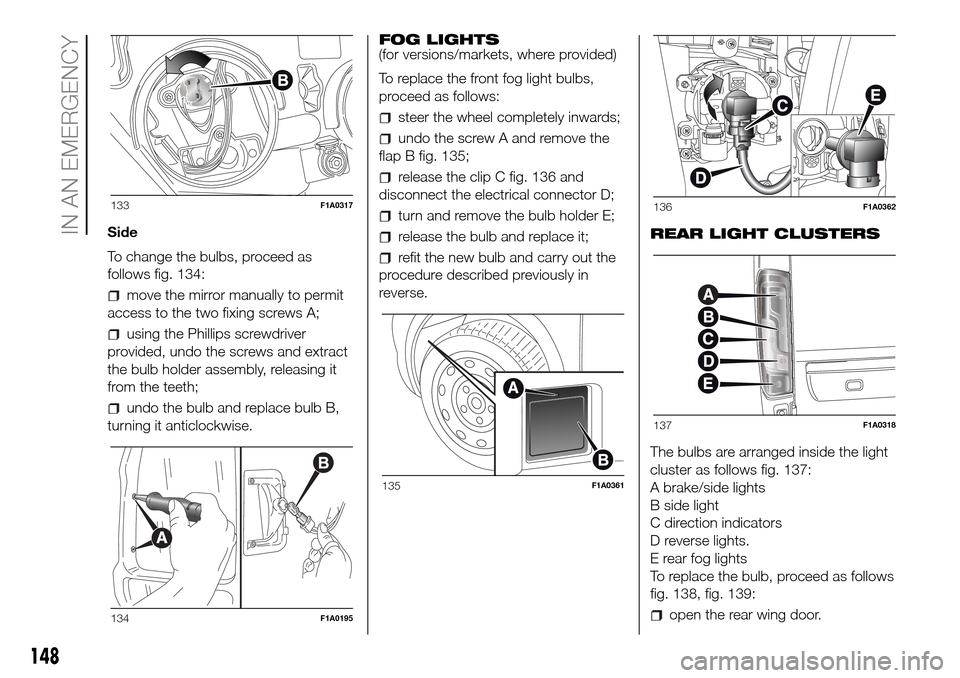
Side
To change the bulbs, proceed as
follows fig. 134:
move the mirror manually to permit
access to the two fixing screws A;
using the Phillips screwdriver
provided, undo the screws and extract
the bulb holder assembly, releasing it
from the teeth;
undo the bulb and replace bulb B,
turning it anticlockwise.FOG LIGHTS
(for versions/markets, where provided)
To replace the front fog light bulbs,
proceed as follows:
steer the wheel completely inwards;
undo the screw A and remove the
flap B fig. 135;
release the clip C fig. 136 and
disconnect the electrical connector D;
turn and remove the bulb holder E;
release the bulb and replace it;
refit the new bulb and carry out the
procedure described previously in
reverse.REAR LIGHT CLUSTERS
The bulbs are arranged inside the light
cluster as follows fig. 137:
A brake/side lights
B side light
C direction indicators
D reverse lights.
E rear fog lights
To replace the bulb, proceed as follows
fig. 138, fig. 139:
open the rear wing door.
133F1A0317
134F1A0195
135F1A0361
136F1A0362
137F1A0318
148
IN AN EMERGENCY
Page 170 of 296
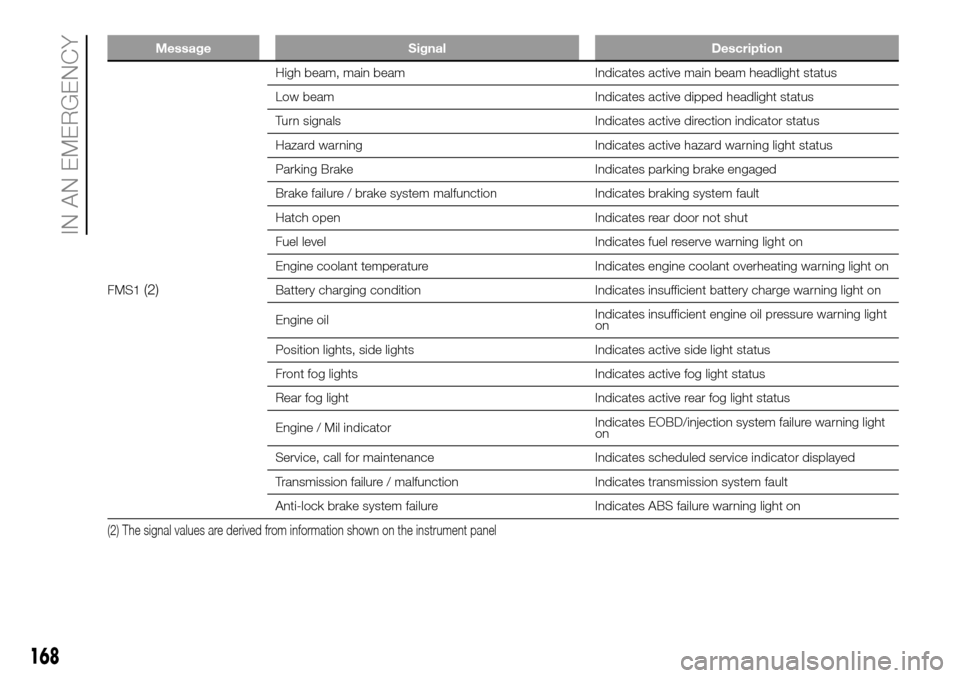
Message Signal Description
FMS1(2)
High beam, main beam Indicates active main beam headlight status
Low beam Indicates active dipped headlight status
Turn signals Indicates active direction indicator status
Hazard warning Indicates active hazard warning light status
Parking Brake Indicates parking brake engaged
Brake failure / brake system malfunction Indicates braking system fault
Hatch open Indicates rear door not shut
Fuel level Indicates fuel reserve warning light on
Engine coolant temperature Indicates engine coolant overheating warning light on
Battery charging condition Indicates insufficient battery charge warning light on
Engine oilIndicates insufficient engine oil pressure warning light
on
Position lights, side lights Indicates active side light status
Front fog lights Indicates active fog light status
Rear fog light Indicates active rear fog light status
Engine / Mil indicatorIndicates EOBD/injection system failure warning light
on
Service, call for maintenance Indicates scheduled service indicator displayed
Transmission failure / malfunction Indicates transmission system fault
Anti-lock brake system failure Indicates ABS failure warning light on
(2) The signal values are derived from information shown on the instrument panel
168
IN AN EMERGENCY