mode button FIAT DUCATO 2016 3.G User Guide
[x] Cancel search | Manufacturer: FIAT, Model Year: 2016, Model line: DUCATO, Model: FIAT DUCATO 2016 3.GPages: 296, PDF Size: 15.08 MB
Page 121 of 296
START&STOP
SYSTEM
IN BRIEF
The Start&Stop device automatically
stops the engine each time the
vehicle is stationary and all the
conditions for automatic switch-off
have been met, and starts it again
when the driver wants to move off.
This improves the efficiency of the
vehicle by reducing fuel consumption,
the emission of harmful gases and
noise pollution.
OPERATING MODE
Stopping the engine
Versions with mechanical gearbox
With the vehicle stationary, the engine
stops with the gearbox in neutral and
the clutch pedal released.
Restarting the engine
Versions with mechanical gearbox
Depress the clutch pedal to restart
the engine.MANUAL ACTIVATION
AND DEACTIVATION OF
THE SYSTEM
To activate/deactivate the system
manually, press the
button on the
dashboard control panel.
24)
118) 119)
WARNING
24)If the vehicle is equipped with manual
climate control, if you want to favour
climate comfort, the Start&Stop system
can be deactivated for continuous climate
control system operation.
WARNING
118)The vehicle should always be
evacuated after the key has been removed
or turned to the STOP position. When
refuelling, make sure that the car is
switched off with the key in the STOP
position.
119)If the battery needs to be replaced,
always contact a Fiat Dealership. The
replacement battery should be of the same
type (L6 105Ah/850A) and should have
the same characteristics.
CRUISE CONTROL
(constant speed
regulator)
(for versions/markets, where provided)
IN BRIEF
This is an electronic driving aid that
allows you to drive at a speed of
above 30 km/h on long and straight
dry roads with few driving changes
(e.g. motorways) at a preset speed
without having to press the
accelerator pedal. It is therefore not
recommended to use this device
on extra-urban roads with traffic. Do
not use the device in town.
Turning the device on
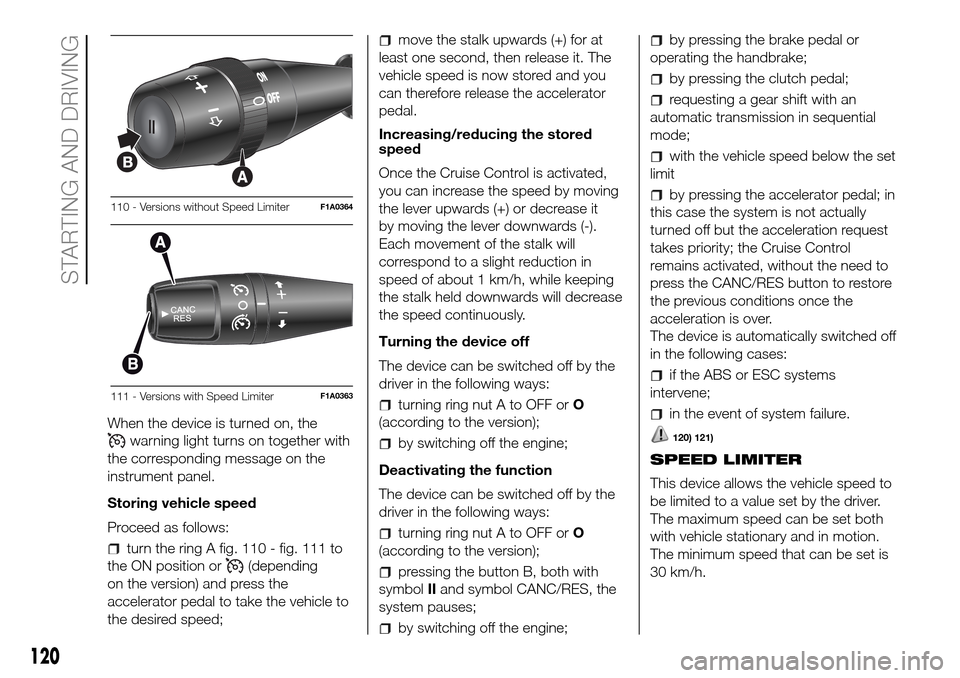
Turn the ring A fig. 110 - fig. 111 to the
ON position or
(depending on the
version).
The Cruise Control cannot be engaged
in 1st or reverse gear. It is advisable
to engage it in 4th or higher gears.
When travelling downhill with the device
engaged, the vehicle speed may
slightly exceed the stored one.
119
Page 122 of 296
When the device is turned on, the
warning light turns on together with
the corresponding message on the
instrument panel.
Storing vehicle speed
Proceed as follows:
turn the ring A fig. 110 - fig. 111 to
the ON position or
(depending
on the version) and press the
accelerator pedal to take the vehicle to
the desired speed;
move the stalk upwards (+) for at
least one second, then release it. The
vehicle speed is now stored and you
can therefore release the accelerator
pedal.
Increasing/reducing the stored
speed
Once the Cruise Control is activated,
you can increase the speed by moving
the lever upwards (+) or decrease it
by moving the lever downwards (-).
Each movement of the stalk will
correspond to a slight reduction in
speed of about 1 km/h, while keeping
the stalk held downwards will decrease
the speed continuously.
Turning the device off
The device can be switched off by the
driver in the following ways:
turning ring nut A to OFF orO
(according to the version);
by switching off the engine;
Deactivating the function
The device can be switched off by the
driver in the following ways:
turning ring nut A to OFF orO
(according to the version);
pressing the button B, both with
symbolIIand symbol CANC/RES, the
system pauses;
by switching off the engine;
by pressing the brake pedal or
operating the handbrake;
by pressing the clutch pedal;
requesting a gear shift with an
automatic transmission in sequential
mode;
with the vehicle speed below the set
limit
by pressing the accelerator pedal; in
this case the system is not actually
turned off but the acceleration request
takes priority; the Cruise Control
remains activated, without the need to
press the CANC/RES button to restore
the previous conditions once the
acceleration is over.
The device is automatically switched off
in the following cases:
if the ABS or ESC systems
intervene;
in the event of system failure.
120) 121)
SPEED LIMITER
This device allows the vehicle speed to
be limited to a value set by the driver.
The maximum speed can be set both
with vehicle stationary and in motion.
The minimum speed that can be set is
30 km/h.
110 - Versions without Speed LimiterF1A0364
111 - Versions with Speed LimiterF1A0363
120
STARTING AND DRIVING
Page 173 of 296
position the jack at the lifting support
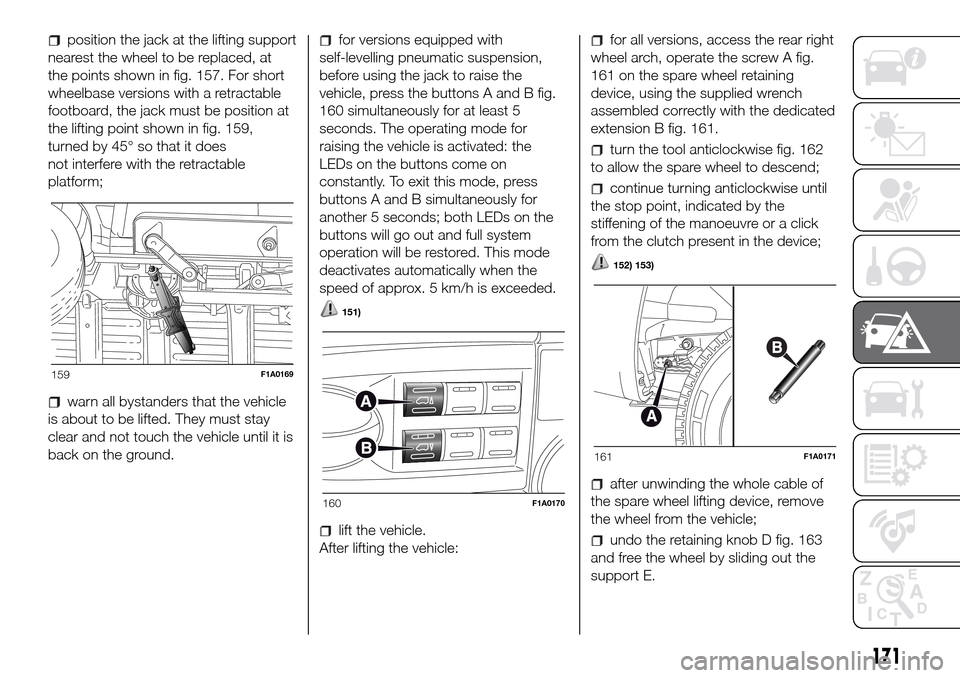
nearest the wheel to be replaced, at
the points shown in fig. 157. For short
wheelbase versions with a retractable
footboard, the jack must be position at
the lifting point shown in fig. 159,
turned by 45° so that it does
not interfere with the retractable
platform;
warn all bystanders that the vehicle
is about to be lifted. They must stay
clear and not touch the vehicle until it is
back on the ground.
for versions equipped with
self-levelling pneumatic suspension,
before using the jack to raise the
vehicle, press the buttons A and B fig.
160 simultaneously for at least 5
seconds. The operating mode for
raising the vehicle is activated: the
LEDs on the buttons come on
constantly. To exit this mode, press
buttons A and B simultaneously for
another 5 seconds; both LEDs on the
buttons will go out and full system
operation will be restored. This mode
deactivates automatically when the
speed of approx. 5 km/h is exceeded.
151)
lift the vehicle.
After lifting the vehicle:
for all versions, access the rear right
wheel arch, operate the screw A fig.
161 on the spare wheel retaining
device, using the supplied wrench
assembled correctly with the dedicated
extension B fig. 161.
turn the tool anticlockwise fig. 162
to allow the spare wheel to descend;
continue turning anticlockwise until
the stop point, indicated by the
stiffening of the manoeuvre or a click
from the clutch present in the device;
152) 153)
after unwinding the whole cable of
the spare wheel lifting device, remove
the wheel from the vehicle;
undo the retaining knob D fig. 163
and free the wheel by sliding out the
support E.
159F1A0169
160F1A0170
161F1A0171
171
Page 266 of 296
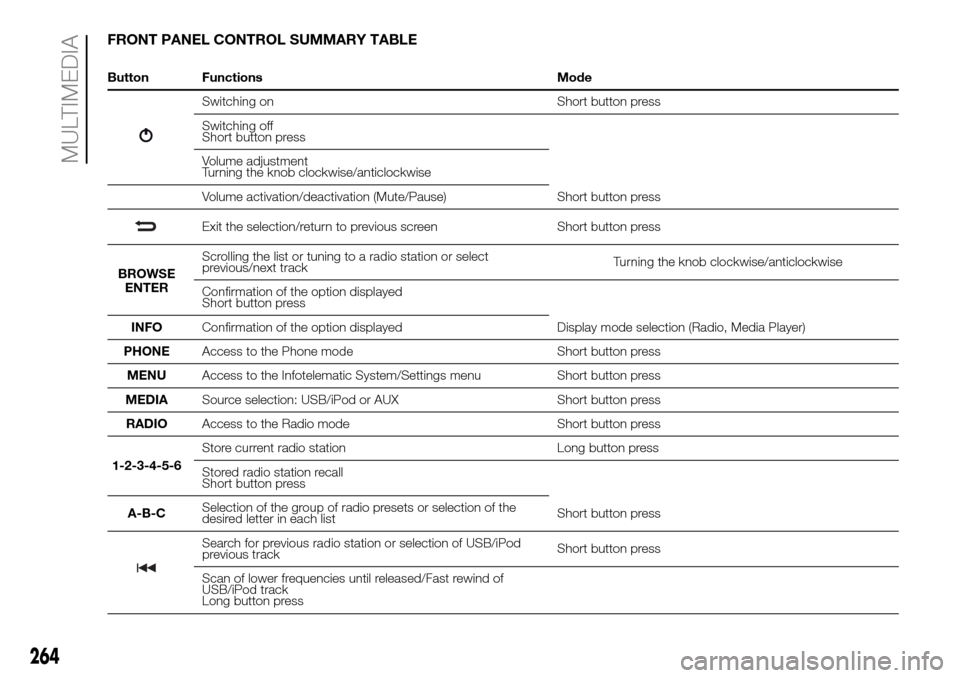
FRONT PANEL CONTROL SUMMARY TABLE
Button Functions Mode
Switching on Short button press
Switching off
Short button press
Volume adjustment
Turning the knob clockwise/anticlockwise
Volume activation/deactivation (Mute/Pause) Short button press
Exit the selection/return to previous screen Short button press
BROWSE
ENTERScrolling the list or tuning to a radio station or select
previous/next trackTurning the knob clockwise/anticlockwise
Confirmation of the option displayed
Short button press
INFOConfirmation of the option displayed Display mode selection (Radio, Media Player)
PHONEAccess to the Phone mode Short button press
MENUAccess to the Infotelematic System/Settings menu Short button press
MEDIASource selection: USB/iPod or AUX Short button press
RADIOAccess to the Radio mode Short button press
1-2-3-4-5-6Store current radio station Long button press
Stored radio station recall
Short button press
A-B-CSelection of the group of radio presets or selection of the
desired letter in each listShort button press
Search for previous radio station or selection of USB/iPod
previous trackShort button press
Scan of lower frequencies until released/Fast rewind of
USB/iPod track
Long button press
264
MULTIMEDIA
Page 267 of 296
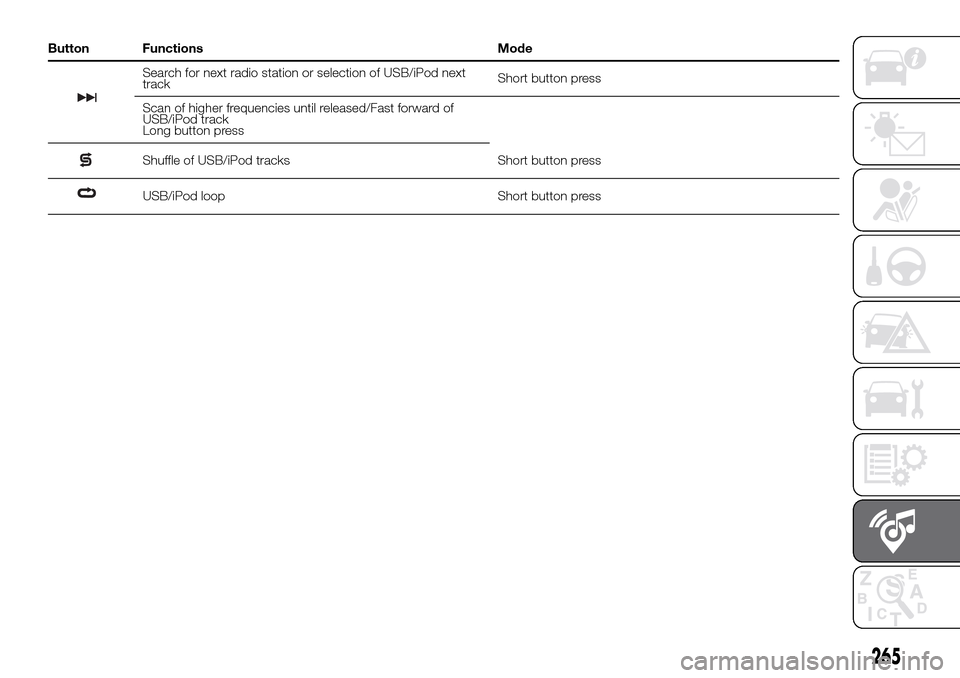
Button Functions Mode
Search for next radio station or selection of USB/iPod next
trackShort button press
Scan of higher frequencies until released/Fast forward of
USB/iPod track
Long button press
Shuffle of USB/iPod tracks Short button press
USB/iPod loop Short button press
265
Page 269 of 296
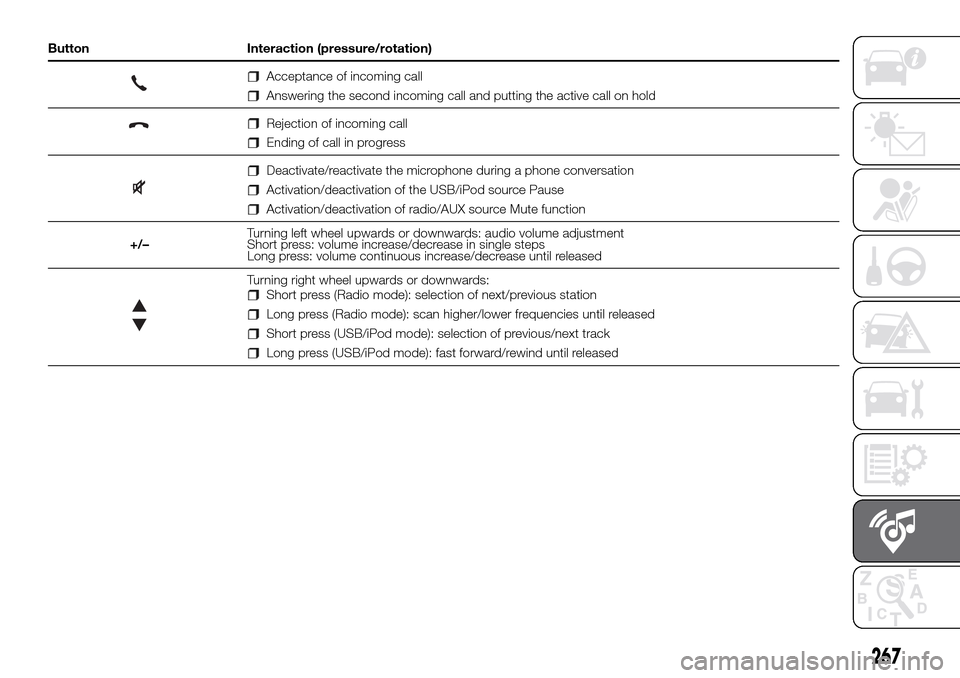
Button Interaction (pressure/rotation)
Acceptance of incoming call
Answering the second incoming call and putting the active call on hold
Rejection of incoming call
Ending of call in progress
Deactivate/reactivate the microphone during a phone conversation
Activation/deactivation of the USB/iPod source Pause
Activation/deactivation of radio/AUX source Mute function
+/–Turning left wheel upwards or downwards: audio volume adjustment
Short press: volume increase/decrease in single steps
Long press: volume continuous increase/decrease until released
Turning right wheel upwards or downwards:Short press (Radio mode): selection of next/previous station
Long press (Radio mode): scan higher/lower frequencies until released
Short press (USB/iPod mode): selection of previous/next track
Long press (USB/iPod mode): fast forward/rewind until released
267
Page 270 of 296
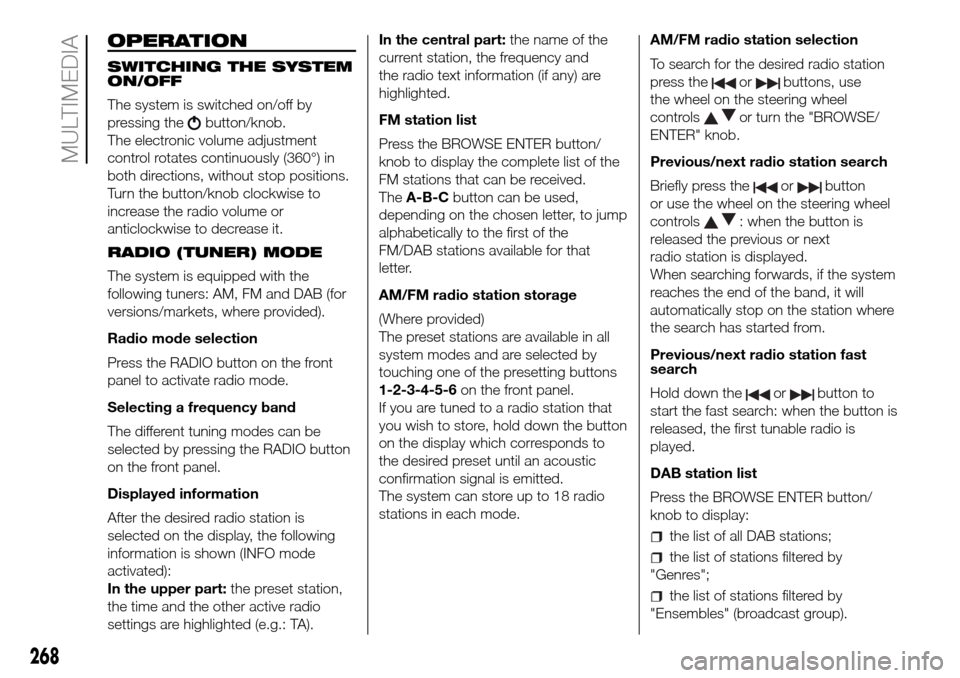
OPERATION
SWITCHING THE SYSTEM
ON/OFF
The system is switched on/off by
pressing the
button/knob.
The electronic volume adjustment
control rotates continuously (360°) in
both directions, without stop positions.
Turn the button/knob clockwise to
increase the radio volume or
anticlockwise to decrease it.
RADIO (TUNER) MODE
The system is equipped with the
following tuners: AM, FM and DAB (for
versions/markets, where provided).
Radio mode selection
Press the RADIO button on the front
panel to activate radio mode.
Selecting a frequency band
The different tuning modes can be
selected by pressing the RADIO button
on the front panel.
Displayed information
After the desired radio station is
selected on the display, the following
information is shown (INFO mode
activated):
In the upper part:the preset station,
the time and the other active radio
settings are highlighted (e.g.: TA).In the central part:the name of the
current station, the frequency and
the radio text information (if any) are
highlighted.
FM station list
Press the BROWSE ENTER button/
knob to display the complete list of the
FM stations that can be received.
TheA-B-Cbutton can be used,
depending on the chosen letter, to jump
alphabetically to the first of the
FM/DAB stations available for that
letter.
AM/FM radio station storage
(Where provided)
The preset stations are available in all
system modes and are selected by
touching one of the presetting buttons
1-2-3-4-5-6on the front panel.
If you are tuned to a radio station that
you wish to store, hold down the button
on the display which corresponds to
the desired preset until an acoustic
confirmation signal is emitted.
The system can store up to 18 radio
stations in each mode.AM/FM radio station selection
To search for the desired radio station
press the
orbuttons, use
the wheel on the steering wheel
controls
or turn the "BROWSE/
ENTER" knob.
Previous/next radio station search
Briefly press the
orbutton
or use the wheel on the steering wheel
controls
: when the button is
released the previous or next
radio station is displayed.
When searching forwards, if the system
reaches the end of the band, it will
automatically stop on the station where
the search has started from.
Previous/next radio station fast
search
Hold down the
orbutton to
start the fast search: when the button is
released, the first tunable radio is
played.
DAB station list
Press the BROWSE ENTER button/
knob to display:
the list of all DAB stations;
the list of stations filtered by
"Genres";
the list of stations filtered by
"Ensembles" (broadcast group).
268
MULTIMEDIA
Page 271 of 296
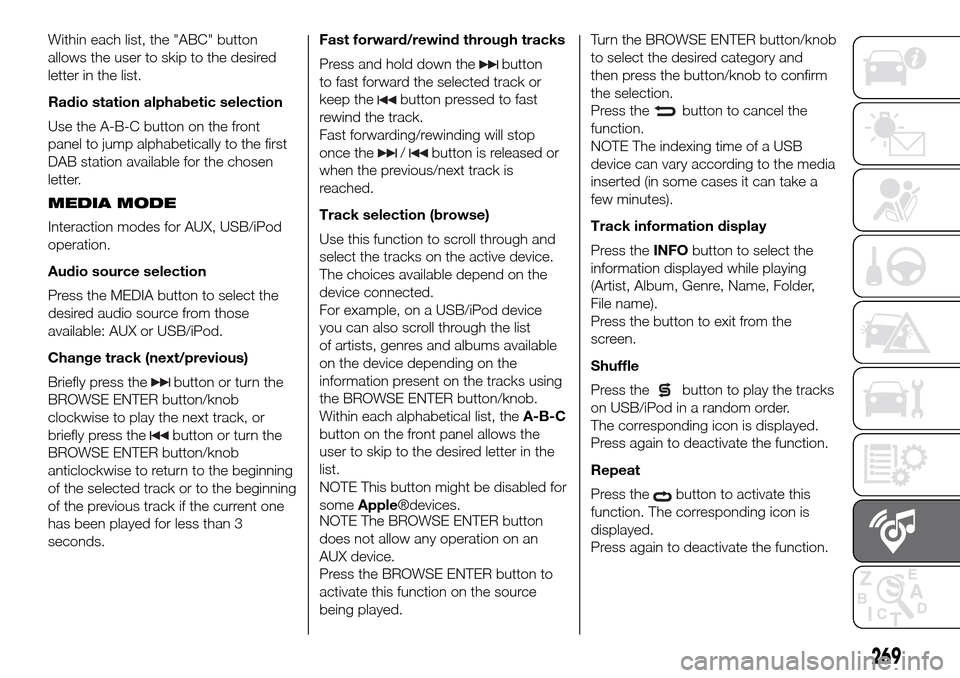
Within each list, the "ABC" button
allows the user to skip to the desired
letter in the list.
Radio station alphabetic selection
Use the A-B-C button on the front
panel to jump alphabetically to the first
DAB station available for the chosen
letter.
MEDIA MODE
Interaction modes for AUX, USB/iPod
operation.
Audio source selection
Press the MEDIA button to select the
desired audio source from those
available: AUX or USB/iPod.
Change track (next/previous)
Briefly press the
button or turn the
BROWSE ENTER button/knob
clockwise to play the next track, or
briefly press the
button or turn the
BROWSE ENTER button/knob
anticlockwise to return to the beginning
of the selected track or to the beginning
of the previous track if the current one
has been played for less than 3
seconds.Fast forward/rewind through tracks
Press and hold down the
button
to fast forward the selected track or
keep the
button pressed to fast
rewind the track.
Fast forwarding/rewinding will stop
once the
/button is released or
when the previous/next track is
reached.
Track selection (browse)
Use this function to scroll through and
select the tracks on the active device.
The choices available depend on the
device connected.
For example, on a USB/iPod device
you can also scroll through the list
of artists, genres and albums available
on the device depending on the
information present on the tracks using
the BROWSE ENTER button/knob.
Within each alphabetical list, theA-B-C
button on the front panel allows the
user to skip to the desired letter in the
list.
NOTE This button might be disabled for
someApple®devices.
NOTE The BROWSE ENTER button
does not allow any operation on an
AUX device.
Press the BROWSE ENTER button to
activate this function on the source
being played.Turn the BROWSE ENTER button/knob
to select the desired category and
then press the button/knob to confirm
the selection.
Press the
button to cancel the
function.
NOTE The indexing time of a USB
device can vary according to the media
inserted (in some cases it can take a
few minutes).
Track information display
Press theINFObutton to select the
information displayed while playing
(Artist, Album, Genre, Name, Folder,
File name).
Press the button to exit from the
screen.
Shuffle
Press the
button to play the tracks
on USB/iPod in a random order.
The corresponding icon is displayed.
Press again to deactivate the function.
Repeat
Press the
button to activate this
function. The corresponding icon is
displayed.
Press again to deactivate the function.
269
Page 272 of 296
USB/iPod SOURCE
To activate USB/iPod mode, connect
the corresponding device (USB or iPod)
to the vehicle's USB port.
208)
If a USB/iPod device is connected to
the system on, this starts playing the
tracks present on the device.
AUX SOURCE
To activate AUX mode, use a suitable
cable to connect a device to the
vehicle's AUX socket.
209)
When you connect a device with AUX
output socket, the system starts AUX
source playback, provided that it is
already playing.
Adjust the volume using the
button/
knob on the front panel or using the
volume adjustment control on the
connected device.
For the "Audio source selection"
function, see the "Media mode"
chapter.
IMPORTANT NOTES
The functions of the device connected
with the AUX socket are directly
managed by the device itself: it is not
possible to change track/folder/playlist
or control playing start/end/pause
with the controls on the front panel or
on the steering wheel.Do not leave the cable of your portable
player connected to the AUX socket
after disconnection, to avoid possible
hiss from the speakers.
PHONE MODE
Phone mode activation
Press the PHONE button on the front
panel to activate the Phone mode.
The available commands can be used
to:
dial the wished phone number;
display and call the contacts in the
mobile phone phonebook;
display and call contacts from the
registers of previous calls;
pair up to 8 phones to make access
and connection easier and quicker;
transfer calls from the system to the
mobile phone and vice versa and
deactivate the microphone audio for
private conversations.
The mobile phone audio is transmitted
through the vehicle’s audio system;
the system automatically mutes the
radio when the Phone function is used.
Shown on display
When a phone is connected to the
system, the display shows various
information (if available):
status of roaming;
network signal intensity;
mobile phone battery charge;
mobile phone name.
Pairing a mobile phone
To pair the mobile phone, proceed as
follows:
activate theBluetooth® function on
the mobile phone;
press thePHONEbutton on the
front panel;
if no phone is paired with the system
yet, the display shows a dedicated
screen;
select "Connect Phone" to start the
pairing procedure then search for the
Uconnect™ device on the mobile
phone (if "No" is selected, the Phone
main screen is displayed);
when prompted by the mobile
phone, use its keypad to enter the PIN
code shown on the system display
or confirm on the mobile phone the PIN
displayed;
from the "Settings" menu you can
always pair a mobile phone by selecting
"Phone menu/Add phone", then
proceed as described above;
during the pairing stage a screen is
displayed showing the progress of
the operation;
270
MULTIMEDIA
Page 275 of 296
FRONT PANEL CONTROL SUMMARY TABLE
Button Functions Mode
1-
Switching on Short button press
Switching off Short button press
Volume adjustment Left/right rotation of knob
2-
Volume activation/deactivation (Mute/Pause) Short button press
3-
Display on/off Short button press
4-
CD ejection Short button press
5-CD housing–
6-
Settings Short button press
7-
Exit the selection/return to previous screen Short button press
8-
BROWSE
ENTERScrolling the list or tuning to a radio station Left/right rotation of knob
Confirmation of the option displayed Short button press
9-
MOREAccess to the additional functions (display of Time, Trip
Computer, Outside temperature)Short button press
10-
PHONEPhone data display Short button press
11-
TRIP(Uconnect™5” Radio)Access to the Trip menu Short button press
11-
NAV(Uconnect™5” Radio
Nav)Access to the Navigation menu Short button press
273