motor FIAT DUCATO 2016 3.G User Guide
[x] Cancel search | Manufacturer: FIAT, Model Year: 2016, Model line: DUCATO, Model: FIAT DUCATO 2016 3.GPages: 296, PDF Size: 15.08 MB
Page 215 of 296
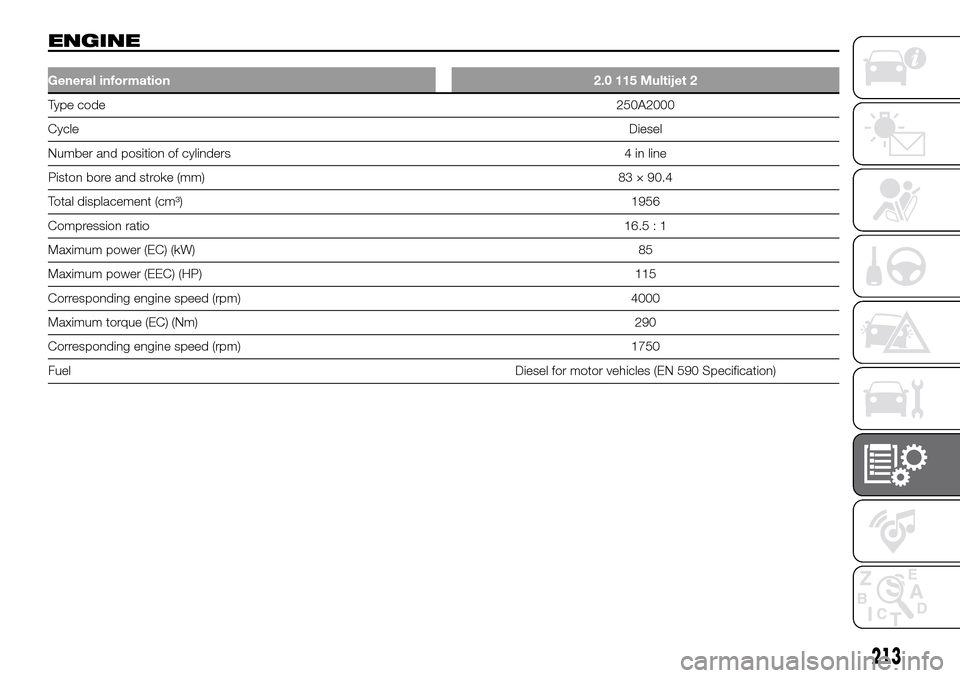
ENGINE
General information2.0 115 Multijet 2
Type code250A2000
CycleDiesel
Number and position of cylinders 4 in line
Piston bore and stroke (mm)83 × 90.4
Total displacement (cm³)1956
Compression ratio16.5 : 1
Maximum power (EC) (kW)85
Maximum power (EEC) (HP)115
Corresponding engine speed (rpm) 4000
Maximum torque (EC) (Nm)290
Corresponding engine speed (rpm) 1750
FuelDiesel for motor vehicles (EN 590 Specification)
213
Page 216 of 296
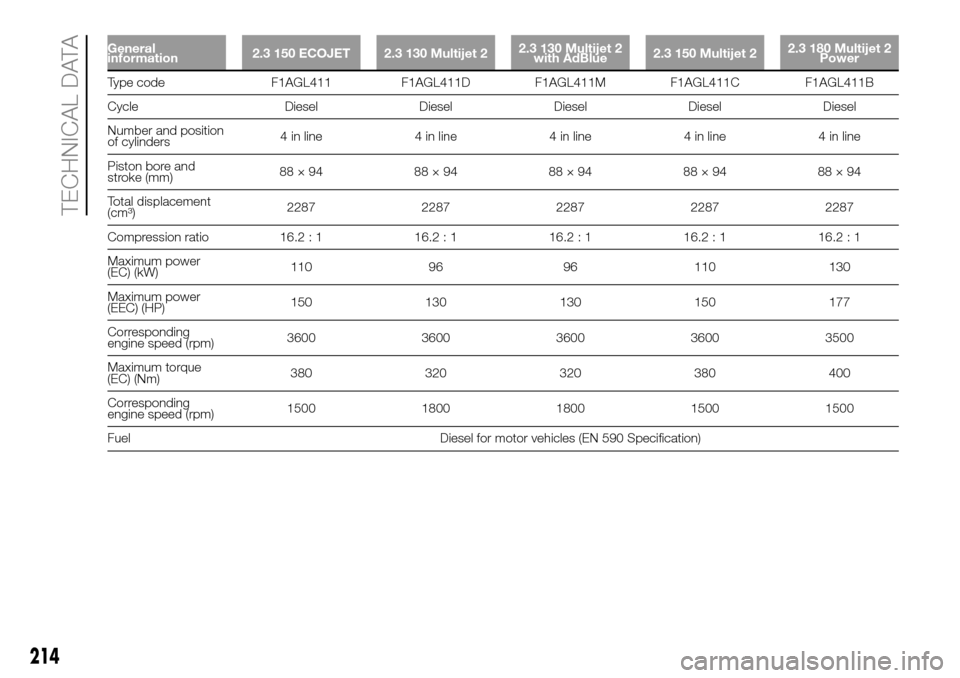
General
information2.3 150 ECOJET 2.3 130 Multijet 22.3 130 Multijet 2
with AdBlue2.3 150 Multijet 22.3 180 Multijet 2
Power
Type code F1AGL411 F1AGL411D F1AGL411M F1AGL411C F1AGL411B
Cycle Diesel Diesel Diesel Diesel Diesel
Number and position
of cylinders4 in line 4 in line 4 in line 4 in line 4 in line
Piston bore and
stroke (mm)88×94 88×94 88×94 88×94 88×94
Total displacement
(cm³)2287 2287 2287 2287 2287
Compression ratio 16.2 : 1 16.2 : 1 16.2 : 1 16.2 : 1 16.2 : 1
Maximum power
(EC) (kW)110 96 96 110 130
Maximum power
(EEC) (HP)150 130 130 150 177
Corresponding
engine speed (rpm)3600 3600 3600 3600 3500
Maximum torque
(EC) (Nm)380 320 320 380 400
Corresponding
engine speed (rpm)1500 1800 1800 1500 1500
Fuel Diesel for motor vehicles (EN 590 Specification)
214
TECHNICAL DATA
Page 239 of 296
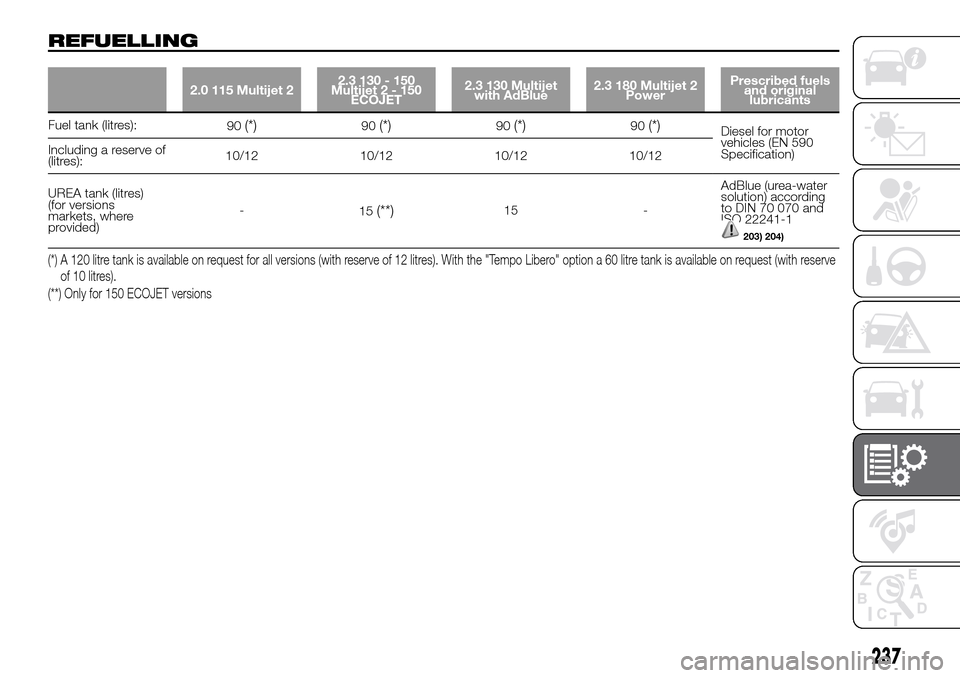
REFUELLING
2.0 115 Multijet 22.3 130 - 150
Multijet2-150
ECOJET2.3 130 Multijet
with AdBlue2.3 180 Multijet 2
PowerPrescribed fuels
and original
lubricants
Fuel tank (litres):
90(*)90(*)90(*)90(*)Diesel for motor
vehicles (EN 590
Specification) Including a reserve of
(litres):10/12 10/12 10/12 10/12
UREA tank (litres)
(for versions
markets, where
provided)-
15
(**)15 -AdBlue (urea-water
solution) according
to DIN 70 070 and
ISO 22241-1
203) 204)
(*) A 120 litre tank is available on request for all versions (with reserve of 12 litres). With the "Tempo Libero" option a 60 litre tank is available on request (with reserve
of 10 litres).
(**) Only for 150 ECOJET versions
237
Page 280 of 296
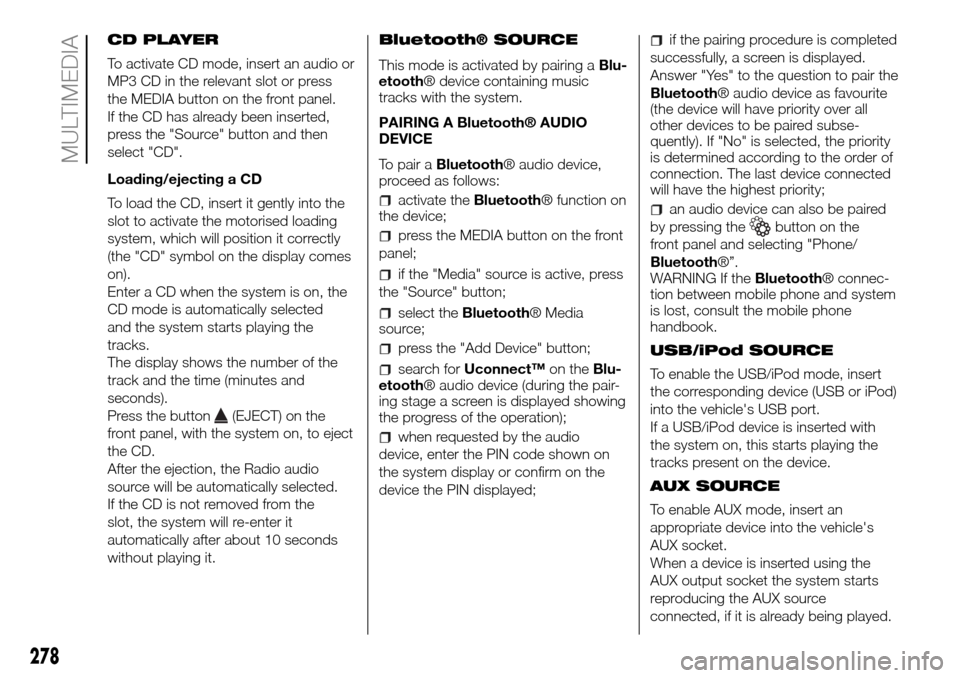
CD PLAYER
To activate CD mode, insert an audio or
MP3 CD in the relevant slot or press
the MEDIA button on the front panel.
If the CD has already been inserted,
press the "Source" button and then
select "CD".
Loading/ejecting a CD
To load the CD, insert it gently into the
slot to activate the motorised loading
system, which will position it correctly
(the "CD" symbol on the display comes
on).
Enter a CD when the system is on, the
CD mode is automatically selected
and the system starts playing the
tracks.
The display shows the number of the
track and the time (minutes and
seconds).
Press the button
(EJECT) on the
front panel, with the system on, to eject
the CD.
After the ejection, the Radio audio
source will be automatically selected.
If the CD is not removed from the
slot, the system will re-enter it
automatically after about 10 seconds
without playing it.Bluetooth® SOURCE
This mode is activated by pairing aBlu-
etooth® device containing music
tracks with the system.
PAIRING A Bluetooth® AUDIO
DEVICE
To pair aBluetooth® audio device,
proceed as follows:
activate theBluetooth® function on
the device;
press the MEDIA button on the front
panel;
if the "Media" source is active, press
the "Source" button;
select theBluetooth® Media
source;
press the "Add Device" button;
search forUconnect™on theBlu-
etooth® audio device (during the pair-
ing stage a screen is displayed showing
the progress of the operation);
when requested by the audio
device, enter the PIN code shown on
the system display or confirm on the
device the PIN displayed;
if the pairing procedure is completed
successfully, a screen is displayed.
Answer "Yes" to the question to pair the
Bluetooth® audio device as favourite
(the device will have priority over all
other devices to be paired subse-
quently). If "No" is selected, the priority
is determined according to the order of
connection. The last device connected
will have the highest priority;
an audio device can also be paired
by pressing the
button on the
front panel and selecting "Phone/
Bluetooth®”.
WARNING If theBluetooth® connec-
tion between mobile phone and system
is lost, consult the mobile phone
handbook.
USB/iPod SOURCE
To enable the USB/iPod mode, insert
the corresponding device (USB or iPod)
into the vehicle's USB port.
If a USB/iPod device is inserted with
the system on, this starts playing the
tracks present on the device.
AUX SOURCE
To enable AUX mode, insert an
appropriate device into the vehicle's
AUX socket.
When a device is inserted using the
AUX output socket the system starts
reproducing the AUX source
connected, if it is already being played.
278
MULTIMEDIA