ESP FIAT DUCATO 2016 3.G Workshop Manual
[x] Cancel search | Manufacturer: FIAT, Model Year: 2016, Model line: DUCATO, Model: FIAT DUCATO 2016 3.GPages: 296, PDF Size: 15.08 MB
Page 262 of 296
RADIO
(for versions/markets, where provided)
For radio operation, consult the
Supplement attached to this Owner
Handbook.
SETUP
(for versions/markets, where provided)
The system consists of:
radio supply leads;
front speaker connection cables;
aerial supply lead;
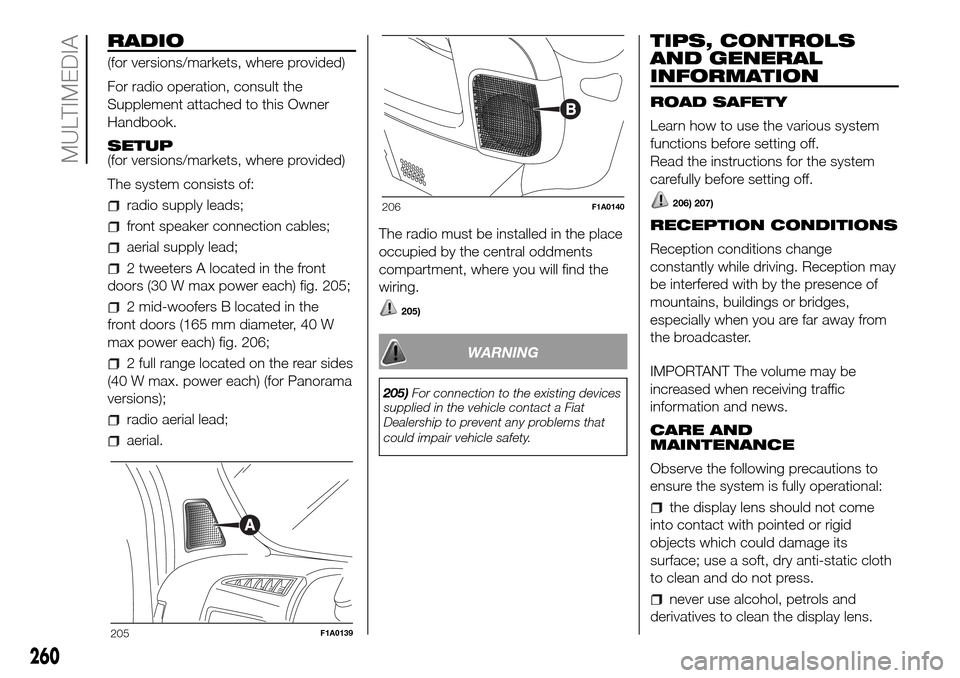
2 tweeters A located in the front
doors (30 W max power each) fig. 205;
2 mid-woofers B located in the
front doors (165 mm diameter, 40 W
max power each) fig. 206;
2 full range located on the rear sides
(40 W max. power each) (for Panorama
versions);
radio aerial lead;
aerial.The radio must be installed in the place
occupied by the central oddments
compartment, where you will find the
wiring.
205)
WARNING
205)For connection to the existing devices
supplied in the vehicle contact a Fiat
Dealership to prevent any problems that
could impair vehicle safety.
TIPS, CONTROLS
AND GENERAL
INFORMATION
ROAD SAFETY
Learn how to use the various system
functions before setting off.
Read the instructions for the system
carefully before setting off.
206) 207)
RECEPTION CONDITIONS
Reception conditions change
constantly while driving. Reception may
be interfered with by the presence of
mountains, buildings or bridges,
especially when you are far away from
the broadcaster.
IMPORTANT The volume may be
increased when receiving traffic
information and news.
CARE AND
MAINTENANCE
Observe the following precautions to
ensure the system is fully operational:
the display lens should not come
into contact with pointed or rigid
objects which could damage its
surface; use a soft, dry anti-static cloth
to clean and do not press.
never use alcohol, petrols and
derivatives to clean the display lens.
205F1A0139
206F1A0140
260
MULTIMEDIA
Page 263 of 296
prevent any liquid from entering the
system: this could damage it beyond
repair.
61) 62)
ANTITHEFT PROTECTION
The system is equipped with an
anti-theft protection system based on
the exchange of information with the
electronic control unit (Body Computer)
on the vehicle.
This guarantees maximum safety and
prevents the secret code from being
entered after the power supply has
been disconnected.
If the check has a positive outcome, the
system will start to operate, whereas if
the comparison codes are not the
same or if the electronic control unit
(Body Computer) is replaced, the
system will ask the user to enter the
secret code according to the procedure
described in the paragraph below.
Entering the secret code
When the system is switched on, if the
code is requested, the display will
show "Please enter Anti-Theft Code"
followed by the screen showing a
keypad to enter the secret code.
The secret code is made up of four
digits from 0 to 9.
Uconnect™3” Radio:The secret code is made up of four
digits, from 0 to 9: to insert the code,
turn the "BROWSE ENTER" right knob
and press to confirm.
Uconnect™5” Radio –Uconnect™
5” Radio NAV
The secret code is made up of four
digits, from 1 to 9: to insert the first
number of the code press the
corresponding key on the display. Enter
the other code digits in the same way.
After inserting the fourth digit, move the
cursor to "OK" and press the
"BROWSE/ENTER" right knob: the
system will start to operate.
If an incorrect code is entered, the
system displays "Incorrect Code" to
notify the user of the need to enter the
correct code.
After the 3 available attempts to enter
the code, the system displays
"Incorrect Code. Radio locked. Wait for
30 minutes". After the text has
disappeared it is possible to start the
code entering procedure again.
Vehicle radio passport
This document certifies ownership of
the system. The vehicle radio passport
shows the system model, serial number
and secret code.In the case of loss of the radio
passport, contact the Fiat Dealership,
taking an ID document and the vehicle
ownership documents.
IMPORTANT Keep the vehicle radio
passport in a safe place so that you
can give the information to the relevant
authorities if the system is stolen.
IMPORTANT NOTES
Look at the screen only and when it is
necessary and safe. If you need to look
at the screen for a long time, pull over
to a safe place so as not to be
distracted while driving.
Immediately stop using the system in
the event of a fault. Otherwise the
system might be damaged. Contact a
Fiat Dealership as soon as possible
to have the system repaired.
WARNING
206)Follow the safety rules here below:
otherwise serious injuries may occur to the
occupants or the system may be
damaged.
207)If the volume is too loud this can be
dangerous. Adjust the volume so that
you can still hear background noises (e.g.
horns, ambulances, police vehicles, etc.).
261
Page 270 of 296
OPERATION
SWITCHING THE SYSTEM
ON/OFF
The system is switched on/off by
pressing the
button/knob.
The electronic volume adjustment
control rotates continuously (360°) in
both directions, without stop positions.
Turn the button/knob clockwise to
increase the radio volume or
anticlockwise to decrease it.
RADIO (TUNER) MODE
The system is equipped with the
following tuners: AM, FM and DAB (for
versions/markets, where provided).
Radio mode selection
Press the RADIO button on the front
panel to activate radio mode.
Selecting a frequency band
The different tuning modes can be
selected by pressing the RADIO button
on the front panel.
Displayed information
After the desired radio station is
selected on the display, the following
information is shown (INFO mode
activated):
In the upper part:the preset station,
the time and the other active radio
settings are highlighted (e.g.: TA).In the central part:the name of the
current station, the frequency and
the radio text information (if any) are
highlighted.
FM station list
Press the BROWSE ENTER button/
knob to display the complete list of the
FM stations that can be received.
TheA-B-Cbutton can be used,
depending on the chosen letter, to jump
alphabetically to the first of the
FM/DAB stations available for that
letter.
AM/FM radio station storage
(Where provided)
The preset stations are available in all
system modes and are selected by
touching one of the presetting buttons
1-2-3-4-5-6on the front panel.
If you are tuned to a radio station that
you wish to store, hold down the button
on the display which corresponds to
the desired preset until an acoustic
confirmation signal is emitted.
The system can store up to 18 radio
stations in each mode.AM/FM radio station selection
To search for the desired radio station
press the
orbuttons, use
the wheel on the steering wheel
controls
or turn the "BROWSE/
ENTER" knob.
Previous/next radio station search
Briefly press the
orbutton
or use the wheel on the steering wheel
controls
: when the button is
released the previous or next
radio station is displayed.
When searching forwards, if the system
reaches the end of the band, it will
automatically stop on the station where
the search has started from.
Previous/next radio station fast
search
Hold down the
orbutton to
start the fast search: when the button is
released, the first tunable radio is
played.
DAB station list
Press the BROWSE ENTER button/
knob to display:
the list of all DAB stations;
the list of stations filtered by
"Genres";
the list of stations filtered by
"Ensembles" (broadcast group).
268
MULTIMEDIA
Page 271 of 296
Within each list, the "ABC" button
allows the user to skip to the desired
letter in the list.
Radio station alphabetic selection
Use the A-B-C button on the front
panel to jump alphabetically to the first
DAB station available for the chosen
letter.
MEDIA MODE
Interaction modes for AUX, USB/iPod
operation.
Audio source selection
Press the MEDIA button to select the
desired audio source from those
available: AUX or USB/iPod.
Change track (next/previous)
Briefly press the
button or turn the
BROWSE ENTER button/knob
clockwise to play the next track, or
briefly press the
button or turn the
BROWSE ENTER button/knob
anticlockwise to return to the beginning
of the selected track or to the beginning
of the previous track if the current one
has been played for less than 3
seconds.Fast forward/rewind through tracks
Press and hold down the
button
to fast forward the selected track or
keep the
button pressed to fast
rewind the track.
Fast forwarding/rewinding will stop
once the
/button is released or
when the previous/next track is
reached.
Track selection (browse)
Use this function to scroll through and
select the tracks on the active device.
The choices available depend on the
device connected.
For example, on a USB/iPod device
you can also scroll through the list
of artists, genres and albums available
on the device depending on the
information present on the tracks using
the BROWSE ENTER button/knob.
Within each alphabetical list, theA-B-C
button on the front panel allows the
user to skip to the desired letter in the
list.
NOTE This button might be disabled for
someApple®devices.
NOTE The BROWSE ENTER button
does not allow any operation on an
AUX device.
Press the BROWSE ENTER button to
activate this function on the source
being played.Turn the BROWSE ENTER button/knob
to select the desired category and
then press the button/knob to confirm
the selection.
Press the
button to cancel the
function.
NOTE The indexing time of a USB
device can vary according to the media
inserted (in some cases it can take a
few minutes).
Track information display
Press theINFObutton to select the
information displayed while playing
(Artist, Album, Genre, Name, Folder,
File name).
Press the button to exit from the
screen.
Shuffle
Press the
button to play the tracks
on USB/iPod in a random order.
The corresponding icon is displayed.
Press again to deactivate the function.
Repeat
Press the
button to activate this
function. The corresponding icon is
displayed.
Press again to deactivate the function.
269
Page 272 of 296
USB/iPod SOURCE
To activate USB/iPod mode, connect
the corresponding device (USB or iPod)
to the vehicle's USB port.
208)
If a USB/iPod device is connected to
the system on, this starts playing the
tracks present on the device.
AUX SOURCE
To activate AUX mode, use a suitable
cable to connect a device to the
vehicle's AUX socket.
209)
When you connect a device with AUX
output socket, the system starts AUX
source playback, provided that it is
already playing.
Adjust the volume using the
button/
knob on the front panel or using the
volume adjustment control on the
connected device.
For the "Audio source selection"
function, see the "Media mode"
chapter.
IMPORTANT NOTES
The functions of the device connected
with the AUX socket are directly
managed by the device itself: it is not
possible to change track/folder/playlist
or control playing start/end/pause
with the controls on the front panel or
on the steering wheel.Do not leave the cable of your portable
player connected to the AUX socket
after disconnection, to avoid possible
hiss from the speakers.
PHONE MODE
Phone mode activation
Press the PHONE button on the front
panel to activate the Phone mode.
The available commands can be used
to:
dial the wished phone number;
display and call the contacts in the
mobile phone phonebook;
display and call contacts from the
registers of previous calls;
pair up to 8 phones to make access
and connection easier and quicker;
transfer calls from the system to the
mobile phone and vice versa and
deactivate the microphone audio for
private conversations.
The mobile phone audio is transmitted
through the vehicle’s audio system;
the system automatically mutes the
radio when the Phone function is used.
Shown on display
When a phone is connected to the
system, the display shows various
information (if available):
status of roaming;
network signal intensity;
mobile phone battery charge;
mobile phone name.
Pairing a mobile phone
To pair the mobile phone, proceed as
follows:
activate theBluetooth® function on
the mobile phone;
press thePHONEbutton on the
front panel;
if no phone is paired with the system
yet, the display shows a dedicated
screen;
select "Connect Phone" to start the
pairing procedure then search for the
Uconnect™ device on the mobile
phone (if "No" is selected, the Phone
main screen is displayed);
when prompted by the mobile
phone, use its keypad to enter the PIN
code shown on the system display
or confirm on the mobile phone the PIN
displayed;
from the "Settings" menu you can
always pair a mobile phone by selecting
"Phone menu/Add phone", then
proceed as described above;
during the pairing stage a screen is
displayed showing the progress of
the operation;
270
MULTIMEDIA
Page 280 of 296
CD PLAYER
To activate CD mode, insert an audio or
MP3 CD in the relevant slot or press
the MEDIA button on the front panel.
If the CD has already been inserted,
press the "Source" button and then
select "CD".
Loading/ejecting a CD
To load the CD, insert it gently into the
slot to activate the motorised loading
system, which will position it correctly
(the "CD" symbol on the display comes
on).
Enter a CD when the system is on, the
CD mode is automatically selected
and the system starts playing the
tracks.
The display shows the number of the
track and the time (minutes and
seconds).
Press the button
(EJECT) on the
front panel, with the system on, to eject
the CD.
After the ejection, the Radio audio
source will be automatically selected.
If the CD is not removed from the
slot, the system will re-enter it
automatically after about 10 seconds
without playing it.Bluetooth® SOURCE
This mode is activated by pairing aBlu-
etooth® device containing music
tracks with the system.
PAIRING A Bluetooth® AUDIO
DEVICE
To pair aBluetooth® audio device,
proceed as follows:
activate theBluetooth® function on
the device;
press the MEDIA button on the front
panel;
if the "Media" source is active, press
the "Source" button;
select theBluetooth® Media
source;
press the "Add Device" button;
search forUconnect™on theBlu-
etooth® audio device (during the pair-
ing stage a screen is displayed showing
the progress of the operation);
when requested by the audio
device, enter the PIN code shown on
the system display or confirm on the
device the PIN displayed;
if the pairing procedure is completed
successfully, a screen is displayed.
Answer "Yes" to the question to pair the
Bluetooth® audio device as favourite
(the device will have priority over all
other devices to be paired subse-
quently). If "No" is selected, the priority
is determined according to the order of
connection. The last device connected
will have the highest priority;
an audio device can also be paired
by pressing the
button on the
front panel and selecting "Phone/
Bluetooth®”.
WARNING If theBluetooth® connec-
tion between mobile phone and system
is lost, consult the mobile phone
handbook.
USB/iPod SOURCE
To enable the USB/iPod mode, insert
the corresponding device (USB or iPod)
into the vehicle's USB port.
If a USB/iPod device is inserted with
the system on, this starts playing the
tracks present on the device.
AUX SOURCE
To enable AUX mode, insert an
appropriate device into the vehicle's
AUX socket.
When a device is inserted using the
AUX output socket the system starts
reproducing the AUX source
connected, if it is already being played.
278
MULTIMEDIA
Page 282 of 296
Making a phone call
The operations described below can
only be accessed if supported by
the mobile phone in use.
For all functions available, refer to the
mobile phone owner's handbook.
A call can be made by:
selecting theicon (mobile
phone phonebook);
selecting "Recent Calls";
selecting theicon;
pressing the "Redial" button.
SMS message reader
The system can read the messages
received by the mobile phone.
To use this function the mobile phone
must support the SMS exchange
function throughBluetooth®.
If this function is not supported by the
phone, the corresponding
button is
deactivated (greyed out).
When a text message is received, the
display will show a screen where the
options "Listen", "Call" or "Ignore" can
be selected.
Press the
button to access the list
of SMS messages received by the
mobile phone (the list displays a
maximum of 60 messages received).SETTINGS
Press the
button on the front panel
to view the "Settings" main menu on
the display.
NOTE The menu items displayed vary
according to the versions.
The menu includes the following items:
Display;
Clock & Date;
Safety/Assistance (for versions/
markets, where provided);
Lights (for versions/markets where
provided);
Doors & Locks;
Audio;
Phone/Bluetooth;
Radio;
Restore Default Settings.
Safety/Assistance
(for versions/markets, where provided)
Rain sensor
The sensitivity of the rain sensor can be
adjusted with this function (for
versions/markets, where provided).
Lights
(for versions/markets, where provided)
This function can be used to carry
out the following adjustments:
Headlight sensor
adjustment of the headlight activation
sensitivity;
"Automatic high beam" (for
versions/markets where provided):
activation/deactivation of automatic
main beam headlights;
“Daytime Running Lights” (DRL) (for
versions/markets, where provided):
activation/deactivation of the daytime
running lights;
“Cornering lights" (for versions/
markets, where provided):
activation/deactivation of the cornering
lights; Doors and Door locks. This
function activates/deactivates
automatic door locking when the
vehicle is in motion ("Autoclose"
function).
"MORE" MODE
Press the MORE button on the front
panel to display the operating settings:
Outside Temperature
Clock
Compass (only forUconnect™5”
Radio Nav)
Trip Computer (only forUconnect™
5” Radio Nav)
Settings (only forUconnect™5”
Radio Nav)
280
MULTIMEDIA
Page 283 of 296
NAVIGATION
210)
(Only forUconnect™5” Radio Nav)
Planning a route
WARNING In the interest of safety and
to reduce distractions while you are
driving, you should always plan a route
before you start driving.
Using the destination search function, it
is possible to find and reach your
destinations in different ways: searching
for a specific address, a partial
address, a specific type of location (for
example a service station or a
restaurant), a postal code, a POI (Point
Of Interest) near your current position
(for example, a restaurant with the
search type set to "nearby"), a pair of
latitude and longitude coordinates,
or by selecting a point on the map.
Select “Search” in the Main menu and
set the search for a destination. While
entering the information, the list
displays the corresponding addresses
and POIs in two separate lists.
The corresponding address and city are
displayed in the Address list and the
POI, the type of POIs and the locations
are displayed in the Point of Interest
lists.
To plan a route towards the destination,
select the “Guide” button.A route is planned and you are guided
to your destination, using spoken
instructions and on-screen directions.
VOICE CONTROLS
NoteFor languages not supported by
the system, voice commands are
not available.
To use the voice commands, press the
("Voice") or("Phone") button on
the steering wheel and say the
command you want to activate, out
loud.
Global
The following voice commands can be
given after pressing the
button on
the steering wheel:
Help
Cancel
Repeat
Voice Prompts
Phone
The following voice commands can be
given after pressing the
button on
the steering wheel:
Call
Dial
Redial
Call back
Last calls
Outgoing calls
Missed calls
Calls received
Phone Book
Search
Show SMS
Send an SMS
Show messages
Radio
The following voice commands can be
given after pressing the
button on
the steering wheel:
Tune to FM "frequency"
Tune to AM "frequency"
Tune to "radio name" FM
Tune to "radio name"
Media
The following voice commands can be
given after pressing the
button on
the steering wheel:
Play song...
Play album…
Play artist…
Play genre…
Play playlist…
Play podcast…
Play audiobook…
Play track number…
Select the source...
View...
281