Automatic FIAT DUCATO 2016 3.G Repair Manual
[x] Cancel search | Manufacturer: FIAT, Model Year: 2016, Model line: DUCATO, Model: FIAT DUCATO 2016 3.GPages: 296, PDF Size: 15.08 MB
Page 192 of 296
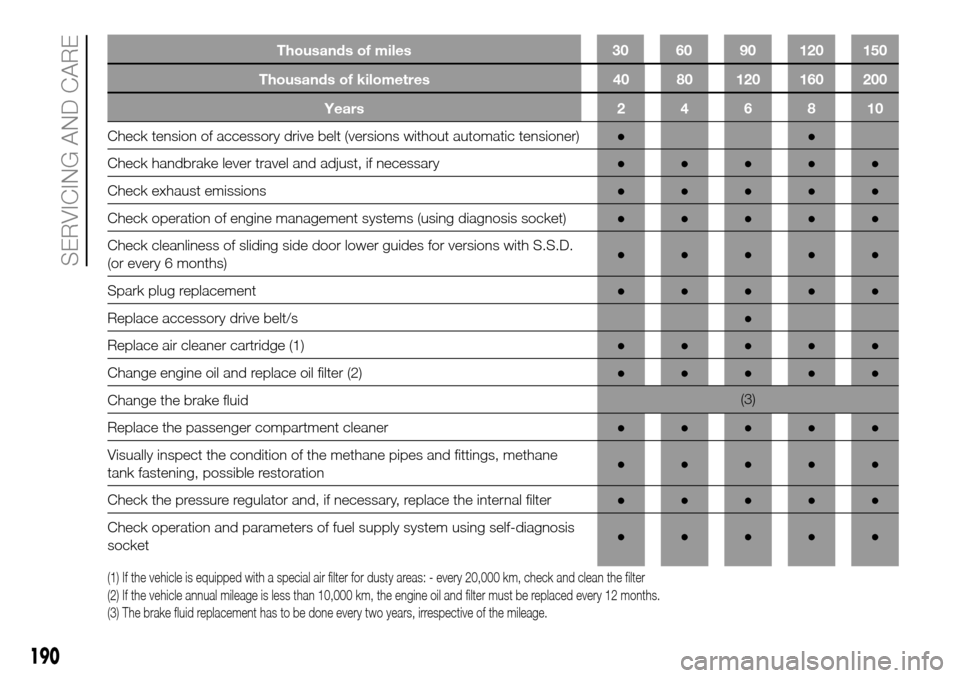
Thousands of kilometres 40 80 120 160 200
Years246810
Check tension of accessory drive belt (versions without automatic tensioner)●●
Check handbrake lever travel and adjust, if necessary●●●●●
Check exhaust emissions●●●●●
Check operation of engine management systems (using diagnosis socket)●●●●●
Check cleanliness of sliding side door lower guides for versions with S.S.D.
(or every 6 months)●●●●●
Spark plug replacement●●●●●
Replace accessory drive belt/s●
Replace air cleaner cartridge (1)●●●●●
Change engine oil and replace oil filter (2)●●●●●
Change the brake fluid(3)
Replace the passenger compartment cleaner●●●●●
Visually inspect the condition of the methane pipes and fittings, methane
tank fastening, possible restoration●●●●●
Check the pressure regulator and, if necessary, replace the internal filter●●●●●
Check operation and parameters of fuel supply system using self-diagnosis
socket●●●●●
(1) If the vehicle is equipped with a special air filter for dusty areas: - every 20,000 km, check and clean the filter
(2) If the vehicle annual mileage is less than 10,000 km, the engine oil and filter must be replaced every 12 months.
(3) The brake fluid replacement has to be done every two years, irrespective of the mileage.
190
SERVICING AND CARE
Thousands of miles 30 60 90 120 150
Page 202 of 296
USEFUL ADVICE FOR
EXTENDING THE LIFE OF
YOUR BATTERY
To avoid draining your battery and
make it last longer, observe the
following instructions:
when you park the vehicle, ensure
that the doors, tailgate and bonnet are
closed properly, to prevent any roof
lights from remaining on inside the
passenger's compartment;
switch off all roof lights inside the
vehicle: the vehicle is however
equipped with a system which switches
all internal lights off automatically;
do not keep accessories (e.g. radio,
hazard warning lights, etc.) switched
on for a long time when the engine
is not running;
before carrying out any operation on
the electrical system, disconnect the
negative battery cable through the
suitable terminal;
completely tighten the battery
terminals.IMPORTANT After turning the ignition
key to STOP and having closed the
driver side door, wait at least one
minute before disconnecting the
electrical supply from the battery. When
reconnecting the electrical supply to
the battery, make sure that the ignition
key is in the STOP position and the
driver side door is closed.
IMPORTANT If the charge level remains
under 50% for a long time, the battery
is damaged by sulphation, reducing
its capacity and efficiency at start-up.
The battery will also be more at risk
of freezing (this can happen already at
-10°C).
Refer to the paragraph "Car inactivity"
in "Starting and driving" if the car is
left parked for a long time.If, after buying the vehicle, you want to
install electrical accessories which
require permanent electric supply
(alarm, etc.) or accessories that in any
case burden the electrical supply,
contact a Fiat Dealership, whose
qualified personnel, in addition
to suggesting the most suitable devices
from Lineaccessori Fiat, will evaluate
the overall electrical consumption,
checking whether the vehicle’s electrical
system is capable of withstanding the
load required, or whether it should
be integrated with a more powerful
battery.
Since some of these devices continue
to consume electricity even when
the engine is off, they gradually run
down the battery.
IMPORTANT If a tachograph is fitted, if
the vehicle is parked for a long period
of 5 days, it is advisable to disconnect
the negative battery terminal to
maintain its charge.
If the vehicle is equipped with a battery
disconnection function (disconnector),
see the description of the procedure
in the "Controls" paragraph in the
"Dashboard and controls" section.
200
SERVICING AND CARE
Page 204 of 296
NOZZLES
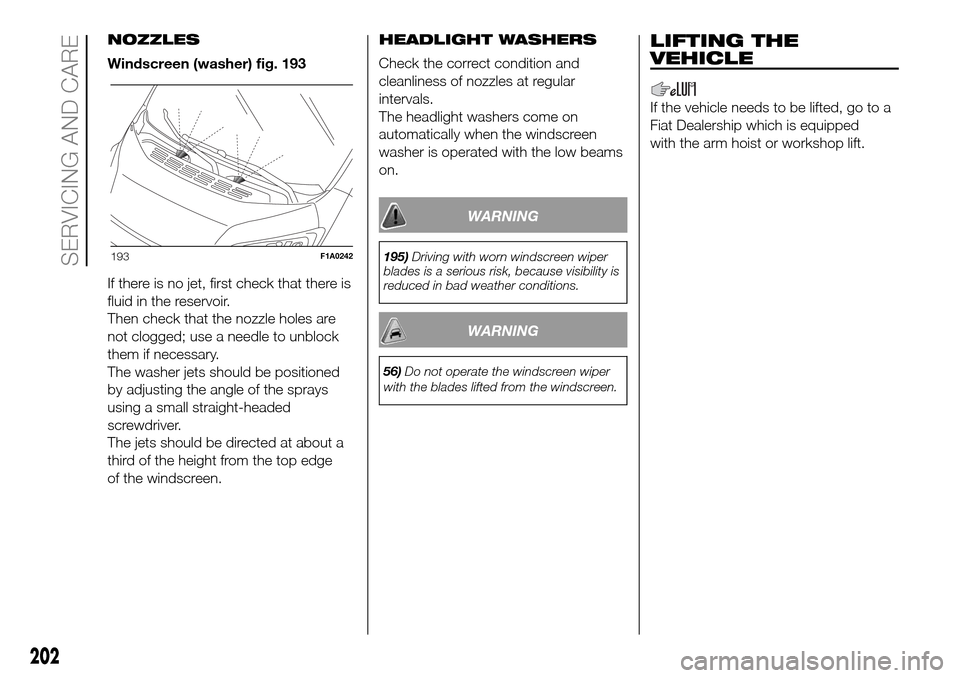
Windscreen (washer) fig. 193
If there is no jet, first check that there is
fluid in the reservoir.
Then check that the nozzle holes are
not clogged; use a needle to unblock
them if necessary.
The washer jets should be positioned
by adjusting the angle of the sprays
using a small straight-headed
screwdriver.
The jets should be directed at about a
third of the height from the top edge
of the windscreen.HEADLIGHT WASHERS
Check the correct condition and
cleanliness of nozzles at regular
intervals.
The headlight washers come on
automatically when the windscreen
washer is operated with the low beams
on.
WARNING
195)Driving with worn windscreen wiper
blades is a serious risk, because visibility is
reduced in bad weather conditions.
WARNING
56)Do not operate the windscreen wiper
with the blades lifted from the windscreen.
LIFTING THE
VEHICLE
If the vehicle needs to be lifted, go to a
Fiat Dealership which is equipped
with the arm hoist or workshop lift.
193F1A0242
202
SERVICING AND CARE
Page 207 of 296
WARNING
57)Keep your speed down when snow
chains are fitted; do not exceed 50 km/h.
Avoid potholes, steps and pavements
and avoid driving for long distances on
roads not covered with snow to prevent
damaging the vehicle and the roadbed.
BODYWORK
PROTECTION AGAINST
ATMOSPHERIC AGENTS
The main causes of corrosion are the
following:
atmospheric pollution;
salty air and humidity (coastal areas,
or hot humid climates);
seasonal environmental conditions.
ADVICE FOR
PRESERVING THE
BODYWORK
Paintwork
Paintwork does not only serve an
aesthetic purpose, but also protects the
underlying sheet metal.
Touch up abrasions and scratches
immediately to prevent rust formation.
Use only original paint products for
touch-ups (see “Bodywork paint
identification plate” in the “Technical
specifications” section).
Normal maintenance of paintwork
consists in washing the car: the
frequency depends on the conditions
and environment where the car is used.
For example, it is advisable to wash
the vehicle more often in areas with
high levels of environmental pollution or
on roads spread with salt.To correctly wash the vehicle, proceed
as follows:
wash the bodywork using a low
pressure jet of water;
wipe a sponge with a slightly soapy
solution over the bodywork, frequently
rinsing the sponge;
rinse well with water and dry with a
jet of air or a chamois leather.
If you put the vehicle through a car
wash, follow these recommendations:
remove the aerial from the roof
so it does not get damaged;
the vehicle should be washed with
water added to a soapy solution;
rinse thoroughly to avoid soap
marks remaining on the bodywork or
less visible parts.
58)
6)
WARNING
58)Some automatic systems equipped
with old generation blades and/or with
a poor maintenance can damage the paint,
promoting the creation of microscoring
which give an opaque/coated appearance
to the paint, especially on dark colours.
In this case, just lightly polish with specific
products.
205
Page 213 of 296
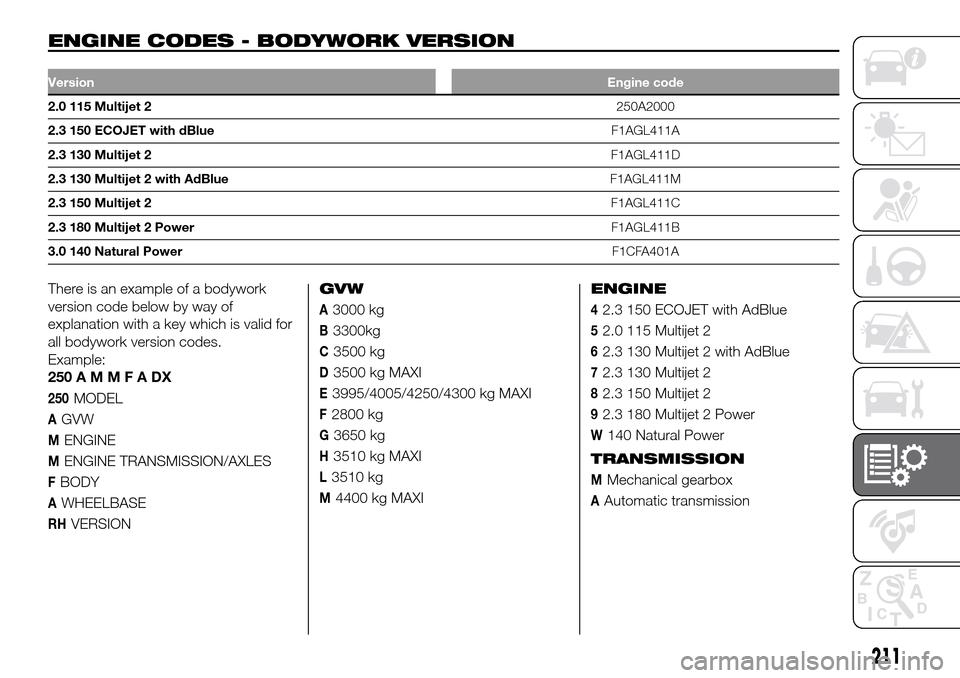
ENGINE CODES - BODYWORK VERSION.
VersionEngine code
2.0 115 Multijet 2250A2000
2.3 150 ECOJET with dBlueF1AGL411A
2.3 130 Multijet 2F1AGL411D
2.3 130 Multijet 2 with AdBlueF1AGL411M
2.3 150 Multijet 2F1AGL411C
2.3 180 Multijet 2 PowerF1AGL411B
3.0 140 Natural PowerF1CFA401A
There is an example of a bodywork
version code below by way of
explanation with a key which is valid for
all bodywork version codes.
Example:
250AMMFADX
250MODEL
AGVW
MENGINE
MENGINE TRANSMISSION/AXLES
FBODY
AWHEELBASE
RHVERSIONGVW
A3000 kg
B3300kg
C3500 kg
D3500 kg MAXI
E3995/4005/4250/4300 kg MAXI
F2800 kg
G3650 kg
H3510 kg MAXI
L3510 kg
M4400 kg MAXIENGINE
42.3 150 ECOJET with AdBlue
52.0 115 Multijet 2
62.3 130 Multijet 2 with AdBlue
72.3 130 Multijet 2
82.3 150 Multijet 2
92.3 180 Multijet 2 Power
W140 Natural Power
TRANSMISSION
MMechanical gearbox
AAutomatic transmission
211
Page 270 of 296
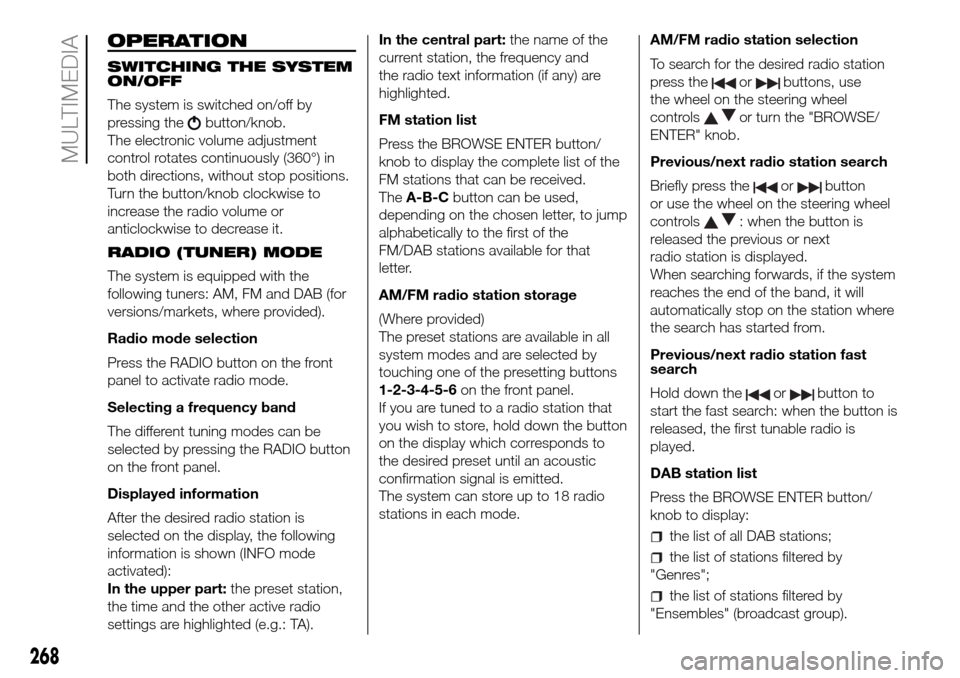
OPERATION
SWITCHING THE SYSTEM
ON/OFF
The system is switched on/off by
pressing the
button/knob.
The electronic volume adjustment
control rotates continuously (360°) in
both directions, without stop positions.
Turn the button/knob clockwise to
increase the radio volume or
anticlockwise to decrease it.
RADIO (TUNER) MODE
The system is equipped with the
following tuners: AM, FM and DAB (for
versions/markets, where provided).
Radio mode selection
Press the RADIO button on the front
panel to activate radio mode.
Selecting a frequency band
The different tuning modes can be
selected by pressing the RADIO button
on the front panel.
Displayed information
After the desired radio station is
selected on the display, the following
information is shown (INFO mode
activated):
In the upper part:the preset station,
the time and the other active radio
settings are highlighted (e.g.: TA).In the central part:the name of the
current station, the frequency and
the radio text information (if any) are
highlighted.
FM station list
Press the BROWSE ENTER button/
knob to display the complete list of the
FM stations that can be received.
TheA-B-Cbutton can be used,
depending on the chosen letter, to jump
alphabetically to the first of the
FM/DAB stations available for that
letter.
AM/FM radio station storage
(Where provided)
The preset stations are available in all
system modes and are selected by
touching one of the presetting buttons
1-2-3-4-5-6on the front panel.
If you are tuned to a radio station that
you wish to store, hold down the button
on the display which corresponds to
the desired preset until an acoustic
confirmation signal is emitted.
The system can store up to 18 radio
stations in each mode.AM/FM radio station selection
To search for the desired radio station
press the
orbuttons, use
the wheel on the steering wheel
controls
or turn the "BROWSE/
ENTER" knob.
Previous/next radio station search
Briefly press the
orbutton
or use the wheel on the steering wheel
controls
: when the button is
released the previous or next
radio station is displayed.
When searching forwards, if the system
reaches the end of the band, it will
automatically stop on the station where
the search has started from.
Previous/next radio station fast
search
Hold down the
orbutton to
start the fast search: when the button is
released, the first tunable radio is
played.
DAB station list
Press the BROWSE ENTER button/
knob to display:
the list of all DAB stations;
the list of stations filtered by
"Genres";
the list of stations filtered by
"Ensembles" (broadcast group).
268
MULTIMEDIA
Page 272 of 296
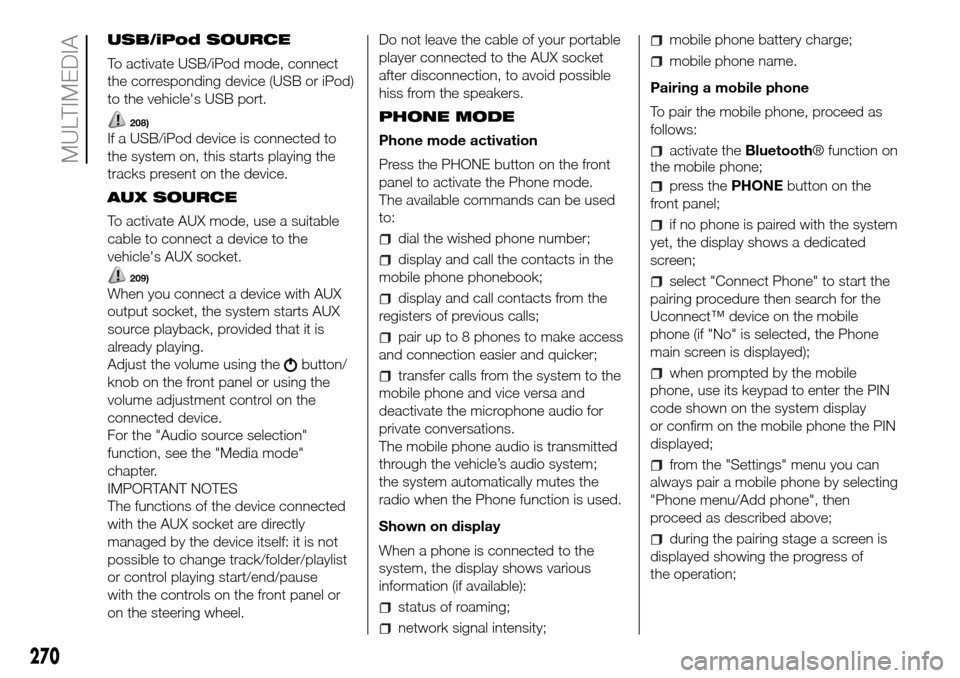
USB/iPod SOURCE
To activate USB/iPod mode, connect
the corresponding device (USB or iPod)
to the vehicle's USB port.
208)
If a USB/iPod device is connected to
the system on, this starts playing the
tracks present on the device.
AUX SOURCE
To activate AUX mode, use a suitable
cable to connect a device to the
vehicle's AUX socket.
209)
When you connect a device with AUX
output socket, the system starts AUX
source playback, provided that it is
already playing.
Adjust the volume using the
button/
knob on the front panel or using the
volume adjustment control on the
connected device.
For the "Audio source selection"
function, see the "Media mode"
chapter.
IMPORTANT NOTES
The functions of the device connected
with the AUX socket are directly
managed by the device itself: it is not
possible to change track/folder/playlist
or control playing start/end/pause
with the controls on the front panel or
on the steering wheel.Do not leave the cable of your portable
player connected to the AUX socket
after disconnection, to avoid possible
hiss from the speakers.
PHONE MODE
Phone mode activation
Press the PHONE button on the front
panel to activate the Phone mode.
The available commands can be used
to:
dial the wished phone number;
display and call the contacts in the
mobile phone phonebook;
display and call contacts from the
registers of previous calls;
pair up to 8 phones to make access
and connection easier and quicker;
transfer calls from the system to the
mobile phone and vice versa and
deactivate the microphone audio for
private conversations.
The mobile phone audio is transmitted
through the vehicle’s audio system;
the system automatically mutes the
radio when the Phone function is used.
Shown on display
When a phone is connected to the
system, the display shows various
information (if available):
status of roaming;
network signal intensity;
mobile phone battery charge;
mobile phone name.
Pairing a mobile phone
To pair the mobile phone, proceed as
follows:
activate theBluetooth® function on
the mobile phone;
press thePHONEbutton on the
front panel;
if no phone is paired with the system
yet, the display shows a dedicated
screen;
select "Connect Phone" to start the
pairing procedure then search for the
Uconnect™ device on the mobile
phone (if "No" is selected, the Phone
main screen is displayed);
when prompted by the mobile
phone, use its keypad to enter the PIN
code shown on the system display
or confirm on the mobile phone the PIN
displayed;
from the "Settings" menu you can
always pair a mobile phone by selecting
"Phone menu/Add phone", then
proceed as described above;
during the pairing stage a screen is
displayed showing the progress of
the operation;
270
MULTIMEDIA
Page 273 of 296
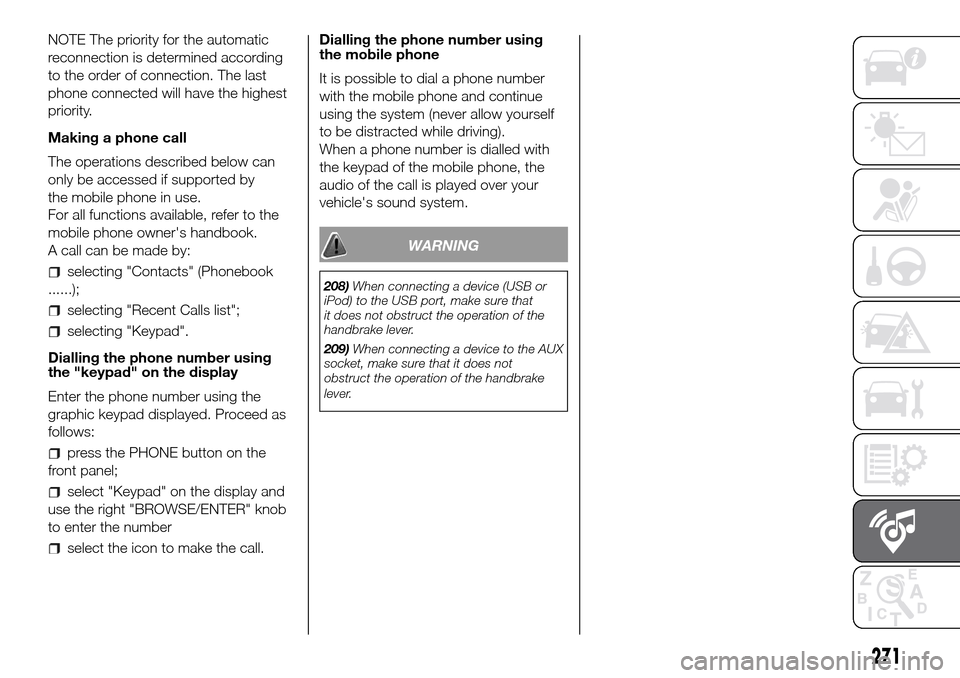
NOTE The priority for the automatic
reconnection is determined according
to the order of connection. The last
phone connected will have the highest
priority.
Making a phone call
The operations described below can
only be accessed if supported by
the mobile phone in use.
For all functions available, refer to the
mobile phone owner's handbook.
A call can be made by:
selecting "Contacts" (Phonebook
......);
selecting "Recent Calls list";
selecting "Keypad".
Dialling the phone number using
the "keypad" on the display
Enter the phone number using the
graphic keypad displayed. Proceed as
follows:
press the PHONE button on the
front panel;
select "Keypad" on the display and
use the right "BROWSE/ENTER" knob
to enter the number
select the icon to make the call.Dialling the phone number using
the mobile phone
It is possible to dial a phone number
with the mobile phone and continue
using the system (never allow yourself
to be distracted while driving).
When a phone number is dialled with
the keypad of the mobile phone, the
audio of the call is played over your
vehicle's sound system.
WARNING
208)When connecting a device (USB or
iPod) to the USB port, make sure that
it does not obstruct the operation of the
handbrake lever.
209)When connecting a device to the AUX
socket, make sure that it does not
obstruct the operation of the handbrake
lever.
271
Page 279 of 296
OPERATION
SWITCHING THE SYSTEM
ON/OFF
The system is switched on/off by
pressing the button/knob.
Turn the button/knob clockwise to
increase the radio volume or
anticlockwise to decrease it.
Radio (Tuner) mode
After the desired radio station is
selected, the following information is
shown on the display:
At the top: the list of radio stations
stored (presets) is displayed; the station
currently playing is highlighted.
In the middle: display of the name of
the current radio station and the
buttons for selecting the previous or
next radio station. At the bottom:
display of the following buttons:
In the middle: display of the name of
the current radio station and the
buttons for selecting the previous or
next radio station. At the bottom:
display of the following buttons:
"Browse": list of the radio stations
available;
"AM/FM", "AM/DAB", "FM/DAB":
selection of the desired frequency band
(button reconfigurable according to
the band selected: AM,FM or DAB);
"Tune" : manual radio station tuning
(not available for DAB radios);
"Info": additional information on the
source being listened to;
"Audio": access to the "Audio
settings" screen.
Audio menu
To access the "Audio" menu, press the
button on the front panel, scroll
through the menu, then select and
press the "Audio" option on the display.
The following adjustments can be
carried out using the "Audio" menu:
"Equaliser" (for versions/markets,
where provided);
"Balance/Fade" (left/right and
front/rear audio balance adjustment);
"Volume/Speed" (excluding versions
with Hi-Fi system) speed-dependent
automatic volume adjustment;
"Loudness" (for versions/markets,
where provided);
"Auto-On Radio";
"Radio Off Delay".
To exit the "Audio" menu, press the
/Done button.
MEDIA MODE
Press the "Source" button to select the
desired audio source among those
available: CD, AUX, USB/iPod orBlu-
etooth®.Track selection (browse)
Use this function to scroll through and
select the tracks on the active device.
The selection options depend on the
device connected or the CD type
inserted.
For example, on an audio CD you can
select the track to be played, while on a
CD-ROM, a USB/iPod orBluetooth®
device you can also scroll through the
list of artists, genres and albums avail-
able depending on the information
present on the tracks.
NOTE A fewBluetooth® devices do
not offer the possibility of scrolling
tracks through all categories.
Within each list, the "ABC" button
allows the user to skip to the desired
letter in the list.
NOTE This button might be disabled for
someApple®devices.
NOTE The "Browse" button does not
allow any operation on the AUX device.
Press the "Browse" button to activate
this function on the source being
played.
Turn the BROWSE ENTER button/knob
to select the desired category and
then press the button/knob to confirm
the selection.
Press the "X" button to cancel the
function.
277
Page 280 of 296
CD PLAYER
To activate CD mode, insert an audio or
MP3 CD in the relevant slot or press
the MEDIA button on the front panel.
If the CD has already been inserted,
press the "Source" button and then
select "CD".
Loading/ejecting a CD
To load the CD, insert it gently into the
slot to activate the motorised loading
system, which will position it correctly
(the "CD" symbol on the display comes
on).
Enter a CD when the system is on, the
CD mode is automatically selected
and the system starts playing the
tracks.
The display shows the number of the
track and the time (minutes and
seconds).
Press the button
(EJECT) on the
front panel, with the system on, to eject
the CD.
After the ejection, the Radio audio
source will be automatically selected.
If the CD is not removed from the
slot, the system will re-enter it
automatically after about 10 seconds
without playing it.Bluetooth® SOURCE
This mode is activated by pairing aBlu-
etooth® device containing music
tracks with the system.
PAIRING A Bluetooth® AUDIO
DEVICE
To pair aBluetooth® audio device,
proceed as follows:
activate theBluetooth® function on
the device;
press the MEDIA button on the front
panel;
if the "Media" source is active, press
the "Source" button;
select theBluetooth® Media
source;
press the "Add Device" button;
search forUconnect™on theBlu-
etooth® audio device (during the pair-
ing stage a screen is displayed showing
the progress of the operation);
when requested by the audio
device, enter the PIN code shown on
the system display or confirm on the
device the PIN displayed;
if the pairing procedure is completed
successfully, a screen is displayed.
Answer "Yes" to the question to pair the
Bluetooth® audio device as favourite
(the device will have priority over all
other devices to be paired subse-
quently). If "No" is selected, the priority
is determined according to the order of
connection. The last device connected
will have the highest priority;
an audio device can also be paired
by pressing the
button on the
front panel and selecting "Phone/
Bluetooth®”.
WARNING If theBluetooth® connec-
tion between mobile phone and system
is lost, consult the mobile phone
handbook.
USB/iPod SOURCE
To enable the USB/iPod mode, insert
the corresponding device (USB or iPod)
into the vehicle's USB port.
If a USB/iPod device is inserted with
the system on, this starts playing the
tracks present on the device.
AUX SOURCE
To enable AUX mode, insert an
appropriate device into the vehicle's
AUX socket.
When a device is inserted using the
AUX output socket the system starts
reproducing the AUX source
connected, if it is already being played.
278
MULTIMEDIA