multimedia FIAT DUCATO 2018 Owner handbook (in English)
[x] Cancel search | Manufacturer: FIAT, Model Year: 2018, Model line: DUCATO, Model: FIAT DUCATO 2018Pages: 304, PDF Size: 14.93 MB
Page 7 of 304
KNOWING YOUR VEHICLE
KNOWING THE INSTRUMENT PANEL
SAFETY
STARTING AND DRIVING
IN AN EMERGENCY
SERVICING AND CARE
TECHNICAL DATA
MULTIMEDIA
INDEX
5
Page 49 of 304
WARNING
40)All adjustments must only be carried
out with the vehicle stationary and the
engine off. Head restraints must be
adjusted so that the head, rather than the
neck, rests on them. Only in this case
can they protect your head correctly. To
take best advantage of the protection
provided by the head restraint, adjust the
seat back so that you are sitting up straight
and your head is as close to the head
restraint as possible.
INTERIOR FITTINGS
COMPARTMENT
BENEATH PASSENGER
SIDE FRONT SEAT
Proceed as follows to use the
compartment:
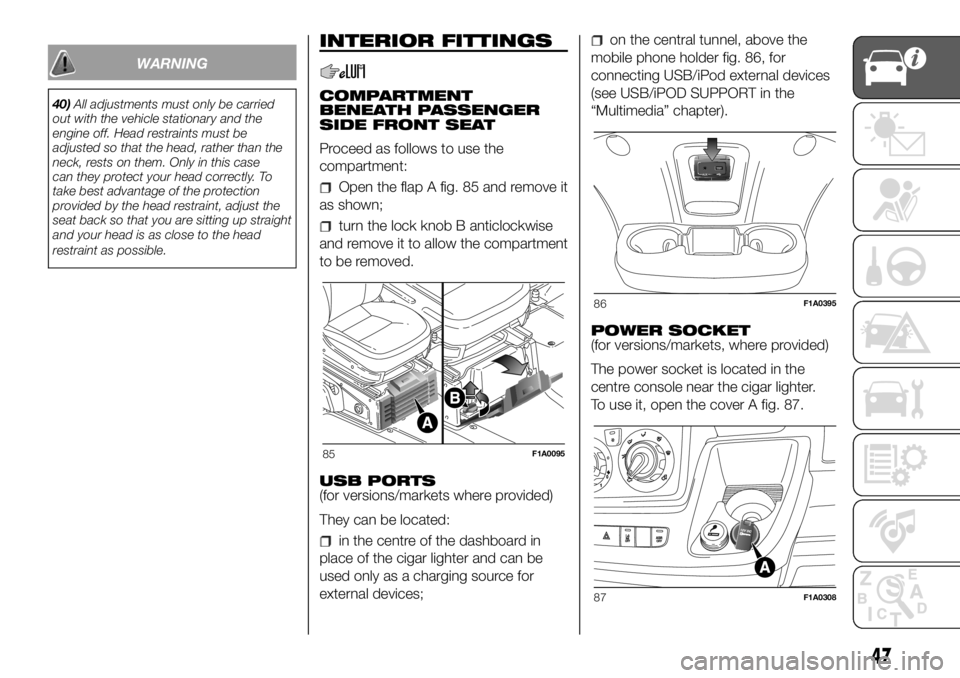
Open the flap A fig. 85 and remove it
as shown;
turn the lock knob B anticlockwise
and remove it to allow the compartment
to be removed.
USB PORTS
(for versions/markets where provided)
They can be located:
in the centre of the dashboard in
place of the cigar lighter and can be
used only as a charging source for
external devices;
on the central tunnel, above the
mobile phone holder fig. 86, for
connecting USB/iPod external devices
(see USB/iPOD SUPPORT in the
“Multimedia” chapter).
POWER SOCKET
(for versions/markets, where provided)
The power socket is located in the
centre console near the cigar lighter.
To use it, open the cover A fig. 87.
85F1A0095
86F1A0395
87F1A0308
47
Page 267 of 304
MULTIMEDIA
This chapter describes the main
functions of the Uconnect™ 3” Radio,
Uconnect™ 5" Radio and Uconnect™
5" Radio Nav infotainment systems
that can be fitted on the vehicle.RADIO.............................................266
TIPS, CONTROLS AND GENERAL
INFORMATION ................................266
UCONNECT 3” RADIO ....................269
OPERATION ....................................274
UCONNECT 5” RADIO –
UCONNECT 5” RADIO NAV ............278
OPERATION ....................................283
265
Page 268 of 304
RADIO
(for versions/markets, where provided)
For radio operation, consult the
Supplement attached to this Owner
Handbook.
SETUP
(for versions/markets, where provided)
The system consists of:
radio supply leads;
front speaker connection cables;
aerial supply lead;
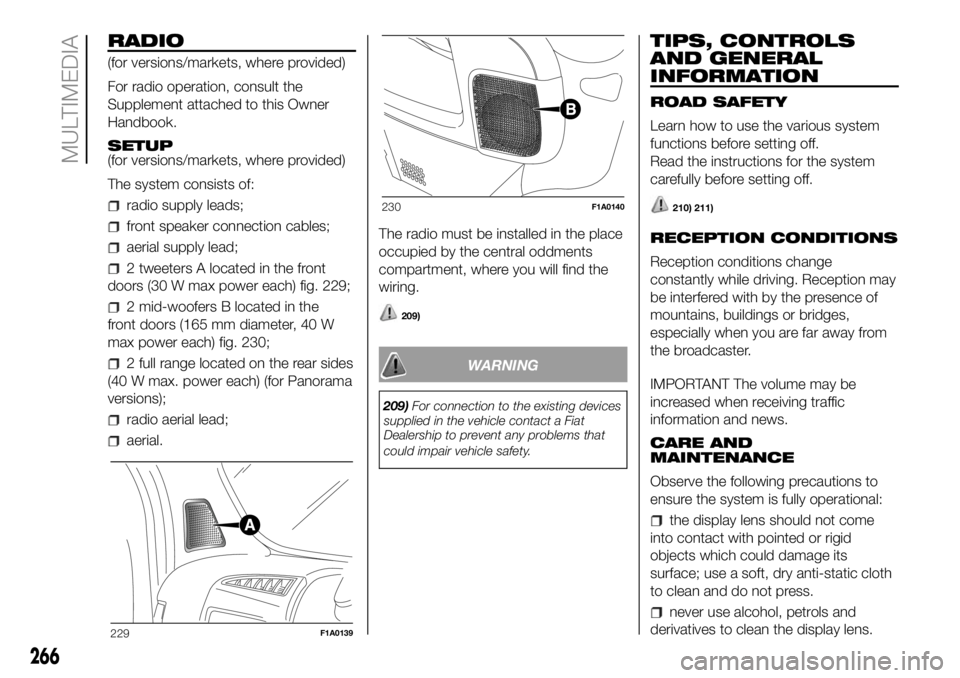
2 tweeters A located in the front
doors (30 W max power each) fig. 229;
2 mid-woofers B located in the
front doors (165 mm diameter, 40 W
max power each) fig. 230;
2 full range located on the rear sides
(40 W max. power each) (for Panorama
versions);
radio aerial lead;
aerial.The radio must be installed in the place
occupied by the central oddments
compartment, where you will find the
wiring.
209)
WARNING
209)For connection to the existing devices
supplied in the vehicle contact a Fiat
Dealership to prevent any problems that
could impair vehicle safety.
TIPS, CONTROLS
AND GENERAL
INFORMATION
ROAD SAFETY
Learn how to use the various system
functions before setting off.
Read the instructions for the system
carefully before setting off.
210) 211)
RECEPTION CONDITIONS
Reception conditions change
constantly while driving. Reception may
be interfered with by the presence of
mountains, buildings or bridges,
especially when you are far away from
the broadcaster.
IMPORTANT The volume may be
increased when receiving traffic
information and news.
CARE AND
MAINTENANCE
Observe the following precautions to
ensure the system is fully operational:
the display lens should not come
into contact with pointed or rigid
objects which could damage its
surface; use a soft, dry anti-static cloth
to clean and do not press.
never use alcohol, petrols and
derivatives to clean the display lens.
229F1A0139
230F1A0140
266
MULTIMEDIA
Page 270 of 304
WARNING
62)Only clean the front panel and the
display lens with a soft, clean, dry,
anti-static cloth. Cleaning and polishing
products may damage the surface. Never
use alcohol, petrols and derivatives.
63)Do not use the display as a base for
supports with suction pads or adhesives
for external navigators or smartphones
or similar devices.
268
MULTIMEDIA
Page 272 of 304
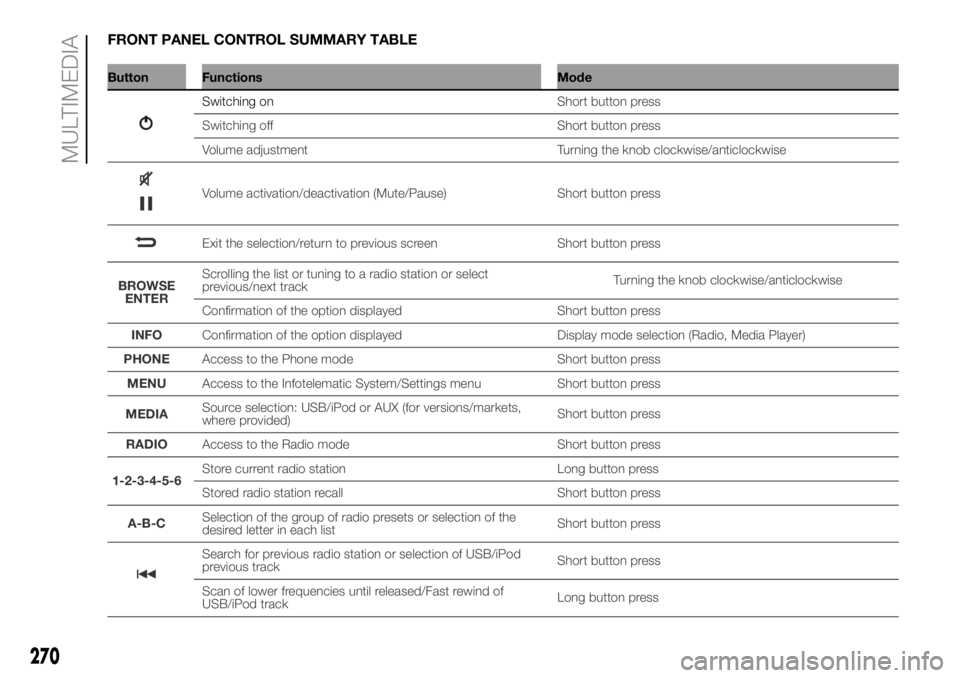
FRONT PANEL CONTROL SUMMARY TABLE
Button Functions Mode
Switching on
270
MULTIMEDIA
Short button press
Switching off Short button press
Volume adjustment Turning the knob clockwise/anticlockwise
Volume activation/deactivation (Mute/Pause) Short button press
Exit the selection/return to previous screen Short button press
BROWSE
ENTERScrolling the list or tuning to a radio station or select
previous/next trackTurning the knob clockwise/anticlockwise
Confirmation of the option displayed Short button press
INFOConfirmation of the option displayed Display mode selection (Radio, Media Player)
PHONEAccess to the Phone mode Short button press
MENUAccess to the Infotelematic System/Settings menu Short button press
MEDIASource selection: USB/iPod or AUX (for versions/markets,
where provided)Short button press
RADIOAccess to the Radio mode Short button press
1-2-3-4-5-6Store current radio station Long button press
Stored radio station recall Short button press
A-B-CSelection of the group of radio presets or selection of the
desired letter in each listShort button press
Search for previous radio station or selection of USB/iPod
previous trackShort button press
Scan of lower frequencies until released/Fast rewind of
USB/iPod trackLong button press
Page 274 of 304
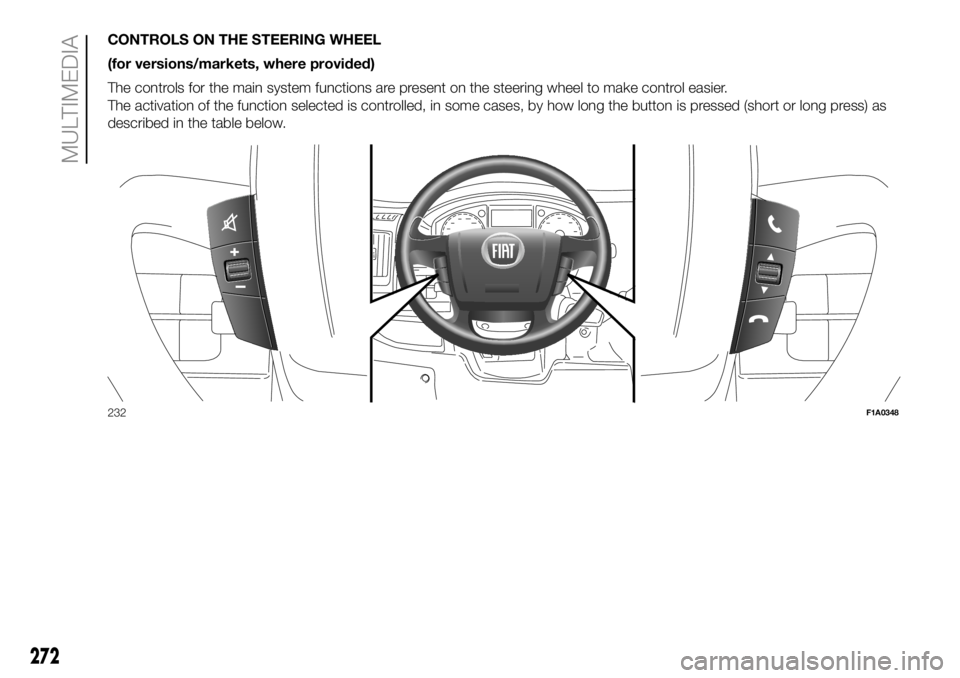
CONTROLS ON THE STEERING WHEEL
(for versions/markets, where provided)
The controls for the main system functions are present on the steering wheel to make control easier.
The activation of the function selected is controlled, in some cases, by how long the button is pressed (short or long press) as
described in the table below.
232F1A0348
272
MULTIMEDIA
Page 276 of 304

OPERATION
SWITCHING THE SYSTEM
ON/OFF
The system is switched on/off by
pressing the
button/knob.
The electronic volume adjustment
control rotates continuously (360°) in
both directions, without stop positions.
Turn the button/knob clockwise to
increase the radio volume or
anticlockwise to decrease it.
RADIO (TUNER) MODE
The system is equipped with the
following tuners: AM, FM and DAB (for
versions/markets, where provided).
Radio mode selection
Press the RADIO button on the front
panel to activate radio mode.
Selecting a frequency band
The different tuning modes can be
selected by pressing the RADIO button
on the front panel.
Displayed information
After the desired radio station is
selected on the display, the following
information is shown (INFO mode
activated):
In the upper part:the preset station,
the time and the other active radio
settings are highlighted (e.g.: TA).In the central part:the name of the
current station, the frequency and
the radio text information (if any) are
highlighted.
FM station list
Press the BROWSE ENTER button/
knob to display the complete list of the
FM stations that can be received.
TheA-B-Cbutton can be used,
depending on the chosen letter, to jump
alphabetically to the first of the
FM/DAB stations available for that
letter.
AM/FM radio station storage
(Where provided)
The preset stations are available in all
system modes and are selected by
touching one of the presetting buttons
1-2-3-4-5-6on the front panel.
If you are tuned to a radio station that
you wish to store, hold down the button
on the display which corresponds to
the desired preset until an acoustic
confirmation signal is emitted.
The system can store up to 18 radio
stations in each mode.AM/FM radio station selection
To search for the desired radio station
press the
orbuttons, use
the wheel on the steering wheel
controls
or turn the "BROWSE/
ENTER" knob.
Previous/next radio station search
Briefly press the
orbutton
or use the wheel on the steering wheel
controls
: when the button is
released the previous or next
radio station is displayed.
When searching forwards, if the system
reaches the end of the band, it will
automatically stop on the station where
the search has started from.
Previous/next radio station fast
search
Hold down the
orbutton to
start the fast search: when the button is
released, the first tunable radio is
played.
DAB station list
Press the BROWSE ENTER button/
knob to display:
the list of all DAB stations;
the list of stations filtered by
"Genres";
the list of stations filtered by
"Ensembles" (broadcast group).
274
MULTIMEDIA
Page 278 of 304
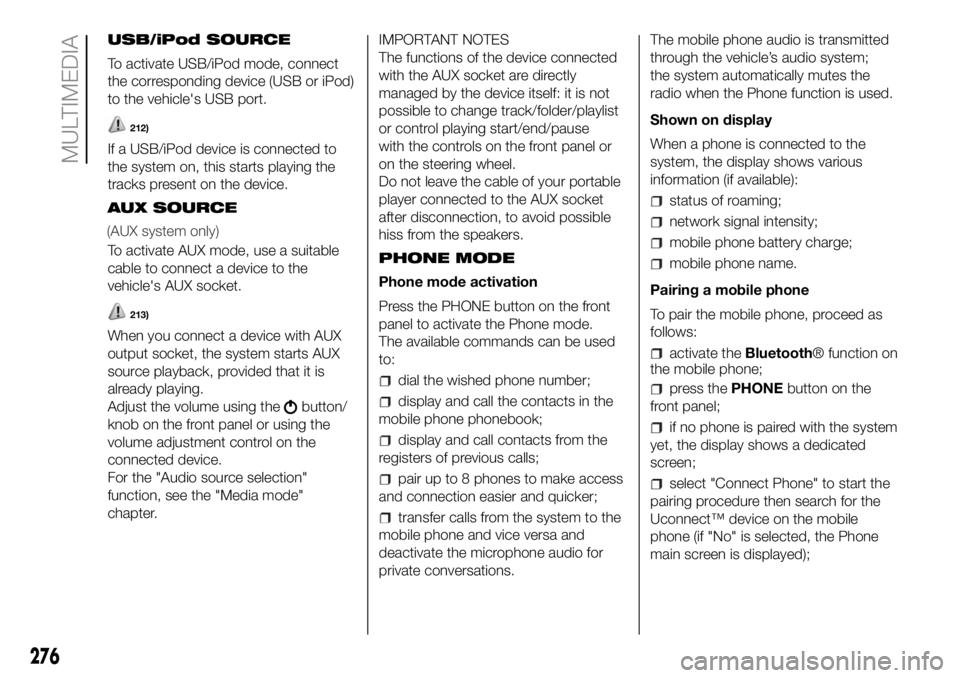
USB/iPod SOURCE
To activate USB/iPod mode, connect
the corresponding device (USB or iPod)
to the vehicle's USB port.
212)
If a USB/iPod device is connected to
the system on, this starts playing the
tracks present on the device.
AUX SOURCE
To activate AUX mode, use a suitable
cable to connect a device to the
vehicle's AUX socket.
213)
When you connect a device with AUX
output socket, the system starts AUX
source playback, provided that it is
already playing.
Adjust the volume using the
button/
knob on the front panel or using the
volume adjustment control on the
connected device.
For the "Audio source selection"
function, see the "Media mode"
chapter.IMPORTANT NOTES
The functions of the device connected
with the AUX socket are directly
managed by the device itself: it is not
possible to change track/folder/playlist
or control playing start/end/pause
with the controls on the front panel or
on the steering wheel.
Do not leave the cable of your portable
player connected to the AUX socket
after disconnection, to avoid possible
hiss from the speakers.
PHONE MODE
Phone mode activation
Press the PHONE button on the front
panel to activate the Phone mode.
The available commands can be used
to:
dial the wished phone number;
display and call the contacts in the
mobile phone phonebook;
display and call contacts from the
registers of previous calls;
pair up to 8 phones to make access
and connection easier and quicker;
transfer calls from the system to the
mobile phone and vice versa and
deactivate the microphone audio for
private conversations.The mobile phone audio is transmitted
through the vehicle’s audio system;
the system automatically mutes the
radio when the Phone function is used.
Shown on display
When a phone is connected to the
system, the display shows various
information (if available):
status of roaming;
network signal intensity;
mobile phone battery charge;
mobile phone name.
Pairing a mobile phone
To pair the mobile phone, proceed as
follows:
activate theBluetooth® function on
the mobile phone;
press thePHONEbutton on the
front panel;
if no phone is paired with the system
yet, the display shows a dedicated
screen;
select "Connect Phone" to start the
pairing procedure then search for the
Uconnect™ device on the mobile
phone (if "No" is selected, the Phone
main screen is displayed);
276
MULTIMEDIA
(AUX system only)
Page 280 of 304
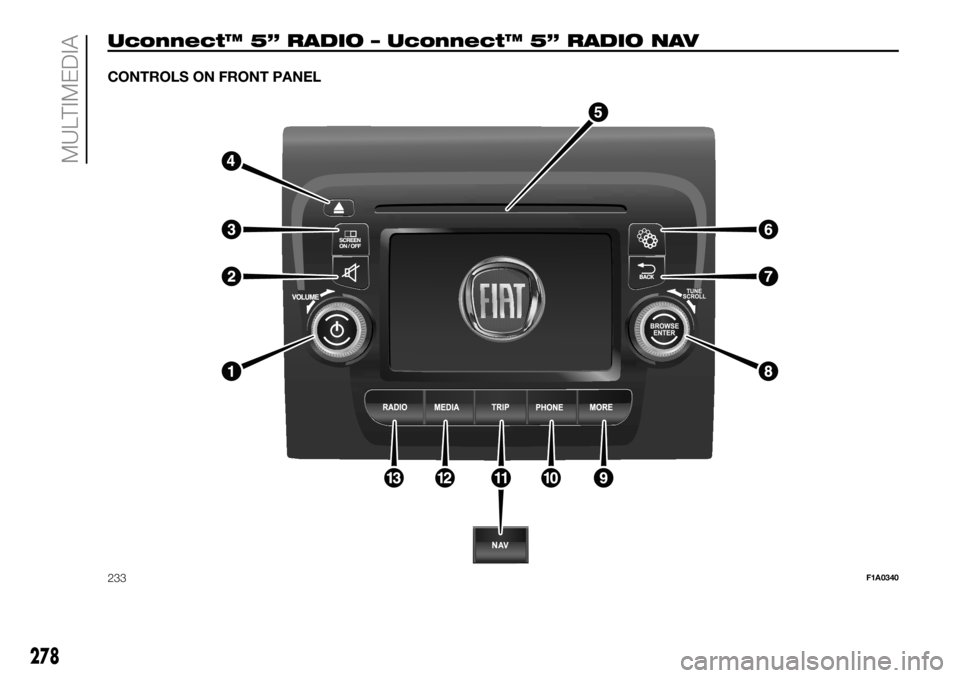
Uconnect™ 5” RADIO – Uconnect™ 5” RADIO NAV
CONTROLS ON FRONT PANEL
233F1A0340
278
MULTIMEDIA