connect FIAT DUCATO 244 2005 3.G Owners Manual
[x] Cancel search | Manufacturer: FIAT, Model Year: 2005, Model line: DUCATO 244, Model: FIAT DUCATO 244 2005 3.GPages: 258, PDF Size: 4.05 MB
Page 14 of 258
13GETTING TO KNOW YOUR VEHICLE
SYSTEM SELF-TEST
If the beep is followed after one sec-
ond by another beep when the elec-
tronic alarm is switched on, check
whether the doors, the bonnet and
the load compartment are perfectly
closed. Try to switch the alarm on
again. If the situation persists, contact
a Fiat Dealership.WHAT SETS
THE ALARM OFF
The electronic alarm will be set off if:
1) a door, the bonnet or the load
compartment is opened;
2) the battery is disconnected or the
electronic alarm power supply cables
are cut;
3) something moves in the passen-
ger compartment (volumetric surveil-
lance);
4) the key is turned to MAR.
When the alarm is triggered, a siren
will sound for about 26 seconds (for a
maximum of 3 cycles with 5 second
pauses, if the cause of the alarm per-
sists) and the direction indicators will
flash for about 5 minutes (only in the
countries where this is allowed).
Once the alarm situation has been
resolved, the alarm will return to its
normal surveillance function. PROGRAMMING
THE SYSTEM
The electronic alarm will have been
programmed by Fiat Dealership.
Any subsequent programming should
also be carried out by a Fiat Deal-
ership.
If additional remote control is re-
quired for any reasons, go to a Fiat
Dealership, taking all the keys you
own and the CODE card with you.
IMPORTANTThe electronic
alarm operation is prepared according
to the laws of the specific country.
This operation is only to be carried
out by a Fiat Dealershipto avoid
damaging the electronic memory stor-
age system.
Page 60 of 258
59GETTING TO KNOW YOUR VEHICLE
SELF-STANDING SUPPLEMENTARY
HEATER (where provided)
The vehicle can be equipped, upon re-
quest, with two different self-standing
heaters:one is totally automatic
whereas the other is programmable.
AUTOMATIC VERSION
The supplementary heater is totally in-
dependent from the engine.
This heater is switched on automat-
ically (if required) when turning the ig-
nition key to MAR. LOOKING AFTER THE
SYSTEM
During the winter, the climate con-
trol system must be turned on at least
once a month for about ten minutes.
Before summer, have the system
checked at a Fiat Dealership.PROGRAMMABLE VERSION
The supplementary heater is totally
independent from the engine and can
be used to:
– heat the passenger compartment
when the engine is off;
– defrost the windows;
– heat the engine coolant and con-
sequently the engine before starting.
The system consists of:
– a diesel burner to heat coolant with
exhaust fume muffler;
– a metering pump connected to the
vehicle fuel pipes to feed the burner;
– a heat exchanger connected to the
engine cooling system pipes; The system is filled with
R134a refrigerant which
will not pollute the envi-
ronment in the event of leakage.
Under no circumstances should
R12 fluid be used as it is incom-
patible with the system compo-
nents and contains CFC.
The heater burns fuel in the
same way as the engine,
though, of course, to a lesser degree
and therefore to avoid intoxication
and suffocation, never use the sup-
plementary heater in closed areas,
garages or workshops not equipped
with specific exhaust evacuation
devices even for short periods of
time.
WARNING
Page 61 of 258
60GETTING TO KNOW YOUR VEHICLE
– a control unit connected to the
heater/ventilation unit for automatic
operation;
– an electronic control unit to check
and adjusted the integrated heater
burner;
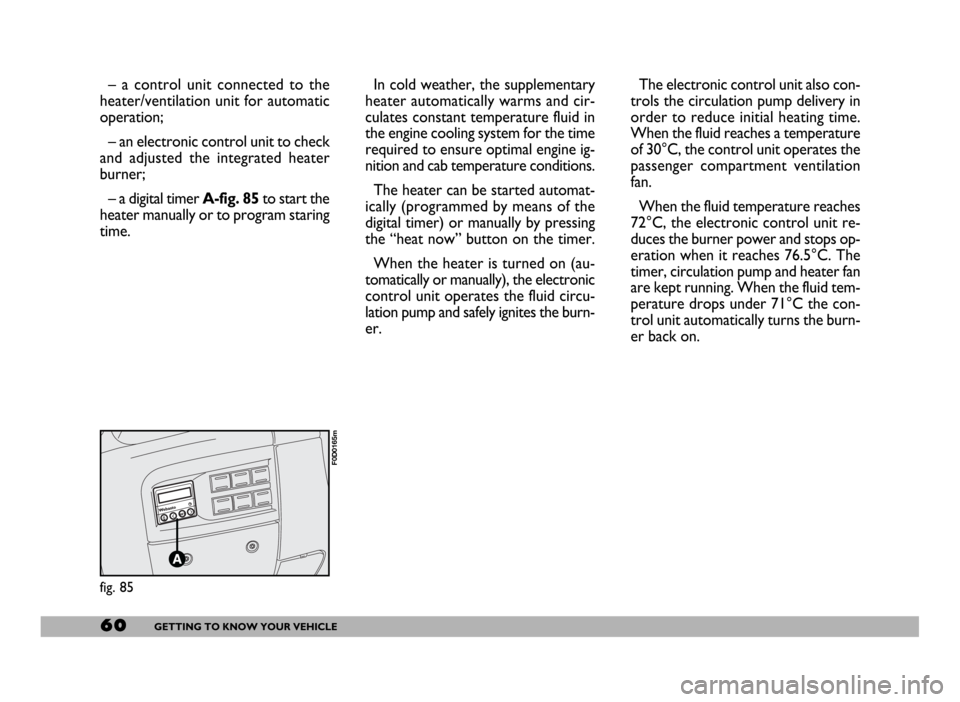
– a digital timer A-fig. 85to start the
heater manually or to program staring
time.In cold weather, the supplementary
heater automatically warms and cir-
culates constant temperature fluid in
the engine cooling system for the time
required to ensure optimal engine ig-
nition and cab temperature conditions.
The heater can be started automat-
ically (programmed by means of the
digital timer) or manually by pressing
the “heat now” button on the timer.
When the heater is turned on (au-
tomatically or manually), the electronic
control unit operates the fluid circu-
lation pump and safely ignites the burn-
er.The electronic control unit also con-
trols the circulation pump delivery in
order to reduce initial heating time.
When the fluid reaches a temperature
of 30°C, the control unit operates the
passenger compartment ventilation
fan.
When the fluid temperature reaches
72°C, the electronic control unit re-
duces the burner power and stops op-
eration when it reaches 76.5°C. The
timer, circulation pump and heater fan
are kept running. When the fluid tem-
perature drops under 71°C the con-
trol unit automatically turns the burn-
er back on.
fig. 85
F0D0165m
Page 68 of 258
67GETTING TO KNOW YOUR VEHICLE
REARVIEW
CAMERA
Vehicles equipped with CONNECT
NAV+ can be fitted with an optional
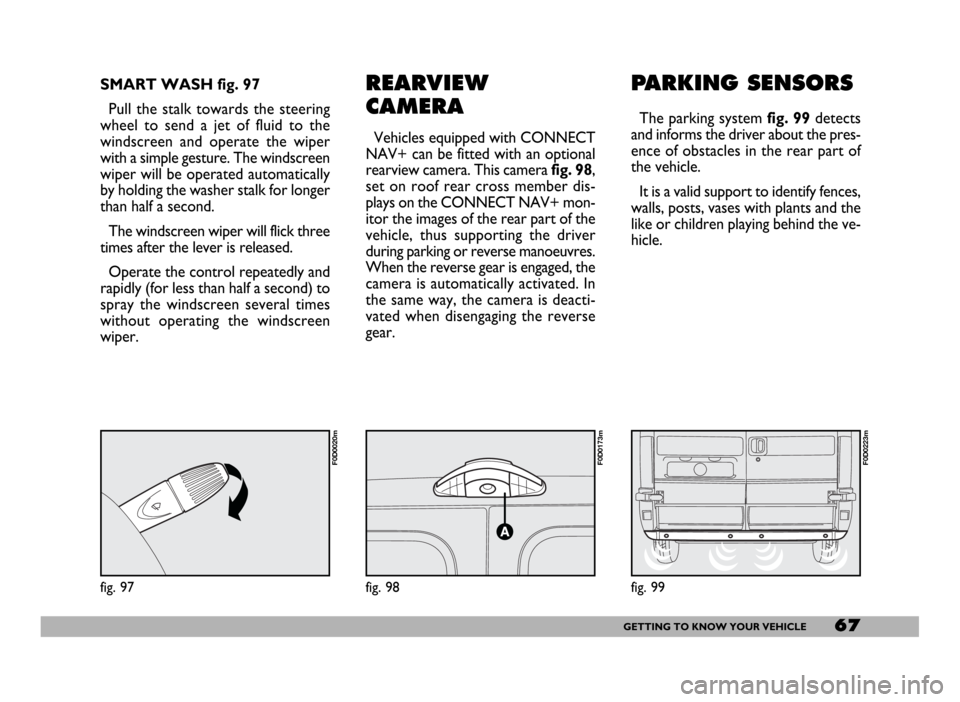
rearview camera. This camerafig. 98,
set on roof rear cross member dis-
plays on the CONNECT NAV+ mon-
itor the images of the rear part of the
vehicle, thus supporting the driver
during parking or reverse manoeuvres.
When the reverse gear is engaged, the
camera is automatically activated. In
the same way, the camera is deacti-
vated when disengaging the reverse
gear.
PARKING SENSORS
The parking system fig. 99detects
and informs the driver about the pres-
ence of obstacles in the rear part of
the vehicle.
It is a valid support to identify fences,
walls, posts, vases with plants and the
like or children playing behind the ve-
hicle.
fig. 98
F0D0173m
SMART WASH fig. 97
Pull the stalk towards the steering
wheel to send a jet of fluid to the
windscreen and operate the wiper
with a simple gesture. The windscreen
wiper will be operated automatically
by holding the washer stalk for longer
than half a second.
The windscreen wiper will flick three
times after the lever is released.
Operate the control repeatedly and
rapidly (for less than half a second) to
spray the windscreen several times
without operating the windscreen
wiper.
fig. 97
F0D0020m
fig. 99
F0D0223m
Page 74 of 258
73GETTING TO KNOW YOUR VEHICLE
Inspect the vehicle carefully to make
sure there is no fuel leak in the en-
gine compartment, under the vehicle
or near the fuel tank.
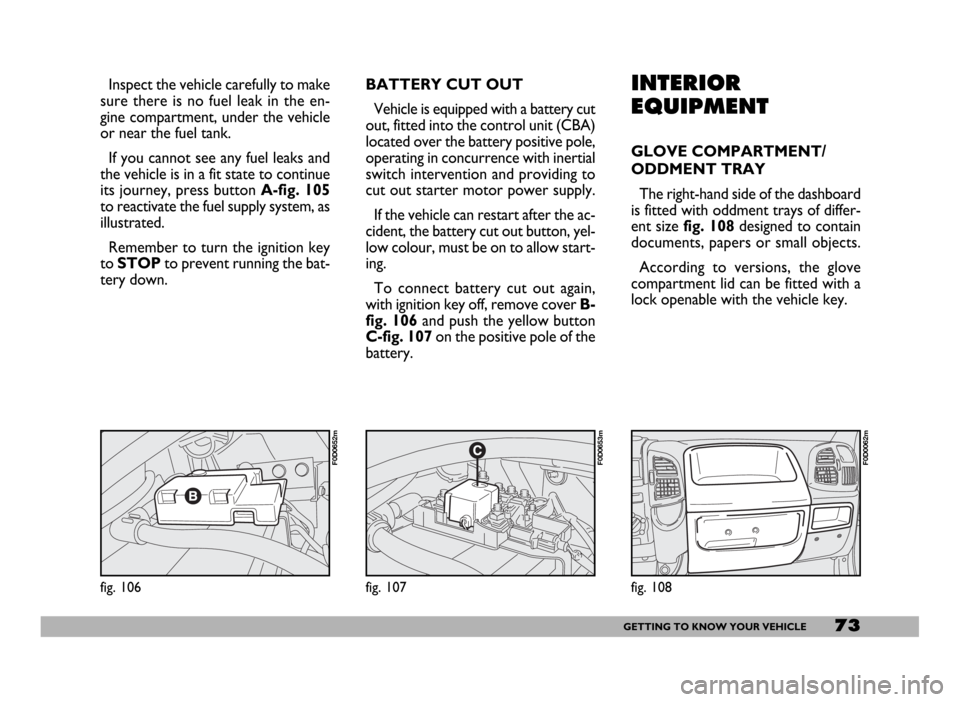
If you cannot see any fuel leaks and
the vehicle is in a fit state to continue
its journey, press button A-fig. 105
to reactivate the fuel supply system, as
illustrated.
Remember to turn the ignition key
to STOPto prevent running the bat-
tery down.INTERIOR
EQUIPMENT
GLOVE COMPARTMENT/
ODDMENT TRAY
The right-hand side of the dashboard
is fitted with oddment trays of differ-
ent sizefig. 108designed to contain
documents, papers or small objects.
According to versions, the glove
compartment lid can be fitted with a
lock openable with the vehicle key.
fig. 108
F0D0062m
fig. 106
F0D0652m
fig. 107
F0D0653m
BATTERY CUT OUT
Vehicle is equipped with a battery cut
out, fitted into the control unit (CBA)
located over the battery positive pole,
operating in concurrence with inertial
switch intervention and providing to
cut out starter motor power supply.
If the vehicle can restart after the ac-
cident, the battery cut out button, yel-
low colour, must be on to allow start-
ing.
To connect battery cut out again,
with ignition key off, remove cover B-
fig. 106 and push the yellow button
C-fig. 107 on the positive pole of the
battery.
Page 76 of 258
75GETTING TO KNOW YOUR VEHICLE
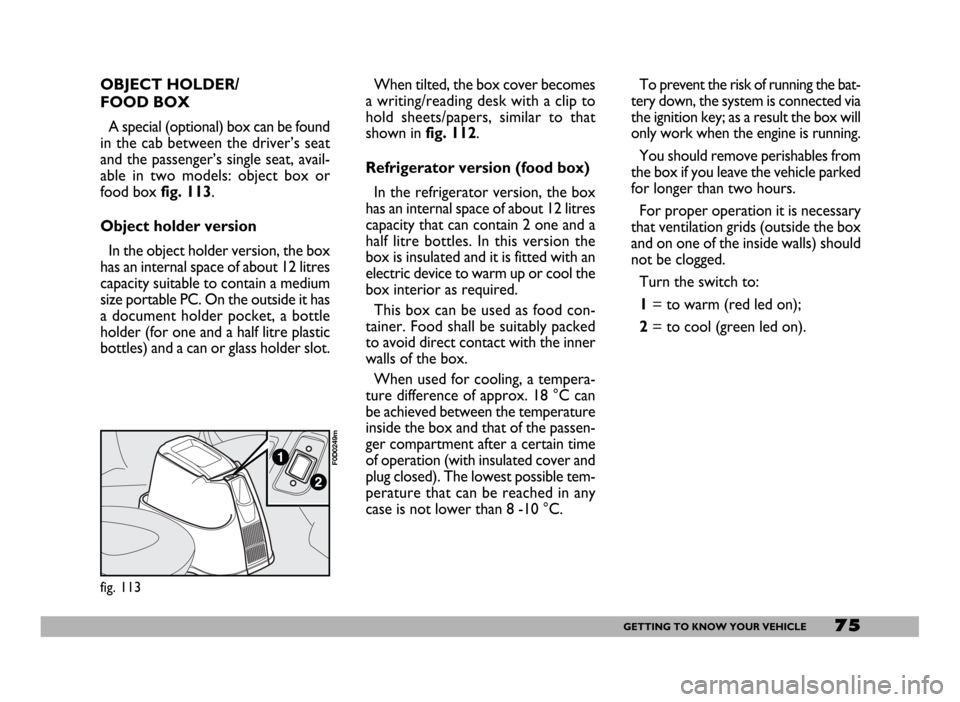
When tilted, the box cover becomes
a writing/reading desk with a clip to
hold sheets/papers, similar to that
shown in fig. 112.
Refrigerator version (food box)
In the refrigerator version, the box
has an internal space of about 12 litres
capacity that can contain 2 one and a
half litre bottles. In this version the
box is insulated and it is fitted with an
electric device to warm up or cool the
box interior as required.
This box can be used as food con-
tainer. Food shall be suitably packed
to avoid direct contact with the inner
walls of the box.
When used for cooling, a tempera-
ture difference of approx. 18 °C can
be achieved between the temperature
inside the box and that of the passen-
ger compartment after a certain time
of operation (with insulated cover and
plug closed). The lowest possible tem-
perature that can be reached in any
case is not lower than 8 -10 °C.To prevent the risk of running the bat-
tery down, the system is connected via
the ignition key; as a result the box will
only work when the engine is running.
You should remove perishables from
the box if you leave the vehicle parked
for longer than two hours.
For proper operation it is necessary
that ventilation grids (outside the box
and on one of the inside walls) should
not be clogged.
Turn the switch to:
1= to warm (red led on);
2= to cool (green led on).
fig. 113
F0D0249m
OBJECT HOLDER/
FOOD BOX
A special (optional) box can be found
in the cab between the driver’s seat
and the passenger’s single seat, avail-
able in two models: object box or
food box fig. 113.
Object holder version
In the object holder version, the box
has an internal space of about 12 litres
capacity suitable to contain a medium
size portable PC. On the outside it has
a document holder pocket, a bottle
holder (for one and a half litre plastic
bottles) and a can or glass holder slot.
Page 77 of 258
76GETTING TO KNOW YOUR VEHICLE
IMPORTANTWith the engine off
and the ignition key at MAR, pro-
longed use (e.g.: for more than an
hour) of accessories with high current
intake could deploy the battery, even
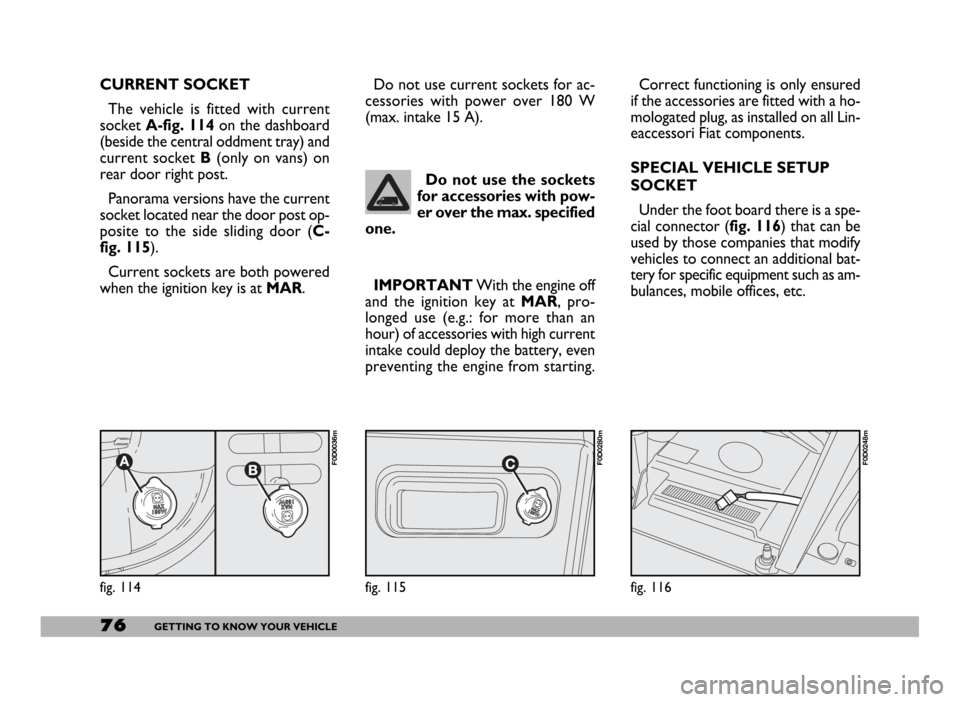
preventing the engine from starting. CURRENT SOCKET
The vehicle is fitted with current
socket A-fig. 114on the dashboard
(beside the central oddment tray) and
current socket B(only on vans) on
rear door right post.
Panorama versions have the current
socket located near the door post op-
posite to the side sliding door (C-
fig. 115).
Current sockets are both powered
when the ignition key is at MAR.
fig. 116
F0D0248m
Do not use the sockets
for accessories with pow-
er over the max. specified
one.
fig. 114
F0D0036m
Correct functioning is only ensured
if the accessories are fitted with a ho-
mologated plug, as installed on all Lin-
eaccessori Fiat components.
SPECIAL VEHICLE SETUP
SOCKET
Under the foot board there is a spe-
cial connector (fig. 116) that can be
used by those companies that modify
vehicles to connect an additional bat-
tery for specific equipment such as am-
bulances, mobile offices, etc. Do not use current sockets for ac-
cessories with power over 180 W
(max. intake 15 A).
fig. 115
F0D0280m
Page 97 of 258
96GETTING TO KNOW YOUR VEHICLE
The action of the ASR is particularly
helpful in the following circumstances:
– slipping of the inner wheel due to
the effect of dynamic load changes or
excessive acceleration.
– too much power transmitted to
the wheels also in relation to the con-
ditions of the road surface.
– acceleration on slippery, snowy or
frozen surfaces.
– in the case of loss of grip on a wet
surface (aquaplaning). Furthermore, the system is equipped
with a connector for interfacing with
specific tools used to read the error
codes stored in the control unit mem-
ory along with a set of diagnostic and
engine specific parameters.ASR SYSTEM
(Antislip Regulation)
The ASR system controls the vehicle
drive and cuts in automatically every
time one or both driving wheels slip.
In slipping conditions, two different
control systems are activated:
– if the slipping involves both the dri-
ving wheels, the ASR function inter-
venes reducing the power transmitted
by the engine;
– if slipping involves only one driving
wheel, the ASR system cuts in auto-
matically braking the wheel that is slip-
ping.
IMPORTANTAfter eliminating the
problem, your Fiat Dealershipwill
run a bench test to fully check the sys-
tem. In some cases, a long road test
may be required.Contact a Fiat Dealer-
ship as soon as possible if
the Uwarning light ei-
ther does not come on when the
key is turned to MAR or comes
on, with fixed or flashing light,
when travelling. Warning light U
operation can be checked by
means of special equipment by
traffic agents. Always comply
with the road traffic regulations
in force in the Country where you
are travelling.
The performance of the
system, in terms of active
safety should not induce the driver
to take pointless and unnecessary
risks. The style of driving must in
any case always be adapted to the
conditions of the road surface, vis-
ibility and traffic. Road safety is al-
ways the driver’s responsibility.
WARNING
Page 100 of 258
99GETTING TO KNOW YOUR VEHICLE
IMPORTANT The cables are se-
cured to the heater cables bundle with
adhesive tape to cut out noise.
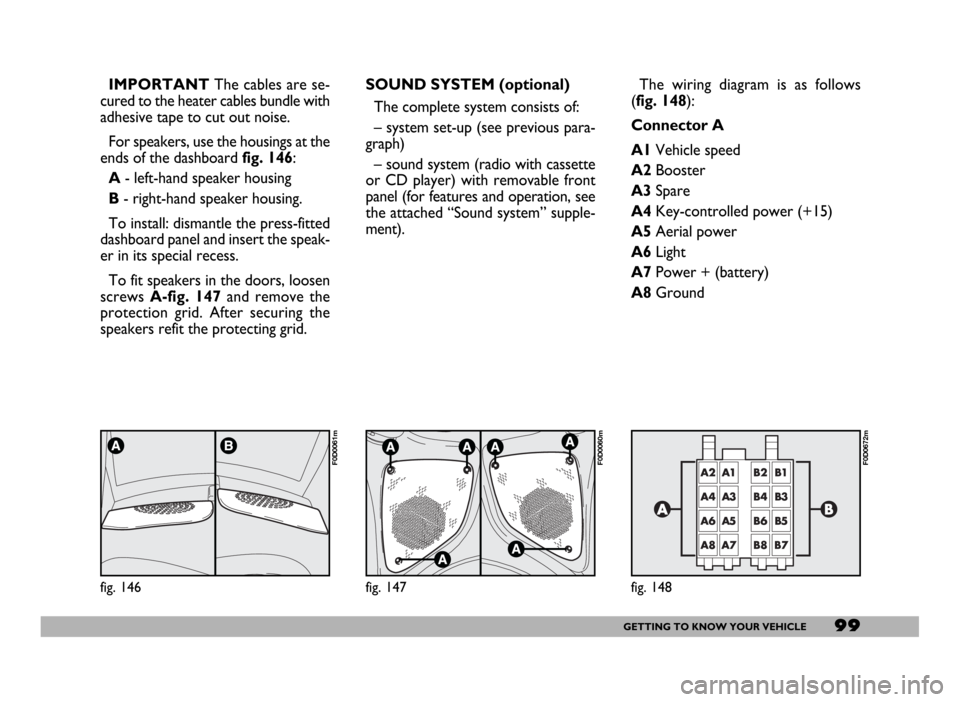
For speakers, use the housings at the
ends of the dashboard fig. 146:
A- left-hand speaker housing
B- right-hand speaker housing.
To install: dismantle the press-fitted
dashboard panel and insert the speak-
er in its special recess.
To fit speakers in the doors, loosen
screws A-fig. 147and remove the
protection grid. After securing the
speakers refit the protecting grid.
fig. 146
F0D0061m
SOUND SYSTEM (optional)
The complete system consists of:
– system set-up (see previous para-
graph)
– sound system (radio with cassette
or CD player) with removable front
panel (for features and operation, see
the attached “Sound system” supple-
ment).
fig. 147
F0D0060m
The wiring diagram is as follows
(fig. 148):
Connector A
A1Vehicle speed
A2Booster
A3Spare
A4Key-controlled power (+15)
A5Aerial power
A6Light
A7Power + (battery)
A8Ground
fig. 148
F0D0672m
Page 101 of 258
100GETTING TO KNOW YOUR VEHICLE
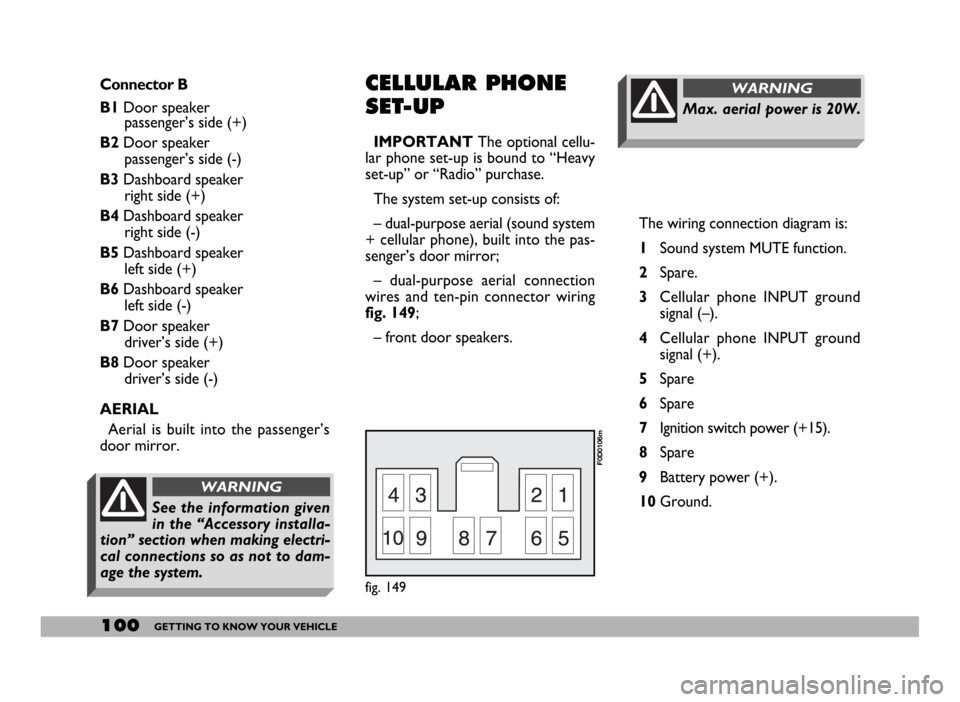
The wiring connection diagram is:
1Sound system MUTE function.
2Spare.
3Cellular phone INPUT ground
signal (–).
4Cellular phone INPUT ground
signal (+).
5Spare
6Spare
7Ignition switch power (+15).
8Spare
9Battery power (+).
10Ground.
Max. aerial power is 20W.
WARNINGConnector B
B1Door speaker
passenger’s side (+)
B2Door speaker
passenger’s side (-)
B3Dashboard speaker
right side (+)
B4Dashboard speaker
right side (-)
B5Dashboard speaker
left side (+)
B6Dashboard speaker
left side (-)
B7Door speaker
driver’s side (+)
B8Door speaker
driver’s side (-)
AERIAL
Aerial is built into the passenger’s
door mirror.CELLULAR PHONE
SET-UP
IMPORTANTThe optional cellu-
lar phone set-up is bound to “Heavy
set-up” or “Radio” purchase.
The system set-up consists of:
– dual-purpose aerial (sound system
+ cellular phone), built into the pas-
senger’s door mirror;
– dual-purpose aerial connection
wires and ten-pin connector wiring
fig. 149;
– front door speakers.
fig. 149
F0D0106m
See the information given
in the “Accessory installa-
tion” section when making electri-
cal connections so as not to dam-
age the system.
WARNING