steering wheel FIAT FIORINO 2018 Owner handbook (in English)
[x] Cancel search | Manufacturer: FIAT, Model Year: 2018, Model line: FIORINO, Model: FIAT FIORINO 2018Pages: 196, PDF Size: 4.99 MB
Page 5 of 196
USE OF THE OWNER HANDBOOK
OPERATING INSTRUCTIONS
Each time direction instructions (left/right or forwards/backwards) about the vehicle are given, these must be intended as
regarding an occupant in the driver's seat. Special cases not complying with this rule will be specified as appropriate in the text.
The figures in the Owner Handbook are provided by way of example only: this might imply that some details of the image do
not correspond to the actual arrangement of your vehicle. In addition, the Handbook has been conceived considering cars with
steering wheel on the left side; it is therefore possible that on cars with steering wheel on the right side, the position or
construction of some controls is not exactly mirror-like with respect to the figure.
To identify the chapter with the information needed you can consult the index at the end of this Owner Handbook.
Chapters can be rapidly identified with dedicated graphic tabs, at the side of each odd page. A few pages further there is a key
for getting to know the chapter order and the relevant symbols in the tabs. There is in any case a textual indication of the
current chapter at the side of each even page.
WARNINGS AND PRECAUTIONS
While reading this Owner Handbook you will find a series ofWARNINGSto prevent procedures that could damage your
vehicle.
There are alsoPRECAUTIONSthat must be carefully followed to prevent incorrect use of the components of the vehicle,
which could cause accidents or injuries.
Therefore allWARNINGSandPRECAUTIONSmust always be carefully followed.
WARNINGSandPRECAUTIONSare recalled in the text with the following symbols:
personal safety;
vehicle integrity;
environmental protection.
NOTE These symbols, when necessary, are indicated besides the title or at the end of the line and are followed by a number.
That number recalls the corresponding warning at the end of the relevant section.
Page 9 of 196
KNOWING YOUR VEHICLE
In-depth knowledge of your new vehicle
starts here.
The handbook that you are reading
simply and directly explains how it
is made and how it works.
That’s why we advise you to read it
seated comfortably on board, so that
you can see what is described here for
yourself.DASHBOARD ................................. 8
KEYS .............................................. 9
IGNITION DEVICE ........................... 11
THE FIAT CODE SYSTEM ............... 11
ALARM ........................................... 12
DOORS ........................................... 13
SEATS ............................................ 16
HEADRESTS ................................... 18
STEERING WHEEL ......................... 19
REAR VIEW MIRRORS .................... 20
EXTERIOR LIGHTS ......................... 21
INTERIOR LIGHTS .......................... 23
WINDOW WASHING ....................... 24
HEATING AND VENTILATION.......... 26
MANUAL CLIMATE CONTROL
SYSTEM ......................................... 26
ELECTRIC WINDOWS .................... 27
BONNET ......................................... 28
PARTITIONS .................................. 29
LUGGAGE COMPARTMENT ........... 31
VERSION WITH METHANE
SYSTEM (NATURAL POWER) ......... 33
7
Page 13 of 196
IGNITION DEVICE
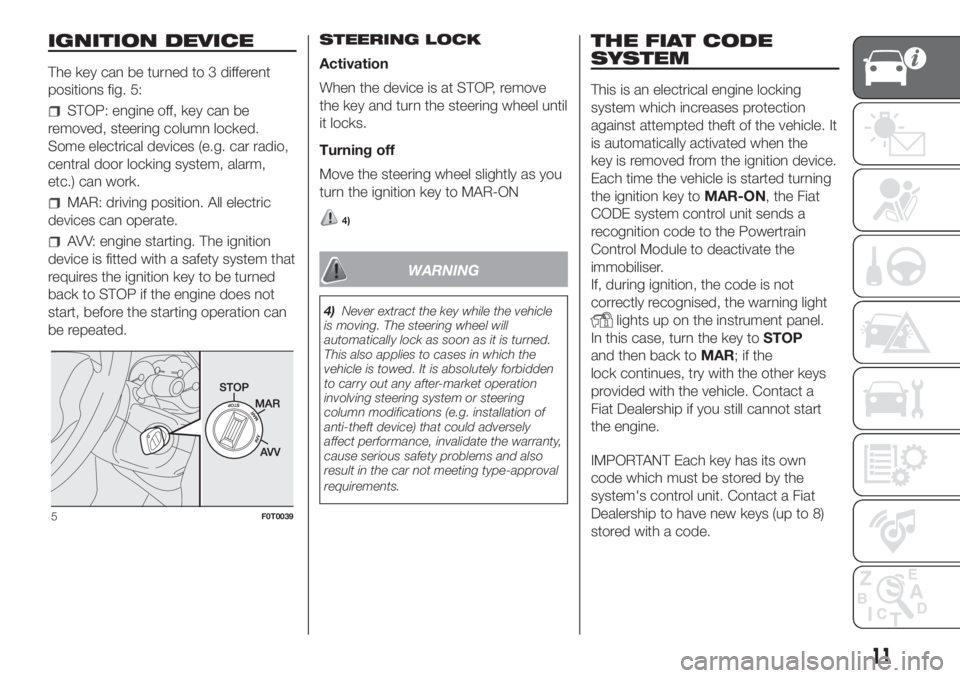
The key can be turned to 3 different
positions fig. 5:
STOP: engine off, key can be
removed, steering column locked.
Some electrical devices (e.g. car radio,
central door locking system, alarm,
etc.) can work.
MAR: driving position. All electric
devices can operate.
AVV: engine starting. The ignition
device is fitted with a safety system that
requires the ignition key to be turned
back to STOP if the engine does not
start, before the starting operation can
be repeated.STEERING LOCK
Activation
When the device is at STOP, remove
the key and turn the steering wheel until
it locks.
Turning off
Move the steering wheel slightly as you
turn the ignition key to MAR-ON
4)
WARNING
4)Never extract the key while the vehicle
is moving. The steering wheel will
automatically lock as soon as it is turned.
This also applies to cases in which the
vehicle is towed. It is absolutely forbidden
to carry out any after-market operation
involving steering system or steering
column modifications (e.g. installation of
anti-theft device) that could adversely
affect performance, invalidate the warranty,
cause serious safety problems and also
result in the car not meeting type-approval
requirements.
THE FIAT CODE
SYSTEM
This is an electrical engine locking
system which increases protection
against attempted theft of the vehicle. It
is automatically activated when the
key is removed from the ignition device.
Each time the vehicle is started turning
the ignition key toMAR-ON, the Fiat
CODE system control unit sends a
recognition code to the Powertrain
Control Module to deactivate the
immobiliser.
If, during ignition, the code is not
correctly recognised, the warning light
lights up on the instrument panel.
In this case, turn the key toSTOP
and then back toMAR;ifthe
lock continues, try with the other keys
provided with the vehicle. Contact a
Fiat Dealership if you still cannot start
the engine.
IMPORTANT Each key has its own
code which must be stored by the
system's control unit. Contact a Fiat
Dealership to have new keys (up to 8)
stored with a code.
5F0T0039
11
Page 18 of 196
WARNING
5)Before opening a door, ensure that you
can do it in conditions of safety.
6)The right sliding side door cannot be
opened with the fuel flap open during
refuelling.
7)Do not leave the sliding side door open
when the vehicle is parked on a gradient. A
knock could release the latch leaving the
door free to move forward.
8)Before leaving the vehicle parked with
sliding doors open, always check that
the latch is engaged.
9)Always use this device when carrying
children.
10)The spring-loaded system is designed
for optimum usage. Accidental knocks
or a strong gust of wind may release the
springs, forcing the doors to close.
11)When closing, shut the right-hand door
2 fig. 13fully before you close the left-hand
door 1 fig. 13. Never shut the two doors
at the same time.
WARNING
2)Make sure that the right sliding side
door is all closed before refuelling to
prevent damage to the door and to the
sliding locking system with fuel filler cap
open, activated during refuelling
operations.
SEATS
12)
FRONT SEATS
Lengthwise adjustment
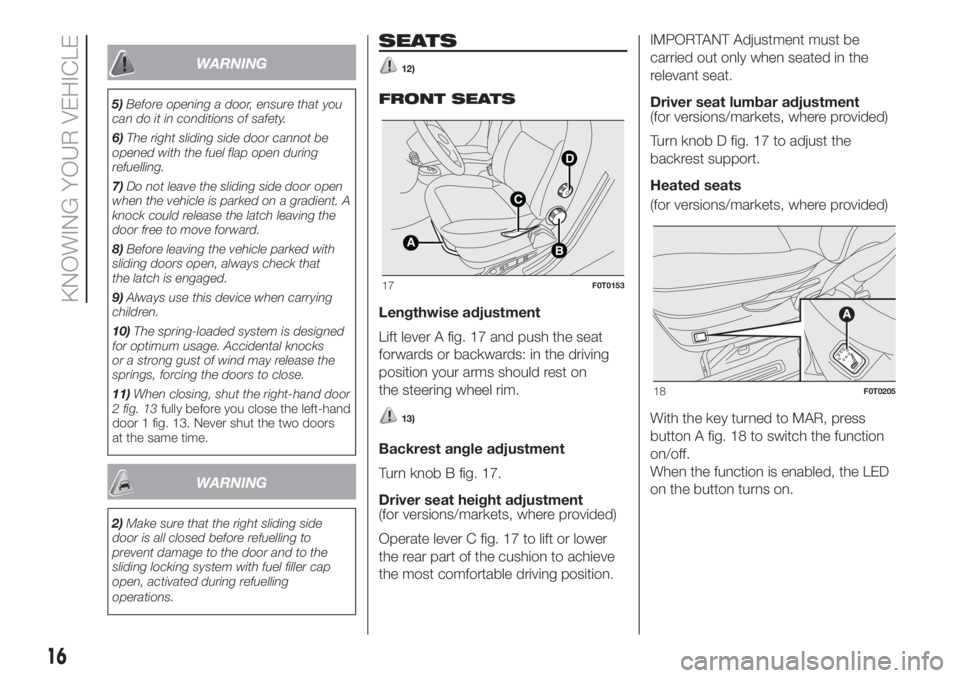
Lift lever A fig. 17 and push the seat
forwards or backwards: in the driving
position your arms should rest on
the steering wheel rim.
13)
Backrest angle adjustment
Turn knob B fig. 17.
Driver seat height adjustment
(for versions/markets, where provided)
Operate lever C fig. 17 to lift or lower
the rear part of the cushion to achieve
the most comfortable driving position.IMPORTANT Adjustment must be
carried out only when seated in the
relevant seat.
Driver seat lumbar adjustment
(for versions/markets, where provided)
Turn knob D fig. 17 to adjust the
backrest support.
Heated seats
(for versions/markets, where provided)
With the key turned to MAR, press
button A fig. 18 to switch the function
on/off.
When the function is enabled, the LED
on the button turns on.
B
D
C
A
17F0T0153
18F0T0205
16
KNOWING YOUR VEHICLE
Page 21 of 196
WARNING
16)All adjustments must be carried out
only with the vehicle stationary and the
engine off. Head restraints must be
adjusted so that the head, rather than the
neck, rests on them. Only in this case
they can protect your head correctly. To
maximise the protective action provided by
the headrest, adjust the seat back so that
your trunk is upright and keep your head
as close to the headrest as possible.
STEERING WHEEL
The height and axial position of the
steering wheel can be adjusted on
some versions.
To adjust, proceed as follows:
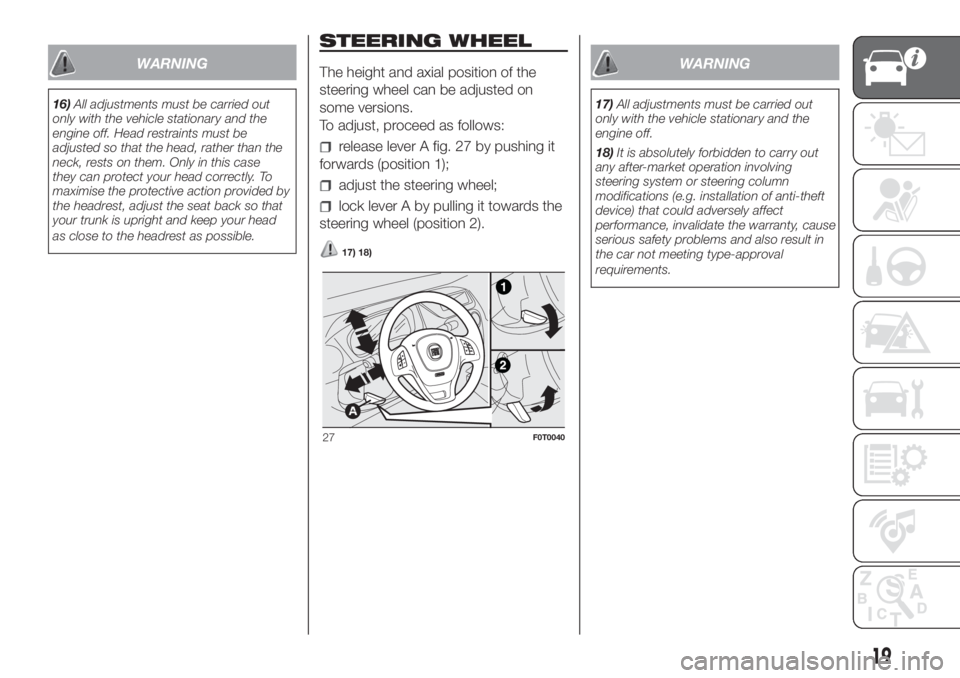
release lever A fig. 27 by pushing it
forwards (position 1);
adjust the steering wheel;
lock lever A by pulling it towards the
steering wheel (position 2).
17) 18)
WARNING
17)All adjustments must be carried out
only with the vehicle stationary and the
engine off.
18)It is absolutely forbidden to carry out
any after-market operation involving
steering system or steering column
modifications (e.g. installation of anti-theft
device) that could adversely affect
performance, invalidate the warranty, cause
serious safety problems and also result in
the car not meeting type-approval
requirements.
27F0T0040
19
Page 23 of 196
EXTERIOR LIGHTS
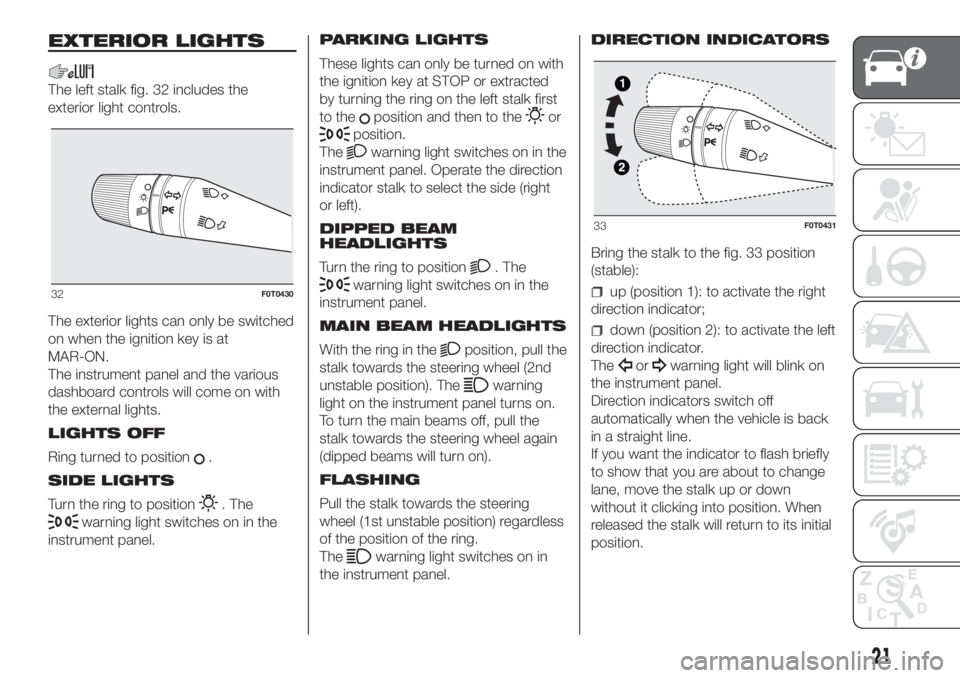
The left stalk fig. 32 includes the
exterior light controls.
The exterior lights can only be switched
on when the ignition key is at
MAR-ON.
The instrument panel and the various
dashboard controls will come on with
the external lights.
LIGHTS OFF
Ring turned to position
.
SIDE LIGHTS
Turn the ring to position
. The
warning light switches on in the
instrument panel.PARKING LIGHTS
These lights can only be turned on with
the ignition key at STOP or extracted
by turning the ring on the left stalk first
to the
position and then to theor
position.
The
warning light switches on in the
instrument panel. Operate the direction
indicator stalk to select the side (right
or left).
DIPPED BEAM
HEADLIGHTS
Turn the ring to position
. The
warning light switches on in the
instrument panel.
MAIN BEAM HEADLIGHTS
With the ring in the
position, pull the
stalk towards the steering wheel (2nd
unstable position). The
warning
light on the instrument panel turns on.
To turn the main beams off, pull the
stalk towards the steering wheel again
(dipped beams will turn on).
FLASHING
Pull the stalk towards the steering
wheel (1st unstable position) regardless
of the position of the ring.
The
warning light switches on in
the instrument panel.DIRECTION INDICATORS
Bring the stalk to the fig. 33 position
(stable):
up (position 1): to activate the right
direction indicator;
down (position 2): to activate the left
direction indicator.
The
orwarning light will blink on
the instrument panel.
Direction indicators switch off
automatically when the vehicle is back
in a straight line.
If you want the indicator to flash briefly
to show that you are about to change
lane, move the stalk up or down
without it clicking into position. When
released the stalk will return to its initial
position.
32F0T0430
33F0T0431
21
Page 24 of 196
Lane change function
If you wish to signal a lane change,
place the left stalk in the unstable
position for less than half a second.
The direction indicator on the side
selected will be activated for 3 flashes
and then go out automatically.
FOG LIGHTS
(for versions/markets, where provided)
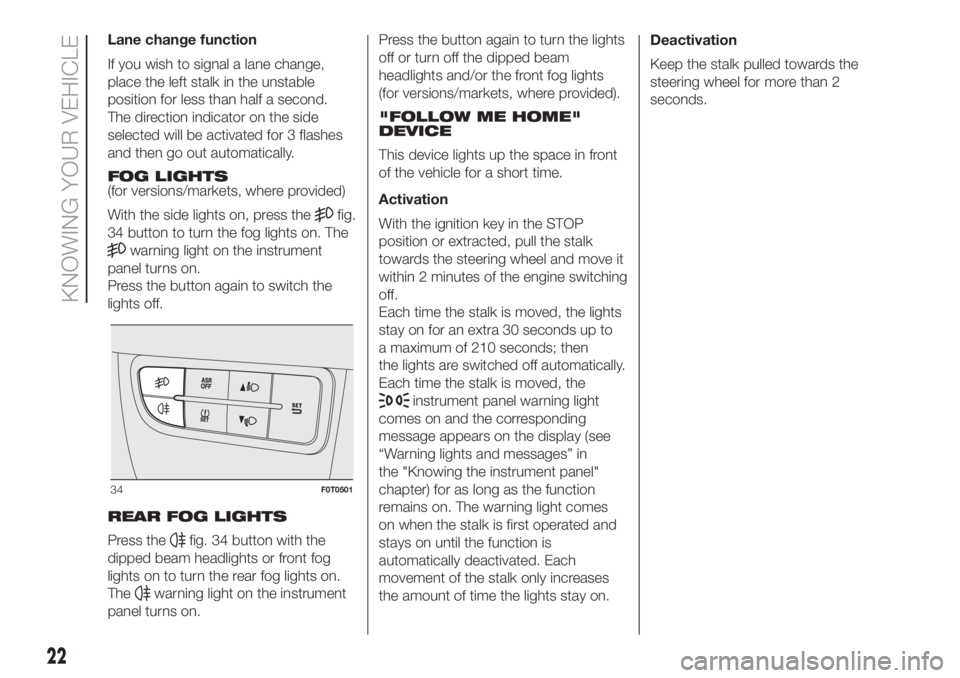
With the side lights on, press the
fig.
34 button to turn the fog lights on. The
warning light on the instrument
panel turns on.
Press the button again to switch the
lights off.
REAR FOG LIGHTS
Press the
fig. 34 button with the
dipped beam headlights or front fog
lights on to turn the rear fog lights on.
The
warning light on the instrument
panel turns on.Press the button again to turn the lights
off or turn off the dipped beam
headlights and/or the front fog lights
(for versions/markets, where provided).
"FOLLOW ME HOME"
DEVICE
This device lights up the space in front
of the vehicle for a short time.
Activation
With the ignition key in the STOP
position or extracted, pull the stalk
towards the steering wheel and move it
within 2 minutes of the engine switching
off.
Each time the stalk is moved, the lights
stay on for an extra 30 seconds up to
a maximum of 210 seconds; then
the lights are switched off automatically.
Each time the stalk is moved, the
instrument panel warning light
comes on and the corresponding
message appears on the display (see
“Warning lights and messages” in
the "Knowing the instrument panel"
chapter) for as long as the function
remains on. The warning light comes
on when the stalk is first operated and
stays on until the function is
automatically deactivated. Each
movement of the stalk only increases
the amount of time the lights stay on.Deactivation
Keep the stalk pulled towards the
steering wheel for more than 2
seconds.
34F0T0501
22
KNOWING YOUR VEHICLE
Page 27 of 196
With the twist switch at, the
windscreen wiper will automatically
adapt to the speed of the vehicle.
With the windscreen wipers
operational, if reverse gear is engaged,
the rear window wiper is automatically
activated.
3)
“Smart washing” function
Pull the stalk towards the steering
wheel (unstable position) to operate the
windscreen washer.
Keeping the stalk pulled for more than
half a second, with just one movement
it is possible to operate the washer
jet and the wiper at the same time.
The windscreen wiper stops working
three strokes after the stalk is released.
A further stroke after approx. 6 seconds
completes the wiping cycle.
REAR WINDOW
WIPER/WASHER
(for versions/markets, where provided)
This operates only with the ignition
key turned to MAR.
Activation
Turn the ring nut to
to operate the
rear window wiper:
in intermittent mode when the
windscreen wiper is not operating;
in synchronous mode (at half the
speed of the windscreen wiper) when
the windscreen wiper is operating;
in continuous mode with reverse
gear engaged and the control active.
With the windscreen wiper on and
reverse gear engaged, rear window
wiping will be continuous.
Pushing the stalk towards the
dashboard (rocking position) will
activate the rear window washer jet.
Keep the stalk pushed for more than
half a second to activate the rear
window wiper as well. Releasing the
stalk will activate the smart washing
function, as described for the
windscreen wiper.
Deactivation
The function stops when the stalk is
released.
4)
WARNING
3)Do not use the windscreen wiper to
remove layers of snow or ice from the
windscreen. In such conditions, the
windscreen wiper may be subjected to
excessive stress and the motor cut-out
switch, which prevents operation for a few
seconds, may intervene. If operation is
not restored, contact a Fiat Dealership.4)Do not use the rear window wiper to
remove layers of snow or ice. In such
conditions, the screen wiper may be
subjected to excessive stress and the
motor cut-out switch, which prevents
operation for a few seconds, may
intervene. If operation is not restored,
contact a Fiat Dealership.
25
Page 53 of 196
What it means What to do
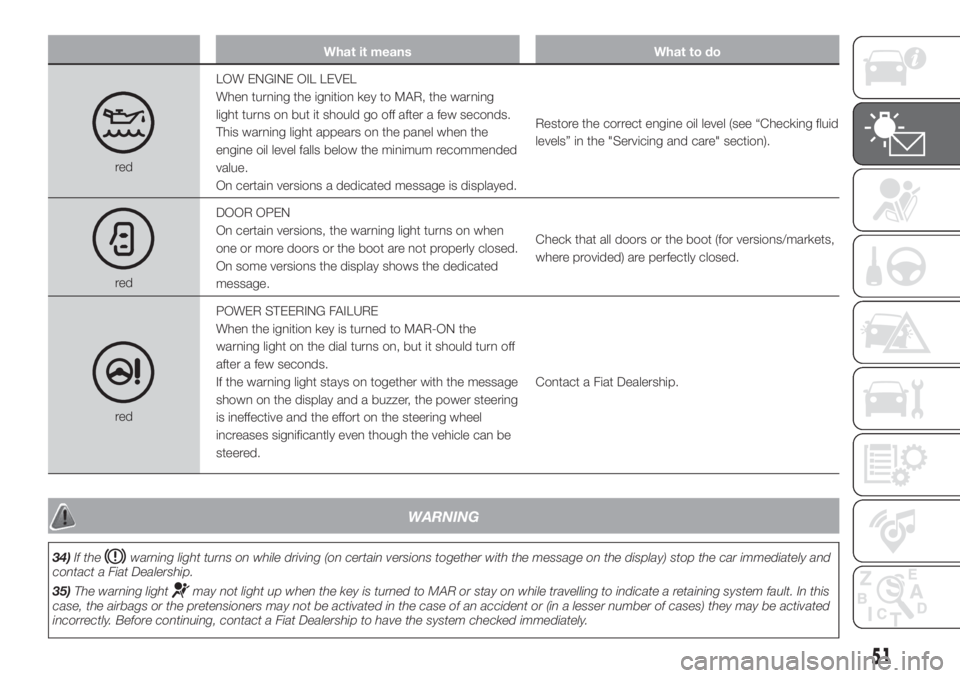
redLOW ENGINE OIL LEVEL
When turning the ignition key to MAR, the warning
light turns on but it should go off after a few seconds.
This warning light appears on the panel when the
engine oil level falls below the minimum recommended
value.
On certain versions a dedicated message is displayed.Restore the correct engine oil level (see “Checking fluid
levels” in the "Servicing and care" section).
redDOOR OPEN
On certain versions, the warning light turns on when
one or more doors or the boot are not properly closed.
On some versions the display shows the dedicated
message.Check that all doors or the boot (for versions/markets,
where provided) are perfectly closed.
redPOWER STEERING FAILURE
When the ignition key is turned to MAR-ON the
warning light on the dial turns on, but it should turn off
after a few seconds.
If the warning light stays on together with the message
shown on the display and a buzzer, the power steering
is ineffective and the effort on the steering wheel
increases significantly even though the vehicle can be
steered.Contact a Fiat Dealership.
WARNING
34)If thewarning light turns on while driving (on certain versions together with the message on the display) stop the car immediately and
contact a Fiat Dealership.
35)The warning light
may not light up when the key is turned to MAR or stay on while travelling to indicate a retaining system fault. In this
case, the airbags or the pretensioners may not be activated in the case of an accident or (in a lesser number of cases) they may be activated
incorrectly. Before continuing, contact a Fiat Dealership to have the system checked immediately.
51
Page 73 of 196
when the space-saver wheel is
fitted. Before carrying out the “Reset”
procedure, inflate the tyres to the rated
pressure values specified in the inflation
pressure table (see "Wheels" paragraph
in the "Technical specifications"
chapter).
If the “Reset” procedure is not carried
out, in all above cases, the
warning
light may give false indications on
one or more tyres.
To carry out the “Reset” procedure,
with the vehicle stopped and the
ignition device at MAR, use the Setup
Menu as follows:
briefly press thebutton: the
display will show "Reset";
press thebutton or the
button to select ("Yes" or "No");
briefly press thebutton: the
display will show "Confirm";
pressbutton orto select
("Yes" to “Reset” or "No" to exit the
video page);
press thebutton again to return
to the standard screen or to the main
menu according to where you are in the
menu.
After the “Reset” the display will show
the "Reset saved" message, indicating
that the "self-learning" has been
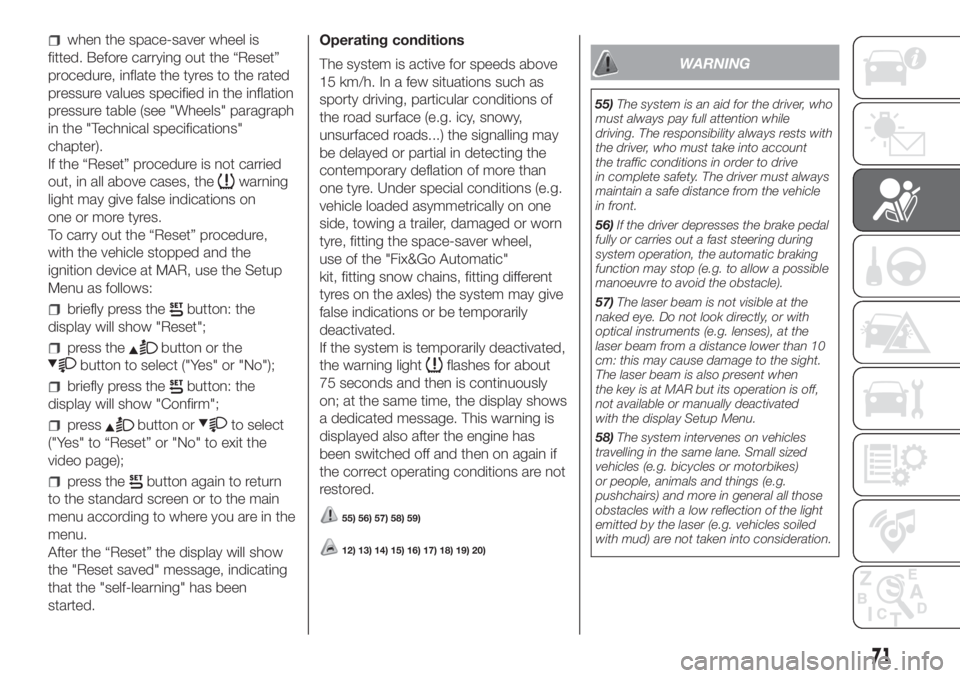
started.Operating conditions
The system is active for speeds above
15 km/h. In a few situations such as
sporty driving, particular conditions of
the road surface (e.g. icy, snowy,
unsurfaced roads...) the signalling may
be delayed or partial in detecting the
contemporary deflation of more than
one tyre. Under special conditions (e.g.
vehicle loaded asymmetrically on one
side, towing a trailer, damaged or worn
tyre, fitting the space-saver wheel,
use of the "Fix&Go Automatic"
kit, fitting snow chains, fitting different
tyres on the axles) the system may give
false indications or be temporarily
deactivated.
If the system is temporarily deactivated,
the warning light
flashes for about
75 seconds and then is continuously
on; at the same time, the display shows
a dedicated message. This warning is
displayed also after the engine has
been switched off and then on again if
the correct operating conditions are not
restored.
55) 56) 57) 58) 59)
12) 13) 14) 15) 16) 17) 18) 19) 20)
WARNING
55)The system is an aid for the driver, who
must always pay full attention while
driving. The responsibility always rests with
the driver, who must take into account
the traffic conditions in order to drive
in complete safety. The driver must always
maintain a safe distance from the vehicle
in front.
56)If the driver depresses the brake pedal
fully or carries out a fast steering during
system operation, the automatic braking
function may stop (e.g. to allow a possible
manoeuvre to avoid the obstacle).
57)The laser beam is not visible at the
naked eye. Do not look directly, or with
optical instruments (e.g. lenses), at the
laser beam from a distance lower than 10
cm: this may cause damage to the sight.
The laser beam is also present when
the key is at MAR but its operation is off,
not available or manually deactivated
with the display Setup Menu.
58)The system intervenes on vehicles
travelling in the same lane. Small sized
vehicles (e.g. bicycles or motorbikes)
or people, animals and things (e.g.
pushchairs) and more in general all those
obstacles with a low reflection of the light
emitted by the laser (e.g. vehicles soiled
with mud) are not taken into consideration.
71