phone FIAT FREEMONT 2014 1.G User Guide
[x] Cancel search | Manufacturer: FIAT, Model Year: 2014, Model line: FREEMONT, Model: FIAT FREEMONT 2014 1.GPages: 388, PDF Size: 4.13 MB
Page 169 of 388
UCONNECT® MULTIMEDIA VIDEO
ENTERTAINMENT SYSTEM (VES™)
(for versions/markets, where
provided)
Your rear seat Video Entertainment System (VES™) is
designed to give your family years of enjoyment. You
can play your favorite CDs or DVDs, listen to audio
over the wireless headphones, or plug and play a variety
of standard video games or audio devices. Please re-
view this Owner's Manual to become familiar with its
features and operation.Getting Started
•
Screen located in the overhead console: Unfold
the overhead LCD screen by pushing the button on
the overhead console behind the screen.
(fig. 121)
• With the ignition switch in the ON or ACC position, turn the radio on by pushing the ON/OFF Volume
Control knob.
• When the Video Screen is open and a DVD is inserted into the radio, the screen turns on auto-
matically, the headphone transmitters turn on and
playback begins.
(fig. 121)
Overhead Video Screen
163
KNOWING
YOUR
VEHICLE
SAFETY
STARTING
AND
DRIVING
W
ARNING
LIGHTS
AND
MESSAGES
IN AN
EMERGENCY
SERVICING
AND CARE
TECHNICAL
SPECIFICATIONS
CONTENTS
Page 170 of 388
Video Screen
NOTE:Typically there are two different ways to
operate the features of the Video Entertainment Sys-
tem (VES™).
• The Remote Control
• The Touch-Screen Radio (for versions/markets, where provided)
Play Video Games
Connect the video game console to the Auxiliary RCA
input jacks located on the back of the center console. Audio/Video RCA Jacks (AUX Jacks)
on the rear of the center console
enable the monitor to display video
directly from a video camera, con-
nect video games for display on the
screen, or play music directly from an
MP3 player.
1. Video in (yellow)
2. Left audio in (white)
3. Right audio in (red)
When connecting an external source to the AUX
input, be sure to follow the standard color coding for
the VES™ jacks: NOTE:
Certain high-end video games, such as Playsta-
tion3 and XBox360 will exceed the power limit of the
vehicle's Power Inverter. Refer to the Power Inverter
section in your vehicle's Owner's Manual for more
information.
Ensure the remote control channel selector switch and
Headphone switch (IR channel) are the same number.
Using The Remote Control
1. Press the MODE button on the Remote Control.
2. While looking at the video screen, highlight AUX 1, by either pressing Up/Down/Left/Right buttons or
by repeatedly pressing the MODE button, then
press ENTER on the Remote Control.
Using The Touchscreen Radio Controls
1. Touch the “MORE” soft-key.
2. Touch the “Rear Entertainment” soft-key to display the Rear Entertainment Controls.
3. If the Rear Entertainment is turned off, touch the “Power” soft-key.
4. Touch the “1” or “2” soft-key for the channel desired and press “Source” soft-key to select the
desired mode.
164
KNOWING YOUR
VEHICLE
SAFETY
STARTING AND
DRIVING
W
ARNING LIGHTS AND
MESSAGES
IN AN
EMERGENCY
SERVICING AND CARE
TECHNICAL
SPECIFICATIONS
CONTENTS
Page 171 of 388
Listen To An Audio Source On Channel 2
While A Video Is Playing On Channel 1
Ensure the Remote Control and Headphone switch is
on Channel 2.
Using The Remote Control
1. Press the MODE button on the Remote Controland the Mode Select Screen will display, unless a
video is playing then only a small banner will appear
on the bottom of the screen.
2. While looking at the video screen, either press Up/ Down/Left/Right on the Remote Control to
highlight the desired audio source or repeatedly
press the MODE button on the remote until the
desired audio source appears on the screen.
Using The Touch-Screen Radio Controls
1. Touch the “MORE” soft-key.
2. Touch the “Rear Entertainment” soft-key to display the Rear Entertainment Controls.
3. If the Rear Entertainment is turned off, touch the “Power” soft-key.
4. Touch the “1” or “2” soft-key for the channel desired then press the “SOURCE” soft key to select
the desired mode. Important Notes For Single Video Screen
System
• VES™ is able to transmit two channels of stereo
audio simultaneously.
• In split screen mode the left side equates to Chan- nel 1 and right side equates to Channel 2.
• If a video source is selected on Channel 1, then Channel 2 is for audio only.
• When selecting a video source on Channel 1, the video will display on the screen and the audio will be
heard on Channel 1 in the headphones.
• Audio can be heard through the headphones even when the Video Screen is closed.
Play A DVD Using The Touchscreen Radio
1. Insert the DVD with the label facing up. The radio automatically selects the appropriate mode after
the disc is recognized and displays the menu screen
or starts playing the first track.
165
KNOWING
YOUR
VEHICLE
SAFETY
STARTING
AND
DRIVING
W
ARNING
LIGHTS
AND
MESSAGES
IN AN
EMERGENCY
SERVICING
AND CARE
TECHNICAL
SPECIFICATIONS
CONTENTS
Page 173 of 388
Remote Control Operation
Quick Reference Chart
This chart provides a quick reference of the remote
control button functions for the different radio modes
and menu screens.NOTE:
• Ensure the remote control channel/screen selector
switch is set to the screen or channel to be con-
trolled.
• Ensure the headphone channel selector switch is set to the screen or channel to be listened to.
Remote
Control Button Standard Screens
Menu Screens
AM/FM/
MW/LW DISC
AUX/AUX1/AUX2 Mode
Select Menu Screen
Setup
Power Screen ON/OFF
Light Remote Backlight ON/OFF
Up Arrow Next Seek Up*Next
Tr a c k Audio:
Next Track
Not Avail-
able Selection
Up Selection
Up
Video Play:Next Chapter
Video Menu:Selection Up
Down Arrow Prev Seek Down* Previous
Tr a c k Audio:
Previous Track
Not Avail-able Selection
Down Selection
Down
Video Play:
Previous
Chapter
Video Menu: Selection
Down
Right Arrow FF Tune Up*Fast For-
ward Audio:
Fast Forward
Not Avail-able Selection
Right Selection
Right
Video Play:
Fast Forward
Video Menu: Selection
Right
167
KNOWING
YOUR
VEHICLE
SAFETY
STARTING
AND
DRIVING
W
ARNING
LIGHTS
AND
MESSAGES
IN AN
EMERGENCY
SERVICING
AND CARE
TECHNICAL
SPECIFICATIONS
CONTENTS
Page 175 of 388
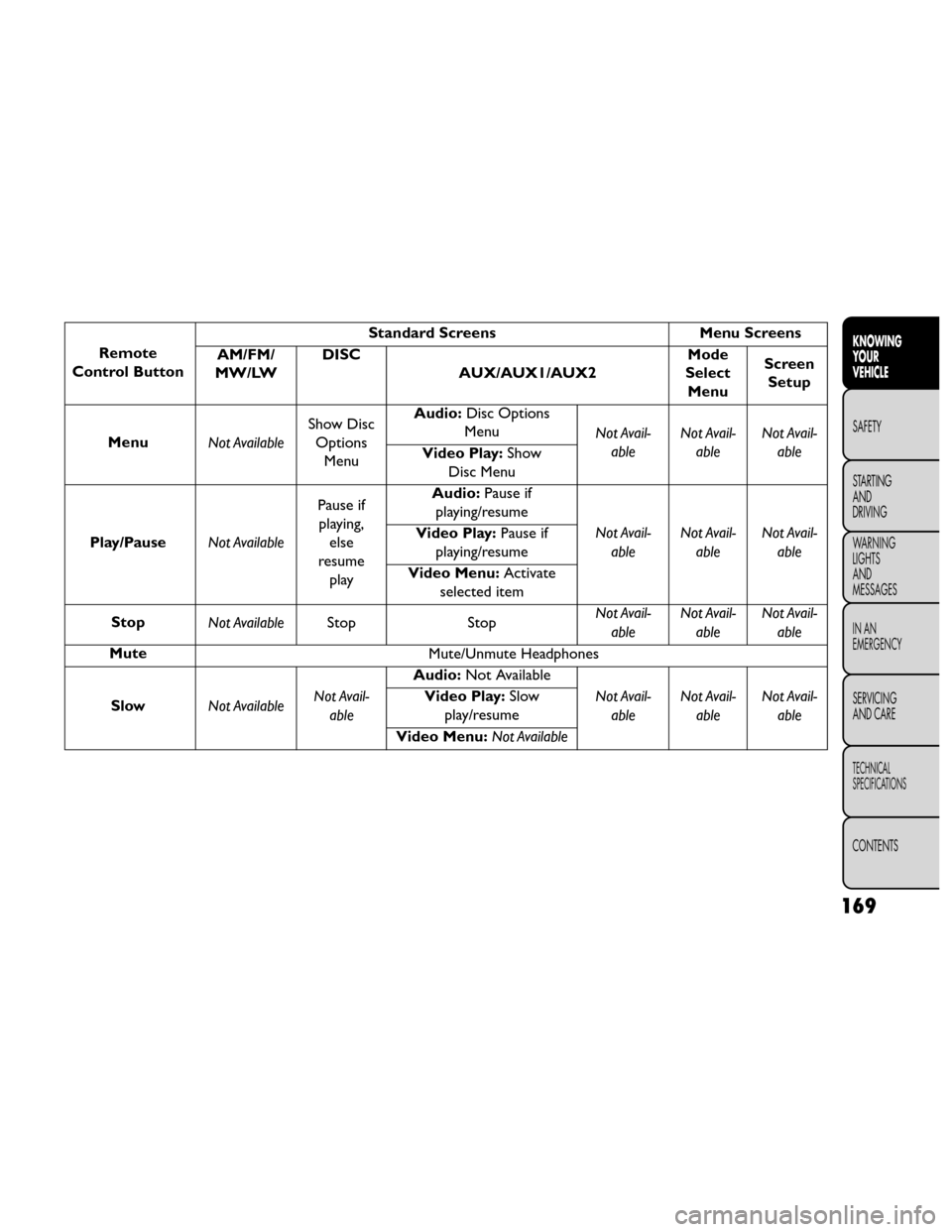
Remote
Control Button Standard Screens
Menu Screens
AM/FM/
MW/LW DISC
AUX/AUX1/AUX2 Mode
Select Menu Screen
Setup
Menu Not AvailableShow Disc
Options Menu Audio:
Disc Options
Menu Not Avail-
able Not Avail-
able Not Avail-
able
Video Play: Show
Disc Menu
Play/Pause Not AvailablePause if
playing, else
resume play Audio:
Pause if
playing/resume
Not Avail-able Not Avail-
able Not Avail-
able
Video Play:
Pause if
playing/resume
Video Menu: Activate
selected item
Stop Not Available Stop StopNot Avail-
able Not Avail-
able Not Avail-
able
Mute Mute/Unmute Headphones
Slow Not Available Not Avail-
able Audio:
Not Available
Not Avail-able Not Avail-
able Not Avail-
able
Video Play:
Slow
play/resume
Video Menu: Not Available
169
KNOWING
YOUR
VEHICLE
SAFETY
STARTING
AND
DRIVING
W
ARNING
LIGHTS
AND
MESSAGES
IN AN
EMERGENCY
SERVICING
AND CARE
TECHNICAL
SPECIFICATIONS
CONTENTS
Page 177 of 388
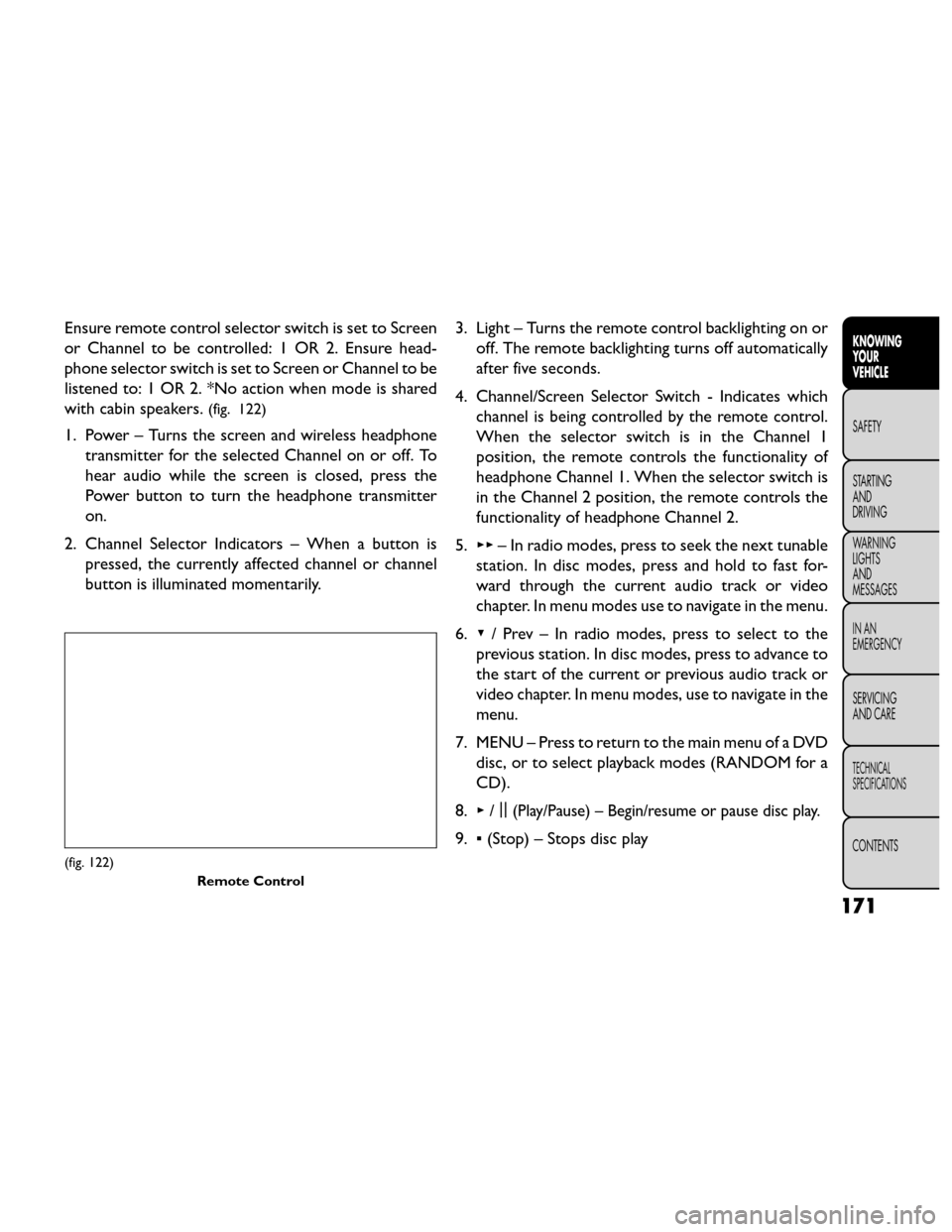
Ensure remote control selector switch is set to Screen
or Channel to be controlled: 1 OR 2. Ensure head-
phone selector switch is set to Screen or Channel to be
listened to: 1 OR 2. *No action when mode is shared
with cabin speakers.
(fig. 122)
1. Power – Turns the screen and wireless headphonetransmitter for the selected Channel on or off. To
hear audio while the screen is closed, press the
Power button to turn the headphone transmitter
on.
2. Channel Selector Indicators – When a button is pressed, the currently affected channel or channel
button is illuminated momentarily. 3. Light – Turns the remote control backlighting on or
off. The remote backlighting turns off automatically
after five seconds.
4. Channel/Screen Selector Switch - Indicates which channel is being controlled by the remote control.
When the selector switch is in the Channel 1
position, the remote controls the functionality of
headphone Channel 1. When the selector switch is
in the Channel 2 position, the remote controls the
functionality of headphone Channel 2.
5. ▸▸ – In radio modes, press to seek the next tunable
station. In disc modes, press and hold to fast for-
ward through the current audio track or video
chapter. In menu modes use to navigate in the menu.
6. ▾/ Prev – In radio modes, press to select to the
previous station. In disc modes, press to advance to
the start of the current or previous audio track or
video chapter. In menu modes, use to navigate in the
menu.
7. MENU – Press to return to the main menu of a DVD disc, or to select playback modes (RANDOM for a
CD).
8. ▸/||
(Play/Pause) – Begin/resume or pause disc play.
9.
▪(Stop) – Stops disc play
(fig. 122)
Remote Control
171
KNOWING
YOUR
VEHICLE
SAFETY
STARTING
AND
DRIVING
W
ARNING
LIGHTS
AND
MESSAGES
IN AN
EMERGENCY
SERVICING
AND CARE
TECHNICAL
SPECIFICATIONS
CONTENTS
Page 178 of 388
10. PROG Up/Down – When listening to a radiomode, pressing PROG Up selects the next preset
and pressing PROG Down selects the previous
preset stored in the radio. When listening to com-
pressed audio on a data disc, PROG Up selects the
next directory and PROG Down selects the pre-
vious directory. When listening to a disc in a radio
with a multiple-disc changer, PROG Up selects the
next disc and PROG Down selects the previous
disc.
11. MUTE – Press to mute the headphone audio out- put for the selected channel.
12. SLOW – Press to slow playback of a DVD disc. Press play (▸) to resume normal play.
13. STATUS – Press to display the current status while in a video mode display.
14. MODE – Press to change the mode of the selected channel. See the Mode Selection section of this
manual for details on changing modes.
15. SETUP – When in a video mode, press the SETUP button to access the display settings (see the
display settings section) to access the DVD setup menu, select the menu button on the radio. When
a disc is loaded in the DVD player (for versions/
markets, where provided) and the VES™ mode is
selected and the disc is stopped, press the SETUP
button to access the DVD Setup menu. (see the
DVD Setup Menu of this manual.)
16. BACK – When navigating in menu mode, press to return to the previous screen. When navigating a
DVDs disc menu, the operation depends on the
disc’s contents.
17. ◂◂– In radio modes, press to seek to the previous
tunable station. In disc modes, press and hold to
fast rewind through the current audio track or
video chapter. In menu modes use to navigate in
the menu.
18. ENTER – Press to select the highlighted option in a menu.
19. ▴/ NEXT – In radio modes, press to select to the
next station. In disc modes, press to advance to
the next audio track or video chapter. In menu
modes, use to navigate in the menu.
172
KNOWING YOUR
VEHICLE
SAFETY
STARTING AND
DRIVING
W
ARNING LIGHTS AND
MESSAGES
IN AN
EMERGENCY
SERVICING AND CARE
TECHNICAL
SPECIFICATIONS
CONTENTS
Page 180 of 388
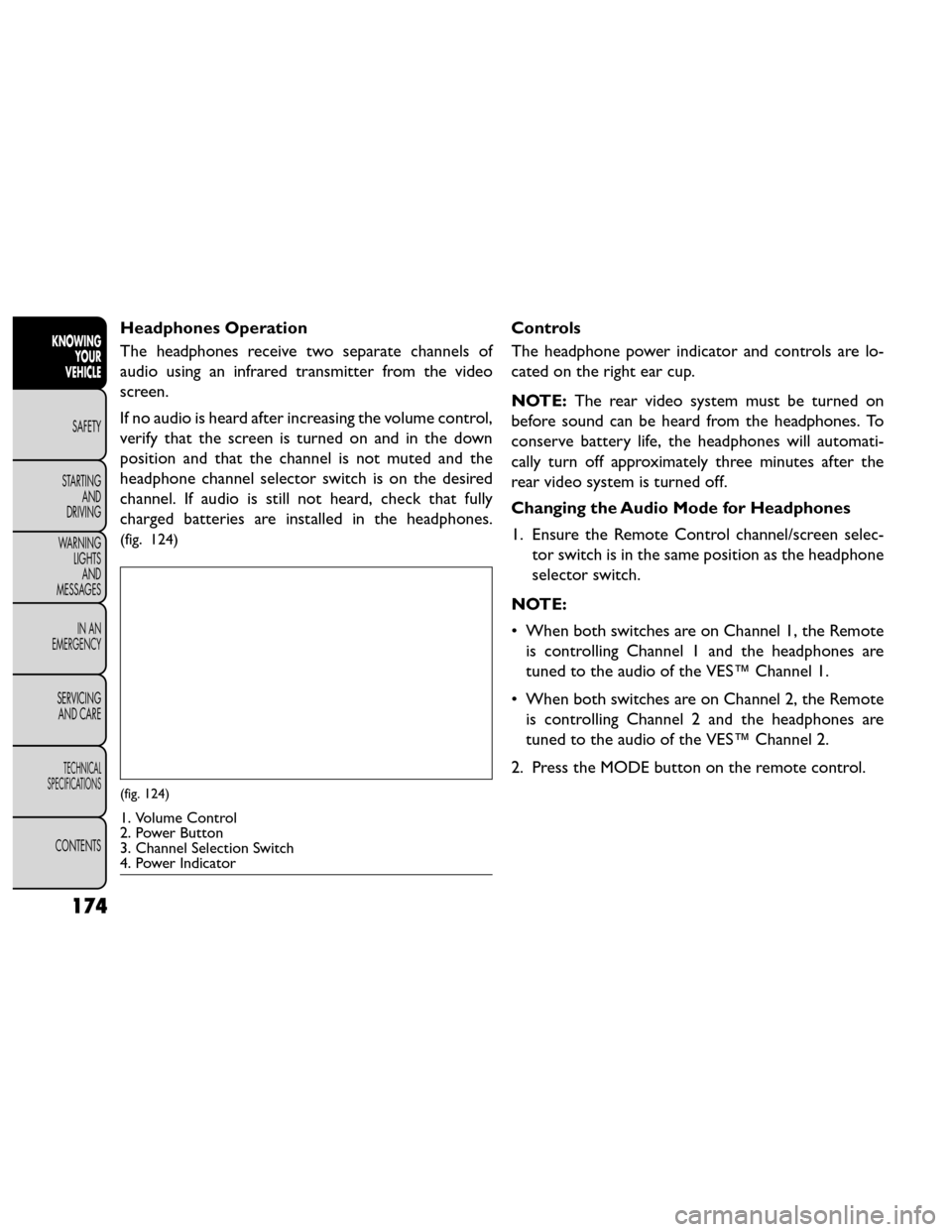
Headphones Operation
The headphones receive two separate channels of
audio using an infrared transmitter from the video
screen.
If no audio is heard after increasing the volume control,
verify that the screen is turned on and in the down
position and that the channel is not muted and the
headphone channel selector switch is on the desired
channel. If audio is still not heard, check that fully
charged batteries are installed in the headphones.
(fig. 124)
Controls
The headphone power indicator and controls are lo-
cated on the right ear cup.
NOTE:The rear video system must be turned on
before sound can be heard from the headphones. To
conserve battery life, the headphones will automati-
cally turn off approximately three minutes after the
rear video system is turned off.
Changing the Audio Mode for Headphones
1. Ensure the Remote Control channel/screen selec- tor switch is in the same position as the headphone
selector switch.
NOTE:
• When both switches are on Channel 1, the Remote is controlling Channel 1 and the headphones are
tuned to the audio of the VES™ Channel 1.
• When both switches are on Channel 2, the Remote is controlling Channel 2 and the headphones are
tuned to the audio of the VES™ Channel 2.
2. Press the MODE button on the remote control.
(fig. 124)
1. Volume Control
2. Power Button
3. Channel Selection Switch
4. Power Indicator
174
KNOWING YOUR
VEHICLE
SAFETY
STARTING AND
DRIVING
W
ARNING LIGHTS AND
MESSAGES
IN AN
EMERGENCY
SERVICING AND CARE
TECHNICAL
SPECIFICATIONS
CONTENTS
Page 181 of 388
3. If the video screen is displaying a video source (suchas a DVD Video), pressing STATUS shows the status
on a popup banner at the bottom of the screen.
Pressing the MODE button will advance to the next
mode. When the mode is in an audio only source
(such as FM), the Mode Selection menu appears on
screen.
4. When the Mode Selection menu appears on screen, use the cursor buttons on the remote control to
navigate to the available modes and press the EN-
TER button to select the new mode.
5. To cancel out of the Mode Selection menu, press the BACK button on the remote control.
Replacing The Headphone Batteries
Each set of headphones requires two AAA batteries for
operation. To replace the batteries:
• Locate the battery compartment on the left ear cup of the headphones, and then slide the battery cover
downward.
• Replace the batteries, making sure to orient them according to the polarity diagram shown.
• Replace the battery compartment cover. Unwired® Stereo Headphone Lifetime
Limited Warranty
Who Does This Warranty Cover?
This warranty
covers the initial user or purchaser ("you" or "your") of
this particular Unwired Technology LLC ("Unwired")
wireless headphone ("Product"). The warranty is not
transferable.
How Long Does The Coverage Last? This war-
ranty lasts as long as you own the Product.
What DoesThis Warranty Cover? Except as speci-
fied below, this warranty covers any Product that in
normal use is defective in workmanship or materials.
What Does This Warranty Not Cover? This war-
ranty does not cover any damage or defect that results
from misuse, abuse or modification of the Product
other than by Unwired. Foam earpieces, which will
wear over time through normal use, are specifically not
covered (replacement foam is available for a nominal
charge). UNWIRED TECHNOLOGY IS NOT LIABLE
FOR ANY INJURIES OR DAMAGES TO PERSONS
OR PROPERTY RESULTING FROM THE USE OF, OR
ANY FAILURE OR DEFECT IN, THE PRODUCT,
NOR IS UNWIRED LIABLE FOR ANY GENERAL,
SPECIAL, DIRECT, INDIRECT, INCIDENTAL, CON-
SEQUENTIAL, EXEMPLARY, PUNITIVE OR OTHER
DAMAGES OF ANY KIND OR NATURE WHATSO-
EVER. Some states and jurisdictions may not allow the
175
KNOWING
YOUR
VEHICLE
SAFETY
STARTING
AND
DRIVING
W
ARNING
LIGHTS
AND
MESSAGES
IN AN
EMERGENCY
SERVICING
AND CARE
TECHNICAL
SPECIFICATIONS
CONTENTS
Page 186 of 388
Listening To Audio With The Screen Closed
To listen to only audio portion of the channel with the
screen closed:
• Set the audio to the desired source and channel.
• Close the video screen.
• To change the current audio mode, press the remotecontrol’s MODE button. This will automatically se-
lect the next available audio mode without using the
MODE/SOURCE Select menu.
If the screen is closed and there is no audio heard,
verify that the headphones are turned on (the ON
indicator is illuminated) and the headphone selector
switch is on the desired channel. If the headphones are
turned on, press the remote control’s power button to
turn audio on. If audio is still not heard, check that fully
charged batteries are installed in the headphones.
Disc Formats
The DVD player is capable of playing the following
types of discs (12 cm or 8 cm diameter):
• DVD-Video discs (MPEG-2 video compression) (see notes about DVD Region Codes)
• Audio Compact Discs (CDs)
• CD Data discs with MP3 and WMA compressed audio format files
• Video CDs (MPEG-1 video compression) DVD Region Codes
The DVD player and many DVD discs are coded by
geographic region. These region codes must match in
order for the disc to play. If the region code for the
DVD disc does not match the region code for the
player, the disc will stop playing and a warning will be
displayed.
DVD Audio Support
When a DVD-Audio disc is inserted in the DVD player,
the DVD-Audio title on the disc is played by default
(most DVD-Audio discs also have a Video title, but the
Video title is ignored). All multi-channel program ma-
terial is automatically mixed down to two channels,
which may result in a lowered apparent volume level.
If you increase the volume level to account for this
change in level, remember to lower the volume before
changing the disc or to another mode.
Recorded Discs
The DVD player will play CD-R and CD-RW discs
recorded in CD-Audio or Video-CD format, or as a
CD-ROM containing MP3 or WMA files. The player
will also play DVD-Video content recorded to a
DVD-R, DVD-RW and DVD-ROM discs.
If you record a disc using a personal computer, there
may be cases where the DVD player may not be able to
play some or the entire disc, even if it is recorded in a
180
KNOWING
YOUR
VEHICLE
SAFETY
STARTING AND
DRIVING
W
ARNING LIGHTS AND
MESSAGES
IN AN
EMERGENCY
SERVICING AND CARE
TECHNICAL
SPECIFICATIONS
CONTENTS