ad blue FIAT FREEMONT 2014 1.G Owners Manual
[x] Cancel search | Manufacturer: FIAT, Model Year: 2014, Model line: FREEMONT, Model: FIAT FREEMONT 2014 1.GPages: 388, PDF Size: 4.13 MB
Page 36 of 388
MESSAGES
In the Main Menu, press and release the UP or DOWN
button until “Messages: XX” displays highlighted in the
EVIC. If there is more than one message, pressing the
SELECT button will display a stored warning message.
Press and release the UP and DOWN buttons if there
is more than one message to step through the remain-
ing stored messages. If there are no message, pressing
the SELECT button will do nothing.
TURN MENU OFF
Select from Main Menu using the DOWN button.
Pressing the SELECT button blanks the menu display.
Pressing any one of the four steering wheel buttons
brings the menu back.Uconnect® SETTINGS
HARD-KEYS
Hard-Keys are located on the left and right side of the
Uconnect® 4.3 screen. In addition, there is a Scroll/
Enter control knob located on the right side of the
Climate Controls in the center of the instrument
panel. Turn the control knob to scroll through menus
and change settings (i.e., 30, 60, 90), press the center of
the control knob one or more times to select or
change a setting (i.e., ON, OFF).
SOFT-KEYS
Soft-Keys are accessible on the Uconnect® touch-
screen.
CUSTOMER PROGRAMMABLE FEATURES —
Uconnect® 4.3 SETTINGS
In this mode the Uconnect® system allows you to
access programmable features that may be equipped
such as Display, Clock, Safety/Assistance, Lights, Doors
& Locks, Heated Seats (for versions/markets, where
provided), Engine Off Operation, Compass Settings,
Audio and Phone/Bluetooth settings through hard-keys
and soft-keys.
NOTE:Only one touchscreen area may be selected at
a time.
30
KNOWING YOUR
VEHICLE
SAFETY
STARTING AND
DRIVING
W
ARNING LIGHTS AND
MESSAGES
IN AN
EMERGENCY
SERVICING AND CARE
TECHNICAL
SPECIFICATIONS
CONTENTS
Page 43 of 388
•Calibration (for versions/markets, where provided)
Press the Calibration key to change this setting. This
compass is self-calibrating, which eliminates the need
to manually reset the compass. When the vehicle is
new, the compass may appear erratic and the EVIC will
display CAL until the compass is calibrated. You may
also calibrate the compass by pressing the ON soft-key
and completing one or more 360–degree turns (in an
area free from large metal or metallic objects) until the
CAL indicator displayed in the EVIC turns off. The
compass will now function normally.
NOTE:A good calibration requires a level surface
and an environment free from large metallic objects
such as buildings, bridges, underground cables, railroad
tracks, etc.
Audio
• Equalizer (for versions/markets, where provided)
Press the Equalizer soft-key to change this display.
When in this display you may adjust the Bass, Mid and
Treble settings. Adjust the settings with the + and –
setting soft-keys or by selecting any point on the scale
in between the + and – soft-keys followed by pressing
the arrow back soft-key.
NOTE: Bass/mid/treble allow the you to simply slide
your finger up/down to change the setting as well as
press directly on the desired setting. • Balance / Fade (for versions/markets, where
provided)
Press the Balance / Fade soft-key to change this display.
When in this display you may adjust the Balance and
Fade settings.
• Speed Adjusted Volume (for versions/markets,
where provided)
Press the Speed Adjusted Volume soft-key to change
this display. Decreases volume relative to vehicle
speed. To change the Speed Adjusted Volume press the
Off, 1, 2 or 3 soft-key followed by pressing the arrow
back soft-key.
• Surround Sound (for versions/markets, where
provided)
Press the Surround Sound soft-key to change this
display. Provides simulated surround sound mode. To
make your selection, press the Surround Sound soft-
key, select ON or OFF followed by pressing the arrow
back soft-key.
Phone / Bluetooth®
• Paired Devices
This feature shows which phones are paired to the
Phone/Bluetooth® system. For further information,
refer to the Uconnect® Supplement.
37
KNOWING
YOUR
VEHICLE
SAFETY
STARTING
AND
DRIVING
W
ARNING
LIGHTS
AND
MESSAGES
IN AN
EMERGENCY
SERVICING
AND CARE
TECHNICAL
SPECIFICATIONS
CONTENTS
Page 44 of 388
CUSTOMER PROGRAMMABLE FEATURES —
Uconnect® 8.4 SETTINGS
In this mode the Uconnect® system allows you to
access programmable features that may be equipped
such as Display, Clock, Safety/Assistance, Lights, Doors
& Locks, Auto-On Comfort, Engine Off Operation,
Compass Settings, Audio and Phone/Bluetooth set-
tings.
NOTE:Only one touchscreen area may be selected at
a time.
When making a selection, scroll up or down until the
preferred setting is highlighted, then press and release
the preferred setting until a check-mark appears next
to the setting, showing that setting has been selected.
Display
• Display Mode (for versions/markets, where
provided)
When in this display you may select one of the auto
display settings. To change Mode status press and
release the Day, Night or Auto soft-key followed by
pressing the arrow back soft-key.
• Display Brightness with Headlights ON
(for versions/markets, where provided)
When in this display you may select display brightness
with the headlights on and the headlights off. Adjust the
brightness with the + and – setting soft-keys or by selecting any point on the scale in between the + and –
soft-keys followed by pressing the arrow back soft-key.
• Display Brightness with Headlights OFF
(for versions/markets, where provided)
When in this display you may select display brightness
with the headlights on and the headlights off. Adjust the
brightness with the + and – setting soft-keys or by
selecting any point on the scale in between the + and –
soft-keys followed by pressing the arrow back soft-key.
• Set Language (for versions/markets, where
provided)
When in this display you may select a different language
for all display nomenclature, including the trip functions
and the navigation system (for versions/markets, where
provided). Press the German, French, Spanish, Italian,
Dutch or English button to select the language pre-
ferred followed by pressing the arrow back soft-key.
Then, as you continue, the information will display in
the selected language.
• Units (for versions/markets, where provided)
When in this display you may select to have the EVIC,
odometer, and navigation system (for versions/
markets, where provided) changed between US and
Metric units of measure. Press US or Metric followed
by pressing the arrow back soft-key. Then, as you
continue, the information will display in the selected
units of measure.
38
KNOWING
YOUR
VEHICLE
SAFETY
STARTING AND
DRIVING
W
ARNING LIGHTS AND
MESSAGES
IN AN
EMERGENCY
SERVICING AND CARE
TECHNICAL
SPECIFICATIONS
CONTENTS
Page 50 of 388
• Perform Compass Calibration (for versions/
markets, where provided)
Press the Calibration key to change this setting. This
compass is self-calibrating, which eliminates the need
to manually reset the compass. When the vehicle is
new, the compass may appear erratic and the EVIC will
display CAL until the compass is calibrated. You may
also calibrate the compass by pressing the ON soft-key
and completing one or more 360–degree turns (in an
area free from large metal or metallic objects) until the
CAL indicator displayed in the EVIC turns off. The
compass will now function normally.
Audio
• Balance/Fade (for versions/markets, where
provided)
When in this display you may adjust the Balance and
Fade settings.
• Equalizer (for versions/markets, where provided)
When in this display you may adjust the Bass, Mid and
Treble settings. Adjust the settings with the + and –
setting soft-keys or by selecting any point on the scale
in between the + and – soft-keys followed by pressing
the arrow back soft-key.NOTE:
Bass/mid/treble allow the you to simply slide
your finger up/down to change the setting as well as
press directly on the desired setting.
• Speed Adjusted Volume (for versions/markets,
where provided)
Decreases volume relative to vehicle speed. To change
the Speed Adjusted Volume press the Off, 1, 2 or 3
soft-key followed by pressing the arrow back soft-key.
• Music Info Cleanup (for versions/markets, where
provided)
This feature helps organize music files for optimized
music navigation. To make your selection, press the
Music Info Cleanup soft-key, select On or Off followed
by pressing the arrow back soft-key.
Phone / Bluetooth®
• Paired Devices
This feature shows which phones are paired to the
Phone/Bluetooth® system. For further information,
refer to the Uconnect® Supplement.
44
KNOWING YOUR
VEHICLE
SAFETY
STARTING AND
DRIVING
W
ARNING LIGHTS AND
MESSAGES
IN AN
EMERGENCY
SERVICING AND CARE
TECHNICAL
SPECIFICATIONS
CONTENTS
Page 76 of 388
14. Driver Temperature Control Up Button
(Uconnect® 8.4 Only)
Provides the driver with independent temperature con-
trol. Push the button for warmer temperature settings.
NOTE:In Sync mode, this button will also automati-
cally adjust the passenger temperature setting at the
same time.
15. Temperature Control (Uconnect® 4.3 Only)
Press the driver or passenger temperature soft-key to
regulate the temperature of the air inside the passen-
ger compartment. Moving the temperature bar into
the red area, indicates warmer temperatures. Moving
the temperature bar into the blue area indicates cooler
temperatures. Driver and passenger have independent
temperature control if Sync mode is not illuminated.
CLIMATE CONTROL FUNCTIONS
A/C (Air Conditioning)
The Air Conditioning (A/C) button allows the opera-
tor to manually activate or deactivate the air condition-
ing system. When the air conditioning system is turned
on, cool dehumidified air will flow through the outlets
into the cabin. For improved fuel economy, press the
A/C button to turn off the air conditioning and manu-
ally adjust the blower and airflow mode settings. Also,
make sure to select only Panel, Bi-Level or Floor
modes. NOTE:
• For Manual Climate Controls, if the system is in Mix,
Floor or Defrost Mode, the A/C can be turned off,
but the A/C system shall remain active to prevent
fogging of the windows.
• If fog or mist appears on the windshield or side glass, select Defrost mode and increase blower speed.
• If your air conditioning performance seems lower than expected, check the front of the A/C condenser
(located in front of the radiator), for an accumulation
of dirt or insects. Clean with a gentle water spray
from the front of the radiator and through the
condenser.
MAX A/C
MAX A/C sets the control for maximum cooling per-
formance.
Press and release to toggle between MAX A/C and the
prior settings. The soft-key illuminates when MAX A/C
is ON.
In MAX A/C, the blower level and mode position can
be adjusted to desired user settings. Pressing other
settings will cause the MAX A/C operation to switch to
the selected setting and MAX A/C to exit.
70
KNOWING YOUR
VEHICLE
SAFETY
STARTING AND
DRIVING
W
ARNING LIGHTS AND
MESSAGES
IN AN
EMERGENCY
SERVICING AND CARE
TECHNICAL
SPECIFICATIONS
CONTENTS
Page 84 of 388
• Floor ModeAir comes from the floor outlets. A slight
amount of air is directed through the defrost
and side window demister outlets.
• Mix Mode Air comes from the floor, defrost and side win-
dow demist outlets. This mode works best in
cold or snowy conditions.
• Defrost Mode Air comes from the windshield and side window
demist outlets. Use Defrost mode with maxi-
mum temperature settings for best windshield and side
window defrosting and defogging. When the defrost
mode is selected, the blower level may will increase.
13. Climate Control OFF Button
Press and release this button to turn the Climate
Control ON/OFF.
14. Driver Temperature Control Down Button
Provides the driver with independent temperature
control. Push the button for cooler temperature set-
tings.
NOTE: In Sync mode, this button will also automati-
cally adjust the passenger temperature setting at the
same time. 15. Driver Temperature Control Up Button
Provides the driver with independent temperature
control. Push the button for warmer temperature
settings.
NOTE:
In Sync mode, this button will also automati-
cally adjust the passenger temperature setting at the
same time.
16. Temperature Control (Uconnect® 4.3 Only)
Press the temperature soft-key to regulate the tem-
perature of the air inside the passenger compartment.
Moving the temperature bar into the red area, indicates
warmer temperatures. Moving the temperature bar
into the blue area indicates cooler temperatures.
A/C (Air Conditioning)
The Air Conditioning (A/C) button allows the opera-
tor to manually activate or deactivate the air condition-
ing system. When the air conditioning system is turned
on, cool dehumidified air will flow through the outlets
into the cabin. For improved fuel economy, press the
A/C button to turn off the air conditioning and manu-
ally adjust the blower and airflow mode settings. Also,
make sure to select only Panel, Bi-Level or Floor
modes.
78
KNOWING YOUR
VEHICLE
SAFETY
STARTING AND
DRIVING
W
ARNING LIGHTS AND
MESSAGES
IN AN
EMERGENCY
SERVICING AND CARE
TECHNICAL
SPECIFICATIONS
CONTENTS
Page 263 of 388
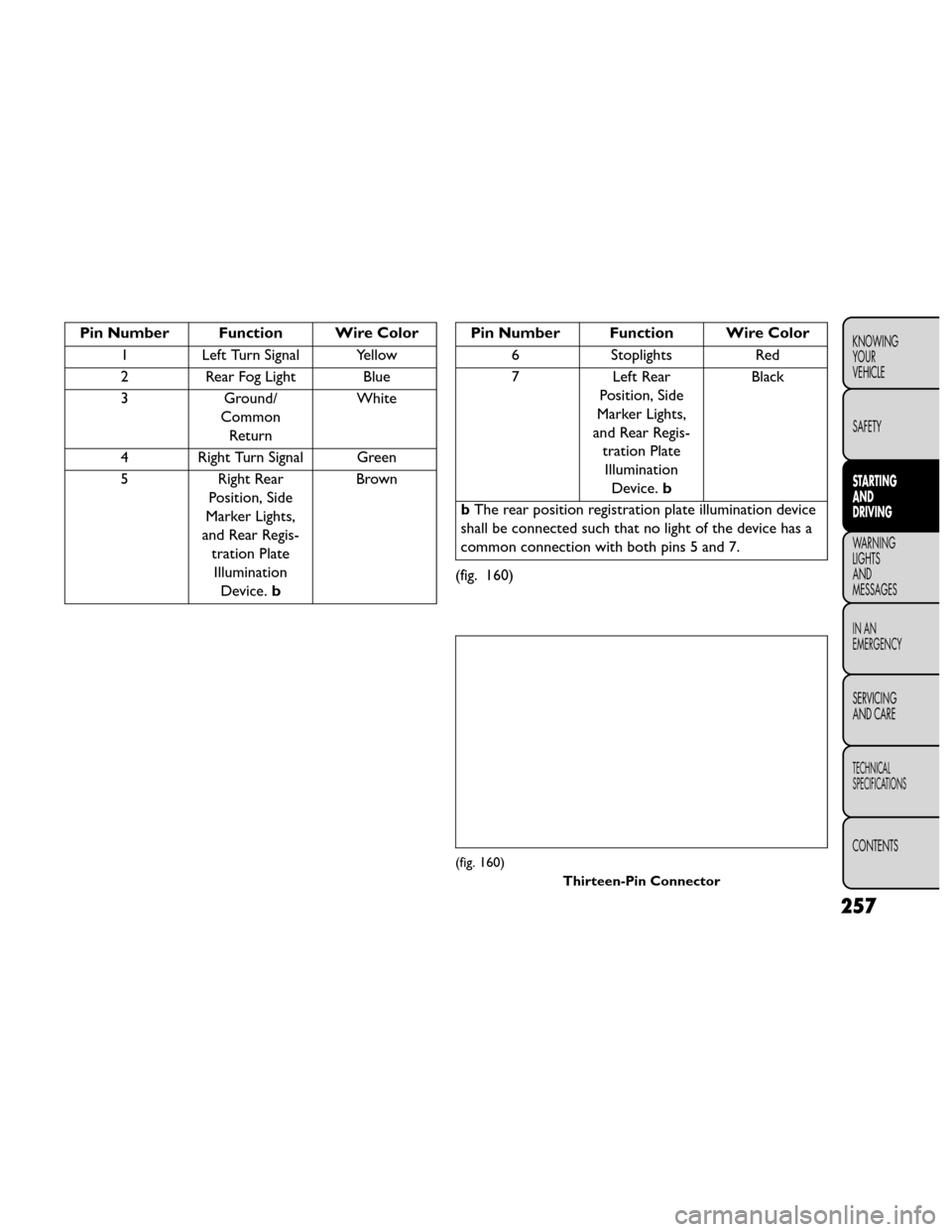
Pin Number Function Wire Color1 Left Turn Signal Yellow
2 Rear Fog Light Blue
3 Ground/
Common Return White
4 Right Turn Signal Green
5 Right Rear
Position, Side
Marker Lights,
and Rear Regis- tration PlateIllumination Device. b BrownPin Number Function Wire Color
6 Stoplights Red
7 Left Rear Position, Side
Marker Lights,
and Rear Regis- tration PlateIllumination Device. b Black
b The rear position registration plate illumination device
shall be connected such that no light of the device has a
common connection with both pins 5 and 7.
(fig. 160)
(fig. 160) Thirteen-Pin Connector
257
KNOWING
YOUR
VEHICLE
SAFETY
STARTING
AND
DRIVING
WARNING
LIGHTS
AND
MESSAGES
IN AN
EMERGENCY
SERVICING
AND CARE
TECHNICAL
SPECIFICATIONS
CONTENTS
Page 264 of 388
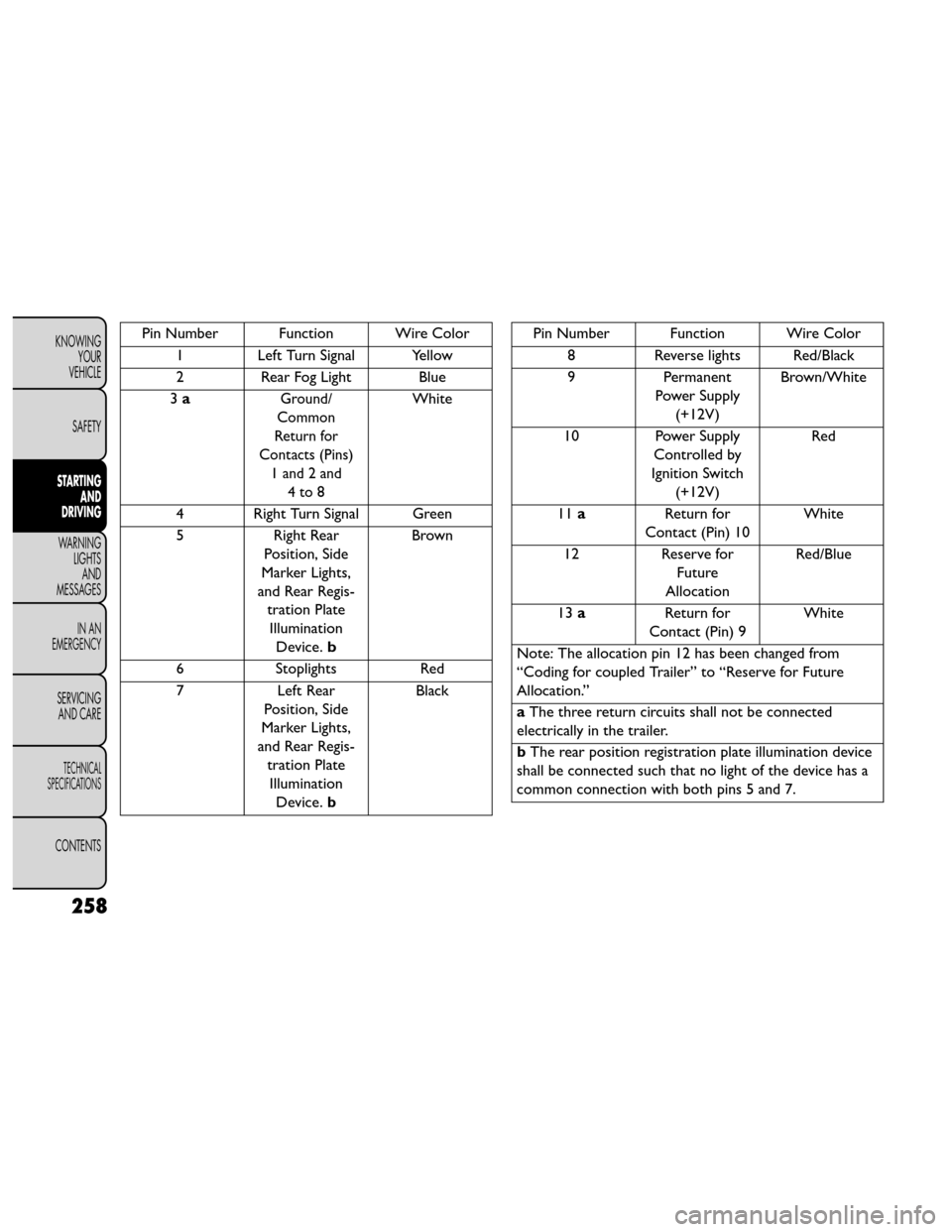
Pin Number Function Wire Color1 Left Turn Signal Yellow
2 Rear Fog Light Blue
3 a
Ground/
Common
Return for
Contacts (Pins) 1 and 2 and 4to8White
4 Right Turn Signal Green
5 Right Rear
Position, Side
Marker Lights,
and Rear Regis- tration PlateIllumination Device. b Brown
6 Stoplights Red
7 Left Rear
Position, Side
Marker Lights,
and Rear Regis- tration PlateIllumination Device. b Black
Pin Number Function Wire Color
8 Reverse lights Red/Black
9 Permanent
Power Supply (+12V) Brown/White
10 Power Supply Controlled by
Ignition Switch (+12V) Red
11 a Return for
Contact (Pin) 10 White
12 Reserve for
Future
Allocation Red/Blue
13 a Return for
Contact (Pin) 9 White
Note: The allocation pin 12 has been changed from
“Coding for coupled Trailer” to “Reserve for Future
Allocation.”
a The three return circuits shall not be connected
electrically in the trailer.
b The rear position registration plate illumination device
shall be connected such that no light of the device has a
common connection with both pins 5 and 7.
258
KNOWING YOUR
VEHICLE
SAFETY
STARTING AND
DRIVING
WARNING LIGHTSAND
MESSAGES
IN AN
EMERGENCY
SERVICING AND CARE
TECHNICAL
SPECIFICATIONS
CONTENTS
Page 305 of 388
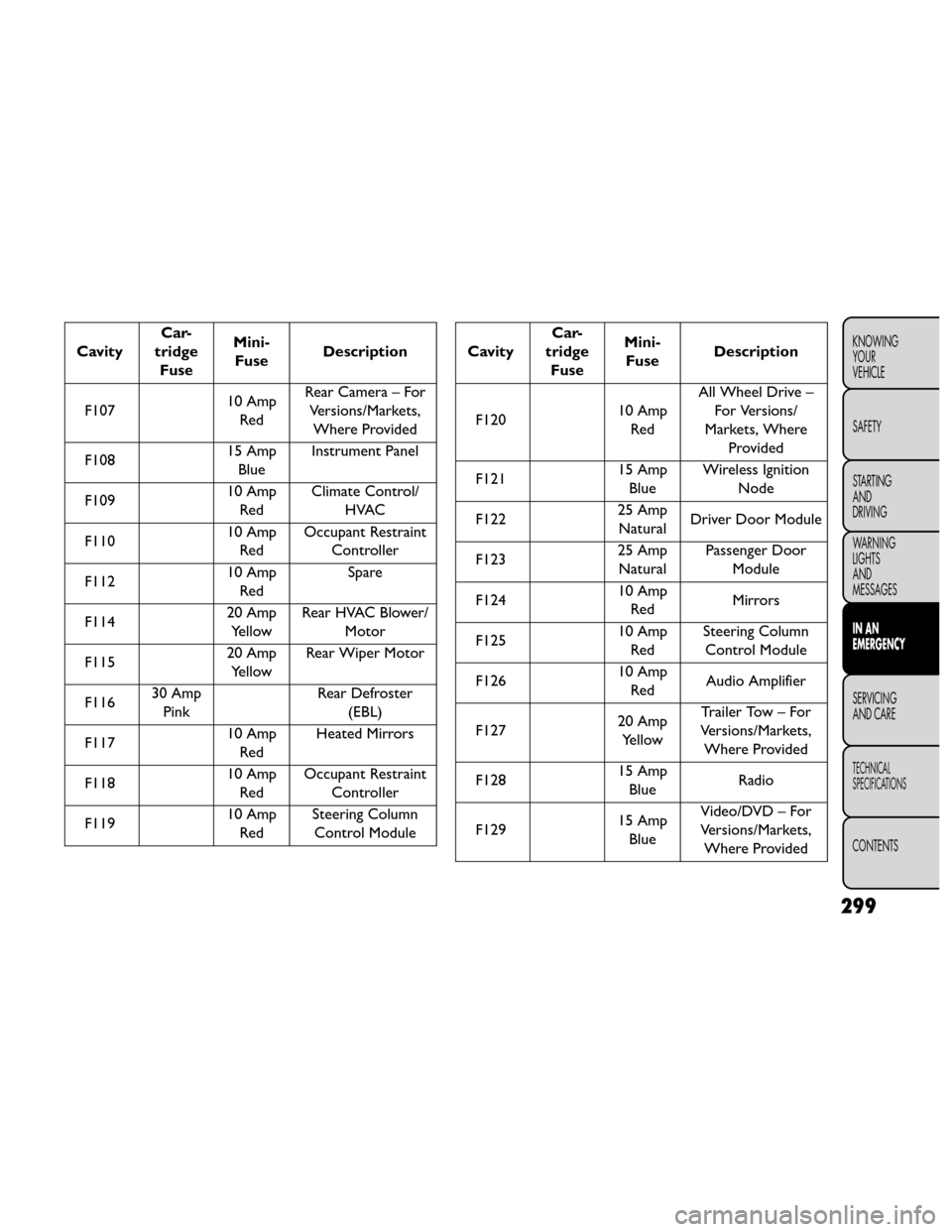
CavityCar-
tridge Fuse Mini-
Fuse Description
F107 10 Amp
Red Rear Camera – For
Versions/Markets,Where Provided
F108 15 Amp
Blue Instrument Panel
F109 10 Amp
Red Climate Control/
HVAC
F110 10 Amp
Red Occupant Restraint
Controller
F112 10 Amp
Red Spare
F114 20 Amp
Yellow Rear HVAC Blower/
Motor
F115 20 Amp
Yellow Rear Wiper Motor
F116 30 Amp
Pink Rear Defroster
(EBL)
F117 10 Amp
Red Heated Mirrors
F118 10 Amp
Red Occupant Restraint
Controller
F119 10 Amp
Red Steering Column
Control ModuleCavity Car-
tridge Fuse Mini-
Fuse Description
F120 10 Amp
Red All Wheel Drive –
For Versions/
Markets, Where Provided
F121 15 Amp
Blue Wireless Ignition
Node
F122 25 Amp
Natural Driver Door Module
F123 25 Amp
Natural Passenger Door
Module
F124 10 Amp
Red Mirrors
F125 10 Amp
Red Steering Column
Control Module
F126 10 Amp
Red Audio Amplifier
F127 20 Amp
Yellow Trailer Tow – For
Versions/Markets, Where Provided
F128 15 Amp
Blue Radio
F129 15 Amp
Blue Video/DVD – For
Versions/Markets, Where Provided
299
KNOWING
YOUR
VEHICLE
SAFETY
STARTING
AND
DRIVING
WARNING
LIGHTS
AND
MESSAGES
IN AN
EMERGENCY
SERVICING
AND CARE
TECHNICAL
SPECIFICATIONS
CONTENTS
Page 306 of 388
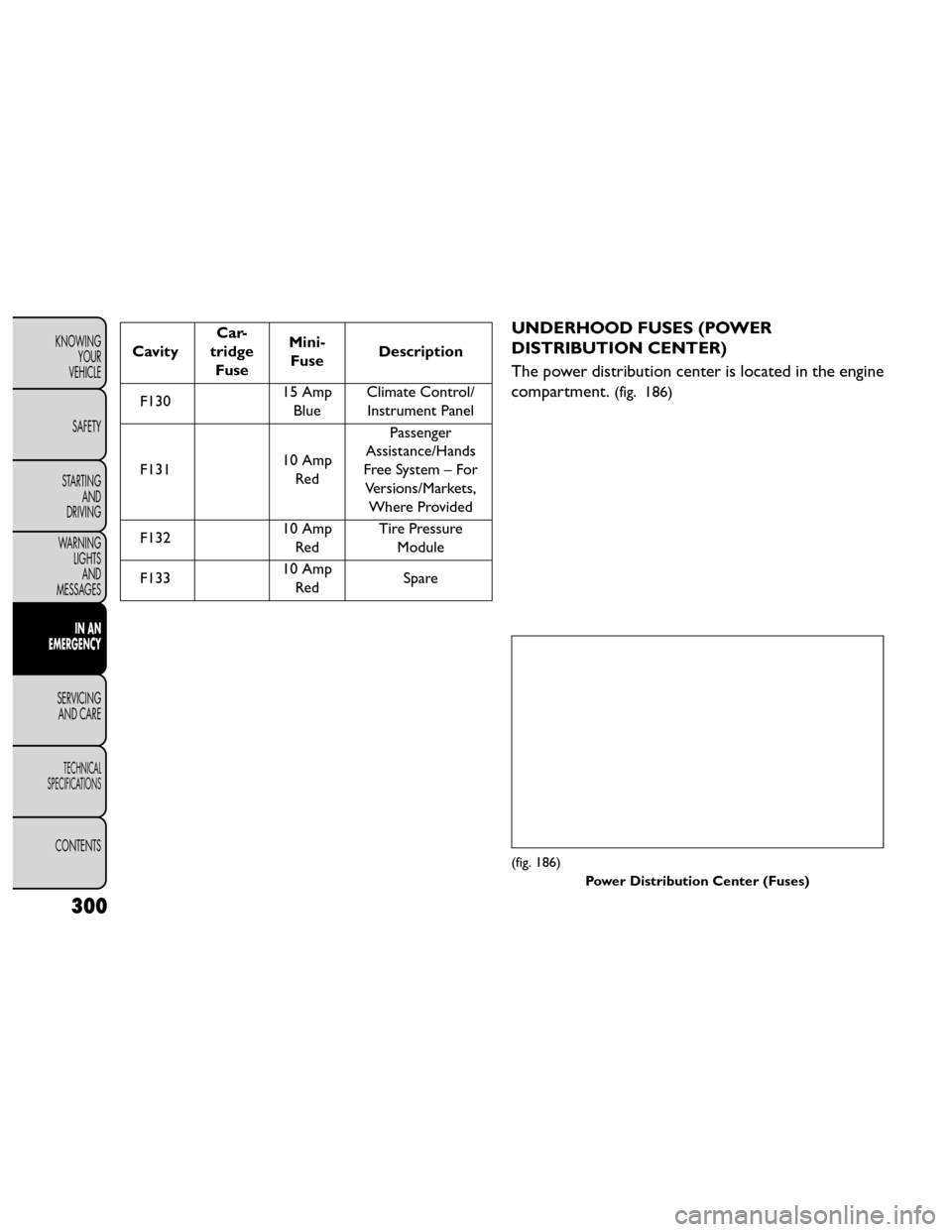
CavityCar-
tridge Fuse Mini-
Fuse Description
F130 15 Amp
Blue Climate Control/
Instrument Panel
F131 10 Amp
Red Passenger
Assistance/Hands
Free System – For Versions/Markets, Where Provided
F132 10 Amp
Red Tire Pressure
Module
F133 10 Amp
Red Spare
UNDERHOOD FUSES (POWER
DISTRIBUTION CENTER)
The power distribution center is located in the engine
compartment.
(fig. 186)
(fig. 186)
Power Distribution Center (Fuses)
300
KNOWINGYOUR
VEHICLE
SAFETY
STARTING AND
DRIVING
WARNING LIGHTSAND
MESSAGES
IN AN
EMERGENCY
SERVICING AND CARE
TECHNICAL
SPECIFICATIONS
CONTENTS