door lock FIAT FREEMONT 2015 1.G User Guide
[x] Cancel search | Manufacturer: FIAT, Model Year: 2015, Model line: FREEMONT, Model: FIAT FREEMONT 2015 1.GPages: 412, PDF Size: 3.37 MB
Page 41 of 412
• Illuminated Approach (for versions/markets,
where provided)
Press the Illuminated Approach button on the touch-
screen to change this display. When this feature is
selected, the headlights will activate and remain on for
0, 30, 60, or 90 seconds when the doors are unlocked
with the RKE transmitter. To change the Illuminated
Approach status press the 0, 30, 60 or 90 button on the
touchscreen followed by pressing the arrow back but-
ton on the touchscreen.
• Headlights with Wipers (for versions/markets,
where provided)
Press the Headlights with Wipers button on the touch-
screen to change this display. When this feature is
selected, and the headlight switch is in the AUTO
position, the headlights will turn on approximately 10
seconds after the wipers are turned on. The headlights
will also turn off when the wipers are turned off if they
were turned on by this feature. To make your selection,
press the Headlights with Wipers button on the touch-
screen, select On or Off followed by pressing the
arrow back button on the touchscreen.• Auto High Beams “SmartBeam™” (for versions/
markets, where provided)
Press the Auto High Beams button on the touchscreen
to change this display. When this feature is selected,
the high beam headlights will deactivate automatically
under certain conditions. To make your selection,
press the Auto High Beams button on the touchscreen,
select ON or OFF followed by pressing the arrow back
button on the touchscreen. Refer to “Lights/
SmartBeam™ (for versions/markets, where provided)”
in “Knowing Your Vehicle” for further information.
• Flash Headlights with Lock (for versions/
markets, where provided)
Press the Flash Headlights with Lock button on the
touchscreen to change this display. When this feature is
selected, the front and rear turn signals will flash when
the doors are locked or unlocked with the RKE trans-
mitter. To make your selection, press the Flash Head-
lights with Lock button on the touchscreen, select On
or Off followed by pressing the arrow back button on
the touchscreen.
35
KNOWING
YOUR
VEHICLE
SAFETY
STAR
TING
AND
DRIVING
WARNING
LIGHTS
AND
MESSAGES
IN AN
EMERGENCY
SERVICING
AND CARE
TECHNICAL
SPECIFICATIONS
CONTENTS
Page 42 of 412
Doors & Locks
• Auto Lock (for versions/markets, where pro-
vided)
When this feature is selected, all doors will lock auto-
matically when the vehicle reaches a speed of 24 km/h.
To make your selection, press the Auto Lock button on
the touchscreen, until a check-mark appears next to
setting, indicating that the setting has been selected.
Press the back arrow button on the touchscreen to
return to the previous menu.
• Auto Unlock on Exit (for versions/markets,
where provided)
Press the Auto Unlock on Exit button on the touch-
screen to change this display. When this feature is
selected, all doors will unlock when the vehicle is
stopped and the transmission is in the PARK or NEU-
TRAL position and the driver's door is opened. To
make your selection, press the Auto Unlock on Exit
button on the touchscreen, select On or Off followed
by pressing the arrow back button on the touchscreen.
• Flash Lights with Lock (for versions/markets,
where provided)
Press the Flash Lights with Lock button on the touch-
screen to change this display. When this feature is
selected, the front and rear turn signals will flash when
the doors are locked or unlocked with the RKE trans-
mitter. To make your selection, press the Flash Lightswith Lock button on the touchscreen, select On or Off
followed by pressing the arrow back button on the
touchscreen.
• Remote Door Unlock Order (for versions/
markets, where provided)
Press the Remote Door Unlock Order button on the
touchscreen to change this display. When
Unlock
Driver Door Only On 1st Press is selected, only the
driver's door will unlock on the first press of the RKE
transmitter UNLOCK button. When Driver Door 1st
Press is selected, you must press the RKE transmitter
UNLOCK button twice to unlock the passenger's
doors. When Unlock All Doors On 1st Press is
selected, all of the doors will unlock on the first press
of the RKE transmitter UNLOCK button.
NOTE: If the vehicle is equipped with Keyless Enter-
N-Go™ (Passive Entry) and the EVIC is programmed
to Unlock All Doors 1st Press, all doors will unlock no
matter which Passive Entry equipped door handle is
grasped. If Driver Door 1st Press is programmed, only
the driver’s door will unlock when the driver’s door is
grasped. With Passive Entry, if Driver Door 1st Press is
programmed pressing the handle more than once will
only result in the driver’s door opening. If driver door
first is selected, once the driver door is opened, the
interior door lock/unlock switch can be used to unlock
all doors (or use RKE transmitter).
36
KNOWING YOUR
VEHICLE
SAFETY
STAR
TINGAND
DRIVING
WARNING LIGHTSAND
MESSAGES
IN AN
EMERGENCY
SERVICINGAND CARE
TECHNICAL
SPECIFICATIONS
CONTENTS
Page 43 of 412
• Passive Entry (Keyless Enter-N-Go™) (for
versions/markets, where provided)
Press the Passive Entry button on the touchscreen to
change this display. This feature allows you to lock and
unlock the vehicle’s door(s) without having to press the
RKE transmitter lock or unlock buttons. To make your
selection, press the Passive Entry button on the touch-
screen, select ON or OFF followed by pressing the
arrow back button on the touchscreen. Refer to “Key-
less Enter-N-Go™” in “Knowing Your Vehicle”.
Heated Seats (for versions/markets, where
provided)
• Auto Heated Seats (for versions/markets, where
provided)
Press the Auto Heated Seats button on the touch-
screen to change this display. When this feature is
selected the driver's heated seat will automatically turn
on when temperatures are below 4.4° C. To make your
selection, press the Auto Heated Seats button on the
touchscreen, select On or Off followed by pressing the
arrow back button on the touchscreen.Engine Off Options
• Headlight Off Delay
Press the Headlight Off Delay button on the touch-
screen to change this display. When this feature is
selected, the driver can choose to have the headlights
remain on for 0, 30, 60, or 90 seconds when exiting the
vehicle. To change the Headlight Off Delay status press
the 0, 30, 60 or 90 button on the touchscreen followed
by pressing the arrow back button on the touchscreen.
• Engine Off Power Delay (for versions/markets,
where provided)
Press the Engine Off Power Delay button on the
touchscreen to change this display. When this feature is
selected, the power window switches, radio,
Uconnect® phone system (for versions/markets,
where provided), DVD video system (for versions/
markets, where provided), power sunroof (for
versions/markets, where provided), and power outlets
will remain active for up to 10 minutes after the ignition
is cycled to OFF. Opening either front vehicle door will
cancel this feature. To change the Engine Off Power
Delay status press the 0 seconds, 45 seconds, 5 min-
utes or 10 minutes button on the touchscreen followed
by pressing the arrow back button on the touchscreen.
37
KNOWING
YOUR
VEHICLE
SAFETY
STAR
TING
AND
DRIVING
WARNING
LIGHTS
AND
MESSAGES
IN AN
EMERGENCY
SERVICING
AND CARE
TECHNICAL
SPECIFICATIONS
CONTENTS
Page 46 of 412
Phone/Bluetooth®
• Paired Devices
This feature shows which phones are paired to the
Phone/Bluetooth® system. For further information,
refer to the Uconnect® Supplement.
CUSTOMER PROGRAMMABLE FEATURES
— Uconnect® 8.4 SETTINGS
In this mode the Uconnect® system allows you to
access programmable features that may be equipped
such as Display, Clock, Safety/Assistance, Lights, Doors
& Locks, Auto-On Comfort, Engine Off Operation,
Compass Settings, Audio and Phone/Bluetooth® set-
tings.
NOTE:Only one touchscreen area may be selected at
a time.
When making a selection, scroll up or down until the
preferred setting is highlighted, then press and release
the preferred setting until a check-mark appears next
to the setting, showing that setting has been selected.
Display
• Display Mode (for versions/markets, where pro-
vided)
When in this display you may select one of the auto
display settings. To change Mode status press and
release the Day, Night or Auto button on the touch- screen followed by pressing the arrow back button on
the touchscreen.
NOTE:
The usage of the Parade Mode feature will
cause the radio to activate the “Display Brightness
With Headlights OFF” control even though the head-
lights are on.
• Display Brightness with Headlights ON (for
versions/markets, where provided)
When in this display you may select display brightness
with the headlights on and the headlights off. Adjust the
brightness with the + and – setting buttons on the
touchscreen or by selecting any point on the scale in
between the + and – buttons on the touchscreen
followed by pressing the arrow back button on the
touchscreen.
• Display Brightness with Headlights OFF (for
versions/markets, where provided)
When in this display you may select display brightness
with the headlights on and the headlights off. Adjust the
brightness with the + and – setting buttons on the
touchscreen or by selecting any point on the scale in
between the + and – buttons on the touchscreen
followed by pressing the arrow back button on the
touchscreen.
40
KNOWING YOUR
VEHICLE
SAFETY
STAR
TINGAND
DRIVING
WARNING LIGHTSAND
MESSAGES
IN AN
EMERGENCY
SERVICINGAND CARE
TECHNICAL
SPECIFICATIONS
CONTENTS
Page 49 of 412
• Hill Start Assist (for versions/markets, where
provided)
When this feature is selected, the Hill Start Assist
(HSA) system is active. Refer to “Electronic Brake
Control System” in “Starting And Driving” for system
function and operating information. To make your
selection, press the Hill Start Assist button on the
touchscreen, select On or Off followed by pressing the
arrow back button on the touchscreen.
Lights
• Headlight Off Delay
When this feature is selected, the driver can choose to
have the headlights remain on for 0, 30, 60, or 90
seconds when exiting the vehicle. To change the Head-
light Off Delay status press the 0, 30, 60 or 90 button
on the touchscreen followed by pressing the arrow
back button on the touchscreen.
• Headlight Illumination on Approach (for
versions/markets, where provided)
When this feature is selected, the headlights will acti-
vate and remain on for 0, 30, 60, or 90 seconds when
the doors are unlocked with the RKE transmitter. To
change the Illuminated Approach status press the 0, 30,
60 or 90 button on the touchscreen followed by
pressing the arrow back button on the touchscreen.• Headlights with Wipers (for versions/markets,
where provided)
When this feature is selected, and the headlight switch
is in the AUTO position, the headlights will turn on
approximately 10 seconds after the wipers are turned
on. The headlights will also turn off when the wipers
are turned off if they were turned on by this feature. To
make your selection, press the Headlights with Wipers
button on the touchscreen, select On or Off followed
by pressing the arrow back button on the touchscreen.
• Auto Dim High Beams “SmartBeam™” (for
versions/markets, where provided)
When this feature is selected, the high beam headlights
will deactivate automatically under certain conditions.
To make your selection, press the Auto High Beams
button on the touchscreen, select ON or OFF fol-
lowed by pressing the arrow back button on the touch-
screen. Refer to “Lights/SmartBeam™ (for versions/
markets, where provided)” in “Knowing Your Vehicle”
for further information.
• Headlight Dipped Beam (Traffic Changeover)
(for versions/markets, where provided)
Low beam headlights have more control of upward
light and direct most of their light downward and either
to the left for right hand drive countries or to the right
for left hand drive countries to provide safe forward
visibility without excessive glare.
43
KNOWING
YOUR
VEHICLE
SAFETY
STAR
TING
AND
DRIVING
WARNING
LIGHTS
AND
MESSAGES
IN AN
EMERGENCY
SERVICING
AND CARE
TECHNICAL
SPECIFICATIONS
CONTENTS
Page 50 of 412
• Flash Headlights With Lock (for versions/
markets, where provided)
When this feature is selected, the front and rear turn
signals will flash when the doors are locked or unlocked
with the RKE transmitter. To make your selection,
press the Flash Headlights with Lock button on the
touchscreen, select On or Off followed by pressing the
arrow back button on the touchscreen.
Doors & Locks
• Auto Lock (for versions/markets, where pro-
vided)
When this feature is selected, all doors will lock auto-
matically when the vehicle reaches a speed of 24 km/h.
To make your selection, press the “Auto Lock” button
on the touchscreen, until a check-mark appears next to
setting, indicating that the setting has been selected.
Press the back arrow button on the touchscreen to
return to the previous menu.
• Auto Unlock on Exit (for versions/markets,
where provided)
When this feature is selected, all doors will unlock
when the vehicle is stopped and the transmission is in
the PARK (for versions/markets, where provided) or
NEUTRAL position and the driver's door is opened. To
make your selection, press the Auto Unlock on Exit
button on the touchscreen, select On or Off followed
by pressing the arrow back button on the touchscreen.• Flash Headlight with Lock (for versions/markets,
where provided)
When this feature is selected, the front and rear turn
signals will flash when the doors are locked or unlocked
with the RKE transmitter. To make your selection,
press the Flash Lights with Lock button on the touch-
screen, select On or Off followed by pressing the
arrow back button on the touchscreen.
• 1st Press of Key Fob Unlocks (for versions/
markets, where provided)
When
Unlock Driver Door Only On 1st Press is
selected, only the driver's door will unlock on the first
press of the RKE transmitter UNLOCK button. When
Driver Door 1st Press is selected, you must press the
RKE transmitter UNLOCK button twice to unlock the
passenger's doors. When Unlock All Doors On 1st
Press is selected, all of the doors will unlock on the
first press of the RKE transmitter UNLOCK button.
44
KNOWING YOUR
VEHICLE
SAFETY
STAR
TINGAND
DRIVING
WARNING LIGHTSAND
MESSAGES
IN AN
EMERGENCY
SERVICINGAND CARE
TECHNICAL
SPECIFICATIONS
CONTENTS
Page 51 of 412
NOTE:If the vehicle is equipped with Keyless Enter-
N-Go™ (Passive Entry) and the EVIC is programmed
to Unlock All Doors 1st Press, all doors will unlock no
matter which Passive Entry equipped door handle is
grasped. If Driver Door 1st Press is programmed, only
the driver’s door will unlock when the driver’s door is
grasped. With Passive Entry, if Driver Door 1st Press is
programmed pressing the handle more than once will
only result in the driver’s door opening. If driver door
first is selected, once the driver door is opened, the
interior door lock/unlock switch can be used to unlock
all doors (or use RKE transmitter).
• Passive Entry (for versions/markets, where pro-
vided)
This feature allows you to lock and unlock the vehicle’s
door(s) without having to press the RKE transmitter
lock or unlock buttons. To make your selection, press
the Passive Entry button on the touchscreen, select
ON or OFF followed by pressing the arrow back
button on the touchscreen. Refer to “Keyless Enter-N-
Go™” in “Knowing Your Vehicle”. Engine Off Options
• Engine Off Power Delay
When this feature is selected, the power window
switches, radio, Uconnect® phone system (for
versions/markets, where provided), DVD video system
(for versions/markets, where provided), power sunroof
(for versions/markets, where provided), and power
outlets will remain active for up to 10 minutes after the
ignition is cycled OFF. Opening either front vehicle
door will cancel this feature. To change the Engine Off
Power Delay status press the 0 seconds, 45 seconds, 5
minutes or 10 minutes button on the touchscreen
followed by pressing the arrow back button on the
touchscreen.
• Headlight Off Delay (for versions/markets,
where provided)
When this feature is selected, the driver can choose to
have the headlights remain on for 0, 30, 60, or 90
seconds when exiting the vehicle. To change the Head-
light Off Delay status press the 0, 30, 60 or 90 button
on the touchscreen followed by pressing the arrow
back button on the touchscreen.
45
KNOWING
YOUR
VEHICLE
SAFETY
STAR
TING
AND
DRIVING
WARNING
LIGHTS
AND
MESSAGES
IN AN
EMERGENCY
SERVICING
AND CARE
TECHNICAL
SPECIFICATIONS
CONTENTS
Page 102 of 412
INTERIOR LIGHTS
The interior lights come on when a door is opened.
To protect the battery, the interior lights will turn off
automatically 10 minutes after the ignition switch is
moved to the LOCK position. This will occur if the
interior lights were switched on manually or are on
because a door is open. This includes the glove box
light, but not the trunk light. To restore interior light
operation, either turn the ignition switch ON or cycle
the light switch.
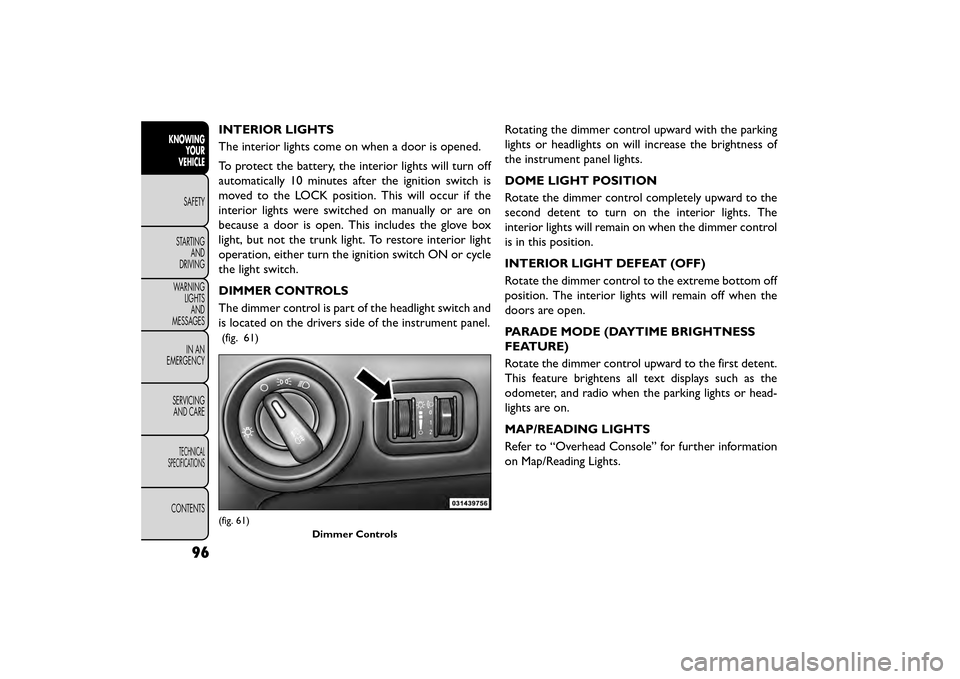
DIMMER CONTROLS
The dimmer control is part of the headlight switch and
is located on the drivers side of the instrument panel.
(fig. 61)
Rotating the dimmer control upward with the parking
lights or headlights on will increase the brightness of
the instrument panel lights.
DOME LIGHT POSITION
Rotate the dimmer control completely upward to the
second detent to turn on the interior lights. The
interior lights will remain on when the dimmer control
is in this position.
INTERIOR LIGHT DEFEAT (OFF)
Rotate the dimmer control to the extreme bottom off
position. The interior lights will remain off when the
doors are open.
PARADE MODE (DAYTIME BRIGHTNESS
FEATURE)
Rotate the dimmer control upward to the first detent.
This feature brightens all text displays such as the
odometer, and radio when the parking lights or head-
lights are on.
MAP/READING LIGHTS
Refer to “Overhead Console” for further information
on Map/Reading Lights.
(fig. 61)Dimmer Controls
96
KNOWINGYOUR
VEHICLE
SAFETY
STAR
TINGAND
DRIVING
WARNING LIGHTSAND
MESSAGES
IN AN
EMERGENCY
SERVICINGAND CARE
TECHNICAL
SPECIFICATIONS
CONTENTS
Page 103 of 412
ILLUMINATED ENTRY
The courtesy lights will turn on when you use the
Remote Keyless Entry (RKE) transmitter to unlock the
doors or open any door or liftgate.
This feature also turns on the approach lighting in the
outside mirrors (for versions/markets, where pro-
vided). Refer to “Mirrors” in “Knowing Your Vehicle”
for further information.
The interior lights will fade to off after approximately
30 seconds or they will immediately fade to off once
the ignition is cycled to the ON/RUN position from the
OFF position.
NOTE:
• The front courtesy overhead console and door cour-tesy lights will turn on if the dimmer control is in the
"Dome ON" position (extreme top position).
• The Illuminated Entry system will not operate if the dimmer control is in the “Dome defeat” position
(extreme bottom position).
WINDSHIELD WIPERS AND
WASHERS
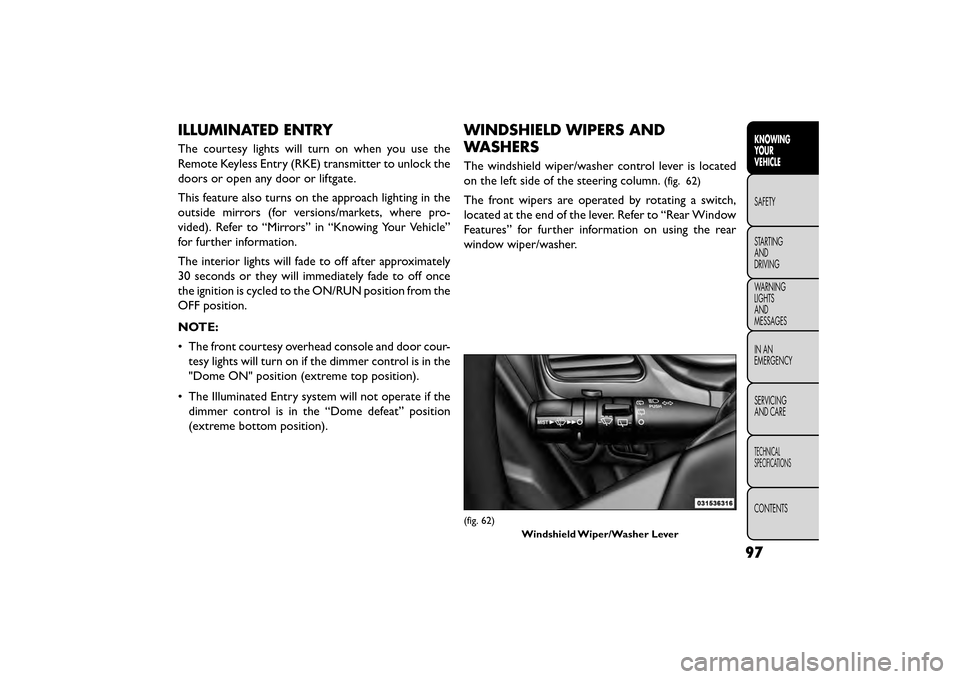
The windshield wiper/washer control lever is located
on the left side of the steering column.
(fig. 62)
The front wipers are operated by rotating a switch,
located at the end of the lever. Refer to “Rear Window
Features” for further information on using the rear
window wiper/washer.
(fig. 62)
Windshield Wiper/Washer Lever
97
KNOWING
YOUR
VEHICLE
SAFETY
STAR
TING
AND
DRIVING
WARNING
LIGHTS
AND
MESSAGES
IN AN
EMERGENCY
SERVICING
AND CARE
TECHNICAL
SPECIFICATIONS
CONTENTS
Page 112 of 412
COURTESY/READING LIGHTS
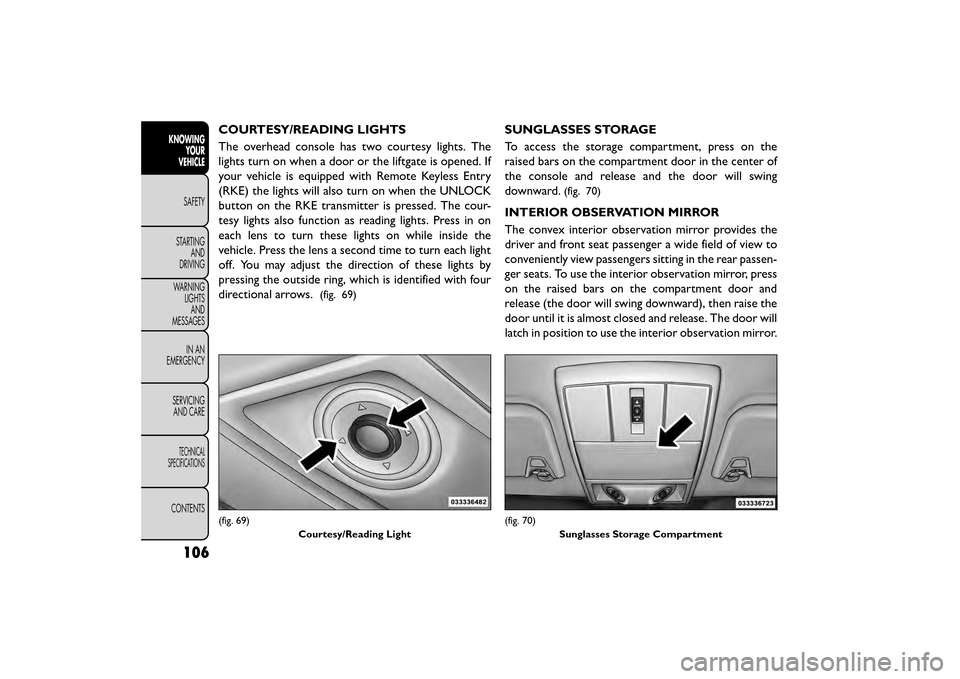
The overhead console has two courtesy lights. The
lights turn on when a door or the liftgate is opened. If
your vehicle is equipped with Remote Keyless Entry
(RKE) the lights will also turn on when the UNLOCK
button on the RKE transmitter is pressed. The cour-
tesy lights also function as reading lights. Press in on
each lens to turn these lights on while inside the
vehicle. Press the lens a second time to turn each light
off. You may adjust the direction of these lights by
pressing the outside ring, which is identified with four
directional arrows.
(fig. 69)
SUNGLASSES STORAGE
To access the storage compartment, press on the
raised bars on the compartment door in the center of
the console and release and the door will swing
downward.
(fig. 70)
INTERIOR OBSERVATION MIRROR
The convex interior observation mirror provides the
driver and front seat passenger a wide field of view to
conveniently view passengers sitting in the rear passen-
ger seats. To use the interior observation mirror, press
on the raised bars on the compartment door and
release (the door will swing downward), then raise the
door until it is almost closed and release. The door will
latch in position to use the interior observation mirror.
(fig. 69)Courtesy/Reading Light(fig. 70)Sunglasses Storage Compartment
106
KNOWINGYOUR
VEHICLE
SAFETY
STAR
TINGAND
DRIVING
WARNING LIGHTSAND
MESSAGES
IN AN
EMERGENCY
SERVICINGAND CARE
TECHNICAL
SPECIFICATIONS
CONTENTS