fuel FIAT FREEMONT 2015 1.G User Guide
[x] Cancel search | Manufacturer: FIAT, Model Year: 2015, Model line: FREEMONT, Model: FIAT FREEMONT 2015 1.GPages: 412, PDF Size: 3.37 MB
Page 159 of 412
NOTE:
• The TPMS is not intended to replace normal tire careand maintenance, or to provide warning of a tire
failure or condition.
• The TPMS should not be used as a tire pressure gauge while adjusting your tire pressure.
• Driving on a significantly under-inflated tire causes the tire to overheat and can lead to tire failure.
Under-inflation also reduces fuel efficiency and tire
tread life, and may affect the vehicle’s handling and
stopping ability.
• The TPMS is not a substitute for proper tire mainte- nance, and it is the driver’s responsibility to maintain
correct tire pressure using an accurate tire pressure
gauge, even if under-inflation has not reached the
level to trigger illumination of the Tire Pressure
Monitoring Telltale Light.
• Seasonal temperature changes will affect tire pres- sure, and the TPMS will monitor the actual tire
pressure in the tire. BASE SYSTEM
The Tire Pressure Monitor System (TPMS) uses wire-
less technology with wheel rim mounted electronic
sensors to monitor tire pressure levels. Sensors,
mounted to each wheel as part of the valve stem,
transmit tire pressure readings to the receiver module.
NOTE:
It is particularly important for you to check
the tire pressure in all of the tires on your vehicle
monthly and to maintain the proper pressure.
The TPMS consists of the following components:
• Receiver Module
• Four Tire Pressure Monitoring Sensors
• Tire Pressure Monitoring Telltale Light
Tire Pressure Monitoring Low Pressure
Warnings
The Tire Pressure Monitoring Telltale Light will
illuminate in the instrument cluster and a chime
will sound when tire pressure is low in one or more of
the four active road tires. Should this occur, you should
stop as soon as possible, check the inflation pressure of
each tire on your vehicle, and inflate each tire to the
vehicle’s recommended cold placard pressure value.
153
KNOWING
YOUR
VEHICLE
SAFETY
STAR
TING
AND
DRIVING
WARNING
LIGHTS
AND
MESSAGES
IN AN
EMERGENCY
SERVICING
AND CARE
TECHNICAL
SPECIFICATIONS
CONTENTS
Page 196 of 412
RADIO OPERATION AND MOBILE
PHONES
Under certain conditions, the mobile phone being on in
your vehicle can cause erratic or noisy performance
from your radio. This condition may be lessened or
eliminated by relocating the mobile phone antenna.
This condition is not harmful to the radio. If your radio
performance does not satisfactorily “clear” by the
repositioning of the antenna, it is recommended that
the radio volume be turned down or off during mobile
phone operation.
ADDING FUEL
FUEL FILLER CAP (GAS CAP)
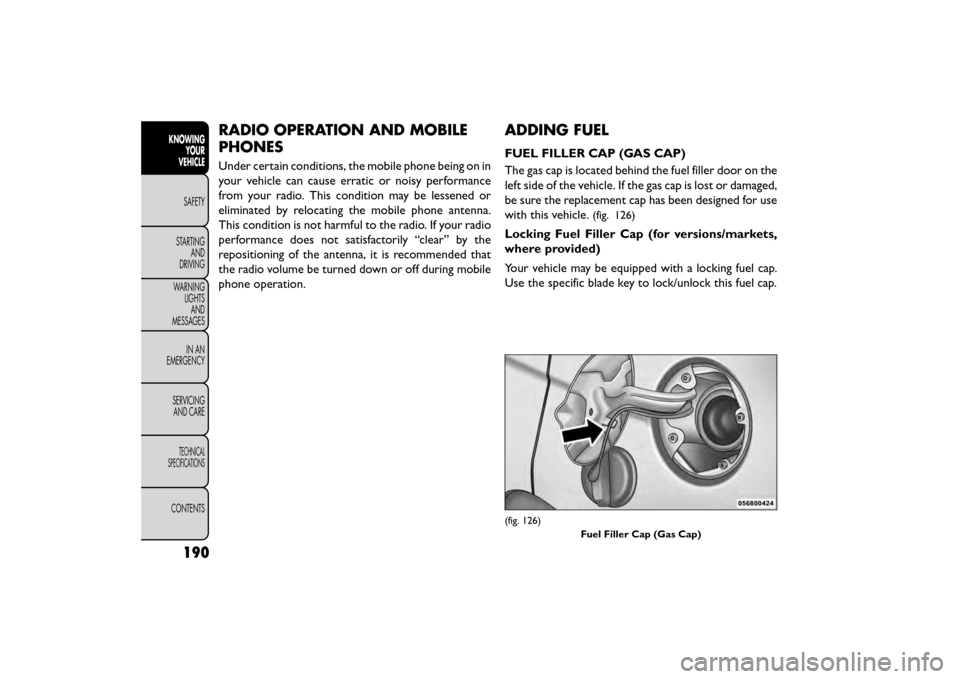
The gas cap is located behind the fuel filler door on the
left side of the vehicle. If the gas cap is lost or damaged,
be sure the replacement cap has been designed for use
with this vehicle.
(fig. 126)
Locking Fuel Filler Cap (for versions/markets,
where provided)
Your vehicle may be equipped with a locking fuel cap.
Use the specific blade key to lock/unlock this fuel cap.
(fig. 126)Fuel Filler Cap (Gas Cap)
190
KNOWINGYOUR
VEHICLE
SAFETY
STAR
TINGAND
DRIVING
WARNING LIGHTSAND
MESSAGES
IN AN
EMERGENCY
SERVICINGAND CARE
TECHNICAL
SPECIFICATIONS
CONTENTS
Page 197 of 412
NOTE:When removing the fuel filler cap, lay the cap
tether in the hook, located on the fuel filler door
reinforcement.
•Damage to the fuel system or emissions
control system could result from using an
improper fuel tank filler tube cap.
• A poorly fitting fuel filler cap could let impuri-
ties into the fuel system.
• A poorly fitting fuel filler cap may cause the
“Malfunction Indicator Light (MIL)” to turn on.
• To avoid fuel spillage and overfilling, do not “top
off ” the fuel tank after filling. When the fuel
nozzle “clicks” or shuts off, the fuel tank is full.
WARNING!
• Never have any smoking materials lit
in or
near the vehicle when the gas cap is
removed or the tank is being filled.
• Never add fuel to the vehicle when the engine is
running.
• A fire may result if gasoline is pumped into a
portable container that is inside of a vehicle.You
could be burned. Always place gas containers on
the ground while filling.
• Failure to follow this warning may result in
serious injury or death. NOTE:
• When the fuel nozzle “clicks” or shuts off, the fuel
tank is full.
• Tighten the gas cap until you hear a “clicking” sound. This is an indication that the gas cap is tightened
properly. The MIL in the instrument cluster may turn
on if the gas cap is not secured properly. Make sure
that the gas cap is tightened each time the vehicle is
refueled.
LOOSE FUEL FILLER CAP MESSAGE (for
versions/markets, where provided)
If the vehicle diagnostic system determines that the
fuel filler cap is loose, improperly installed, or damaged,
a “Check Gascap” message will display in the Electronic
Vehicle Information Center (EVIC). If this occurs,
tighten the fuel filler cap properly and press the TRIP
ODOMETER button to turn off the message. If the
problem continues, the message will appear the next
time the vehicle is started.
191
KNOWING
YOUR
VEHICLE
SAFETY
STAR
TING
AND
DRIVING
WARNING
LIGHTS
AND
MESSAGES
IN AN
EMERGENCY
SERVICING
AND CARE
TECHNICAL
SPECIFICATIONS
CONTENTS
Page 218 of 412
Do not drive your vehicle after the air bags have
deployed. If you are involved in another collision, the
air bags will not be in place to protect you.
WARNING!
Deployed air bags and seat belt preten-
sion er
s cannot protect you in another
collision. Have the air bags, seat belt pretension-
ers, and the seat belt retractor assemblies re-
placed by an authorized dealer immediately.
Also, have the Occupant Restraint Controller Sys-
tem serviced as well.
NOTE:
• Air bag covers may not be obvious in the interior trim, but they will open during air bag deployment.
• After any collision, the vehicle should be taken to an authorized dealer immediately. ENHANCED ACCIDENT RESPONSE
SYSTEM
In the event of an impact, if the communication net-
work remains intact, and the power remains intact,
depending on the nature of the event, the ORC will
determine whether to have the Enhanced Accident
Response System perform the following functions:
• Cut off fuel to the engine.
• Flash hazard lights as long as the battery has power
or until the ignition switch is turned to the “OFF”
position.
• Turn on the interior lights, which remain on as long as the battery has power or until the ignition switch
is turned to the “OFF” position.
• Unlock the doors automatically.
SYSTEM RESET PROCEDURE
In order to reset the Enhanced Accident Response
System functions after an event, the ignition switch
must be changed from ignition START or ON/RUN to
ignition OFF.
212
KNOWING YOUR
VEHICLE
SAFETY
STARTING AND
DRIVING
WARNING LIGHTSAND
MESSAGES
IN
AN
EMERGENCY
SERVICINGAND CARE
TECHNICAL
SPECIFICATIONS
CONTENTS
Page 242 of 412
WARNING! (Continued)
• If required, mounting posts must be properly
installed, if not equipped from the factory. Fail-
ure to properly follow floor mat installation or
mounting can cause interference with the brake
pedal and accelerator pedal operation causing
loss of control of the vehicle.
Periodic Safety Checks You Should Make
Outside The Vehicle
Tires
Examine tires for excessive tread wear and uneven
wear patterns. Check for stones, nails, glass, or other
objects lodged in the tread or sidewall. Inspect the
tread for cuts and cracks. Inspect sidewalls for cuts,
cracks and bulges. Check the wheel nuts for tightness.
Check the tires (including spare) for proper cold infla-
tion pressure. Lights
Have someone observe the operation of brake lights
and exterior lights while you work the controls. Check
turn signal and high beam indicator lights on the instru-
ment panel.
Door Latches
Check for positive closing, latching, and locking.
Fluid Leaks
Check area under vehicle after overnight parking for
fuel, engine coolant, oil, or other fluid leaks. Also, if
gasoline fumes are detected or if fuel, power steering
fluid (for versions/markets, where provided), or brake
fluid leaks are suspected, the cause should be located
and corrected immediately.
236
KNOWING
YOUR
VEHICLE
SAFETY
STARTING AND
DRIVING
WARNING LIGHTSAND
MESSAGES
IN
AN
EMERGENCY
SERVICINGAND CARE
TECHNICAL
SPECIFICATIONS
CONTENTS
Page 245 of 412
NOTE:If the ignition switch is left in the ACC or RUN
(engine not running) position and the transmission is in
PARK, the system will automatically time out after 30
minutes of inactivity and the ignition will switch to the
OFF position.
ENGINE START/STOP Button Functions –
With Driver’s Foot OFF The Brake Pedal (In
PARK Or NEUTRAL Position)
The ENGINE START/STOP button operates similar to
an ignition switch. It has four positions, OFF, ACC,
RUN and START. To change the ignition switch posi-
tions without starting the vehicle and use the accesso-
ries follow these steps.
• Starting with the ignition switch in the OFF position:
• Press the ENGINE START/STOP button once to change the ignition switch to the ACC position,
• Press the ENGINE START/STOP button a second time to change the ignition switch to the RUN
position,
• Press the ENGINE START/STOP button a third time to return the ignition switch to the OFF position. EXTREME COLD WEATHER
(BELOW −29°C)
To ensure reliable starting at these temperatures, use
of an externally powered electric engine block heater is
recommended.
IF ENGINE FAILS TO START
WARNING!
• Never pour fuel or other flammable
li qui
ds into the throttle body air inlet
opening in an attempt to start the vehicle. This
could result in a flash fire causing serious per-
sonal injury.
• Do not attempt to push or tow your vehicle to
get it started. Unburned fuel could enter the
catalytic converter and once the engine has
started, ignite and damage the converter and
vehicle. If the vehicle has a discharged battery,
booster cables may be used to obtain a start from
a booster battery or the battery in another ve-
hicle.This type of start can be dangerous if done
improperly. Refer to “Jump Starting” in “In An
Emergency” for further information.
239
KNOWING
YOUR
VEHICLE
SAFETY
STARTING
AND
DRIVING
WARNING
LIGHTS
AND
MESSAGES
IN AN
EMERGENC
Y
SERVICING
AND CARE
TECHNICAL
SPECIFICATIONS
CONTENTS
Page 246 of 412
Clearing A Flooded Engine (Using ENGINE
START/STOP Button)
If the engine fails to start after you have followed the
“Normal Starting” or “Extreme Cold Weather" proce-
dures, it may be flooded. To clear any excess fuel:
1. Press and hold the brake pedal.
2. Press the accelerator pedal all the way to the floorand hold it.
3. Push and release the ENGINE START/STOP button once.
The starter motor will engage automatically, run for 10
seconds, and then disengage. Once this occurs, release
the accelerator pedal and the brake pedal, wait 10 to 15
seconds, then repeat the “Normal Starting” proce-
dure.
AFTER STARTING
The idle speed is controlled automatically and it will
decrease as the engine warms up. NORMAL STARTING — DIESEL ENGINE
Using The ENGINE START/STOP Button
1. Turn the ignition switch to the ON position by
pressing the ENGINE START/STOP button twice.
2. Watch the “Wait To Start Indicator Light” in the instrument cluster. Refer to “Instrument Cluster” in
“Warning Lights And Messages” for further infor-
mation. It will illuminate for two to ten seconds or
more, depending on engine temperature. When the
“Wait To Start Indicator Light” goes out, the engine
isreadytostart.
3. DO NOT press the accelerator. To start the engine, the transmission must be in PARK or NEUTRAL.
Press the brake pedal (automatic transmission only)
or press and hold the clutch pedal (manual transmis-
sion only) while pressing and holding the ENGINE
START/STOP button. Release the button when the
engine starts.
NOTE: The starter motor may need to remain
engaged for up to 30 seconds in very cold conditions
until the engine is started. If the vehicle does not start,
release the button. Wait for 25-30 seconds and then
try to start again.
4. After the engine starts, allow it to idle for approxi- mately 30 seconds before driving. This allows oil to
circulate and lubricate the turbocharger.
240
KNOWING YOUR
VEHICLE
SAFETY
STARTING AND
DRIVING
WARNING LIGHTSAND
MESSAGES
INAN
EMERGENC
Y
SERVICING AND CARE
TECHNICAL
SPECIFICATIONS
CONTENTS
Page 252 of 412
DOWNSHIFTING
Proper downshifting will improve fuel economy and
prolong engine life.
If you skip a gear while downshifting or
downshift at too high of a vehicle speed,
these conditions may cause the engine to
overspeed if too low of a gear is selected and the
clutch pedal is released. Damage to the clutch and
the transmission can result from skipping a gear
while downshifting or downshifting at too high of
a vehicle speed even if the clutch pedal is held
pressed (i.e., not released).
To maintain a safe speed and prolong brake life, shift
down to second or first when descending a steep
grade.
When turning a corner, or driving up a steep grade,
downshift early so that the engine will not be overbur-
dened.
AUTOMATIC TRANSMISSION (for
versions/markets, where
provided)
Damage to the transmission may occur if
the following precautions are not ob-
served:
• Shift into or out of PARK or REVERSE only after
the vehicle has come to a complete stop.
• Do not shift between PARK, REVERSE, NEU-
TRAL, or DRIVE when the engine is above idle
speed.
• Before shifting into any gear, make sure your
foot is firmly pressing the brake pedal.
NOTE: You must press and hold the brake pedal while
shifting out of PARK.
246
KNOWING YOUR
VEHICLE
SAFETY
STARTING AND
DRIVING
WARNING LIGHTSAND
MESSAGES
INAN
EMERGENC
Y
SERVICING AND CARE
TECHNICAL
SPECIFICATIONS
CONTENTS
Page 257 of 412
•Before moving the shift lever out of
PARK, you must turn the ignition switch
from the LOCK/OFF position to the ON/
RUN position, and also press the brake pedal.
Otherwise, damage to the shift lever could result .
• DO NOT race the engine when shifting from
PARK or NEUTRAL into another gear range, as
this can damage the drivetrain.
The following indicators should be used to ensure that
you have engaged the transmission into the PARK
position:
• When shifting into PARK, firmly move the shift lever all the way forward and to the left until it stops and is
fully seated.
• Look at the transmission gear position display and verify that it indicates the PARK position.
• With brake pedal released, verify that the shift lever will not move out of PARK.
REVERSE (R)
This range is for moving the vehicle backward. Shift into
REVERSE only after the vehicle has come to a complete
stop.
NEUTRAL (N)
Use this range when the vehicle is standing for pro-
longed periods with the engine running. The engine may be started in this range. Apply the parking brake
and shift the transmission into PARK if you must leave
the vehicle.
WARNING!
Do not coast in NEUTRAL and never
turn of
f the ignition to coast down a hill.
These are unsafe practices that limit your re-
sponse to changing traffic or road conditions.You
might lose control of the vehicle and have a
collision.
Towing the vehicle, coasting, or driving
for any other reason with the transmis-
sion in NEUTRAL can cause severe trans-
mission damage. Refer to “Recreational Towing”
in “Starting and Driving” and “Towing A Disabled
Vehicle” in “What To Do In Emergencies” for fur-
ther information.
DRIVE (D)
This range should be used for most city and highway
driving. It provides the smoothest upshifts and down-
shifts, and the best fuel economy. The transmission
automatically upshifts through all forward gears. The
DRIVE position provides optimum driving characteris-
tics under all normal operating conditions.
251
KNOWING
YOUR
VEHICLE
SAFETY
STARTING
AND
DRIVING
WARNING
LIGHTS
AND
MESSAGES
IN AN
EMERGENC
Y
SERVICING
AND CARE
TECHNICAL
SPECIFICATIONS
CONTENTS
Page 259 of 412
NOTE:Even if the transmission can be reset, we
recommend that you visit your authorized dealer at
your earliest possible convenience. Your authorized
dealer has diagnostic equipment to determine if the
problem could recur.
If the transmission cannot be reset, authorized dealer
service is required.
Overdrive Operation
The automatic transmission includes an electronically
controlled Overdrive (top gear). The transmission will
automatically shift into Overdrive if the following con-
ditions are present:
• The shift lever is in the DRIVE position.
• The transmission fluid has reached an adequate tem- perature.
• The engine coolant has reached an adequate tem- perature.
• The vehicle speed is sufficiently high.
• The driver is not heavily pressing the accelerator.
Torque Converter Clutch
A feature designed to improve fuel economy has been
included in the automatic transmission on your vehicle.
A clutch within the torque converter engages auto-
matically at calibrated speeds. This may result in a
slightly different feeling or response during normal
operation in the upper gears. When the vehicle speed
drops or during some accelerations, the clutch auto-
matically disengages.
NOTE: The torque converter clutch will not engage
until the transmission fluid and engine coolant are
warm (usually after 2 to 5 km of driving). Because the
engine speed is higher when the torque converter
clutch is not engaged, it may seem as if the transmission
is not shifting into Overdrive when cold. This is normal.
Using the AutoStick® shift control, when the transmis-
sion is sufficiently warm, will demonstrate that the
transmission is able to shift into and out of Overdrive.
253
KNOWING
YOUR
VEHICLE
SAFETY
STARTING
AND
DRIVING
WARNING
LIGHTS
AND
MESSAGES
IN AN
EMERGENC
Y
SERVICING
AND CARE
TECHNICAL
SPECIFICATIONS
CONTENTS