seats FIAT FREEMONT 2015 1.G User Guide
[x] Cancel search | Manufacturer: FIAT, Model Year: 2015, Model line: FREEMONT, Model: FIAT FREEMONT 2015 1.GPages: 412, PDF Size: 3.37 MB
Page 66 of 412
WARNING!
• Adjusting a seat while the vehicle is
m o
ving is dangerous. The sudden move-
ment of the seat could cause you to lose control.
The seat belt might not be adjusted properly and
you could be injured. Adjust the seat only while
the vehicle is parked.
• Do not ride with the seatback reclined so that
the shoulder belt is no longer resting against your
chest . In a collision you could slide under the seat
belt and be seriously or even fatally injured. Use
the recliner only when the vehicle is parked.
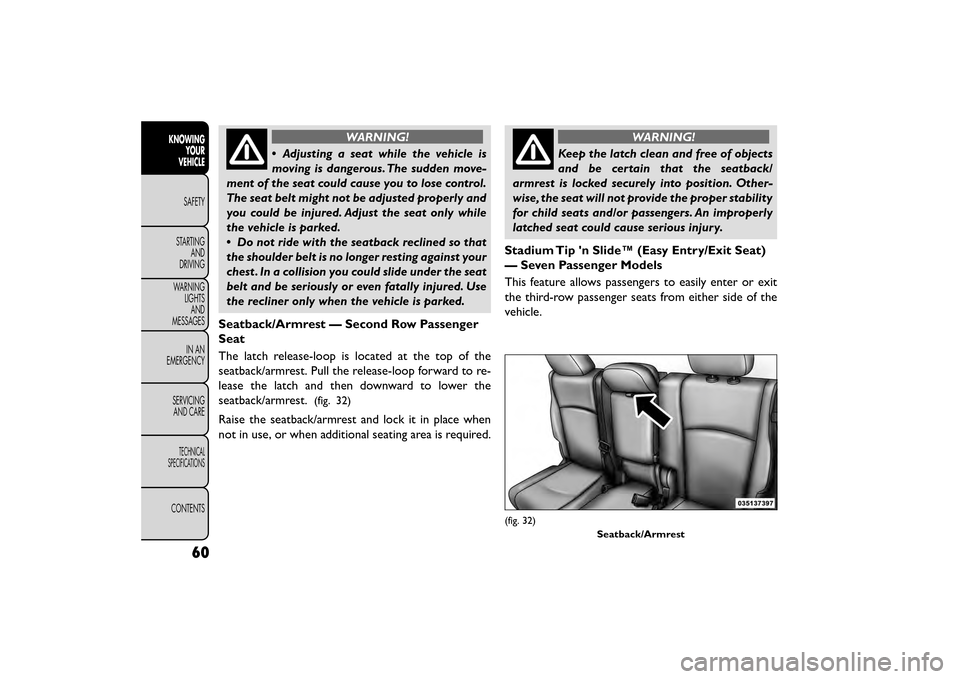
Seatback/Armrest — Second Row Passenger
Seat
The latch release-loop is located at the top of the
seatback/armrest. Pull the release-loop forward to re-
lease the latch and then downward to lower the
seatback/armrest.
(fig. 32)
Raise the seatback/armrest and lock it in place when
not in use, or when additional seating area is required.
WARNING!
Keep the latch clean and free of objects
and be
certain that the seatback/
armrest is locked securely into position. Other-
wise, the seat will not provide the proper stability
for child seats and/or passengers. An improperly
latched seat could cause serious injury.
Stadium Tip 'n Slide™ (Easy Entry/Exit Seat)
— Seven Passenger Models
This feature allows passengers to easily enter or exit
the third-row passenger seats from either side of the
vehicle.
(fig. 32) Seatback/Armrest
60
KNOWINGYOUR
VEHICLE
SAFETY
STAR
TINGAND
DRIVING
WARNING LIGHTSAND
MESSAGES
IN AN
EMERGENCY
SERVICINGAND CARE
TECHNICAL
SPECIFICATIONS
CONTENTS
Page 67 of 412
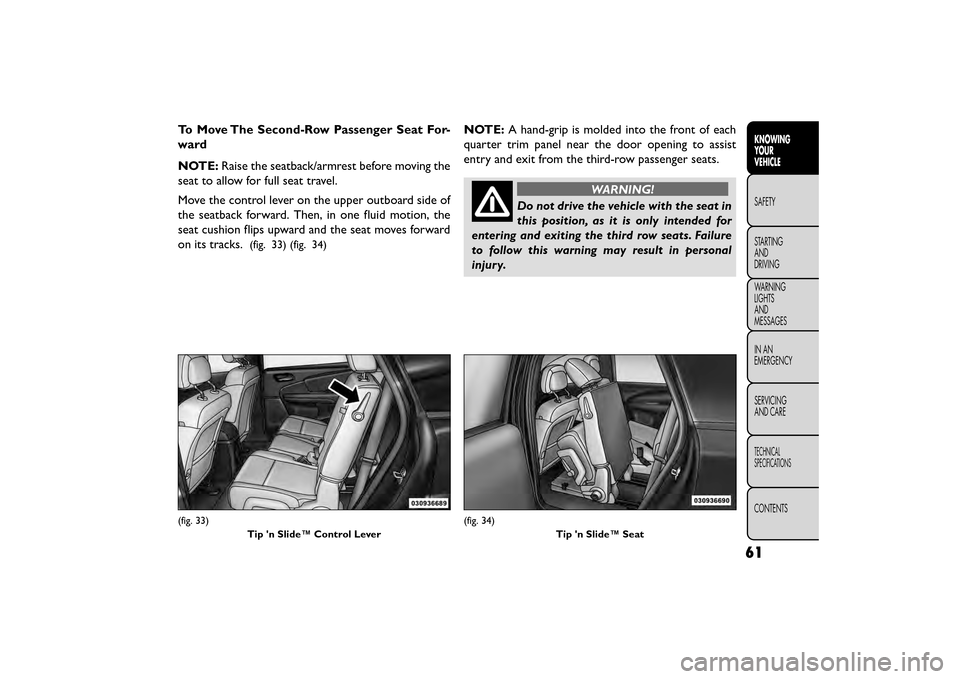
To Move The Second-Row Passenger Seat For-
ward
NOTE:Raise the seatback/armrest before moving the
seat to allow for full seat travel.
Move the control lever on the upper outboard side of
the seatback forward. Then, in one fluid motion, the
seat cushion flips upward and the seat moves forward
on its tracks.
(fig. 33) (fig. 34)
NOTE: A hand-grip is molded into the front of each
quarter trim panel near the door opening to assist
entry and exit from the third-row passenger seats.
WARNING!
Do not drive the vehicle with the seat in
this posi
tion, as it is only intended for
entering and exiting the third row seats. Failure
to follow this warning may result in personal
injury.
(fig. 33)
Tip 'n Slide™ Control Lever(fig. 34) Tip 'n Slide™ Seat
61
KNOWING
YOUR
VEHICLE
SAFETY
STAR
TING
AND
DRIVING
WARNING
LIGHTS
AND
MESSAGES
IN AN
EMERGENCY
SERVICING
AND CARE
TECHNICAL
SPECIFICATIONS
CONTENTS
Page 68 of 412
To Unfold And Move The Second-Row Passen-
ger Seat Rearward
Move the seatback rearward until it locks in place and
then continue sliding the seat rearward on its tracks
until it locks in place.
Push the seat cushion downward to lock it in place.
Adjust the seat track position as desired. Using body
pressure, move forward and rearward on the seat to be
sure that the seat adjusters have latched.
WARNING!
Be certain that the seatback and seat
are lock ed
securely into position. Other-
wise, the seat will not provide the proper stability
for child seats and/or passengers. An improperly
latched seat could cause serious injury.
50/50 SPLIT THIRD-ROW PASSENGER
SEATS WITH FOLD-FLAT FEATURE (Seven
Passenger Models)
To provide additional storage area, each third-row
passenger seatback can be folded flat. This allows for
extended cargo space and still maintains some rear
seating room if needed. NOTE:
Prior to folding the third-row passenger seat-
back, make sure the second-row passenger seatback is
not in a reclined position. This will allow the seatback
to fold easily.
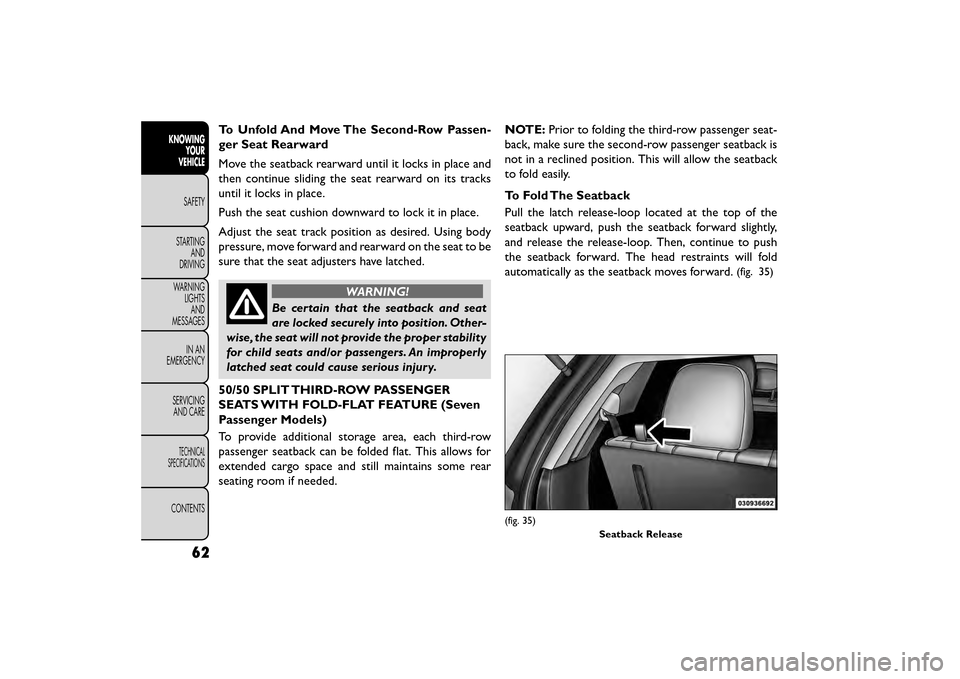
To Fold The Seatback
Pull the latch release-loop located at the top of the
seatback upward, push the seatback forward slightly,
and release the release-loop. Then, continue to push
the seatback forward. The head restraints will fold
automatically as the seatback moves forward.
(fig. 35)
(fig. 35)
Seatback Release
62
KNOWINGYOUR
VEHICLE
SAFETY
STAR
TINGAND
DRIVING
WARNING LIGHTSAND
MESSAGES
IN AN
EMERGENCY
SERVICINGAND CARE
TECHNICAL
SPECIFICATIONS
CONTENTS
Page 82 of 412
NOTE:In cold weather, use of Recirculation mode
may lead to excessive window fogging. The recircula-
tion feature may be unavailable (soft button greyed
out). Recirculation mode is not allowed in Defrost
mode to improve window clearing operation. Recircu-
lation will be disabled automatically if this mode is
selected. Attempting to use Recirculation while in this
mode will cause the LED in the control button to blink
and then turn off.
Rear Manual Temperature Control (MTC) (for
versions/markets, where provided)
The rear MTC system has floor air outlets at the rear
right side of the 3rd Row seats and overhead outlets at
each outboard rear seating position. The system pro-
vides heated air through the floor outlets or cool,
dehumidified air through the headliner outlets.
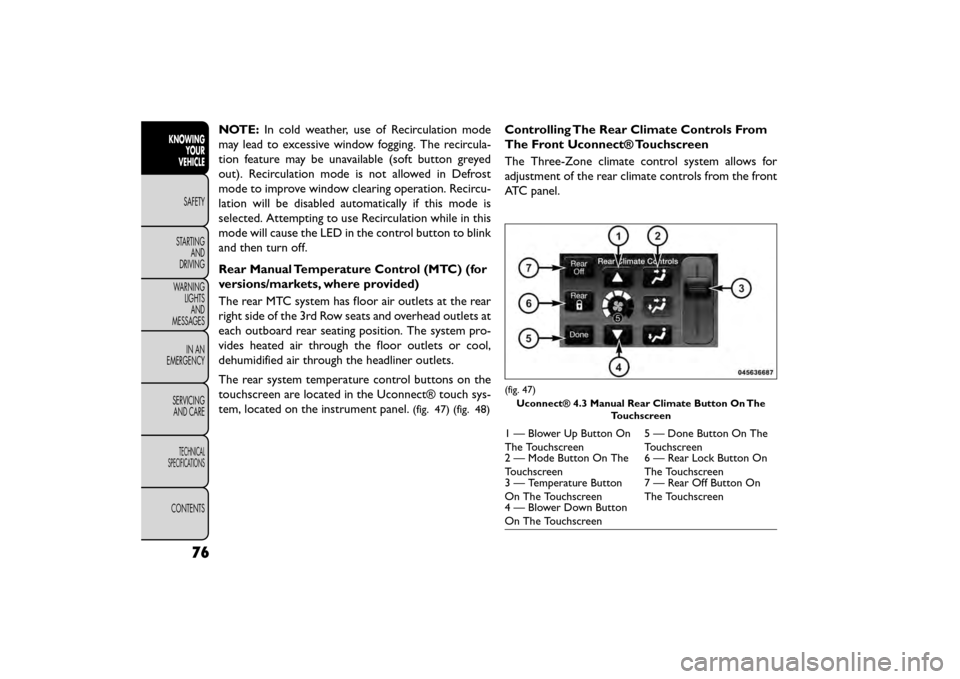
The rear system temperature control buttons on the
touchscreen are located in the Uconnect® touch sys-
tem, located on the instrument panel.
(fig. 47) (fig. 48)
Controlling The Rear Climate Controls From
The Front Uconnect® Touchscreen
The Three-Zone climate control system allows for
adjustment of the rear climate controls from the front
ATC panel.
(fig. 47)
Uconnect® 4.3 Manual Rear Climate Button On The Touchscreen
1 — Blower Up Button On
The Touchscreen 5 — Done Button On The
Touchscreen
2 — Mode Button On The
Touchscreen 6 — Rear Lock Button On
The Touchscreen
3 — Temperature Button
On The Touchscreen 7 — Rear Off Button On
The Touchscreen
4 — Blower Down Button
On The Touchscreen
76
KNOWING
YOUR
VEHICLE
SAFETY
STAR
TINGAND
DRIVING
WARNING LIGHTSAND
MESSAGES
IN AN
EMERGENCY
SERVICINGAND CARE
TECHNICAL
SPECIFICATIONS
CONTENTS
Page 92 of 412
The operator can also select the direction of the
airflow by selecting one of the available mode settings.
A/C operation and Recirculation control can also be
manually selected in Manual operation.
NOTE:Each of these features operates independently
from each other. If any feature is controlled manually,
temperature control will continue to operate auto-
matically.
Rear Automatic Temperature Control (ATC)
(for versions/markets, where provided)
The rear ATC system has floor air outlets at the rear
right side of the 3rd Row seats and overhead outlets at
each outboard rear seating position. The system pro-
vides heated air through the floor outlets or cool,
dehumidified air through the headliner outlets.
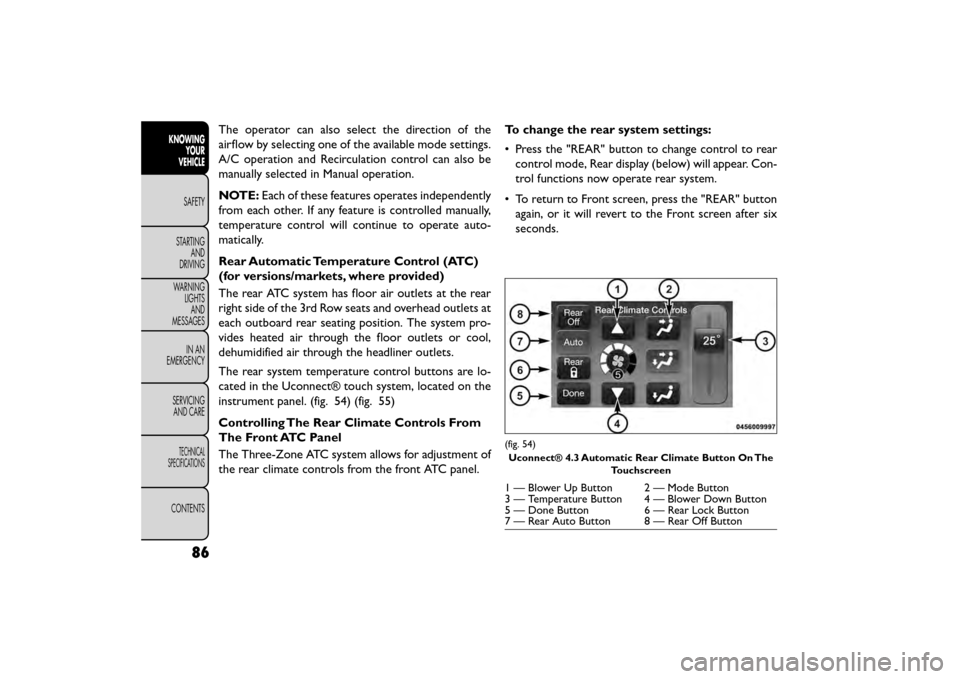
The rear system temperature control buttons are lo-
cated in the Uconnect® touch system, located on the
instrument panel. (fig. 54) (fig. 55)
Controlling The Rear Climate Controls From
The Front ATC Panel
The Three-Zone ATC system allows for adjustment of
the rear climate controls from the front ATC panel. To change the rear system settings:
• Press the "REAR" button to change control to rear
control mode, Rear display (below) will appear. Con-
trol functions now operate rear system.
• To return to Front screen, press the "REAR" button again, or it will revert to the Front screen after six
seconds.
(fig. 54)
Uconnect® 4.3 Automatic Rear Climate Button On The Touchscreen
1 — Blower Up Button 2 — Mode Button
3 — Temperature Button 4 — Blower Down Button
5 — Done Button 6 — Rear Lock Button
7 — Rear Auto Button 8 — Rear Off Button
86
KNOWINGYOUR
VEHICLE
SAFETY
STAR
TINGAND
DRIVING
WARNING LIGHTSAND
MESSAGES
IN AN
EMERGENCY
SERVICINGAND CARE
TECHNICAL
SPECIFICATIONS
CONTENTS
Page 94 of 412
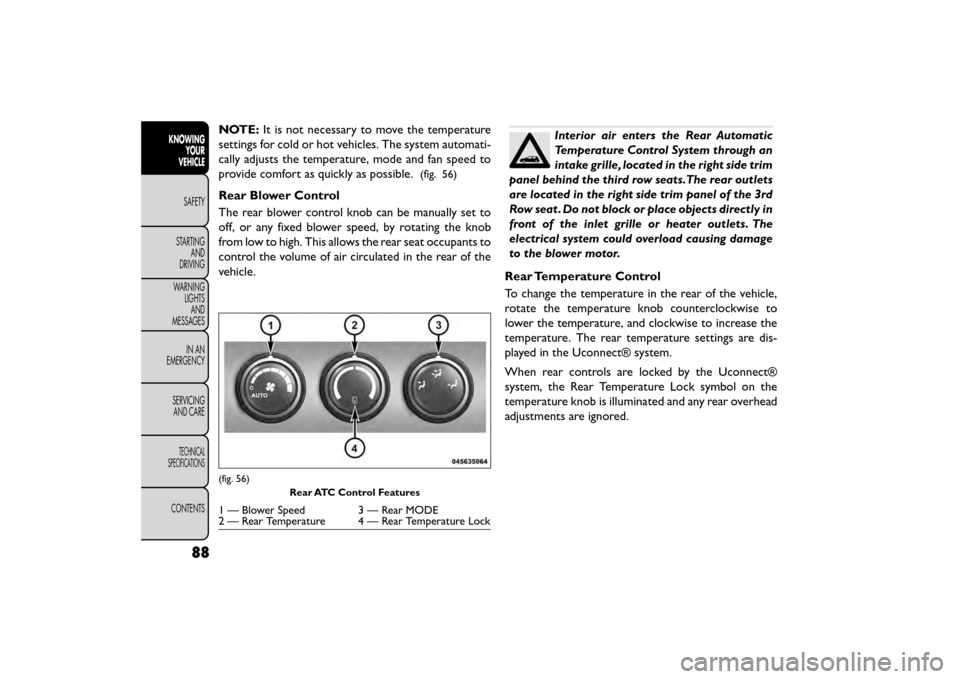
NOTE:It is not necessary to move the temperature
settings for cold or hot vehicles. The system automati-
cally adjusts the temperature, mode and fan speed to
provide comfort as quickly as possible.
(fig. 56)
Rear Blower Control
The rear blower control knob can be manually set to
off, or any fixed blower speed, by rotating the knob
from low to high. This allows the rear seat occupants to
control the volume of air circulated in the rear of the
vehicle.
Interior air enters the Rear Automatic
Temperature Control System through an
intake grille, located in the right side trim
panel behind the third row seats.The rear outlets
are located in the right side trim panel of the 3rd
Row seat . Do not block or place objects directly in
front of the inlet grille or heater outlets. The
electrical system could overload causing damage
to the blower motor.
Rear Temperature Control
To change the temperature in the rear of the vehicle,
rotate the temperature knob counterclockwise to
lower the temperature, and clockwise to increase the
temperature. The rear temperature settings are dis-
played in the Uconnect® system.
When rear controls are locked by the Uconnect®
system, the Rear Temperature Lock symbol on the
temperature knob is illuminated and any rear overhead
adjustments are ignored.
(fig. 56) Rear ATC Control Features
1 — Blower Speed 3 — Rear MODE
2 — Rear Temperature 4 — Rear Temperature Lock
88
KNOWINGYOUR
VEHICLE
SAFETY
STAR
TINGAND
DRIVING
WARNING LIGHTSAND
MESSAGES
IN AN
EMERGENCY
SERVICINGAND CARE
TECHNICAL
SPECIFICATIONS
CONTENTS
Page 112 of 412
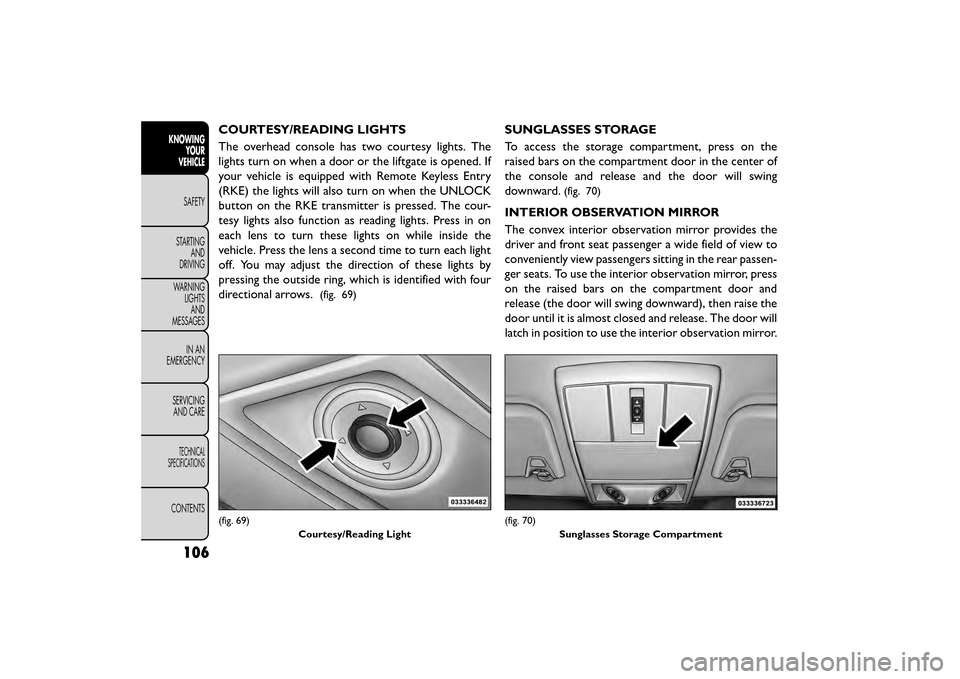
COURTESY/READING LIGHTS
The overhead console has two courtesy lights. The
lights turn on when a door or the liftgate is opened. If
your vehicle is equipped with Remote Keyless Entry
(RKE) the lights will also turn on when the UNLOCK
button on the RKE transmitter is pressed. The cour-
tesy lights also function as reading lights. Press in on
each lens to turn these lights on while inside the
vehicle. Press the lens a second time to turn each light
off. You may adjust the direction of these lights by
pressing the outside ring, which is identified with four
directional arrows.
(fig. 69)
SUNGLASSES STORAGE
To access the storage compartment, press on the
raised bars on the compartment door in the center of
the console and release and the door will swing
downward.
(fig. 70)
INTERIOR OBSERVATION MIRROR
The convex interior observation mirror provides the
driver and front seat passenger a wide field of view to
conveniently view passengers sitting in the rear passen-
ger seats. To use the interior observation mirror, press
on the raised bars on the compartment door and
release (the door will swing downward), then raise the
door until it is almost closed and release. The door will
latch in position to use the interior observation mirror.
(fig. 69)Courtesy/Reading Light(fig. 70)Sunglasses Storage Compartment
106
KNOWINGYOUR
VEHICLE
SAFETY
STAR
TINGAND
DRIVING
WARNING LIGHTSAND
MESSAGES
IN AN
EMERGENCY
SERVICINGAND CARE
TECHNICAL
SPECIFICATIONS
CONTENTS
Page 121 of 412
•Many accessories that can be plugged
in draw power from the vehicle's battery,
even when not in use (i.e., cellular
phones, etc .). Eventually, if plugged in long
enough, the vehicle's battery will discharge suffi-
ciently to degrade battery life and/or prevent the
engine from starting.
• Accessories that draw higher power (i.e., cool-
ers, vacuum cleaners, lights, etc .) will degrade the
battery even more quickly. Only use these inter-
mittently and with greater caution.
• After the use of high power draw accessories, or
long periods of the vehicle not being started (with
accessories still plugged in), the vehicle must be
driven a sufficient length of time to allow the
alternator to recharge the vehicle's battery.
• Power outlets are designed for accessory plugs
only. Do not hang any type of accessory or acces-
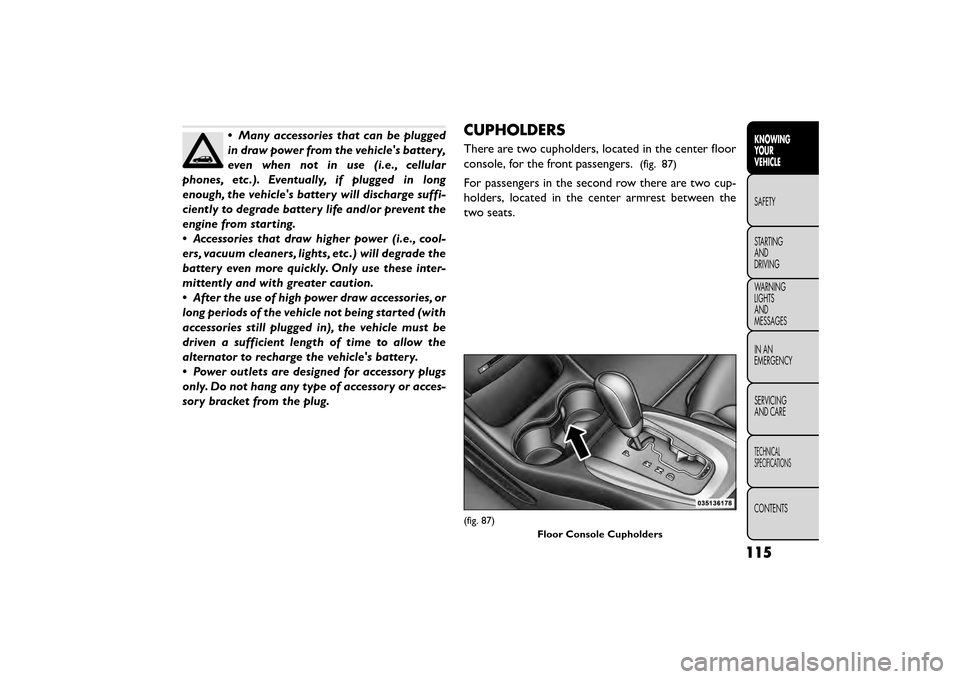
sory bracket from the plug.CUPHOLDERS
There are two cupholders, located in the center floor
console, for the front passengers.
(fig. 87)
For passengers in the second row there are two cup-
holders, located in the center armrest between the
two seats.
(fig. 87)
Floor Console Cupholders
115
KNOWING
YOUR
VEHICLE
SAFETY
STAR
TING
AND
DRIVING
WARNING
LIGHTS
AND
MESSAGES
IN AN
EMERGENCY
SERVICING
AND CARE
TECHNICAL
SPECIFICATIONS
CONTENTS
Page 127 of 412
Automatic Door Locks — (for versions/
markets, where provided)
The auto door lock feature default condition is dis-
abled. When enabled, the door locks will lock auto-
matically when the vehicle's speed exceeds 24 km/h.
The auto door lock feature can be enabled or disabled
by your authorized dealer per written request of the
customer. Please see your authorized dealer for ser-
vice.
Automatic Unlock Doors On Exit
The doors will unlock automatically on vehicles with
power door locks if:
1. The Automatic Unlock Doors On Exit feature isenabled.
2. The vehicle was in motion, then speed returned to 0 km/h and the transmission shift lever is placed in
PARK.
3. Any door is opened.
4. The doors were not previously unlocked.
To change the current setting, refer to “Uconnect®
Settings” in “Knowing Your Vehicle” for further infor-
mation. NOTE:
Use the Automatic Unlock Doors On Exit
feature in accordance with local laws.
Automatic Unlock Doors On Exit
Programming
The Automatic Unlock Doors On Exit feature can be
enabled or disabled as follows:
• For vehicles equipped with the Uconnect®, refer to “Uconnect® Settings” in “Knowing Your Vehicle” for
further information.
NOTE: Use the Automatic Unlock Doors On Exit
feature in accordance with local laws.
CHILD-PROTECTION DOOR LOCK SYSTEM
— REAR DOORS
To provide a safer environment for small children riding
in the rear seats, the rear doors are equipped with a
Child-Protection Door Lock system.
121
KNOWING
YOUR
VEHICLE
SAFETY
STAR
TING
AND
DRIVING
WARNING
LIGHTS
AND
MESSAGES
IN AN
EMERGENCY
SERVICING
AND CARE
TECHNICAL
SPECIFICATIONS
CONTENTS
Page 138 of 412
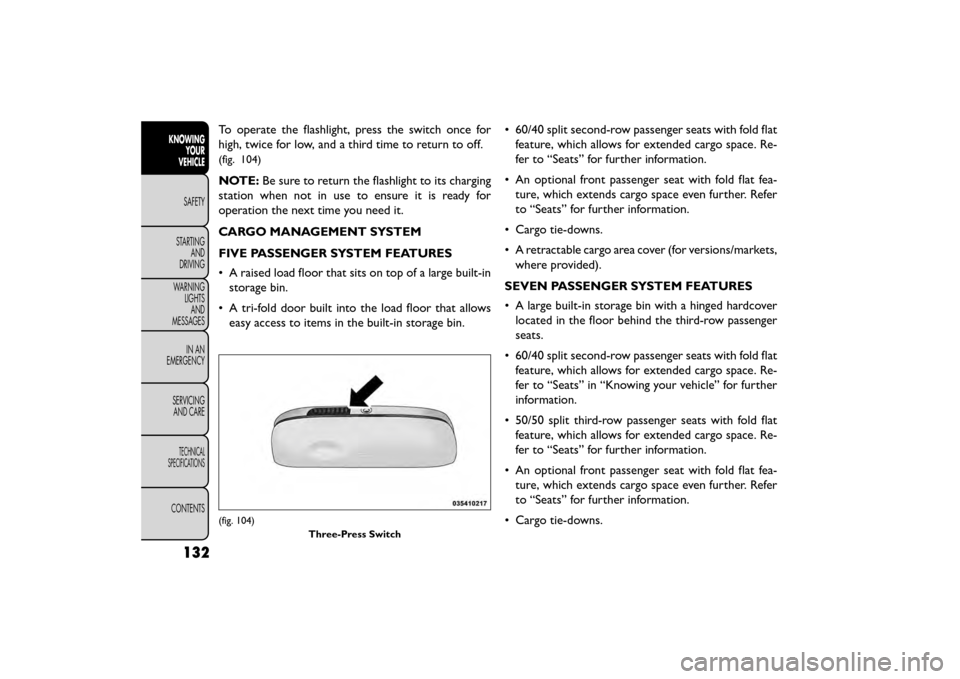
To operate the flashlight, press the switch once for
high, twice for low, and a third time to return to off.
(fig. 104)
NOTE:Be sure to return the flashlight to its charging
station when not in use to ensure it is ready for
operation the next time you need it.
CARGO MANAGEMENT SYSTEM
FIVE PASSENGER SYSTEM FEATURES
• A raised load floor that sits on top of a large built-in storage bin.
• A tri-fold door built into the load floor that allows easy access to items in the built-in storage bin. • 60/40 split second-row passenger seats with fold flat
feature, which allows for extended cargo space. Re-
fer to “Seats” for further information.
• An optional front passenger seat with fold flat fea- ture, which extends cargo space even further. Refer
to “Seats” for further information.
• Cargo tie-downs.
• A retractable cargo area cover (for versions/markets, where provided).
SEVEN PASSENGER SYSTEM FEATURES
• A large built-in storage bin with a hinged hardcover located in the floor behind the third-row passenger
seats.
• 60/40 split second-row passenger seats with fold flat feature, which allows for extended cargo space. Re-
fer to “Seats” in “Knowing your vehicle” for further
information.
• 50/50 split third-row passenger seats with fold flat feature, which allows for extended cargo space. Re-
fer to “Seats” for further information.
• An optional front passenger seat with fold flat fea- ture, which extends cargo space even further. Refer
to “Seats” for further information.
• Cargo tie-downs.
(fig. 104) Three-Press Switch
132
KNOWINGYOUR
VEHICLE
SAFETY
STAR
TINGAND
DRIVING
WARNING LIGHTSAND
MESSAGES
IN AN
EMERGENCY
SERVICINGAND CARE
TECHNICAL
SPECIFICATIONS
CONTENTS