stop start FIAT FREEMONT 2015 1.G User Guide
[x] Cancel search | Manufacturer: FIAT, Model Year: 2015, Model line: FREEMONT, Model: FIAT FREEMONT 2015 1.GPages: 412, PDF Size: 3.37 MB
Page 183 of 412
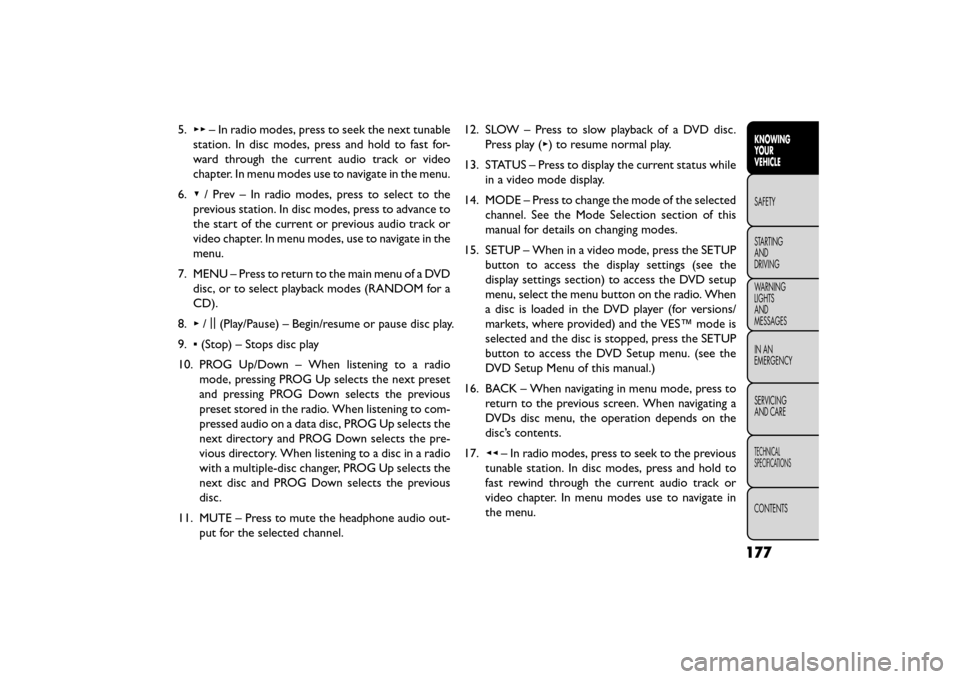
5.▸▸ – In radio modes, press to seek the next tunable
station. In disc modes, press and hold to fast for-
ward through the current audio track or video
chapter. In menu modes use to navigate in the menu.
6. ▾/ Prev – In radio modes, press to select to the
previous station. In disc modes, press to advance to
the start of the current or previous audio track or
video chapter. In menu modes, use to navigate in the
menu.
7. MENU – Press to return to the main menu of a DVD disc, or to select playback modes (RANDOM for a
CD).
8. ▸/||
(Play/Pause) – Begin/resume or pause disc play.
9. ▪(Stop) – Stops disc play
10. PROG Up/Down – When listening to a radio mode, pressing PROG Up selects the next preset
and pressing PROG Down selects the previous
preset stored in the radio. When listening to com-
pressed audio on a data disc, PROG Up selects the
next directory and PROG Down selects the pre-
vious directory. When listening to a disc in a radio
with a multiple-disc changer, PROG Up selects the
next disc and PROG Down selects the previous
disc.
11. MUTE – Press to mute the headphone audio out- put for the selected channel. 12. SLOW – Press to slow playback of a DVD disc.
Press play (▸) to resume normal play.
13. STATUS – Press to display the current status while in a video mode display.
14. MODE – Press to change the mode of the selected channel. See the Mode Selection section of this
manual for details on changing modes.
15. SETUP – When in a video mode, press the SETUP button to access the display settings (see the
display settings section) to access the DVD setup
menu, select the menu button on the radio. When
a disc is loaded in the DVD player (for versions/
markets, where provided) and the VES™ mode is
selected and the disc is stopped, press the SETUP
button to access the DVD Setup menu. (see the
DVD Setup Menu of this manual.)
16. BACK – When navigating in menu mode, press to return to the previous screen. When navigating a
DVDs disc menu, the operation depends on the
disc’s contents.
17. ◂◂– In radio modes, press to seek to the previous
tunable station. In disc modes, press and hold to
fast rewind through the current audio track or
video chapter. In menu modes use to navigate in
the menu.
177
KNOWING
YOUR
VEHICLE
SAFETY
STAR
TING
AND
DRIVING
WARNING
LIGHTS
AND
MESSAGES
IN AN
EMERGENCY
SERVICING
AND CARE
TECHNICAL
SPECIFICATIONS
CONTENTS
Page 200 of 412
The BeltAlert warning sequence begins after the ve-
hicle speed is over 8 km/h by blinking the Seat Belt
Reminder Light and sounding an intermittent chime.
Once the sequence starts, it will continue for the
entire duration or until the respective seat belts are
buckled. After the sequence completes, the Seat Belt
Reminder Light remains illuminated until the respective
seat belts are buckled. The driver should instruct all
other occupants to buckle their seat belts. If an out-
board front seat belt is unbuckled while traveling at
speeds greater than 8 km/h, BeltAlert will provide both
audio and visual notification.
The outboard front passenger seat BeltAlert is not
active when the outboard front passenger seat is un-
occupied. BeltAlert may be triggered when an animal
or heavy object is on the outboard front passenger seat
or when the seat is folded flat (if equipped). It is
recommended that pets be restrained in the rear seat
(if equipped) in pet harnesses or pet carriers that are
secured by seat belts, and cargo is properly stowed.
BeltAlert can be activated or deactivated by your
authorized dealer. Fiat Group does not recommend
deactivating BeltAlert.NOTE:
If BeltAlert has been deactivated, the Seat Belt
Reminder Light will continue to illuminate while the
driver’s or outboard front passenger’s (if equipped with
BeltAlert) seat belt remains unbuckled.
LAP/SHOULDER BELTS
All seating positions in your vehicle are equipped with
lap/shoulder belts.
The seat belt webbing retractor will lock only during
very sudden stops or collisions. This feature allows the
shoulder part of the seat belt to move freely with you
under normal conditions. However, in a collision the
seat belt will lock and reduce your risk of striking the
inside of the vehicle or being thrown out of the vehicle.
WARNING!
• Relying on the air bags alone could
lead to
more severe injuries in a collision.
The air bags work with your seat belt to restrain
you properly. In some collisions, the air bags
won’t deploy at all. Always wear your seat belt
even though you have air bags.
(Continued)
194
KNOWINGYOUR
VEHICLE
SAFETY
STARTING AND
DRIVING
WARNING LIGHTSAND
MESSAGES
IN
AN
EMERGENCY
SERVICINGAND CARE
TECHNICAL
SPECIFICATIONS
CONTENTS
Page 202 of 412
WARNING! (Continued)
• A seat belt that is too loose will not protect you
properly. In a sudden stop, you could move too far
forward, increasing the possibility of injury.Wear
your seat belt snugly.
• A seat belt that is worn under your arm is
dangerous.Your body could strike the inside sur-
faces of the vehicle in a collision, increasing head
and neck injury. A seat belt worn under the arm
can cause internal injuries. Ribs aren’t as strong
as shoulder bones. Wear the seat belt over your
shoulder so that your strongest bones will take
the force in a collision.
• A shoulder belt placed behind you will not
protect you from injury during a collision.You are
more likely to hit your head in a collision if you do
not wear your shoulder belt .The lap and shoulder
belt are meant to be used together.
• A frayed or torn seat belt could rip apart in a
collision and leave you with no protection. In-
spect the seat belt system periodically, checking
for cuts, frays, or loose parts. Damaged parts
must be replaced immediately. Do not disas-
semble or modify the seat belt system. Seat belt
assemblies must be replaced after a collision. LAP/SHOULDER BELT OPERATING
INSTRUCTIONS
1. Enter the vehicle and close the door. Sit back and
adjust the seat.
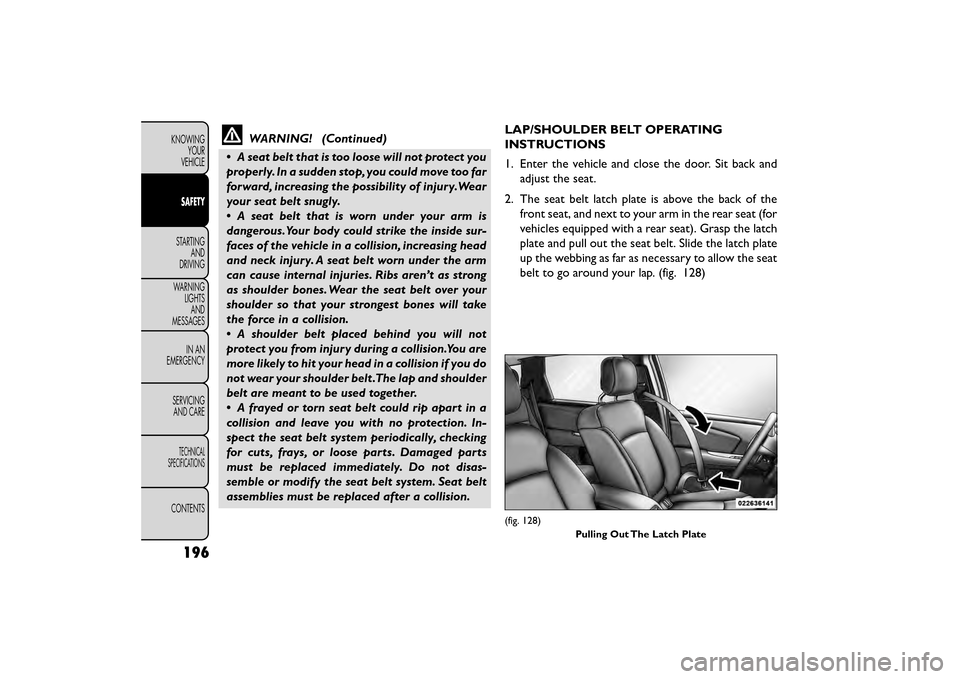
2. The seat belt latch plate is above the back of the front seat, and next to your arm in the rear seat (for
vehicles equipped with a rear seat). Grasp the latch
plate and pull out the seat belt. Slide the latch plate
up the webbing as far as necessary to allow the seat
belt to go around your lap. (fig. 128)
(fig. 128)
Pulling Out The Latch Plate
196
KNOWINGYOUR
VEHICLE
SAFETY
STARTING AND
DRIVING
WARNING LIGHTSAND
MESSAGES
IN
AN
EMERGENCY
SERVICINGAND CARE
TECHNICAL
SPECIFICATIONS
CONTENTS
Page 226 of 412
Group 3
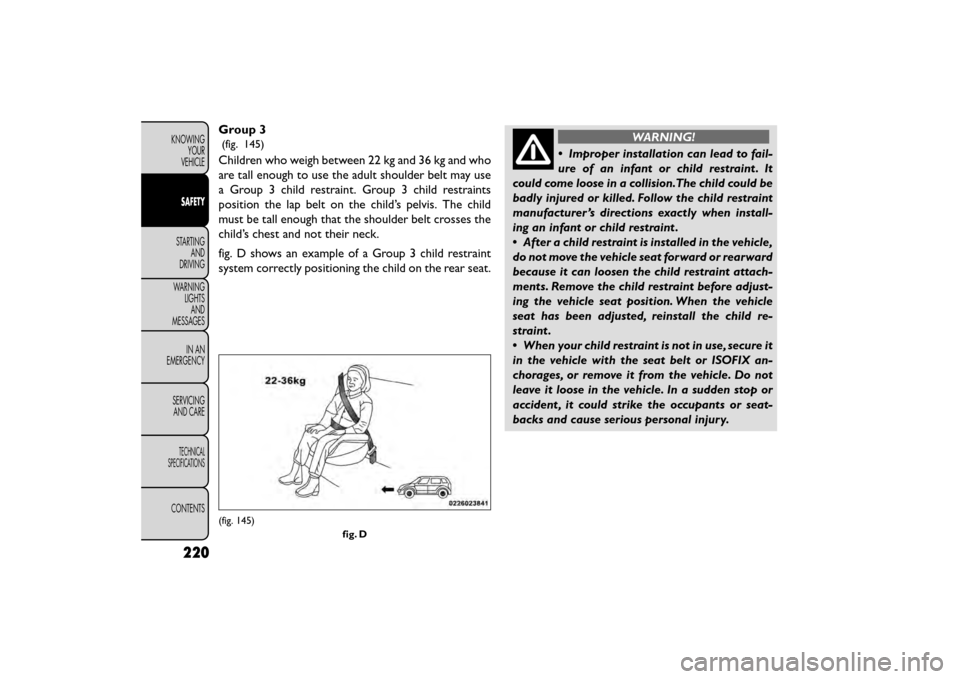
(fig. 145)
Children who weigh between 22 kg and 36 kg and who
are tall enough to use the adult shoulder belt may use
a Group 3 child restraint. Group 3 child restraints
position the lap belt on the child’s pelvis. The child
must be tall enough that the shoulder belt crosses the
child’s chest and not their neck.
fig. D shows an example of a Group 3 child restraint
system correctly positioning the child on the rear seat.
WARNING!
• Improper installation can lead to fail-
ure of
an infant or child restraint . It
could come loose in a collision.The child could be
badly injured or killed. Follow the child restraint
manufacturer ’s directions exactly when install-
ing an infant or child restraint .
• After a child restraint is installed in the vehicle,
do not move the vehicle seat forward or rearward
because it can loosen the child restraint attach-
ments. Remove the child restraint before adjust-
ing the vehicle seat position. When the vehicle
seat has been adjusted, reinstall the child re-
straint.
• When your child restraint is not in use, secure it
in the vehicle with the seat belt or ISOFIX an-
chorages, or remove it from the vehicle. Do not
leave it loose in the vehicle. In a sudden stop or
accident , it could strike the occupants or seat-
backs and cause serious personal injury.
(fig. 145)
fig. D
220
KNOWINGYOUR
VEHICLE
SAFETY
STARTING AND
DRIVING
WARNING LIGHTSAND
MESSAGES
IN
AN
EMERGENCY
SERVICINGAND CARE
TECHNICAL
SPECIFICATIONS
CONTENTS
Page 244 of 412
WARNING! (Continued)
• Do not leave the Key Fob in or near the vehicle
(or in a location accessible to children), and do
not leave the ignition of a vehicle equipped with
Keyless Enter-N-Go™ in the ACC or ON/RUN
mode. A child could operate power windows,
other controls, or move the vehicle.
• Do not leave animals or children inside parked
vehicles in hot weather; interior heat buildup
may cause serious injury or death.
KEYLESS ENTER-N-GO™
This feature allows the driver to op-
erate the ignition switch with the
push of a button, as long as the Re-
mote Keyless Entry (RKE) transmit-
ter is in the passenger compartment.
NORMAL STARTING — GASOLINE ENGINE
Using The ENGINE START/STOP Button
1. The transmission must be in PARK or NEUTRAL.
2. Press and hold the brake pedal while pushing the ENGINE START/STOP button once. 3. The system takes over and attempts to start the
vehicle. If the vehicle fails to start, the starter will
disengage automatically after 10 seconds.
4. If you wish to stop the cranking of the engine prior to the engine starting, push the button again.
NOTE: Normal starting of either a cold or a warm
engine is obtained without pumping or pressing the
accelerator pedal.
To Turn Off The Engine Using ENGINE
START/STOP Button
1. Place the shift lever in PARK, then press and release the ENGINE START/STOP button.
2. The ignition switch will return to the OFF position.
3. If the shift lever is not in PARK and the vehicle speed is above 8 km/h, the ENGINE START/STOP button
must be held for two seconds before the engine
shuts off. The ignition switch position will remain in
the ACC position until the shift lever is in PARK and
the button is pressed twice to the OFF position. If
the shift lever is not in PARK and the ENGINE
START/STOP button is pressed once, the EVIC will
display a “Vehicle Not In Park” message and the
engine will remain running. Never leave a vehicle out
of the PARK position, or it could roll.
238
KNOWING YOUR
VEHICLE
SAFETY
STARTING AND
DRIVING
WARNING LIGHTSAND
MESSAGES
INAN
EMERGENC
Y
SERVICING AND CARE
TECHNICAL
SPECIFICATIONS
CONTENTS
Page 245 of 412
NOTE:If the ignition switch is left in the ACC or RUN
(engine not running) position and the transmission is in
PARK, the system will automatically time out after 30
minutes of inactivity and the ignition will switch to the
OFF position.
ENGINE START/STOP Button Functions –
With Driver’s Foot OFF The Brake Pedal (In
PARK Or NEUTRAL Position)
The ENGINE START/STOP button operates similar to
an ignition switch. It has four positions, OFF, ACC,
RUN and START. To change the ignition switch posi-
tions without starting the vehicle and use the accesso-
ries follow these steps.
• Starting with the ignition switch in the OFF position:
• Press the ENGINE START/STOP button once to change the ignition switch to the ACC position,
• Press the ENGINE START/STOP button a second time to change the ignition switch to the RUN
position,
• Press the ENGINE START/STOP button a third time to return the ignition switch to the OFF position. EXTREME COLD WEATHER
(BELOW −29°C)
To ensure reliable starting at these temperatures, use
of an externally powered electric engine block heater is
recommended.
IF ENGINE FAILS TO START
WARNING!
• Never pour fuel or other flammable
li qui
ds into the throttle body air inlet
opening in an attempt to start the vehicle. This
could result in a flash fire causing serious per-
sonal injury.
• Do not attempt to push or tow your vehicle to
get it started. Unburned fuel could enter the
catalytic converter and once the engine has
started, ignite and damage the converter and
vehicle. If the vehicle has a discharged battery,
booster cables may be used to obtain a start from
a booster battery or the battery in another ve-
hicle.This type of start can be dangerous if done
improperly. Refer to “Jump Starting” in “In An
Emergency” for further information.
239
KNOWING
YOUR
VEHICLE
SAFETY
STARTING
AND
DRIVING
WARNING
LIGHTS
AND
MESSAGES
IN AN
EMERGENC
Y
SERVICING
AND CARE
TECHNICAL
SPECIFICATIONS
CONTENTS
Page 246 of 412
Clearing A Flooded Engine (Using ENGINE
START/STOP Button)
If the engine fails to start after you have followed the
“Normal Starting” or “Extreme Cold Weather" proce-
dures, it may be flooded. To clear any excess fuel:
1. Press and hold the brake pedal.
2. Press the accelerator pedal all the way to the floorand hold it.
3. Push and release the ENGINE START/STOP button once.
The starter motor will engage automatically, run for 10
seconds, and then disengage. Once this occurs, release
the accelerator pedal and the brake pedal, wait 10 to 15
seconds, then repeat the “Normal Starting” proce-
dure.
AFTER STARTING
The idle speed is controlled automatically and it will
decrease as the engine warms up. NORMAL STARTING — DIESEL ENGINE
Using The ENGINE START/STOP Button
1. Turn the ignition switch to the ON position by
pressing the ENGINE START/STOP button twice.
2. Watch the “Wait To Start Indicator Light” in the instrument cluster. Refer to “Instrument Cluster” in
“Warning Lights And Messages” for further infor-
mation. It will illuminate for two to ten seconds or
more, depending on engine temperature. When the
“Wait To Start Indicator Light” goes out, the engine
isreadytostart.
3. DO NOT press the accelerator. To start the engine, the transmission must be in PARK or NEUTRAL.
Press the brake pedal (automatic transmission only)
or press and hold the clutch pedal (manual transmis-
sion only) while pressing and holding the ENGINE
START/STOP button. Release the button when the
engine starts.
NOTE: The starter motor may need to remain
engaged for up to 30 seconds in very cold conditions
until the engine is started. If the vehicle does not start,
release the button. Wait for 25-30 seconds and then
try to start again.
4. After the engine starts, allow it to idle for approxi- mately 30 seconds before driving. This allows oil to
circulate and lubricate the turbocharger.
240
KNOWING YOUR
VEHICLE
SAFETY
STARTING AND
DRIVING
WARNING LIGHTSAND
MESSAGES
INAN
EMERGENC
Y
SERVICING AND CARE
TECHNICAL
SPECIFICATIONS
CONTENTS
Page 247 of 412
To Turn Off The Engine Using ENGINE
START/STOP Button
1. With the vehicle stopped, place the shift lever inNEUTRAL/PARK, then press and release the EN-
GINE START/STOP button.
2. The ignition switch will return to the OFF position.
NOTE:
• If the ignition switch is left in the ACC position, the system will automatically time out after 30 minutes
of inactivity and the ignition will switch to the OFF
position.
• If the ignition switch is left in the RUN position, the system will automatically time out after 30 minutes
of inactivity if the vehicle speed is 0 km/h and the
engine is not running. • If the shift lever is not in PARK and the vehicle speed
is above 8 km/h, the ENGINE START/STOP button
must be held for two seconds before the engine
shuts off. The ignition switch position will remain in
the ACC position until the vehicle is stopped and the
button is pressed twice to the OFF position.
Turbocharger “Cool Down”
NOTE: Letting the engine idle after extended opera-
tion allows the turbine housing to cool to normal
operating temperature.
The following chart should be used as a guide in
determining the amount of engine idle time required to
sufficiently cool down the turbocharger before shut
down, depending upon the type of driving and the
amount of cargo.
TurboCharger “Cool Down” Chart
Driving Conditions Load Turbocharger
Temperature Idle Time (In Minutes)
Before Shut Down
Stop & Go Empty Cool Less than 1
Stop & Go Medium Warm 1
Highway Speeds Medium Warm 2
City Traffic Maximum Gross Combina-
tion Weight Rating Warm 3
241
KNOWING
YOUR
VEHICLE
SAFETY
STARTING
AND
DRIVING
WARNING
LIGHTS
AND
MESSAGES
IN
AN
EMERGENC
Y
SERVICING
AND CARE
TECHNICAL
SPECIFICATIONS
CONTENTS
Page 251 of 412
MANUAL TRANSMISSION (for
versions/markets, where
provided)
WARNING!
You or others could be injured if you
leave t
he vehicle unattended without
having the parking brake fully applied.The park-
ing brake should always be applied when the
driver is not in the vehicle, especially on an
incline.
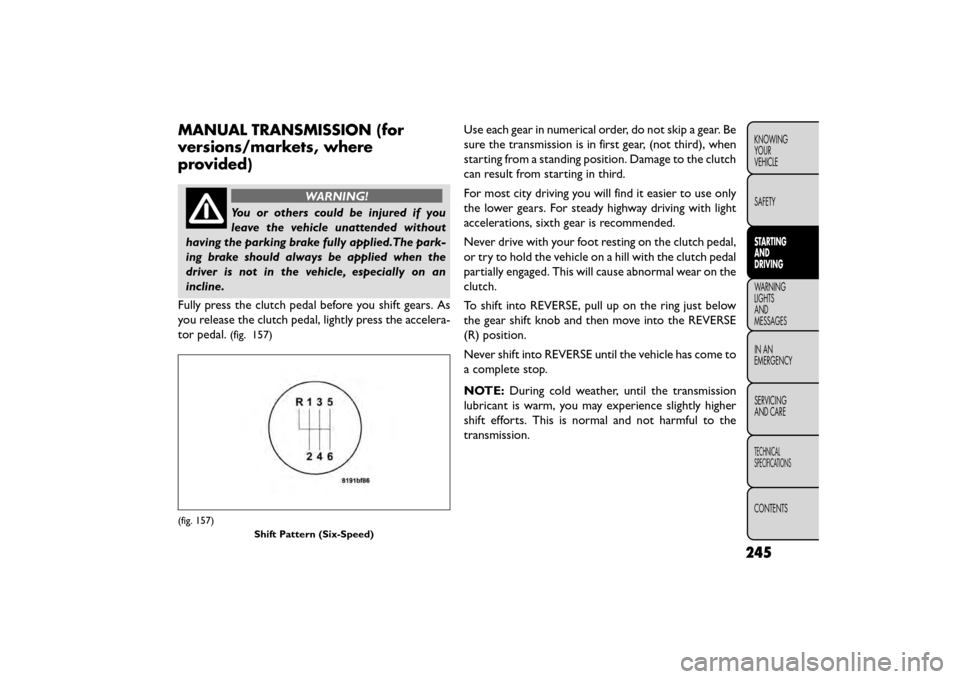
Fully press the clutch pedal before you shift gears. As
you release the clutch pedal, lightly press the accelera-
tor pedal.
(fig. 157)
Use each gear in numerical order, do not skip a gear. Be
sure the transmission is in first gear, (not third), when
starting from a standing position. Damage to the clutch
can result from starting in third.
For most city driving you will find it easier to use only
the lower gears. For steady highway driving with light
accelerations, sixth gear is recommended.
Never drive with your foot resting on the clutch pedal,
or try to hold the vehicle on a hill with the clutch pedal
partially engaged. This will cause abnormal wear on the
clutch.
To shift into REVERSE, pull up on the ring just below
the gear shift knob and then move into the REVERSE
(R) position.
Never shift into REVERSE until the vehicle has come to
a complete stop.
NOTE: During cold weather, until the transmission
lubricant is warm, you may experience slightly higher
shift efforts. This is normal and not harmful to the
transmission.
(fig. 157)
Shift Pattern (Six-Speed)
245
KNOWING
YOUR
VEHICLE
SAFETY
STARTING
AND
DRIVING
WARNING
LIGHTS
AND
MESSAGES
INAN
EMERGENC
Y
SERVICING
AND CARE
TECHNICAL
SPECIFICATIONS
CONTENTS
Page 252 of 412
DOWNSHIFTING
Proper downshifting will improve fuel economy and
prolong engine life.
If you skip a gear while downshifting or
downshift at too high of a vehicle speed,
these conditions may cause the engine to
overspeed if too low of a gear is selected and the
clutch pedal is released. Damage to the clutch and
the transmission can result from skipping a gear
while downshifting or downshifting at too high of
a vehicle speed even if the clutch pedal is held
pressed (i.e., not released).
To maintain a safe speed and prolong brake life, shift
down to second or first when descending a steep
grade.
When turning a corner, or driving up a steep grade,
downshift early so that the engine will not be overbur-
dened.
AUTOMATIC TRANSMISSION (for
versions/markets, where
provided)
Damage to the transmission may occur if
the following precautions are not ob-
served:
• Shift into or out of PARK or REVERSE only after
the vehicle has come to a complete stop.
• Do not shift between PARK, REVERSE, NEU-
TRAL, or DRIVE when the engine is above idle
speed.
• Before shifting into any gear, make sure your
foot is firmly pressing the brake pedal.
NOTE: You must press and hold the brake pedal while
shifting out of PARK.
246
KNOWING YOUR
VEHICLE
SAFETY
STARTING AND
DRIVING
WARNING LIGHTSAND
MESSAGES
INAN
EMERGENC
Y
SERVICING AND CARE
TECHNICAL
SPECIFICATIONS
CONTENTS