transmission FIAT FREEMONT 2015 1.G User Guide
[x] Cancel search | Manufacturer: FIAT, Model Year: 2015, Model line: FREEMONT, Model: FIAT FREEMONT 2015 1.GPages: 412, PDF Size: 3.37 MB
Page 48 of 412
• Set Time Hours
When in this display you may select the time display
settings. To make your selection, press the Set Time
button on the touchscreen, adjust the hours using the
up and down buttons on the touchscreen, followed by
pressing the arrow back button on the touchscreen
when all selections are complete.
• Set Time Minutes
When in this display you may select the time display
settings. To make your selection, press the Set Time
button on the touchscreen, adjust the minutes using
the up and down buttons on the touchscreen, followed
by pressing the arrow back button on the touchscreen
when all selections are complete.
• Time Format
When in this display you may select the time display
settings. To make your selection, press the Set Time
button on the touchscreen, select 12 hr or 24 hr
followed by pressing the arrow back button on the
touchscreen when all selections are complete.
• Show Time in Status Bar (for versions/markets,
where provided)
When in this display you may turn on or shut off the
digital clock in the status bar. To change the Show Time
Status setting press and release the On or Off button
on the touchscreen followed by pressing the arrow
back button on the touchscreen.Safety / Assistance
• Park Assist (for versions/markets, where pro-
vided)
The Rear Park Assist system will scan for objects
behind the vehicle when the transmission shift lever is
in REVERSE and the vehicle speed is less than 11 km/h.
The system can be enabled with Sound Only, Sound
and Display, or turned OFF. To change the Park Assist
status press and release the Off, Sound Only or Sounds
and Display button followed by pressing the arrow back
button on the touchscreen.
• Parkview Backup Camera (for versions/markets,
where provided)
Your vehicle may be equipped with the ParkView®
Rear Back Up Camera that allows you to see an
on-screen image of the rear surroundings of your
vehicle whenever the shift lever is put into REVERSE.
The image will be displayed on the radio touchscreen
display along with a caution note to “check entire
surroundings” across the top of the screen. After five
seconds this note will disappear. The ParkView® cam-
era is located on the rear of the vehicle above the rear
License plate. To make your selection, press the
Parkview Backup Camera check box in the "Safety &
Driving Assistance" menu to enable/disable the
Parkview Backup Camera.
42
KNOWING
YOUR
VEHICLE
SAFETY
STAR
TINGAND
DRIVING
WARNING LIGHTSAND
MESSAGES
IN AN
EMERGENCY
SERVICINGAND CARE
TECHNICAL
SPECIFICATIONS
CONTENTS
Page 50 of 412
• Flash Headlights With Lock (for versions/
markets, where provided)
When this feature is selected, the front and rear turn
signals will flash when the doors are locked or unlocked
with the RKE transmitter. To make your selection,
press the Flash Headlights with Lock button on the
touchscreen, select On or Off followed by pressing the
arrow back button on the touchscreen.
Doors & Locks
• Auto Lock (for versions/markets, where pro-
vided)
When this feature is selected, all doors will lock auto-
matically when the vehicle reaches a speed of 24 km/h.
To make your selection, press the “Auto Lock” button
on the touchscreen, until a check-mark appears next to
setting, indicating that the setting has been selected.
Press the back arrow button on the touchscreen to
return to the previous menu.
• Auto Unlock on Exit (for versions/markets,
where provided)
When this feature is selected, all doors will unlock
when the vehicle is stopped and the transmission is in
the PARK (for versions/markets, where provided) or
NEUTRAL position and the driver's door is opened. To
make your selection, press the Auto Unlock on Exit
button on the touchscreen, select On or Off followed
by pressing the arrow back button on the touchscreen.• Flash Headlight with Lock (for versions/markets,
where provided)
When this feature is selected, the front and rear turn
signals will flash when the doors are locked or unlocked
with the RKE transmitter. To make your selection,
press the Flash Lights with Lock button on the touch-
screen, select On or Off followed by pressing the
arrow back button on the touchscreen.
• 1st Press of Key Fob Unlocks (for versions/
markets, where provided)
When
Unlock Driver Door Only On 1st Press is
selected, only the driver's door will unlock on the first
press of the RKE transmitter UNLOCK button. When
Driver Door 1st Press is selected, you must press the
RKE transmitter UNLOCK button twice to unlock the
passenger's doors. When Unlock All Doors On 1st
Press is selected, all of the doors will unlock on the
first press of the RKE transmitter UNLOCK button.
44
KNOWING YOUR
VEHICLE
SAFETY
STAR
TINGAND
DRIVING
WARNING LIGHTSAND
MESSAGES
IN AN
EMERGENCY
SERVICINGAND CARE
TECHNICAL
SPECIFICATIONS
CONTENTS
Page 111 of 412
Using Electronic Speed Control On Hills
The transmission may downshift on hills to maintain
the vehicle set speed.
NOTE:The Electronic Speed Control system main-
tains speed up and down hills. A slight speed change on
moderate hills is normal.
On steep hills, a greater speed loss or gain may occur
so it may be preferable to drive without Electronic
Speed Control.
WARNING!
Electronic Speed Control can be danger-
ous w h
ere the system cannot maintain a
constant speed.Your vehicle could go too fast for
the conditions, and you could lose control and
have an accident . Do not use Electronic Speed
Control in heavy traffic or on roads that are
winding, icy, snow-covered or slippery.
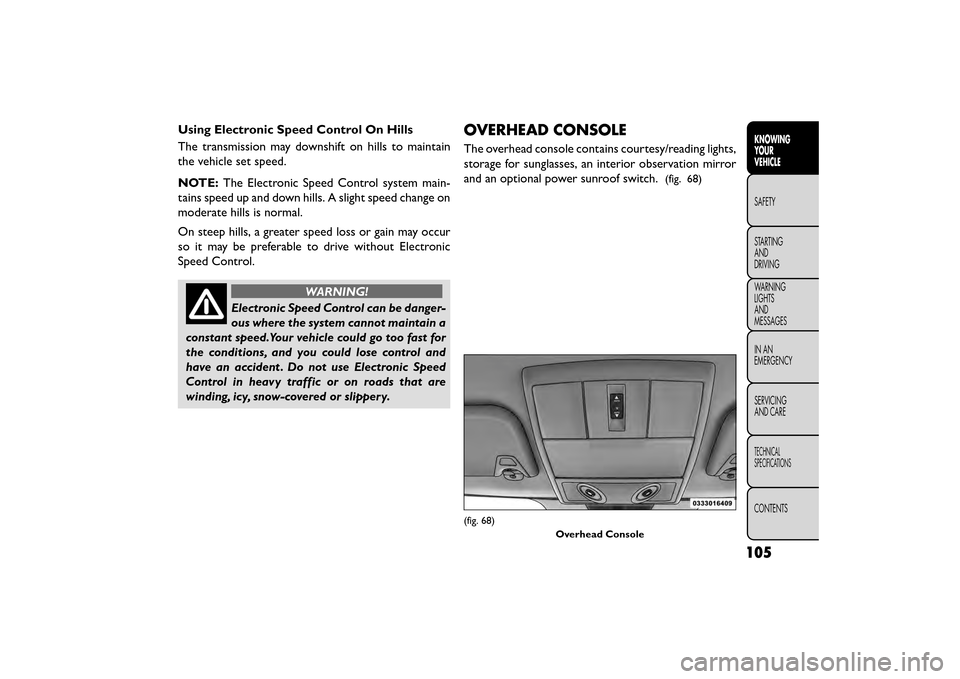
OVERHEAD CONSOLE
The overhead console contains courtesy/reading lights,
storage for sunglasses, an interior observation mirror
and an optional power sunroof switch.
(fig. 68)
(fig. 68)
Overhead Console
105
KNOWING
YOUR
VEHICLE
SAFETY
STAR
TING
AND
DRIVING
WARNING
LIGHTS
AND
MESSAGES
IN AN
EMERGENCY
SERVICING
AND CARE
TECHNICAL
SPECIFICATIONS
CONTENTS
Page 116 of 412
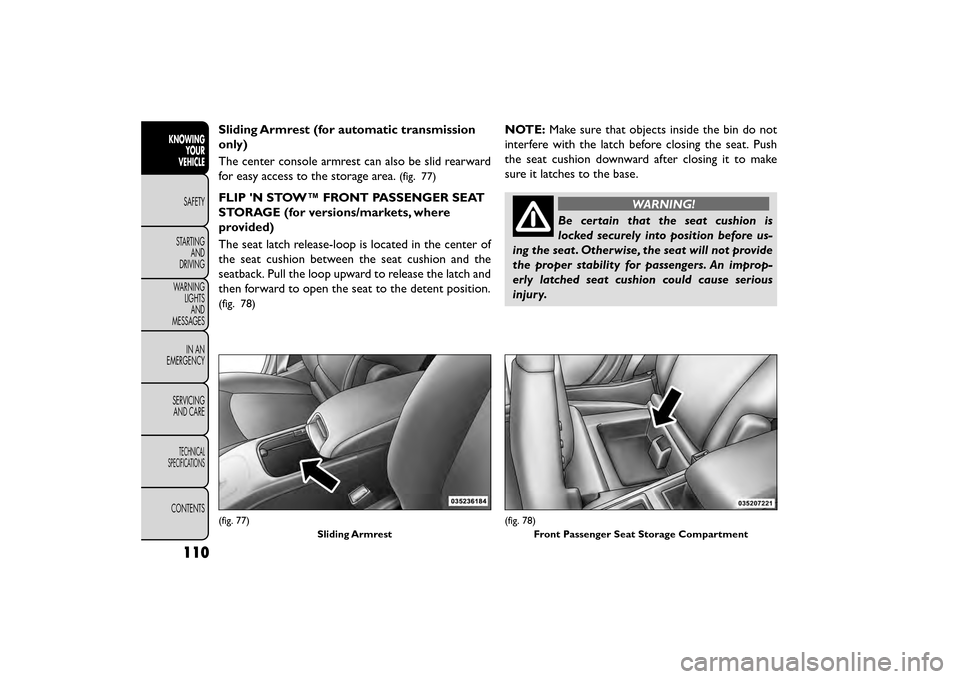
Sliding Armrest (for automatic transmission
only)
The center console armrest can also be slid rearward
for easy access to the storage area.
(fig. 77)
FLIP 'N STOW™ FRONT PASSENGER SEAT
STORAGE (for versions/markets, where
provided)
The seat latch release-loop is located in the center of
the seat cushion between the seat cushion and the
seatback. Pull the loop upward to release the latch and
then forward to open the seat to the detent position.
(fig. 78)
NOTE:Make sure that objects inside the bin do not
interfere with the latch before closing the seat. Push
the seat cushion downward after closing it to make
sure it latches to the base.
WARNING!
Be certain that the seat cushion is
locked sec
urely into position before us-
ing the seat . Otherwise, the seat will not provide
the proper stability for passengers. An improp-
erly latched seat cushion could cause serious
injury.
(fig. 77)
Sliding Armrest(fig. 78)Front Passenger Seat Storage Compartment
110
KNOWINGYOUR
VEHICLE
SAFETY
STAR
TINGAND
DRIVING
WARNING LIGHTSAND
MESSAGES
IN AN
EMERGENCY
SERVICINGAND CARE
TECHNICAL
SPECIFICATIONS
CONTENTS
Page 126 of 412
WARNING!
• For personal security and safety in the
e v
ent of a collision, lock the vehicle
doors before you drive as well as when you park
and leave the vehicle.
• When leaving the vehicle, always remove the
Key Fob from the vehicle and lock your vehicle.
Unsupervised use of vehicle equipment may
cause severe personal injuries or death.
• Never leave children alone in a vehicle, or with
access to an unlocked vehicle. Allowing children
to be in a vehicle unattended is dangerous for a
number of reasons. A child or others could be
seriously or fatally injured. Children should be
warned not to touch the parking brake, brake
pedal or the transmission gear selector.
• Do not leave the Key Fob in or near the vehicle,
or in a location accessible to children, and do not
leave the ignition of a vehicle equipped with
Keyless Enter-N-Go™ in the ACC or ON/RUN
mode. A child could operate power windows,
other controls, or move the vehicle. POWER DOOR LOCKS
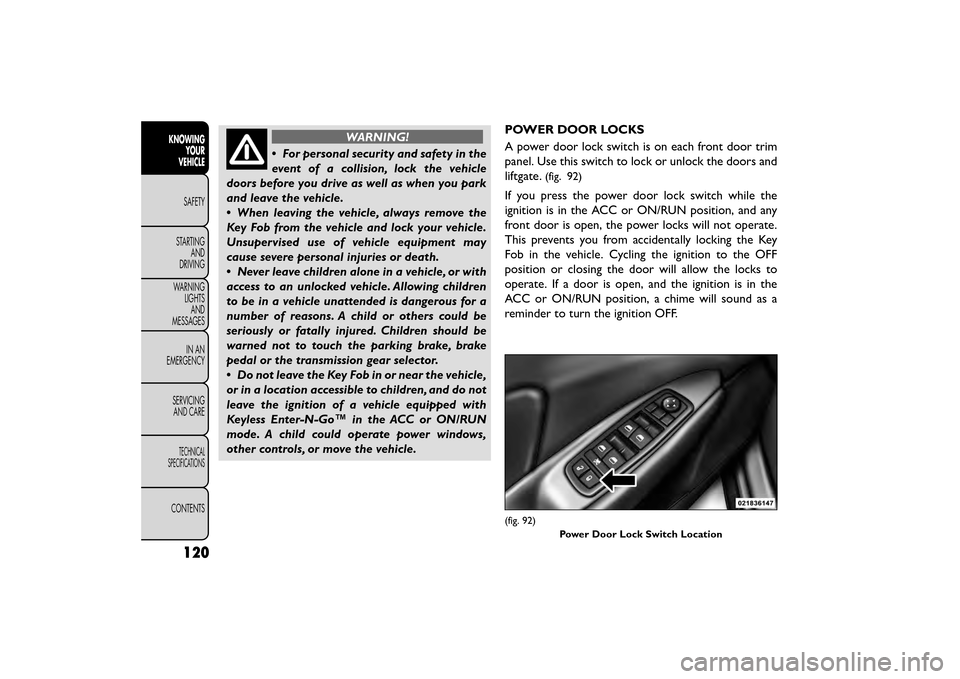
A power door lock switch is on each front door trim
panel. Use this switch to lock or unlock the doors and
liftgate.
(fig. 92)
If you press the power door lock switch while the
ignition is in the ACC or ON/RUN position, and any
front door is open, the power locks will not operate.
This prevents you from accidentally locking the Key
Fob in the vehicle. Cycling the ignition to the OFF
position or closing the door will allow the locks to
operate. If a door is open, and the ignition is in the
ACC or ON/RUN position, a chime will sound as a
reminder to turn the ignition OFF.
(fig. 92)
Power Door Lock Switch Location
120
KNOWINGYOUR
VEHICLE
SAFETY
STAR
TINGAND
DRIVING
WARNING LIGHTSAND
MESSAGES
IN AN
EMERGENCY
SERVICINGAND CARE
TECHNICAL
SPECIFICATIONS
CONTENTS
Page 127 of 412
Automatic Door Locks — (for versions/
markets, where provided)
The auto door lock feature default condition is dis-
abled. When enabled, the door locks will lock auto-
matically when the vehicle's speed exceeds 24 km/h.
The auto door lock feature can be enabled or disabled
by your authorized dealer per written request of the
customer. Please see your authorized dealer for ser-
vice.
Automatic Unlock Doors On Exit
The doors will unlock automatically on vehicles with
power door locks if:
1. The Automatic Unlock Doors On Exit feature isenabled.
2. The vehicle was in motion, then speed returned to 0 km/h and the transmission shift lever is placed in
PARK.
3. Any door is opened.
4. The doors were not previously unlocked.
To change the current setting, refer to “Uconnect®
Settings” in “Knowing Your Vehicle” for further infor-
mation. NOTE:
Use the Automatic Unlock Doors On Exit
feature in accordance with local laws.
Automatic Unlock Doors On Exit
Programming
The Automatic Unlock Doors On Exit feature can be
enabled or disabled as follows:
• For vehicles equipped with the Uconnect®, refer to “Uconnect® Settings” in “Knowing Your Vehicle” for
further information.
NOTE: Use the Automatic Unlock Doors On Exit
feature in accordance with local laws.
CHILD-PROTECTION DOOR LOCK SYSTEM
— REAR DOORS
To provide a safer environment for small children riding
in the rear seats, the rear doors are equipped with a
Child-Protection Door Lock system.
121
KNOWING
YOUR
VEHICLE
SAFETY
STAR
TING
AND
DRIVING
WARNING
LIGHTS
AND
MESSAGES
IN AN
EMERGENCY
SERVICING
AND CARE
TECHNICAL
SPECIFICATIONS
CONTENTS
Page 154 of 412
HSA Activation Criteria
The following criteria must be met in order for HSA to
activate:
• Vehicle must be stopped.
• Vehicle must be on a 6% (approximate) grade orgreater hill.
• Gear selection matches vehicle uphill direction (i.e., vehicle facing uphill is in forward gear; vehicle backing
uphill is in REVERSE gear).
WARNING!
There may be situations on minor hills
wit h
a loaded vehicle, or while pulling a
trailer where the system will not activate and
slight rolling may occur, which could cause a
collision with another vehicle or object . Always
remember the driver is responsible for braking
the vehicle.
HSA will work in REVERSE and all forward gears when
the activation criteria have been met. The system will
not activate if the vehicle is placed in NEUTRAL or
PARK.
Towing With HSA
HSA will provide assistance when starting on a grade
when pulling a trailer.
WARNING!
• If you use a trailer brake controller
wi t
h your trailer, your trailer brakes may
be activated and deactivated with the brake
switch. If so, when the brake pedal is released,
there may not be enough brake pressure to hold
the vehicle and trailer on a hill and this could
cause a collision with another vehicle or object
behind you. In order to avoid rolling down the hill
while resuming acceleration, manually activate
the trailer brake prior to releasing the brake
pedal. Always remember the driver is responsible
for braking the vehicle.
• HSA is not a parking brake. If you stop the
vehicle on a hill without putting the transmission
in PARK and using the parking brake, it will roll
down the hill and could cause a collision with
another vehicle or object . Always remember to
use the parking brake while parking on a hill, and
that the driver is responsible for braking the
vehicle.
HSA Off
If you wish to turn off the HSA system, it can be done
using the Customer Programmable Features in the
Electronic Vehicle Information Center (EVIC). Refer to
“Electronic Vehicle Information Center (EVIC)” in
“Knowing your vehicle” for further information.
148
KNOWING YOUR
VEHICLE
SAFETY
STAR
TINGAND
DRIVING
WARNING LIGHTSAND
MESSAGES
IN AN
EMERGENCY
SERVICINGAND CARE
TECHNICAL
SPECIFICATIONS
CONTENTS
Page 155 of 412
TRAILER SWAY CONTROL (TSC)
TSC uses sensors in the vehicle to recognize an exces-
sively swaying trailer. TSC activates automatically once
the excessively swaying trailer is recognized. When
TSC is functioning, the “ESC Activation/Malfunction
Indicator Light” will flash, the engine power will be
reduced, and you will feel the brake being applied to
individual wheels in an attempt to stop the trailer from
swaying.
NOTE:The TSC is disabled when the ESC system is in
the “Partial Off ” mode.
WARNING!
• TSC cannot stop all trailers from
s w
aying. Always use caution when tow-
ing a trailer and follow the tongue weight recom-
mendations. Refer to “Trailer Towing” in “Starting
and Driving” for further information.
• If TSC activates while towing a trailer, stop the
vehicle at the nearest safe location and adjust
the trailer load to eliminate the trailer sway.
• Failure to follow these warnings can result in an
accident or serious personal injury.
ONBOARD DIAGNOSTIC SYSTEM —
OBD II
Your vehicle is equipped with a sophisticated onboard
diagnostic system called OBD II. This system monitors
the performance of the emissions, engine, and auto-
matic transmission control systems. When these sys-
tems are operating properly, your vehicle will provide
excellent performance and fuel economy, as well as
engine emissions well within current government regu-
lations.
If any of these systems require service, the OBD II
system will turn on the “Malfunction Indicator Light”
(MIL). It will also store diagnostic codes and other
information to assist your service technician in making
repairs. Although your vehicle will usually be drivable
and not need towing, see your authorized dealer for
service as soon as possible.
• Prolonged driving with the MIL on
could cause further damage to the emis-
sion control system. It could also affect
fuel economy and driveability.The vehicle must be
serviced before any emissions tests can be per-
formed.
• If the MIL is flashing while the engine is running,
severe catalytic converter damage and power loss
will soon occur. Immediate service is required.
149
KNOWING
YOUR
VEHICLE
SAFETY
STAR
TING
AND
DRIVING
WARNING
LIGHTS
AND
MESSAGES
IN AN
EMERGENCY
SERVICING
AND CARE
TECHNICAL
SPECIFICATIONS
CONTENTS
Page 171 of 412
PARKVIEW® REAR BACK UP
CAMERA (for versions/markets,
where provided)
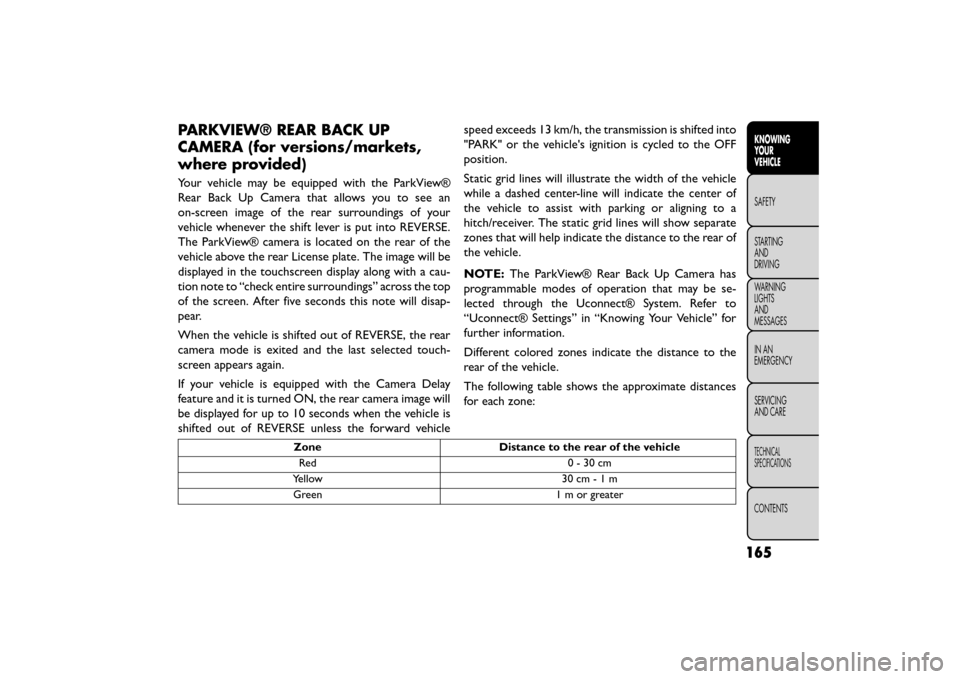
Your vehicle may be equipped with the ParkView®
Rear Back Up Camera that allows you to see an
on-screen image of the rear surroundings of your
vehicle whenever the shift lever is put into REVERSE.
The ParkView® camera is located on the rear of the
vehicle above the rear License plate. The image will be
displayed in the touchscreen display along with a cau-
tion note to “check entire surroundings” across the top
of the screen. After five seconds this note will disap-
pear.
When the vehicle is shifted out of REVERSE, the rear
camera mode is exited and the last selected touch-
screen appears again.
If your vehicle is equipped with the Camera Delay
feature and it is turned ON, the rear camera image will
be displayed for up to 10 seconds when the vehicle is
shifted out of REVERSE unless the forward vehiclespeed exceeds 13 km/h, the transmission is shifted into
"PARK" or the vehicle's ignition is cycled to the OFF
position.
Static grid lines will illustrate the width of the vehicle
while a dashed center-line will indicate the center of
the vehicle to assist with parking or aligning to a
hitch/receiver. The static grid lines will show separate
zones that will help indicate the distance to the rear of
the vehicle.
NOTE:
The ParkView® Rear Back Up Camera has
programmable modes of operation that may be se-
lected through the Uconnect® System. Refer to
“Uconnect® Settings” in “Knowing Your Vehicle” for
further information.
Different colored zones indicate the distance to the
rear of the vehicle.
The following table shows the approximate distances
for each zone:
Zone Distance to the rear of the vehicle
Red 0-30cm
Yellow 30 cm-1m
Green 1 m or greater
165
KNOWING
YOUR
VEHICLE
SAFETY
STAR
TING
AND
DRIVING
WARNING
LIGHTS
AND
MESSAGES
IN AN
EMERGENCY
SERVICING
AND CARE
TECHNICAL
SPECIFICATIONS
CONTENTS
Page 177 of 412
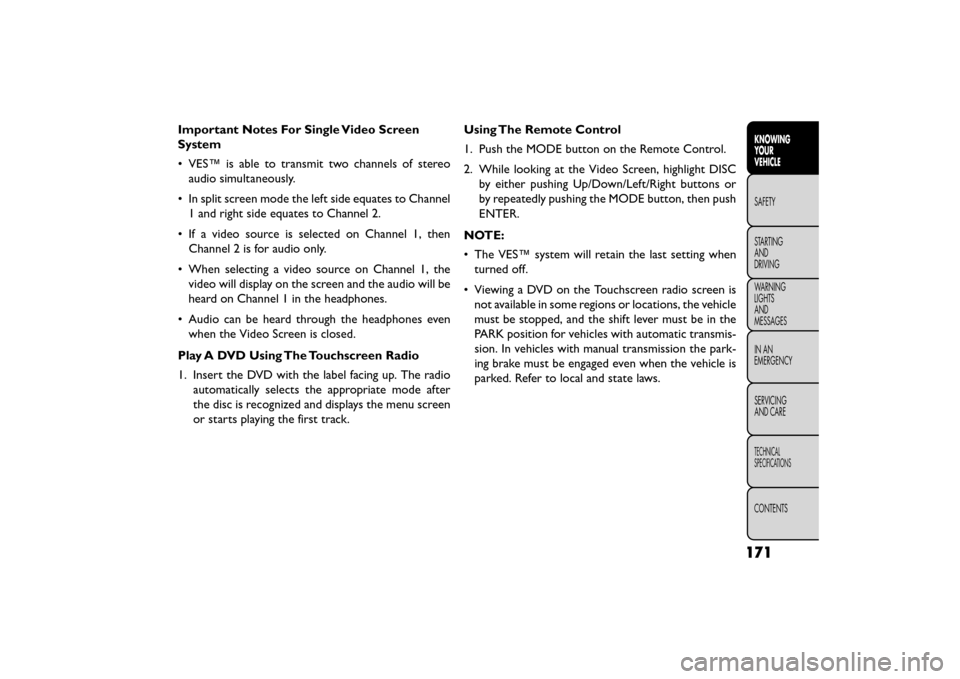
Important Notes For Single Video Screen
System
• VES™ is able to transmit two channels of stereoaudio simultaneously.
• In split screen mode the left side equates to Channel 1 and right side equates to Channel 2.
• If a video source is selected on Channel 1, then Channel 2 is for audio only.
• When selecting a video source on Channel 1, the video will display on the screen and the audio will be
heard on Channel 1 in the headphones.
• Audio can be heard through the headphones even when the Video Screen is closed.
Play A DVD Using The Touchscreen Radio
1. Insert the DVD with the label facing up. The radio automatically selects the appropriate mode after
the disc is recognized and displays the menu screen
or starts playing the first track. Using The Remote Control
1. Push the MODE button on the Remote Control.
2. While looking at the Video Screen, highlight DISC
by either pushing Up/Down/Left/Right buttons or
by repeatedly pushing the MODE button, then push
ENTER.
NOTE:
• The VES™ system will retain the last setting when turned off.
• Viewing a DVD on the Touchscreen radio screen is not available in some regions or locations, the vehicle
must be stopped, and the shift lever must be in the
PARK position for vehicles with automatic transmis-
sion. In vehicles with manual transmission the park-
ing brake must be engaged even when the vehicle is
parked. Refer to local and state laws.
171
KNOWING
YOUR
VEHICLE
SAFETY
STAR
TING
AND
DRIVING
WARNING
LIGHTS
AND
MESSAGES
IN AN
EMERGENCY
SERVICING
AND CARE
TECHNICAL
SPECIFICATIONS
CONTENTS