ignition FIAT FREEMONT 2015 1.G Owner's Manual
[x] Cancel search | Manufacturer: FIAT, Model Year: 2015, Model line: FREEMONT, Model: FIAT FREEMONT 2015 1.GPages: 412, PDF Size: 3.37 MB
Page 100 of 412
LIGHTS-ON REMINDER
If the headlights or parking lights are on after the
ignition is placed in the OFF position, a chime will
sound to alert the driver when the driver's door is
opened.
FRONT AND REAR FOG LIGHTS (for
versions/markets, where provided)
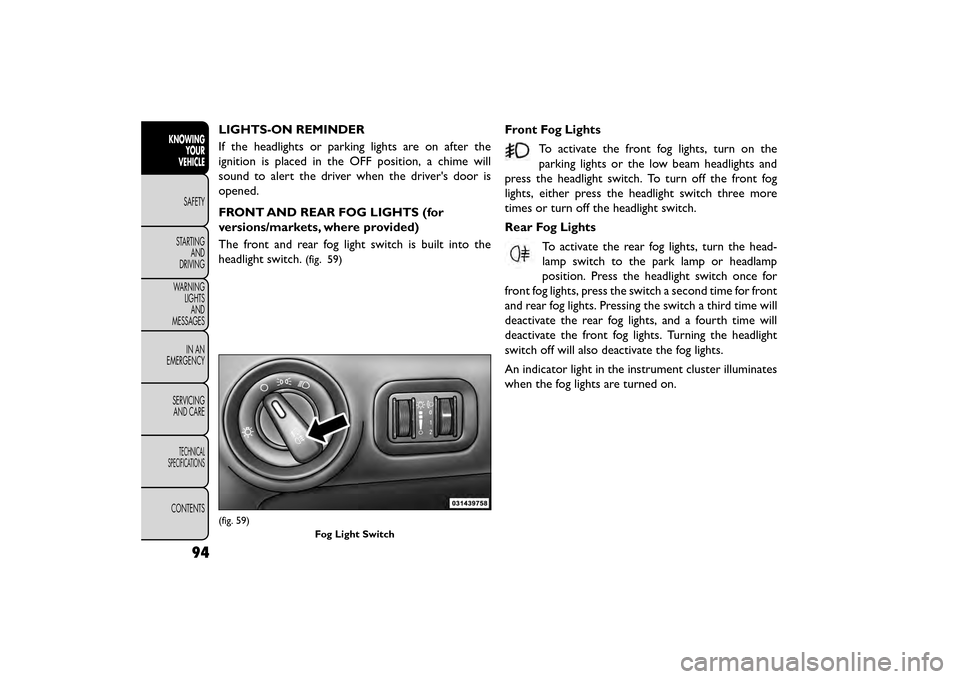
The front and rear fog light switch is built into the
headlight switch.
(fig. 59)
Front Fog LightsTo activate the front fog lights, turn on the
parking lights or the low beam headlights and
press the headlight switch. To turn off the front fog
lights, either press the headlight switch three more
times or turn off the headlight switch.
Rear Fog Lights
To activate the rear fog lights, turn the head-
lamp switch to the park lamp or headlamp
position. Press the headlight switch once for
front fog lights, press the switch a second time for front
and rear fog lights. Pressing the switch a third time will
deactivate the rear fog lights, and a fourth time will
deactivate the front fog lights. Turning the headlight
switch off will also deactivate the fog lights.
An indicator light in the instrument cluster illuminates
when the fog lights are turned on.
(fig. 59)
Fog Light Switch
94
KNOWINGYOUR
VEHICLE
SAFETY
STAR
TINGAND
DRIVING
WARNING LIGHTSAND
MESSAGES
IN AN
EMERGENCY
SERVICINGAND CARE
TECHNICAL
SPECIFICATIONS
CONTENTS
Page 102 of 412
INTERIOR LIGHTS
The interior lights come on when a door is opened.
To protect the battery, the interior lights will turn off
automatically 10 minutes after the ignition switch is
moved to the LOCK position. This will occur if the
interior lights were switched on manually or are on
because a door is open. This includes the glove box
light, but not the trunk light. To restore interior light
operation, either turn the ignition switch ON or cycle
the light switch.
DIMMER CONTROLS
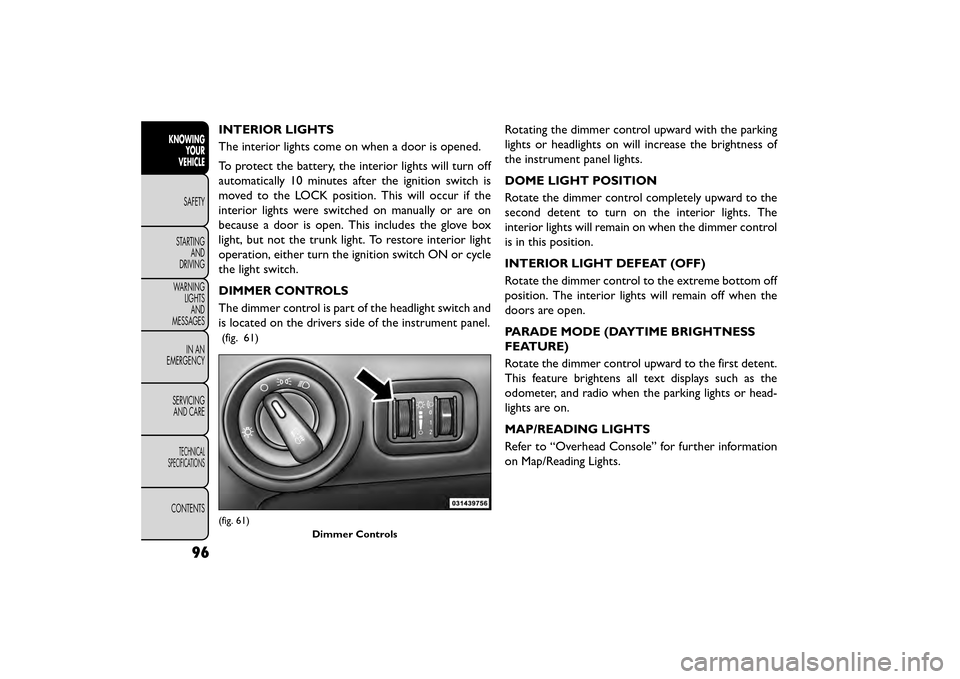
The dimmer control is part of the headlight switch and
is located on the drivers side of the instrument panel.
(fig. 61)
Rotating the dimmer control upward with the parking
lights or headlights on will increase the brightness of
the instrument panel lights.
DOME LIGHT POSITION
Rotate the dimmer control completely upward to the
second detent to turn on the interior lights. The
interior lights will remain on when the dimmer control
is in this position.
INTERIOR LIGHT DEFEAT (OFF)
Rotate the dimmer control to the extreme bottom off
position. The interior lights will remain off when the
doors are open.
PARADE MODE (DAYTIME BRIGHTNESS
FEATURE)
Rotate the dimmer control upward to the first detent.
This feature brightens all text displays such as the
odometer, and radio when the parking lights or head-
lights are on.
MAP/READING LIGHTS
Refer to “Overhead Console” for further information
on Map/Reading Lights.
(fig. 61)Dimmer Controls
96
KNOWINGYOUR
VEHICLE
SAFETY
STAR
TINGAND
DRIVING
WARNING LIGHTSAND
MESSAGES
IN AN
EMERGENCY
SERVICINGAND CARE
TECHNICAL
SPECIFICATIONS
CONTENTS
Page 103 of 412
ILLUMINATED ENTRY
The courtesy lights will turn on when you use the
Remote Keyless Entry (RKE) transmitter to unlock the
doors or open any door or liftgate.
This feature also turns on the approach lighting in the
outside mirrors (for versions/markets, where pro-
vided). Refer to “Mirrors” in “Knowing Your Vehicle”
for further information.
The interior lights will fade to off after approximately
30 seconds or they will immediately fade to off once
the ignition is cycled to the ON/RUN position from the
OFF position.
NOTE:
• The front courtesy overhead console and door cour-tesy lights will turn on if the dimmer control is in the
"Dome ON" position (extreme top position).
• The Illuminated Entry system will not operate if the dimmer control is in the “Dome defeat” position
(extreme bottom position).
WINDSHIELD WIPERS AND
WASHERS
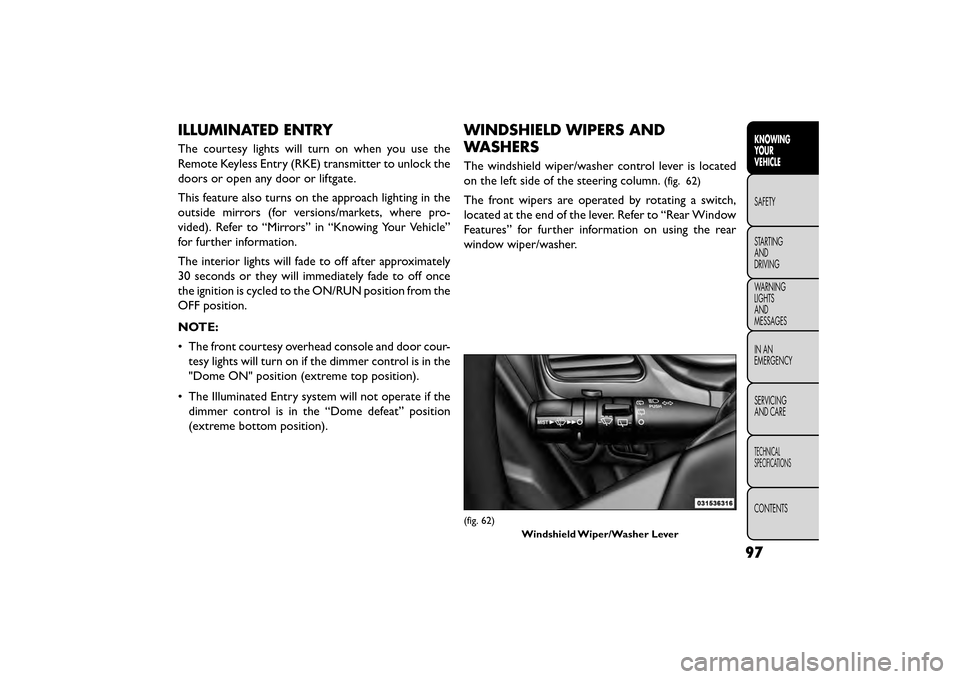
The windshield wiper/washer control lever is located
on the left side of the steering column.
(fig. 62)
The front wipers are operated by rotating a switch,
located at the end of the lever. Refer to “Rear Window
Features” for further information on using the rear
window wiper/washer.
(fig. 62)
Windshield Wiper/Washer Lever
97
KNOWING
YOUR
VEHICLE
SAFETY
STAR
TING
AND
DRIVING
WARNING
LIGHTS
AND
MESSAGES
IN AN
EMERGENCY
SERVICING
AND CARE
TECHNICAL
SPECIFICATIONS
CONTENTS
Page 105 of 412
NOTE:The wipers will automatically return to the
“park” position if you turn OFF the ignition switch
while they are operating. The wipers will resume op-
eration when you turn the ignition switch back to the
ON position.
• Turn the windshield wipers OFF when
driving through an automatic car wash.
Damage to the windshield wipers may
result if the wiper control is left in any position
other than OFF.
• In cold weather, always turn OFF the wiper
switch and allow the wipers to return to the park
position before turning OFF the engine. If the
wiper switch is left ON and the wipers freeze to
the windshield, damage to the wiper motor may
occur when the vehicle is restarted.
• Always remove any buildup of snow that pre-
vents the windshield wiper blades from returning
to the “park” position. If the windshield wiper
control is turned OFF, and the blades cannot
return to the “park” position, damage to the wiper
motor may occur. WINDSHIELD WASHERS
To use the windshield washer, push the washer knob,
located on the end of the multifunction lever, inward to
the second detent.
If you activate the washer while the wiper control is in
the delay range, the wipers will operate in low-speed
for two or three wipe cycles after releasing the lever
and then resume the intermittent interval previously
selected.
If you activate the washer while the wiper control is in
the OFF position, the wipers will operate for two or
three wipe cycles and then turn OFF.
WARNING!
Sudden loss of visibility through the
windshi eld
could lead to a collision. You
might not see other vehicles or other obstacles.To
avoid sudden icing of the windshield during freez-
ing weather, warm the windshield with the de-
froster before and during windshield washer use.
99
KNOWING
YOUR
VEHICLE
SAFETY
STAR
TING
AND
DRIVING
WARNING
LIGHTS
AND
MESSAGES
IN AN
EMERGENCY
SERVICING
AND CARE
TECHNICAL
SPECIFICATIONS
CONTENTS
Page 106 of 412
MIST FEATURE
Push the washer knob, located on the end of the
multifunction lever, inward to the first detent to acti-
vate a single wipe cycle to clear the windshield of road
mist or spray from a passing vehicle. The wipers will
continue to operate until you release the lever.
NOTE:The mist feature does not activate the washer
pump; therefore, no washer fluid will be sprayed on the
windshield. The wash function must be used in order to
spray the windshield with washer fluid.
HEADLIGHTS ON WITH WIPERS (for
versions/markets, where provided)
When this feature is active, the headlights will turn on
after the wipers are turned on if the headlight switch is
placed in the AUTO position and programmable fea-
ture is set to ON. In addition, the headlights will turn
off when the wipers are turned off if they were turned
on by this feature.
NOTE: The Headlights On with Wipers feature can be
turned on or off using the Uconnect® System. Refer to
“Uconnect® Settings” in “Knowing Your Vehicle” for
further information.HEADLIGHT WASHERS (for
versions/markets, where
provided)
The Headlight Washers are recessed into the top of
the fascia, centrally located below each headlight.
The windshield wiper/washer control lever operates
the headlight washers when the ignition switch is in the
ON position and the headlights are ON. The lever is
located on the left side of the steering column.
To use the headlight washers, push the washer knob,
located on the end of the multifunction lever, inward to
the second detent to activate the windshield washers
and release it. When this is done, the two stationary
washer nozzles at each headlight spray one timed
high-pressure spray of washer fluid onto each headlight
lens. In addition, the windshield washers will spray the
windshield and the windshield wipers will cycle.
NOTE: After turning the ignition switch and head-
lights ON, the headlight washers will operate on the
first spray of the windshield washer and then every
eleventh spray after that.
100
KNOWING YOUR
VEHICLE
SAFETY
STAR
TINGAND
DRIVING
WARNING LIGHTSAND
MESSAGES
IN AN
EMERGENCY
SERVICINGAND CARE
TECHNICAL
SPECIFICATIONS
CONTENTS
Page 107 of 412
REAR WINDOW FEATURES
REAR WINDOW WIPER/WASHER
The rear window wiper/washer control is located on
the left side of the steering column.
(fig. 65)
Rotate the switch upward to the first detent
position for rear wiper operation.
NOTE: The rear wiper operates in an intermittent
mode only. Rotate the switch upward past the first detent
position to activate the rear washer. The washer
pump will continue to operate as long as the switch is
held. Upon release, the wiper will cycle three times
before returning to the set position.
(fig. 66)
If the rear wiper is operating when the ignition is
turned to the LOCK position, the wiper will automati-
cally return to the “Park” position. When the vehicle is
restarted, the wiper will resume function at whichever
position the switch is set at.
(fig. 65)
Rear Wiper/Washer(fig. 66)Rear Wiper/Washer Control
101
KNOWING
YOUR
VEHICLE
SAFETY
STAR
TING
AND
DRIVING
WARNING
LIGHTS
AND
MESSAGES
IN AN
EMERGENCY
SERVICING
AND CARE
TECHNICAL
SPECIFICATIONS
CONTENTS
Page 110 of 412
TO DEACTIVATE
A soft tap on the brake pedal, pushing the CANCEL
button, or normal brake pressure while slowing the
vehicle will deactivate the Electronic Speed Control
without erasing the set speed memory.
Pressing the ON/OFF button or turning the ignition
switch OFF erases the set speed memory.
TO RESUME SPEED
To resume a previously set speed, push the RES (+)
button and release. Resume can be used at any speed
above 32 km/h.
TO VARY THE SPEED SETTING
To Increase Speed
When the Electronic Speed Control is set, you can
increase speed by pushing the RES (+) button.
• Pressing the RES (+) button once will result in a2 km/h increase in set speed. Each subsequent tap of
the button results in an increase of 2 km/h.
• If the button is continually pressed, the set speed will continue to increase until the button is released,
then the new set speed will be established. To Decrease Speed
When the Electronic Speed Control is set, you can
decrease speed by pushing the SET (-) button.
• Pressing the SET (-) button once will result in a
2 km/h decrease in set speed. Each subsequent tap of
the button results in a decrease of 2 km/h.
• If the button is continually pressed, the set speed will continue to decrease until the button is released,
then the new set speed will be established.
TO ACCELERATE FOR PASSING
Press the accelerator as you would normally. When the
pedal is released, the vehicle will return to the set
speed.
104
KNOWING YOUR
VEHICLE
SAFETY
STAR
TINGAND
DRIVING
WARNING LIGHTSAND
MESSAGES
IN AN
EMERGENCY
SERVICINGAND CARE
TECHNICAL
SPECIFICATIONS
CONTENTS
Page 113 of 412
NOTE:From the “observation mirror” position, the
door can only be closed.
To return to the full open position, the door must first
be closed and then opened by pressing the latch again
to release.
(fig. 71)
POWER SUNROOF SWITCH (for
versions/markets, where provided)
Refer to “Power Sunroof ” for further information.
HAZARD WARNING FLASHERS
The Hazard Warning flasher switch is located in the
instrument panel switch bank, above the climate
controls.
Press the switch to turn on the Hazard Warning
flasher. When the switch is activated, all direc-
tional turn signals will flash on and off to warn oncom-
ing traffic of an emergency. Press the switch a second
time to turn off the Hazard Warning flashers.
This is an emergency warning system and it should not
be used when the vehicle is in motion. Use it when your
vehicle is disabled and it is creating a safety hazard for
other motorists.
When you must leave the vehicle to seek assistance,
the Hazard Warning flashers will continue to operate
even though the ignition is placed in the OFF position.
NOTE: With extended use the Hazard Warning flash-
ers may wear down your battery.
(fig. 71)
Observation Mirror
107
KNOWING
YOUR
VEHICLE
SAFETY
STAR
TING
AND
DRIVING
WARNING
LIGHTS
AND
MESSAGES
IN AN
EMERGENCY
SERVICING
AND CARE
TECHNICAL
SPECIFICATIONS
CONTENTS
Page 118 of 412
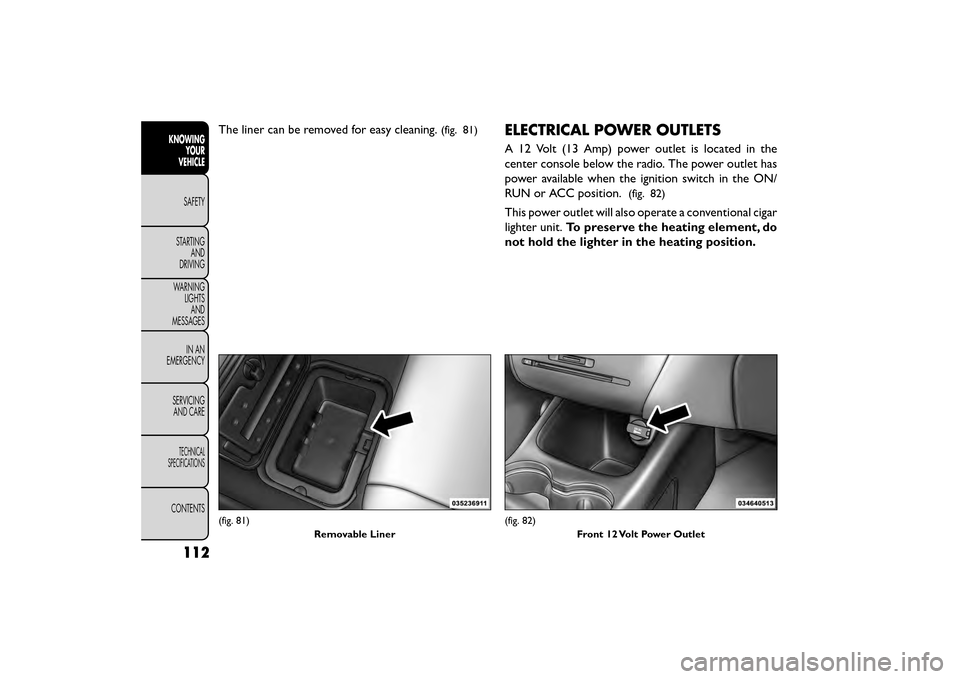
The liner can be removed for easy cleaning.(fig. 81)ELECTRICAL POWER OUTLETS
A 12 Volt (13 Amp) power outlet is located in the
center console below the radio. The power outlet has
power available when the ignition switch in the ON/
RUN or ACC position.
(fig. 82)
This power outlet will also operate a conventional cigar
lighter unit.To preserve the heating element, do
not hold the lighter in the heating position.
(fig. 81)
Removable Liner(fig. 82)Front 12 Volt Power Outlet
112
KNOWINGYOUR
VEHICLE
SAFETY
STAR
TINGAND
DRIVING
WARNING LIGHTSAND
MESSAGES
IN AN
EMERGENCY
SERVICINGAND CARE
TECHNICAL
SPECIFICATIONS
CONTENTS
Page 119 of 412
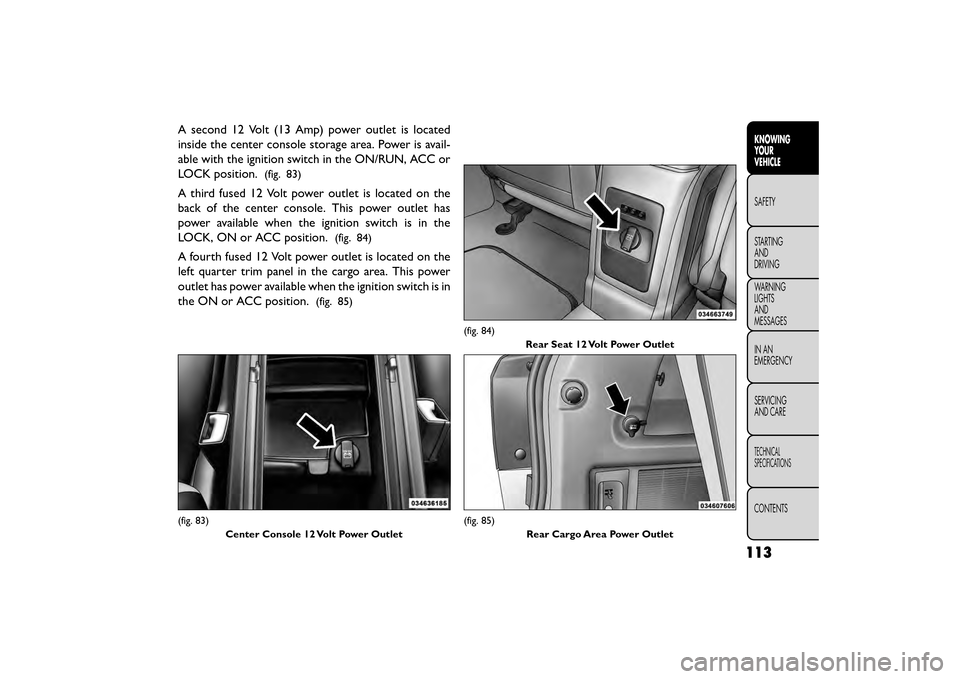
A second 12 Volt (13 Amp) power outlet is located
inside the center console storage area. Power is avail-
able with the ignition switch in the ON/RUN, ACC or
LOCK position.
(fig. 83)
A third fused 12 Volt power outlet is located on the
back of the center console. This power outlet has
power available when the ignition switch is in the
LOCK, ON or ACC position.
(fig. 84)
A fourth fused 12 Volt power outlet is located on the
left quarter trim panel in the cargo area. This power
outlet has power available when the ignition switch is in
the ON or ACC position.
(fig. 85)
(fig. 83)Center Console 12 Volt Power Outlet
(fig. 84) Rear Seat 12 Volt Power Outlet
(fig. 85) Rear Cargo Area Power Outlet
113
KNOWING
YOUR
VEHICLE
SAFETY
STAR
TING
AND
DRIVING
WARNING
LIGHTS
AND
MESSAGES
IN AN
EMERGENCY
SERVICING
AND CARE
TECHNICAL
SPECIFICATIONS
CONTENTS