tow FIAT FREEMONT 2015 1.G Owner's Manual
[x] Cancel search | Manufacturer: FIAT, Model Year: 2015, Model line: FREEMONT, Model: FIAT FREEMONT 2015 1.GPages: 412, PDF Size: 3.37 MB
Page 255 of 412
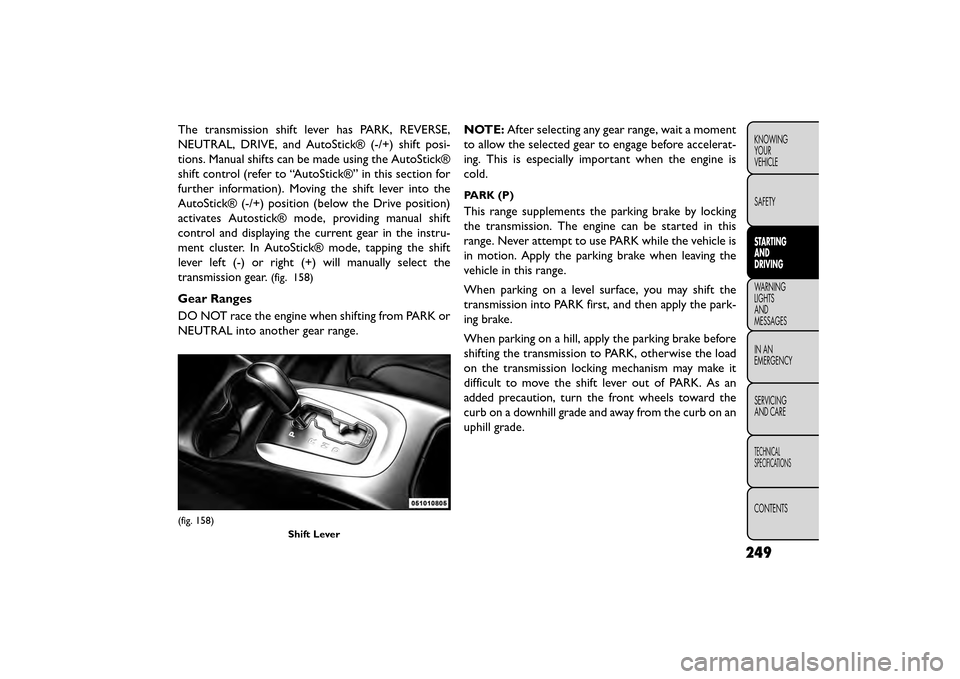
The transmission shift lever has PARK, REVERSE,
NEUTRAL, DRIVE, and AutoStick® (-/+) shift posi-
tions. Manual shifts can be made using the AutoStick®
shift control (refer to “AutoStick®” in this section for
further information). Moving the shift lever into the
AutoStick® (-/+) position (below the Drive position)
activates Autostick® mode, providing manual shift
control and displaying the current gear in the instru-
ment cluster. In AutoStick® mode, tapping the shift
lever left (-) or right (+) will manually select the
transmission gear.
(fig. 158)
Gear Ranges
DO NOT race the engine when shifting from PARK or
NEUTRAL into another gear range.NOTE:
After selecting any gear range, wait a moment
to allow the selected gear to engage before accelerat-
ing. This is especially important when the engine is
cold.
PARK (P)
This range supplements the parking brake by locking
the transmission. The engine can be started in this
range. Never attempt to use PARK while the vehicle is
in motion. Apply the parking brake when leaving the
vehicle in this range.
When parking on a level surface, you may shift the
transmission into PARK first, and then apply the park-
ing brake.
When parking on a hill, apply the parking brake before
shifting the transmission to PARK, otherwise the load
on the transmission locking mechanism may make it
difficult to move the shift lever out of PARK. As an
added precaution, turn the front wheels toward the
curb on a downhill grade and away from the curb on an
uphill grade.
(fig. 158)
Shift Lever
249
KNOWING
YOUR
VEHICLE
SAFETY
STARTING
AND
DRIVING
WARNING
LIGHTS
AND
MESSAGES
INAN
EMERGENC
Y
SERVICING
AND CARE
TECHNICAL
SPECIFICATIONS
CONTENTS
Page 257 of 412
•Before moving the shift lever out of
PARK, you must turn the ignition switch
from the LOCK/OFF position to the ON/
RUN position, and also press the brake pedal.
Otherwise, damage to the shift lever could result .
• DO NOT race the engine when shifting from
PARK or NEUTRAL into another gear range, as
this can damage the drivetrain.
The following indicators should be used to ensure that
you have engaged the transmission into the PARK
position:
• When shifting into PARK, firmly move the shift lever all the way forward and to the left until it stops and is
fully seated.
• Look at the transmission gear position display and verify that it indicates the PARK position.
• With brake pedal released, verify that the shift lever will not move out of PARK.
REVERSE (R)
This range is for moving the vehicle backward. Shift into
REVERSE only after the vehicle has come to a complete
stop.
NEUTRAL (N)
Use this range when the vehicle is standing for pro-
longed periods with the engine running. The engine may be started in this range. Apply the parking brake
and shift the transmission into PARK if you must leave
the vehicle.
WARNING!
Do not coast in NEUTRAL and never
turn of
f the ignition to coast down a hill.
These are unsafe practices that limit your re-
sponse to changing traffic or road conditions.You
might lose control of the vehicle and have a
collision.
Towing the vehicle, coasting, or driving
for any other reason with the transmis-
sion in NEUTRAL can cause severe trans-
mission damage. Refer to “Recreational Towing”
in “Starting and Driving” and “Towing A Disabled
Vehicle” in “What To Do In Emergencies” for fur-
ther information.
DRIVE (D)
This range should be used for most city and highway
driving. It provides the smoothest upshifts and down-
shifts, and the best fuel economy. The transmission
automatically upshifts through all forward gears. The
DRIVE position provides optimum driving characteris-
tics under all normal operating conditions.
251
KNOWING
YOUR
VEHICLE
SAFETY
STARTING
AND
DRIVING
WARNING
LIGHTS
AND
MESSAGES
IN AN
EMERGENC
Y
SERVICING
AND CARE
TECHNICAL
SPECIFICATIONS
CONTENTS
Page 258 of 412
When frequent transmission shifting occurs (such as
when operating the vehicle under heavy loading condi-
tions, in hilly terrain, traveling into strong head winds,
or while towing heavy trailers), use the AutoStick®
shift control (refer to “AutoStick®” in this section for
further information) to select a lower gear. Under
these conditions, using a lower gear will improve per-
formance and extend transmission life by reducing
excessive shifting and heat buildup.
If the transmission temperature exceeds normal oper-
ating limits, the powertrain controller will modify the
transmission shift schedule and expand the range of
torque converter clutch engagement. This is done to
prevent transmission damage due to overheating.
During cold temperatures, transmission operation may
be modified depending on engine and transmission
temperature as well as vehicle speed. This feature
improves warm up time of the engine and transmission
to achieve maximum efficiency.
Engagement of the torque converter clutch is inhibited
until the transmission fluid is warm (refer to the "Note"
under "Torque Converter Clutch" in this section).
During extremely cold temperatures (-27°C or below),
operation may briefly be limited to only second gear
(for four-speed transmission) or third gear (for six-
speed transmission).Transmission Limp Home Mode
Transmission function is monitored electronically for
abnormal conditions. If a condition is detected that
could result in transmission damage, Transmission
Limp Home Mode is activated. In this mode, the trans-
mission remains in second gear (for four-speed trans-
mission) or third gear (for six-speed transmission)
regardless of which forward gear is selected. PARK,
REVERSE, and NEUTRAL will continue to operate.
The Malfunction Indicator Light (MIL) may be illumi-
nated. Limp Home Mode allows the vehicle to be
driven to an authorized dealer for service without
damaging the transmission.
In the event of a momentary problem, the transmission
can be reset to regain all forward gears by performing
the following steps:
1. Stop the vehicle.
2. Shift the transmission into PARK.
3. Turn the ignition switch to the LOCK/OFF position.
4. Wait approximately 10 seconds.
5. Restart the engine.
6. Shift into the desired gear range. If the problem is nolonger detected, the transmission will return to
normal operation.
252
KNOWING YOUR
VEHICLE
SAFETY
STARTING AND
DRIVING
WARNING LIGHTSAND
MESSAGES
INAN
EMERGENC
Y
SERVICING AND CARE
TECHNICAL
SPECIFICATIONS
CONTENTS
Page 260 of 412
AUTOSTICK
AutoStick is a driver-interactive transmission feature
providing manual shift control, giving you more control
of the vehicle. AutoStick allows you to maximize en-
gine braking, eliminate undesirable upshifts and down-
shifts, and improve overall vehicle performance.
This system can also provide you with more control
during passing, city driving, cold slippery conditions,
mountain driving, trailer towing, and many other situ-
ations.
OPERATION
When the shift lever is in the AutoStick position
(below the DRIVE position), it can be moved from side
to side. This allows the driver to manually select the
transmission gear being used. Moving the shift lever to
the left (-) triggers a downshift and to the right (+) an
upshift. The current gear will be displayed in the instru-
ment cluster.In AutoStick mode, the transmission will shift up or
down when the driver moves the shift lever to the right
(+) or left (-), unless an engine lugging or overspeed
condition would result. It will remain in the selected
gear until another upshift or downshift is chosen,
except as described below.
• The transmission will automatically upshift when
necessary to prevent engine over-speed.
• The transmission will automatically downshift as the vehicle slows (to prevent engine lugging) and will
display the current gear.
• The transmission will automatically downshift to first gear when coming to a stop. After a stop, the driver
should manually upshift (+) the transmission as the
vehicle is accelerated.
• You can start out, from a stop, in first or second gear. Tapping (+) (at a stop) will allow starting in second
gear. Starting out in second gear is helpful in snow or
icy conditions.
254
KNOWING YOUR
VEHICLE
SAFETY
STARTING AND
DRIVING
WARNING LIGHTSAND
MESSAGES
INAN
EMERGENC
Y
SERVICING AND CARE
TECHNICAL
SPECIFICATIONS
CONTENTS
Page 264 of 412
WARNING!
• Driving through standing water limits
y our
vehicle’s traction capabilities. Do
not exceed 8 km/h when driving through standing
water.
• Driving through standing water limits your ve-
hicle’s braking capabilities, which increases stop-
ping distances. Therefore, after driving through
standing water, drive slowly and lightly press on
the brake pedal several times to dr y the brakes.
• Getting water inside your vehicle’s engine can
cause it to lock up and stall out , and leave you
stranded.
• Failure to follow these warnings may result in
injuries that are serious or fatal to you, your
passengers, and others around you.
TRAILER TOWING
In this section you will find safety tips and information
on limits to the type of towing you can reasonably do
with your vehicle. Before towing a trailer, carefully
review this information to tow your load as efficiently
and safely as possible.
To maintain the New Vehicle Limited Warranty cover-
age, follow the requirements and recommendations in
this manual concerning vehicles used for trailer towing.
COMMON TOWING DEFINITIONS
The following trailer towing related definitions will
assist you in understanding the following information:
Gross Vehicle Weight Rating (GVWR)
The GVWR is the total allowable weight of your
vehicle. This includes driver, passengers, cargo, and
tongue weight. The total load must be limited so that
you do not exceed the GVWR.
258
KNOWING YOUR
VEHICLE
SAFETY
STARTING AND
DRIVING
WARNING LIGHTSAND
MESSAGES
INAN
EMERGENC
Y
SERVICING AND CARE
TECHNICAL
SPECIFICATIONS
CONTENTS
Page 266 of 412
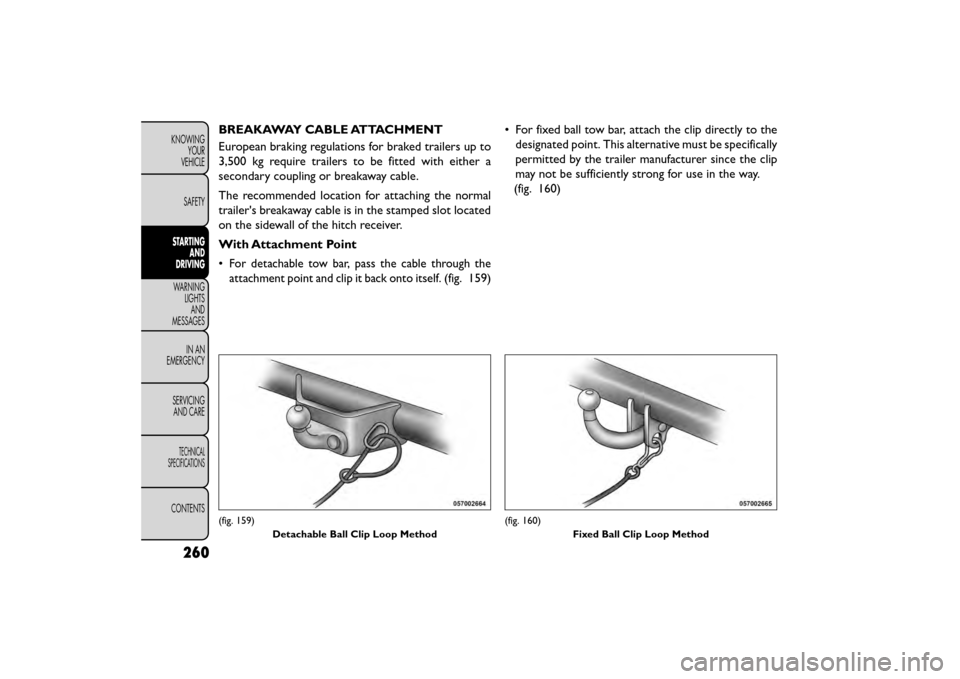
BREAKAWAY CABLE ATTACHMENT
European braking regulations for braked trailers up to
3,500 kg require trailers to be fitted with either a
secondary coupling or breakaway cable.
The recommended location for attaching the normal
trailer's breakaway cable is in the stamped slot located
on the sidewall of the hitch receiver.
With Attachment Point
•
For detachable tow bar, pass the cable through the
attachment point and clip it back onto itself.
(fig. 159)• For fixed ball tow bar, attach the clip directly to the
designated point. This alternative must be specifically
permitted by the trailer manufacturer since the clip
may not be sufficiently strong for use in the way.
(fig. 160)
(fig. 159)
Detachable Ball Clip Loop Method(fig. 160) Fixed Ball Clip Loop Method
260
KNOWINGYOUR
VEHICLE
SAFETY
STARTING AND
DRIVING
WARNING LIGHTSAND
MESSAGES
INAN
EMERGENC
Y
SERVICING AND CARE
TECHNICAL
SPECIFICATIONS
CONTENTS
Page 267 of 412
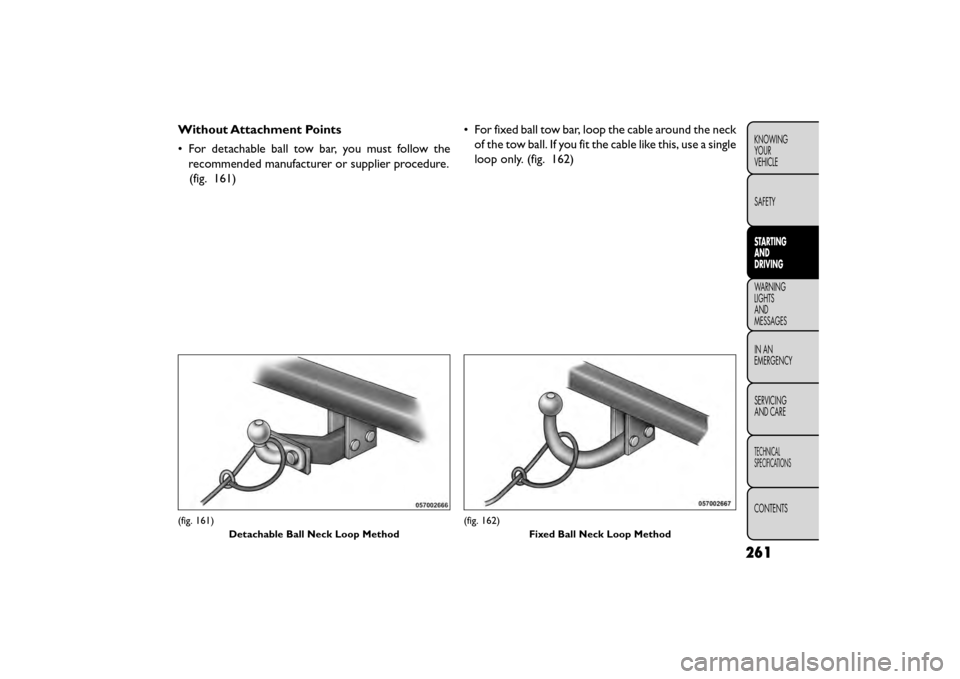
Without Attachment Points
• For detachable ball tow bar, you must follow therecommended manufacturer or supplier procedure.(fig. 161) • For fixed ball tow bar, loop the cable around the neck
of the tow ball. If you fit the cable like this, use a single
loop only. (fig. 162)
(fig. 161)
Detachable Ball Neck Loop Method(fig. 162) Fixed Ball Neck Loop Method
261
KNOWING
YOUR
VEHICLE
SAFETY
STARTING
AND
DRIVING
WARNING
LIGHTS
AND
MESSAGES
INAN
EMERGENC
Y
SERVICING
AND CARE
TECHNICAL
SPECIFICATIONS
CONTENTS
Page 268 of 412
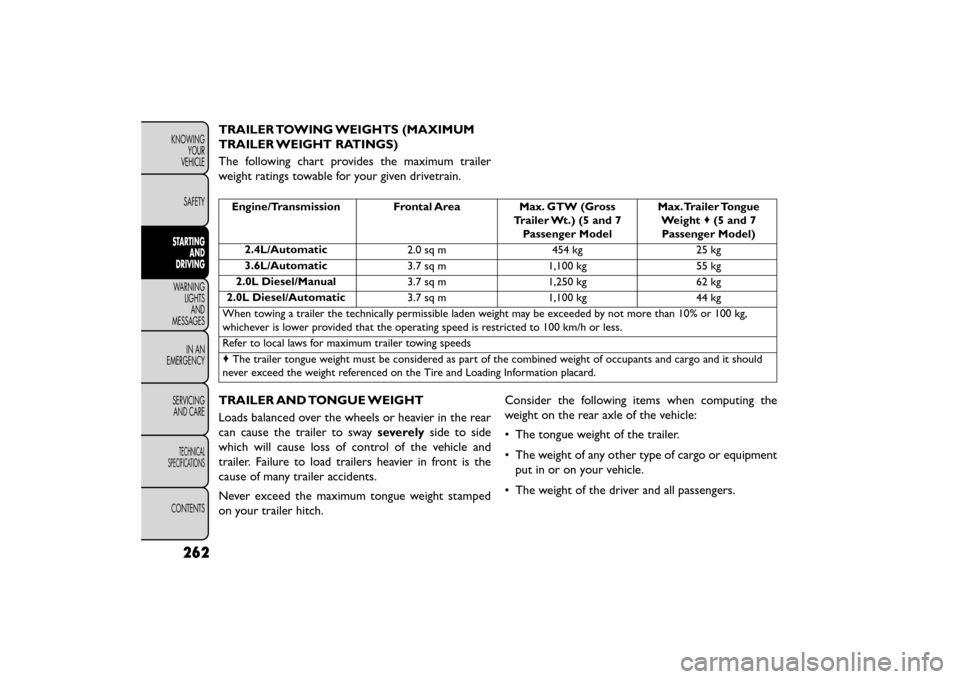
TRAILER TOWING WEIGHTS (MAXIMUM
TRAILER WEIGHT RATINGS)
The following chart provides the maximum trailer
weight ratings towable for your given drivetrain.
Engine/Transmission Frontal AreaMax. GTW (Gross
Trailer Wt.) (5 and 7 Passenger Model Max.Trailer Tongue
Weight ♦(5 and 7
Passenger Model)
2.4L/Automatic 2.0 sq m454 kg25 kg
3.6L/Automatic 3.7 sq m1,100 kg 55 kg
2.0L Diesel/Manual 3.7 sq m1,250 kg 62 kg
2.0L Diesel/Automatic 3.7 sq m1,100 kg 44 kg
When towing a trailer the technically permissible laden weight may be exceeded by not more than 10% or 100 kg,
whichever is lower provided that the operating speed is restricted to 100 km/h or less.
Refer to local laws for maximum trailer towing speeds
♦ The trailer tongue weight must be considered as part of the combined weight of occupants and cargo and it should
never exceed the weight referenced on the Tire and Loading Information placard.
TRAILER AND TONGUE WEIGHT
Loads balanced over the wheels or heavier in the rear
can cause the trailer to sway severelyside to side
which will cause loss of control of the vehicle and
trailer. Failure to load trailers heavier in front is the
cause of many trailer accidents.
Never exceed the maximum tongue weight stamped
on your trailer hitch. Consider the following items when computing the
weight on the rear axle of the vehicle:
• The tongue weight of the trailer.
• The weight of any other type of cargo or equipment
put in or on your vehicle.
• The weight of the driver and all passengers.
262
KNOWING YOUR
VEHICLE
SAFETY
STARTING AND
DRIVING
WARNING LIGHTSAND
MESSAGES
INAN
EMERGENC
Y
SERVICING AND CARE
TECHNICAL
SPECIFICATIONS
CONTENTS
Page 269 of 412
NOTE:Remember that everything put into or on the
trailer adds to the load on your vehicle. Also, additional
factory-installed options or dealer-installed options
must be considered as part of the total load on your
vehicle. Refer to the Tire and Loading Information
placard, located on the face of the driver's door or on
the driver's side “B” pillar, for the maximum combined
weight of occupants and cargo for your vehicle.
TOWING REQUIREMENTS
To promote proper break-in of your new vehicle drive-
train components the following guidelines are recom-
mended:
• Do not tow a trailer at all during the
first 805 km the new vehicle is driven.The
engine, axle or other parts could be dam-
aged.
• Then, during the first 805 km that a trailer is
towed, do not drive over 80 km/h and do not make
starts at full throttle. This helps the engine and
other parts of the vehicle wear in at the heavier
loads.
Perform the maintenance listed in the Maintenance
Schedule. When towing a trailer, never exceed the
GAWR ratings.
WARNING!
Improper towing can lead to an injury
acci den
t . Follow these guidelines to
make your trailer towing as safe as possible:
• Make certain that the load is secured in the
trailer and that it will not shift during travel.
When trailering cargo that is not fully secured,
dynamic load shifts can occur that may be diffi-
cult for the driver to control.You could lose con-
trol of your vehicle and have an accident .
• All trailer hitches should be professionally in-
stalled on your vehicle.
• When hauling cargo or towing a trailer, do not
overload your vehicle or trailer. Overloading can
cause a loss of control, poor performance, or
damage to brakes, axle, engine, transmission,
steering, suspension, chassis structure, or tires.
• Safety chains must always be used between
your vehicle and trailer. Always connect the
chains to the frame or hook retainers of the
vehicle hitch. Cross the chains under the trailer
tongue and allow enough slack for turning cor-
ners.
(Continued)
263
KNOWING
YOUR
VEHICLE
SAFETY
STARTING
AND
DRIVING
WARNING
LIGHTS
AND
MESSAGES
INAN
EMERGENC
Y
SERVICING
AND CARE
TECHNICAL
SPECIFICATIONS
CONTENTS
Page 270 of 412
WARNING! (Continued)
• Vehicles with trailers should not be parked on a
grade.When parking, apply the parking brake on
the tow vehicle. Always, block or "chock" the
trailer wheels.
• GCWR must not be exceeded.
• Total weight must be distributed between
the tow vehicle and the trailer such that the
following four ratings are not exceeded:1.
GVWR 2. GTW 3. GAWR 4.Tongue weight rating
for the trailer hitch utilized.
Towing Requirements — Tires
• Do not attempt to tow a trailer while using a com- pact spare tire.
• Proper tire inflation pressures are essential for the safe and satisfactory operation of your vehicle. Refer
to “Tires – General Information” in “Technical Speci-
fications” for proper tire inflation procedures.
• Check the trailer tires for proper tire inflation pres- sures before trailer usage.
• Check for signs of tire wear or visible tire damage before towing a trailer. Refer to “Tires – General
Information” in “Technical Specifications” for the
proper tire inspection procedures. • When replacing tires, refer to “Tires – General
Information” in “Technical Specifications” for proper
tire replacement procedures. Replacing tires with a
higher load carrying capacity will not increase the
vehicle's GVWR and GAWR limits.
Towing Requirements — Trailer Brakes
•Do notinterconnect the hydraulic brake system or
vacuum system of your vehicle with that of the
trailer. This could cause inadequate braking and pos-
sible personal injury.
• When towing a trailer equipped with a hydraulic surge actuated brake system, an electronic brake
controller is not required.
• Trailer brakes are recommended for trailers over 450 kg and required for trailers in excess of 750 kg.
If the trailer weighs more than 450 kg
loaded, it should have its own brakes, and
they should be of adequate capacity. Fail-
ure to do this could lead to accelerated brake
lining wear, higher brake pedal effort , and longer
stopping distances.
264
KNOWING YOUR
VEHICLE
SAFETY
STARTING AND
DRIVING
WARNING LIGHTSAND
MESSAGES
INAN
EMERGENC
Y
SERVICING AND CARE
TECHNICAL
SPECIFICATIONS
CONTENTS