power outlet FIAT FREEMONT 2015 1.G Owners Manual
[x] Cancel search | Manufacturer: FIAT, Model Year: 2015, Model line: FREEMONT, Model: FIAT FREEMONT 2015 1.GPages: 412, PDF Size: 3.37 MB
Page 12 of 412
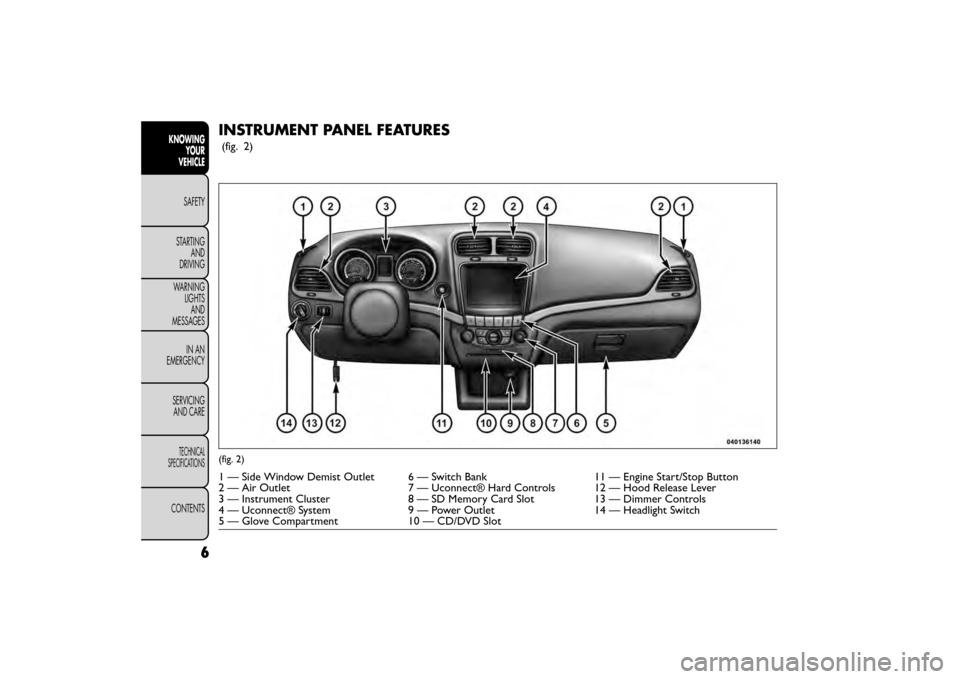
INSTRUMENT PANEL FEATURES
(fig. 2)
(fig. 2)
1 — Side Window Demist Outlet 6 — Switch Bank11 — Engine Start/Stop Button
2 — Air Outlet 7 — Uconnect® Hard Controls 12 — Hood Release Lever
3 — Instrument Cluster 8 — SD Memory Card Slot13 — Dimmer Controls
4 — Uconnect® System 9 — Power Outlet14 — Headlight Switch
5 — Glove Compartment 10 — CD/DVD Slot
6
KNOWING
YOUR
VEHICLE
SAFETY
STAR
TINGAND
DRIVING
WARNING LIGHTSAND
MESSAGES
IN AN
EMERGENCY
SERVICINGAND CARE
TECHNICAL
SPECIFICATIONS
CONTENTS
Page 16 of 412
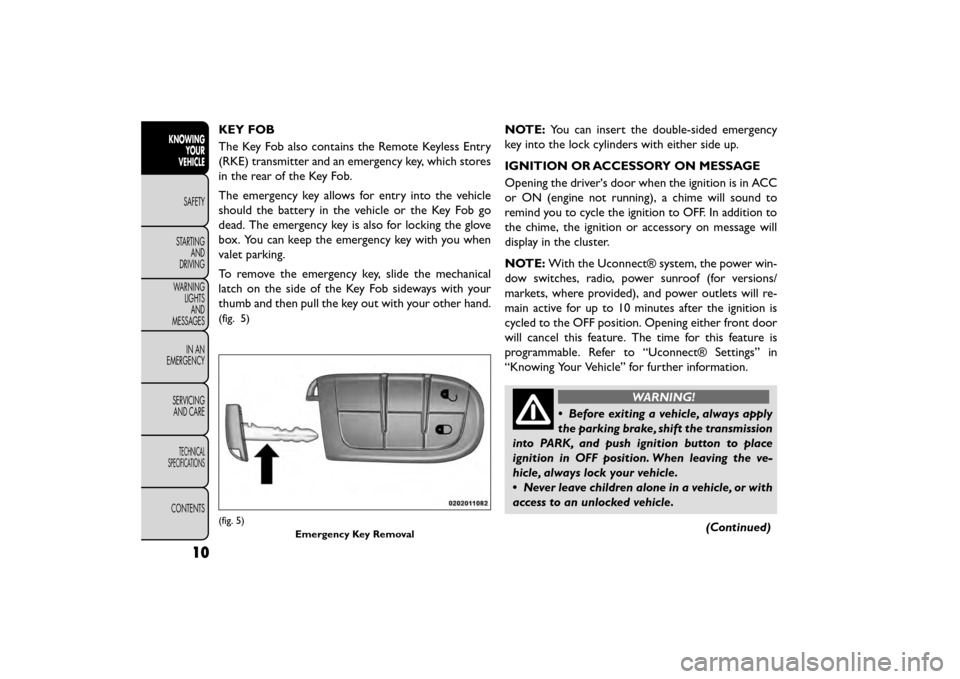
KEY FOB
The Key Fob also contains the Remote Keyless Entry
(RKE) transmitter and an emergency key, which stores
in the rear of the Key Fob.
The emergency key allows for entry into the vehicle
should the battery in the vehicle or the Key Fob go
dead. The emergency key is also for locking the glove
box. You can keep the emergency key with you when
valet parking.
To remove the emergency key, slide the mechanical
latch on the side of the Key Fob sideways with your
thumb and then pull the key out with your other hand.
(fig. 5)
NOTE:You can insert the double-sided emergency
key into the lock cylinders with either side up.
IGNITION OR ACCESSORY ON MESSAGE
Opening the driver's door when the ignition is in ACC
or ON (engine not running), a chime will sound to
remind you to cycle the ignition to OFF. In addition to
the chime, the ignition or accessory on message will
display in the cluster.
NOTE: With the Uconnect® system, the power win-
dow switches, radio, power sunroof (for versions/
markets, where provided), and power outlets will re-
main active for up to 10 minutes after the ignition is
cycled to the OFF position. Opening either front door
will cancel this feature. The time for this feature is
programmable. Refer to “Uconnect® Settings” in
“Knowing Your Vehicle” for further information.
WARNING!
• Before exiting a vehicle, always apply
t h
e parking brake, shift the transmission
into PARK, and push ignition button to place
ignition in OFF position. When leaving the ve-
hicle, always lock your vehicle.
• Never leave children alone in a vehicle, or with
access to an unlocked vehicle.
(Continued)
(fig. 5)Emergency Key Removal
10
KNOWINGYOUR
VEHICLE
SAFETY
STAR
TINGAND
DRIVING
WARNING LIGHTSAND
MESSAGES
IN AN
EMERGENCY
SERVICINGAND CARE
TECHNICAL
SPECIFICATIONS
CONTENTS
Page 43 of 412
• Passive Entry (Keyless Enter-N-Go™) (for
versions/markets, where provided)
Press the Passive Entry button on the touchscreen to
change this display. This feature allows you to lock and
unlock the vehicle’s door(s) without having to press the
RKE transmitter lock or unlock buttons. To make your
selection, press the Passive Entry button on the touch-
screen, select ON or OFF followed by pressing the
arrow back button on the touchscreen. Refer to “Key-
less Enter-N-Go™” in “Knowing Your Vehicle”.
Heated Seats (for versions/markets, where
provided)
• Auto Heated Seats (for versions/markets, where
provided)
Press the Auto Heated Seats button on the touch-
screen to change this display. When this feature is
selected the driver's heated seat will automatically turn
on when temperatures are below 4.4° C. To make your
selection, press the Auto Heated Seats button on the
touchscreen, select On or Off followed by pressing the
arrow back button on the touchscreen.Engine Off Options
• Headlight Off Delay
Press the Headlight Off Delay button on the touch-
screen to change this display. When this feature is
selected, the driver can choose to have the headlights
remain on for 0, 30, 60, or 90 seconds when exiting the
vehicle. To change the Headlight Off Delay status press
the 0, 30, 60 or 90 button on the touchscreen followed
by pressing the arrow back button on the touchscreen.
• Engine Off Power Delay (for versions/markets,
where provided)
Press the Engine Off Power Delay button on the
touchscreen to change this display. When this feature is
selected, the power window switches, radio,
Uconnect® phone system (for versions/markets,
where provided), DVD video system (for versions/
markets, where provided), power sunroof (for
versions/markets, where provided), and power outlets
will remain active for up to 10 minutes after the ignition
is cycled to OFF. Opening either front vehicle door will
cancel this feature. To change the Engine Off Power
Delay status press the 0 seconds, 45 seconds, 5 min-
utes or 10 minutes button on the touchscreen followed
by pressing the arrow back button on the touchscreen.
37
KNOWING
YOUR
VEHICLE
SAFETY
STAR
TING
AND
DRIVING
WARNING
LIGHTS
AND
MESSAGES
IN AN
EMERGENCY
SERVICING
AND CARE
TECHNICAL
SPECIFICATIONS
CONTENTS
Page 51 of 412
NOTE:If the vehicle is equipped with Keyless Enter-
N-Go™ (Passive Entry) and the EVIC is programmed
to Unlock All Doors 1st Press, all doors will unlock no
matter which Passive Entry equipped door handle is
grasped. If Driver Door 1st Press is programmed, only
the driver’s door will unlock when the driver’s door is
grasped. With Passive Entry, if Driver Door 1st Press is
programmed pressing the handle more than once will
only result in the driver’s door opening. If driver door
first is selected, once the driver door is opened, the
interior door lock/unlock switch can be used to unlock
all doors (or use RKE transmitter).
• Passive Entry (for versions/markets, where pro-
vided)
This feature allows you to lock and unlock the vehicle’s
door(s) without having to press the RKE transmitter
lock or unlock buttons. To make your selection, press
the Passive Entry button on the touchscreen, select
ON or OFF followed by pressing the arrow back
button on the touchscreen. Refer to “Keyless Enter-N-
Go™” in “Knowing Your Vehicle”. Engine Off Options
• Engine Off Power Delay
When this feature is selected, the power window
switches, radio, Uconnect® phone system (for
versions/markets, where provided), DVD video system
(for versions/markets, where provided), power sunroof
(for versions/markets, where provided), and power
outlets will remain active for up to 10 minutes after the
ignition is cycled OFF. Opening either front vehicle
door will cancel this feature. To change the Engine Off
Power Delay status press the 0 seconds, 45 seconds, 5
minutes or 10 minutes button on the touchscreen
followed by pressing the arrow back button on the
touchscreen.
• Headlight Off Delay (for versions/markets,
where provided)
When this feature is selected, the driver can choose to
have the headlights remain on for 0, 30, 60, or 90
seconds when exiting the vehicle. To change the Head-
light Off Delay status press the 0, 30, 60 or 90 button
on the touchscreen followed by pressing the arrow
back button on the touchscreen.
45
KNOWING
YOUR
VEHICLE
SAFETY
STAR
TING
AND
DRIVING
WARNING
LIGHTS
AND
MESSAGES
IN AN
EMERGENCY
SERVICING
AND CARE
TECHNICAL
SPECIFICATIONS
CONTENTS
Page 118 of 412
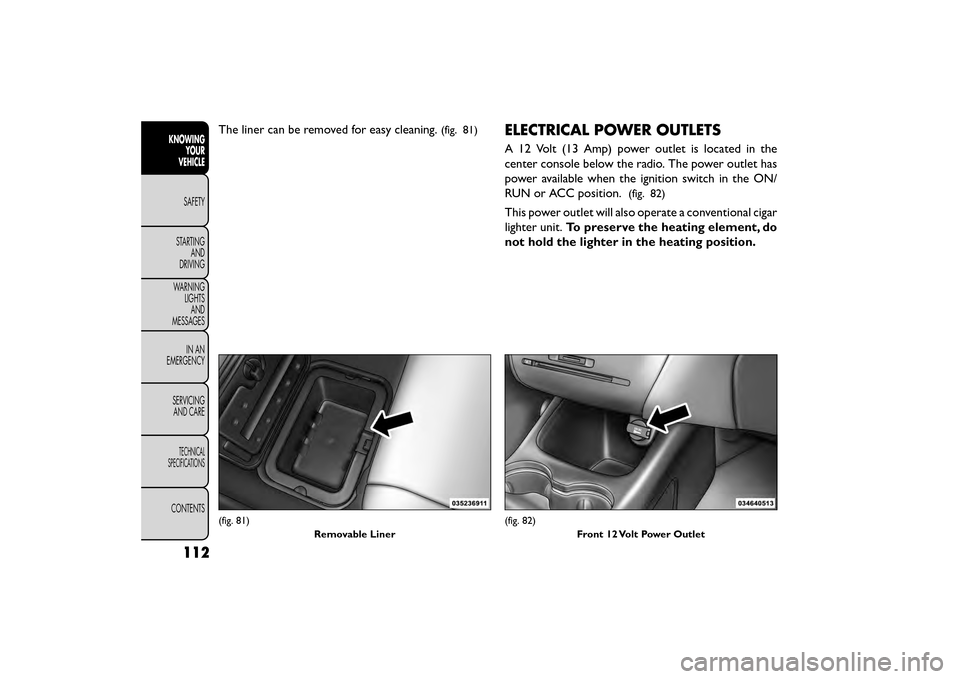
The liner can be removed for easy cleaning.(fig. 81)ELECTRICAL POWER OUTLETS
A 12 Volt (13 Amp) power outlet is located in the
center console below the radio. The power outlet has
power available when the ignition switch in the ON/
RUN or ACC position.
(fig. 82)
This power outlet will also operate a conventional cigar
lighter unit.To preserve the heating element, do
not hold the lighter in the heating position.
(fig. 81)
Removable Liner(fig. 82)Front 12 Volt Power Outlet
112
KNOWINGYOUR
VEHICLE
SAFETY
STAR
TINGAND
DRIVING
WARNING LIGHTSAND
MESSAGES
IN AN
EMERGENCY
SERVICINGAND CARE
TECHNICAL
SPECIFICATIONS
CONTENTS
Page 119 of 412
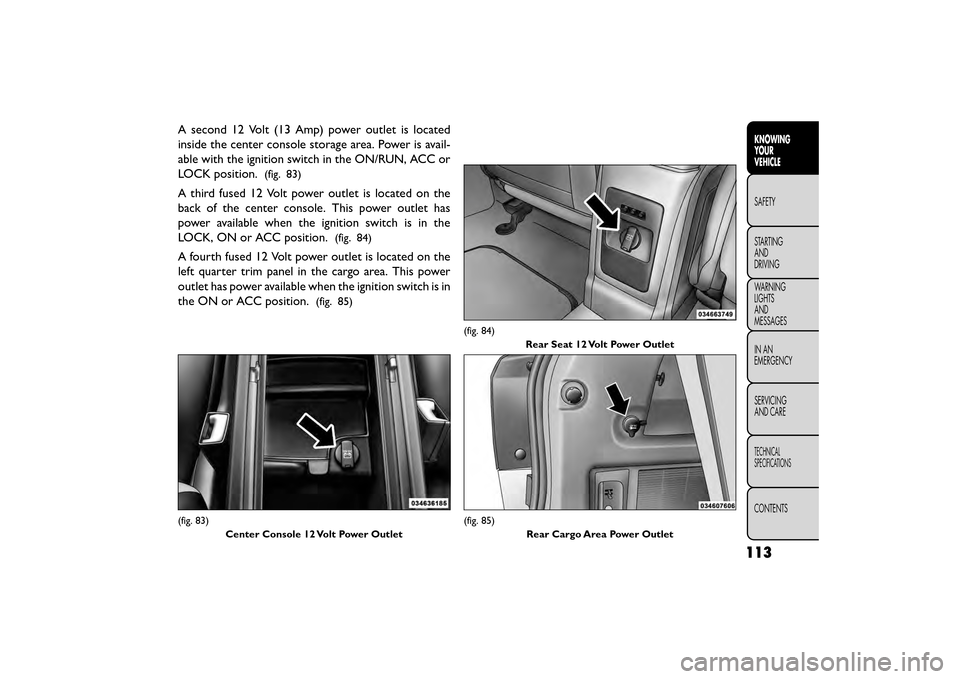
A second 12 Volt (13 Amp) power outlet is located
inside the center console storage area. Power is avail-
able with the ignition switch in the ON/RUN, ACC or
LOCK position.
(fig. 83)
A third fused 12 Volt power outlet is located on the
back of the center console. This power outlet has
power available when the ignition switch is in the
LOCK, ON or ACC position.
(fig. 84)
A fourth fused 12 Volt power outlet is located on the
left quarter trim panel in the cargo area. This power
outlet has power available when the ignition switch is in
the ON or ACC position.
(fig. 85)
(fig. 83)Center Console 12 Volt Power Outlet
(fig. 84) Rear Seat 12 Volt Power Outlet
(fig. 85) Rear Cargo Area Power Outlet
113
KNOWING
YOUR
VEHICLE
SAFETY
STAR
TING
AND
DRIVING
WARNING
LIGHTS
AND
MESSAGES
IN AN
EMERGENCY
SERVICING
AND CARE
TECHNICAL
SPECIFICATIONS
CONTENTS
Page 120 of 412
•Do not exceed the maximum power of
160Watts (13 Amps) at 12Volts. If the 160
Watt (13 Amp) power rating is exceeded
the fuse protecting the system will need to be
replaced.
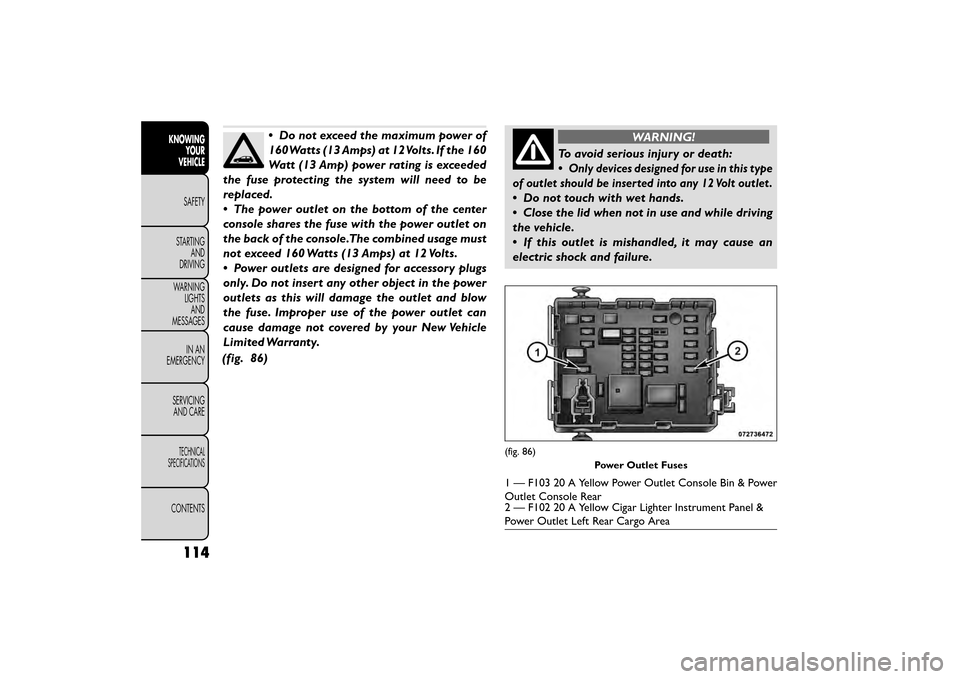
• The power outlet on the bottom of the center
console shares the fuse with the power outlet on
the back of the console.The combined usage must
not exceed 160 Watts (13 Amps) at 12 Volts.
• Power outlets are designed for accessory plugs
only. Do not insert any other object in the power
outlets as this will damage the outlet and blow
the fuse. Improper use of the power outlet can
cause damage not covered by your New Vehicle
Limited Warranty.
(fig. 86)WARNING!
To avoid serious injury or death:
•
Only devices designed for use in this type
of outlet should be inserted into any 12 Volt outlet .
• Do not touch with wet hands.
• Close the lid when not in use and while driving
the vehicle.
• If this outlet is mishandled, it may cause an
electric shock and failure.
(fig. 86)
Power Outlet Fuses
1 — F103 20 A Yellow Power Outlet Console Bin & Power
Outlet Console Rear
2 — F102 20 A Yellow Cigar Lighter Instrument Panel &
Power Outlet Left Rear Cargo Area
114
KNOWINGYOUR
VEHICLE
SAFETY
STAR
TINGAND
DRIVING
WARNING LIGHTSAND
MESSAGES
IN AN
EMERGENCY
SERVICINGAND CARE
TECHNICAL
SPECIFICATIONS
CONTENTS
Page 121 of 412
•Many accessories that can be plugged
in draw power from the vehicle's battery,
even when not in use (i.e., cellular
phones, etc .). Eventually, if plugged in long
enough, the vehicle's battery will discharge suffi-
ciently to degrade battery life and/or prevent the
engine from starting.
• Accessories that draw higher power (i.e., cool-
ers, vacuum cleaners, lights, etc .) will degrade the
battery even more quickly. Only use these inter-
mittently and with greater caution.
• After the use of high power draw accessories, or
long periods of the vehicle not being started (with
accessories still plugged in), the vehicle must be
driven a sufficient length of time to allow the
alternator to recharge the vehicle's battery.
• Power outlets are designed for accessory plugs
only. Do not hang any type of accessory or acces-
sory bracket from the plug.CUPHOLDERS
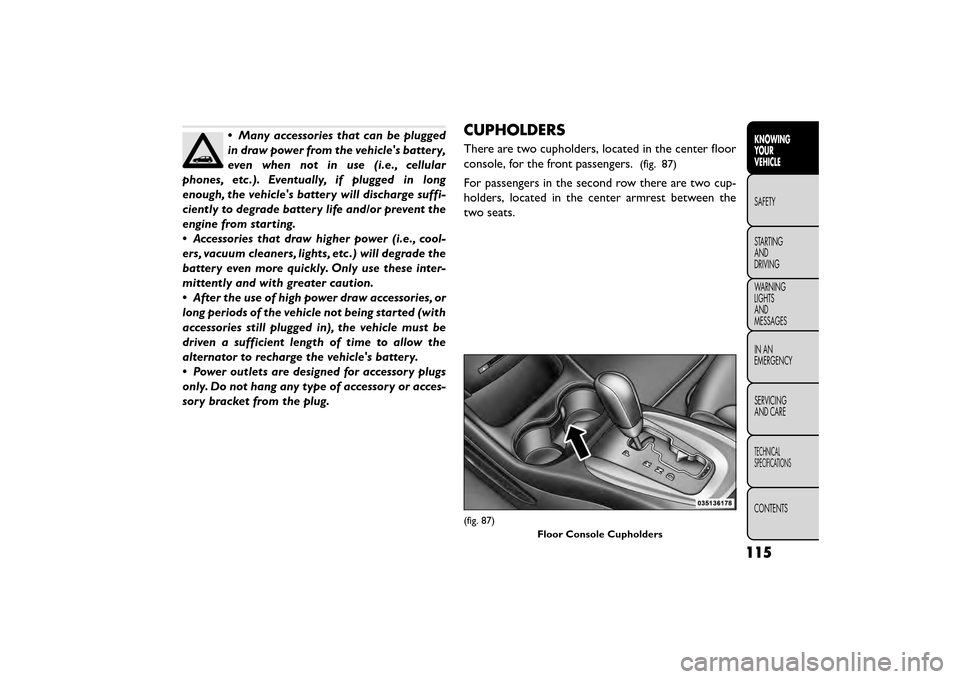
There are two cupholders, located in the center floor
console, for the front passengers.
(fig. 87)
For passengers in the second row there are two cup-
holders, located in the center armrest between the
two seats.
(fig. 87)
Floor Console Cupholders
115
KNOWING
YOUR
VEHICLE
SAFETY
STAR
TING
AND
DRIVING
WARNING
LIGHTS
AND
MESSAGES
IN AN
EMERGENCY
SERVICING
AND CARE
TECHNICAL
SPECIFICATIONS
CONTENTS
Page 287 of 412
4. Connect the opposite end of the negative(-)
jumper cable to the remote negative (-)post of the
vehicle with the discharged battery.
WARNING!
Do not connect the jumper cable to the
nega t
ive(-)post of the discharged bat-
tery. The resulting electrical spark could cause
the battery to explode and could result in per-
sonal injury. Only use the specific ground point ,
do not use any other exposed metal parts.
5. Start the engine in the vehicle that has the booster battery, let the engine idle a few minutes, and then
start the engine in the vehicle with the discharged
battery.
6. Once the engine is started, remove the jumper cables in the reverse sequence:
Disconnecting The Jumper Cables
1. Disconnect the negative (-)jumper cable from the
remote negative (-)post of the vehicle with the
discharged battery.
2. Disconnect the negative end (-)of the jumper cable
from the negative (-)post of the booster battery. 3. Disconnect the opposite end of the positive
(+)
jumper cable from the positive (+)post of the
booster battery.
4. Disconnect the positive (+)end of the jumper cable
from the remote positive (+)post of the discharged
vehicle.
5. Reinstall the protective cover over the remote posi- tive (+)battery post of the discharged vehicle.
If frequent jump-starting is required to start your
vehicle, you should have the battery and charging
system inspected at your authorized dealer.
Accessories plugged into the vehicle
power outlets draw power from the vehi-
cle’s battery, even when not in use (i.e.,
cellular phones, etc .). Eventually, if plugged in long
enough without engine operation, the vehicle’s
battery will discharge sufficiently to degrade bat-
tery life and/or prevent the engine from starting.
281
KNOWING
YOUR
VEHICLE
SAFETY
STARTING
AND
DRIVING
WARNING
LIGHTS
AND
MESSAGES
IN AN
EMERGENCY
SER VICING
AND
CARE
TECHNICAL
SPECIFICATIONS
CONTENTS
Page 302 of 412
WARNING! (Continued)
• Take care not to allow the contents of Tire
Service Kit to come in contact with hair, eyes, or
clothing. Tire Service Kit is harmful if inhaled,
swallowed, or absorbed through the skin. It
causes skin, eye, and respiratory irritation. Flush
immediately with plenty of water if there is any
contact with eyes or skin. Change clothing as
soon as possible, if there is any contact with
clothing.
• Tire Service Kit Sealant solution contains latex.
In case of an allergic reaction or rash, consult a
physician immediately. Keep Tire Service Kit out
of reach of children. If swallowed, rinse mouth
immediately with plenty of water and drink
plenty of water. Do not induce vomiting! Consult
a physician immediately.
SEALING A TIRE WITH TIRE SERVICE KIT
(A) Whenever You Stop To Use Tire Service
Kit:
1. Pull over to a safe location and turn on the vehicle’s Hazard Warning flashers.
2. Verify that the valve stem (on the wheel with the deflated tire) is in a position that is near to the
ground. This will allow the Tire Service Kit Hoses (6) and (7) to reach the valve stem and keep the Tire
Service Kit flat on the ground. This will provide the
best positioning of the kit when injecting the sealant
into the deflated tire and running the air pump.
Move the vehicle as necessary to place the valve
stem in this position before proceeding.
3. Place the transmission in PARK (auto transmission) or in Gear (manual transmission) and turn Off the
ignition.
4. Set the parking brake.
(B) Setting Up To Use Tire Service Kit:
1. Push in the Mode Select Knob (5) and turn to the Sealant Mode position.
2. Uncoil the Sealant Hose (6) and then remove the cap from the fitting at the end of the hose.
3. Place the Tire Service Kit flat on the ground next to the deflated tire.
4. Remove the cap from the valve stem and then screw the fitting at the end of the Sealant Hose (6) onto
the valve stem.
5. Uncoil the Power Plug (8) and insert the plug into the vehicle’s 12 Volt power outlet.
296
KNOWING YOUR
VEHICLE
SAFETY
STARTING AND
DRIVING
WARNING LIGHTSAND
MESSAGES
IN AN
EMERGENCY
SER VICING
AND
CARE
TECHNICAL
SPECIFICATIONS
CONTENTS