instrument panel FIAT FREEMONT 2016 1.G User Guide
[x] Cancel search | Manufacturer: FIAT, Model Year: 2016, Model line: FREEMONT, Model: FIAT FREEMONT 2016 1.GPages: 412, PDF Size: 3.36 MB
Page 88 of 412
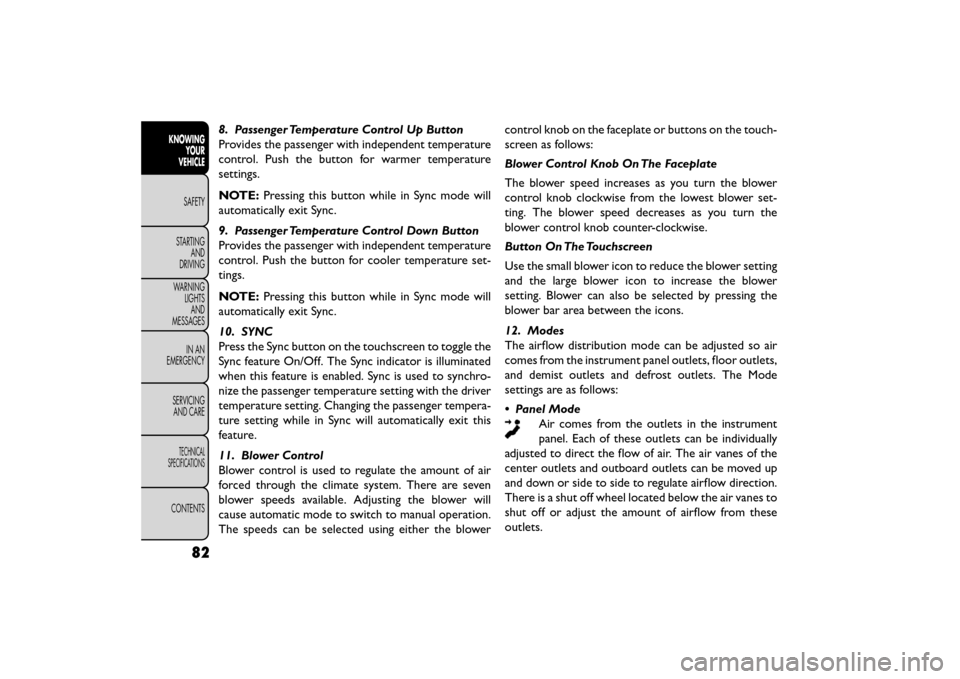
8. Passenger Temperature Control Up Button
Provides the passenger with independent temperature
control. Push the button for warmer temperature
settings.
NOTE:Pressing this button while in Sync mode will
automatically exit Sync.
9. Passenger Temperature Control Down Button
Provides the passenger with independent temperature
control. Push the button for cooler temperature set-
tings.
NOTE: Pressing this button while in Sync mode will
automatically exit Sync.
10. SYNC
Press the Sync button on the touchscreen to toggle the
Sync feature On/Off. The Sync indicator is illuminated
when this feature is enabled. Sync is used to synchro-
nize the passenger temperature setting with the driver
temperature setting. Changing the passenger tempera-
ture setting while in Sync will automatically exit this
feature.
11. Blower Control
Blower control is used to regulate the amount of air
forced through the climate system. There are seven
blower speeds available. Adjusting the blower will
cause automatic mode to switch to manual operation.
The speeds can be selected using either the blower control knob on the faceplate or buttons on the touch-
screen as follows:
Blower Control Knob On The Faceplate
The blower speed increases as you turn the blower
control knob clockwise from the lowest blower set-
ting. The blower speed decreases as you turn the
blower control knob counter-clockwise.
Button On The Touchscreen
Use the small blower icon to reduce the blower setting
and the large blower icon to increase the blower
setting. Blower can also be selected by pressing the
blower bar area between the icons.
12. Modes
The airflow distribution mode can be adjusted so air
comes from the instrument panel outlets, floor outlets,
and demist outlets and defrost outlets. The Mode
settings are as follows:
• Panel Mode
Air comes from the outlets in the instrument
panel. Each of these outlets can be individually
adjusted to direct the flow of air. The air vanes of the
center outlets and outboard outlets can be moved up
and down or side to side to regulate airflow direction.
There is a shut off wheel located below the air vanes to
shut off or adjust the amount of airflow from these
outlets.
82
KNOWING YOUR
VEHICLE
SAFETY
STAR
TINGAND
DRIVING
WARNING LIGHTSAND
MESSAGES
IN AN
EMERGENCY
SERVICINGAND CARE
TECHNICAL
SPECIFICATIONS
CONTENTS
Page 89 of 412
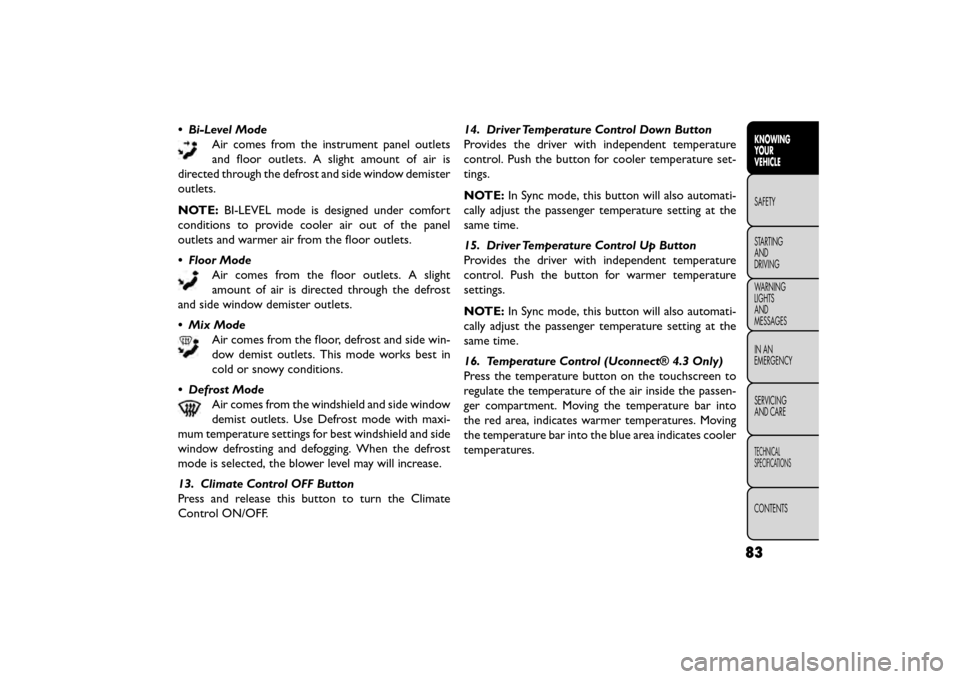
• Bi-Level ModeAir comes from the instrument panel outlets
and floor outlets. A slight amount of air is
directed through the defrost and side window demister
outlets.
NOTE: BI-LEVEL mode is designed under comfort
conditions to provide cooler air out of the panel
outlets and warmer air from the floor outlets.
• Floor Mode Air comes from the floor outlets. A slight
amount of air is directed through the defrost
and side window demister outlets.
• Mix Mode Air comes from the floor, defrost and side win-
dow demist outlets. This mode works best in
cold or snowy conditions.
• Defrost Mode Air comes from the windshield and side window
demist outlets. Use Defrost mode with maxi-
mum temperature settings for best windshield and side
window defrosting and defogging. When the defrost
mode is selected, the blower level may will increase.
13. Climate Control OFF Button
Press and release this button to turn the Climate
Control ON/OFF. 14. Driver Temperature Control Down Button
Provides the driver with independent temperature
control. Push the button for cooler temperature set-
tings.
NOTE:
In Sync mode, this button will also automati-
cally adjust the passenger temperature setting at the
same time.
15. Driver Temperature Control Up Button
Provides the driver with independent temperature
control. Push the button for warmer temperature
settings.
NOTE: In Sync mode, this button will also automati-
cally adjust the passenger temperature setting at the
same time.
16. Temperature Control (Uconnect® 4.3 Only)
Press the temperature button on the touchscreen to
regulate the temperature of the air inside the passen-
ger compartment. Moving the temperature bar into
the red area, indicates warmer temperatures. Moving
the temperature bar into the blue area indicates cooler
temperatures.
83
KNOWING
YOUR
VEHICLE
SAFETY
STAR
TING
AND
DRIVING
WARNING
LIGHTS
AND
MESSAGES
IN AN
EMERGENCY
SERVICING
AND CARE
TECHNICAL
SPECIFICATIONS
CONTENTS
Page 92 of 412
The operator can also select the direction of the
airflow by selecting one of the available mode settings.
A/C operation and Recirculation control can also be
manually selected in Manual operation.
NOTE:Each of these features operates independently
from each other. If any feature is controlled manually,
temperature control will continue to operate auto-
matically.
Rear Automatic Temperature Control (ATC)
(for versions/markets, where provided)
The rear ATC system has floor air outlets at the rear
right side of the 3rd Row seats and overhead outlets at
each outboard rear seating position. The system pro-
vides heated air through the floor outlets or cool,
dehumidified air through the headliner outlets.
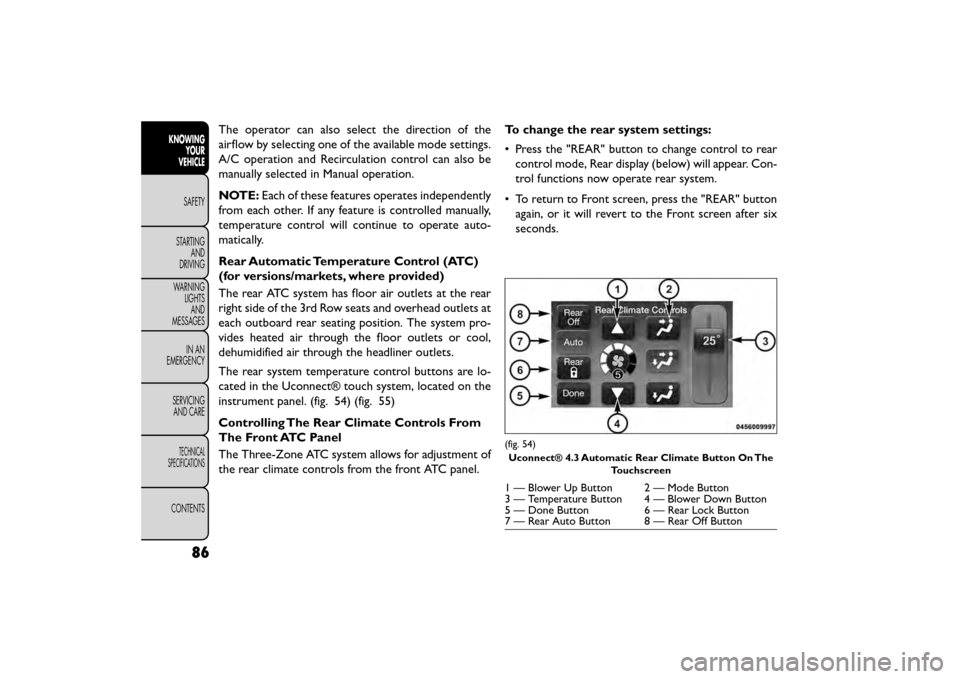
The rear system temperature control buttons are lo-
cated in the Uconnect® touch system, located on the
instrument panel. (fig. 54) (fig. 55)
Controlling The Rear Climate Controls From
The Front ATC Panel
The Three-Zone ATC system allows for adjustment of
the rear climate controls from the front ATC panel. To change the rear system settings:
• Press the "REAR" button to change control to rear
control mode, Rear display (below) will appear. Con-
trol functions now operate rear system.
• To return to Front screen, press the "REAR" button again, or it will revert to the Front screen after six
seconds.
(fig. 54)
Uconnect® 4.3 Automatic Rear Climate Button On The Touchscreen
1 — Blower Up Button 2 — Mode Button
3 — Temperature Button 4 — Blower Down Button
5 — Done Button 6 — Rear Lock Button
7 — Rear Auto Button 8 — Rear Off Button
86
KNOWINGYOUR
VEHICLE
SAFETY
STAR
TINGAND
DRIVING
WARNING LIGHTSAND
MESSAGES
IN AN
EMERGENCY
SERVICINGAND CARE
TECHNICAL
SPECIFICATIONS
CONTENTS
Page 98 of 412
LIGHTS
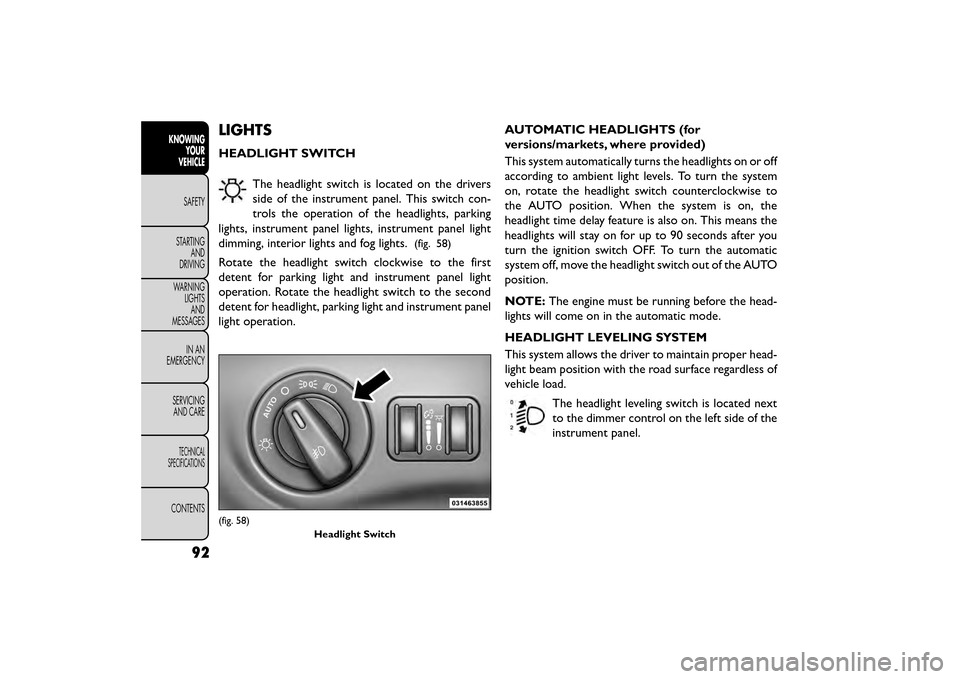
HEADLIGHT SWITCHThe headlight switch is located on the drivers
side of the instrument panel. This switch con-
trols the operation of the headlights, parking
lights, instrument panel lights, instrument panel light
dimming, interior lights and fog lights.
(fig. 58)
Rotate the headlight switch clockwise to the first
detent for parking light and instrument panel light
operation. Rotate the headlight switch to the second
detent for headlight, parking light and instrument panel
light operation. AUTOMATIC HEADLIGHTS (for
versions/markets, where provided)
This system automatically turns the headlights on or off
according to ambient light levels. To turn the system
on, rotate the headlight switch counterclockwise to
the AUTO position. When the system is on, the
headlight time delay feature is also on. This means the
headlights will stay on for up to 90 seconds after you
turn the ignition switch OFF. To turn the automatic
system off, move the headlight switch out of the AUTO
position.
NOTE:
The engine must be running before the head-
lights will come on in the automatic mode.
HEADLIGHT LEVELING SYSTEM
This system allows the driver to maintain proper head-
light beam position with the road surface regardless of
vehicle load.
The headlight leveling switch is located next
to the dimmer control on the left side of the
instrument panel.
(fig. 58) Headlight Switch
92
KNOWINGYOUR
VEHICLE
SAFETY
STAR
TINGAND
DRIVING
WARNING LIGHTSAND
MESSAGES
IN AN
EMERGENCY
SERVICINGAND CARE
TECHNICAL
SPECIFICATIONS
CONTENTS
Page 102 of 412
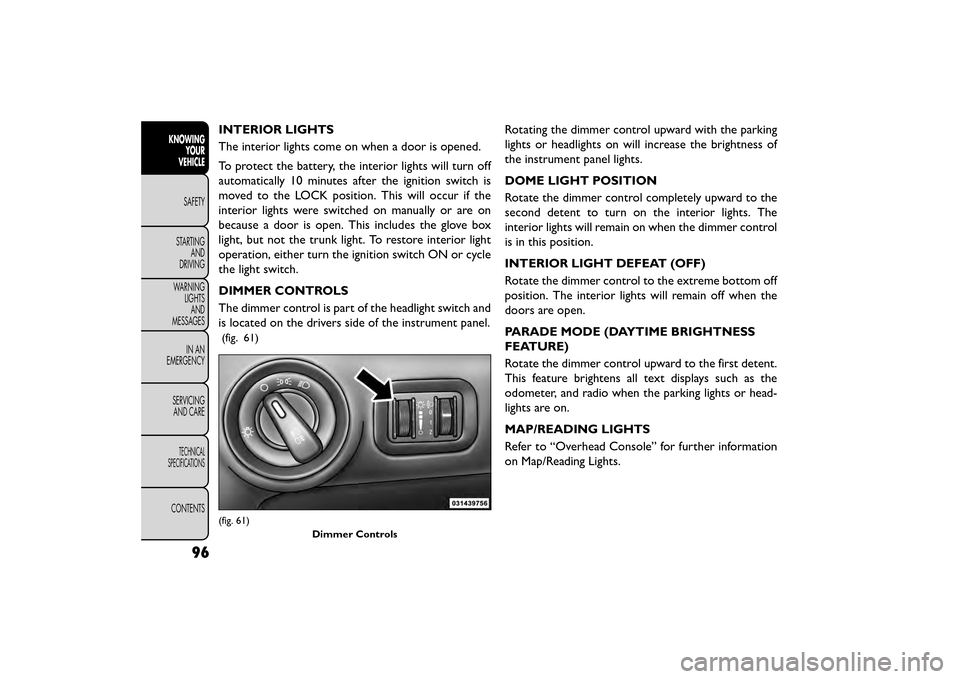
INTERIOR LIGHTS
The interior lights come on when a door is opened.
To protect the battery, the interior lights will turn off
automatically 10 minutes after the ignition switch is
moved to the LOCK position. This will occur if the
interior lights were switched on manually or are on
because a door is open. This includes the glove box
light, but not the trunk light. To restore interior light
operation, either turn the ignition switch ON or cycle
the light switch.
DIMMER CONTROLS
The dimmer control is part of the headlight switch and
is located on the drivers side of the instrument panel.
(fig. 61)
Rotating the dimmer control upward with the parking
lights or headlights on will increase the brightness of
the instrument panel lights.
DOME LIGHT POSITION
Rotate the dimmer control completely upward to the
second detent to turn on the interior lights. The
interior lights will remain on when the dimmer control
is in this position.
INTERIOR LIGHT DEFEAT (OFF)
Rotate the dimmer control to the extreme bottom off
position. The interior lights will remain off when the
doors are open.
PARADE MODE (DAYTIME BRIGHTNESS
FEATURE)
Rotate the dimmer control upward to the first detent.
This feature brightens all text displays such as the
odometer, and radio when the parking lights or head-
lights are on.
MAP/READING LIGHTS
Refer to “Overhead Console” for further information
on Map/Reading Lights.
(fig. 61)Dimmer Controls
96
KNOWINGYOUR
VEHICLE
SAFETY
STAR
TINGAND
DRIVING
WARNING LIGHTSAND
MESSAGES
IN AN
EMERGENCY
SERVICINGAND CARE
TECHNICAL
SPECIFICATIONS
CONTENTS
Page 108 of 412
•Turn the rear wiper off when driving
through an automatic car wash. Damage
to the rear wiper may result if the rear
wiper switch is left in the ON position.
• In cold weather, always turn off the rear wiper
switch and allow the rear wiper to return to the
park position before turning off the engine. If the
rear wiper switch is left on and the rear wiper
freezes to the window, damage to the rear wiper
motor may occur when the vehicle is restarted.
• Always remove any buildup of snow that pre-
vents the rear wiper blade from returning to the
park position. If the rear wiper control is turned
off and the blade cannot return to the park
position, damage to the rear wiper motor may
occur.
REAR WINDOW DEFROSTER
The rear window defroster button is located on
the climate control panel. Press this button to
turn on the rear window defroster and the heated
outside mirrors (for versions/markets, where pro-
vided). An indicator in the button will illuminate when
the rear window defroster is on. The rear window
defroster automatically turns off after approximately
10 minutes. NOTE:
To prevent excessive battery drain, use the
rear window defroster only when the engine is oper-
ating.
Failure to follow these cautions can
cause damage to the heating elements:
• Use care when washing the inside of
the rear window. Do not use abrasive window
cleaners on the interior surface of the window.
Use a soft cloth and a mild washing solution,
wiping parallel to the heating elements. Labels
can be peeled off after soaking with warm water.
• Do not use scrapers, sharp instruments, or abra-
sive window cleaners on the interior surface of
the window.
• Keep all objects a safe distance from the win-
dow.
102
KNOWING YOUR
VEHICLE
SAFETY
STAR
TINGAND
DRIVING
WARNING LIGHTSAND
MESSAGES
IN AN
EMERGENCY
SERVICINGAND CARE
TECHNICAL
SPECIFICATIONS
CONTENTS
Page 113 of 412
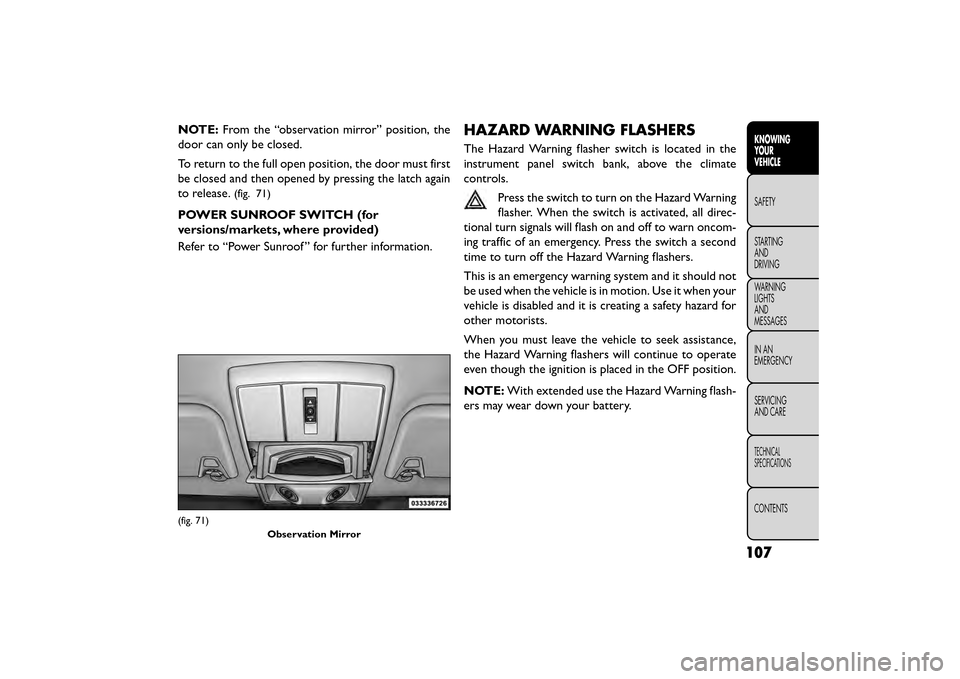
NOTE:From the “observation mirror” position, the
door can only be closed.
To return to the full open position, the door must first
be closed and then opened by pressing the latch again
to release.
(fig. 71)
POWER SUNROOF SWITCH (for
versions/markets, where provided)
Refer to “Power Sunroof ” for further information.
HAZARD WARNING FLASHERS
The Hazard Warning flasher switch is located in the
instrument panel switch bank, above the climate
controls.
Press the switch to turn on the Hazard Warning
flasher. When the switch is activated, all direc-
tional turn signals will flash on and off to warn oncom-
ing traffic of an emergency. Press the switch a second
time to turn off the Hazard Warning flashers.
This is an emergency warning system and it should not
be used when the vehicle is in motion. Use it when your
vehicle is disabled and it is creating a safety hazard for
other motorists.
When you must leave the vehicle to seek assistance,
the Hazard Warning flashers will continue to operate
even though the ignition is placed in the OFF position.
NOTE: With extended use the Hazard Warning flash-
ers may wear down your battery.
(fig. 71)
Observation Mirror
107
KNOWING
YOUR
VEHICLE
SAFETY
STAR
TING
AND
DRIVING
WARNING
LIGHTS
AND
MESSAGES
IN AN
EMERGENCY
SERVICING
AND CARE
TECHNICAL
SPECIFICATIONS
CONTENTS
Page 114 of 412
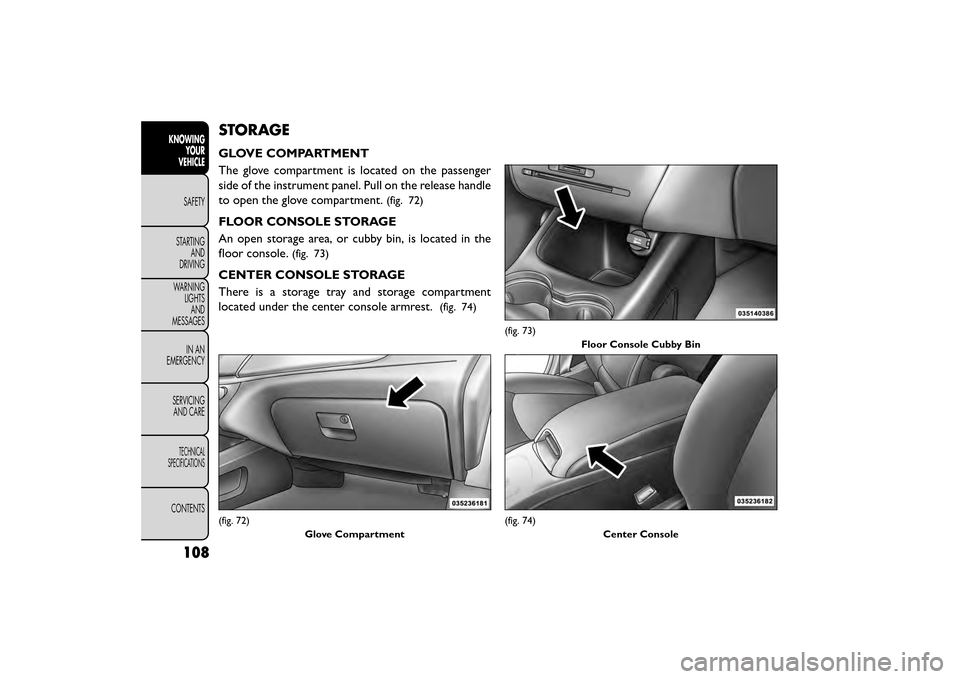
STORAGE
GLOVE COMPARTMENT
The glove compartment is located on the passenger
side of the instrument panel. Pull on the release handle
to open the glove compartment.
(fig. 72)
FLOOR CONSOLE STORAGE
An open storage area, or cubby bin, is located in the
floor console.
(fig. 73)
CENTER CONSOLE STORAGE
There is a storage tray and storage compartment
located under the center console armrest.
(fig. 74)
(fig. 72)Glove Compartment
(fig. 73)Floor Console Cubby Bin
(fig. 74) Center Console
108
KNOWINGYOUR
VEHICLE
SAFETY
STAR
TINGAND
DRIVING
WARNING LIGHTSAND
MESSAGES
IN AN
EMERGENCY
SERVICINGAND CARE
TECHNICAL
SPECIFICATIONS
CONTENTS
Page 120 of 412
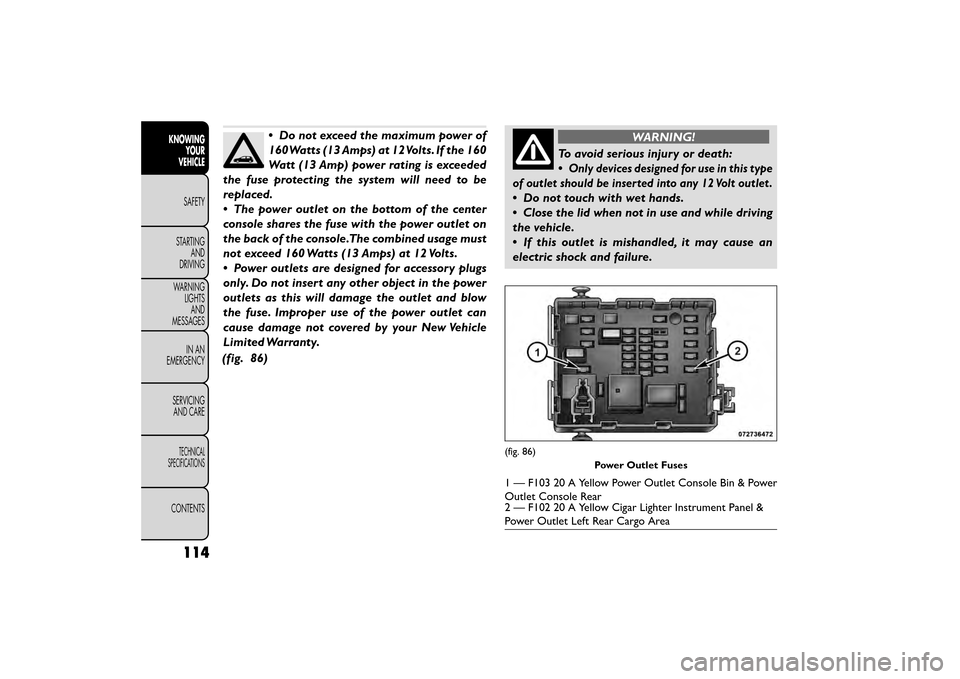
•Do not exceed the maximum power of
160Watts (13 Amps) at 12Volts. If the 160
Watt (13 Amp) power rating is exceeded
the fuse protecting the system will need to be
replaced.
• The power outlet on the bottom of the center
console shares the fuse with the power outlet on
the back of the console.The combined usage must
not exceed 160 Watts (13 Amps) at 12 Volts.
• Power outlets are designed for accessory plugs
only. Do not insert any other object in the power
outlets as this will damage the outlet and blow
the fuse. Improper use of the power outlet can
cause damage not covered by your New Vehicle
Limited Warranty.
(fig. 86)WARNING!
To avoid serious injury or death:
•
Only devices designed for use in this type
of outlet should be inserted into any 12 Volt outlet .
• Do not touch with wet hands.
• Close the lid when not in use and while driving
the vehicle.
• If this outlet is mishandled, it may cause an
electric shock and failure.
(fig. 86)
Power Outlet Fuses
1 — F103 20 A Yellow Power Outlet Console Bin & Power
Outlet Console Rear
2 — F102 20 A Yellow Cigar Lighter Instrument Panel &
Power Outlet Left Rear Cargo Area
114
KNOWINGYOUR
VEHICLE
SAFETY
STAR
TINGAND
DRIVING
WARNING LIGHTSAND
MESSAGES
IN AN
EMERGENCY
SERVICINGAND CARE
TECHNICAL
SPECIFICATIONS
CONTENTS
Page 142 of 412
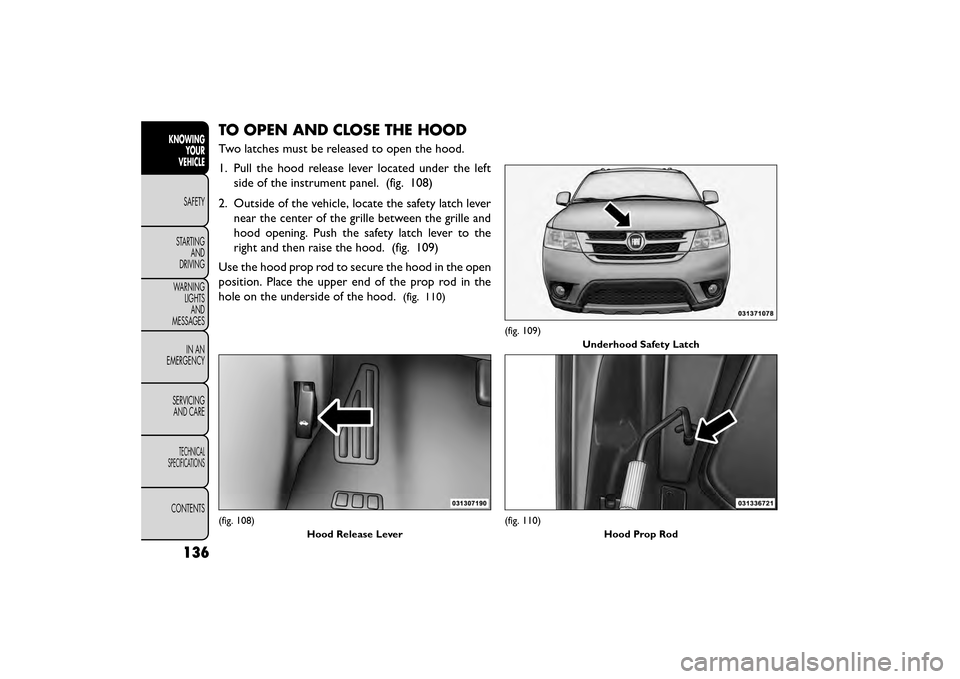
TO OPEN AND CLOSE THE HOOD
Two latches must be released to open the hood.
1. Pull the hood release lever located under the leftside of the instrument panel. (fig. 108)
2. Outside of the vehicle, locate the safety latch lever near the center of the grille between the grille and
hood opening. Push the safety latch lever to the
right and then raise the hood. (fig. 109)
Use the hood prop rod to secure the hood in the open
position. Place the upper end of the prop rod in the
hole on the underside of the hood.
(fig. 110)
(fig. 108) Hood Release Lever
(fig. 109)Underhood Safety Latch
(fig. 110) Hood Prop Rod
136
KNOWINGYOUR
VEHICLE
SAFETY
STAR
TINGAND
DRIVING
WARNING LIGHTSAND
MESSAGES
IN AN
EMERGENCY
SERVICINGAND CARE
TECHNICAL
SPECIFICATIONS
CONTENTS