wheel FIAT FREEMONT 2016 1.G Owner's Manual
[x] Cancel search | Manufacturer: FIAT, Model Year: 2016, Model line: FREEMONT, Model: FIAT FREEMONT 2016 1.GPages: 412, PDF Size: 3.36 MB
Page 211 of 412
SUPPLEMENTAL RESTRAINT SYSTEM
(SRS)
AIR BAG SYSTEM COMPONENTS
Your vehicle may be equipped with the following air bag
system components:
• Occupant Restraint Controller (ORC)
• Air Bag Warning Light
• Steering Wheel and Column
• Instrument Panel
• Knee Impact Bolsters
• Advanced Front Air Bags
• Supplemental Side Air Bags
• Front and Side Impact Sensors
• Seat Belt Pretensioners
• Seat Belt Buckle SwitchADVANCED FRONT AIR BAGS
This vehicle has Advanced Front Air Bags for both the
driver and front passenger as a supplement to the seat
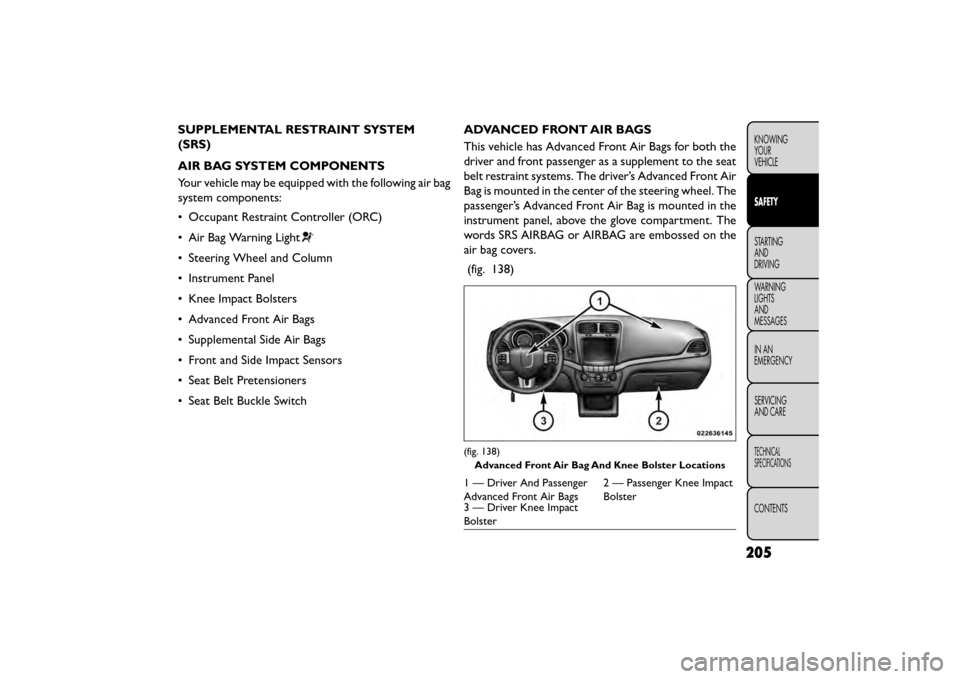
belt restraint systems. The driver’s Advanced Front Air
Bag is mounted in the center of the steering wheel. The
passenger’s Advanced Front Air Bag is mounted in the
instrument panel, above the glove compartment. The
words SRS AIRBAG or AIRBAG are embossed on the
air bag covers.
(fig. 138)
(fig. 138) Advanced Front Air Bag And Knee Bolster Locations
1 — Driver And Passenger
Advanced Front Air Bags 2 — Passenger Knee Impact
Bolster
3 — Driver Knee Impact
Bolster
205
KNOWING
YOUR
VEHICLE
SAFETY
STARTING
AND
DRIVING
WARNING
LIGHTS
AND
MESSAGES
IN
AN
EMERGENCY
SERVICING
AND CARE
TECHNICAL
SPECIFICATIONS
CONTENTS
Page 212 of 412
WARNING!
• Being too close to the steering wheel
or ins
trument panel during Advanced
Front Air Bag deployment could cause serious
injury, including death. Air bags need room to
inflate. Sit back, comfortably extending your
arms to reach the steering wheel or instrument
panel.
• Never place a rear-facing child restraint in
front of an air bag. A deploying Passenger Ad-
vanced Front Air Bag can cause death or serious
injury to a child 12 years or younger, including a
child in a rear-facing child restraint .
• Only use a rear-facing child restraint in a ve-
hicle with a rear seat .
ADVANCED FRONT AIR BAG FEATURES
The Advanced Front Air Bag system has multistage
driver and front passenger air bags. This system pro-
vides output appropriate to the severity and type of
collision as determined by the Occupant Restraint
Controller (ORC), which may receive information
from the front impact sensors or other system com-
ponents.
The first stage inflator is triggered immediately during
an impact that requires air bag deployment. A low energy output is used in less severe collisions. A higher
energy output is used for more severe collisions.
This vehicle may be equipped with a driver and/or front
passenger seat belt buckle switch that detects whether
the driver or front passenger seat belt is buckled. The
seat belt buckle switch may adjust the inflation rate of
the Advanced Front Air Bags.
WARNING!
• No objects should be placed over or
n ear
the air bag on the instrument panel
or steering wheel, because any such objects could
cause harm if the vehicle is in a collision severe
enough to cause the air bags to inflate.
• Do not put anything on or around the air bag
covers or attempt to open them manually. You
may damage the air bags and you could be
injured because the air bags may no longer be
functional. The protective covers for the air bag
cushions are designed to open only when the air
bags are inflating.
• Relying on the air bags alone could lead to
more severe injuries in a collision. The air bags
work with your seat belt to restrain you properly.
In some collisions, air bags won’t deploy at all.
Always wear your seat belts even though you
have air bags.
206
KNOWING YOUR
VEHICLE
SAFETY
STARTING AND
DRIVING
WARNING LIGHTSAND
MESSAGES
IN
AN
EMERGENCY
SERVICINGAND CARE
TECHNICAL
SPECIFICATIONS
CONTENTS
Page 213 of 412
ADVANCED FRONT AIR BAG OPERATION
Advanced Front Air Bags are designed to provide
additional protection by supplementing the seat belts.
Advanced Front Air Bags are not expected to reduce
the risk of injury in rear, side, or rollover collisions. The
Advanced Front Air Bags will not deploy in all frontal
collisions, including some that may produce substantial
vehicle damage — for example, some pole collisions,
truck underrides, and angle offset collisions.
On the other hand, depending on the type and location
of impact, Advanced Front Air Bags may deploy in
crashes with little vehicle front-end damage but that
produce a severe initial deceleration.
Because air bag sensors measure vehicle deceleration
over time, vehicle speed and damage by themselves are
not good indicators of whether or not an air bag should
have deployed.
Seat belts are necessary for your protection in all
collisions, and also are needed to help keep you in
position, away from an inflating air bag.
When the ORC detects a collision requiring the Ad-
vanced Front Air Bags, it signals the inflator units. A
large quantity of non-toxic gas is generated to inflate
the Advanced Front Air Bags.The steering wheel hub trim cover and the upper right
side of the instrument panel separate and fold out of
the way as the air bags inflate to their full size. The
Advanced Front Air Bags fully inflate in less time than it
takes to blink your eyes. The air bags then quickly
deflate while helping to restrain the driver and front
passenger.
KNEE IMPACT BOLSTERS
The Knee Impact Bolsters help protect the knees of
the driver and front passenger, and position the front
occupants for improved interaction with the Advanced
Front Air Bags.
WARNING!
• Do not drill, cut , or tamper with the
kn ee
impact bolsters in any way.
• Do not mount any accessories to the knee
impact bolsters such as alarm lights, stereos,
citizen band radios, etc .
207
KNOWING
YOUR
VEHICLE
SAFETY
STARTING
AND
DRIVING
WARNING
LIGHTS
AND
MESSAGES
IN
AN
EMERGENCY
SERVICING
AND CARE
TECHNICAL
SPECIFICATIONS
CONTENTS
Page 220 of 412
WARNING!
Ignoring the Air Bag Warning Light in
your ins
trument panel could mean you
won’t have the air bags to protect you in a
collision. If the light does not come on as a bulb
check when the ignition is first turned on, stays
on after you start the vehicle, or if it comes on as
you drive, have an authorized dealer service the
air bag system immediately.
MAINTAINING YOUR AIR BAG SYSTEM
WARNING!
• Modifications to any part of the air
bag sys
tem could cause it to fail when
you need it . You could be injured if the air bag
system is not there to protect you. Do not modify
the components or wiring, including adding any
kind of badges or stickers to the steering wheel
hub trim cover or the upper right side of the
instrument panel. Do not modify the front bum-
per, vehicle body structure, or add aftermarket
side steps or running boards.
(Continued)
WARNING! (Continued)
• It is dangerous to try to repair any part of the
air bag system yourself. Be sure to tell anyone
who works on your vehicle that it has an air bag
system.
• Do not attempt to modify any part of your air
bag system.The air bag may inflate accidentally
or may not function properly if modifications are
made.Take your vehicle to an authorized dealer
for any air bag system service. If your seat , includ-
ing your trim cover and cushion, needs to be
serviced in any way (including removal or
loosening/tightening of seat attachment bolts),
take the vehicle to your authorized dealer. Only
manufacturer approved seat accessories may be
used. If it is necessary to modify the air bag
system for persons with disabilities, contact your
authorized dealer.
214
KNOWING YOUR
VEHICLE
SAFETY
STARTING AND
DRIVING
WARNING LIGHTSAND
MESSAGES
IN
AN
EMERGENCY
SERVICINGAND CARE
TECHNICAL
SPECIFICATIONS
CONTENTS
Page 242 of 412
WARNING! (Continued)
• If required, mounting posts must be properly
installed, if not equipped from the factory. Fail-
ure to properly follow floor mat installation or
mounting can cause interference with the brake
pedal and accelerator pedal operation causing
loss of control of the vehicle.
Periodic Safety Checks You Should Make
Outside The Vehicle
Tires
Examine tires for excessive tread wear and uneven
wear patterns. Check for stones, nails, glass, or other
objects lodged in the tread or sidewall. Inspect the
tread for cuts and cracks. Inspect sidewalls for cuts,
cracks and bulges. Check the wheel nuts for tightness.
Check the tires (including spare) for proper cold infla-
tion pressure. Lights
Have someone observe the operation of brake lights
and exterior lights while you work the controls. Check
turn signal and high beam indicator lights on the instru-
ment panel.
Door Latches
Check for positive closing, latching, and locking.
Fluid Leaks
Check area under vehicle after overnight parking for
fuel, engine coolant, oil, or other fluid leaks. Also, if
gasoline fumes are detected or if fuel, power steering
fluid (for versions/markets, where provided), or brake
fluid leaks are suspected, the cause should be located
and corrected immediately.
236
KNOWING
YOUR
VEHICLE
SAFETY
STARTING AND
DRIVING
WARNING LIGHTSAND
MESSAGES
IN
AN
EMERGENCY
SERVICINGAND CARE
TECHNICAL
SPECIFICATIONS
CONTENTS
Page 249 of 412
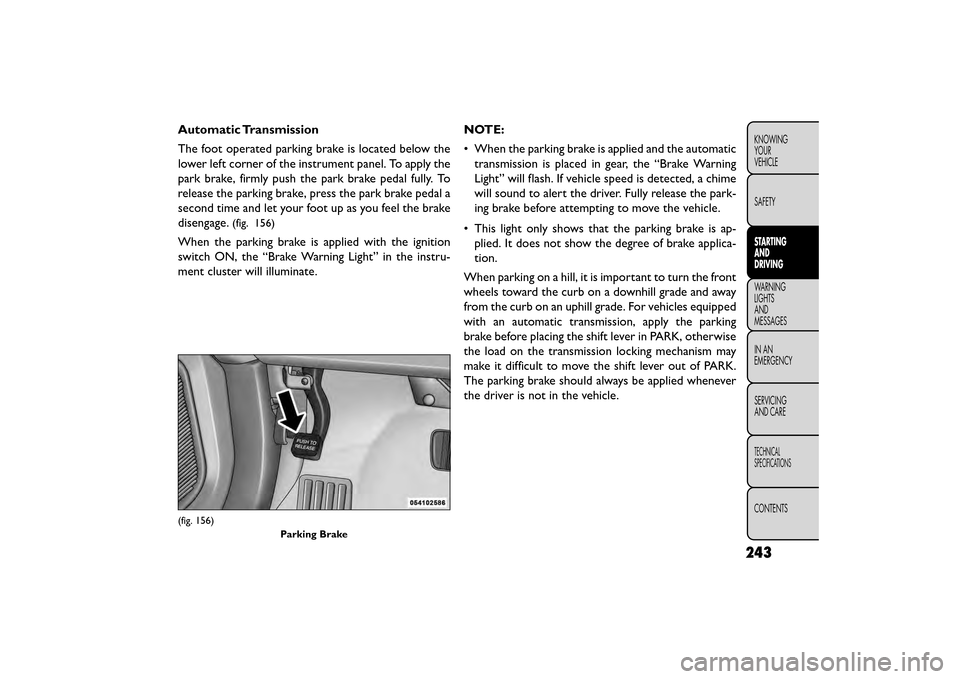
Automatic Transmission
The foot operated parking brake is located below the
lower left corner of the instrument panel. To apply the
park brake, firmly push the park brake pedal fully. To
release the parking brake, press the park brake pedal a
second time and let your foot up as you feel the brake
disengage.
(fig. 156)
When the parking brake is applied with the ignition
switch ON, the “Brake Warning Light” in the instru-
ment cluster will illuminate.NOTE:
• When the parking brake is applied and the automatic
transmission is placed in gear, the “Brake Warning
Light” will flash. If vehicle speed is detected, a chime
will sound to alert the driver. Fully release the park-
ing brake before attempting to move the vehicle.
• This light only shows that the parking brake is ap- plied. It does not show the degree of brake applica-
tion.
When parking on a hill, it is important to turn the front
wheels toward the curb on a downhill grade and away
from the curb on an uphill grade. For vehicles equipped
with an automatic transmission, apply the parking
brake before placing the shift lever in PARK, otherwise
the load on the transmission locking mechanism may
make it difficult to move the shift lever out of PARK.
The parking brake should always be applied whenever
the driver is not in the vehicle.
(fig. 156) Parking Brake
243
KNOWING
YOUR
VEHICLE
SAFETY
STARTING
AND
DRIVING
WARNING
LIGHTS
AND
MESSAGES
INAN
EMERGENC
Y
SERVICING
AND CARE
TECHNICAL
SPECIFICATIONS
CONTENTS
Page 255 of 412
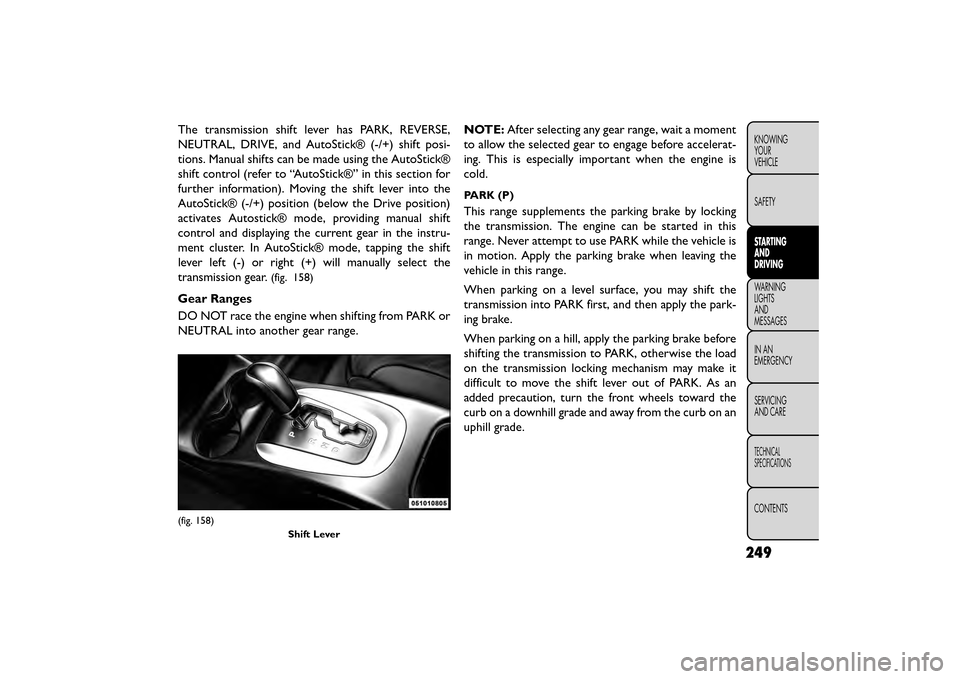
The transmission shift lever has PARK, REVERSE,
NEUTRAL, DRIVE, and AutoStick® (-/+) shift posi-
tions. Manual shifts can be made using the AutoStick®
shift control (refer to “AutoStick®” in this section for
further information). Moving the shift lever into the
AutoStick® (-/+) position (below the Drive position)
activates Autostick® mode, providing manual shift
control and displaying the current gear in the instru-
ment cluster. In AutoStick® mode, tapping the shift
lever left (-) or right (+) will manually select the
transmission gear.
(fig. 158)
Gear Ranges
DO NOT race the engine when shifting from PARK or
NEUTRAL into another gear range.NOTE:
After selecting any gear range, wait a moment
to allow the selected gear to engage before accelerat-
ing. This is especially important when the engine is
cold.
PARK (P)
This range supplements the parking brake by locking
the transmission. The engine can be started in this
range. Never attempt to use PARK while the vehicle is
in motion. Apply the parking brake when leaving the
vehicle in this range.
When parking on a level surface, you may shift the
transmission into PARK first, and then apply the park-
ing brake.
When parking on a hill, apply the parking brake before
shifting the transmission to PARK, otherwise the load
on the transmission locking mechanism may make it
difficult to move the shift lever out of PARK. As an
added precaution, turn the front wheels toward the
curb on a downhill grade and away from the curb on an
uphill grade.
(fig. 158)
Shift Lever
249
KNOWING
YOUR
VEHICLE
SAFETY
STARTING
AND
DRIVING
WARNING
LIGHTS
AND
MESSAGES
INAN
EMERGENC
Y
SERVICING
AND CARE
TECHNICAL
SPECIFICATIONS
CONTENTS
Page 261 of 412
• If a requested downshift would cause the engine toover-speed, that shift will not occur.
• Avoid using speed control when AutoStick is en- gaged.
• Transmission shifting will be more noticeable when AutoStick is engaged.
• The system may revert to automatic shift mode if a fault or overheat condition is detected.
To disengage AutoStick mode, return the shift lever to
the DRIVE position. You can shift in or out of the
AutoStick position at any time without taking your foot
off the accelerator pedal.
WARNING!
Do not downshift for additional engine
brakin g
on a slippery surface. The drive
wheels could lose their grip and the vehicle could
skid, causing a collision or personal injury.
ALL WHEEL DRIVE (AWD) (for
versions/markets, where
provided)
This feature provides on-demand All-Wheel Drive
(AWD). The system is automatic with no driver inputs
or additional driving skills required. Under normal
driving conditions, the front wheels provide most of
the traction. If the front wheels begin to lose traction,
power is shifted automatically to the rear wheels. The
greater the front wheel traction loss, the greater the
power transfer to the rear wheels.
Additionally, on dry pavement under heavy throttle
input (where one may have no wheel spin), torque will
be sent to the rear in a pre-emptive effort to improve
vehicle launch and performance characteristics.
All wheels must have the same size and
type tires. Unequal tire sizes must not be
used. Unequal tire size may cause failure
of the power transfer unit .
255
KNOWING
YOUR
VEHICLE
SAFETY
STARTING
AND
DRIVING
WARNING
LIGHTS
AND
MESSAGES
IN AN
EMERGENC
Y
SERVICING
AND CARE
TECHNICAL
SPECIFICATIONS
CONTENTS
Page 262 of 412
DRIVING ON SLIPPERY SURFACES
ACCELERATION
Rapid acceleration on snow covered, wet, or other
slippery surfaces may cause the driving wheels to pull
erratically to the right or left. This phenomenon occurs
when there is a difference in the surface traction under
the front (driving) wheels.
WARNING!
Rapid acceleration on slippery surfaces
is dan gerous
. Unequal traction can
cause sudden pulling of the front wheels. You
could lose control of the vehicle and possibly
have a collision. Accelerate slowly and carefully
whenever there is likely to be poor traction (ice,
snow, wet , mud, loose sand, etc .). TRACTION
When driving on wet or slushy roads, it is possible for
a wedge of water to build up between the tire and road
surface. This is hydroplaning and may cause partial or
complete loss of vehicle control and stopping ability. To
reduce this possibility, the following precautions should
be observed:
1. Slow down during rainstorms or when the roads are
slushy.
2. Slow down if the road has standing water or puddles.
3. Replace the tires when tread wear indicators first become visible.
4. Keep tires properly inflated.
5. Maintain sufficient distance between your vehicle and the vehicle in front of you to avoid a collision in
a sudden stop.
256
KNOWING YOUR
VEHICLE
SAFETY
STARTING AND
DRIVING
WARNING LIGHTSAND
MESSAGES
INAN
EMERGENC
Y
SERVICING AND CARE
TECHNICAL
SPECIFICATIONS
CONTENTS
Page 268 of 412
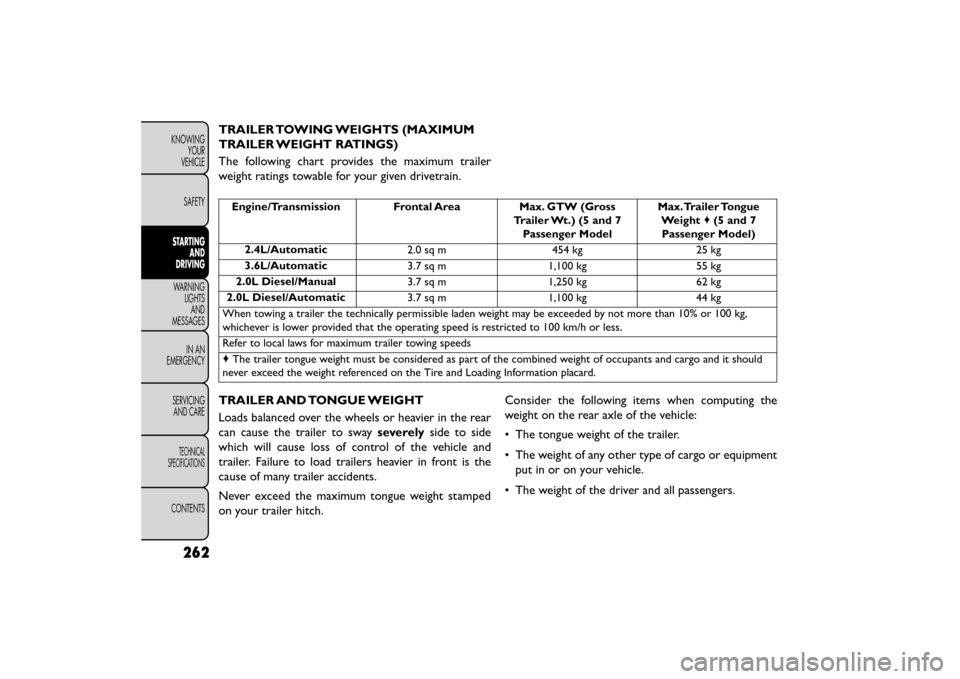
TRAILER TOWING WEIGHTS (MAXIMUM
TRAILER WEIGHT RATINGS)
The following chart provides the maximum trailer
weight ratings towable for your given drivetrain.
Engine/Transmission Frontal AreaMax. GTW (Gross
Trailer Wt.) (5 and 7 Passenger Model Max.Trailer Tongue
Weight ♦(5 and 7
Passenger Model)
2.4L/Automatic 2.0 sq m454 kg25 kg
3.6L/Automatic 3.7 sq m1,100 kg 55 kg
2.0L Diesel/Manual 3.7 sq m1,250 kg 62 kg
2.0L Diesel/Automatic 3.7 sq m1,100 kg 44 kg
When towing a trailer the technically permissible laden weight may be exceeded by not more than 10% or 100 kg,
whichever is lower provided that the operating speed is restricted to 100 km/h or less.
Refer to local laws for maximum trailer towing speeds
♦ The trailer tongue weight must be considered as part of the combined weight of occupants and cargo and it should
never exceed the weight referenced on the Tire and Loading Information placard.
TRAILER AND TONGUE WEIGHT
Loads balanced over the wheels or heavier in the rear
can cause the trailer to sway severelyside to side
which will cause loss of control of the vehicle and
trailer. Failure to load trailers heavier in front is the
cause of many trailer accidents.
Never exceed the maximum tongue weight stamped
on your trailer hitch. Consider the following items when computing the
weight on the rear axle of the vehicle:
• The tongue weight of the trailer.
• The weight of any other type of cargo or equipment
put in or on your vehicle.
• The weight of the driver and all passengers.
262
KNOWING YOUR
VEHICLE
SAFETY
STARTING AND
DRIVING
WARNING LIGHTSAND
MESSAGES
INAN
EMERGENC
Y
SERVICING AND CARE
TECHNICAL
SPECIFICATIONS
CONTENTS