engine FIAT FULLBACK 2016 1.G Owner's Manual
[x] Cancel search | Manufacturer: FIAT, Model Year: 2016, Model line: FULLBACK, Model: FIAT FULLBACK 2016 1.GPages: 312, PDF Size: 13.67 MB
Page 44 of 312
![FIAT FULLBACK 2016 1.G Owners Manual Lamp monitor buzzer
If the following operation is performed,
a buzzer will sound to remind the driver
to turn off the lamps. [Except for
vehicles equipped with the keyless
operation system]
If the dri](/img/10/4601/w960_4601-43.png "FIAT FULLBACK 2016 1.G Owners Manual Lamp monitor buzzer
If the following operation is performed,
a buzzer will sound to remind the driver
to turn off the lamps. [Except for
vehicles equipped with the keyless
operation system]
If the dri")
Lamp monitor buzzer
If the following operation is performed,
a buzzer will sound to remind the driver
to turn off the lamps. [Except for
vehicles equipped with the keyless
operation system]
If the driver’s door is opened when the
key is in the “LOCK” or “ACC” position
or removed from the ignition switch
while the lamps are on. [For vehicles
equipped with the keyless operation
system] If the driver’s door is opened
when the operation mode is in ACC or
OFF while the lamps are on. In both
cases, the buzzer will automatically
stop if the auto-cutoff function is
activated, the lamp switch is turned off,
or the door is closed.
Daytime running lamp
The daytime running lamps comes on
when the engine is running and the
lamp switch is in the “OFF” or “AUTO”
position and the tail lamps are off.
55) 56)
Dipper (High/Low beam change)
When the lamp switch is in the
position, the beam changes from
high to low (or low to high) each time
the lever is pulled fully (A). While the
high beam is on, the high beam
indicator lamp in the instrument cluster
will also illuminate.Headlamp flasher
The high beams flash when the lever is
pulled slightly (B), and will go off when it
is released. When the high beam is on,
the high beam indicator lamp in the
instrument cluster will illuminate.
NOTE The high beams can also flash
when the lamp switch is OFF.
NOTE If you turn the lamps off with the
headlamps set to high beam, the
headlamps are automatically returned
to their low-beam setting when the
lamp switch is next turned to theposition.
HEADLAMP LEVELLING
SWITCH
(where provided)
57)
The angle of the headlamp beam varies
depending upon the load carried by the
vehicle. The headlamp levelling switch
can be used to adjust the headlamp
illumination distance (when the lower
beam is illuminated) so that the
headlamps’ glare does not distract the
drivers of approaching vehicles. Set the
switch (referring to the following table)
to the appropriate position according to
the number of people and the load in
the vehicle.
NOTE When adjusting the beam
position, first put the dial in the “0”
position (the highest beam position).
63AA0061218
64AHA105525
42
GETTING TO KNOW YOUR VEHICLE
Page 49 of 312
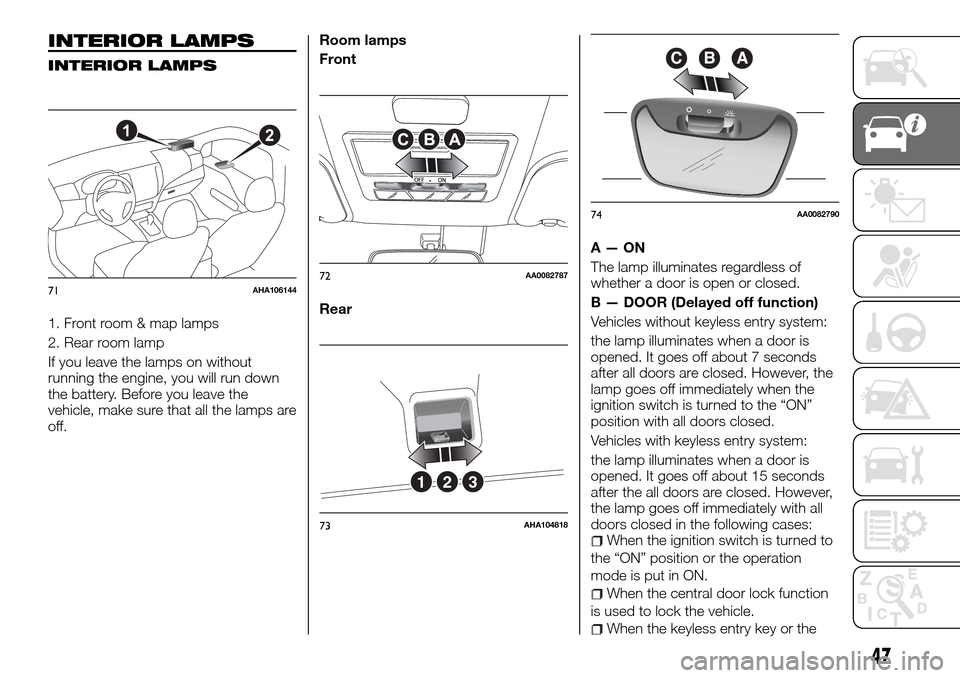
INTERIOR LAMPS
INTERIOR LAMPS
1. Front room & map lamps
2. Rear room lamp
If you leave the lamps on without
running the engine, you will run down
the battery. Before you leave the
vehicle, make sure that all the lamps are
off.Room lamps
Front
RearA—ON
The lamp illuminates regardless of
whether a door is open or closed.
B — DOOR (Delayed off function)
Vehicles without keyless entry system:
the lamp illuminates when a door is
opened. It goes off about 7 seconds
after all doors are closed. However, the
lamp goes off immediately when the
ignition switch is turned to the “ON”
position with all doors closed.
Vehicles with keyless entry system:
the lamp illuminates when a door is
opened. It goes off about 15 seconds
after the all doors are closed. However,
the lamp goes off immediately with all
doors closed in the following cases:
When the ignition switch is turned to
the “ON” position or the operation
mode is put in ON.
When the central door lock function
is used to lock the vehicle.
When the keyless entry key or the
21
71AHA10614472AA0082787
321
73AHA104818
ABC
74AA0082790
47
Page 50 of 312
keyless operation key is used to lock
the vehicle.
If the vehicle is equipped with the
keyless operation system, when the
keyless operation function is used to
lock the vehicle.
Auto cut-out function:
if the lamp is left switched on with the
ignition switch is in the “LOCK” or
“ACC” position or the operation mode
is in OFF or ACC, and a door is
opened, it goes off automatically after
approximately 30 minutes. The lamp will
illuminate again after it automatically
goes off in the following cases:
When the ignition switch is turned to
the “ON” position or the operation
mode is put in ON.
When the keyless entry system or
the keyless operation system is
operated.
When all doors are closed.
C — OFF
The lamp goes off regardless of
whether a door is open or closed.
NOTE When the key was used to start
the engine, if the key is removed while
the doors are closed, the lamp is
illuminated and after a few seconds it
goes off.
NOTE When the keyless operation
function was used to start the engine, if
the operation mode is put in OFF while
the door are closed, the lampilluminates and after about 15 seconds
it goes off (if so equipped).
NOTE The time until the lamp goes off
(delayed off) can be adjusted. For
details, please consult a Fiat Dealership.
NOTE The auto cut-out function
cannot be operated when the room
lamp switch is in the “ON” position (1).
Also, this function can be deactivated.
For details, please consult a Fiat
Dealership.
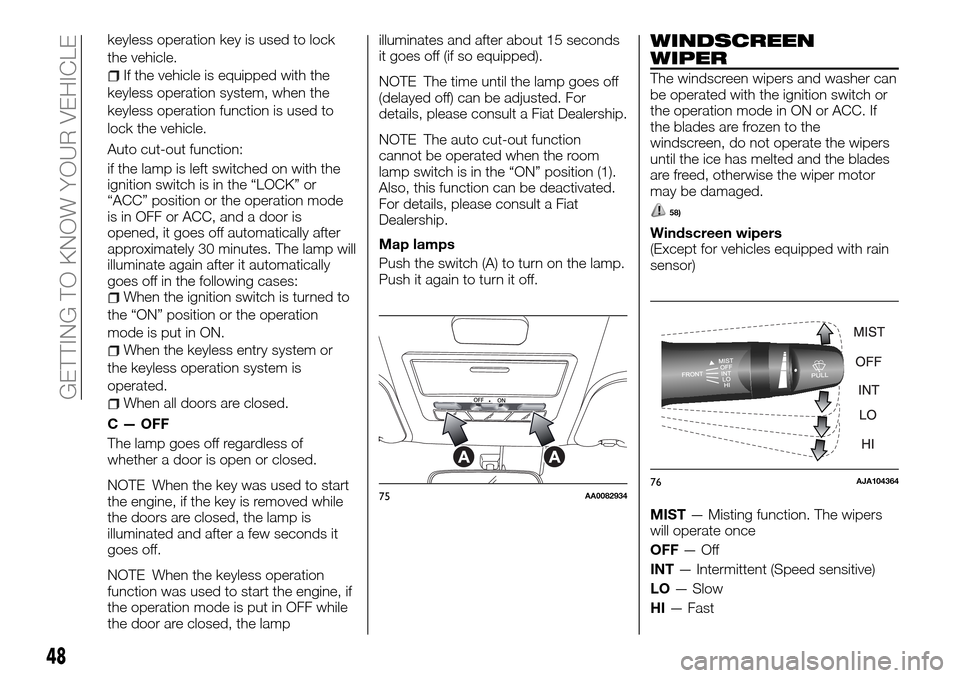
Map lamps
Push the switch (A) to turn on the lamp.
Push it again to turn it off.
WINDSCREEN
WIPER
The windscreen wipers and washer can
be operated with the ignition switch or
the operation mode in ON or ACC. If
the blades are frozen to the
windscreen, do not operate the wipers
until the ice has melted and the blades
are freed, otherwise the wiper motor
may be damaged.
58)
Windscreen wipers
(Except for vehicles equipped with rain
sensor)
MIST— Misting function. The wipers
will operate once
OFF—Off
INT— Intermittent (Speed sensitive)
LO— Slow
HI— Fast
75AA008293476AJA104364
48
GETTING TO KNOW YOUR VEHICLE
Page 57 of 312
Cooler/Heater manual
air conditioning
The heater/air conditioning can only be
used while the engine is running.
2)
Control panel
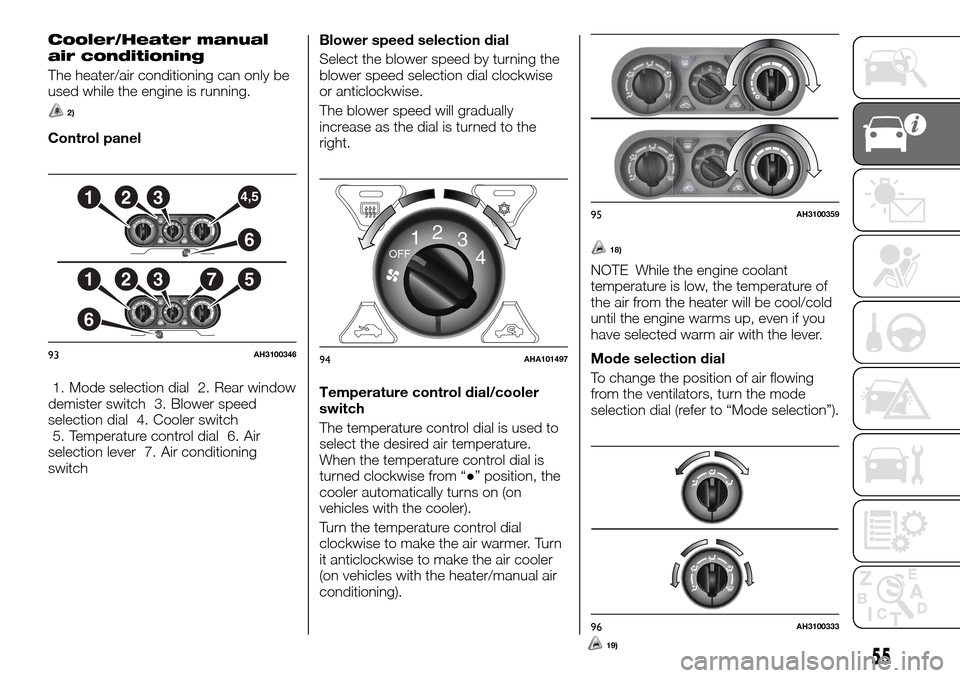
1. Mode selection dial 2. Rear window
demister switch 3. Blower speed
selection dial 4. Cooler switch
5. Temperature control dial 6. Air
selection lever 7. Air conditioning
switchBlower speed selection dial
Select the blower speed by turning the
blower speed selection dial clockwise
or anticlockwise.
The blower speed will gradually
increase as the dial is turned to the
right.
Temperature control dial/cooler
switch
The temperature control dial is used to
select the desired air temperature.
When the temperature control dial is
turned clockwise from “●” position, the
cooler automatically turns on (on
vehicles with the cooler).
Turn the temperature control dial
clockwise to make the air warmer. Turn
it anticlockwise to make the air cooler
(on vehicles with the heater/manual air
conditioning).
18)
NOTE While the engine coolant
temperature is low, the temperature of
the air from the heater will be cool/cold
until the engine warms up, even if you
have selected warm air with the lever.
Mode selection dial
To change the position of air flowing
from the ventilators, turn the mode
selection dial (refer to “Mode selection”).1
6
2375
1234,5
6
93AH3100346
OFF12
3OFF12
3
4
94AHA101497
2222222233333333444
222233333333444
95AH3100359
96AH3100333
5519)
Page 61 of 312
AUTOMATIC CLIMATE CONTROL AIR CONDITIONER
(where provided)
The air conditioner can only be used while the engine is running.
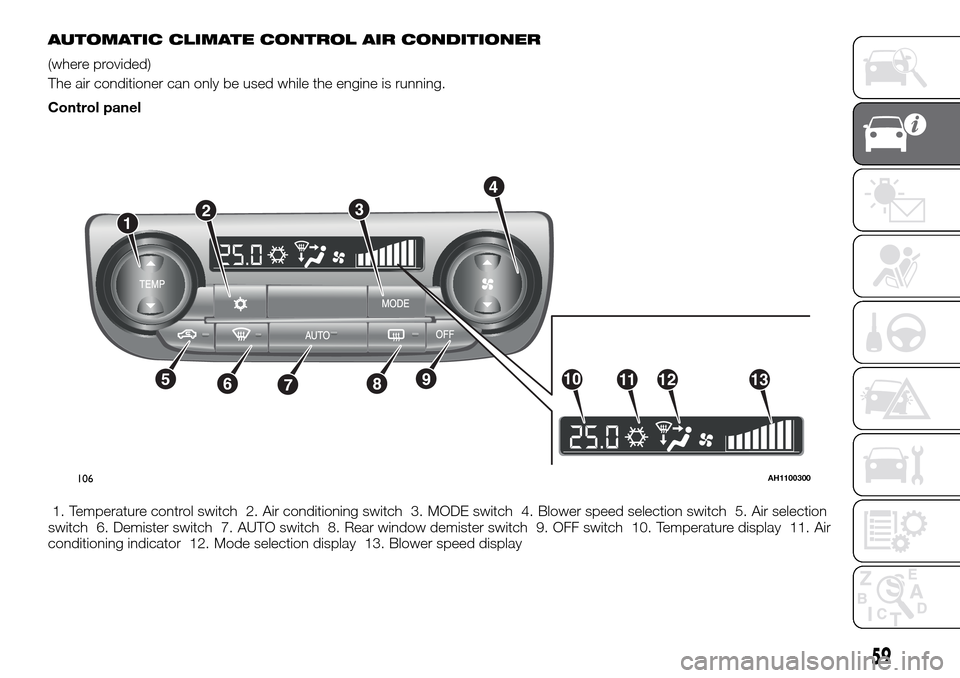
Control panel
1. Temperature control switch 2. Air conditioning switch 3. MODE switch 4. Blower speed selection switch 5. Air selection
switch 6. Demister switch 7. AUTO switch 8. Rear window demister switch 9. OFF switch 10. Temperature display 11. Air
conditioning indicator 12. Mode selection display 13. Blower speed display
1
1011121356789
3
4
2
106AH1100300
59
Page 63 of 312
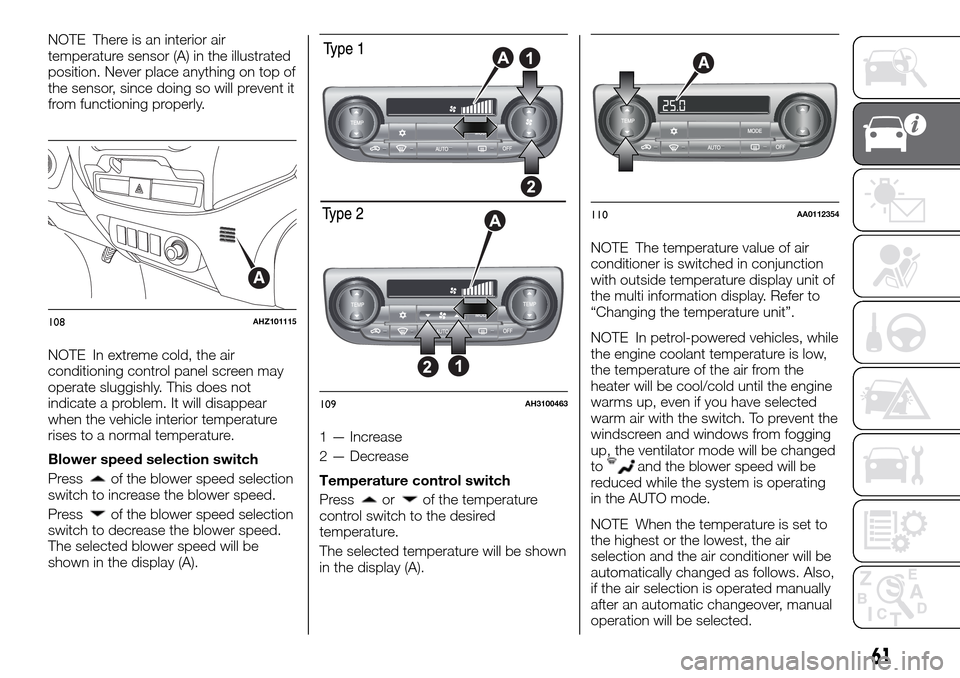
NOTE There is an interior air
temperature sensor (A) in the illustrated
position. Never place anything on top of
the sensor, since doing so will prevent it
from functioning properly.
NOTE In extreme cold, the air
conditioning control panel screen may
operate sluggishly. This does not
indicate a problem. It will disappear
when the vehicle interior temperature
rises to a normal temperature.
Blower speed selection switch
Press
of the blower speed selection
switch to increase the blower speed.
Press
of the blower speed selection
switch to decrease the blower speed.
The selected blower speed will be
shown in the display (A).1 — Increase
2 — Decrease
Temperature control switch
Pressorof the temperature
control switch to the desired
temperature.
The selected temperature will be shown
in the display (A).NOTE The temperature value of air
conditioner is switched in conjunction
with outside temperature display unit of
the multi information display. Refer to
“Changing the temperature unit”.
NOTE In petrol-powered vehicles, while
the engine coolant temperature is low,
the temperature of the air from the
heater will be cool/cold until the engine
warms up, even if you have selected
warm air with the switch. To prevent the
windscreen and windows from fogging
up, the ventilator mode will be changed
to
and the blower speed will be
reduced while the system is operating
in the AUTO mode.
NOTE When the temperature is set to
the highest or the lowest, the air
selection and the air conditioner will be
automatically changed as follows. Also,
if the air selection is operated manually
after an automatic changeover, manual
operation will be selected.
A
108AHZ101115
109AH3100463
A
110AA0112354
61
Page 65 of 312
periodically to increase ventilation so
that the windows do not become
fogged up.
NOTE When the engine coolant
temperature rises to a certain level, the
air selection is automatically switched to
the recirculation position and the
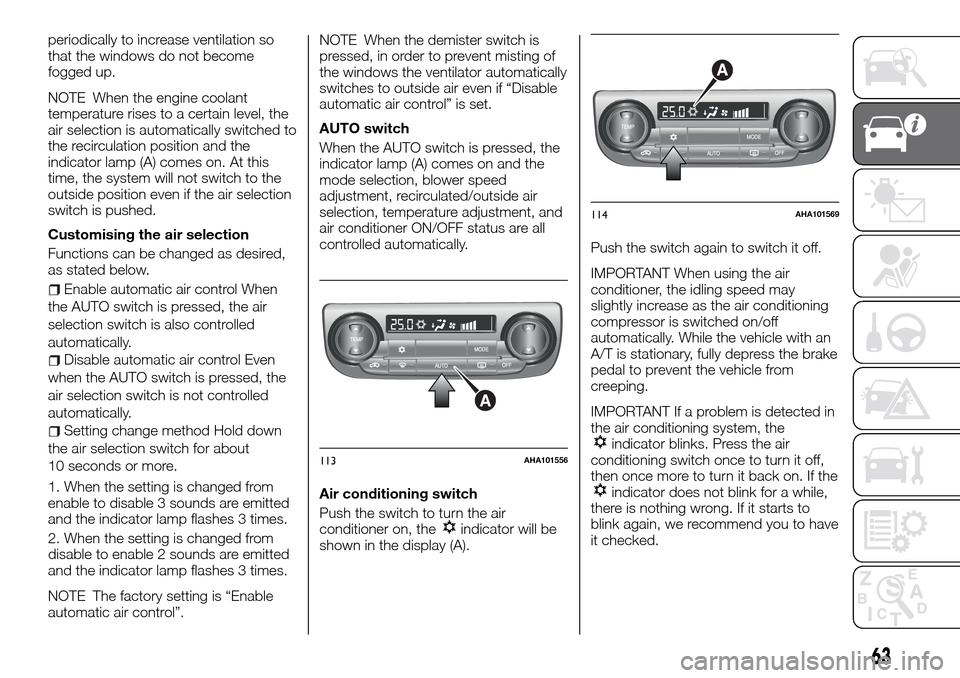
indicator lamp (A) comes on. At this
time, the system will not switch to the
outside position even if the air selection
switch is pushed.
Customising the air selection
Functions can be changed as desired,
as stated below.
Enable automatic air control When
the AUTO switch is pressed, the air
selection switch is also controlled
automatically.
Disable automatic air control Even
when the AUTO switch is pressed, the
air selection switch is not controlled
automatically.
Setting change method Hold down
the air selection switch for about
10 seconds or more.
1. When the setting is changed from
enable to disable 3 sounds are emitted
and the indicator lamp flashes 3 times.
2. When the setting is changed from
disable to enable 2 sounds are emitted
and the indicator lamp flashes 3 times.
NOTE The factory setting is “Enable
automatic air control”.NOTE When the demister switch is
pressed, in order to prevent misting of
the windows the ventilator automatically
switches to outside air even if “Disable
automatic air control” is set.
AUTO switch
When the AUTO switch is pressed, the
indicator lamp (A) comes on and the
mode selection, blower speed
adjustment, recirculated/outside air
selection, temperature adjustment, and
air conditioner ON/OFF status are all
controlled automatically.
Air conditioning switch
Push the switch to turn the air
conditioner on, the
indicator will be
shown in the display (A).Push the switch again to switch it off.
IMPORTANT When using the air
conditioner, the idling speed may
slightly increase as the air conditioning
compressor is switched on/off
automatically. While the vehicle with an
A/T is stationary, fully depress the brake
pedal to prevent the vehicle from
creeping.
IMPORTANT If a problem is detected in
the air conditioning system, the
indicator blinks. Press the air
conditioning switch once to turn it off,
then once more to turn it back on. If the
indicator does not blink for a while,
there is nothing wrong. If it starts to
blink again, we recommend you to have
it checked.
A
113AHA101556
A
114AHA101569
63
Page 69 of 312
AIR PURIFIER
An air filter has been incorporated into
this air conditioner so that dirt and dust
are cleaned from the air.
Replace the air filter periodically as its
ability to clean the air will be reduced as
it collects pollen and dirt.
NOTE Operation in certain conditions
such as driving on a dusty road and
frequent use of the air conditioner can
lead to reduction of service life of the
filter. When you feel that the airflow is
lower than normal or when the
windscreen or windows start to fog up
easily, replace the air filter. We
recommend you to have it checked.
REAR WINDOW
DEMISTER SWITCH
(where provided)
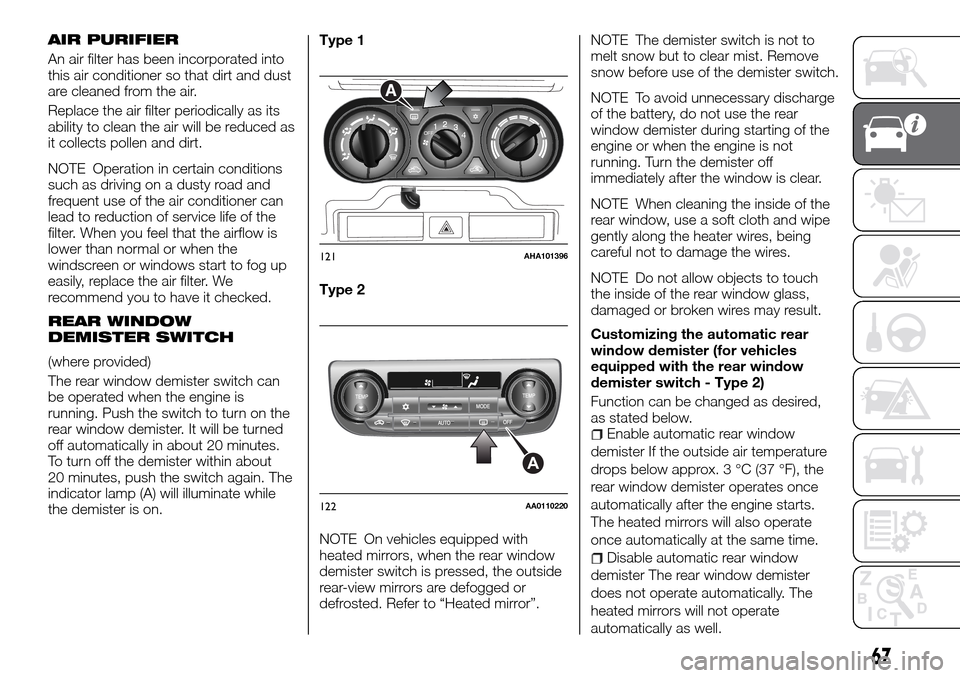
The rear window demister switch can
be operated when the engine is
running. Push the switch to turn on the
rear window demister. It will be turned
off automatically in about 20 minutes.
To turn off the demister within about
20 minutes, push the switch again. The
indicator lamp (A) will illuminate while
the demister is on.Type 1
Type 2
NOTE On vehicles equipped with
heated mirrors, when the rear window
demister switch is pressed, the outside
rear-view mirrors are defogged or
defrosted. Refer to “Heated mirror”.NOTE The demister switch is not to
melt snow but to clear mist. Remove
snow before use of the demister switch.
NOTE To avoid unnecessary discharge
of the battery, do not use the rear
window demister during starting of the
engine or when the engine is not
running. Turn the demister off
immediately after the window is clear.
NOTE When cleaning the inside of the
rear window, use a soft cloth and wipe
gently along the heater wires, being
careful not to damage the wires.
NOTE Do not allow objects to touch
the inside of the rear window glass,
damaged or broken wires may result.
Customizing the automatic rear
window demister (for vehicles
equipped with the rear window
demister switch - Type 2)
Function can be changed as desired,
as stated below.
Enable automatic rear window
demister If the outside air temperature
drops below approx. 3 °C (37 °F), the
rear window demister operates once
automatically after the engine starts.
The heated mirrors will also operate
once automatically at the same time.
Disable automatic rear window
demister The rear window demister
does not operate automatically. The
heated mirrors will not operate
automatically as well.
OFF12
3OFF12
3
4
A
121AHA101396
A
122AA0110220
67
Page 70 of 312
Setting change method Hold down
the rear window demister switch for
about 10 seconds or more. When the
setting is changed from enable to
disable 3 sounds are emitted and the
indicator lamp flashes 3 times. When
the setting is changed from disable to
enable 2 sounds are emitted and the
indicator lamp flashes 3 times.
NOTE The factory setting is “Disable
automatic rear window demister”.
WARNING
60)For safety, make sure you have a clear
view through all windows.
IMPORTANT
18)When using the air conditioning, the
idling speed may slightly increase as the air
conditioning compressor is switched on/off
automatically. While the vehicle with an
automatic transmission is stationary, fully
depress the brake pedal to prevent the
vehicle from creeping.
19)When using the mode selection dial
between the
andpositions, prevent
fogging by moving the air selection lever to
select outside air (refer to “Air selection
lever”).
20)Use of the
(recirculation) position
for extended time may cause the windows
to fog up.21)If the outside air is dusty or otherwise
contaminated, or if high cooling
performance is desired, set air selection
lever to the
(recirculation) position and
the temperature control dial all the way to
the right. Switch to the
(outside)
position periodically to increase ventilation
so that the windows do not become
fogged up.
IMPORTANT
2)The system uses a coolant that is
compatible with the laws in force in the
countries where the vehicle is sold, R134a
or R1234yf (indicated on a specific plate in
the engine compartment). The use of other
coolants affects the efficiency and condition
of the system. Also the compressor
coolants used must be compatible with the
indicated coolant.
WINDOW
MANUAL WINDOW
CONTROL
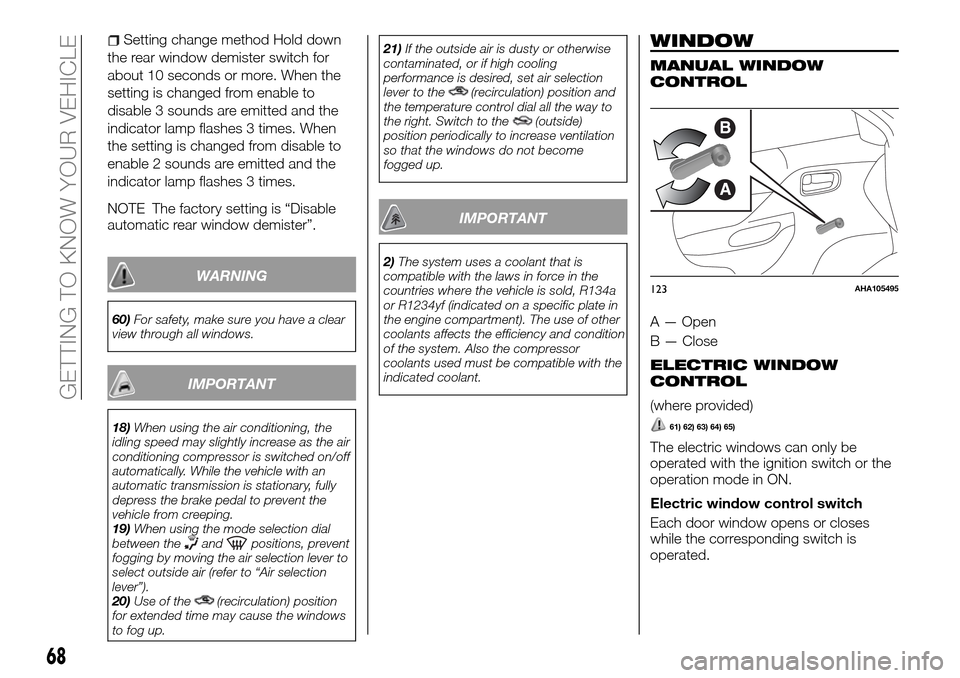
A — Open
B — Close
ELECTRIC WINDOW
CONTROL
(where provided)
61) 62) 63) 64) 65)
The electric windows can only be
operated with the ignition switch or the
operation mode in ON.
Electric window control switch
Each door window opens or closes
while the corresponding switch is
operated.
B
A
123AHA105495
68
GETTING TO KNOW YOUR VEHICLE
Page 71 of 312
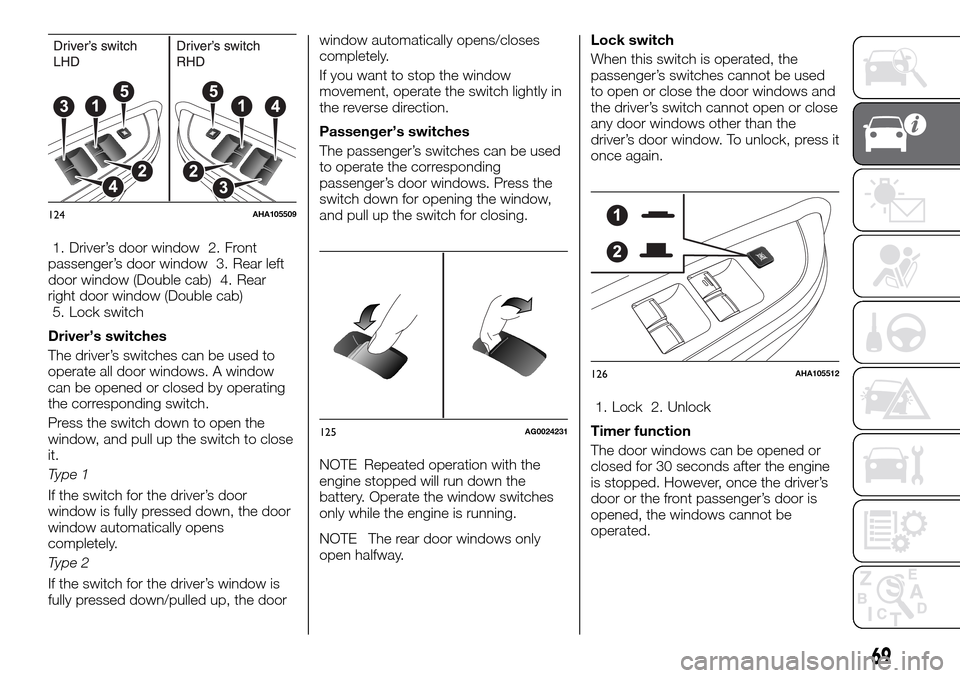
1. Driver’s door window 2. Front
passenger’s door window 3. Rear left
door window (Double cab) 4. Rear
right door window (Double cab)
5. Lock switch
Driver’s switches
The driver’s switches can be used to
operate all door windows. A window
can be opened or closed by operating
the corresponding switch.
Press the switch down to open the
window, and pull up the switch to close
it.
Type 1
If the switch for the driver’s door
window is fully pressed down, the door
window automatically opens
completely.
Type 2
If the switch for the driver’s window is
fully pressed down/pulled up, the doorwindow automatically opens/closes
completely.
If you want to stop the window
movement, operate the switch lightly in
the reverse direction.
Passenger’s switches
The passenger’s switches can be used
to operate the corresponding
passenger’s door windows. Press the
switch down for opening the window,
and pull up the switch for closing.
NOTE Repeated operation with the
engine stopped will run down the
battery. Operate the window switches
only while the engine is running.
NOTE The rear door windows only
open halfway.Lock switch
When this switch is operated, the
passenger’s switches cannot be used
to open or close the door windows and
the driver’s switch cannot open or close
any door windows other than the
driver’s door window. To unlock, press it
once again.
1. Lock 2. Unlock
Timer function
The door windows can be opened or
closed for 30 seconds after the engine
is stopped. However, once the driver’s
door or the front passenger’s door is
opened, the windows cannot be
operated.
124AHA105509
125AG0024231
126AHA105512
69