ignition FIAT FULLBACK 2016 1.G Workshop Manual
[x] Cancel search | Manufacturer: FIAT, Model Year: 2016, Model line: FULLBACK, Model: FIAT FULLBACK 2016 1.GPages: 312, PDF Size: 13.67 MB
Page 151 of 312
AUTOMATIC
TRANSMISSION
SPORT MODE 5A/T
(where provided)
During running-in period or immediately
after reconnection of the battery cable,
there may be a case where gear shifts
are not made smoothly. This does not
indicate a faulty transmission. Gear
shifts will become smooth after the
transmission has been shifted several
times by the electronic control system.
Selector lever operation
The transmission has 5 forward gears
and 1 reverse gear.
The individual gears are selected
automatically, depending on the speed
of the vehicle and the position of the
accelerator pedal.
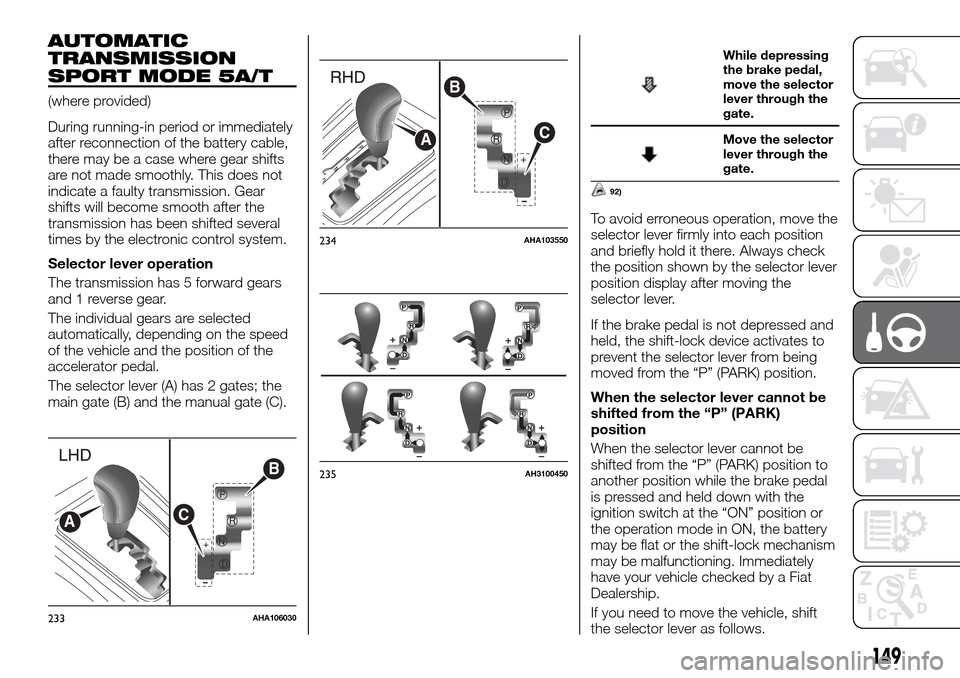
The selector lever (A) has 2 gates; the
main gate (B) and the manual gate (C).
While depressing
the brake pedal,
move the selector
lever through the
gate.
Move the selector
lever through the
gate.
92)
To avoid erroneous operation, move the
selector lever firmly into each position
and briefly hold it there. Always check
the position shown by the selector lever
position display after moving the
selector lever.
If the brake pedal is not depressed and
held, the shift-lock device activates to
prevent the selector lever from being
moved from the “P” (PARK) position.
When the selector lever cannot be
shifted from the “P” (PARK)
position
When the selector lever cannot be
shifted from the “P” (PARK) position to
another position while the brake pedal
is pressed and held down with the
ignition switch at the “ON” position or
the operation mode in ON, the battery
may be flat or the shift-lock mechanism
may be malfunctioning. Immediately
have your vehicle checked by a Fiat
Dealership.
If you need to move the vehicle, shift
the selector lever as follows.
+
P
R
N
D
B
CA
233AHA106030
+
B
C
A
234AHA103550
235AH3100450
149
Page 152 of 312
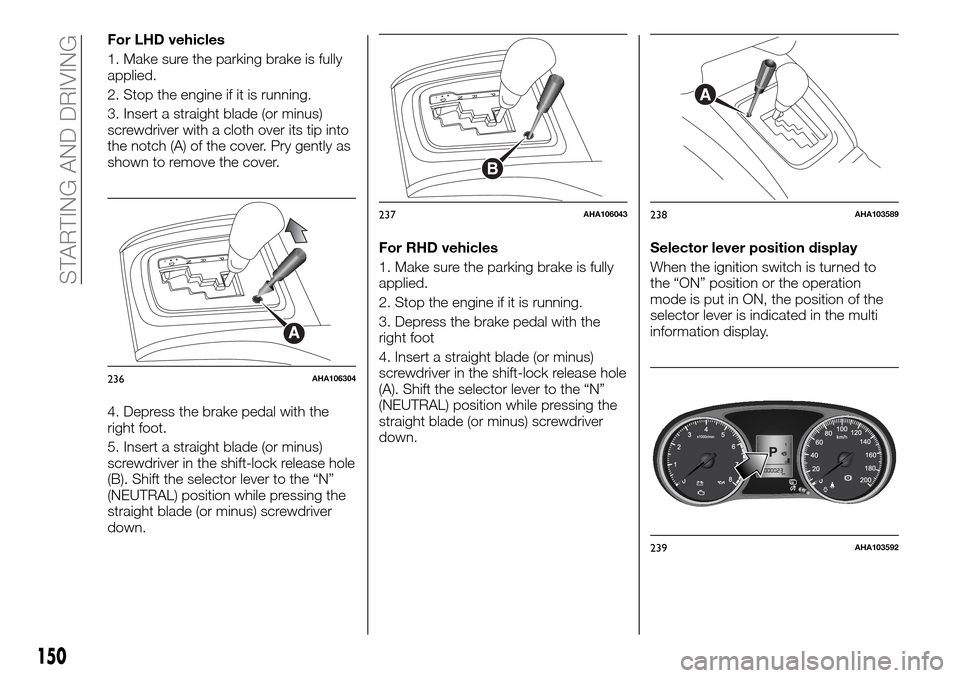
For LHD vehicles
1. Make sure the parking brake is fully
applied.
2. Stop the engine if it is running.
3. Insert a straight blade (or minus)
screwdriver with a cloth over its tip into
the notch (A) of the cover. Pry gently as
shown to remove the cover.
4. Depress the brake pedal with the
right foot.
5. Insert a straight blade (or minus)
screwdriver in the shift-lock release hole
(B). Shift the selector lever to the “N”
(NEUTRAL) position while pressing the
straight blade (or minus) screwdriver
down.For RHD vehicles
1. Make sure the parking brake is fully
applied.
2. Stop the engine if it is running.
3. Depress the brake pedal with the
right foot
4. Insert a straight blade (or minus)
screwdriver in the shift-lock release hole
(A). Shift the selector lever to the “N”
(NEUTRAL) position while pressing the
straight blade (or minus) screwdriver
down.Selector lever position display
When the ignition switch is turned to
the “ON” position or the operation
mode is put in ON, the position of the
selector lever is indicated in the multi
information display.
A
236AHA106304
B
237AHA106043
A
238AHA103589
239AHA103592
150
STARTING AND DRIVING
Page 154 of 312
perform a downshift when the selector
lever or the shift paddles is moved to
the “— (SHIFT DOWN)” position at
certain vehicle speeds.
Downward shifts are made
automatically when the vehicle slows
down. When the vehicle stops, 1st gear
is automatically selected.
When driving away on a slippery road,
push the selector lever forward into the
“+ (SHIFT UP)” position. This cause the
transmission to shift into the 2nd gear
which is better for smooth driving away
on a slippery road. Push the selector
lever to the “— (SHIFT DOWN)” side to
shift back to the 1st gear.
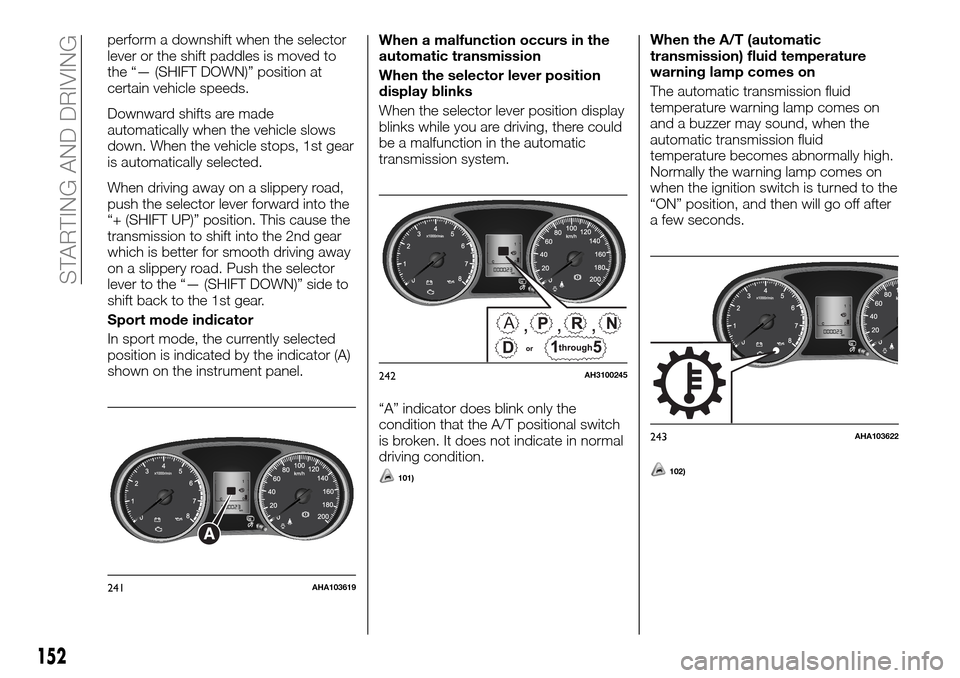
Sport mode indicator
In sport mode, the currently selected
position is indicated by the indicator (A)
shown on the instrument panel.When a malfunction occurs in the
automatic transmission
When the selector lever position
display blinks
When the selector lever position display
blinks while you are driving, there could
be a malfunction in the automatic
transmission system.
“A” indicator does blink only the
condition that the A/T positional switch
is broken. It does not indicate in normal
driving condition.
101)
When the A/T (automatic
transmission) fluid temperature
warning lamp comes on
The automatic transmission fluid
temperature warning lamp comes on
and a buzzer may sound, when the
automatic transmission fluid
temperature becomes abnormally high.
Normally the warning lamp comes on
when the ignition switch is turned to the
“ON” position, and then will go off after
a few seconds.
102)
A
241AHA103619
,,,A
242AH3100245
243AHA103622
152
STARTING AND DRIVING
Page 158 of 312
When the vehicle is moving, and only
while it can be steered straight ahead,
release the accelerator pedal beforeo
perating the transfer shift lever.
To shift from 4H to 4L
Stop the vehicle, depress the clutch
pedal to the floor and operate the
transfer shift lever.
To shift from 4L to 4H
Stop the vehicle, depress the clutch
pedal to the floor and operate the
transfer shift lever.
Shifting of the transfer shift lever
between “2H” and “4H” should only be
done at speeds below 100 km/h.
During driving, never attempt to shift
from “4H” to “4L”.
When shifting from “2H” to “4H” in cold
weather while the vehicle is in motion,
the transmission gear may make some
noise. In cold weather, try to shift the
gear while the vehicle is stopped.
There may be a case that the transfer
shift lever feels heavy when it is moved
from “4H” to “2H” with the steering
wheel in turned position. This is normal
and not any indication of trouble.
208)
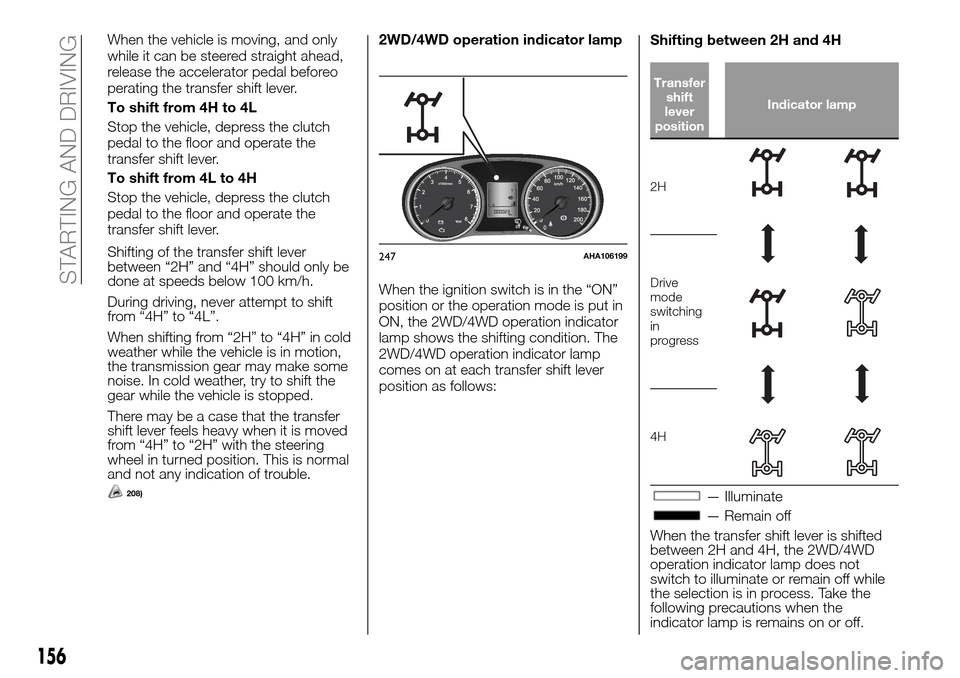
2WD/4WD operation indicator lamp
When the ignition switch is in the “ON”
position or the operation mode is put in
ON, the 2WD/4WD operation indicator
lamp shows the shifting condition. The
2WD/4WD operation indicator lamp
comes on at each transfer shift lever
position as follows:Shifting between 2H and 4H
Transfer
shift
lever
positionIndicator lamp
2H
Drive
mode
switching
in
progress
4H
— Illuminate
— Remain off
When the transfer shift lever is shifted
between 2H and 4H, the 2WD/4WD
operation indicator lamp does not
switch to illuminate or remain off while
the selection is in process. Take the
following precautions when the
indicator lamp is remains on or off.
247AHA106199
156
STARTING AND DRIVING
Page 162 of 312
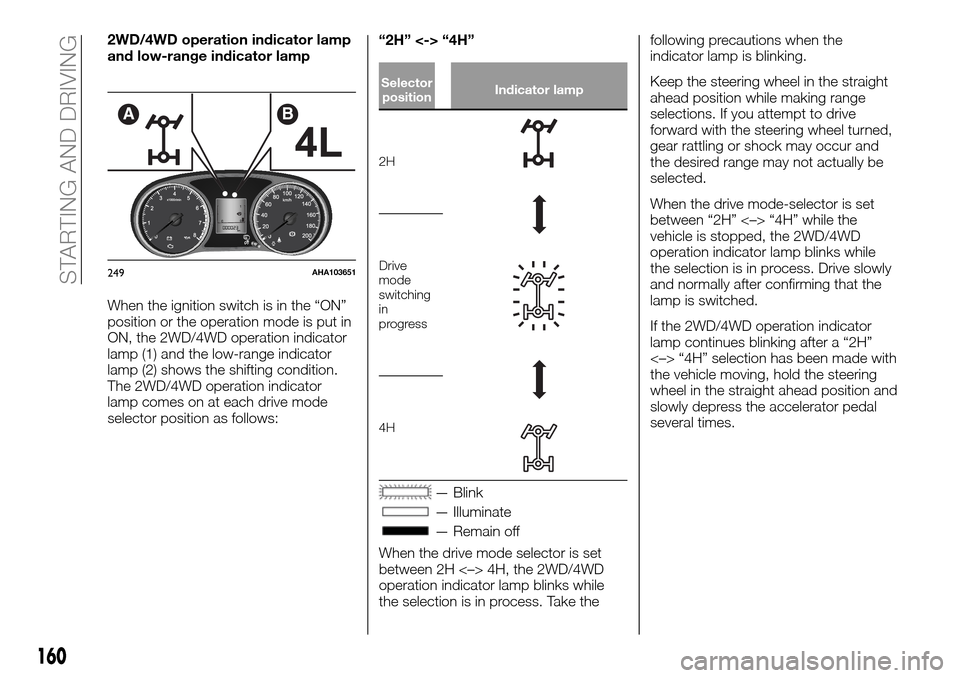
2WD/4WD operation indicator lamp
and low-range indicator lamp
When the ignition switch is in the “ON”
position or the operation mode is put in
ON, the 2WD/4WD operation indicator
lamp (1) and the low-range indicator
lamp (2) shows the shifting condition.
The 2WD/4WD operation indicator
lamp comes on at each drive mode
selector position as follows:“2H” <-> “4H”
Selector
positionIndicator lamp
2H
Drive
mode
switching
in
progress
4H
— Blink
— Illuminate
— Remain off
When the drive mode selector is set
between 2H <–> 4H, the 2WD/4WD
operation indicator lamp blinks while
the selection is in process. Take thefollowing precautions when the
indicator lamp is blinking.
Keep the steering wheel in the straight
ahead position while making range
selections. If you attempt to drive
forward with the steering wheel turned,
gear rattling or shock may occur and
the desired range may not actually be
selected.
When the drive mode-selector is set
between “2H” <–> “4H” while the
vehicle is stopped, the 2WD/4WD
operation indicator lamp blinks while
the selection is in process. Drive slowly
and normally after confirming that the
lamp is switched.
If the 2WD/4WD operation indicator
lamp continues blinking after a “2H”
<–> “4H” selection has been made with
the vehicle moving, hold the steering
wheel in the straight ahead position and
slowly depress the accelerator pedal
several times.
AB
249AHA103651
160
STARTING AND DRIVING
Page 166 of 312
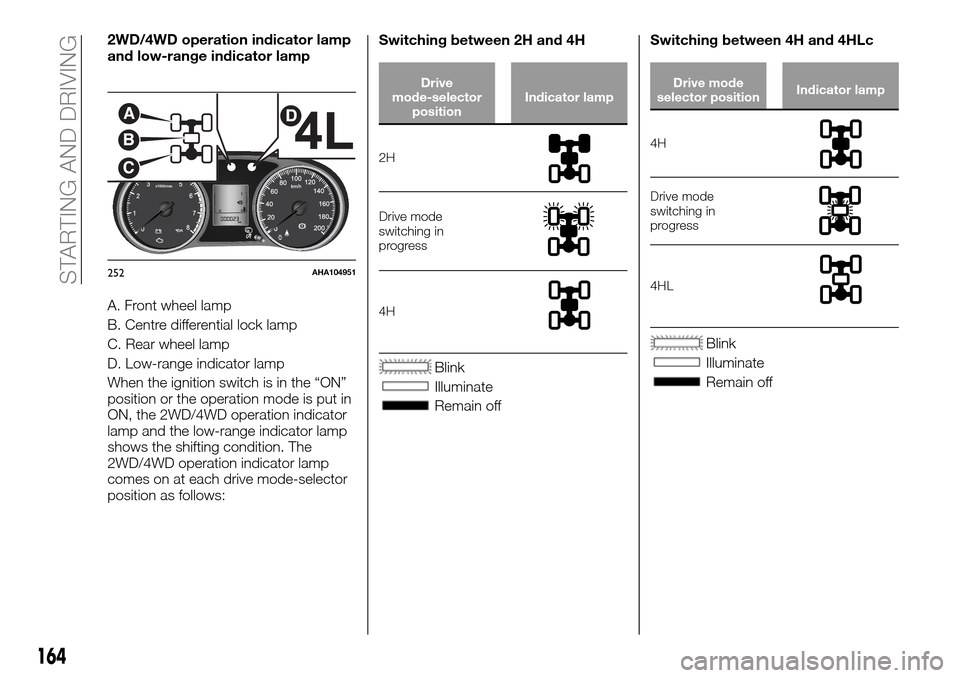
2WD/4WD operation indicator lamp
and low-range indicator lamp
A. Front wheel lamp
B. Centre differential lock lamp
C. Rear wheel lamp
D. Low-range indicator lamp
When the ignition switch is in the “ON”
position or the operation mode is put in
ON, the 2WD/4WD operation indicator
lamp and the low-range indicator lamp
shows the shifting condition. The
2WD/4WD operation indicator lamp
comes on at each drive mode-selector
position as follows:Switching between 2H and 4H
Drive
mode-selector
positionIndicator lamp
2H
Drive mode
switching in
progress
4H
Blink
Illuminate
Remain offSwitching between 4H and 4HLc
Drive mode
selector positionIndicator lamp
4H
Drive mode
switching in
progress
4HL
Blink
Illuminate
Remain off
A
B
C
D
252AHA104951
164
STARTING AND DRIVING
Page 169 of 312
110)
The rear differential lock does not
operate when the drive mode-selector
is in “2H” position (Easy select 4WD),
“2H” or “4H” position (Super select
4WD II).
When the rear differential is locked with
the drive mode-selector in “4L” or “4H”
position (Easy select 4WD), “4LLc” or
“4HLc” position (Super select 4WD II)
changing the drive mode-selector to
“2H” position (Easy select 4WD), “2H”
or “4H” position (Super select 4WD II)
makes the rear differential unlock
automatically.Rear differential lock indicator lamp
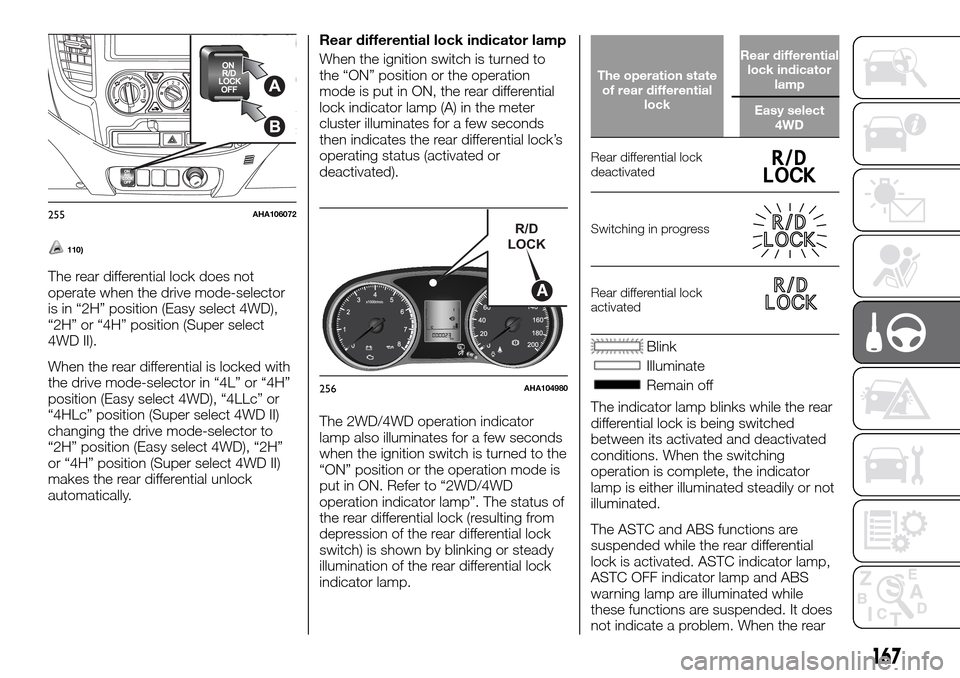
When the ignition switch is turned to
the “ON” position or the operation
mode is put in ON, the rear differential
lock indicator lamp (A) in the meter
cluster illuminates for a few seconds
then indicates the rear differential lock’s
operating status (activated or
deactivated).
The 2WD/4WD operation indicator
lamp also illuminates for a few seconds
when the ignition switch is turned to the
“ON” position or the operation mode is
put in ON. Refer to “2WD/4WD
operation indicator lamp”. The status of
the rear differential lock (resulting from
depression of the rear differential lock
switch) is shown by blinking or steady
illumination of the rear differential lock
indicator lamp.
The operation state
of rear differential
lockRear differential
lock indicator
lamp
Easy select
4WD
Rear differential lock
deactivated
Switching in progress
Rear differential lock
activated
Blink
Illuminate
Remain off
The indicator lamp blinks while the rear
differential lock is being switched
between its activated and deactivated
conditions. When the switching
operation is complete, the indicator
lamp is either illuminated steadily or not
illuminated.
The ASTC and ABS functions are
suspended while the rear differential
lock is activated. ASTC indicator lamp,
ASTC OFF indicator lamp and ABS
warning lamp are illuminated while
these functions are suspended. It does
not indicate a problem. When the rear
255AHA106072R/D
LOCK
A
256AHA104980
167
Page 179 of 312
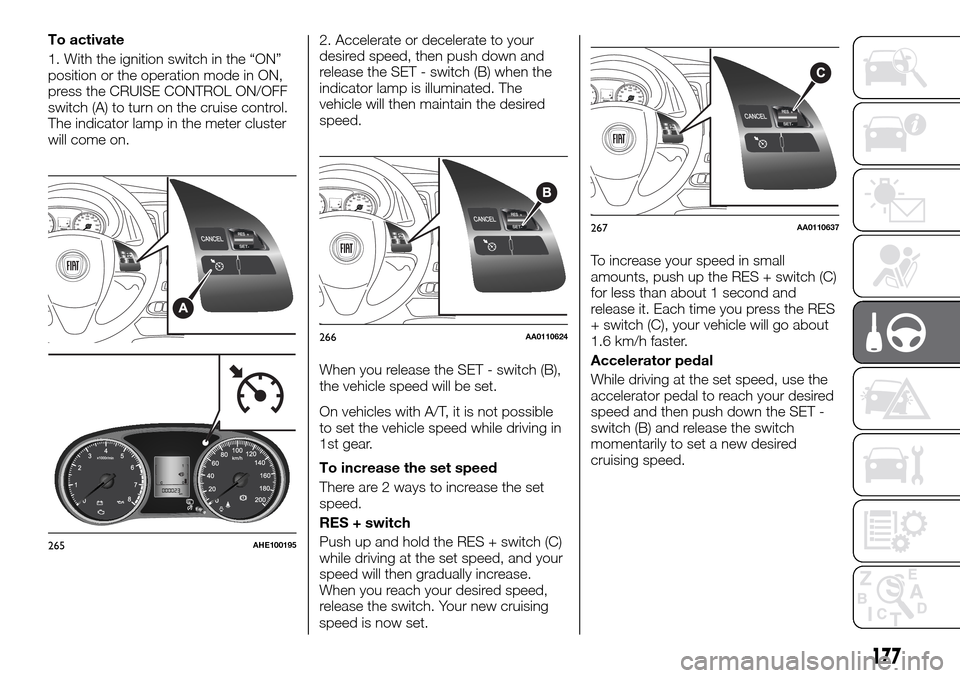
To activate
1. With the ignition switch in the “ON”
position or the operation mode in ON,
press the CRUISE CONTROL ON/OFF
switch (A) to turn on the cruise control.
The indicator lamp in the meter cluster
will come on.2. Accelerate or decelerate to your
desired speed, then push down and
release the SET - switch (B) when the
indicator lamp is illuminated. The
vehicle will then maintain the desired
speed.
When you release the SET - switch (B),
the vehicle speed will be set.
On vehicles with A/T, it is not possible
to set the vehicle speed while driving in
1st gear.
To increase the set speed
There are 2 ways to increase the set
speed.
RES + switch
Push up and hold the RES + switch (C)
while driving at the set speed, and your
speed will then gradually increase.
When you reach your desired speed,
release the switch. Your new cruising
speed is now set.To increase your speed in small
amounts, push up the RES + switch (C)
for less than about 1 second and
release it. Each time you press the RES
+ switch (C), your vehicle will go about
1.6 km/h faster.
Accelerator pedal
While driving at the set speed, use the
accelerator pedal to reach your desired
speed and then push down the SET -
switch (B) and release the switch
momentarily to set a new desired
cruising speed.
265AHE100195
266AA0110624
267AA0110637
177
Page 181 of 312
The set speed driving is deactivated
automatically in any of the following
ways.
When you depress the clutch pedal
(on vehicles with M/T).
When your speed slows to about
15 km/h or more below the set speed
because of a hill, etc.
When your speed slows to about
40 km/h or less.
When the active stability & traction
control (ASTC) starts operating. Refer to
“Active stability & traction control
(ASTC)”.
227)
Also, the set speed driving may be
deactivated as follow:
When the engine speed rises and
approaches the tachometer’s red zone
(the red-coloured part of the
tachometer dial).
127)
To resume the set speed
If the set speed driving is deactivated
by the condition described in “To
deactivate”, you can resume the
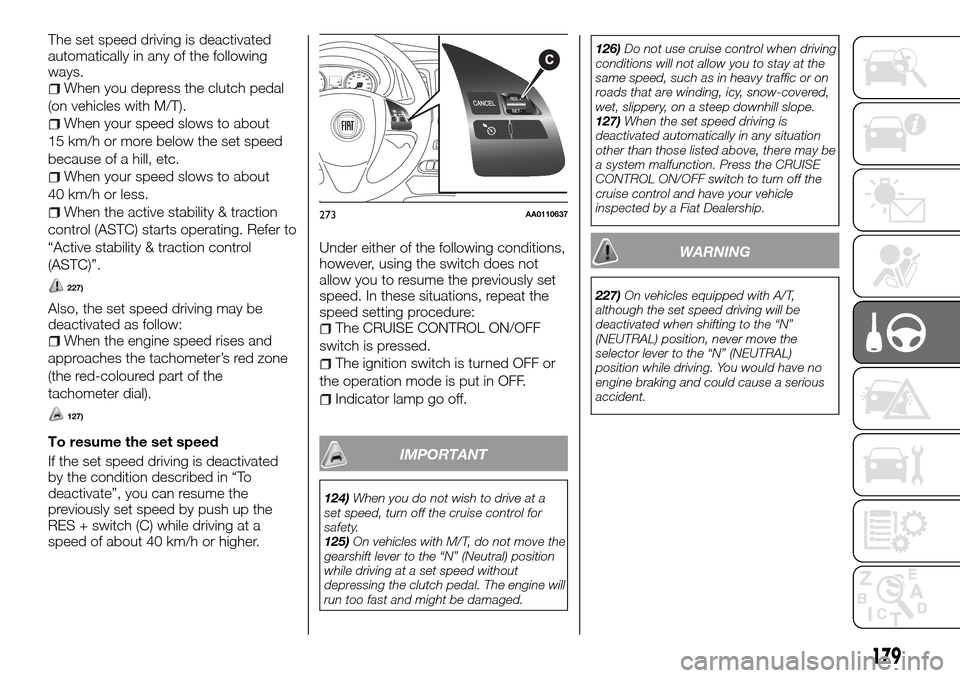
previously set speed by push up the
RES + switch (C) while driving at a
speed of about 40 km/h or higher.Under either of the following conditions,
however, using the switch does not
allow you to resume the previously set
speed. In these situations, repeat the
speed setting procedure:
The CRUISE CONTROL ON/OFF
switch is pressed.
The ignition switch is turned OFF or
the operation mode is put in OFF.
Indicator lamp go off.
IMPORTANT
124)When you do not wish to drive at a
set speed, turn off the cruise control for
safety.
125)On vehicles with M/T, do not move the
gearshift lever to the “N” (Neutral) position
while driving at a set speed without
depressing the clutch pedal. The engine will
run too fast and might be damaged.126)Do not use cruise control when driving
conditions will not allow you to stay at the
same speed, such as in heavy traffic or on
roads that are winding, icy, snow-covered,
wet, slippery, on a steep downhill slope.
127)When the set speed driving is
deactivated automatically in any situation
other than those listed above, there may be
a system malfunction. Press the CRUISE
CONTROL ON/OFF switch to turn off the
cruise control and have your vehicle
inspected by a Fiat Dealership.
WARNING
227)On vehicles equipped with A/T,
although the set speed driving will be
deactivated when shifting to the “N”
(NEUTRAL) position, never move the
selector lever to the “N” (NEUTRAL)
position while driving. You would have no
engine braking and could cause a serious
accident.
273AA0110637
179
Page 182 of 312
REAR VIEW CAMERA
(where provided)
The rear-view camera is a system that
shows the view behind the vehicle on a
screen of the Communication System
or the DISPLAY AUDIO.
228) 229) 230)
128)
Range of view of rear-view camera
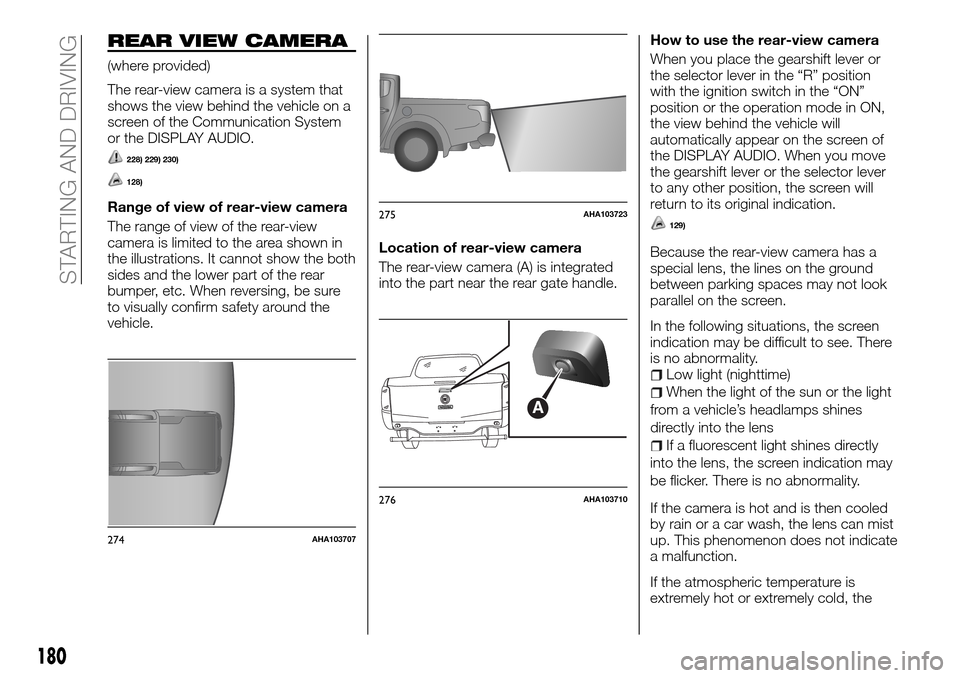
The range of view of the rear-view
camera is limited to the area shown in
the illustrations. It cannot show the both
sides and the lower part of the rear
bumper, etc. When reversing, be sure
to visually confirm safety around the
vehicle.Location of rear-view camera
The rear-view camera (A) is integrated
into the part near the rear gate handle.How to use the rear-view camera
When you place the gearshift lever or
the selector lever in the “R” position
with the ignition switch in the “ON”
position or the operation mode in ON,
the view behind the vehicle will
automatically appear on the screen of
the DISPLAY AUDIO. When you move
the gearshift lever or the selector lever
to any other position, the screen will
return to its original indication.129)
Because the rear-view camera has a
special lens, the lines on the ground
between parking spaces may not look
parallel on the screen.
In the following situations, the screen
indication may be difficult to see. There
is no abnormality.
Low light (nighttime)
When the light of the sun or the light
from a vehicle’s headlamps shines
directly into the lens
If a fluorescent light shines directly
into the lens, the screen indication may
be flicker. There is no abnormality.
If the camera is hot and is then cooled
by rain or a car wash, the lens can mist
up. This phenomenon does not indicate
a malfunction.
If the atmospheric temperature is
extremely hot or extremely cold, the
274AHA103707
275AHA103723
A
276AHA103710
180
STARTING AND DRIVING