ConF FIAT GRANDE PUNTO 2007 199 / 1.G User Guide
[x] Cancel search | Manufacturer: FIAT, Model Year: 2007, Model line: GRANDE PUNTO, Model: FIAT GRANDE PUNTO 2007 199 / 1.GPages: 242, PDF Size: 3.71 MB
Page 28 of 242
27
SAFETY
DEVICES
CORRECT USE
OF THE CAR
WARNING
LIGHTS AND
MESSAGES
IN AN
EMERGENCY
CAR
MAINTENANCE
TECHNICAL
SPECIFICATIONS
INDEX
DASHBOARD
AND CONTROLS
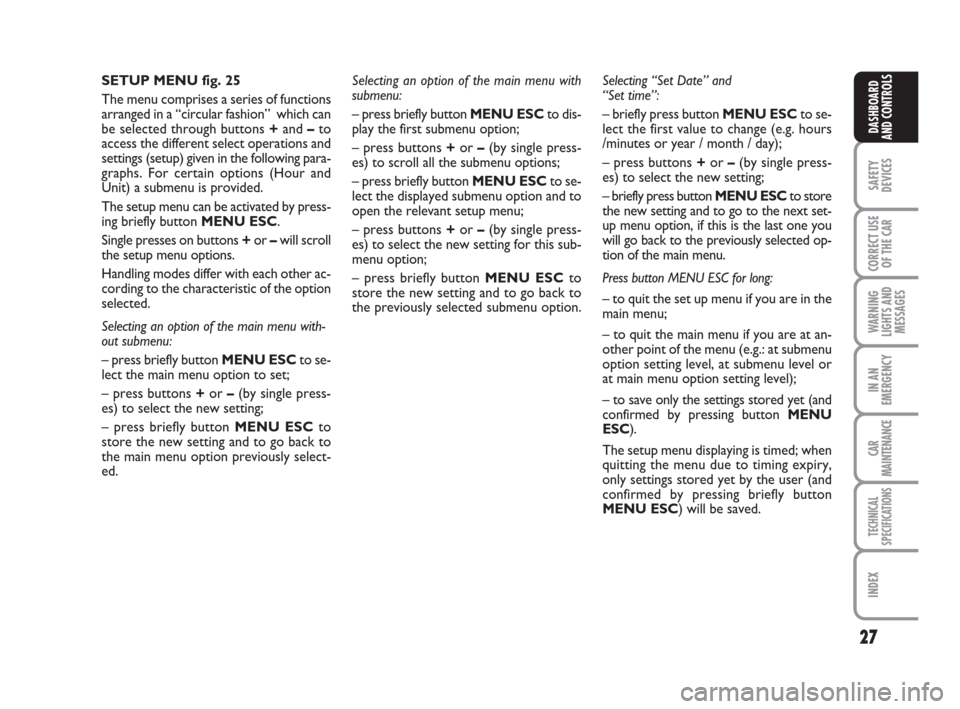
SETUP MENU fig. 25
The menu comprises a series of functions
arranged in a “circular fashion” which can
be selected through buttons +and –to
access the different select operations and
settings (setup) given in the following para-
graphs. For certain options (Hour and
Unit) a submenu is provided.
The setup menu can be activated by press-
ing briefly button MENU ESC.
Single presses on buttons +or –will scroll
the setup menu options.
Handling modes differ with each other ac-
cording to the characteristic of the option
selected.
Selecting an option of the main menu with-
out submenu:
– press briefly button MENU ESCto se-
lect the main menu option to set;
– press buttons +or –(by single press-
es) to select the new setting;
– press briefly button MENU ESCto
store the new setting and to go back to
the main menu option previously select-
ed.Selecting “Set Date” and
“Set time”:
– briefly press button MENU ESCto se-
lect the first value to change (e.g. hours
/minutes or year / month / day);
– press buttons +or –(by single press-
es) to select the new setting;
– briefly press button MENU ESCto store
the new setting and to go to the next set-
up menu option, if this is the last one you
will go back to the previously selected op-
tion of the main menu.
Press button MENU ESC for long:
– to quit the set up menu if you are in the
main menu;
– to quit the main menu if you are at an-
other point of the menu (e.g.: at submenu
option setting level, at submenu level or
at main menu option setting level);
– to save only the settings stored yet (and
confirmed by pressing button MENU
ESC).
The setup menu displaying is timed; when
quitting the menu due to timing expiry,
only settings stored yet by the user (and
confirmed by pressing briefly button
MENU ESC) will be saved. Selecting an option of the main menu with
submenu:
– press briefly button MENU ESCto dis-
play the first submenu option;
– press buttons +or –(by single press-
es) to scroll all the submenu options;
– press briefly button MENU ESCto se-
lect the displayed submenu option and to
open the relevant setup menu;
– press buttons +or –(by single press-
es) to select the new setting for this sub-
menu option;
– press briefly button MENU ESC to
store the new setting and to go back to
the previously selected submenu option.
001-036 Punto GDX GB 20-07-2007 9:40 Pagina 27
Page 30 of 242
29
SAFETY
DEVICES
CORRECT USE
OF THE CAR
WARNING
LIGHTS AND
MESSAGES
IN AN
EMERGENCY
CAR
MAINTENANCE
TECHNICAL
SPECIFICATIONS
INDEX
DASHBOARD
AND CONTROLS– briefly press button MENU ESCto go
back to the menu screen or press the but-
ton for long to go back to the standard
screen without storing settings.
To cancel the setting, proceed as follows:
– briefly press button MENU ESC: (On)
will flash on the display;
– press button –: (Off) will flash on the dis-
play;
– briefly press button MENU ESCto go
back to the menu screen or press the but-
ton for long to go back to the standard
screen without storing settings.
Rain sensor sensitivity adjustment
(Rain sensor) (where provided)
With this function it is possible to adjust
the rain sensor sensitivity according to 4
levels.
To set the required sensitivity level pro-
ceed as follows:
– briefly press button MENU ESC, the
previously set sensitivity “level” will flash
on the display; Speed limit (Speed Beep)
With this function it is possible to set the
car speed limit (km/h or mph); when this
limit is exceeded the driver is immediate-
ly alerted (see section “Warning lights and
messages”).
To set the speed limit, proceed as follows:
– briefly press button MENU ESC, the
display will show the wording (Speed
Beep);
– press button +or –to select speed lim-
it activation (On) or deactivation (Off);
– if the function has been activated (On),
press buttons +or –to select the re-
quired speed limit and then press MENU
ESCto confirm.
NoteThe possible setting is between 30 and
200 km/h, or between 20 and 125 mph de-
pending on the unit set previously (see para-
graph “Setting the distance unit (Units)”) de-
scribed later. Every press on button +/ –in-
creases/decreases by 5 units. Keeping the
button +/ –pressed obtains the automatic
fast increase or decrease. When you are
near the required setting complete adjust-
ment by single presses.
– press button +or –for setting;
– briefly press button MENU ESCto go
back to the menu screen or press the but-
ton for long to go back to the standard
screen without storing settings.
Trip B On/Off (tripB data)
Through this option it is possible to acti-
vate (On) or deactivate (Off) the Trip B
(partial trip).
For further information see “Trip com-
puter”.
For activation / deactivation, proceed as
follows:
– briefly press button MENU ESC: (On)
or (Off) will flash on the display (accord-
ing to previous setting);
– press button +or –for setting;
– briefly press button MENU ESCto go
back to the menu screen or press the but-
ton for long to go back to the standard
screen without storing settings.
DISPLAY FUNCTIONS
(see Multifunctional Display or Reconfigurable Multifunctional Display)
001-036 Punto GDX GB 20-07-2007 9:41 Pagina 29
Page 31 of 242
30
SAFETY
DEVICES
CORRECT USE
OF THE CAR
WARNING
LIGHTS AND
MESSAGES
IN AN
EMERGENCY
CAR
MAINTENANCE
TECHNICAL
SPECIFICATIONS
INDEX
DASHBOARD
AND CONTROLS
Set date (Set Date)
This function enables to update the date
(day - month - year).
To correct the date proceed as follows:
– briefly press button MENU ESC: “day”
will flash on the display;
– press button +or –for setting;
– briefly press button MENU ESC:
“month” will flash on the display;
– press button +or –for setting;
– briefly press button MENU ESC:
“year” will flash on the display;
– press button +or –for setting.
NoteEvery press on button +or – in-
creases/decreases by 1 unit. Keeping the
button pressed obtains automatic fast in-
crease or decrease. When you are near
the required setting complete adjustment
by single presses.
– briefly press button MENU ESCto go
back to the menu screen or press the but-
ton for long to go back to the standard
screen without storing settings. Set clock (Set time)
This function enables to set the clock
through two sub-menus: “Time” and
“Mode”.
Proceed as follows:
– briefly press button MENU ESC, the
display will show the two sub-menus
“Time” and “Mode”;
– press button +or –to surf the two sub-
menus;
– select the required option and then
press button MENU ESCbriefly;
– if selecting “Time”, briefly press button
MENU ESC, “hours” will flash on the
display;
– press button +or –for setting;
– briefly press button MENU ESC, “min-
utes” will flash on the display;
– press button +or –for setting;
– if selecting “Mode”:briefly press button
MENU ESC , “24h” or “12h” mode will
flash on the display;
– press button +or –to select “24h” or
“12h”.
After setting, briefly press button MENU
ESCto go back to the submenu screen
or press the button for long to go back to
the main menu screen without storing set-
tings.
– Press again button MENU ESCfor long
to go back to the standard screen or to
the main menu according to the current
menu level displayed.First screen (information displayed
in the main screen)
(where provided)
This function enables to select the type of
information displayed in the main screen.
It is possible to display the date or the
pressure of the turbo-compressor.
To select one of the two items, proceed
as follows:
– push the button MENU ESCfor a
short time, “First screen” is displayed;
– press again the button MENU ESCfor
a short time to display the “Date” and
“Engine Info” options;
– press +or –to select the type of infor-
mation to be displayed in the main screen;
– press MENU ESCfor a short time to
store the selection and return to the pre-
vious screen or press the button for a
longer time to return to the standard
screen without storing the selection.
Rotating the ignition key on MAR, the re-
configurable multifunctional display, after
the start-up check, displays the previous-
ly set information using the “First screen”
function of the menu.
001-036 Punto GDX GB 20-07-2007 9:41 Pagina 30
Page 35 of 242
34
SAFETY
DEVICES
CORRECT USE
OF THE CAR
WARNING
LIGHTS AND
MESSAGES
IN AN
EMERGENCY
CAR
MAINTENANCE
TECHNICAL
SPECIFICATIONS
INDEX
DASHBOARD
AND CONTROLS
Front passenger’s air bag
and side bag (where provided)
activation/deactivation
(Passenger Bag)
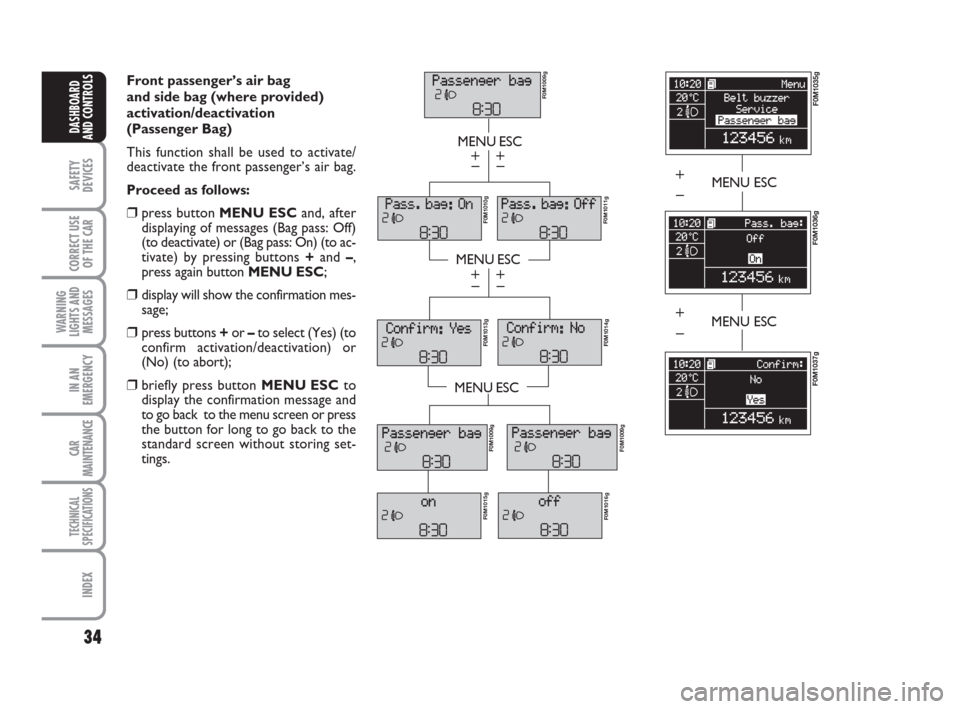
This function shall be used to activate/
deactivate the front passenger’s air bag.
Proceed as follows:
❒press button MENU ESCand, after
displaying of messages (Bag pass: Off)
(to deactivate) or (Bag pass: On) (to ac-
tivate) by pressing buttons +and –,
press again button MENU ESC;
❒display will show the confirmation mes-
sage;
❒press buttons +or –to select (Yes) (to
confirm activation/deactivation) or
(No) (to abort);
❒briefly press button MENU ESCto
display the confirmation message and
to go back to the menu screen or press
the button for long to go back to the
standard screen without storing set-
tings.
MENU ESC
MENU ESC
MENU ESC
– +
– +
– +
– +
F0M1009g
F0M1011gF0M1010g F0M1013g
F0M1014g
F0M1009g
F0M1015g
F0M1016gF0M1009g
MENU ESC
F0M1035g
F0M1036g
+
–
F0M1037g
MENU ESC+
–
001-036 Punto GDX GB 20-07-2007 9:41 Pagina 34
Page 83 of 242
82
SAFETY
DEVICES
CORRECT USE
OF THE CAR
WARNING
LIGHTS AND
MESSAGES
IN AN
EMERGENCY
CAR
MAINTENANCE
TECHNICAL
SPECIFICATIONS
INDEX
DASHBOARD
AND CONTROLS
Automatic continuous operation ac-
tivatesby pressing control switches for
over half a second. The window will stop
when it is completely open or when press-
ing the button again.
Versions with 4 power windows (front
and rear) are fitted with anti-crushing safe-
ty device to detect the presence of an ob-
stacle in the window closing stroke. If an
obstacle is detected, the safety system will
stop window closing and, according to
window position, will also reverse window
stroke.
IMPORTANT In the event that the anti-
crushing function is activated 5 times in
only 1 minute, the system will automati-
cally enter the “recovery” mode (self-pro-
tection). This conditions is pointed out by
the fact that, in the closing phase, the win-
dow goes up in jerks.
The system conforms to the
forthcoming standard
2000/4/EC concerning the safety of
passengers leaning out of the pas-
senger compartment.
WARNINGSo, it is necessary to carry out the sys-
tem restore procedure, acting as follows:
❒open the windows;
or
❒turn the ignition key to STOPand then
to MAR.
If no malfunction is present, the window
returns to its normal operation automat-
ically.
IMPORTANT With ignition key at STOP
or removed, the power windows remain
activated for about 2 minutes and are de-
activated immediately the moment a door
is opened.IMPORTANT On certain versions, press-
ing the remote control button
Ëfor over
2 seconds will open the windows where-
as pressing the remote control button
Áfor over 2 seconds will close them.
037-088 Punto GDX GB 20-07-2007 9:41 Pagina 82
Page 197 of 242
196
WARNING
LIGHTS AND
MESSAGES
TECHNICAL
SPECIFICATIONS
INDEX
DASHBOARD
AND CONTROLS
SAFETY
DEVICES
CORRECT USE
OF THE CAR
IN AN
EMERGENCY
CAR
MAINTENANCE
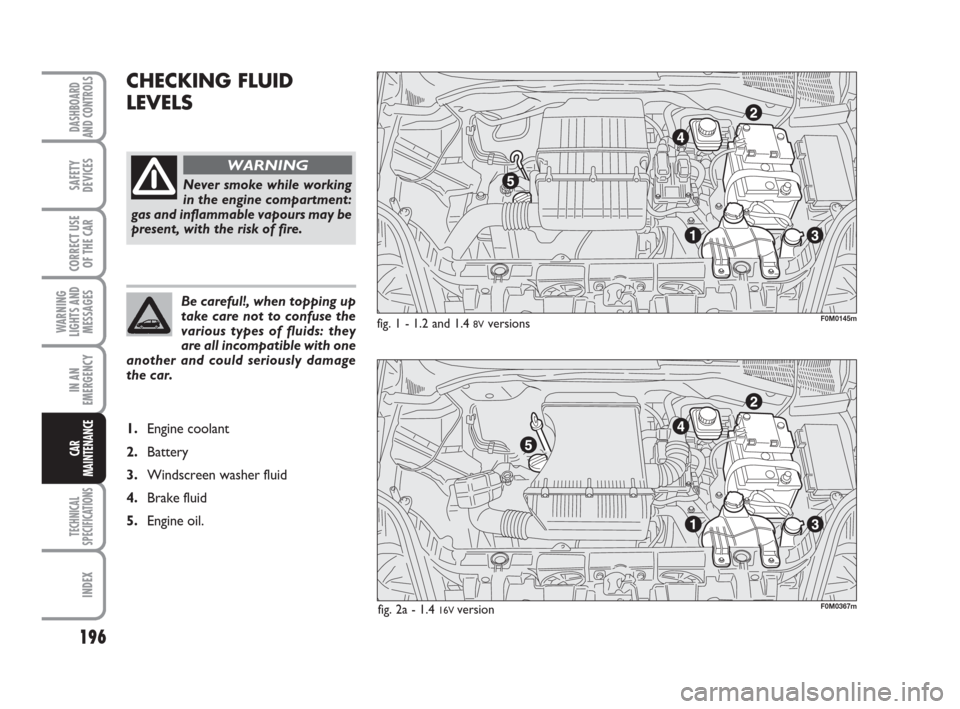
CHECKING FLUID
LEVELS
fig. 1 - 1.2 and 1.4 8Vversions
Never smoke while working
in the engine compartment:
gas and inflammable vapours may be
present, with the risk of fire.
WARNING
Be careful!, when topping up
take care not to confuse the
various types of fluids: they
are all incompatible with one
another and could seriously damage
the car.
1.Engine coolant
2.Battery
3.Windscreen washer fluid
4.Brake fluid
5.Engine oil.
F0M0145m
F0M0367mfig. 2a - 1.4 16V version
189-210 Punto GDX GB 20-07-2007 9:43 Pagina 196
Page 241 of 242
Fiat Group Automobiles S.p.A. - Servizi al Cliente - Assistenza Tecnica - Ingegneria Assistenziale - Largo Senatore G. Agnelli. 5 - 10040 Volvera - Torino (Italia)
Print N. 603.81.203 - 07/2007 - 1st edition
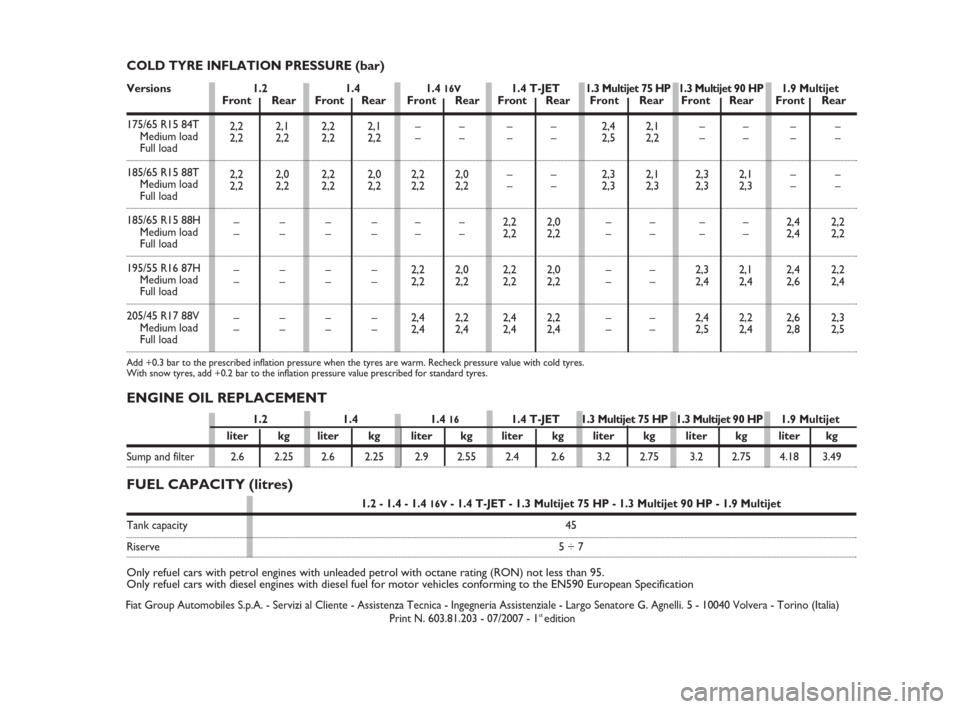
1.2 - 1.4 - 1.4 16V- 1.4 T-JET - 1.3 Multijet 75 HP - 1.3 Multijet 90 HP - 1.9 Multijet
Tank capacity45
Riserve5 ÷ 7
Only refuel cars with petrol engines with unleaded petrol with octane rating (RON) not less than 95.
Only refuel cars with diesel engines with diesel fuel for motor vehicles conforming to the EN590 European Specification
FUEL CAPACITY (litres) ENGINE OIL REPLACEMENT
COLD TYRE INFLATION PRESSURE (bar)
2,2 2,1
2,2 2,2
2,2 2,0
2,2 2,2
––
––
––
––
––
––2,2 2,1
2,2 2,2
2,2 2,0
2,2 2,2
––
––
––
––
––
––2,4 2,1
2,5 2,2
2,3 2,1
2,3 2,3
––
––
––
––
––
––––
––
2,3 2,1
2,3 2,3
––
––
2,3 2,1
2,4 2,4
2,4 2,2
2,5 2,4––
––
––
––
2,4 2,2
2,4 2,2
2,4 2,2
2,6 2,4
2,6 2,3
2,8 2,5 ––
––
2,2 2,0
2,2 2,2
––
––
2,2 2,0
2,2 2,2
2,4 2,2
2,4 2,4––
––
––
––
2,2 2,0
2,2 2,2
2,2 2,0
2,2 2,2
2,4 2,2
2,4 2,4 Versions
1.2 1.4 1.4 16V1.4 T-JET1.3 Multijet 75 HP 1.3 Multijet 90 HP1.9 MultijetFront Rear Front Rear Front Rear Front Rear Front Rear Front Rear Front Rear
175/65 R15 84T
Medium load
Full load
185/65 R15 88T
Medium load
Full load
185/65 R15 88H
Medium load
Full load
195/55 R16 87H
Medium load
Full load
205/45 R17 88V
Medium load
Full load
Add +0.3 bar to the prescribed inflation pressure when the tyres are warm. Recheck pressure value with cold tyres.
With snow tyres, add +0.2 bar to the inflation pressure value prescribed for standard tyres.
1.2 1.4 1.4 161.4 T-JET1.3 Multijet 75 HP 1.3 Multijet 90 HP1.9 Multijet
liter kg liter kg liter kg liter kg liter kg liter kg liter kg
Sump and filter 2.6 2.25 2.6 2.25 2.9 2.55 2.4 2.6 3.2 2.75 3.2 2.75 4.18 3.49
232-240 Punto GDX GB 20-07-2007 9:44 Pagina 240