Front light FIAT GRANDE PUNTO 2007 199 / 1.G Owners Manual
[x] Cancel search | Manufacturer: FIAT, Model Year: 2007, Model line: GRANDE PUNTO, Model: FIAT GRANDE PUNTO 2007 199 / 1.GPages: 242, PDF Size: 3.71 MB
Page 5 of 242
4
SAFETY
DEVICES
CORRECT USE
OF THE CAR
WARNING
LIGHTS AND
MESSAGES
IN AN
EMERGENCY
CAR
MAINTENANCE
TECHNICAL
SPECIFICATIONS
INDEX
DASHBOARD
AND CONTROLSDASHBOARD ...................................................................... 5
SYMBOLS ............................................................................... 7
THE FIAT CODE SYSTEM.................................................. 7
THE KEYS .............................................................................. 8
ALARM ................................................................................... 11
IGNITION DEVICE.............................................................. 13
INSTRUMENT PANEL ........................................................ 14
INSTRUMENTS..................................................................... 16
DIGITAL DISPLAY ............................................................... 18
MULTIFUNCTION DISPLAY ............................................ 23
RECONFIGURABLE MULTIFUNCTION DISPLAY .... 26
DISPLAY FUNCTIONS ...................................................... 29
TRIP COMPUTER ................................................................ 35
FRONT SEATS ..................................................................... 37
REAR SEATS .......................................................................... 38
HEAD RESTRAINTS............................................................. 39
STEERING WHEEL .............................................................. 40
REARVIEW MIRRORS......................................................... 40
HEATING AND VENTILATION...................................... 42
MANUAL CLIMATE CONTROL SYSTEM .................... 46
AUTOMATIC TWO-ZONE CLIMATE
CONTROL SYSTEM ........................................................... 52
EXTERNAL LIGHTS............................................................. 59
WINDOW WASHING....................................................... 61
CRUISE CONTROL ............................................................ 64
CEILING LIGHTS.................................................................. 66CONTROLS........................................................................... 69
FUEL CUT-OFF SWITCH .................................................. 71
INTERIOR FITTINGS........................................................... 72
SKY-DOME SUNROOF ..................................................... 76
DOORS .................................................................................. 78
POWER WINDOWS/WINDOW WINDERS .............. 81
BOOT ...................................................................................... 84
BONNET................................................................................. 87
ROOF RACK/SKI RACK .................................................... 88
HEADLIGHTS........................................................................ 89
ABS SYSTEM ......................................................................... 91
ESP SYSTEM .......................................................................... 92
EOBD SYSTEM ..................................................................... 95
DUALDRIVE ELECTRIC POWER
STEERING SYSTEM ............................................................. 96
T.P.M.S. SYSTEM .................................................................. 98
PARKING SENSORS ........................................................... 101
SOUND SYSTEM.................................................................. 103
HANDS FREE KIT WITH VOICE RECOGNITION
AND Bluetooth
®TECHNOLOGY ................................ 104
RADIONAVIGATOR PRESETTING
SYSTEM .................................................................................. 104
ACCESSORIES PURCHASED BY THE OWNER .......... 105
AT THE FILLING STATION ............................................. 106
PROTECTING THE ENVIRONMENT............................. 107
DD D
A A
S S
H H
B B
O O
A A
R R
D D
A A
N N
D D
C C
O O
N N
T T
R R
O O
L L
S S
001-036 Punto GDX GB 20-07-2007 9:40 Pagina 4
Page 6 of 242
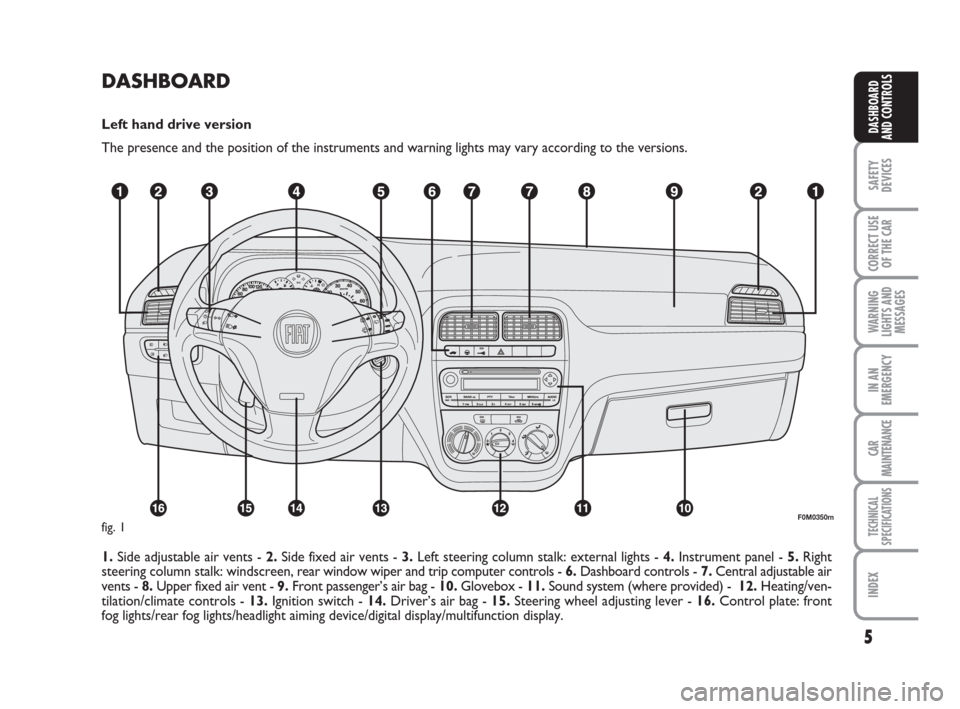
DASHBOARD
Left hand drive version
The presence and the position of the instruments and warning lights may vary according to the versions.
1. Side adjustable air vents - 2.Side fixed air vents - 3.Left steering column stalk: external lights - 4.Instrument panel - 5.Right
steering column stalk: windscreen,rear window wiper and trip computer controls - 6.Dashboard controls - 7.Central adjustable air
vents - 8.Upper fixed air vent - 9.Front passenger’s air bag - 10.Glovebox - 11.Sound system (where provided) - 12.Heating/ven-
tilation/climate controls - 13.Ignition switch - 14.Driver’s air bag - 15.Steering wheel adjusting lever - 16.Control plate: front
fog lights/rear fog lights/headlight aiming device/digital display/multifunction display.
5
SAFETY
DEVICES
CORRECT USE
OF THE CAR
WARNING
LIGHTS AND
MESSAGES
IN AN
EMERGENCY
CAR
MAINTENANCE
TECHNICAL
SPECIFICATIONS
INDEX
DASHBOARD
AND CONTROLS
F0M0350mfig. 1
001-036 Punto GDX GB 20-07-2007 9:40 Pagina 5
Page 7 of 242
6
SAFETY
DEVICES
CORRECT USE
OF THE CAR
WARNING
LIGHTS AND
MESSAGES
IN AN
EMERGENCY
CAR
MAINTENANCE
TECHNICAL
SPECIFICATIONS
INDEX
DASHBOARD
AND CONTROLS
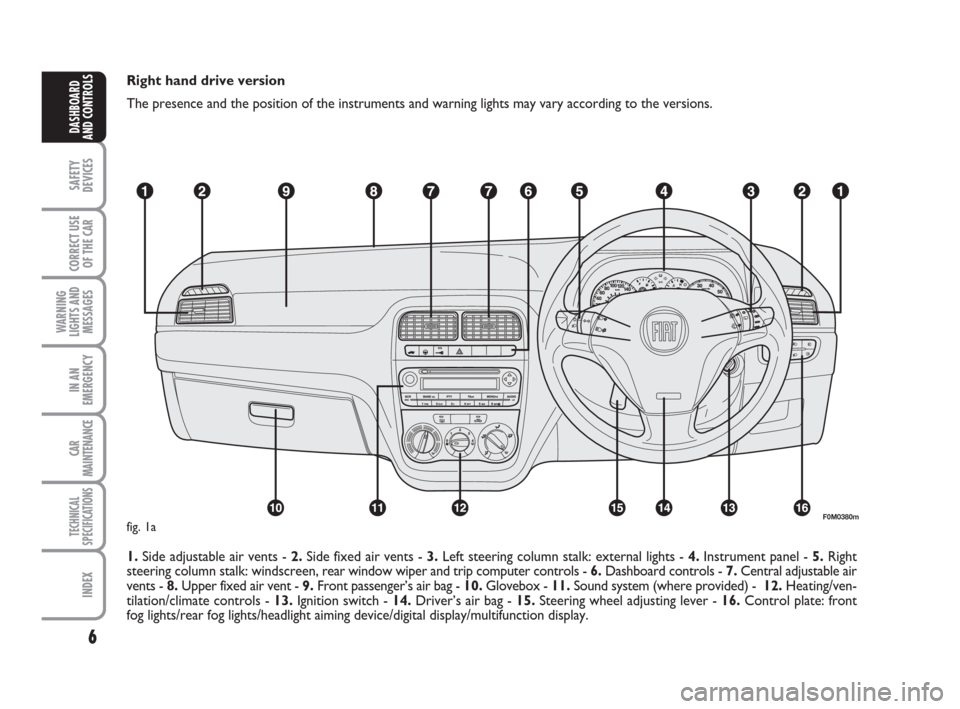
Right hand drive version
The presence and the position of the instruments and warning lights may vary according to the versions.
1. Side adjustable air vents - 2.Side fixed air vents - 3.Left steering column stalk: external lights - 4.Instrument panel - 5.Right
steering column stalk: windscreen,rear window wiper and trip computer controls - 6.Dashboard controls - 7.Central adjustable air
vents - 8.Upper fixed air vent - 9.Front passenger’s air bag - 10.Glovebox - 11.Sound system (where provided) - 12.Heating/ven-
tilation/climate controls - 13.Ignition switch - 14.Driver’s air bag - 15.Steering wheel adjusting lever - 16.Control plate: front
fog lights/rear fog lights/headlight aiming device/digital display/multifunction display.
F0M0380mfig. 1a
001-036 Punto GDX GB 20-07-2007 9:40 Pagina 6
Page 19 of 242
18
SAFETY
DEVICES
CORRECT USE
OF THE CAR
WARNING
LIGHTS AND
MESSAGES
IN AN
EMERGENCY
CAR
MAINTENANCE
TECHNICAL
SPECIFICATIONS
INDEX
DASHBOARD
AND CONTROLS
DIGITAL DISPLAY
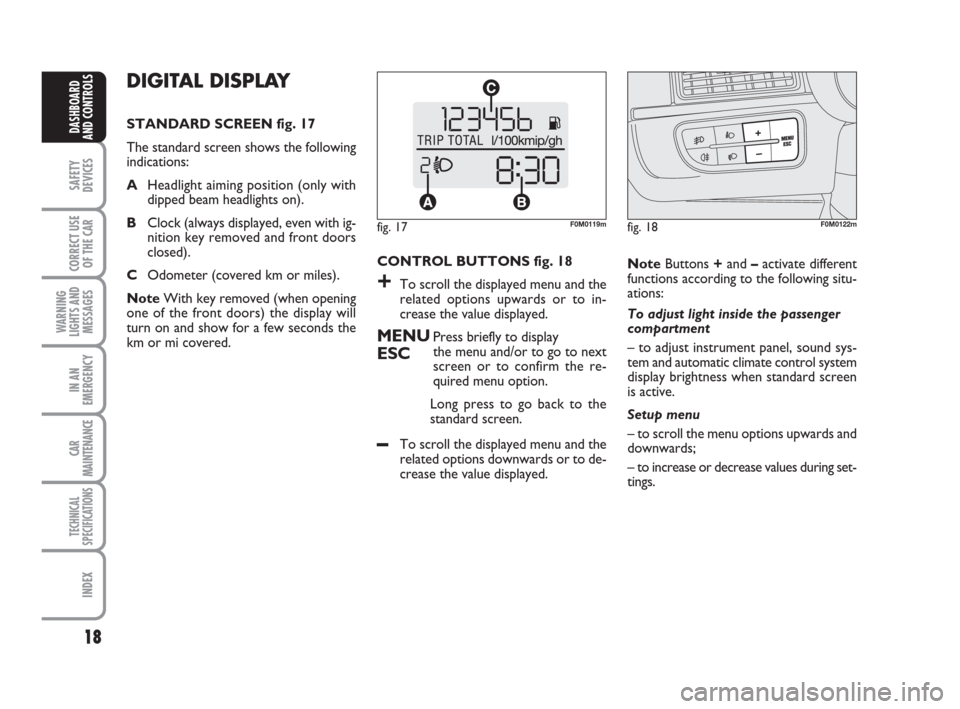
STANDARD SCREEN fig. 17
The standard screen shows the following
indications:
AHeadlight aiming position (only with
dipped beam headlights on).
BClock (always displayed, even with ig-
nition key removed and front doors
closed).
COdometer (covered km or miles).
NoteWith key removed (when opening
one of the front doors) the display will
turn on and show for a few seconds the
km or mi covered.CONTROL BUTTONS fig. 18
+To scroll the displayed menu and the
related options upwards or to in-
crease the value displayed.
MENUPress briefly to display
ESCthe menu and/or to go to next
screen or to confirm the re-
quired menu option.
Long press to go back to the
standard screen.
–To scroll the displayed menu and the
related options downwards or to de-
crease the value displayed.NoteButtons +and –activate different
functions according to the following situ-
ations:
To adjust light inside the passenger
compartment
– to adjust instrument panel, sound sys-
tem and automatic climate control system
display brightness when standard screen
is active.
Setup menu
– to scroll the menu options upwards and
downwards;
– to increase or decrease values during set-
tings.
fig. 17F0M0119mfig. 18F0M0122m
001-036 Punto GDX GB 20-07-2007 9:40 Pagina 18
Page 23 of 242
22
SAFETY
DEVICES
CORRECT USE
OF THE CAR
WARNING
LIGHTS AND
MESSAGES
IN AN
EMERGENCY
CAR
MAINTENANCE
TECHNICAL
SPECIFICATIONS
INDEX
DASHBOARD
AND CONTROLS
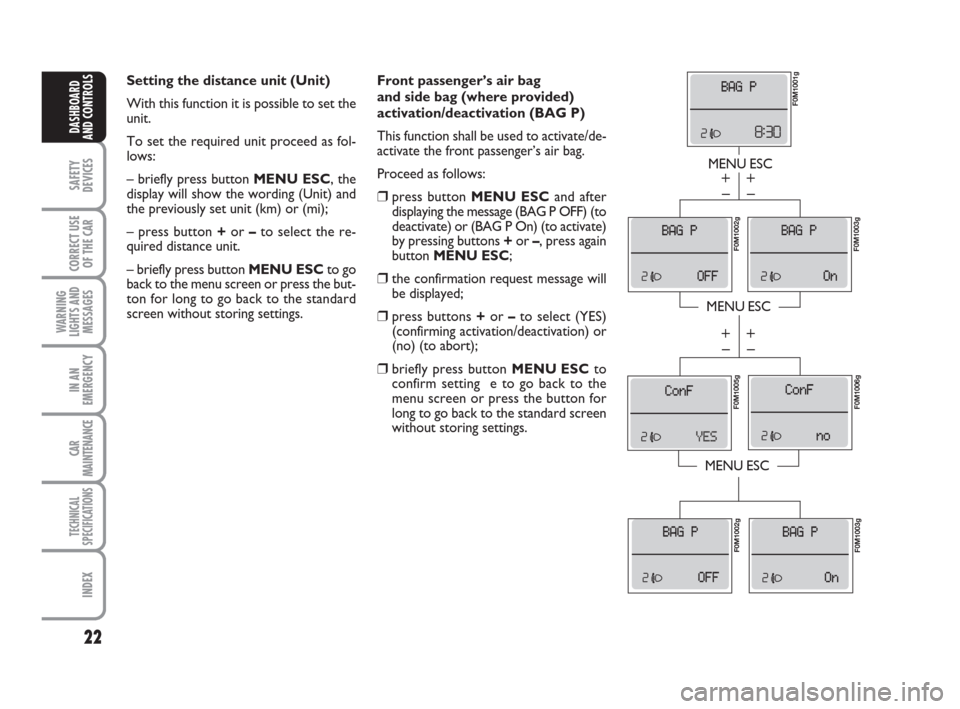
Front passenger’s air bag
and side bag (where provided)
activation/deactivation (BAG P)
This function shall be used to activate/de-
activate the front passenger’s air bag.
Proceed as follows:
❒press button MENU ESCand after
displaying the message (BAG P OFF) (to
deactivate) or (BAG P On) (to activate)
by pressing buttons +or –, press again
button MENU ESC;
❒the confirmation request message will
be displayed;
❒press buttons +or –to select (YES)
(confirming activation/deactivation) or
(no) (to abort);
❒briefly press button MENU ESC to
confirm setting e to go back to the
menu screen or press the button for
long to go back to the standard screen
without storing settings.
MENU ESC
MENU ESC
MENU ESC
– +
– +
– +
– +
F0M1001g
F0M1003gF0M1002g F0M1005g
F0M1006g F0M1002g
F0M1003g
Setting the distance unit (Unit)
With this function it is possible to set the
unit.
To set the required unit proceed as fol-
lows:
– briefly press button MENU ESC, the
display will show the wording (Unit) and
the previously set unit (km) or (mi);
– press button +or –to select the re-
quired distance unit.
– briefly press button MENU ESCto go
back to the menu screen or press the but-
ton for long to go back to the standard
screen without storing settings.
001-036 Punto GDX GB 20-07-2007 9:40 Pagina 22
Page 24 of 242
23
SAFETY
DEVICES
CORRECT USE
OF THE CAR
WARNING
LIGHTS AND
MESSAGES
IN AN
EMERGENCY
CAR
MAINTENANCE
TECHNICAL
SPECIFICATIONS
INDEX
DASHBOARD
AND CONTROLS
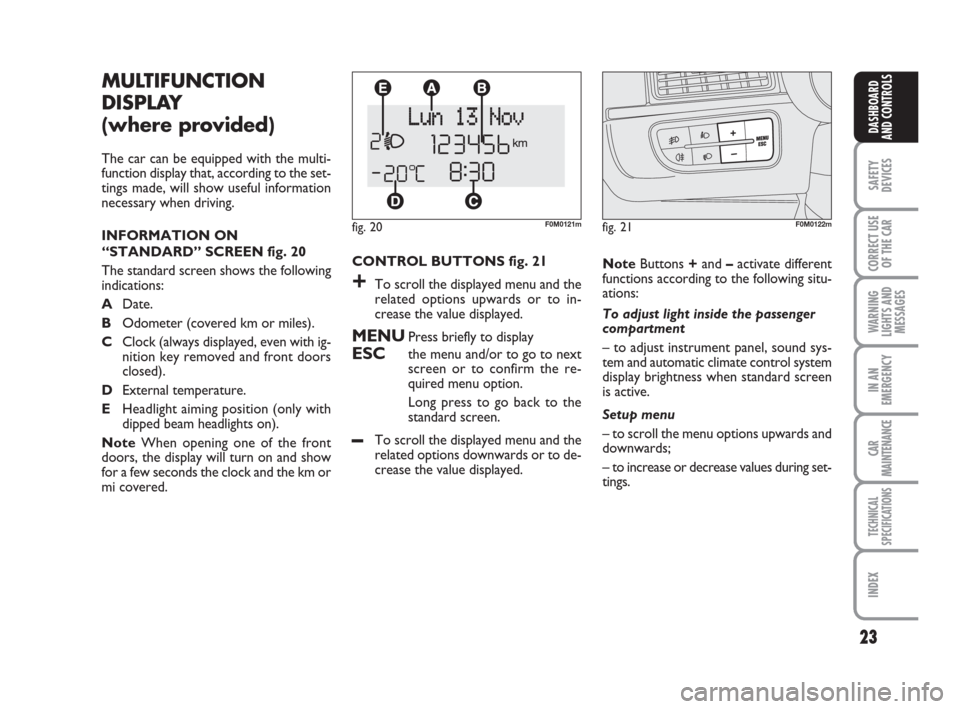
CONTROL BUTTONS fig. 21
+To scroll the displayed menu and the
related options upwards or to in-
crease the value displayed.
MENUPress briefly to display
ESCthe menu and/or to go to next
screen or to confirm the re-
quired menu option.
Long press to go back to the
standard screen.
–To scroll the displayed menu and the
related options downwards or to de-
crease the value displayed.
MULTIFUNCTION
DISPLAY
(where provided)
The car can be equipped with the multi-
function display that, according to the set-
tings made, will show useful information
necessary when driving.
INFORMATION ON
“STANDARD” SCREEN fig. 20
The standard screen shows the following
indications:
ADate.
BOdometer (covered km or miles).
CClock (always displayed, even with ig-
nition key removed and front doors
closed).
DExternal temperature.
EHeadlight aiming position (only with
dipped beam headlights on).
NoteWhen opening one of the front
doors, the display will turn on and show
for a few seconds the clock and the km or
mi covered.NoteButtons +and –activate different
functions according to the following situ-
ations:
To adjust light inside the passenger
compartment
– to adjust instrument panel, sound sys-
tem and automatic climate control system
display brightness when standard screen
is active.
Setup menu
– to scroll the menu options upwards and
downwards;
– to increase or decrease values during set-
tings.
fig. 20F0M0121mfig. 21F0M0122m
001-036 Punto GDX GB 20-07-2007 9:40 Pagina 23
Page 27 of 242
26
SAFETY
DEVICES
CORRECT USE
OF THE CAR
WARNING
LIGHTS AND
MESSAGES
IN AN
EMERGENCY
CAR
MAINTENANCE
TECHNICAL
SPECIFICATIONS
INDEX
DASHBOARD
AND CONTROLS
fig. 23F0M2050gfig. 24F0M9000m
fig. 25F0M0122m
RECONFIGURABLE
MULTIFUNCTION
DISPLAY
(where provided)
The car can be provided with the recon-
figurable multifunction display that shows
useful information, according to the previ-
ous settings made, necessary when driving.
INFORMATION ON
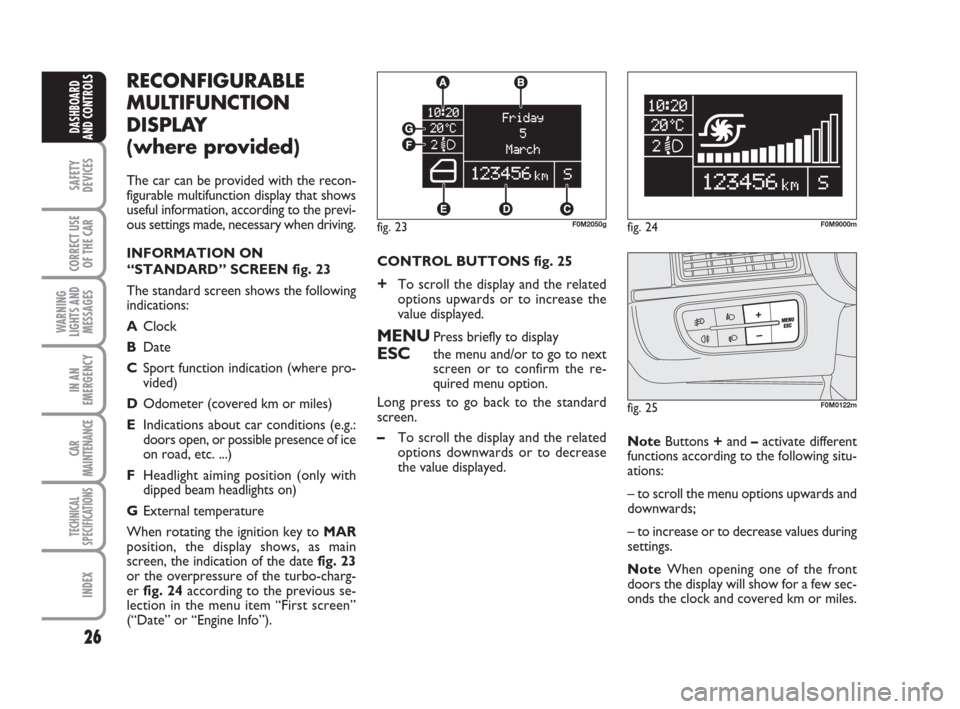
“STANDARD” SCREEN fig. 23
The standard screen shows the following
indications:
AClock
BDate
CSport function indication (where pro-
vided)
DOdometer (covered km or miles)
EIndications about car conditions (e.g.:
doors open, or possible presence of ice
on road, etc. ...)
FHeadlight aiming position (only with
dipped beam headlights on)
GExternal temperature
When rotating the ignition key to MAR
position, the display shows, as main
screen, the indication of the date fig. 23
or the overpressure of the turbo-charg-
er fig. 24according to the previous se-
lection in the menu item “First screen”
(“Date” or “Engine Info”).CONTROL BUTTONS fig. 25
+To scroll the display and the related
options upwards or to increase the
value displayed.
MENUPress briefly to display
ESCthe menu and/or to go to next
screen or to confirm the re-
quired menu option.
Long press to go back to the standard
screen.
–To scroll the display and the related
options downwards or to decrease
the value displayed.NoteButtons +and –activate different
functions according to the following situ-
ations:
– to scroll the menu options upwards and
downwards;
– to increase or to decrease values during
settings.
NoteWhen opening one of the front
doors the display will show for a few sec-
onds the clock and covered km or miles.
001-036 Punto GDX GB 20-07-2007 9:40 Pagina 26
Page 35 of 242
34
SAFETY
DEVICES
CORRECT USE
OF THE CAR
WARNING
LIGHTS AND
MESSAGES
IN AN
EMERGENCY
CAR
MAINTENANCE
TECHNICAL
SPECIFICATIONS
INDEX
DASHBOARD
AND CONTROLS
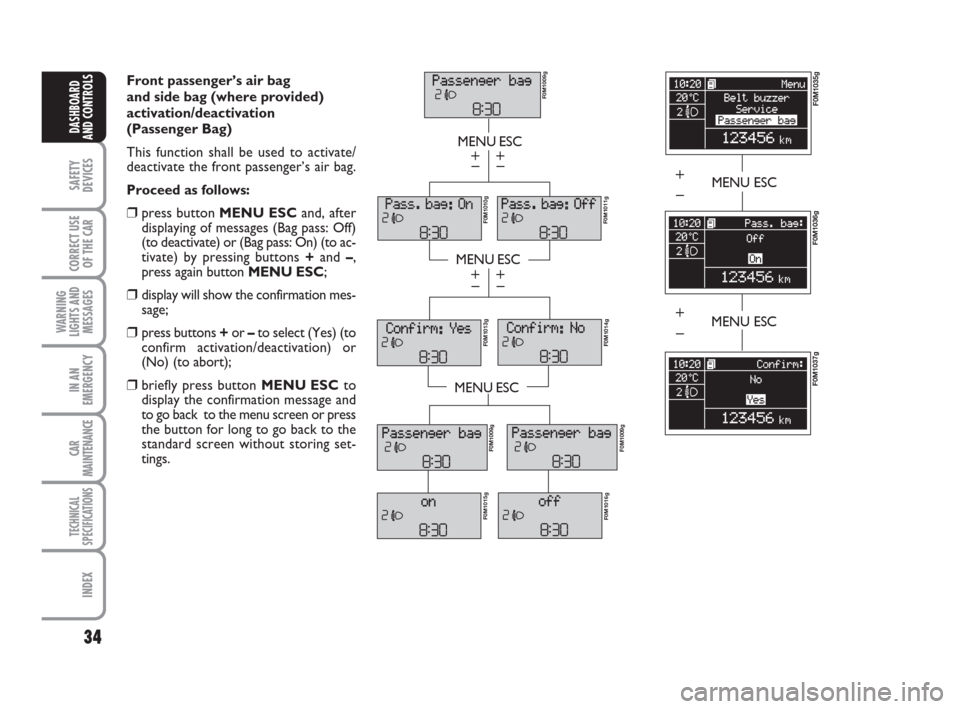
Front passenger’s air bag
and side bag (where provided)
activation/deactivation
(Passenger Bag)
This function shall be used to activate/
deactivate the front passenger’s air bag.
Proceed as follows:
❒press button MENU ESCand, after
displaying of messages (Bag pass: Off)
(to deactivate) or (Bag pass: On) (to ac-
tivate) by pressing buttons +and –,
press again button MENU ESC;
❒display will show the confirmation mes-
sage;
❒press buttons +or –to select (Yes) (to
confirm activation/deactivation) or
(No) (to abort);
❒briefly press button MENU ESCto
display the confirmation message and
to go back to the menu screen or press
the button for long to go back to the
standard screen without storing set-
tings.
MENU ESC
MENU ESC
MENU ESC
– +
– +
– +
– +
F0M1009g
F0M1011gF0M1010g F0M1013g
F0M1014g
F0M1009g
F0M1015g
F0M1016gF0M1009g
MENU ESC
F0M1035g
F0M1036g
+
–
F0M1037g
MENU ESC+
–
001-036 Punto GDX GB 20-07-2007 9:41 Pagina 34
Page 38 of 242
37
SAFETY
DEVICES
CORRECT USE
OF THE CAR
WARNING
LIGHTS AND
MESSAGES
IIN AN
EMERGENCY
CAR
MAINTENANCE
TECHNICAL
SPECIFICATIONS
INDEX
DASHBOARD
AND CONTROLS
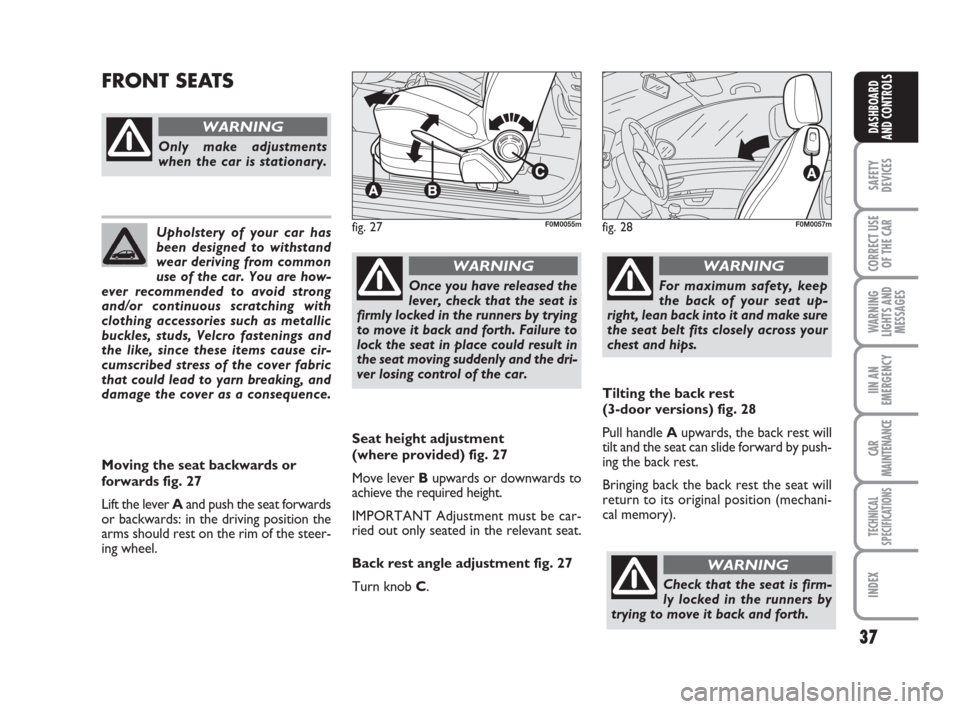
Seat height adjustment
(where provided) fig. 27
Move lever Bupwards or downwards to
achieve the required height.
IMPORTANT Adjustment must be car-
ried out only seated in the relevant seat.
Back rest angle adjustment fig. 27
Turn knob C.
FRONT SEATS
fig. 27F0M0055m
Only make adjustments
when the car is stationary.
WARNING
Moving the seat backwards or
forwards fig. 27
Lift the lever Aand push the seat forwards
or backwards: in the driving position the
arms should rest on the rim of the steer-
ing wheel.
Once you have released the
lever, check that the seat is
firmly locked in the runners by trying
to move it back and forth. Failure to
lock the seat in place could result in
the seat moving suddenly and the dri-
ver losing control of the car.
WARNING
For maximum safety, keep
the back of your seat up-
right, lean back into it and make sure
the seat belt fits closely across your
chest and hips.
WARNING
Upholstery of your car has
been designed to withstand
wear deriving from common
use of the car. You are how-
ever recommended to avoid strong
and/or continuous scratching with
clothing accessories such as metallic
buckles, studs, Velcro fastenings and
the like, since these items cause cir-
cumscribed stress of the cover fabric
that could lead to yarn breaking, and
damage the cover as a consequence.fig. 28F0M0057m
Tilting the back rest
(3-door versions) fig. 28
Pull handle Aupwards, the back rest will
tilt and the seat can slide forward by push-
ing the back rest.
Bringing back the back rest the seat will
return to its original position (mechani-
cal memory).
Check that the seat is firm-
ly locked in the runners by
trying to move it back and forth.
WARNING
037-088 Punto GDX GB 20-07-2007 9:41 Pagina 37
Page 40 of 242
39
SAFETY
DEVICES
CORRECT USE
OF THE CAR
WARNING
LIGHTS AND
MESSAGES
IIN AN
EMERGENCY
CAR
MAINTENANCE
TECHNICAL
SPECIFICATIONS
INDEX
DASHBOARD
AND CONTROLS
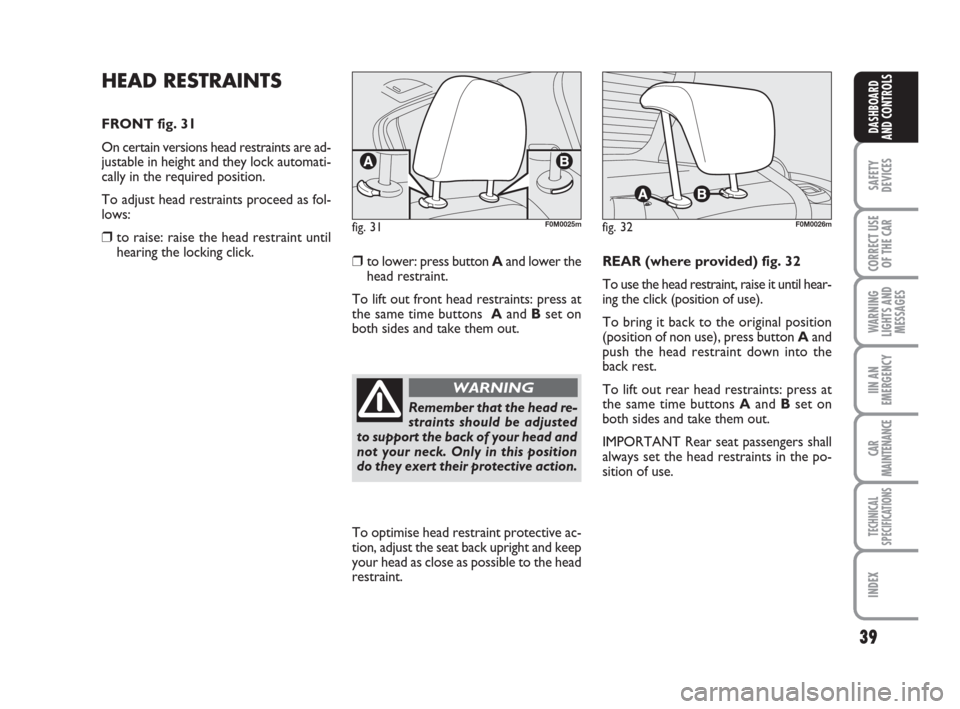
HEAD RESTRAINTS
FRONT fig. 31
On certain versions head restraints are ad-
justable in height and they lock automati-
cally in the required position.
To adjust head restraints proceed as fol-
lows:
❒ to raise: raise the head restraint until
hearing the locking click.
❒to lower: press button Aand lower the
head restraint.
To lift out front head restraints: press at
the same time buttons Aand Bset on
both sides and take them out.REAR (where provided) fig. 32
To use the head restraint, raise it until hear-
ing the click (position of use).
To bring it back to the original position
(position of non use), press button Aand
push the head restraint down into the
back rest.
To lift out rear head restraints: press at
the same time buttons Aand Bset on
both sides and take them out.
IMPORTANT Rear seat passengers shall
always set the head restraints in the po-
sition of use.
fig. 31F0M0025mfig. 32F0M0026m
To optimise head restraint protective ac-
tion, adjust the seat back upright and keep
your head as close as possible to the head
restraint.
Remember that the head re-
straints should be adjusted
to support the back of your head and
not your neck. Only in this position
do they exert their protective action.
WARNING
037-088 Punto GDX GB 20-07-2007 9:41 Pagina 39