door lock FIAT IDEA 2007 1.G User Guide
[x] Cancel search | Manufacturer: FIAT, Model Year: 2007, Model line: IDEA, Model: FIAT IDEA 2007 1.GPages: 314, PDF Size: 4.78 MB
Page 18 of 314
17
SAFETY
DEVICES
CORRECT USE
OF THE CAR
WARNING
LIGHTS AND
MESSAGES
IN AN
EMERGENCY
CAR
MAINTENANCE
TECHNICAL
SPECIFICATIONS
INDEX
DASHBOARD
AND CONTROLS
WARNINGIf the battery of the key with remote control is down, the dead lock device can be
activated only using the metal insert of the key in the door revolving plug as
previously described. The dead lock device guarantees the best protection against unwanted access. Therefore, it should be actuated every
time the car is parked and left unattended.
Page 19 of 314
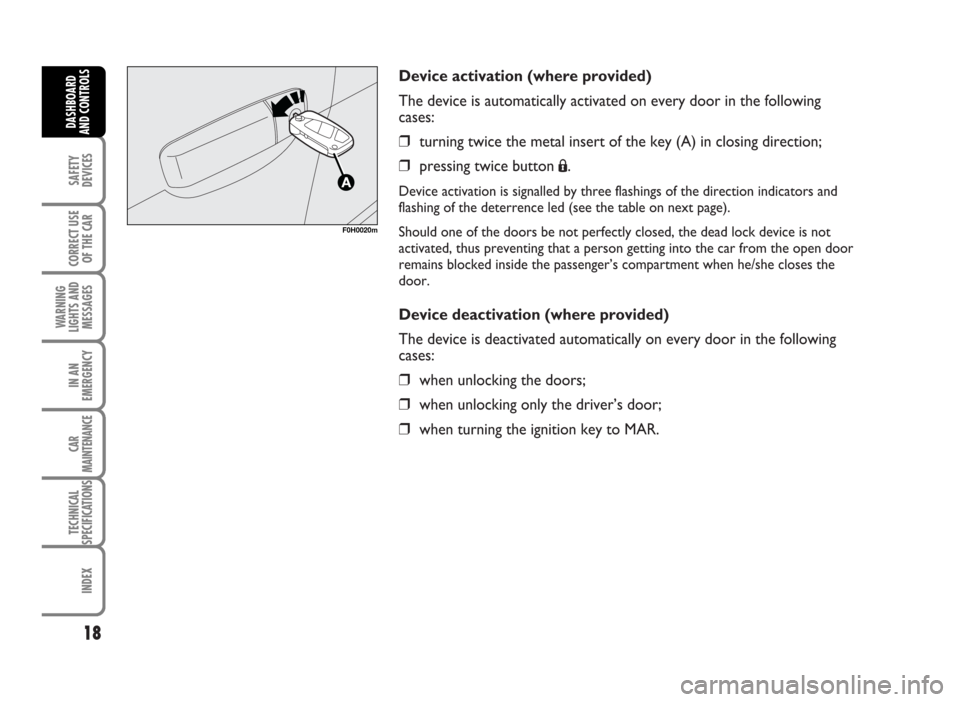
Device activation (where provided)
The device is automatically activated on every door in the following
cases:
❒turning twice the metal insert of the key (A) in closing direction;
❒pressing twice button
Á.
Device activation is signalled by three flashings of the direction indicators and
flashing of the deterrence led (see the table on next page).
Should one of the doors be not perfectly closed, the dead lock device is not
activated, thus preventing that a person getting into the car from the open door
remains blocked inside the passenger’s compartment when he/she closes the
door.
Device deactivation (where provided)
The device is deactivated automatically on every door in the following
cases:
❒when unlocking the doors;
❒when unlocking only the driver’s door;
❒when turning the ignition key to MAR.
18
SAFETY
DEVICES
CORRECT USE
OF THE CAR
WARNING
LIGHTS AND
MESSAGES
IN AN
EMERGENCY
CAR
MAINTENANCE
TECHNICAL
SPECIFICATIONS
INDEX
DASHBOARD
AND CONTROLS
F0H0020m
Page 20 of 314
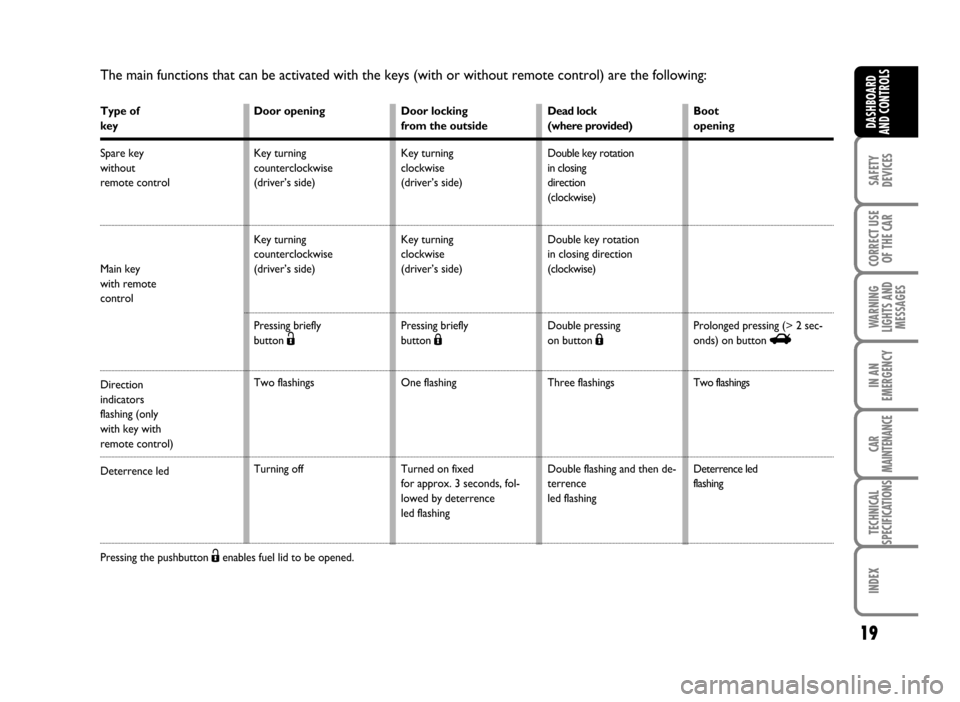
The main functions that can be activated with the keys (with or without remote control) are the following:
Type of
key
Spare key
without
remote control
Main key
with remote
control
Direction
indicators
flashing (only
with key with
remote control)
Deterrence led
Pressing the pushbutton Ëenables fuel lid to be opened.
19
SAFETY
DEVICES
CORRECT USE
OF THE CAR
WARNING
LIGHTS AND
MESSAGES
IN AN
EMERGENCY
CAR
MAINTENANCE
TECHNICAL
SPECIFICATIONS
INDEX
DASHBOARD
AND CONTROLSDoor opening
Key turning
counterclockwise
(driver’s side)
Key turning
counterclockwise
(driver’s side)
Pressing briefly
button
Ë
Two flashings
Turning off Door locking
from the outside
Key turning
clockwise
(driver’s side)
Key turning
clockwise
(driver’s side)
Pressing briefly
button
Á
One flashing
Turned on fixed
for approx. 3 seconds, fol-
lowed by deterrence
led flashingDead lock
(where provided)
Double key rotation
in closing
direction
(clockwise)
Double key rotation
in closing direction
(clockwise)
Double pressing
on button
Á
Three flashings
Double flashing and then de-
terrence
led flashingBoot
opening
Prolonged pressing (> 2 sec-
onds) on button
R
Two flashings
Deterrence led
flashing
Page 28 of 314
27
SAFETY
DEVICES
CORRECT USE
OF THE CAR
WARNING
LIGHTS AND
MESSAGES
IN AN
EMERGENCY
CAR
MAINTENANCE
TECHNICAL
SPECIFICATIONS
INDEX
DASHBOARD
AND CONTROLS
MULTIFUNCTION DISPLAY
(On two-line mode panel)
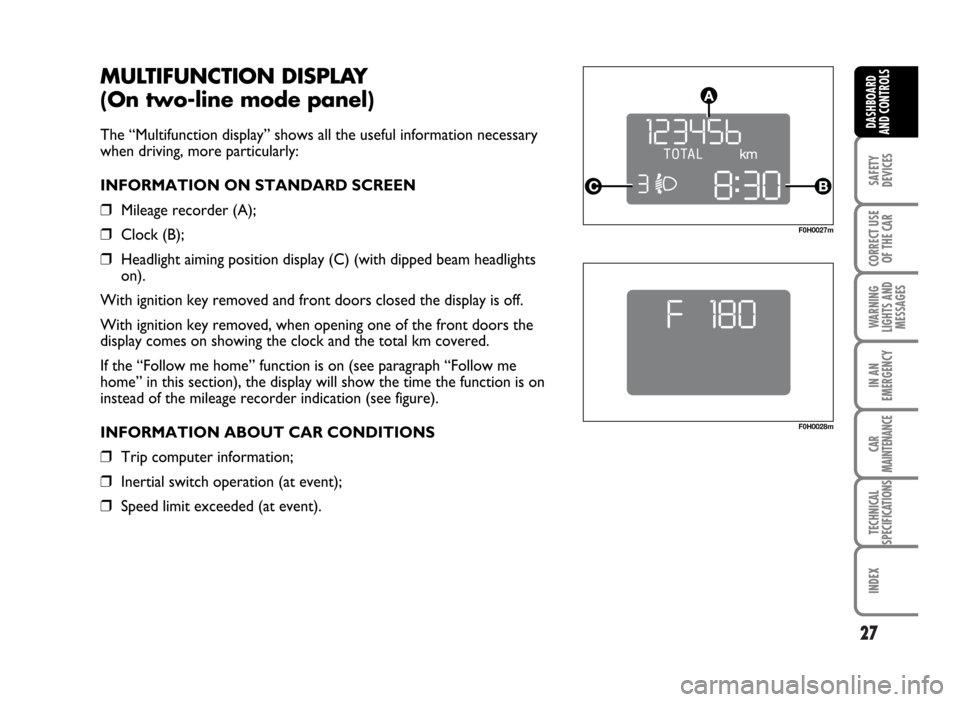
The “Multifunction display” shows all the useful information necessary
when driving, more particularly:
INFORMATION ON STANDARD SCREEN
❒Mileage recorder (A);
❒Clock (B);
❒Headlight aiming position display (C) (with dipped beam headlights
on).
With ignition key removed and front doors closed the display is off.
With ignition key removed, when opening one of the front doors the
display comes on showing the clock and the total km covered.
If the “Follow me home” function is on (see paragraph “Follow me
home” in this section), the display will show the time the function is on
instead of the mileage recorder indication (see figure).
INFORMATION ABOUT CAR CONDITIONS
❒Trip computer information;
❒Inertial switch operation (at event);
❒Speed limit exceeded (at event).
F0H0028m
F0H0027m
Page 36 of 314
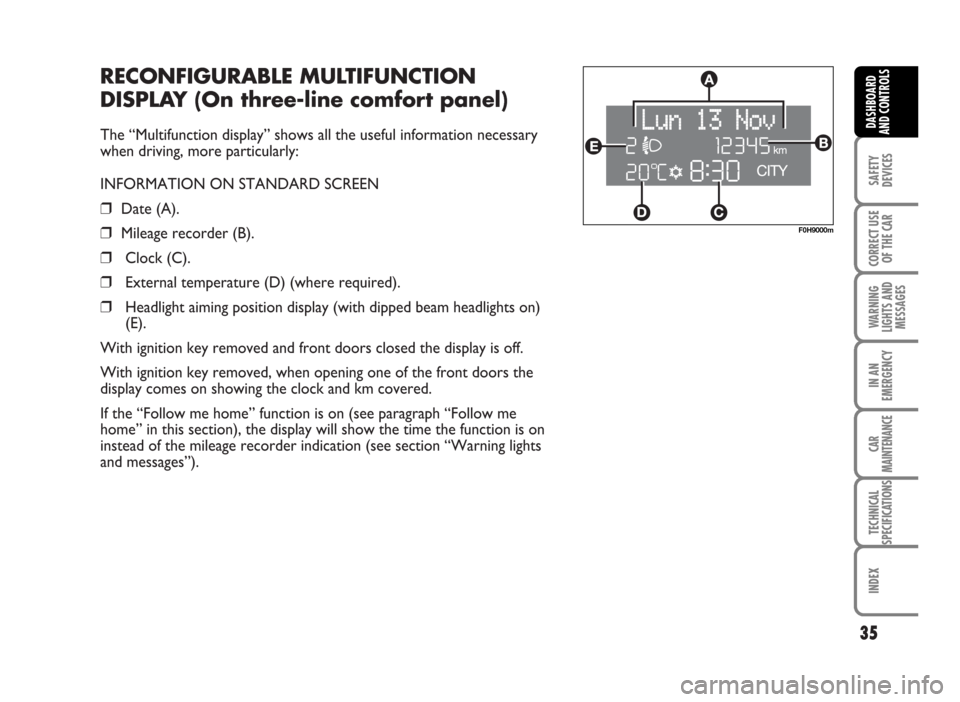
RECONFIGURABLE MULTIFUNCTION
DISPLAY (On three-line comfort panel)
The “Multifunction display” shows all the useful information necessary
when driving, more particularly:
INFORMATION ON STANDARD SCREEN
❒Date (A).
❒Mileage recorder (B).
❒Clock (C).
❒External temperature (D) (where required).
❒Headlight aiming position display (with dipped beam headlights on)
(E).
With ignition key removed and front doors closed the display is off.
With ignition key removed, when opening one of the front doors the
display comes on showing the clock and km covered.
If the “Follow me home” function is on (see paragraph “Follow me
home” in this section), the display will show the time the function is on
instead of the mileage recorder indication (see section “Warning lights
and messages”).
35
SAFETY
DEVICES
CORRECT USE
OF THE CAR
WARNING
LIGHTS AND
MESSAGES
IN AN
EMERGENCY
CAR
MAINTENANCE
TECHNICAL
SPECIFICATIONS
INDEX
DASHBOARD
AND CONTROLS
F0H9000m
Page 39 of 314
SET-UP MENU
The “Set-up Menu” enables to perform the following
adjustments and/or settings using the control buttons
(see previous pages):
❒SPEED LIMIT
❒AUTOMATIC HEADLIGHT DAYLIGHT SENSOR
(where provided)
❒TRIP B ON/OFF
❒SET CLOCK
❒CLOCK MODE
❒SET DATE
❒SPEEDLOCK
❒INDEPENDENT BOOT
❒DRIVER’S DOOR UNLOCKING❒DISTANCE UNIT
❒CONSUMPTION UNIT
❒TEMPERATURE UNIT (where required)
❒LANGUAGE
❒BUZZER VOLUME
❒BUTTON VOLUME
❒S.B.R. (Seat Belt Reminder) BUZZER
REACTIVATION (*)
❒SERVICE
❒EXIT MENU
38
SAFETY
DEVICES
CORRECT USE
OF THE CAR
WARNING
LIGHTS AND
MESSAGES
IN AN
EMERGENCY
CAR
MAINTENANCE
TECHNICAL
SPECIFICATIONS
INDEX
DASHBOARD
AND CONTROLS
(*) This function can be displayed only after Fiat Dealership has deactivated the S.B.R. system.
Page 43 of 314
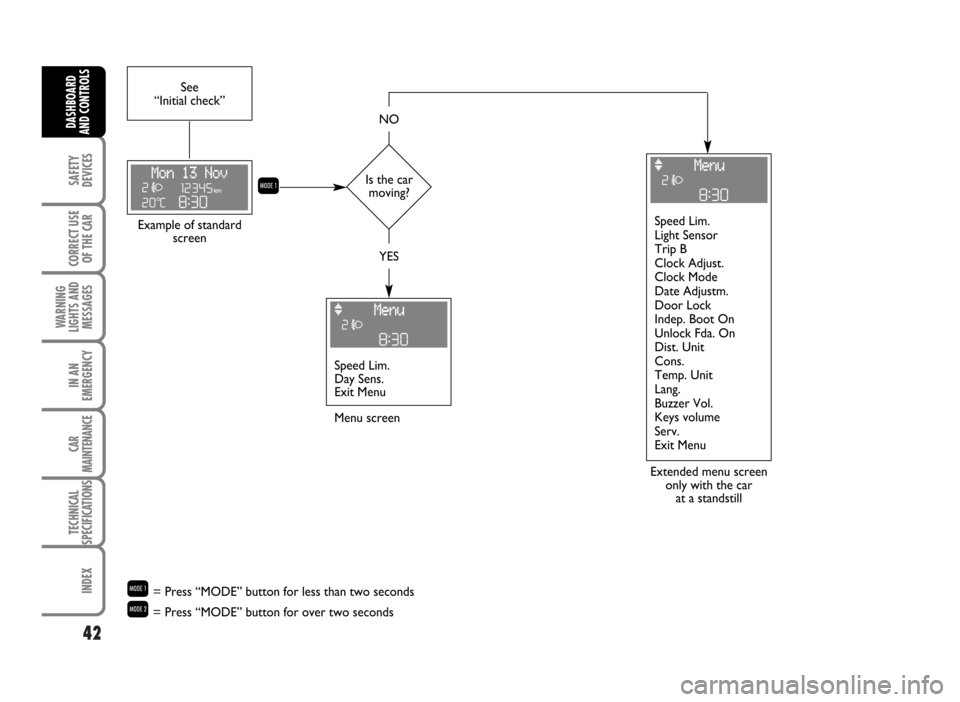
42
SAFETY
DEVICES
CORRECT USE
OF THE CAR
WARNING
LIGHTS AND
MESSAGES
IN AN
EMERGENCY
CAR
MAINTENANCE
TECHNICAL
SPECIFICATIONS
INDEX
DASHBOARD
AND CONTROLS
Is the car
moving? See
“Initial check”
Extended menu screen
only with the car
at a standstill Example of standard
screen
Menu screen
Q
NO
YES
Speed Lim.
Day Sens.
Exit MenuSpeed Lim.
Light Sensor
Trip B
Clock Adjust.
Clock Mode
Date Adjustm.
Door Lock
Indep. Boot On
Unlock Fda. On
Dist. Unit
Cons.
Temp. Unit
Lang.
Buzzer Vol.
Keys volume
Serv.
Exit Menu
Q= Press “MODE” button for less than two seconds
R= Press “MODE” button for over two seconds
Page 50 of 314
49
SAFETY
DEVICES
CORRECT USE
OF THE CAR
WARNING
LIGHTS AND
MESSAGES
IN AN
EMERGENCY
CAR
MAINTENANCE
TECHNICAL
SPECIFICATIONS
INDEX
DASHBOARD
AND CONTROLS
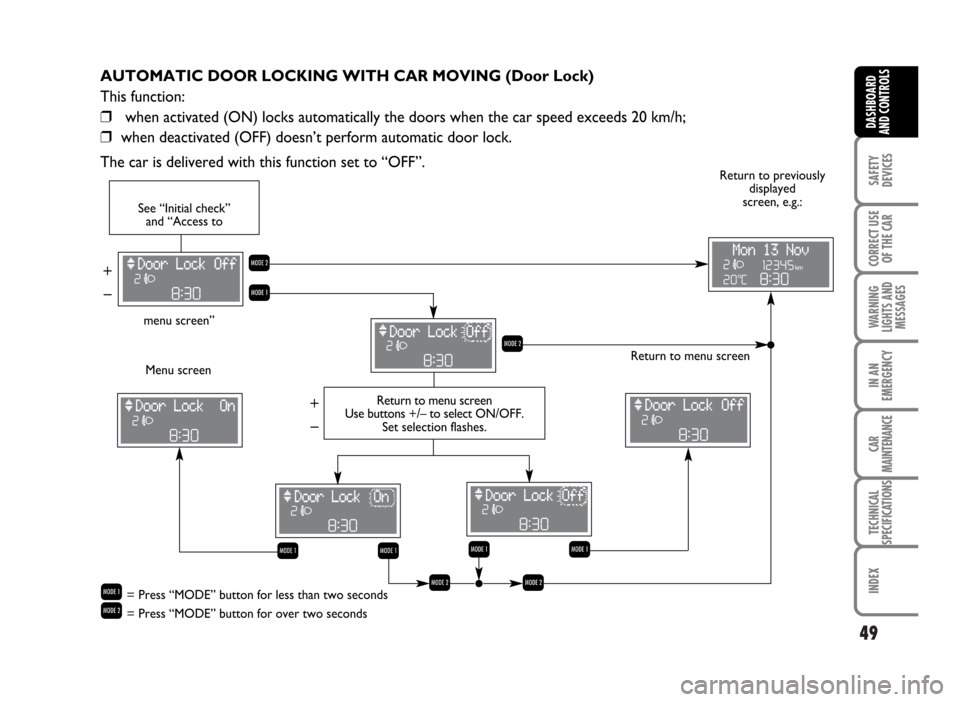
AUTOMATIC DOOR LOCKING WITH CAR MOVING (Door Lock)
This function:
❒when activated (ON) locks automatically the doors when the car speed exceeds 20 km/h;
❒when deactivated (OFF) doesn’t perform automatic door lock.
The car is delivered with this function set to “OFF”.
Return to menu screen
Menu screenReturn to previously
displayed
screen, e.g.:
R
Q
– + – +
R
Q
Q
See “Initial check”
and “Access to
menu screen”
Return to menu screen
Use buttons +/– to selectON/OFF.
Set selection flashes.
Q= Press “MODE” button for less than two seconds
R= Press “MODE” button for over two seconds
Q
Q
RR
Page 51 of 314
50
SAFETY
DEVICES
CORRECT USE
OF THE CAR
WARNING
LIGHTS AND
MESSAGES
IN AN
EMERGENCY
CAR
MAINTENANCE
TECHNICAL
SPECIFICATIONS
INDEX
DASHBOARD
AND CONTROLS
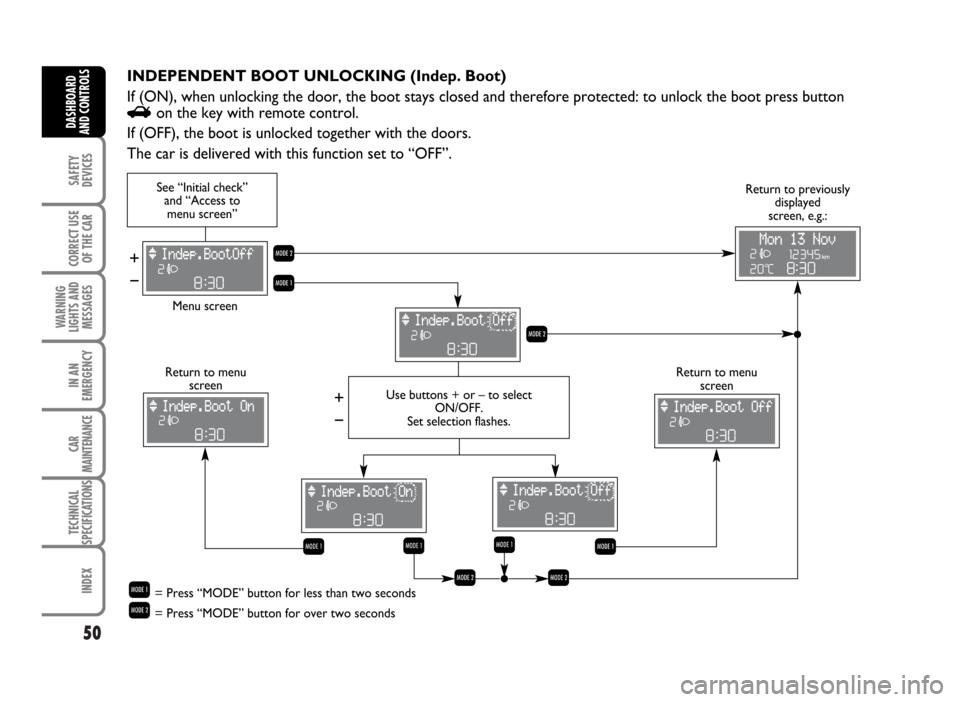
INDEPENDENT BOOT UNLOCKING (Indep. Boot)
If (ON), when unlocking the door, the boot stays closed and therefore protected: to unlock the boot press button
Ron the key with remote control.
If (OFF), the boot is unlocked together with the doors.
The car is delivered with this function set to “OFF”.
R
Q
See “Initial check”
and “Access to
menu screen”
Menu screen
– + – +
Use buttons + or – to select
ON/OFF.
Set selection flashes.
R
Return to menu
screen Return to menu
screenReturn to previously
displayed
screen, e.g.:
Q Q
Q= Press “MODE” button for less than two seconds
R= Press “MODE” button for over two seconds
Q
Q
RR
Page 52 of 314
51
SAFETY
DEVICES
CORRECT USE
OF THE CAR
WARNING
LIGHTS AND
MESSAGES
IN AN
EMERGENCY
CAR
MAINTENANCE
TECHNICAL
SPECIFICATIONS
INDEX
DASHBOARD
AND CONTROLS
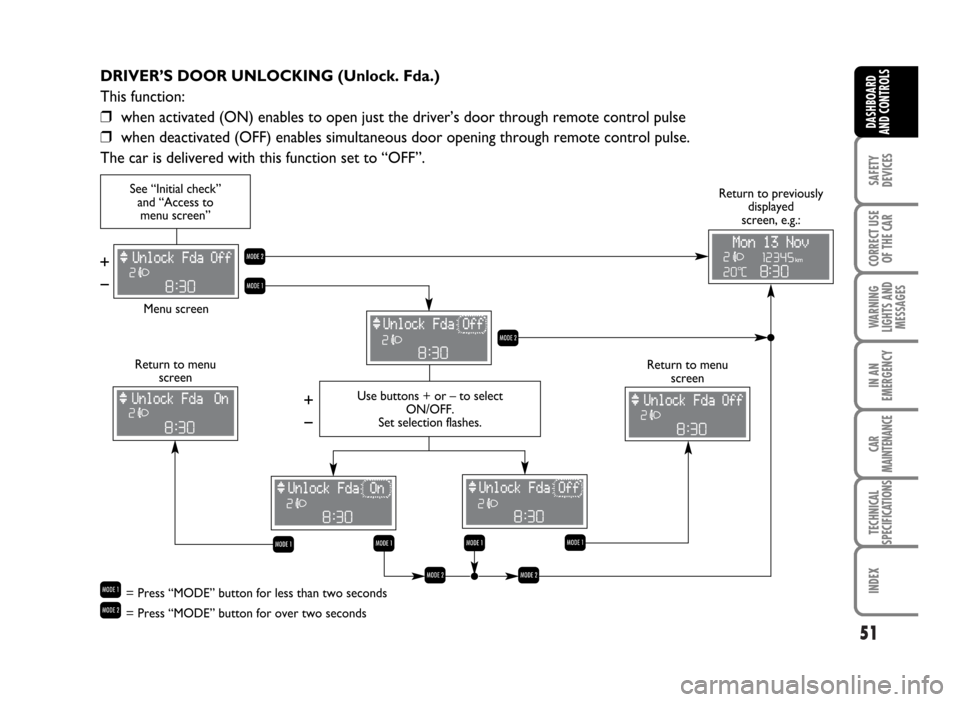
DRIVER’S DOOR UNLOCKING (Unlock. Fda.)
This function:
❒when activated (ON) enables to open just the driver’s door through remote control pulse
❒when deactivated (OFF) enables simultaneous door opening through remote control pulse.
The car is delivered with this function set to “OFF”.
R
Q
See “Initial check”
and “Access to
menu screen”
Menu screen
– + – +
Use buttons + or – to select
ON/OFF.
Set selection flashes.
R
Return to menu
screen Return to menu
screen
Q
Q
Return to previously
displayed
screen, e.g.:
Q= Press “MODE” button for less than two seconds
R= Press “MODE” button for over two seconds
Q
Q
RR